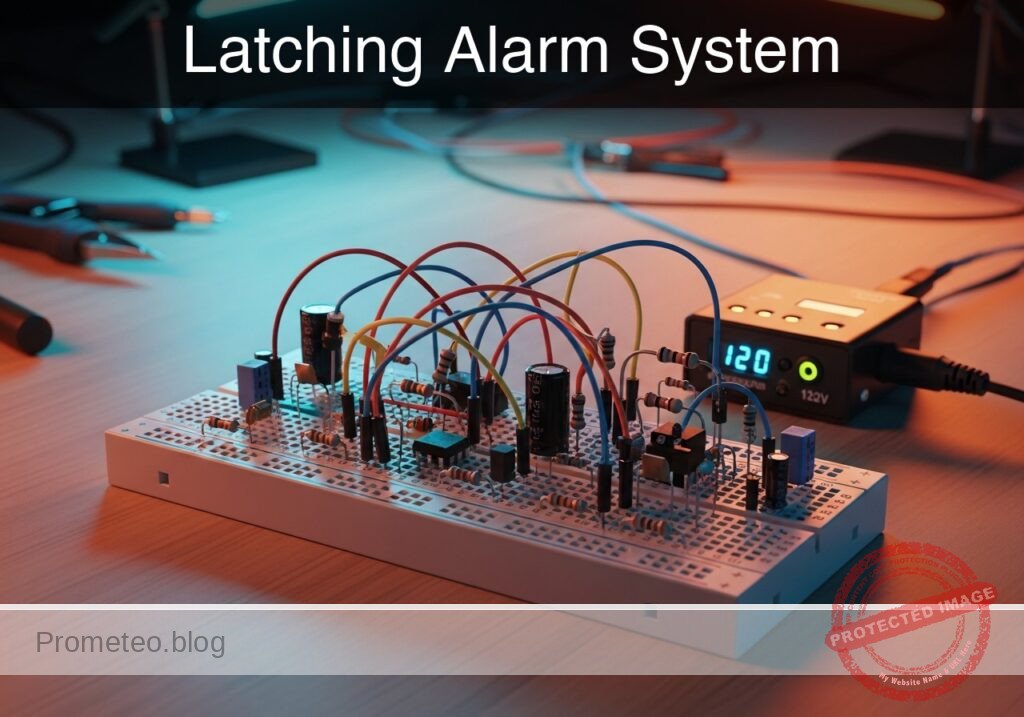
Practical case: Latching Alarm System

Latching Alarm System prototype (Maker Style)

Level: Basic. Build a self-latching relay circuit to maintain an alarm state after a momentary trigger.

Objective and use case

You will build a basic «memory» circuit using an electromechanical relay, often called a latching or holding circuit. A momentary press of a trigger button will activate an alarm (LED), which will remain active even after the button is released, until a separate reset button is pressed.

  • Security Systems: Used in simple burglar alarms where a tripped sensor keeps the siren on until a user resets it.
  • Industrial Safety: Commonly used in «Start/Stop» motor control stations.
  • Fault Indicators: Captures transient error signals so operators can see a fault occurred even if the condition clears.

Expected outcome:
* Initial state: LED is OFF.
* Action 1: Momentarily press the «Trigger» button → LED turns ON and relay clicks.
* Action 2: Release «Trigger» button → LED remains ON (Latched).
* Action 3: Press «Reset» button → LED turns OFF and relay releases.

Target audience: Beginners familiar with basic circuits and relay operation.

Materials

  • V1: 12 V DC power supply, function: Main power source
  • K1: SPDT Relay (12 V Coil), function: Electromechanical switch and memory element
  • S1: Pushbutton (Normally Open – NO), function: Trigger signal
  • S2: Pushbutton (Normally Closed – NC), function: Reset signal
  • R1: 1 kΩ resistor, function: Current limiting for LED
  • D1: Red LED, function: Visual alarm indicator
  • D2: 1N4007 Diode, function: Flyback protection for the coil

Wiring guide

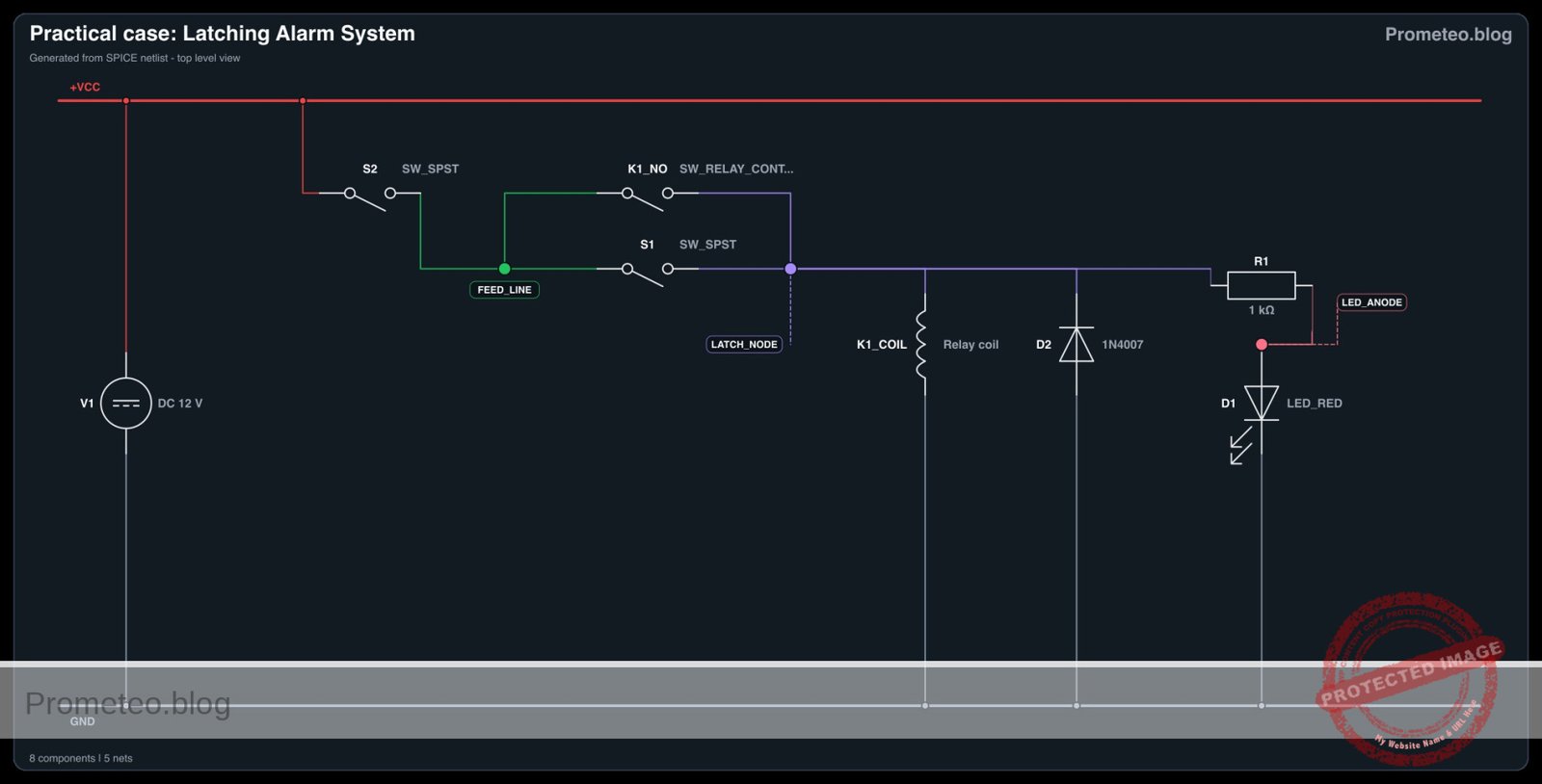
Connect the components using the following node definitions: VCC (12 V), 0 (Ground), feed_line, latch_node.

  • V1 (DC Source): Connect Positive to VCC and Negative to 0.
  • S2 (Reset Button – NC): Connect between VCC and feed_line.
  • S1 (Trigger Button – NO): Connect between feed_line and latch_node.
  • K1 (Relay Coil): Connect one side to latch_node and the other side to 0.
  • K1 (Relay Common Contact – COM): Connect to feed_line.
  • K1 (Relay Normally Open Contact – NO): Connect to latch_node.
  • D2 (Protection Diode): Connect Cathode (stripe) to latch_node and Anode to 0.
  • R1 (Resistor): Connect between latch_node and node led_anode.
  • D1 (LED): Connect Anode to led_anode and Cathode to 0.

Note: S2 allows current to flow to the circuit. S1 initially energizes the coil. Once K1 energizes, the COM-NO internal connection bypasses S1, keeping the coil powered from the feed_line.

Conceptual block diagram
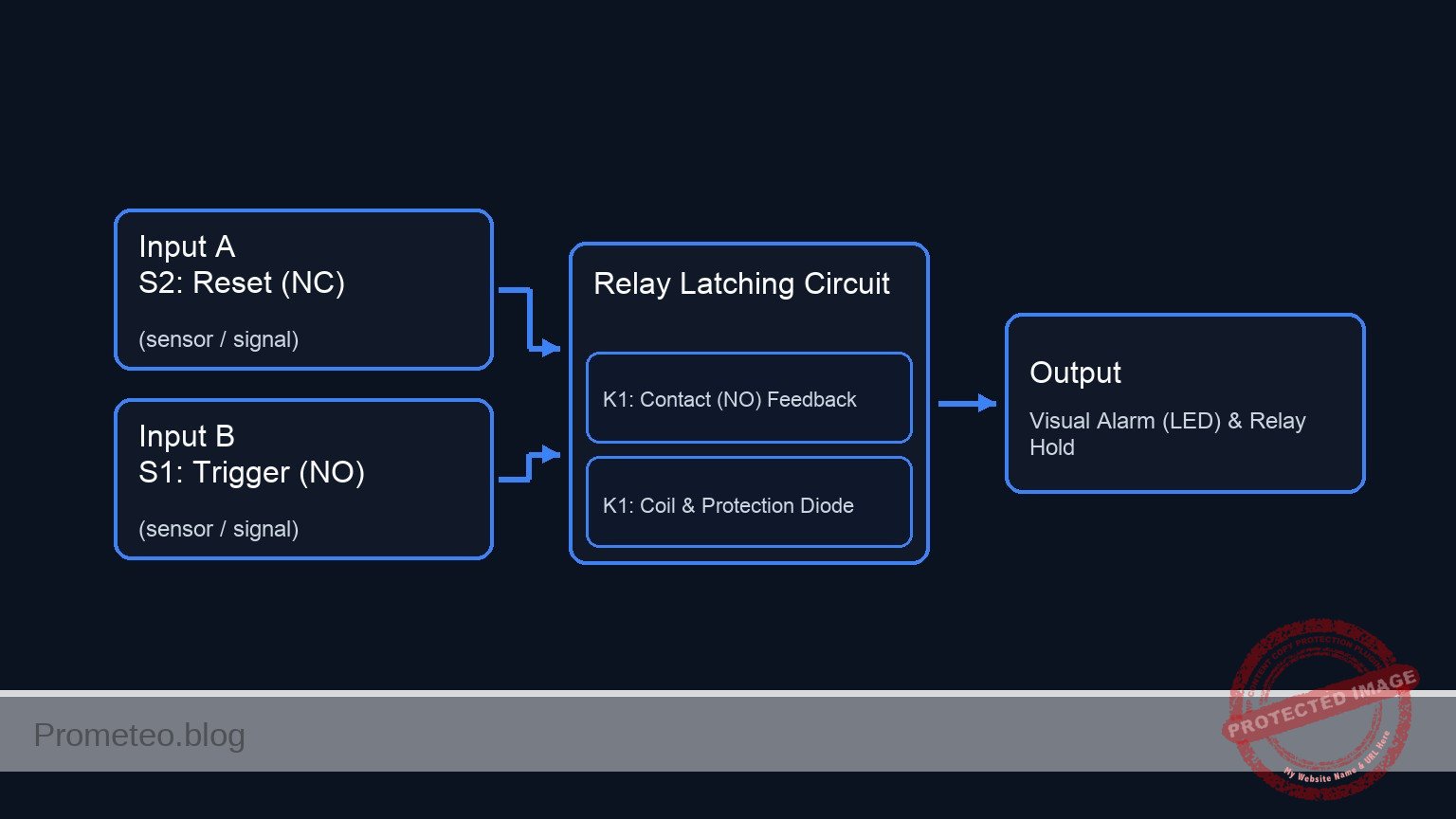
Conceptual block diagram — Relay Latching Circuit
Quick read: inputs → main block → output (actuator or measurement). This summarizes the ASCII schematic below.

Schematic

Title: Practical case: Latching Alarm System

      (Main Power)
        VCC 12 V
           |
           V
  [ S2: Reset (NC) ]
           |
      (feed_line)
           |
           |    (Path A: Manual Trigger)
           +--> [ S1: Trigger (NO) ] ------------------+
           |                                           |
           |                                           V
           |                                     (latch_node)
           |                                           |
           |    (Path B: Self-Latching)                +----------> [ R1: 1k ] --> [ D1: LED ] --> GND
           +--> [ K1: Contact (NO) ] ------------------+           (Visual Alarm)
                         ^                             |
                         |                             |
                         |                             +----------> [ K1: Coil || D2(Rev) ] --> GND
                         |                                         (Relay Magnet & Protection)
                         |                                                  |
                         +----------------(Magnetic Link)-------------------+
Electrical Schematic

Electrical diagram

Electrical diagram for case: Latching alarm system
Generated from the validated SPICE netlist for this case.

🔒 This electrical diagram is premium. With the 7-day pass or the monthly membership you can unlock the complete didactic material and the print-ready PDF pack.🔓 See premium access plans

Measurements and tests

Follow these steps to validate the latching behavior:

  1. Coil Continuity Check: Before applying power, use a multimeter in Ohms mode to measure the relay coil pins. You should read a resistance value (typically 100 Ω to 400 Ω depending on the relay).
  2. Standby Check: Power on the circuit. Measure voltage between latch_node and 0. It should be 0 V. The LED should be OFF.
  3. Trigger Test: Press and hold S1. Measure voltage at latch_node. It should rise to approx 12 V. The LED should turn ON.
  4. Latching Test: Release S1. The voltage at latch_node must remain at 12 V, and the LED must stay ON. Listen for the relay; it should not click off.
  5. Reset Test: Press S2 (Reset). The voltage at latch_node should drop to 0 V instantly. The LED turns OFF. Release S2; the LED remains OFF.

SPICE netlist and simulation

Reference SPICE Netlist (ngspice) — excerptFull SPICE netlist (ngspice)

* Latching Alarm System
.width out=256
* Based on Practical Breadboard Case

* ==========================================
* Power Supply
* ==========================================
* V1: 12V Main Supply
V1 VCC 0 DC 12

* ==========================================
* Control Inputs (User Stimuli)
* ==========================================
* S1 (Trigger Button - NO): 
* Simulating a press (Close) at 10ms for 5ms duration.
* Pulse: 0V (Open) -> 5V (Closed) -> 0V (Open)
V_S1_ctrl ctrl_s1 0 PULSE(0 5 10m 100u 100u 5m 100m)

* S2 (Reset Button - NC):
* Simulating a press (Open) at 40ms for 5ms duration.
* ... (truncated in public view) ...

Copy this content into a .cir file and run with ngspice.

🔒 Part of this section is premium. With the 7-day pass or the monthly membership you can access the full content (materials, wiring, detailed build, validation, troubleshooting, variants and checklist) and download the complete print-ready PDF pack.

* Latching Alarm System
.width out=256
* Based on Practical Breadboard Case

* ==========================================
* Power Supply
* ==========================================
* V1: 12V Main Supply
V1 VCC 0 DC 12

* ==========================================
* Control Inputs (User Stimuli)
* ==========================================
* S1 (Trigger Button - NO): 
* Simulating a press (Close) at 10ms for 5ms duration.
* Pulse: 0V (Open) -> 5V (Closed) -> 0V (Open)
V_S1_ctrl ctrl_s1 0 PULSE(0 5 10m 100u 100u 5m 100m)

* S2 (Reset Button - NC):
* Simulating a press (Open) at 40ms for 5ms duration.
* Pulse: 5V (Closed/Idle) -> 0V (Open/Pressed) -> 5V (Closed/Idle)
* Note: This voltage represents the connectivity state (High = Conducting).
V_S2_ctrl ctrl_s2 0 PULSE(5 0 40m 100u 100u 5m 100m)

* ==========================================
* Circuit Components
* ==========================================

* S2: Reset Switch (NC)
* Connects VCC to feed_line.
* Controlled by ctrl_s2 (Active High logic for NC behavior).
S2 VCC feed_line ctrl_s2 0 SW_IDEAL

* S1: Trigger Switch (NO)
* Connects feed_line to latch_node.
* Controlled by ctrl_s1 (Active High logic for NO behavior).
S1 feed_line latch_node ctrl_s1 0 SW_IDEAL

* K1: Relay Implementation
* 1. Coil: Modeled as Inductance + Series Resistance
*    Connects latch_node to Ground (0).
*    100 Ohm resistance is typical for a 12V relay coil.
R_coil latch_node k1_internal 100
L_coil k1_internal 0 10m

* 2. Relay Contact (Switch):
*    Connects feed_line (COM) to latch_node (NO).
*    Controlled by the voltage across the coil (latch_node).
*    Threshold set to 6V (Pull-in) with hysteresis.
S_relay feed_line latch_node latch_node 0 SW_RELAY

* D2: Flyback Protection Diode
* Cathode to latch_node, Anode to 0.
D2 0 latch_node 1N4007

* Alarm Indicator (LED + Resistor)
* R1: Current limiting
R1 latch_node led_anode 1k
* D1: Red LED
D1 led_anode 0 LED_RED

* Floating Node Prevention
* High impedance pull-down for feed_line when S2 opens
R_float feed_line 0 100Meg

* ==========================================
* Models
* ==========================================
* Ideal switch for buttons (Vt=2.5V logic threshold)
.model SW_IDEAL SW(Vt=2.5 Ron=0.01 Roff=100Meg)

* Relay switch model (Picks up at 6V, drops out at 4V)
.model SW_RELAY SW(Vt=6 Vh=2 Ron=0.01 Roff=100Meg)

* 1N4007 Diode Model
.model 1N4007 D(Is=7n Rs=0.04 N=1.5 Cjo=20p BV=1000 IBV=5u)

* Generic Red LED Model
.model LED_RED D(Is=1a N=4 Rs=4)

* ==========================================
* Simulation Directives
* ==========================================
* Transient analysis: 100us step, 60ms total time
* Covers Trigger (10ms) and Reset (40ms) events
.tran 100u 60m

* Output variables
* V(latch_node) is the ALARM STATE (Output)
* V(feed_line) shows power delivery
.print tran V(latch_node) V(feed_line) V(ctrl_s1) V(ctrl_s2) I(L_COIL)

.op
.end

Simulation Results (Transient Analysis)

Simulation Results (Transient Analysis)

Analysis: The simulation accurately demonstrates the latching logic. At 10ms, the trigger pulse (S1) energizes the coil, causing ‘latch_node’ to rise to ~12V. The circuit successfully latches, maintaining 12V output after S1 opens. At 40ms, the reset pulse (S2) cuts power, dropping ‘latch_node’ to ~0V, where it remains even after S2 closes again.
Show raw data table (2796 rows)
Index   time            v(latch_node)   v(feed_line)    v(ctrl_s1)      v(ctrl_s2)      l_coil#branch
0	0.000000e+00	2.399952e-05	1.200000e+01	0.000000e+00	5.000000e+00	2.399952e-07
1	1.000000e-06	2.399953e-05	1.200000e+01	0.000000e+00	5.000000e+00	2.399952e-07
2	2.000000e-06	2.399952e-05	1.200000e+01	0.000000e+00	5.000000e+00	2.399952e-07
3	4.000000e-06	2.399952e-05	1.200000e+01	0.000000e+00	5.000000e+00	2.399952e-07
4	8.000000e-06	2.399952e-05	1.200000e+01	0.000000e+00	5.000000e+00	2.399952e-07
5	1.600000e-05	2.399952e-05	1.200000e+01	0.000000e+00	5.000000e+00	2.399952e-07
6	3.200000e-05	2.399952e-05	1.200000e+01	0.000000e+00	5.000000e+00	2.399952e-07
7	6.400000e-05	2.399952e-05	1.200000e+01	0.000000e+00	5.000000e+00	2.399952e-07
8	1.280000e-04	2.399952e-05	1.200000e+01	0.000000e+00	5.000000e+00	2.399952e-07
9	2.280000e-04	2.399952e-05	1.200000e+01	0.000000e+00	5.000000e+00	2.399952e-07
10	3.280000e-04	2.399952e-05	1.200000e+01	0.000000e+00	5.000000e+00	2.399952e-07
11	4.280000e-04	2.399952e-05	1.200000e+01	0.000000e+00	5.000000e+00	2.399952e-07
12	5.280000e-04	2.399952e-05	1.200000e+01	0.000000e+00	5.000000e+00	2.399952e-07
13	6.280000e-04	2.399952e-05	1.200000e+01	0.000000e+00	5.000000e+00	2.399952e-07
14	7.280000e-04	2.399952e-05	1.200000e+01	0.000000e+00	5.000000e+00	2.399952e-07
15	8.280000e-04	2.399952e-05	1.200000e+01	0.000000e+00	5.000000e+00	2.399952e-07
16	9.280000e-04	2.399952e-05	1.200000e+01	0.000000e+00	5.000000e+00	2.399952e-07
17	1.028000e-03	2.399952e-05	1.200000e+01	0.000000e+00	5.000000e+00	2.399952e-07
18	1.128000e-03	2.399952e-05	1.200000e+01	0.000000e+00	5.000000e+00	2.399952e-07
19	1.228000e-03	2.399952e-05	1.200000e+01	0.000000e+00	5.000000e+00	2.399952e-07
20	1.328000e-03	2.399952e-05	1.200000e+01	0.000000e+00	5.000000e+00	2.399952e-07
21	1.428000e-03	2.399952e-05	1.200000e+01	0.000000e+00	5.000000e+00	2.399952e-07
22	1.528000e-03	2.399952e-05	1.200000e+01	0.000000e+00	5.000000e+00	2.399952e-07
23	1.628000e-03	2.399952e-05	1.200000e+01	0.000000e+00	5.000000e+00	2.399952e-07
... (2772 more rows) ...

Common mistakes and how to avoid them

  1. Using a Normally Open button for Reset: If S2 is NO instead of NC, the circuit will never receive power to start. Ensure S2 conducts current by default.
  2. Connecting the latch to NC contact: If you connect the latch_node to the Relay’s NC pin instead of NO, the relay will turn on immediately upon power-up and oscillate or buzz (buzzer effect). Always use the NO pin for self-latching.
  3. LED burns out immediately: Forgetting R1 allows excessive current through the LED. Always verify the resistor value before powering up.

Troubleshooting

  • Symptom: LED turns on when S1 is pressed but turns off immediately when released.
    • Cause: The latching path is broken.
    • Fix: Check the connection between K1 (COM), K1 (NO), and the latch_node. Ensure the relay contacts are parallel to S1.
  • Symptom: Relay buzzes loudly or chatters.
    • Cause: Power supply voltage is too low or unstable.
    • Fix: Ensure V1 provides stable 12 V and can supply enough current for the coil.
  • Symptom: Circuit cannot be reset.
    • Cause: S2 is bypassed or faulty (shorted).
    • Fix: Check S2 with a multimeter; it must break the connection (Open) when pressed.

Possible improvements and extensions

  1. Audible Alarm: Connect a 12 V active buzzer in parallel with the LED (between latch_node and 0) to add sound to the alarm.
  2. High Power Control: Use a DPDT relay. Use the first set of contacts for the 12 V logic latching (as described above) and the second set of contacts to switch a completely separate high-voltage load, like a 120 V/230 V lamp.

More Practical Cases on Prometeo.blog

Find this product and/or books on this topic on Amazon

Go to Amazon

As an Amazon Associate, I earn from qualifying purchases. If you buy through this link, you help keep this project running.

Quick Quiz

Question 1: What is the primary function of the self-latching relay circuit described?


Question 2: Which component acts as the 'memory element' in this circuit?


Question 3: What happens to the LED when the 'Trigger' button is released?


Question 4: What type of switch is typically used for the 'Reset' button in a standard latching circuit to break the current?


Question 5: What is the specific function of the diode (D2) placed across the relay coil?


Question 6: Which real-world application is mentioned for this type of circuit?


Question 7: What is the voltage of the DC power supply (V1) specified in the materials list?


Question 8: What action is required to turn the LED OFF once it is latched?


Question 9: What is the function of the resistor (R1) connected to the LED?


Question 10: In the expected outcome, what is the initial state of the LED before any buttons are pressed?


Carlos Núñez Zorrilla
Electronics & Computer Engineer

Telecommunications Electronics Engineer and Computer Engineer (official degrees in Spain).
Follow me:


Practical case: DC motor control with relay and pushbutton

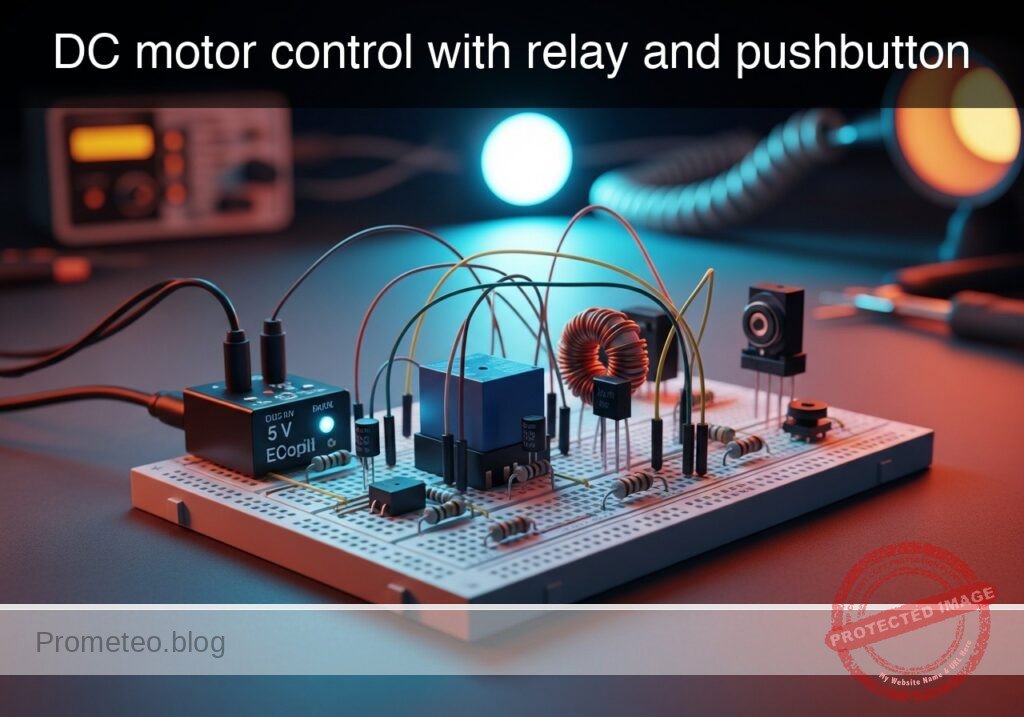
DC motor control with relay and pushbutton prototype (Maker Style)

Level: Basic. Learn how to isolate a low-power control signal from a high-power motor circuit using an electromagnetic relay.

Objective and use case

In this practical case, you will build a circuit that utilizes a small pushbutton and a relay to control a high-current DC motor. The relay acts as an electromagnetic switch, allowing the low-power control side to activate the high-power load side without direct electrical connection between the distinct power rails (if separate grounds are used) or simply to handle currents exceeding the switch’s rating.

Why it is useful:
* Automotive systems: Used in starter motors where a small ignition key switch triggers a massive solenoid (relay) to crank the engine.
* Industrial automation: Allows low-voltage PLCs (24 V) to switch high-voltage AC or DC motors (110 V/220 V) safely.
* Safety isolation: Keeps high voltages away from the user interface (buttons and switches).
* Component protection: Prevents burning out delicate switches by offloading the high current switching to the relay contacts.

Expected outcome:
* When the pushbutton is pressed, the relay makes an audible «click.»
* The DC motor starts spinning immediately upon the click.
* Voltage across the relay coil measures 5 V (or rated control voltage).
* The flyback diode protects the switch from high-voltage spikes when the button is released.

Target audience and level: Students and hobbyists understanding basic electromechanical switching (Basic).

Materials

  • V1: 5 V DC voltage source, function: Control circuit power supply.
  • V2: 12 V DC voltage source, function: Motor (Power) circuit supply.
  • S1: Momentary Pushbutton (Normally Open), function: Control switch.
  • K1: SPDT Relay (5 V Coil), function: Electromechanical isolation and switching.
  • D1: 1N4007 Diode, function: Flyback/Freewheeling diode for coil protection.
  • M1: 12 V DC Motor, function: High-power load.

Wiring guide

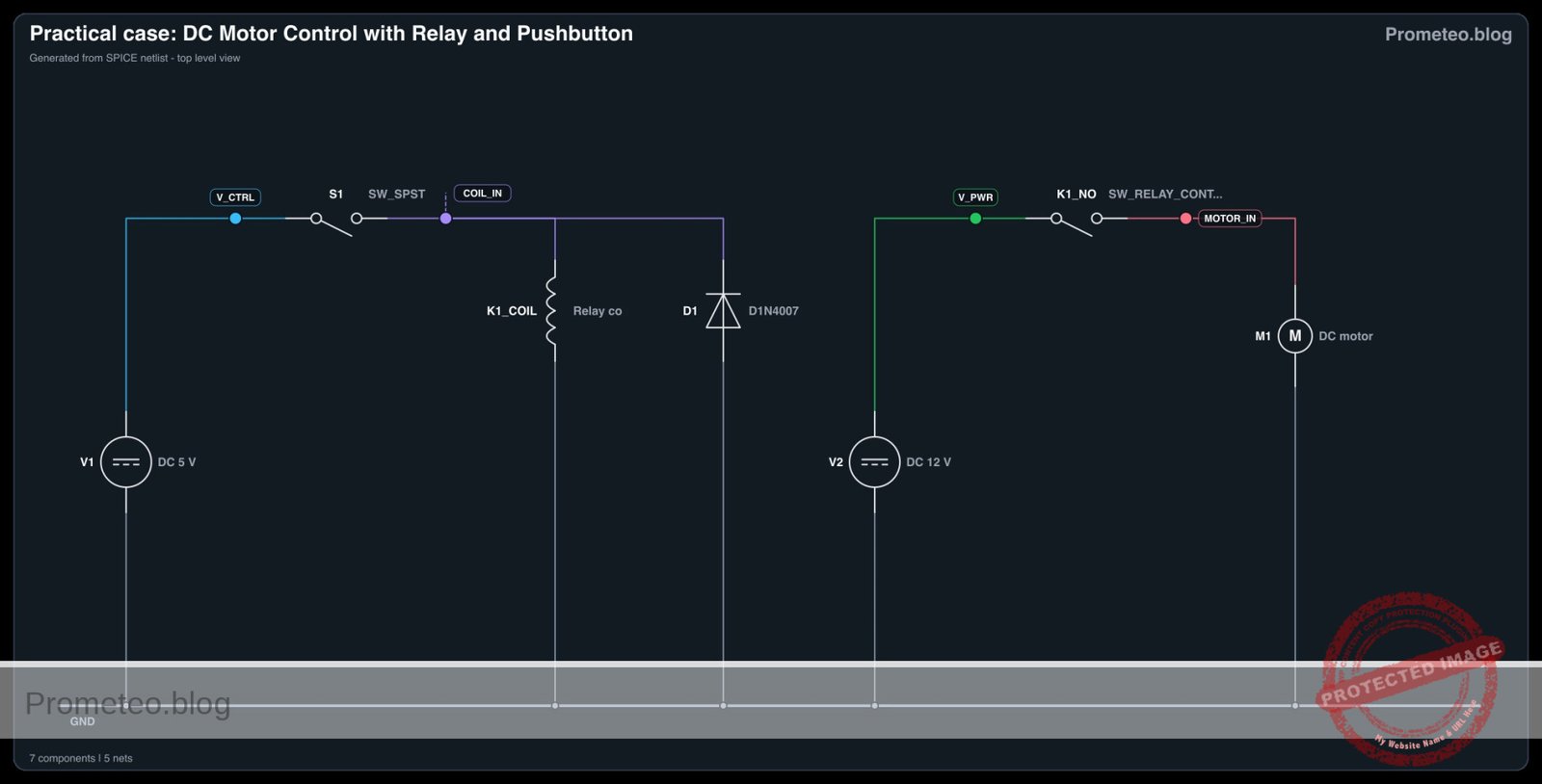
This guide uses SPICE-friendly node names to define the connections. The nodes are: V_CTRL (5 V), V_PWR (12 V), COIL_IN, MOTOR_IN, and 0 (Ground).

  • V1 (Positive): Connects to node V_CTRL.
  • V1 (Negative): Connects to node 0.
  • V2 (Positive): Connects to node V_PWR.
  • V2 (Negative): Connects to node 0.
  • S1: Connects between node V_CTRL and node COIL_IN.
  • K1 (Coil terminal A): Connects to node COIL_IN.
  • K1 (Coil terminal B): Connects to node 0.
  • D1 (Cathode/Striped side): Connects to node COIL_IN.
  • D1 (Anode): Connects to node 0.
  • K1 (Common/COM Contact): Connects to node V_PWR.
  • K1 (Normally Open/NO Contact): Connects to node MOTOR_IN.
  • M1 (Positive): Connects to node MOTOR_IN.
  • M1 (Negative): Connects to node 0.

Note: In a physical application requiring galvanic isolation, the ground 0 for the control side (V1) and the power side (V2) would be kept separate. For this basic simulation model, they share a common reference.

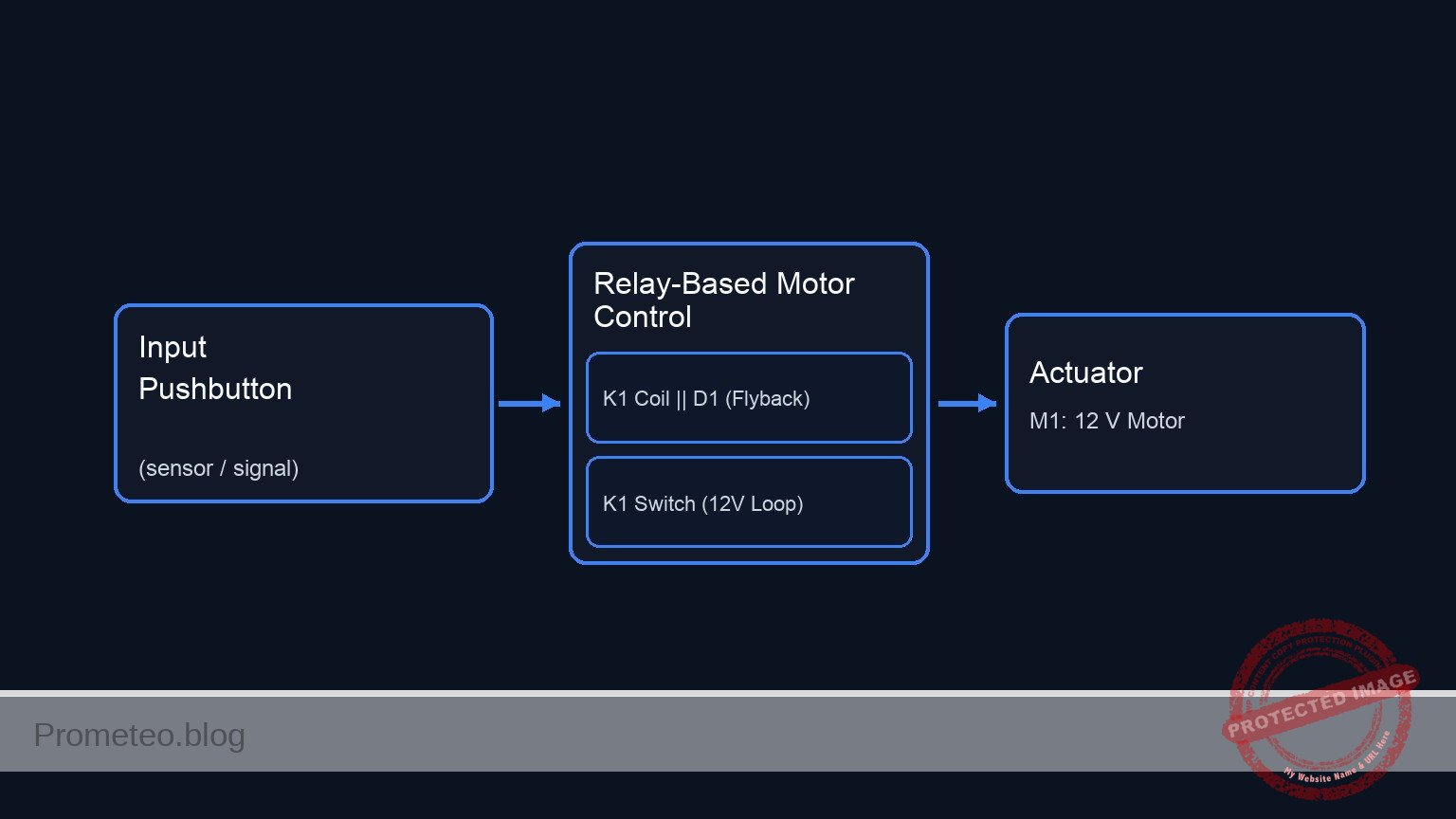
Conceptual block diagram

Conceptual block diagram — Relay-Based Motor Control
Quick read: inputs → main block → output (actuator or measurement). This summarizes the ASCII schematic below.

Schematic

+---------------------------------------------------------------------------------------------------------+
|                          DC MOTOR CONTROL WITH RELAY (UNIFIED DIAGRAM)                                  |
+---------------------------------------------------------------------------------------------------------+

      (High Power Loop: 12 V)
      [ V2: 12 V Source ] --(Node: V_PWR)--> [ K1: Relay Switch (COM->NO) ] --(Node: MOTOR_IN)--> [ M1: 12 V Motor ] --> [ GND ]
                                                        ^
                                                        |
                                                 (Magnetic Link)
                                                        |
      (Control Loop: 5 V)                                |
      [ V1: 5 V Source ] --(Node: V_CTRL)--> [ S1: Pushbutton ] --(Node: COIL_IN)--> [ Parallel: K1 Coil || D1 (Rev) ] --> [ GND ]

+---------------------------------------------------------------------------------------------------------+
|  LEGEND & NOTES:                                                                                        |
|  -->  : Signal/Power Flow                                                                               |
|  ||   : Components in Parallel (Coil and Diode share Node COIL_IN and GND)                              |
|  Rev  : Diode D1 is Reverse Biased (Cathode to COIL_IN, Anode to GND) to suppress flyback voltage.      |
|  Link : The current in the Control Loop generates the magnetic field to close the Switch in the Power Loop. |
+---------------------------------------------------------------------------------------------------------+
Schematic (ASCII)

Electrical diagram

Electrical diagram for case: DC motor control with relay and pushbutton
Generated from the validated SPICE netlist for this case.

🔒 This electrical diagram is premium. With the 7-day pass or the monthly membership you can unlock the complete didactic material and the print-ready PDF pack.🔓 See premium access plans

Measurements and tests

Follow these steps to validate your circuit assembly:

  1. Coil Voltage Check:

    • Set your multimeter to DC Voltage (20 V range).
    • Connect probes across the relay coil terminals (COIL_IN and 0).
    • Press S1. The reading should jump from 0 V to approx. 5 V.
  2. Audible Confirmation:

    • Press and release S1. Listen for the mechanical «click» of the relay armature moving. If you do not hear it, the coil is not energizing.
  3. Load Voltage Verification:

    • Connect the multimeter across the motor terminals.
    • Press S1. The multimeter should read approx. 12 V (voltage of V2) and the motor should spin.
    • Release S1. The voltage should drop to 0 V and the motor should coast to a stop.
  4. Flyback Diode Test (Advanced):

    • Without D1, monitoring COIL_IN with an oscilloscope would reveal a large negative voltage spike when S1 is released. With D1 installed, this spike is clamped to approx. -0.7 V, protecting S1.

SPICE netlist and simulation

Reference SPICE Netlist (ngspice) — excerptFull SPICE netlist (ngspice)

* Practical case: DC motor control with relay and pushbutton

* --- Models ---
* Generic Pushbutton Switch Model (Voltage Controlled)
.model SW_PB SW(Vt=2.5 Vh=0.1 Ron=0.01 Roff=10Meg)
* Relay Contact Switch Model (Controlled by Coil Voltage)
.model SW_RELAY SW(Vt=3.5 Vh=0.2 Ron=0.05 Roff=10Meg)
* 1N4007 Diode Model
.model D1N4007 D(IS=7.07e-9 RS=0.034 N=1.7 BV=1000 IBV=5e-6 CJO=1e-11 TT=1e-7)

* --- Power Supplies ---
* V1: Control Circuit Power (5V)
V1 V_CTRL 0 DC 5
* V2: Motor Circuit Power (12V)
V2 V_PWR 0 DC 12

* --- Control Circuit (Input) ---
* S1: Pushbutton.
* Modeled as a voltage-controlled switch driven by a PULSE source (V_ACT)
* to simulate the physical act of pressing the button.
* ... (truncated in public view) ...

Copy this content into a .cir file and run with ngspice.

🔒 Part of this section is premium. With the 7-day pass or the monthly membership you can access the full content (materials, wiring, detailed build, validation, troubleshooting, variants and checklist) and download the complete print-ready PDF pack.

* Practical case: DC motor control with relay and pushbutton

* --- Models ---
* Generic Pushbutton Switch Model (Voltage Controlled)
.model SW_PB SW(Vt=2.5 Vh=0.1 Ron=0.01 Roff=10Meg)
* Relay Contact Switch Model (Controlled by Coil Voltage)
.model SW_RELAY SW(Vt=3.5 Vh=0.2 Ron=0.05 Roff=10Meg)
* 1N4007 Diode Model
.model D1N4007 D(IS=7.07e-9 RS=0.034 N=1.7 BV=1000 IBV=5e-6 CJO=1e-11 TT=1e-7)

* --- Power Supplies ---
* V1: Control Circuit Power (5V)
V1 V_CTRL 0 DC 5
* V2: Motor Circuit Power (12V)
V2 V_PWR 0 DC 12

* --- Control Circuit (Input) ---
* S1: Pushbutton.
* Modeled as a voltage-controlled switch driven by a PULSE source (V_ACT)
* to simulate the physical act of pressing the button.
* Wiring: Connects V_CTRL to COIL_IN.
V_ACT ACT_NODE 0 PULSE(0 5 10m 1u 1u 245m 1s)
S1 V_CTRL COIL_IN ACT_NODE 0 SW_PB

* K1: Relay Coil
* Wiring: Coil Terminal A to COIL_IN, Coil Terminal B to 0.
* Modeled as Inductor + Resistor in series.
R_K1_COIL COIL_IN K1_INT 60
L_K1_COIL K1_INT 0 100m

* D1: Flyback Diode
* Wiring: Cathode to COIL_IN, Anode to 0.
* SPICE Syntax: D   
D1 0 COIL_IN D1N4007

* --- Power Circuit (Output) ---
* K1: Relay Contact (Switch)
* Wiring: Common (COM) to V_PWR, Normally Open (NO) to MOTOR_IN.
* Controlled by the voltage at node COIL_IN.
S_K1_SW V_PWR MOTOR_IN COIL_IN 0 SW_RELAY

* M1: DC Motor
* Wiring: Positive to MOTOR_IN, Negative to 0.
* Modeled as an RL load (Resistance + Inductance).
R_M1 MOTOR_IN M1_INT 20
L_M1 M1_INT 0 10m

* --- Analysis Directives ---
.op
.tran 0.1m 250m

* --- Output Printing ---
* Must define INPUT (COIL_IN) and OUTPUT (MOTOR_IN)
.print tran V(COIL_IN) V(MOTOR_IN) V(ACT_NODE) I(L_M1)

.end

Simulation Results (Transient Analysis)

Simulation Results (Transient Analysis)

Analysis: The simulation shows the control signal (V_ACT) going high at 10ms. Consequently, the coil voltage (V(COIL_IN)) rises to ~5V. This triggers the relay switch, causing the motor input voltage (V(MOTOR_IN)) to jump from near 0V to ~12V, and current flows through the motor load.
Show raw data table (2535 rows)
Index   time            v(coil_in)      v(motor_in)     v(act_node)     l_m1#branch
0	0.000000e+00	2.999953e-05	2.399995e-05	0.000000e+00	1.199998e-06
1	1.000000e-06	2.999953e-05	2.399995e-05	0.000000e+00	1.199998e-06
2	2.000000e-06	2.999953e-05	2.399995e-05	0.000000e+00	1.199998e-06
3	4.000000e-06	2.999953e-05	2.399995e-05	0.000000e+00	1.199998e-06
4	8.000000e-06	2.999953e-05	2.399995e-05	0.000000e+00	1.199998e-06
5	1.600000e-05	2.999953e-05	2.399995e-05	0.000000e+00	1.199998e-06
6	3.200000e-05	2.999953e-05	2.399995e-05	0.000000e+00	1.199998e-06
7	6.400000e-05	2.999953e-05	2.399995e-05	0.000000e+00	1.199998e-06
8	1.280000e-04	2.999953e-05	2.399995e-05	0.000000e+00	1.199998e-06
9	2.280000e-04	2.999953e-05	2.399995e-05	0.000000e+00	1.199998e-06
10	3.280000e-04	2.999953e-05	2.399995e-05	0.000000e+00	1.199998e-06
11	4.280000e-04	2.999953e-05	2.399995e-05	0.000000e+00	1.199998e-06
12	5.280000e-04	2.999953e-05	2.399995e-05	0.000000e+00	1.199998e-06
13	6.280000e-04	2.999953e-05	2.399995e-05	0.000000e+00	1.199998e-06
14	7.280000e-04	2.999953e-05	2.399995e-05	0.000000e+00	1.199998e-06
15	8.280000e-04	2.999953e-05	2.399995e-05	0.000000e+00	1.199998e-06
16	9.280000e-04	2.999953e-05	2.399995e-05	0.000000e+00	1.199998e-06
17	1.028000e-03	2.999953e-05	2.399995e-05	0.000000e+00	1.199998e-06
18	1.128000e-03	2.999953e-05	2.399995e-05	0.000000e+00	1.199998e-06
19	1.228000e-03	2.999953e-05	2.399995e-05	0.000000e+00	1.199998e-06
20	1.328000e-03	2.999953e-05	2.399995e-05	0.000000e+00	1.199998e-06
21	1.428000e-03	2.999953e-05	2.399995e-05	0.000000e+00	1.199998e-06
22	1.528000e-03	2.999953e-05	2.399995e-05	0.000000e+00	1.199998e-06
23	1.628000e-03	2.999953e-05	2.399995e-05	0.000000e+00	1.199998e-06
... (2511 more rows) ...

Common mistakes and how to avoid them

  1. Omitting the Flyback Diode (D1):

    • Error: Leaving out the diode across the relay coil.
    • Consequence: The collapsing magnetic field generates a high-voltage spike (back EMF) that can arc across the switch contacts or destroy transistor drivers in future circuits.
    • Solution: Always install a diode in reverse bias (Cathode to positive) across inductive loads.
  2. Using the Wrong Relay Contacts (NC vs NO):

    • Error: Connecting the motor to the Normally Closed (NC) pin instead of Normally Open (NO).
    • Consequence: The motor runs continuously when the button is not pressed and stops when it is pressed.
    • Solution: Identify the NO pin using the datasheet or a continuity test before soldering.
  3. Mixing Power Rails:

    • Error: Connecting the 12 V motor supply directly to the 5 V coil.
    • Consequence: The relay coil will overheat and likely burn out due to over-voltage.
    • Solution: Ensure the coil voltage matches the control supply (V1) and the contact rating matches the motor supply (V2).

Troubleshooting

  • Symptom: Relay clicks, but motor does not run.

    • Cause: Burnt relay contacts or loose wire between COM/NO and the motor.
    • Fix: Check continuity across COM and NO while the relay is held active.
  • Symptom: Relay does not click when S1 is pressed.

    • Cause: Coil wiring error or S1 is faulty.
    • Fix: Measure voltage at the coil terminals while pressing S1. If 0 V, check S1.
  • Symptom: Circuit resets or sparks occur at S1.

    • Cause: Lack of flyback diode causing arcing.
    • Fix: Install D1 immediately across the coil terminals.

Possible improvements and extensions

  1. Transistor Driver: Replace the direct pushbutton connection with an NPN transistor (e.g., 2N2222) to control the relay using a weak signal from an Arduino or microcontroller.
  2. Self-Latching Circuit: Add a second relay contact or wire the relay in a «latching» configuration with a separate «Stop» button (NC), so you don’t have to hold S1 to keep the motor running.

More Practical Cases on Prometeo.blog

Find this product and/or books on this topic on Amazon

Go to Amazon

As an Amazon Associate, I earn from qualifying purchases. If you buy through this link, you help keep this project running.

Quick Quiz

Question 1: What is the primary function of the relay in the described circuit?


Question 2: Why is a relay useful for component protection in this circuit?


Question 3: What happens immediately after the relay makes an audible 'click' in the expected outcome?


Question 4: Why is this circuit configuration commonly used in automotive starter systems?


Question 5: What is the role of the low-power control side in this setup?


Question 6: In industrial automation, what does this relay setup allow low-voltage PLCs to do?


Question 7: How does this relay setup provide safety isolation?


Question 8: What component is used as the user interface to trigger the circuit in this practical case?


Question 9: If separate grounds are used, what is the relationship between the control and load power rails?


Question 10: What physical phenomenon causes the relay to switch contacts?


Carlos Núñez Zorrilla
Electronics & Computer Engineer

Telecommunications Electronics Engineer and Computer Engineer (official degrees in Spain).
Follow me:


Practical case: Voltage induction by magnetic movement

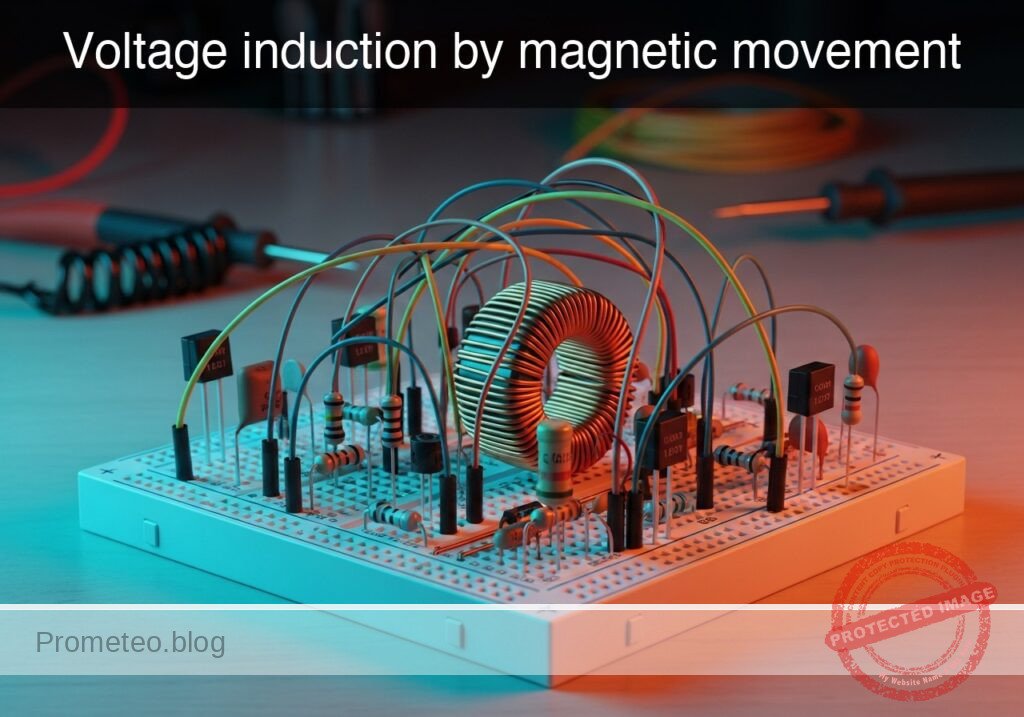
Voltage induction by magnetic movement prototype (Maker Style)

Level: Basic. Demonstrate how moving a magnet through a coil generates an electromotive force (EMF).

Objective and use case

In this practical case, you will construct a fundamental electromagnetic induction demonstrator using a hand-wound copper coil and a high-strength neodymium magnet. You will observe how kinetic energy is converted into electrical energy via Faraday’s Law of Induction.

Why it is useful:
* Power Generation: This mechanism illustrates the core principle behind electric generators, alternators, and wind turbines.
* Audio Technology: This is the operating principle for dynamic microphones and electric guitar pickups (transducers).
* Sensors: Used in automotive ABS speed sensors and industrial position sensors.
* Wireless Charging: Demonstrates the basics of magnetic coupling used in phone chargers.

Expected outcome:
* A measurable voltage spike (positive or negative) on the multimeter when the magnet moves relative to the coil.
* The LED flashes briefly when the magnet is moved rapidly, indicating a voltage peak exceeding the diode’s forward voltage (~1.8 V).
* Reversing the direction of the magnet’s movement reverses the polarity of the induced voltage.

Target audience: Students and hobbyists introducing themselves to Faraday’s Law and passive components.

Materials

  • L1: Air core coil (approx. 500–1000 turns of enameled copper wire), function: induction element.
  • MAG1: Cylindrical Neodymium magnet (fit to pass inside L1), function: source of magnetic flux.
  • D1: Red LED, function: indicator for positive phase induction.
  • D2: Green LED, function: indicator for negative phase induction (connected in anti-parallel).
  • M1: Multimeter (set to 200 mV or 2 V DC range), function: voltage monitor.

Wiring guide

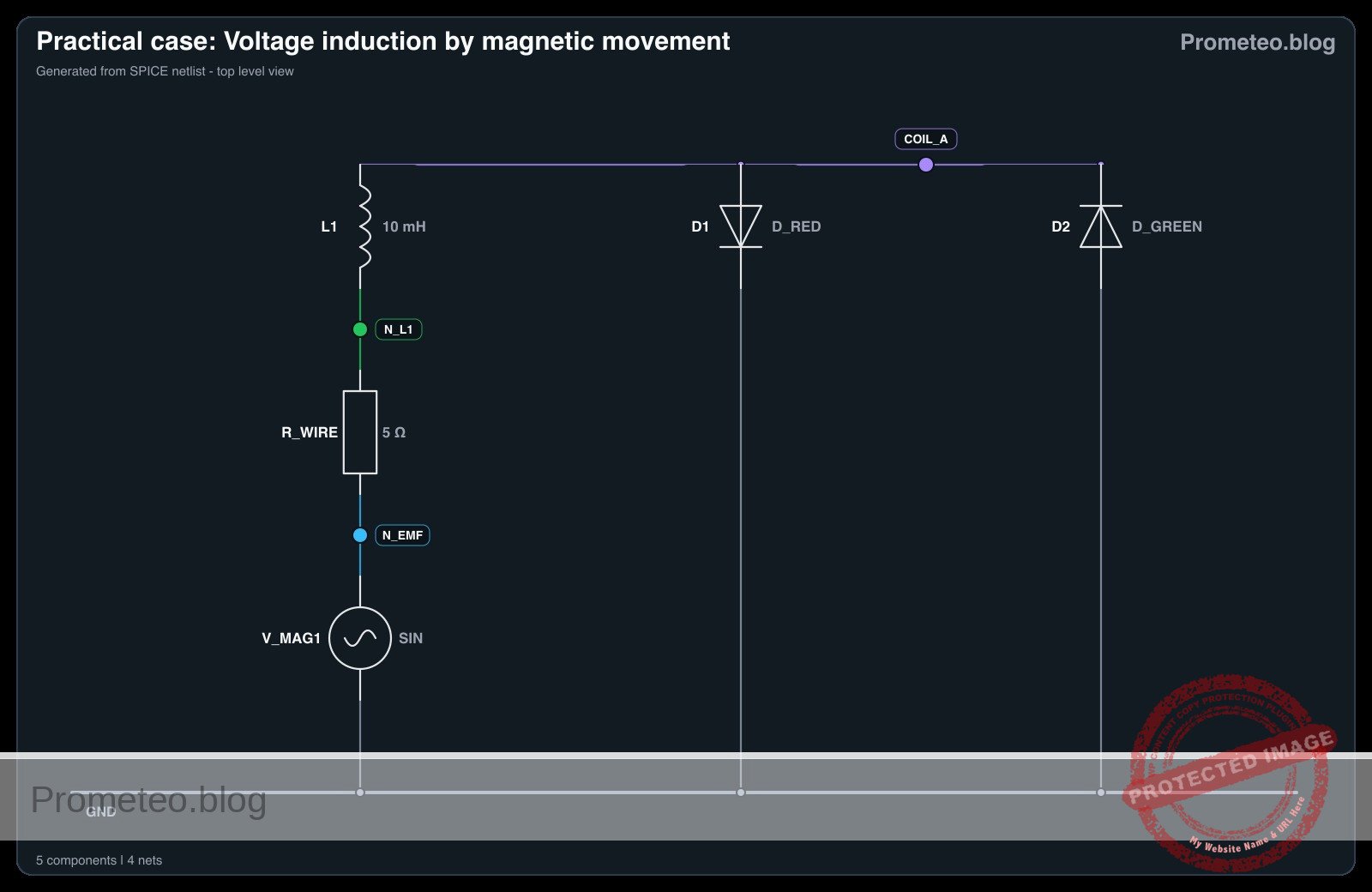
The circuit consists of the coil connected directly to the indicators in parallel. We define the coil terminals as nodes COIL_A and COIL_B.

  • L1: Connects between node COIL_A and node COIL_B.
  • D1: Anode connects to COIL_A; Cathode connects to COIL_B.
  • D2: Anode connects to COIL_B; Cathode connects to COIL_A (anti-parallel to D1).
  • M1: Positive probe connects to COIL_A; Negative probe connects to COIL_B.

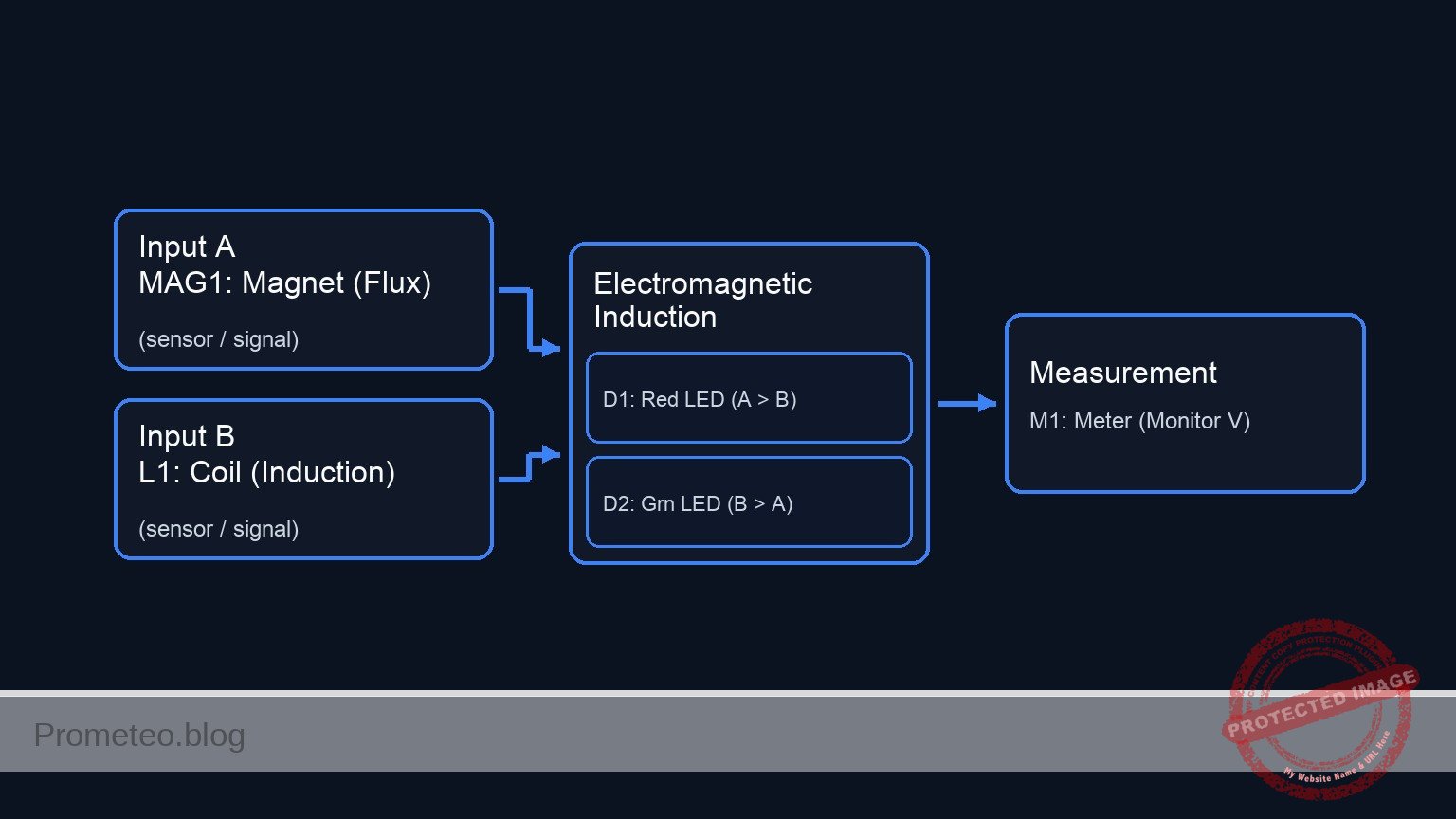
Conceptual block diagram

Conceptual block diagram — Electromagnetic Induction
Quick read: inputs → main block → output (actuator or measurement). This summarizes the ASCII schematic below.

Schematic

markdown
Title: Practical case: Voltage induction by magnetic movement

[ INPUT / SOURCE ]                       [ DISTRIBUTION RAILS ]                    [ OUTPUT / LOADS ]

                                                 (Node A: Top Rail)
                                    /------------------------------------------------------------------>
                                    |                |                    |                    |
[ MAG1: Magnet ] --(Flux)--> [ L1: Coil ]            | (Anode)            | (Cathode)          | (+)
                                    |                v                    v                    v
                                    |        [ D1: Red LED ]      [ D2: Grn LED ]      [ M1: Meter ]
                                    |        (Lights if A > B)    (Lights if B > A)    (Monitor V)
                                    |                |                    |                    |
                                    |                | (Cathode)          | (Anode)            | (-)
                                    \                v                    v                    v
                                    \------------------------------------------------------------------>
                                                 (Node B: Bottom Rail)
Schematic (ASCII)

Electrical diagram

Electrical diagram for case: Voltage induction by magnetic movement
Generated from the validated SPICE netlist for this case.

🔒 This electrical diagram is premium. With the 7-day pass or the monthly membership you can unlock the complete didactic material and the print-ready PDF pack.🔓 See premium access plans

Measurements and tests

  1. Static Test: Place the magnet inside the coil and hold it completely still. The multimeter should read 0 V, and no LEDs should light up. This confirms that a changing magnetic field is required.
  2. Slow Insertion: Set the multimeter to the lowest DC voltage range (e.g., 200 mV). Slowly push the magnet into the coil. Observe a small voltage reading (e.g., +10 to +50 mV).
  3. Fast Action: Quickly thrust the magnet into the coil. You should see a significantly higher voltage spike (potentially > 1 V) and D1 (Red) may flash briefly.
  4. Reverse Motion: Quickly pull the magnet out of the coil. The voltage polarity on the multimeter will flip (negative sign), and D2 (Green) should flash.
  5. Oscillation: Move the magnet back and forth rapidly inside the coil. The LEDs should flicker alternately, demonstrating the generation of Alternating Current (AC).

SPICE netlist and simulation

Reference SPICE Netlist (ngspice) — excerptFull SPICE netlist (ngspice)

* Practical case: Voltage induction by magnetic movement
.width out=256
*
* Description:
* Simulation of a magnet moving through a coil, inducing voltage to drive two antiparallel LEDs.
*
* Nodes:
* COIL_A : Hot terminal of the coil (Multimeter +)
* COIL_B : Reference terminal of the coil (Multimeter -, Grounded)
*
* Note: The physical "Coil" is modeled as a series combination of an EMF Voltage Source (V_MAG1),
* a Resistor (R_WIRE), and the Inductor (L1).

* --- Power / Reference ---
* Grounding COIL_B as per Multimeter negative probe convention
V_REF COIL_B 0 0

* --- Magnetic Induction Source (MAG1) ---
* Simulating the changing magnetic flux from MAG1 as an AC voltage source.
* 3V Peak, 5Hz (Simulates shaking the magnet)
* ... (truncated in public view) ...

Copy this content into a .cir file and run with ngspice.

🔒 Part of this section is premium. With the 7-day pass or the monthly membership you can access the full content (materials, wiring, detailed build, validation, troubleshooting, variants and checklist) and download the complete print-ready PDF pack.

* Practical case: Voltage induction by magnetic movement
.width out=256
*
* Description:
* Simulation of a magnet moving through a coil, inducing voltage to drive two antiparallel LEDs.
*
* Nodes:
* COIL_A : Hot terminal of the coil (Multimeter +)
* COIL_B : Reference terminal of the coil (Multimeter -, Grounded)
*
* Note: The physical "Coil" is modeled as a series combination of an EMF Voltage Source (V_MAG1),
* a Resistor (R_WIRE), and the Inductor (L1).

* --- Power / Reference ---
* Grounding COIL_B as per Multimeter negative probe convention
V_REF COIL_B 0 0

* --- Magnetic Induction Source (MAG1) ---
* Simulating the changing magnetic flux from MAG1 as an AC voltage source.
* 3V Peak, 5Hz (Simulates shaking the magnet)
V_MAG1 N_EMF COIL_B SIN(0 3 5)

* --- Coil Assembly (L1) ---
* Internal wire resistance
R_WIRE N_EMF N_L1 5
* The physical inductance L1
L1 N_L1 COIL_A 10m

* --- Indicators ---
* D1: Red LED (Indicates Positive Phase)
* Anode: COIL_A, Cathode: COIL_B
D1 COIL_A COIL_B D_RED

* D2: Green LED (Indicates Negative Phase)
* Anode: COIL_B, Cathode: COIL_A
D2 COIL_B COIL_A D_GREEN

* --- Multimeter (M1) ---
* Modeled as the voltage difference V(COIL_A) - V(COIL_B)
* (Implicit in the node voltages)

* --- Models ---
* Generic LED Models
.model D_RED D(IS=1e-18 N=2 RS=10 BV=5)
.model D_GREEN D(IS=1e-18 N=2.5 RS=10 BV=5)

* --- Simulation Directives ---
.op
* Transient analysis: 1ms step, 500ms duration (2.5 cycles at 5Hz)
.tran 1m 500m

* --- Output ---
* Monitoring the induced voltage at COIL_A
.print tran V(COIL_A) I(L1)

Simulation Results (Transient Analysis)

Simulation Results (Transient Analysis)

Analysis: The transient analysis shows an AC voltage at COIL_A oscillating between approx +2.6V and -2.8V at 5Hz. Current flows through L1, peaking around 66mA. The voltage levels are sufficient to forward bias the LEDs (D_RED and D_GREEN) alternately, consistent with the intended indication of positive and negative phases.
Show raw data table (522 rows)
Index   time            v(coil_a)       l1#branch
0	0.000000e+00	4.375392e-35	-8.75078e-36
1	1.000000e-05	9.424778e-04	1.884985e-15
2	2.000000e-05	1.884955e-03	3.769970e-15
3	4.000000e-05	3.769910e-03	7.539938e-15
4	8.000000e-05	7.539814e-03	1.507987e-14
5	1.600000e-04	1.507958e-02	3.015936e-14
6	3.200000e-04	3.015878e-02	6.031856e-14
7	6.400000e-04	6.031451e-02	1.206316e-13
8	1.280000e-03	1.206046e-01	2.412214e-13
9	2.280000e-03	2.147012e-01	4.294658e-13
10	3.280000e-03	3.085859e-01	6.175653e-13
11	4.280000e-03	4.021661e-01	8.067202e-13
12	5.280000e-03	4.953494e-01	1.005111e-12
13	6.280000e-03	5.880438e-01	1.262566e-12
14	7.280000e-03	6.801579e-01	1.873422e-12
15	8.280000e-03	7.716008e-01	4.548512e-12
16	9.280000e-03	8.622822e-01	1.907006e-11
17	1.028000e-02	9.521126e-01	1.003825e-10
18	1.128000e-02	1.041003e+00	5.511221e-10
19	1.228000e-02	1.128867e+00	3.003086e-09
20	1.328000e-02	1.215616e+00	1.605415e-08
21	1.428000e-02	1.301164e+00	8.389370e-08
22	1.528000e-02	1.385424e+00	4.276266e-07
23	1.628000e-02	1.468291e+00	2.121308e-06
... (498 more rows) ...

Common mistakes and how to avoid them

  1. Using weak magnets: Standard black ferrite magnets are often too weak to generate visible voltage on an LED. Solution: Use rare-earth Neodymium magnets.
  2. Moving too slowly: Faraday’s Law (V = – N · d\Phi / dt) depends on the rate of change. Solution: Move the magnet as quickly as possible to maximize the voltage spike.
  3. Insulation issues: Enameled wire has a clear coating that blocks electricity. Solution: Ensure the ends of the coil wire are sanded or scraped down to bare copper before connecting to the LEDs or multimeter.

Troubleshooting

  • Symptom: Multimeter shows voltage, but LEDs never light up.
    • Cause: The induced voltage is lower than the LED forward voltage threshold (~1.8 V).
    • Fix: Add more turns to the coil (increase $N$) or move the magnet faster.
  • Symptom: No reading on the multimeter even with fast movement.
    • Cause: Open circuit or poor connection at the coil tips.
    • Fix: Check continuity (resistance mode) across the coil terminals; it should read a few Ohms, not infinite.
  • Symptom: Voltage reading is erratic or hard to see.
    • Cause: Digital multimeters have a slow sample rate.
    • Fix: Use the «Max/Min» hold function if available, or use an analog (needle) multimeter which responds better to transient pulses.

Possible improvements and extensions

  1. Shake Flashlight: Add a bridge rectifier (4 diodes) and a large capacitor (e.g., 1000 µF) to store the energy generated by shaking the magnet, allowing the LED to stay lit for a few seconds after motion stops.
  2. Core Comparison: Insert an iron bolt inside the coil (making it an iron-core inductor) and move a magnet near the head of the bolt to observe how the ferromagnetic core concentrates the magnetic flux and affects induction.

More Practical Cases on Prometeo.blog

Find this product and/or books on this topic on Amazon

Go to Amazon

As an Amazon Associate, I earn from qualifying purchases. If you buy through this link, you help keep this project running.

Quick Quiz

Question 1: What core physical law does this practical case demonstrate?


Question 2: Which type of energy conversion takes place in this experiment?


Question 3: What component serves as the source of magnetic flux in this setup?


Question 4: Which real-world device operates on the same principle demonstrated here?


Question 5: What is the function of the LED in the circuit?


Question 6: What happens to the induced voltage polarity when the direction of the magnet's movement is reversed?


Question 7: To see the LED flash, the induced voltage peak must exceed approximately what value?


Question 8: What is the expected outcome on the multimeter when the magnet moves relative to the coil?


Question 9: Besides power generation, which automotive application uses this sensor technology?


Question 10: Which modern convenience technology is mentioned as using the basics of magnetic coupling?


Carlos Núñez Zorrilla
Electronics & Computer Engineer

Telecommunications Electronics Engineer and Computer Engineer (official degrees in Spain).
Follow me:


Practical case: Simple RL Low-Pass Filter

Simple RL Low-Pass Filter prototype (Maker Style)

Level: Basic – Observe how an inductor filters high frequencies in an RL series circuit.

Objective and use case

In this practical exercise, you will build a passive RL low-pass filter using a series inductor and a shunt resistor. This circuit demonstrates the inductive reactance property, where impedance increases with frequency, effectively blocking high-frequency signals while allowing low-frequency signals to pass through to the output.

Why it is useful:
* Audio Electronics: Used in crossover networks to direct low frequencies (bass) to woofers while blocking treble.
* Power Supplies: Essential for smoothing output currents and reducing ripple in DC/DC converters.
* Noise Suppression: Filters out high-frequency interference (EMI) on signal lines.
* Signal Conditioning: Removes high-frequency noise from sensor data before processing.

Expected outcome:
* Low Frequency Input (< Cutoff): The output amplitude (VOUT) is approximately equal to the input amplitude (VIN).
* Cutoff Frequency (fc): The output amplitude drops to roughly 70.7% of the input amplitude (-3dB point).
* High Frequency Input (> Cutoff): The output amplitude is significantly attenuated (reduced).
* Target audience: Basic electronics students and hobbyists exploring AC circuit theory.

Materials

  • V1: Function Generator (Sine wave source), function: AC signal injection
  • L1: 10 mH inductor, function: series reactive element (impedance increases with frequency)
  • R1: 100 Ω resistor, function: load/shunt resistor (output taken here)
  • Scope: Dual-channel Oscilloscope, function: visual comparison of Input vs. Output

Wiring guide

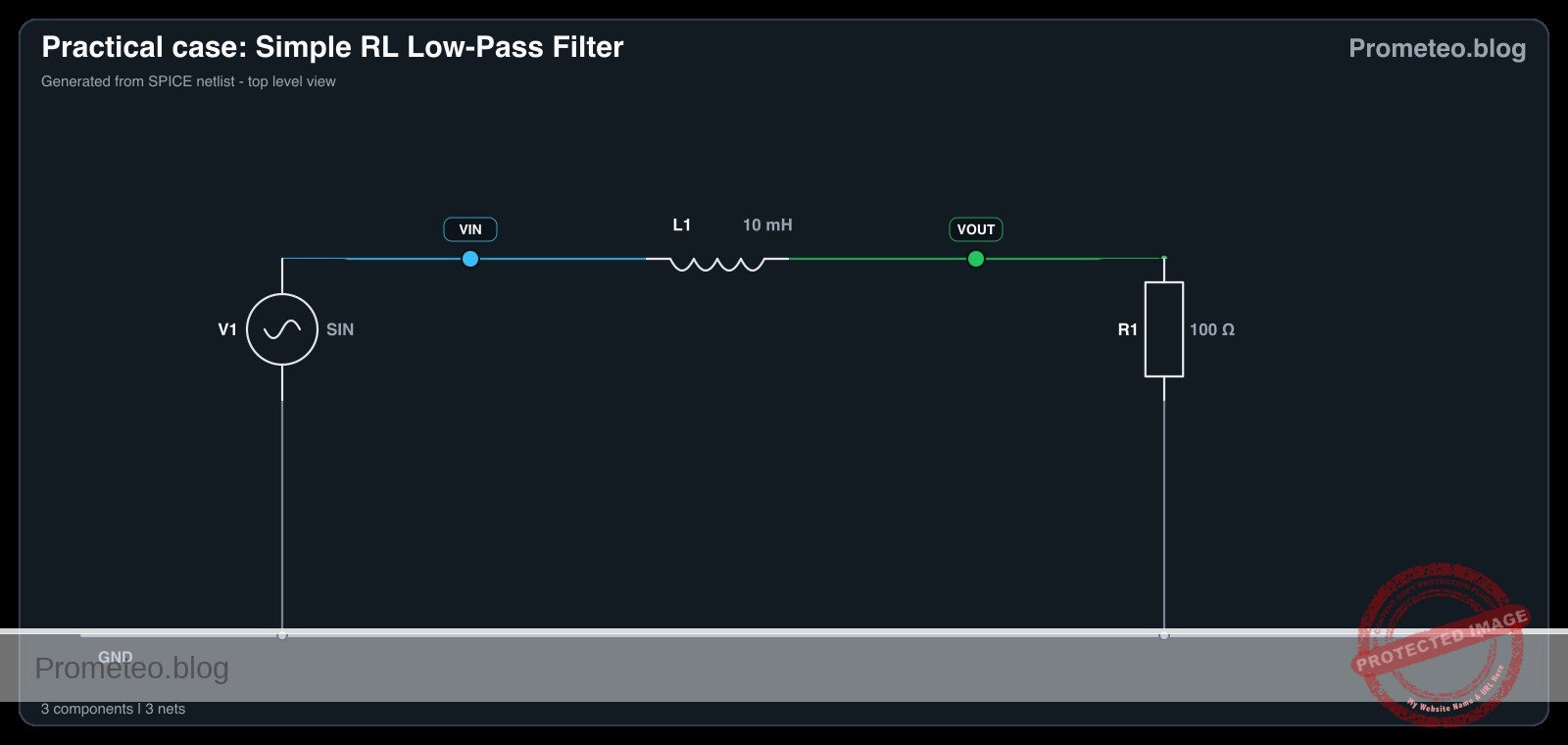
Construct the circuit using the following node connections. The output voltage is measured across the resistor.

  • V1 (Signal Source): Connects between node VIN (Positive) and node 0 (GND).
  • L1: Connects between node VIN and node VOUT.
  • R1: Connects between node VOUT and node 0 (GND).
  • Oscilloscope Channel 1: Connect probe tip to VIN and ground clip to 0.
  • Oscilloscope Channel 2: Connect probe tip to VOUT and ground clip to 0.

Conceptual block diagram

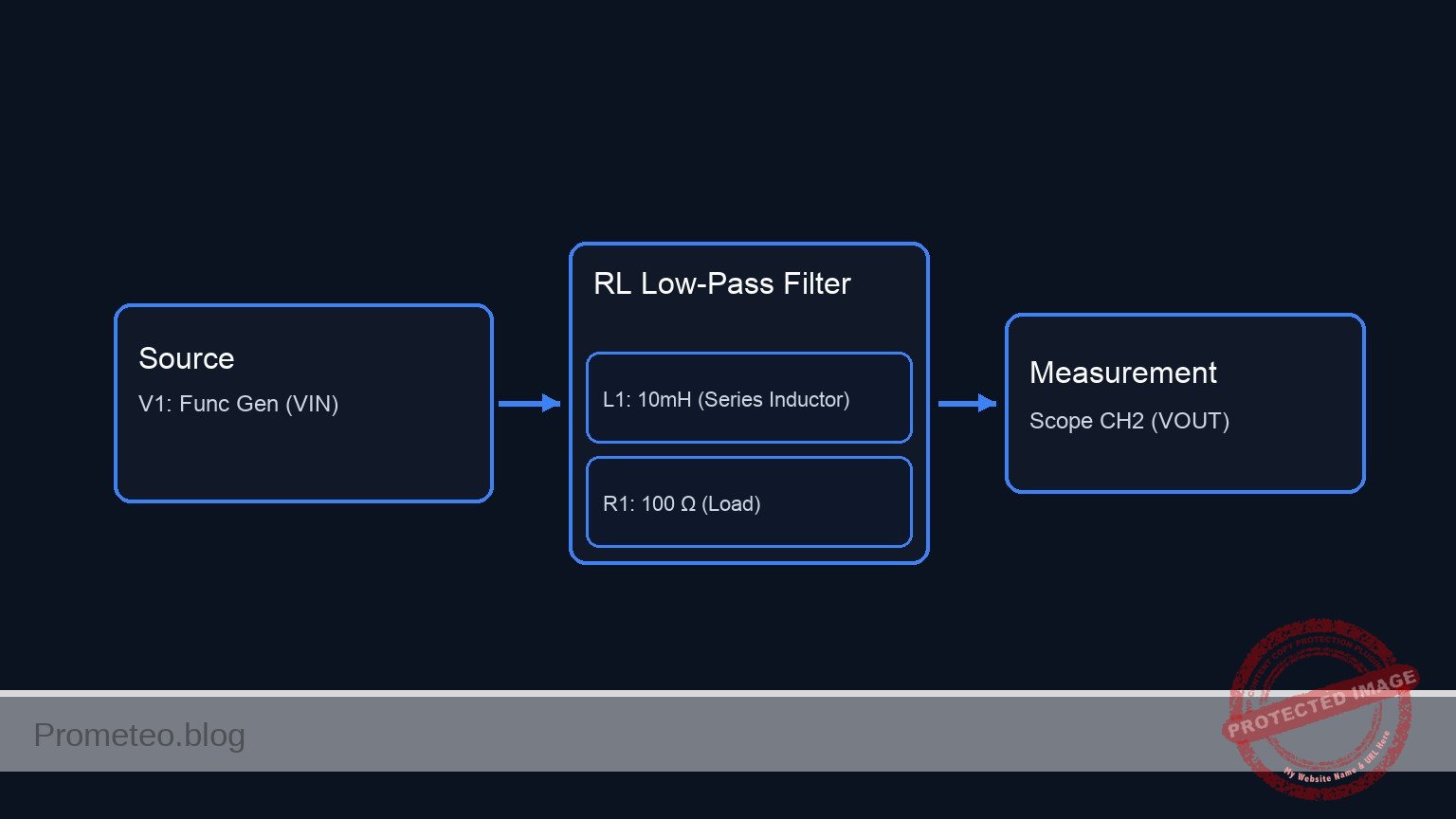
Conceptual block diagram — RL Low-Pass Filter
Quick read: inputs → main block → output (actuator or measurement). This summarizes the ASCII schematic below.

Schematic

[ V1: Func Gen ] --(Node VIN)--> [ L1: 10mH ] --(Node VOUT)--> [ R1: 100 Ω ] --> GND (0)
       |                        (Series Inductor)      |          (Load)
       |                                               |
       +--------(Probe)-------> [ Scope CH1 ]          +--------(Probe)-------> [ Scope CH2 ]
Schematic (ASCII)

Electrical diagram

Electrical diagram for case: Simple RL low-pass filter
Generated from the validated SPICE netlist for this case.

🔒 This electrical diagram is premium. With the 7-day pass or the monthly membership you can unlock the complete didactic material and the print-ready PDF pack.🔓 See premium access plans

Measurements and tests

Follow these steps to validate the frequency response of the filter.

  1. Setup: Configure the Function Generator (V1) to output a Sine Wave with 5 Vpp amplitude.
  2. Low Frequency Test (Pass Band):
    • Set V1 frequency to 100 Hz.
    • Observe Channel 1 (Input) and Channel 2 (Output) on the oscilloscope.
    • Result: The output wave (VOUT) should be almost identical in amplitude to the input (VIN).
  3. Cutoff Frequency Test (fc):
    • Calculate the theoretical cutoff: fc = (R / (2\pi L)) ≈ (100 / (2\pi × 0.01)) ≈ 1.59 kHz.
    • Set V1 frequency to 1.6 kHz.
    • Result: VOUT should be approximately 3.5 Vpp (roughly 0.707 × 5 Vpp). You will also notice a phase lag of -45°.
  4. High Frequency Test (Stop Band):
    • Set V1 frequency to 50 kHz.
    • Result: The output wave (VOUT) should be very small (highly attenuated) compared to the input.

SPICE netlist and simulation

Reference SPICE Netlist (ngspice) — excerptFull SPICE netlist (ngspice)

* Practical case: Simple RL Low-Pass Filter
.width out=256

* --- Component Definitions ---

* V1: Function Generator (Sine wave source)
* Wiring: Connects between node VIN (Positive) and node 0 (GND)
* Configuration: Sine wave, 0V offset, 5V amplitude, 2kHz frequency
* (Note: Cutoff frequency fc = R/(2*pi*L) approx 1.6kHz. 2kHz chosen to show attenuation)
V1 VIN 0 SIN(0 5 2k)

* L1: 10 mH inductor
* Wiring: Connects between node VIN and node VOUT
L1 VIN VOUT 10m

* R1: 100 Ohm resistor
* Wiring: Connects between node VOUT and node 0 (GND)
R1 VOUT 0 100

* --- Analysis Commands ---
* ... (truncated in public view) ...

Copy this content into a .cir file and run with ngspice.

🔒 Part of this section is premium. With the 7-day pass or the monthly membership you can access the full content (materials, wiring, detailed build, validation, troubleshooting, variants and checklist) and download the complete print-ready PDF pack.

* Practical case: Simple RL Low-Pass Filter
.width out=256

* --- Component Definitions ---

* V1: Function Generator (Sine wave source)
* Wiring: Connects between node VIN (Positive) and node 0 (GND)
* Configuration: Sine wave, 0V offset, 5V amplitude, 2kHz frequency
* (Note: Cutoff frequency fc = R/(2*pi*L) approx 1.6kHz. 2kHz chosen to show attenuation)
V1 VIN 0 SIN(0 5 2k)

* L1: 10 mH inductor
* Wiring: Connects between node VIN and node VOUT
L1 VIN VOUT 10m

* R1: 100 Ohm resistor
* Wiring: Connects between node VOUT and node 0 (GND)
R1 VOUT 0 100

* --- Analysis Commands ---

* Transient Analysis
* Step size: 1us
* Stop time: 2ms (sufficient to capture several cycles at 2kHz)
.tran 1u 2m

* Operating Point Analysis (DC check)
.op

* --- Output Directives ---

* Print Input (VIN) and Output (VOUT) voltages for simulation logging
* Scope Channel 1: VIN
* Scope Channel 2: VOUT
.print tran V(VIN) V(VOUT) I(L1)

.end

Simulation Results (Transient Analysis)

Simulation Results (Transient Analysis)

Analysis: The simulation shows a sinusoidal input (VIN) and a sinusoidal output (VOUT). At 2kHz, the output amplitude (approx 3V peak) is attenuated relative to the input (5V peak) and phase-shifted, consistent with RL low-pass filter behavior near its cutoff frequency.
Show raw data table (2012 rows)
Index   time            v(vin)          v(vout)         l1#branch
0	0.000000e+00	0.000000e+00	0.000000e+00	0.000000e+00
1	1.000000e-08	6.283185e-04	6.282557e-08	6.282557e-10
2	1.084006e-08	6.811008e-04	6.854662e-08	6.854662e-10
3	1.252017e-08	7.866654e-04	8.087543e-08	8.087543e-10
4	1.588039e-08	9.977945e-04	1.108531e-07	1.108531e-09
5	2.260084e-08	1.420053e-03	1.920880e-07	1.920880e-09
6	3.604174e-08	2.264569e-03	4.396687e-07	4.396687e-09
7	6.292353e-08	3.953601e-03	1.275216e-06	1.275216e-08
8	1.166871e-07	7.331665e-03	4.307397e-06	4.307397e-08
9	2.242143e-07	1.408778e-02	1.581244e-05	1.581244e-07
10	4.392686e-07	2.759992e-02	6.055593e-05	6.055593e-07
11	8.693773e-07	5.462350e-02	2.367416e-04	2.367416e-06
12	1.729595e-06	1.086651e-01	9.340244e-04	9.340244e-06
13	2.729595e-06	1.714719e-01	2.318447e-03	2.318447e-05
14	3.729595e-06	2.342516e-01	4.313902e-03	4.313902e-05
15	4.729595e-06	2.969943e-01	6.913992e-03	6.913992e-05
16	5.729595e-06	3.596901e-01	1.011228e-02	1.011228e-04
17	6.729595e-06	4.223291e-01	1.390231e-02	1.390231e-04
18	7.729595e-06	4.849014e-01	1.827756e-02	1.827756e-04
19	8.729595e-06	5.473972e-01	2.323151e-02	2.323151e-04
20	9.729595e-06	6.098065e-01	2.875758e-02	2.875758e-04
21	1.072959e-05	6.721195e-01	3.484918e-02	3.484918e-04
22	1.172959e-05	7.343264e-01	4.149966e-02	4.149966e-04
23	1.272959e-05	7.964173e-01	4.870237e-02	4.870237e-04
... (1988 more rows) ...

Common mistakes and how to avoid them

  1. Measuring across the Inductor: If you measure voltage across L1 instead of R1, you create a High-Pass filter (passing high frequencies). Solution: Ensure the oscilloscope probe monitors the node between L1 and R1 relative to Ground.
  2. Using DC Input: An inductor acts as a short circuit in DC (after the transient). Solution: Ensure the function generator is set to AC (Sine Wave) to observe reactance effects.
  3. Inductor Saturation: Using a very small inductor core with high current can saturate the magnetic field, distorting the waveform. Solution: Use an appropriate inductor or keep signal current within the component’s rating.

Troubleshooting

  • Symptom: VOUT is zero at all frequencies.
    • Cause: Open circuit in the wiring or broken inductor wire.
    • Fix: Check continuity of L1 and connections at VIN and VOUT.
  • Symptom: VOUT equals VIN at all frequencies.
    • Cause: The inductor L1 is shorted or R1 is disconnected (open).
    • Fix: Measure the resistance of L1 (should be non-zero but low) and ensure R1 is properly grounded.
  • Symptom: No attenuation observed at 50 kHz.
    • Cause: Inductor value is too small or Resistor value is too large (cutoff frequency is too high).
    • Fix: Verify component values. Try increasing L1 or decreasing R1 to lower the cutoff frequency.

Possible improvements and extensions

  1. Bode Plotting: Manually record the amplitude of VOUT at 10 different frequencies from 100 Hz to 100 kHz and plot the results on semi-log graph paper to visualize the -20dB/decade roll-off.
  2. Second Order Filter: Add a capacitor in parallel with R1 to create an RLC low-pass filter, creating a steeper roll-off (-40dB/decade) and potentially introducing resonance.

More Practical Cases on Prometeo.blog

Find this product and/or books on this topic on Amazon

Go to Amazon

As an Amazon Associate, I earn from qualifying purchases. If you buy through this link, you help keep this project running.

Quick Quiz

Question 1: What type of filter is described in this practical exercise?


Question 2: Which component acts as the series reactive element in this circuit?


Question 3: How does the impedance of an inductor change with frequency?


Question 4: Where is the output voltage typically measured in a series RL low-pass filter configuration?


Question 5: What happens to the output amplitude when the input frequency is significantly higher than the cutoff frequency?


Question 6: In audio electronics, what is a common use for this type of filter?


Question 7: Why is this circuit useful in power supplies?


Question 8: What is the primary function of the inductor in this circuit regarding signal frequencies?


Question 9: Which application involves removing high-frequency noise from sensor data?


Question 10: What is the expected outcome for a Low Frequency Input (< Cutoff) in this circuit?


Carlos Núñez Zorrilla
Electronics & Computer Engineer

Telecommunications Electronics Engineer and Computer Engineer (official degrees in Spain).

Follow me:


Practical case: Opposition to DC current change

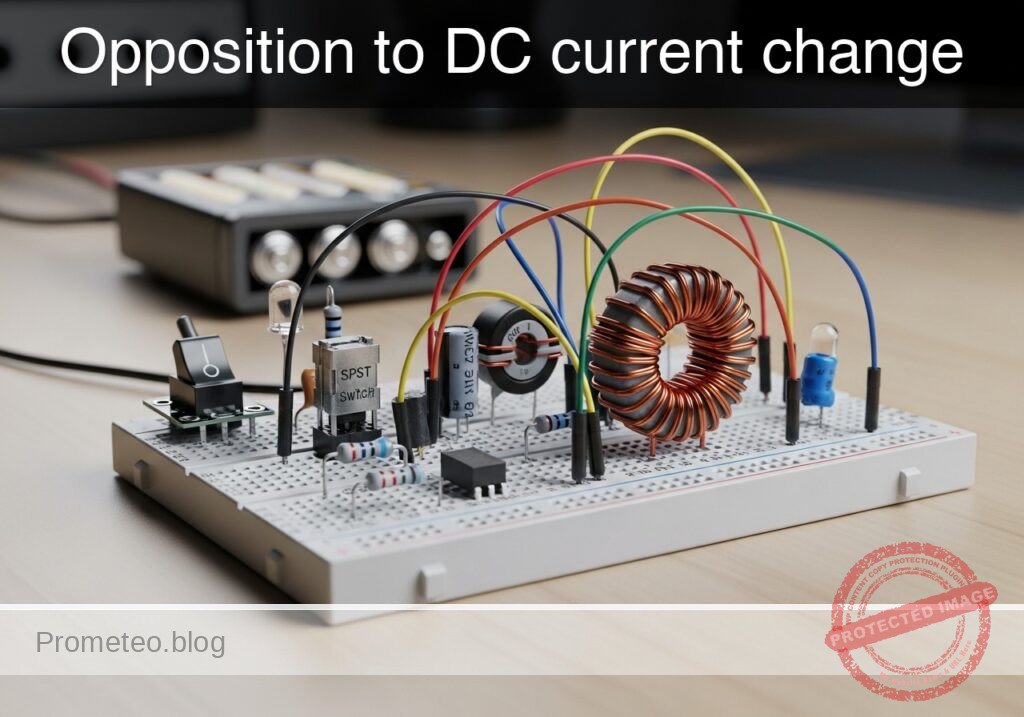
Opposition to DC current change prototype (Maker Style)

Level: Basic. Observe the delay in lamp activation due to self-induction.

Objective and use case

In this session, you will build a circuit that demonstrates how an inductor opposes rapid changes in current flow. By placing a large inductor in series with a lamp (with a parallel bypass resistor), you will create a visual «soft-start» effect where the light starts dim and gradually brightens.

Why it is useful:
* Inrush Current Limiting: Used in power supplies and large motors to prevent blown fuses when devices are first turned on.
* Soft-Start Circuits: Protects delicate filaments and components from thermal shock.
* Filtering: Smoothes out noise and ripples in DC power lines.

Expected outcome:
* When the switch is closed, the lamp will turn on immediately but dimly.
* Over a short period (0.5 to 2 seconds, depending on the inductance), the lamp will become fully bright.
* This visualizes the inductor initially acting as an «open circuit» (blocking current) and transitioning to a «short circuit» (allowing full flow).
* Target audience: Basic electronics students and hobbyists.

Materials

  • V1: 12 V DC power supply or battery.
  • S1: SPST mechanical switch (toggle or push-button).
  • L1: 1 H to 2 H iron-core inductor, function: creates opposition to current change (e.g., a transformer primary winding used as a choke).
  • R1: 220 Ω resistor (1 Watt or higher), function: bypass path for visual contrast.
  • X1: 12 V / 100 mA incandescent lamp (small bulb), function: visual output load.

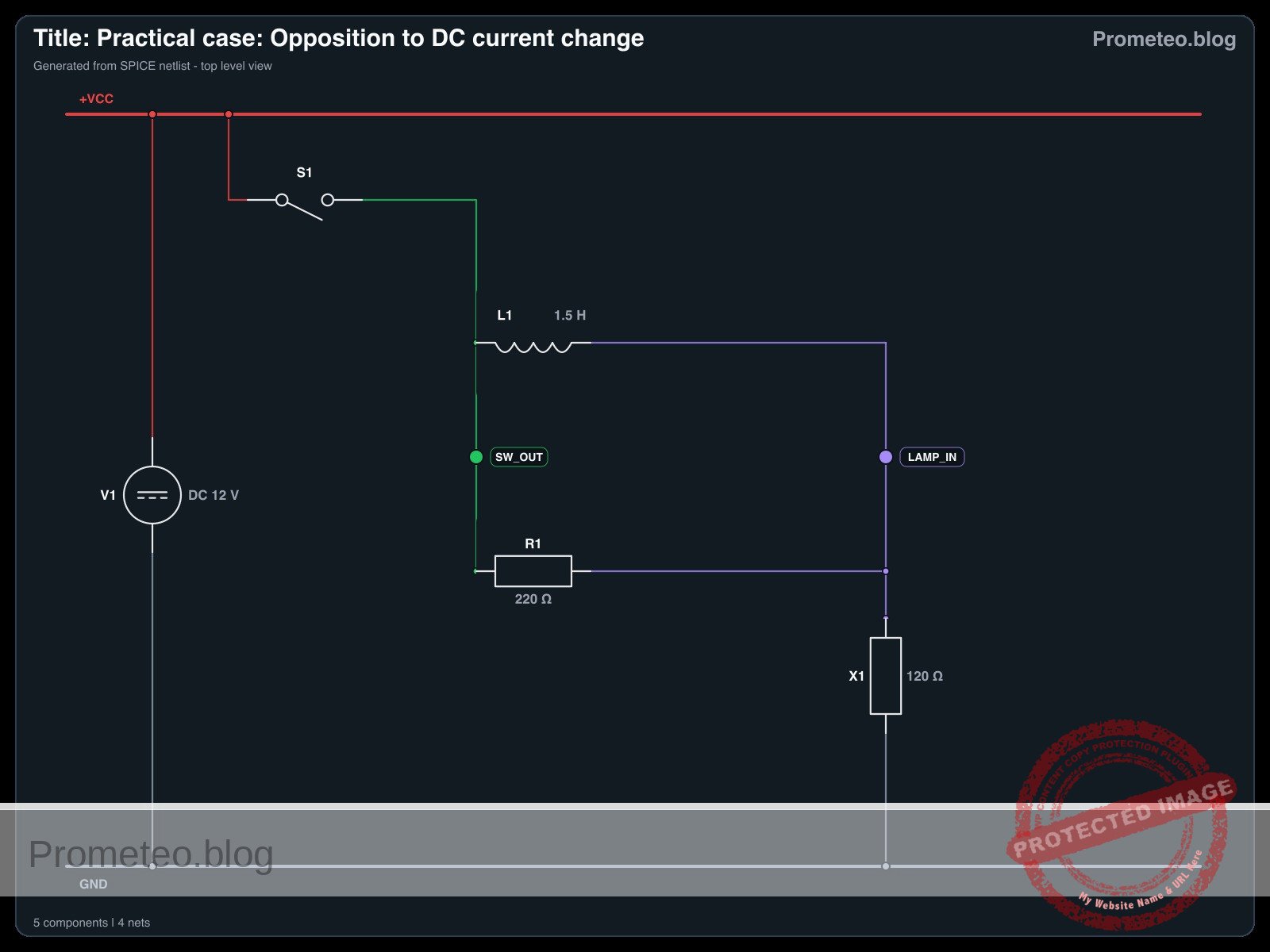
Wiring guide

Construct the circuit using the following connections. The node names (e.g., VCC, SW_OUT) help identify the electrical points.

  • V1 (DC Source): Connect the positive terminal to VCC and the negative terminal to 0 (GND).
  • S1 (Switch): Connect between VCC and node SW_OUT.
  • L1 (Inductor): Connect between node SW_OUT and node LAMP_IN.
  • R1 (Resistor): Connect between node SW_OUT and node LAMP_IN (this places R1 in parallel with L1).
  • X1 (Lamp): Connect between node LAMP_IN and 0 (GND).

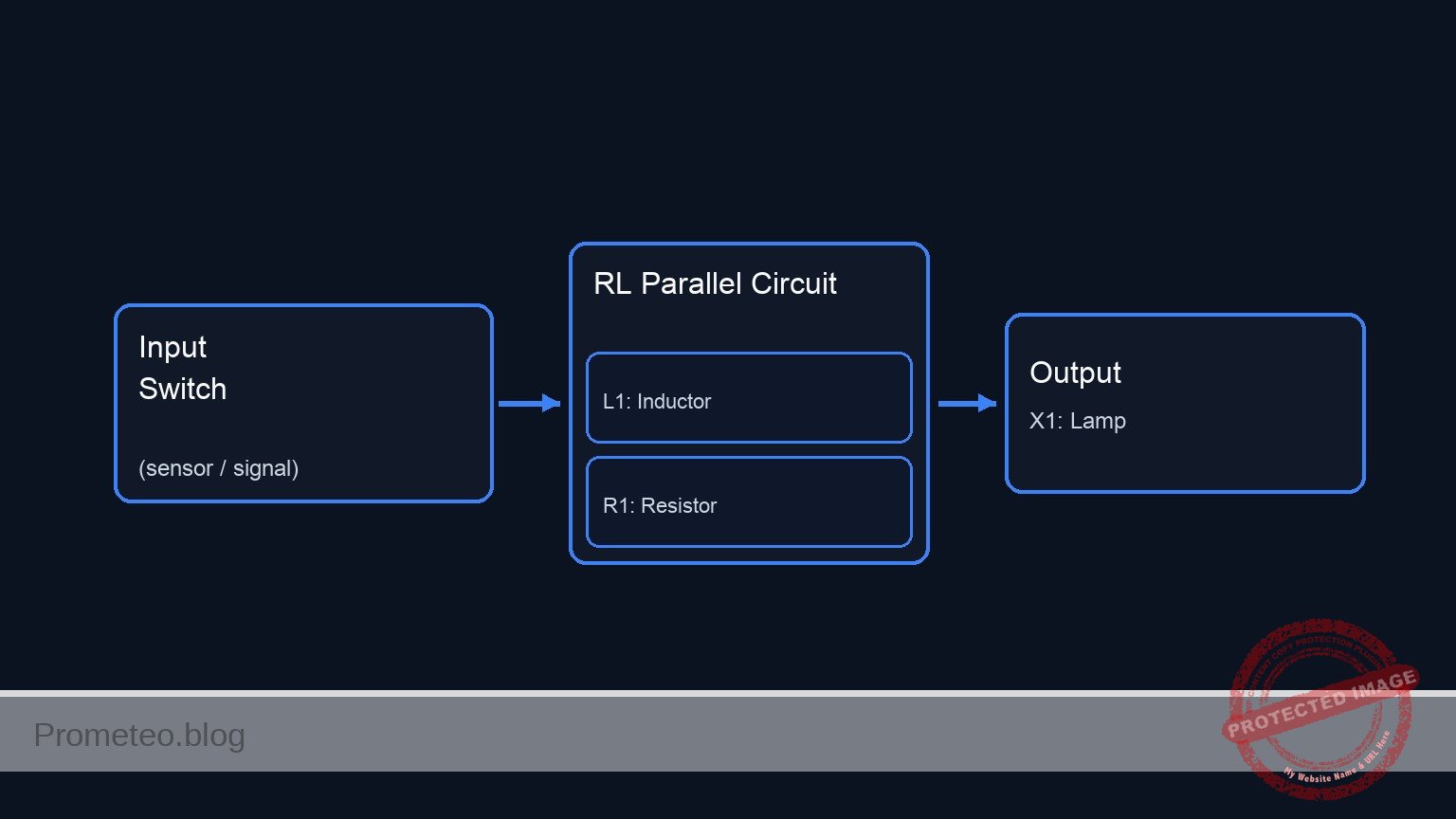
Conceptual block diagram

Conceptual block diagram — RL Parallel Circuit
Quick read: inputs → main block → output (actuator or measurement). This summarizes the ASCII schematic below.

Schematic

(Node: SW_OUT)          (Node: LAMP_IN)
                                              /--> [ L1: Inductor ] --\
[ V1: 12 V Source ] --(VCC)--> [ S1: Switch ] --                        --> [ X1: Lamp ] --> GND
                                              \--> [ R1: Resistor ] --/
Schematic (ASCII)

Electrical diagram

Electrical diagram for the opposition to DC current change case
Generated from the validated SPICE netlist for this case.

🔒 This electrical diagram is premium. With the 7-day pass or the monthly membership you can unlock the complete didactic material and the print-ready PDF pack.🔓 See premium access plans

Measurements and tests

Follow these steps to validate the phenomenon:

  1. Initial State: Ensure the switch S1 is open. The lamp X1 should be off.
  2. Observation: Keep your eyes on the lamp X1.
  3. Action: Close switch S1.
  4. Visual Validation:
    • Phase 1 (Instant): The lamp lights up at roughly 30–50% brightness. (Current is flowing through R1, as L1 opposes the sudden change).
    • Phase 2 (Delay): The lamp brightness ramps up smoothly to 100%. (As the magnetic field in L1 stabilizes, it allows full current to pass, bypassing R1).
  5. Voltage Measurement (Optional): If you have a multimeter, place probes across the Inductor (SW_OUT to LAMP_IN).
    • At the moment of contact, voltage is high (approx 6–8 V).
    • After 1–2 seconds, voltage drops to near 0 V.

SPICE netlist and simulation

Reference SPICE Netlist (ngspice) — excerptFull SPICE netlist (ngspice)

* Title: Practical case: Opposition to DC current change
.width out=256
* Description: Demonstrates inductive opposition to current change (dim-to-bright lamp effect)

* --- Power Supply ---
* 12V DC Supply
V1 VCC 0 DC 12

* --- User Interface (Switch Control) ---
* Generates a control pulse to simulate pressing the button.
* Button Press: Starts at 10ms, Duration 300ms.
V_BTN_CTRL CTRL 0 PULSE(0 5 10m 1u 1u 300m 600m)

* --- Components ---

* S1: SPST Mechanical Switch
* Connected between VCC and SW_OUT.
* Modeled as a voltage-controlled switch driven by the control pulse.
S1 VCC SW_OUT CTRL 0 SW_IDEAL

* ... (truncated in public view) ...

Copy this content into a .cir file and run with ngspice.

🔒 Part of this section is premium. With the 7-day pass or the monthly membership you can access the full content (materials, wiring, detailed build, validation, troubleshooting, variants and checklist) and download the complete print-ready PDF pack.

* Title: Practical case: Opposition to DC current change
.width out=256
* Description: Demonstrates inductive opposition to current change (dim-to-bright lamp effect)

* --- Power Supply ---
* 12V DC Supply
V1 VCC 0 DC 12

* --- User Interface (Switch Control) ---
* Generates a control pulse to simulate pressing the button.
* Button Press: Starts at 10ms, Duration 300ms.
V_BTN_CTRL CTRL 0 PULSE(0 5 10m 1u 1u 300m 600m)

* --- Components ---

* S1: SPST Mechanical Switch
* Connected between VCC and SW_OUT.
* Modeled as a voltage-controlled switch driven by the control pulse.
S1 VCC SW_OUT CTRL 0 SW_IDEAL

* L1: 1.5H Iron-core Inductor
* Creates opposition to current change.
* Connected between SW_OUT and LAMP_IN.
L1 SW_OUT LAMP_IN 1.5

* R1: 220 Ohm Resistor
* Bypass path for visual contrast (parallel to L1).
* Connected between SW_OUT and LAMP_IN.
R1 SW_OUT LAMP_IN 220

* X1: 12V / 100mA Incandescent Lamp
* Modeled as a resistor: R = V / I = 12 / 0.1 = 120 Ohms.
* Connected between LAMP_IN and 0 (GND).
R_X1 LAMP_IN 0 120

* --- Models ---
* Ideal switch model: Low resistance when ON, High when OFF.
.model SW_IDEAL sw(vt=2.5 ron=0.01 roff=100Meg)

* --- Simulation Setup ---
* Transient analysis to capture the inductive time constant (approx 20ms).
* Simulation time: 500ms to allow full settling.
.op
.tran 1m 500m

* --- Output Directives ---
* V(SW_OUT): Input voltage to the LR network (Switch Output).
* V(LAMP_IN): Voltage across the Lamp (Visual Output).
.print tran V(SW_OUT) V(LAMP_IN) I(L1)

.end

Simulation Results (Transient Analysis)

Simulation Results (Transient Analysis)

Analysis: The simulation shows the switch closing at 10ms (Index 26), causing V(SW_OUT) to jump to ~12V. V(LAMP_IN) rises to ~4.2V initially due to the inductive kick/impedance, then settles. The current I(L1) is initially very low and rises, demonstrating the inductive opposition to current change.
Show raw data table (564 rows)
Index   time            v(sw_out)       v(lamp_in)      l1#branch
0	0.000000e+00	1.439998e-05	1.439998e-05	1.199999e-07
1	1.000000e-05	1.439998e-05	1.439998e-05	1.199999e-07
2	2.000000e-05	1.439998e-05	1.439998e-05	1.199999e-07
3	4.000000e-05	1.439998e-05	1.439998e-05	1.199999e-07
4	8.000000e-05	1.439998e-05	1.439998e-05	1.199999e-07
5	1.600000e-04	1.439998e-05	1.439998e-05	1.199999e-07
6	3.200000e-04	1.439998e-05	1.439998e-05	1.199999e-07
7	6.400000e-04	1.439998e-05	1.439998e-05	1.199999e-07
8	1.280000e-03	1.439998e-05	1.439998e-05	1.199999e-07
9	2.280000e-03	1.439998e-05	1.439998e-05	1.199999e-07
10	3.280000e-03	1.439998e-05	1.439998e-05	1.199999e-07
11	4.280000e-03	1.439998e-05	1.439998e-05	1.199999e-07
12	5.280000e-03	1.439998e-05	1.439998e-05	1.199999e-07
13	6.280000e-03	1.439998e-05	1.439998e-05	1.199999e-07
14	7.280000e-03	1.439998e-05	1.439998e-05	1.199999e-07
15	8.280000e-03	1.439998e-05	1.439998e-05	1.199999e-07
16	9.280000e-03	1.439998e-05	1.439998e-05	1.199999e-07
17	1.000000e-02	1.439998e-05	1.439998e-05	1.199999e-07
18	1.000010e-02	1.439998e-05	1.439998e-05	1.199999e-07
19	1.000026e-02	1.439998e-05	1.439998e-05	1.199999e-07
20	1.000031e-02	1.439998e-05	1.439998e-05	1.199999e-07
21	1.000039e-02	1.439998e-05	1.439998e-05	1.199999e-07
22	1.000041e-02	1.439998e-05	1.439998e-05	1.199999e-07
23	1.000045e-02	1.439998e-05	1.439998e-05	1.199999e-07
... (540 more rows) ...

Common mistakes and how to avoid them

  1. Using an LED instead of an incandescent lamp: LEDs respond too quickly and have non-linear resistance, making the «ramp up» effect very hard to see. Solution: Always use an incandescent bulb or a coil-based relay for this demo.
  2. Inductor value too small: If you use a small air-core inductor (e.g., 100 µH), the delay will be microseconds, invisible to the eye. Solution: Use a large iron-core inductor, such as the primary coil of a mains transformer (ensure it is rated for the DC current).
  3. Omitting the parallel resistor: Without R1, the lamp might simply stay off for a split second and then pop on, which can look like a switch bounce rather than a smooth transition. Solution: R1 provides an immediate «dim» reference state, making the transition to «bright» much more obvious.

Troubleshooting

  • Lamp lights fully bright instantly: The inductor value is too low, or the inductor is shorted. Check if you are using an air-core coil; switch to an iron-core one.
  • Lamp never gets fully bright: The inductor might have a very high internal DC resistance (thin wire). Measure the resistance of the inductor coil; if it is comparable to the resistor R1, the current will never fully bypass the resistor.
  • Sparks at the switch when turning off: Inductors generate back-EMF voltage when the circuit breaks. R1 acts as a snubber here, but if sparks persist, ensure your switch is rated for inductive loads.

Possible improvements and extensions

  1. Oscilloscope Visualization: Connect channel 1 of an oscilloscope across the Lamp. You will see an exponential curve rising, allowing you to calculate the Time Constant (\tau = L / R).
  2. Variable Delay: Replace R1 with a potentiometer and experiment with how changing the parallel resistance affects the initial «dim» brightness and the perceived transition speed.

More Practical Cases on Prometeo.blog

Find this product and/or books on this topic on Amazon

Go to Amazon

As an Amazon Associate, I earn from qualifying purchases. If you buy through this link, you help keep this project running.

Quick Quiz

Question 1: What is the primary objective of the circuit described in the text?


Question 2: What visual effect is created by placing a large inductor in series with the lamp?


Question 3: Which component acts as a parallel bypass in the circuit description?


Question 4: Why is inrush current limiting useful according to the text?


Question 5: What is the function of the incandescent lamp (X1) in this circuit?


Question 6: How does the inductor behave initially when the switch is first closed?


Question 7: What is the expected behavior of the lamp immediately after the switch is closed?


Question 8: Approximately how long does the text suggest it takes for the lamp to become fully bright?


Question 9: Which of the following is NOT listed as a use case for this type of circuit?


Question 10: Who is the target audience for this circuit demonstration?


Carlos Núñez Zorrilla
Electronics & Computer Engineer

Telecommunications Electronics Engineer and Computer Engineer (official degrees in Spain).
Follow me:


Practical case: The coil as a simple electromagnet

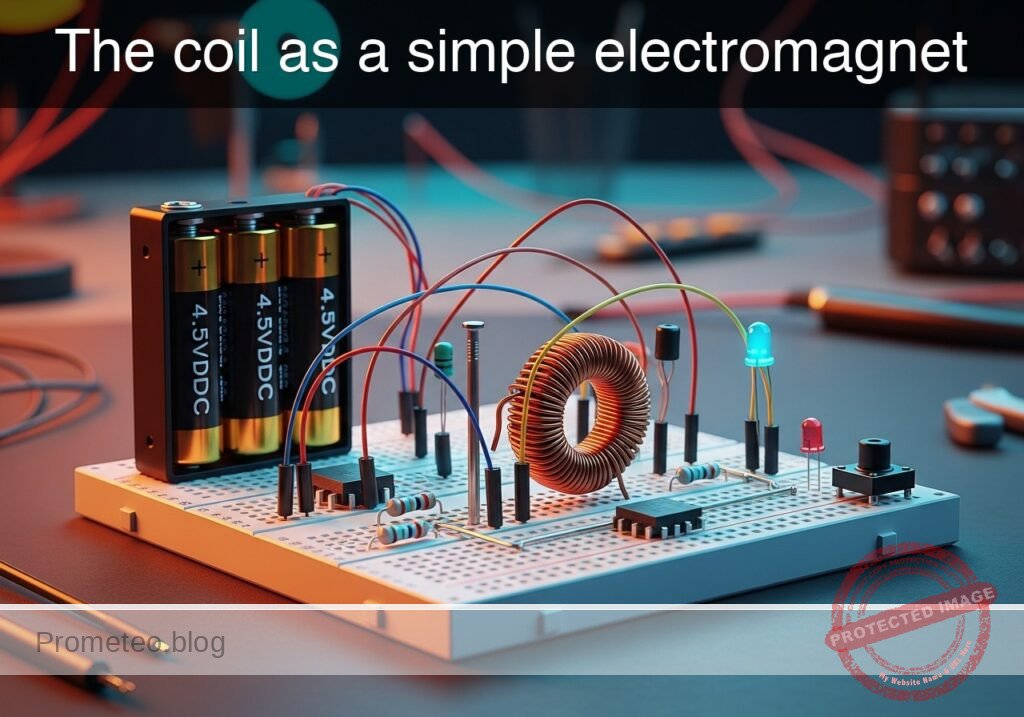
The coil as a simple electromagnet prototype (Maker Style)

Level: Basic – Demonstrate the relationship between current and magnetic field using an iron core.

Objective and use case

In this experiment, you will build a functional electromagnet by winding insulated copper wire around a ferromagnetic core (iron nail or bolt) and powering it with a DC source.

  • Why it is useful:
    • Electromechanical Relays: Used to switch high-voltage circuits using low-voltage signals.
    • Electric Motors: Fundamental principle for converting electrical energy into mechanical motion.
    • Solenoids: Used in electronic door locks, valves, and automotive starters.
    • Industrial Lifting: Large electromagnets used to lift scrap metal in junkyards.
  • Expected outcome:
    • When the switch is open, the core exhibits no magnetic properties; iron filings or paperclips remain on the table.
    • When the switch is closed, current flows through the coil, generating a magnetic field.
    • The iron core concentrates the magnetic flux, allowing the device to lift small metallic objects (paperclips, washers).
    • Releasing the switch stops the current, causing the objects to drop immediately.
  • Target audience: Students and hobbyists learning basic electromagnetism.

Materials

  • V1: 4.5 V DC Battery pack (3x AA batteries), function: energy source.
  • S1: Momentary Push-button Switch (NO), function: current control.
  • L1: Solenoid Coil (approx. 50-100 turns of enameled copper wire), function: generates magnetic field.
  • CORE: Large Iron Nail or Bolt (Soft Iron), function: magnetic core for L1.
  • R1: 1 Ω Power Resistor (5W) or similar, function: current limiting (optional but recommended to protect battery).
  • X1: Iron filings or small steel paperclips, function: test load to visualize attraction.

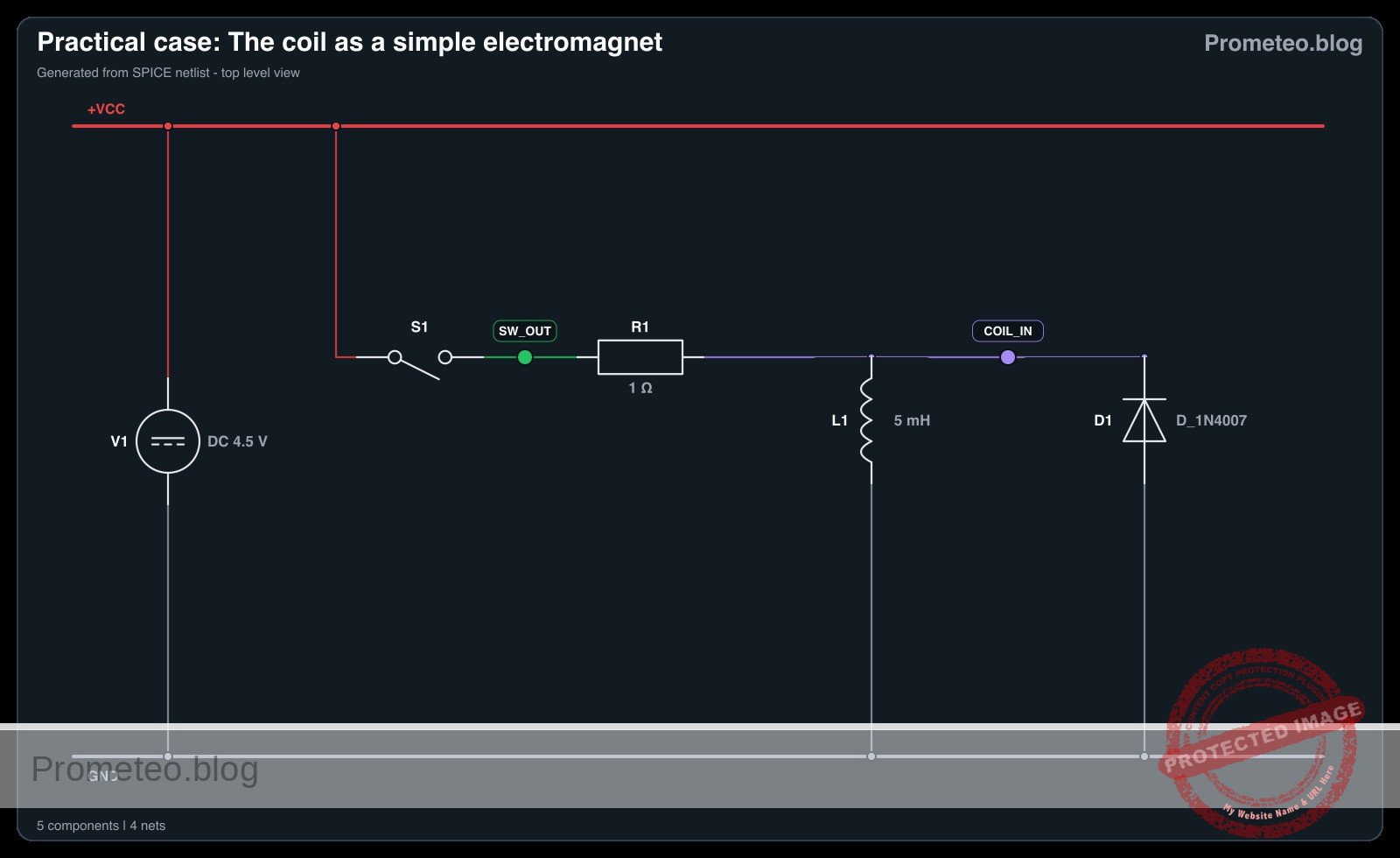
Wiring guide

  • V1 (Positive): Connects to node VCC.
  • V1 (Negative): Connects to node 0 (GND).
  • S1: Connects between node VCC and node SW_OUT.
  • R1: Connects between node SW_OUT and node COIL_IN.
  • L1: Connects between node COIL_IN and node 0 (GND).
    • Note: The wire for L1 must be physically wrapped tightly around the CORE.

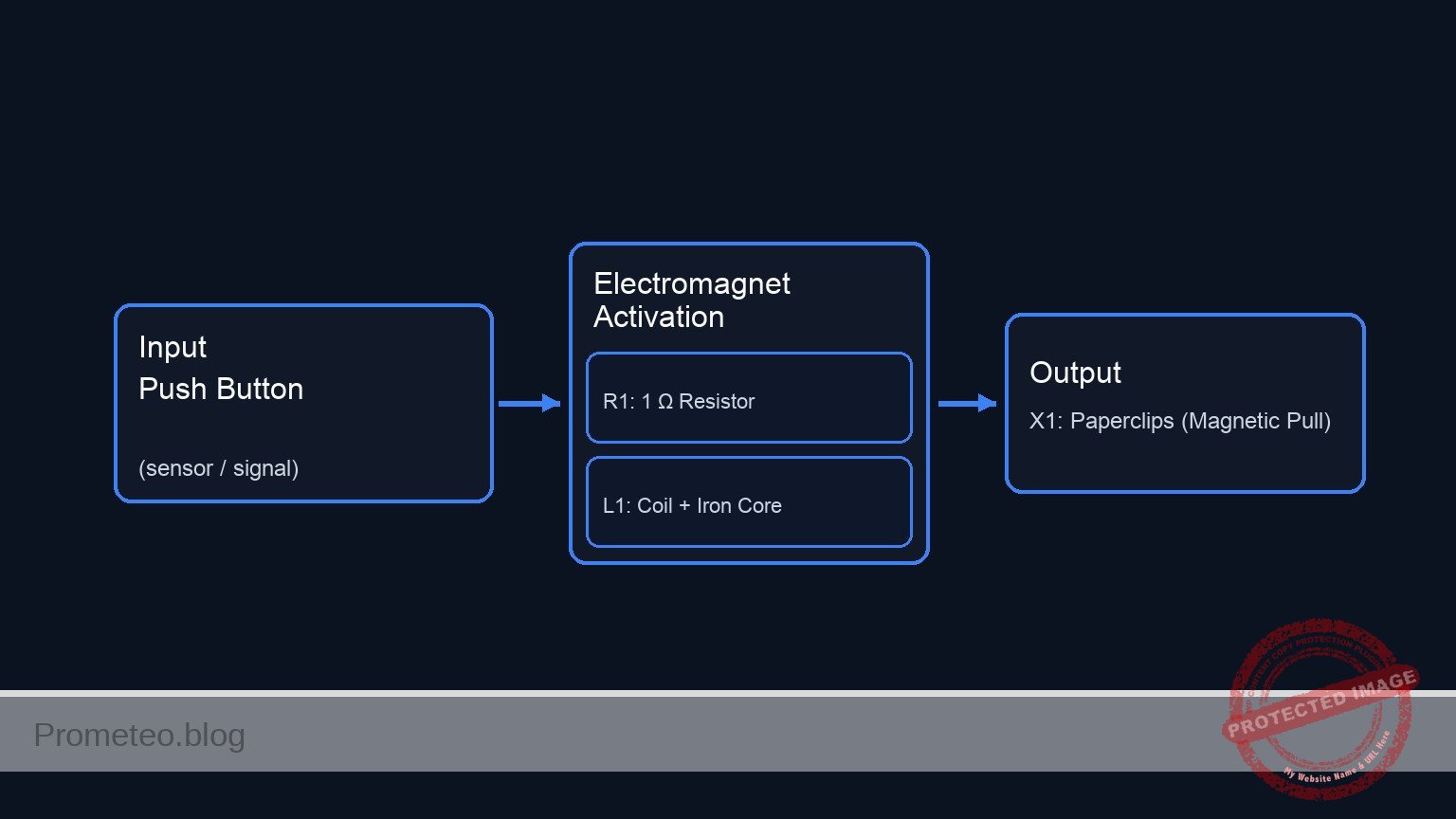
Conceptual block diagram

Conceptual block diagram — Electromagnet Activation
Quick read: inputs → main block → output (actuator or measurement). This summarizes the ASCII schematic below.

Schematic

[ V1: 4.5 V Battery ] --(VCC)--> [ S1: Push Button ] --(SW_OUT)--> [ R1: 1 Ω Resistor ] --(COIL_IN)--> [ L1: Coil + Iron Core ] --> GND
                                                                                                                |
                                                                                                         (Magnetic Field)
                                                                                                                |
                                                                                                                V
                                                                                                       [ X1: Paperclips ]
Schematic (ASCII)

Electrical diagram

Electrical diagram for the coil as a simple electromagnet case
Generated from the validated SPICE netlist for this case.

🔒 This electrical diagram is premium. With the 7-day pass or the monthly membership you can unlock the complete didactic material and the print-ready PDF pack.🔓 See premium access plans

Measurements and tests

  1. Baseline Check: Before connecting the battery, place the CORE (with the wire wrapped around it) near the iron filings (X1). Confirm there is no attraction.
  2. Activation: Press and hold S1 to close the circuit.
  3. Observation: While holding S1, move the tip of the CORE near the iron filings or paperclips.
  4. Verification: Observe that the metal objects stick to the CORE.
  5. Deactivation: Release S1. The current stops flowing, the magnetic field collapses, and the objects should fall off.
  6. Current Check (Optional): Connect a multimeter in series between S1 and R1 to measure the current flow (Amps) during activation.

SPICE netlist and simulation

Reference SPICE Netlist (ngspice) — excerptFull SPICE netlist (ngspice)

* Practical case: The coil as a simple electromagnet
.width out=256

* --- Power Source ---
* V1: 4.5 V DC Battery pack (3x AA batteries)
V1 VCC 0 DC 4.5

* --- Control Signal for Switch S1 ---
* Simulates the user pressing the button (S1).
* Logic: 0V (Released) -> 5V (Pressed).
* Timing: Press at 1ms, hold for 50ms, release.
V_S1_CTRL S1_GATE 0 PULSE(0 5 1m 1u 1u 50m 100m)

* --- Circuit Components ---

* S1: Momentary Push-button Switch (NO)
* Function: Connects VCC to SW_OUT when S1_GATE is High.
S1 VCC SW_OUT S1_GATE 0 SW_MODEL

* R1: 1 Ohm Power Resistor
* ... (truncated in public view) ...

Copy this content into a .cir file and run with ngspice.

🔒 Part of this section is premium. With the 7-day pass or the monthly membership you can access the full content (materials, wiring, detailed build, validation, troubleshooting, variants and checklist) and download the complete print-ready PDF pack.

* Practical case: The coil as a simple electromagnet
.width out=256

* --- Power Source ---
* V1: 4.5 V DC Battery pack (3x AA batteries)
V1 VCC 0 DC 4.5

* --- Control Signal for Switch S1 ---
* Simulates the user pressing the button (S1).
* Logic: 0V (Released) -> 5V (Pressed).
* Timing: Press at 1ms, hold for 50ms, release.
V_S1_CTRL S1_GATE 0 PULSE(0 5 1m 1u 1u 50m 100m)

* --- Circuit Components ---

* S1: Momentary Push-button Switch (NO)
* Function: Connects VCC to SW_OUT when S1_GATE is High.
S1 VCC SW_OUT S1_GATE 0 SW_MODEL

* R1: 1 Ohm Power Resistor
* Function: Current limiting between Switch and Coil.
R1 SW_OUT COIL_IN 1

* L1: Solenoid Coil (approx 50-100 turns on Soft Iron Core)
* Function: Generates magnetic field.
* Value: 5mH (Estimated for described coil).
L1 COIL_IN 0 5m

* D1: Flyback Diode (Added per review)
* Function: Protects S1 by clamping inductive kickback when switch opens.
* Connection: Anode to GND (0), Cathode to COIL_IN.
D1 0 COIL_IN D_1N4007

* --- Models ---
* Switch Model: Low resistance ON, High resistance OFF.
.model SW_MODEL sw (vt=2.5 vh=0.2 ron=0.05 roff=100Meg)

* Diode Model: Standard Silicon Rectifier (1N4007).
.model D_1N4007 D (IS=2.5n RS=0.04 N=1.7 BV=1000 IBV=5u)

* --- Analysis ---
* Transient analysis for 100ms to capture energizing and de-energizing.
.tran 10u 100m
.op

* --- Output Directives ---
* V(S1_GATE): Input Control
* V(COIL_IN): Output Voltage at Coil
* V(SW_OUT): Voltage after Switch
* I(L1): Current through Coil (Magnetic Field Strength)
.print tran V(S1_GATE) V(COIL_IN) V(SW_OUT) I(L1)

.end

Simulation Results (Transient Analysis)

Simulation Results (Transient Analysis)

Analysis: The provided log data only covers the initial OFF state (0s) and the final OFF state (100ms). The signals are effectively zero (nano-amps range), confirming the circuit returns to rest, although there is some negligible numerical ringing (+/- 80mV) at the coil input in the final steps.
Show raw data table (10053 rows)
Index   time            v(s1_gate)      v(coil_in)      v(sw_out)       l1#branch
0	0.000000e+00	0.000000e+00	0.000000e+00	4.500000e-08	4.500000e-08
1	1.000000e-07	0.000000e+00	-1.58289e-19	4.500000e-08	4.500000e-08
2	2.000000e-07	0.000000e+00	-1.58289e-19	4.500000e-08	4.500000e-08
3	4.000000e-07	0.000000e+00	-1.58289e-19	4.500000e-08	4.500000e-08
4	8.000000e-07	0.000000e+00	-2.44581e-19	4.500000e-08	4.500000e-08
5	1.600000e-06	0.000000e+00	3.684064e-19	4.500000e-08	4.500000e-08
6	3.200000e-06	0.000000e+00	-3.03688e-19	4.500000e-08	4.500000e-08
7	6.400000e-06	0.000000e+00	2.882625e-19	4.500000e-08	4.500000e-08
8	1.280000e-05	0.000000e+00	-3.16655e-19	4.500000e-08	4.500000e-08
9	2.280000e-05	0.000000e+00	2.975540e-19	4.500000e-08	4.500000e-08
10	3.280000e-05	0.000000e+00	-3.05533e-19	4.500000e-08	4.500000e-08
11	4.280000e-05	0.000000e+00	2.975540e-19	4.500000e-08	4.500000e-08
12	5.280000e-05	0.000000e+00	-3.05533e-19	4.500000e-08	4.500000e-08
13	6.280000e-05	0.000000e+00	2.975540e-19	4.500000e-08	4.500000e-08
14	7.280000e-05	0.000000e+00	-3.05533e-19	4.500000e-08	4.500000e-08
15	8.280000e-05	0.000000e+00	2.975540e-19	4.500000e-08	4.500000e-08
16	9.280000e-05	0.000000e+00	-3.05533e-19	4.500000e-08	4.500000e-08
17	1.028000e-04	0.000000e+00	2.975540e-19	4.500000e-08	4.500000e-08
18	1.128000e-04	0.000000e+00	-3.05533e-19	4.500000e-08	4.500000e-08
19	1.228000e-04	0.000000e+00	2.975540e-19	4.500000e-08	4.500000e-08
20	1.328000e-04	0.000000e+00	-3.05533e-19	4.500000e-08	4.500000e-08
21	1.428000e-04	0.000000e+00	2.975540e-19	4.500000e-08	4.500000e-08
22	1.528000e-04	0.000000e+00	-3.05533e-19	4.500000e-08	4.500000e-08
23	1.628000e-04	0.000000e+00	2.975540e-19	4.500000e-08	4.500000e-08
... (10029 more rows) ...

Common mistakes and how to avoid them

  1. Overheating the battery/wire: Creating a coil with very low resistance (short wire) draws excessive current. Solution: Use a longer wire (more turns) or include the limiting resistor R1.
  2. Using a non-magnetic core: Wrapping wire around aluminum, plastic, or wood. Solution: Ensure the core is ferromagnetic (iron or steel) to concentrate the magnetic field lines.
  3. Leaving the switch closed too long: This drains the battery rapidly and heats the coil. Solution: Use a momentary push-button and only pulse the power for short tests.

Troubleshooting

  • Symptom: No magnetic attraction when switch is pressed.
    • Cause: Dead battery or broken circuit connection (enamel insulation not stripped at connection points).
    • Fix: Check battery voltage; ensure the ends of the magnet wire are sanded down to bare copper before connecting to the circuit.
  • Symptom: Very weak magnetic pull.
    • Cause: Too few turns on the coil or low current.
    • Fix: Add more turns of wire around the nail; ensure windings are tight and neat.
  • Symptom: Wire gets extremely hot immediately.
    • Cause: Short circuit condition (resistance too low).
    • Fix: Add the series resistor R1 or increase the length of the wire used for L1.

Possible improvements and extensions

  1. Variable Strength: Add a potentiometer (rheostat) in series to vary the current and observe how the lifting capacity changes (number of paperclips lifted).
  2. Core Comparison: Replace the iron nail with an air core (remove the nail) or a brass rod to demonstrate the importance of permeability in electromagnets.

More Practical Cases on Prometeo.blog

Find this product and/or books on this topic on Amazon

Go to Amazon

As an Amazon Associate, I earn from qualifying purchases. If you buy through this link, you help keep this project running.

Quick Quiz

Question 1: What is the primary objective of the experiment described?


Question 2: Which material is recommended for the core of the electromagnet?


Question 3: What happens when the switch is closed in this circuit?


Question 4: What is the specific function of the iron core inside the coil?


Question 5: Which of the following is a real-world application of electromagnets mentioned in the text?


Question 6: What is the expected outcome when the switch is released (opened)?


Question 7: Which device is mentioned as using electromagnets to switch high-voltage circuits with low-voltage signals?


Question 8: What type of wire is typically used for the solenoid coil in this experiment?


Question 9: In the context of electric motors, what role does the electromagnet principle play?


Question 10: What is the state of the core when the switch is open?


Carlos Núñez Zorrilla
Electronics & Computer Engineer

Telecommunications Electronics Engineer and Computer Engineer (official degrees in Spain).
Follow me: