Practical case: Safe Hydraulic Press Control

Safe Hydraulic Press Control prototype (Maker Style)

Level: Basic — Implement a safety logic circuit requiring two simultaneous inputs to activate a load.

Objective and use case

In this practical case, you will build a digital logic circuit that enforces a «two-hand control» safety mechanism. The load (simulated by an LED) will only activate when two separate pushbuttons are pressed simultaneously, preventing accidental operation.

Why it is useful:
* Industrial Safety: Prevents operators from injuring their hands in hydraulic presses or cutting machines by forcing them to use both hands to start the cycle.
* Dual Authorization: Similar logic is used in security systems where two keys or signals are required to authorize an action (e.g., bank vaults).
* Interlock Systems: Ensures multiple conditions (e.g., Door Closed AND Start Button Pressed) are met before a machine runs.

Expected outcome:
* Rest State: The output LED remains OFF when no buttons or only one button is pressed.
* Active State: The output LED turns ON strictly when both buttons are held down.
* Logic Level: The output voltage at the gate pin reads High ($\approx$ 5 V) only during simultaneous activation.
* Visual Feedback: Immediate response from the LED indicating the «Safe to Operate» condition.

Target audience: Students and hobbyists learning basic digital logic and safety interlocks.

Materials

  • U1: 74HC08, function: Quad 2-input AND gate IC.
  • V1: 5 V DC supply, function: Main power source.
  • SW1: Normally Open (NO) Pushbutton, function: Left-hand safety trigger.
  • SW2: Normally Open (NO) Pushbutton, function: Right-hand safety trigger.
  • R1: 10 kΩ resistor, function: Pull-down resistor for Input A.
  • R2: 10 kΩ resistor, function: Pull-down resistor for Input B.
  • R3: 330 Ω resistor, function: Current limiting for output LED.
  • D1: Green LED, function: Indicator for «Motor Active» (Load).

Pin-out of the 74HC08

The 74HC08 contains four independent AND gates. We will use the first gate.

Pin Name Logic function Connection in this case
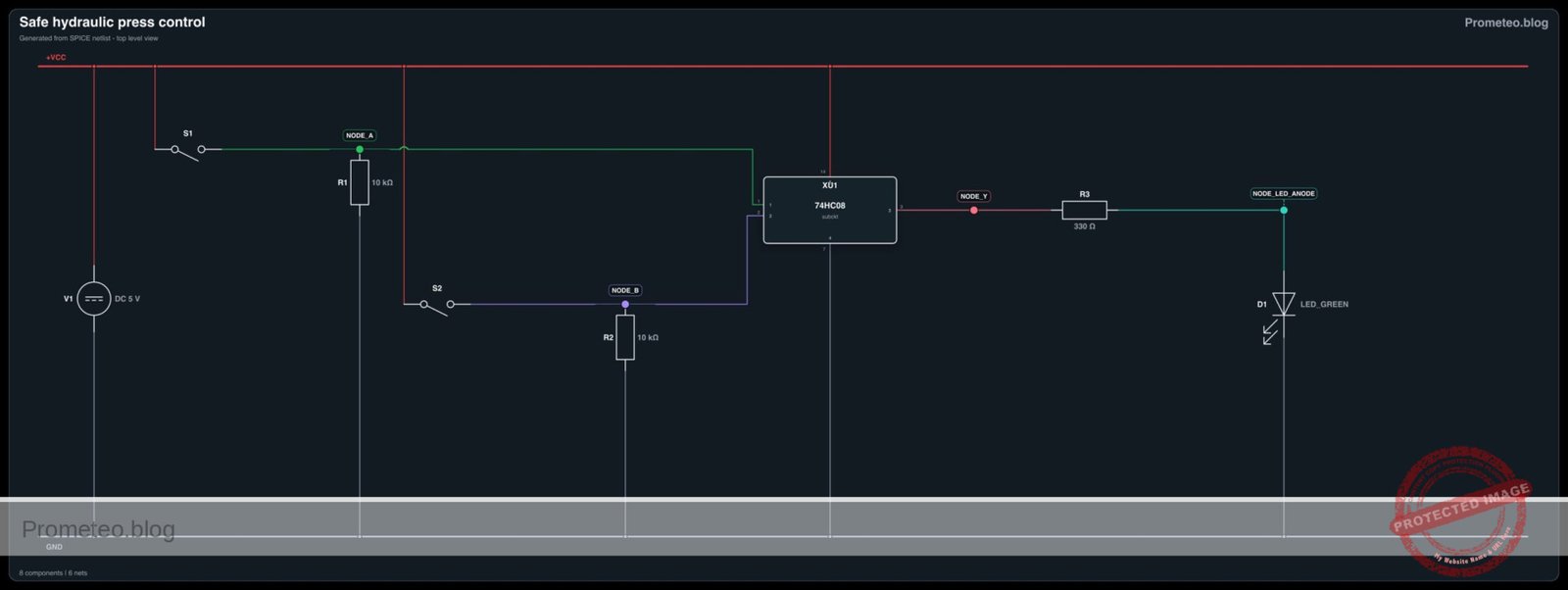
1 1A Input A Connected to Node A (SW1)
2 1B Input B Connected to Node B (SW2)
3 1Y Output Connected to Node Y (to LED driver)
7 GND Ground Connected to Node 0
14 VCC Supply Voltage Connected to Node VCC (+5V)

Wiring guide

Construct the circuit using the following node connections. Ensure the power supply is off while wiring.

  • Power Nodes:

    • Connect V1 positive terminal to Node VCC.
    • Connect V1 negative terminal to Node 0 (GND).
    • Connect U1 Pin 14 to VCC.
    • Connect U1 Pin 7 to 0.
  • Input A Logic (Left Hand):

    • Connect one side of SW1 to VCC.
    • Connect the other side of SW1 to Node A.
    • Connect R1 between Node A and Node 0 (Pull-down).
    • Connect U1 Pin 1 to Node A.
  • Input B Logic (Right Hand):

    • Connect one side of SW2 to VCC.
    • Connect the other side of SW2 to Node B.
    • Connect R2 between Node B and Node 0 (Pull-down).
    • Connect U1 Pin 2 to Node B.
  • Output Logic (Load):

    • Connect U1 Pin 3 to Node Y.
    • Connect R3 between Node Y and Node LED_ANODE.
    • Connect D1 Anode to Node LED_ANODE.
    • Connect D1 Cathode to Node 0.

Conceptual block diagram
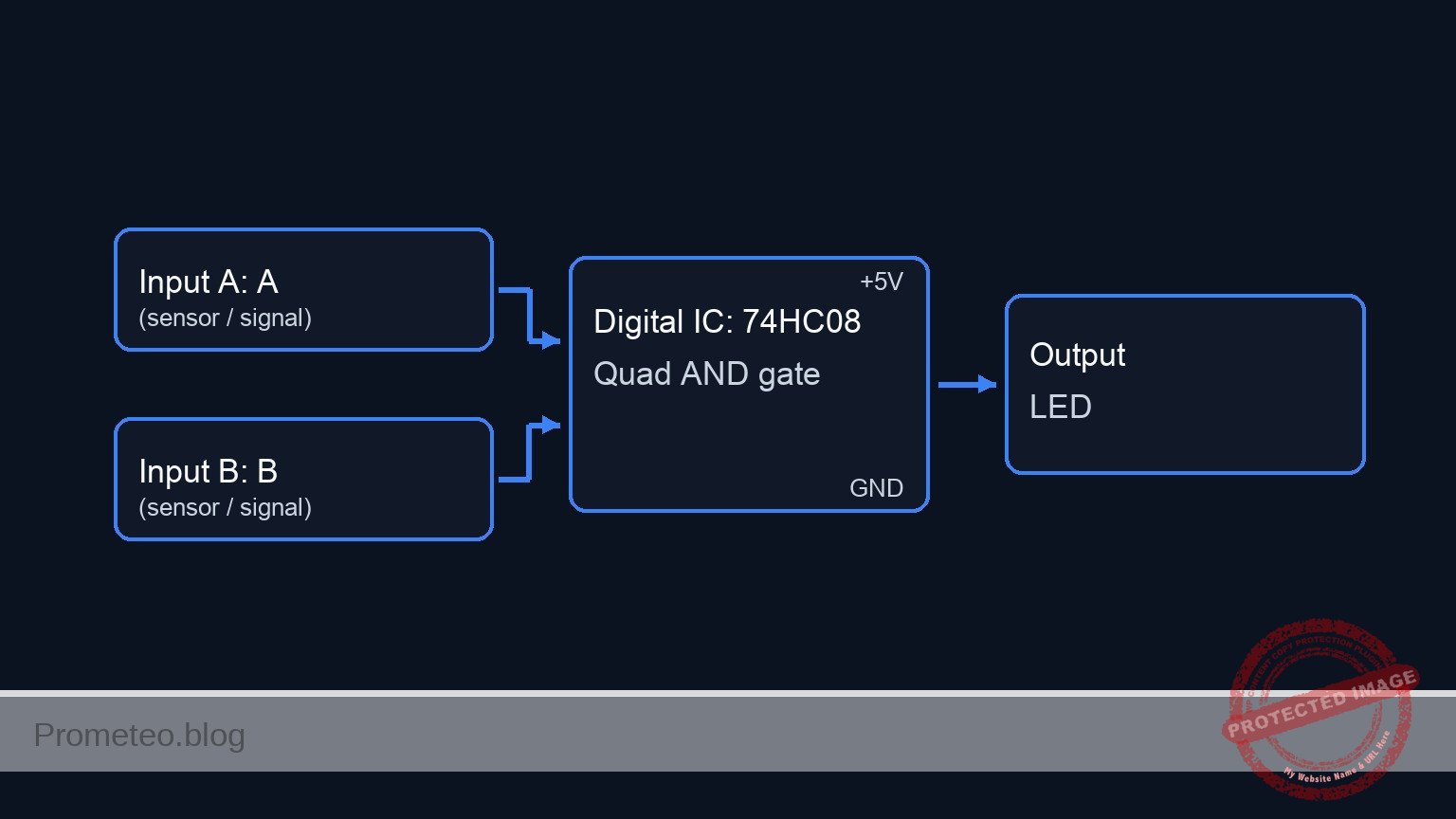
Conceptual block diagram — 74HC08 Quad AND gate

Schematic

Practical case: Safe Hydraulic Press Control

      [ INPUTS / SENSORS ]                  [ LOGIC PROCESSING ]                  [ OUTPUT / ACTUATOR ]

                                            +------------------+
(VCC) --> [ SW1: Left Hand ] --(Node A)---> |      Pin 1       |
               (NO Push)          |         |                  |
                                  v         |    U1: 74HC08    |
                              [ R1: 10k ]   |    (AND Gate)    |
                              (Pull-Down)   |                  | --(Node Y)--> [ R3: 330 ] --> [ D1: Green LED ] --> (GND)
                                  |         |      Pin 3       |               (Limit)         (Motor Active)
                                (GND)       |                  |
                                            |                  |
(VCC) --> [ SW2: Right Hand ]--(Node B)---> |      Pin 2       |
               (NO Push)          |         +------------------+
                                  v
                              [ R2: 10k ]
                              (Pull-Down)
                                  |
                                (GND)

Note: U1 Power Connections (Pin 14 to VCC, Pin 7 to GND) are implied for IC operation.
Schematic (ASCII)

Electrical diagram

Electrical diagram for safe hydraulic press control
Generated from the validated SPICE netlist for this case.

🔒 This electrical diagram is premium. With the 7-day pass or the monthly membership you can unlock the complete didactic material and the print-ready PDF pack.🔓 See premium access plans

Truth table

This circuit implements the Boolean function $Y = A \cdot B$.

SW1 (Input A) SW2 (Input B) Output Y (Logic) LED Status System State
Open (0) Open (0) Low (0) OFF Safe / Stop
Open (0) Closed (1) Low (0) OFF Safe / Stop
Closed (1) Open (0) Low (0) OFF Safe / Stop
Closed (1) Closed (1) High (1) ON Active / Run

Measurements and tests

  1. Preparation: Set your multimeter to DC Voltage mode. Power on the V1 source (5 V).
  2. Idle Check: With no buttons pressed, measure the voltage at Node Y. It should be $\approx$ 0 V. The LED is OFF.
  3. Single Button Test: Press and hold SW1 only. Measure voltage at Node A ($\approx$ 5 V) and Node Y ($\approx$ 0 V). The LED remains OFF.
  4. Single Button Test: Press and hold SW2 only. Measure voltage at Node B ($\approx$ 5 V) and Node Y ($\approx$ 0 V). The LED remains OFF.
  5. Simultaneous Activation: Press both SW1 and SW2. Measure voltage at Node Y. It should read $\approx$ 3.5 V to 4.5 V (depending on the specific HC/LS logic family load and VCC). The LED turns ON.

SPICE netlist and simulation

Reference SPICE Netlist (ngspice) — excerptFull SPICE netlist (ngspice)

* Practical case: Safe Hydraulic Press Control

.title Safe Hydraulic Press Control

*******************************************************************************
* Component Models
*******************************************************************************

* Pushbutton Switch Model (Ideal Voltage Controlled Switch)
* Simulates the mechanical contact closing when control voltage is high (> 2.5V)
.model SW_PUSH SW(Vt=2.5 Vh=0.1 Ron=0.01 Roff=10Meg)

* LED Model (Green)
* Standard Green LED parameters
.model LED_GREEN D(IS=1e-22 RS=10 N=2 BV=5 IBV=10u CJO=10p TT=10n)

* 74HC08 Quad 2-input AND Gate (Behavioral Model for Simulation)
* Implements one gate of the IC. 
* Pins: 1=InputA, 2=InputB, 3=OutputY, 7=GND, 14=VCC
.subckt 74HC08_GATE 1 2 3 7 14
    * Behavioral Voltage Source using continuous Sigmoid function for convergence
    * Y = VCC * (Sigmoid(A) * Sigmoid(B))
    * Threshold centered at 2.5V with steep slope (k=50)
    B1 3 7 V = V(14) * (1 / (1 + exp(-50 * (V(1) - 2.5)))) * (1 / (1 + exp(-50 * (V(2) - 2.5))))
.ends

*******************************************************************************
* Main Power Supply
*******************************************************************************
* V1: 5V DC supply connected to Node VCC and Node 0 (GND)
* ... (truncated in public view) ...

Copy this content into a .cir file and run with ngspice.

🔒 Part of this section is premium. With the 7-day pass or the monthly membership you can access the full content (materials, wiring, detailed build, validation, troubleshooting, variants and checklist) and download the complete print-ready PDF pack.

* Practical case: Safe Hydraulic Press Control

.title Safe Hydraulic Press Control

*******************************************************************************
* Component Models
*******************************************************************************

* Pushbutton Switch Model (Ideal Voltage Controlled Switch)
* Simulates the mechanical contact closing when control voltage is high (> 2.5V)
.model SW_PUSH SW(Vt=2.5 Vh=0.1 Ron=0.01 Roff=10Meg)

* LED Model (Green)
* Standard Green LED parameters
.model LED_GREEN D(IS=1e-22 RS=10 N=2 BV=5 IBV=10u CJO=10p TT=10n)

* 74HC08 Quad 2-input AND Gate (Behavioral Model for Simulation)
* Implements one gate of the IC. 
* Pins: 1=InputA, 2=InputB, 3=OutputY, 7=GND, 14=VCC
.subckt 74HC08_GATE 1 2 3 7 14
    * Behavioral Voltage Source using continuous Sigmoid function for convergence
    * Y = VCC * (Sigmoid(A) * Sigmoid(B))
    * Threshold centered at 2.5V with steep slope (k=50)
    B1 3 7 V = V(14) * (1 / (1 + exp(-50 * (V(1) - 2.5)))) * (1 / (1 + exp(-50 * (V(2) - 2.5))))
.ends

*******************************************************************************
* Main Power Supply
*******************************************************************************
* V1: 5V DC supply connected to Node VCC and Node 0 (GND)
V1 VCC 0 DC 5

*******************************************************************************
* Input A Logic (Left Hand)
*******************************************************************************
* V_ACT_LEFT: Virtual actuator (Finger) for Left Button
* Generates a pulse: ON for 50us, OFF for 50us (Period 100us)
V_ACT_LEFT CTRL_LEFT 0 PULSE(0 5 0 1u 1u 50u 100u)

* SW1: Left Safety Trigger
* Connects VCC to Node_A when CTRL_LEFT is High
S1 VCC Node_A CTRL_LEFT 0 SW_PUSH

* R1: 10k Pull-down resistor for Input A
R1 Node_A 0 10k

*******************************************************************************
* Input B Logic (Right Hand)
*******************************************************************************
* V_ACT_RIGHT: Virtual actuator (Finger) for Right Button
* Generates a pulse: ON for 100us, OFF for 100us (Period 200us)
* Timing creates overlap with Left button to test AND logic (1+1, 0+1, 1+0, 0+0)
V_ACT_RIGHT CTRL_RIGHT 0 PULSE(0 5 0 1u 1u 100u 200u)

* SW2: Right Safety Trigger
* Connects VCC to Node_B when CTRL_RIGHT is High
S2 VCC Node_B CTRL_RIGHT 0 SW_PUSH

* R2: 10k Pull-down resistor for Input B
R2 Node_B 0 10k

*******************************************************************************
* Logic Processing (U1: 74HC08)
*******************************************************************************
* U1: AND Gate processing Left (A) and Right (B) inputs
* Connections: Pin1=Node_A, Pin2=Node_B, Pin3=Node_Y, Pin7=0(GND), Pin14=VCC
XU1 Node_A Node_B Node_Y 0 VCC 74HC08_GATE

*******************************************************************************
* Output Logic (Load)
*******************************************************************************
* R3: Current limiting resistor (330 Ohm)
R3 Node_Y Node_LED_ANODE 330

* D1: Green LED Indicator (Motor Active)
* Anode to R3, Cathode to GND
D1 Node_LED_ANODE 0 LED_GREEN

*******************************************************************************
* Simulation Commands
*******************************************************************************
* Transient analysis for 250us to cover full truth table sequence
.tran 1u 250u

* Print directives for logging signal states
.print tran V(Node_A) V(Node_B) V(Node_Y) V(Node_LED_ANODE)

.end

Simulation Results (Transient Analysis)

Simulation Results (Transient Analysis)
Show raw data table (786 rows)
Index   time            v(node_a)       v(node_b)       v(node_y)
0	0.000000e+00	4.995005e-03	4.995005e-03	2.199277e-108
1	1.000000e-08	4.995005e-03	4.995005e-03	2.199277e-108
2	2.000000e-08	4.995005e-03	4.995005e-03	2.199277e-108
3	4.000000e-08	4.995005e-03	4.995005e-03	2.199277e-108
4	8.000000e-08	4.995005e-03	4.995005e-03	2.199277e-108
5	1.600000e-07	4.995005e-03	4.995005e-03	2.199277e-108
6	3.200000e-07	4.995005e-03	4.995005e-03	2.199277e-108
7	3.600000e-07	4.995005e-03	4.995005e-03	2.199277e-108
8	4.300000e-07	4.995005e-03	4.995005e-03	2.199277e-108
9	4.493750e-07	4.995005e-03	4.995005e-03	2.199277e-108
10	4.832812e-07	4.995005e-03	4.995005e-03	2.199277e-108
11	5.162979e-07	4.999995e+00	4.999995e+00	5.000000e+00
12	5.474468e-07	4.999995e+00	4.999995e+00	5.000000e+00
13	5.779894e-07	4.999995e+00	4.999995e+00	5.000000e+00
14	6.039341e-07	4.999995e+00	4.999995e+00	5.000000e+00
15	6.320124e-07	4.999995e+00	4.999995e+00	5.000000e+00
16	6.881690e-07	4.999995e+00	4.999995e+00	5.000000e+00
17	8.004820e-07	4.999995e+00	4.999995e+00	5.000000e+00
18	1.000000e-06	4.999995e+00	4.999995e+00	5.000000e+00
19	1.022463e-06	4.999995e+00	4.999995e+00	5.000000e+00
20	1.067388e-06	4.999995e+00	4.999995e+00	5.000000e+00
21	1.157238e-06	4.999995e+00	4.999995e+00	5.000000e+00
22	1.336939e-06	4.999995e+00	4.999995e+00	5.000000e+00
23	1.696341e-06	4.999995e+00	4.999995e+00	5.000000e+00
... (762 more rows) ...

Common mistakes and how to avoid them

  1. Floating Inputs: Forgetting R1 or R2 causes the inputs to «float» when buttons are open, leading to erratic LED flickering or false triggering. Solution: Ensure pull-down resistors connect the inputs to ground.
  2. Confusing 7408 with 7400: The 7408 is an AND gate; the 7400 is a NAND gate. If the LED is ON when buttons are not pressed, you likely used the wrong chip. Solution: Check the markings on the IC package.
  3. LED Polarity: The LED does not light up even when Logic Y is High. Solution: Ensure the longer leg (Anode) faces the resistor/IC and the shorter leg (Cathode) faces Ground.

Troubleshooting

  • Symptom: LED is always ON, regardless of buttons.
    • Cause: Input pins shorted to VCC or incorrect IC (e.g., OR gate 74HC32 used by mistake).
    • Fix: Check wiring at Pins 1 and 2; verify IC part number.
  • Symptom: LED is very dim when both buttons are pressed.
    • Cause: R3 value is too high or VCC is too low.
    • Fix: Ensure R3 is around 220 Ω to 330 Ω; check V1 is 5 V.
  • Symptom: Circuit works for one button but ignores the other.
    • Cause: Broken switch or disconnected jumper wire on one input.
    • Fix: Use a multimeter to verify continuity across SW1 and SW2 when pressed.

Possible improvements and extensions

  1. Power Interface: Replace the LED with an NPN transistor (like 2N2222) and a relay to control a real high-voltage motor.
  2. Master Enable Switch: Add a third switch connected to a third input (using a 3-input AND gate like 74HC11) to act as a «Key Switch» that must be active before the two hand buttons work.

More Practical Cases on Prometeo.blog

Find this product and/or books on this topic on Amazon

Go to Amazon

As an Amazon Associate, I earn from qualifying purchases. If you buy through this link, you help keep this project running.

Quick Quiz

Question 1: What is the primary objective of the circuit described in the text?


Question 2: Which logic operation is fundamentally required to implement this safety mechanism?


Question 3: What component is used to simulate the load in this practical case?


Question 4: Under what specific condition will the output LED turn ON?


Question 5: What is the expected output voltage at the gate pin during simultaneous activation?


Question 6: Why is this type of circuit useful for industrial safety?


Question 7: What is the state of the output LED when only one button is pressed?


Question 8: Besides industrial safety, what other application is mentioned for this logic?


Question 9: What does an 'Interlock System' ensure according to the text?


Question 10: In the context of the 'Rest State', what happens when no buttons are pressed?


Carlos Núñez Zorrilla
Electronics & Computer Engineer

Telecommunications Electronics Engineer and Computer Engineer (official degrees in Spain).

Follow me:


Practical case: Double Key Security System

Double Key Security System prototype (Maker Style)

Level: Basic – Build a logic circuit that activates an alarm only when two security keys are turned simultaneously.

Objective and use case

In this project, you will build a digital safety interlock circuit using a 74HC08 Quad 2-Input AND Gate. The system mimics a high-security protocol where a mechanism (represented by an LED) activates only if two separate inputs (switches) are triggered at the exact same time.

  • Real-world applications:

    • Industrial machinery: Safety presses requiring the operator to place both hands on separate buttons to prevent injury.
    • Bank vaults: Dual-key requirements where two managers must be present to open a safe.
    • Aerospace: Launch control systems requiring dual confirmation commands.
    • Home Automation: «Smart» lock logic where biometric data and a PIN code must both match.
  • Expected outcome:

    • Idle State: LED remains completely OFF (Logic Low, < 0.1 V) when switches are open.
    • Single Activation: LED remains OFF if only Switch A or only Switch B is closed.
    • Active State: LED turns ON (Logic High, > 3.5 V) exclusively when Switch A AND Switch B are closed.
    • Visual: A clear, stable light signal indicating «Access Granted.»
  • Target audience and level: Students exploring digital logic basics and the 7400 IC family.

Materials

  • U1: 74HC08 Quad 2-Input AND Gate IC.
  • S1: SPST toggle switch or push button, function: Security Key A.
  • S2: SPST toggle switch or push button, function: Security Key B.
  • R1: 10 kΩ resistor, function: pull-down resistor for Input A.
  • R2: 10 kΩ resistor, function: pull-down resistor for Input B.
  • R3: 330 Ω resistor, function: LED current limiting.
  • D1: Red LED, function: System Status Indicator.
  • V1: 5 V DC power supply.

Pin-out of the IC used

Selected Chip: 74HC08 (Quad 2-Input AND Gate)

Pin Name Logic Function Connection in this case
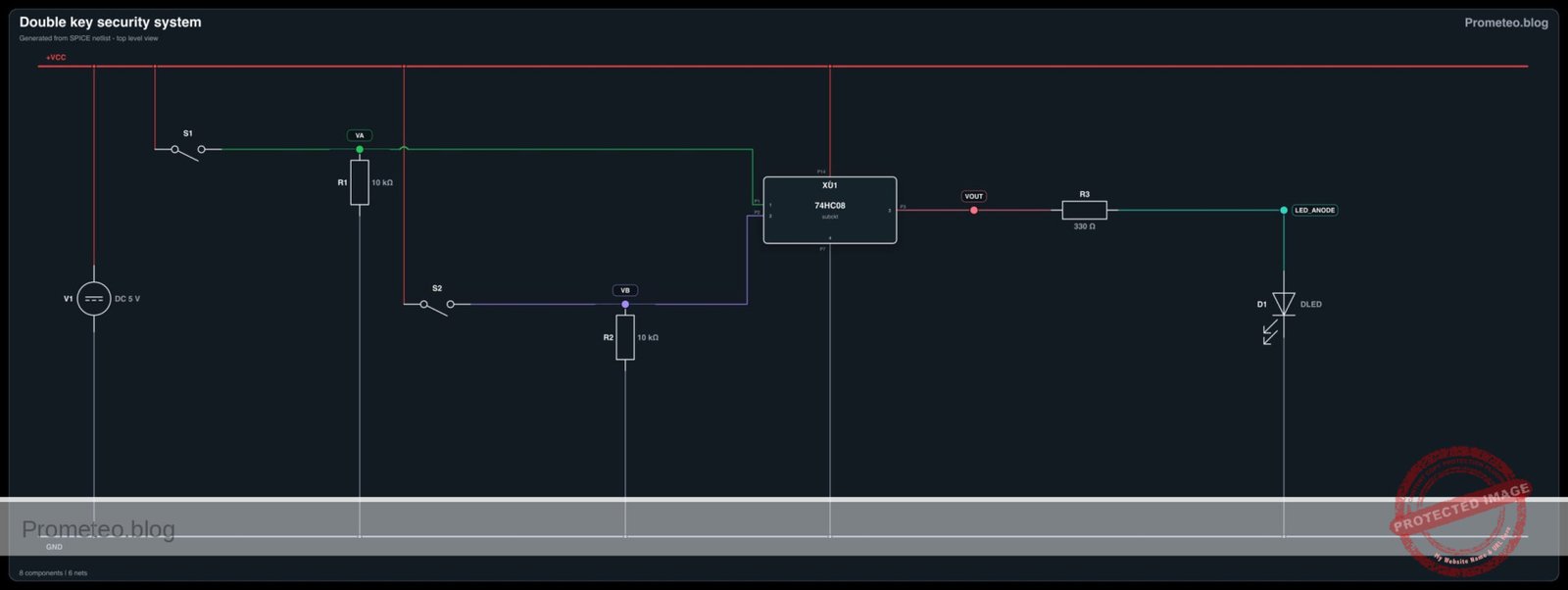
1 1A Input A (Gate 1) Connected to S1 node (VA)
2 1B Input B (Gate 1) Connected to S2 node (VB)
3 1Y Output (Gate 1) Connected to LED driver node (VOUT)
7 GND Ground Connected to 0 V
14 VCC Power Supply Connected to +5 V

(Note: Pins 4, 5, 6, 8, 9, 10, 11, 12, 13 are unused in this single-gate implementation but inputs should technically be grounded in a permanent PCB design to prevent noise.)

Wiring guide

Follow this node-based connection guide to assemble the circuit on your breadboard.

  • Power Rail Connections:

    • Connect V1 positive terminal to node VCC.
    • Connect V1 negative terminal to node 0 (GND).
    • Connect U1 Pin 14 to VCC.
    • Connect U1 Pin 7 to 0.
  • Input Stage (Switch A):

    • Connect S1 between node VCC and node VA.
    • Connect R1 between node VA and node 0 (this ensures VA is Low when S1 is open).
    • Connect U1 Pin 1 to node VA.
  • Input Stage (Switch B):

    • Connect S2 between node VCC and node VB.
    • Connect R2 between node VB and node 0 (this ensures VB is Low when S2 is open).
    • Connect U1 Pin 2 to node VB.
  • Output Stage:

    • Connect U1 Pin 3 to node VOUT.
    • Connect R3 between node VOUT and the Anode of D1.
    • Connect the Cathode of D1 to node 0.

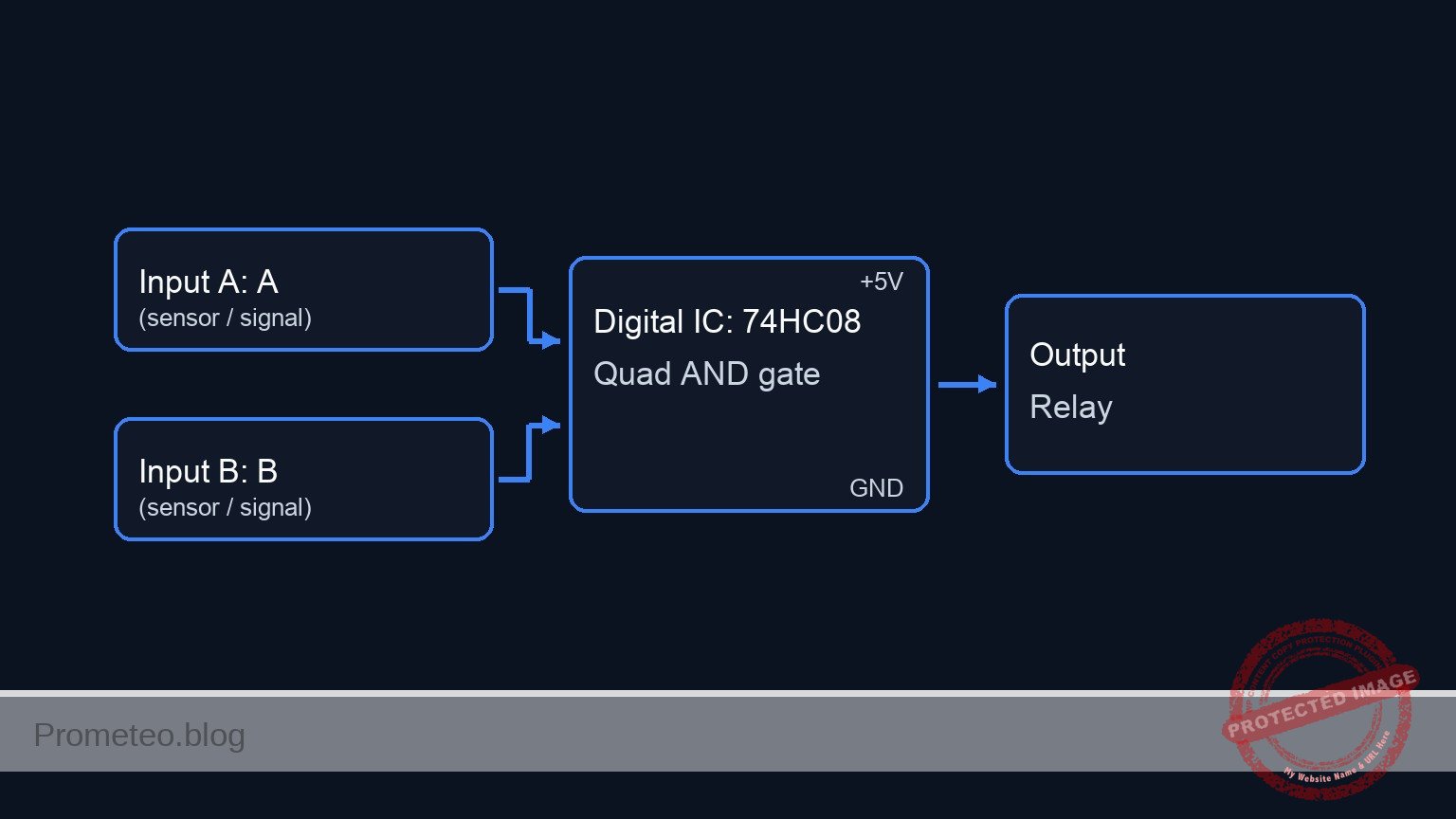
Conceptual block diagram

Conceptual block diagram — 74HC08 Quad AND gate

Schematic

[ INPUTS ]                                [ LOGIC ]                         [ OUTPUT ]

 [ VCC ] -> [ S1: Key A ] --+--(Node VA)-->+-------------------+
                            |              |  Pin 1            |
                       [ R1: 10k ]         |                   |
                            v              |    U1: 74HC08     |
                         [ GND ]           |    (AND Gate)     |--(Pin 3)--> [ R3: 330 Ω ] --> [ D1: LED ] --> [ GND ]
                                           |                   |
 [ VCC ] -> [ S2: Key B ] --+--(Node VB)-->+-------------------+
                            |                 Pin 2
                       [ R2: 10k ]
                            v
                         [ GND ]
Schematic (ASCII)

Electrical diagram

Electrical diagram for double key security system
Generated from the validated SPICE netlist for this case.

🔒 This electrical diagram is premium. With the 7-day pass or the monthly membership you can unlock the complete didactic material and the print-ready PDF pack.🔓 See premium access plans

Truth table

The 74HC08 follows standard positive boolean logic (A AND B).

Key A (S1) Key B (S2) Input A (Pin 1) Input B (Pin 2) Output Y (Pin 3) LED Status
Open Open 0 (Low) 0 (Low) 0 (Low) OFF
Open Closed 0 (Low) 1 (High) 0 (Low) OFF
Closed Open 1 (High) 0 (Low) 0 (Low) OFF
Closed Closed 1 (High) 1 (High) 1 (High) ON

Measurements and tests

  1. Supply Check: Use a multimeter to verify 5 V between VCC and 0 on the breadboard rails.
  2. Input Verification:
    • Keep S1 open: Measure voltage at VA. It should be 0 V.
    • Close S1: Measure voltage at VA. It should be ~5 V.
    • Repeat for S2 and VB.
  3. Logic Logic Verification:
    • Close S1 only. Measure VOUT at Pin 3. Expected: ~0 V.
    • Close S2 only. Measure VOUT at Pin 3. Expected: ~0 V.
    • Close both S1 and S2. Measure VOUT. Expected: > 3.5 V (High Logic).
  4. Current Draw (Optional): Measure the current through R3 when the LED is ON. It should be approximately 8–10 mA.

SPICE netlist and simulation

Reference SPICE Netlist (ngspice) — excerptFull SPICE netlist (ngspice)

* Practical case: Double Key Security System

* --- Power Supply ---
* V1: 5V DC Power Supply connected to VCC and GND (0)
V1 VCC 0 DC 5

* --- Input Stage (Switch A) ---
* User actuation simulation for Switch A (Control Signal)
* Generates a pulse sequence to test logic states. 
* Logic sequence plan: 00 -> 01 -> 10 -> 11
* Actuation A: Low for 100us, High for 100us.
V_ACT_A ACT_A 0 PULSE(0 5 100u 1u 1u 99u 200u)

* S1: SPST Switch connecting VCC to VA when actuated
S1 VCC VA ACT_A 0 SW_PUSHBUTTON

* R1: 10k Pull-down resistor for Input A
R1 VA 0 10k

* --- Input Stage (Switch B) ---
* User actuation simulation for Switch B (Control Signal)
* Actuation B: Toggles every 50us.
V_ACT_B ACT_B 0 PULSE(0 5 50u 1u 1u 49u 100u)

* S2: SPST Switch connecting VCC to VB when actuated
S2 VCC VB ACT_B 0 SW_PUSHBUTTON

* R2: 10k Pull-down resistor for Input B
R2 VB 0 10k

* ... (truncated in public view) ...

Copy this content into a .cir file and run with ngspice.

🔒 Part of this section is premium. With the 7-day pass or the monthly membership you can access the full content (materials, wiring, detailed build, validation, troubleshooting, variants and checklist) and download the complete print-ready PDF pack.

* Practical case: Double Key Security System

* --- Power Supply ---
* V1: 5V DC Power Supply connected to VCC and GND (0)
V1 VCC 0 DC 5

* --- Input Stage (Switch A) ---
* User actuation simulation for Switch A (Control Signal)
* Generates a pulse sequence to test logic states. 
* Logic sequence plan: 00 -> 01 -> 10 -> 11
* Actuation A: Low for 100us, High for 100us.
V_ACT_A ACT_A 0 PULSE(0 5 100u 1u 1u 99u 200u)

* S1: SPST Switch connecting VCC to VA when actuated
S1 VCC VA ACT_A 0 SW_PUSHBUTTON

* R1: 10k Pull-down resistor for Input A
R1 VA 0 10k

* --- Input Stage (Switch B) ---
* User actuation simulation for Switch B (Control Signal)
* Actuation B: Toggles every 50us.
V_ACT_B ACT_B 0 PULSE(0 5 50u 1u 1u 49u 100u)

* S2: SPST Switch connecting VCC to VB when actuated
S2 VCC VB ACT_B 0 SW_PUSHBUTTON

* R2: 10k Pull-down resistor for Input B
R2 VB 0 10k

* --- Logic Stage (U1: 74HC08) ---
* Quad 2-Input AND Gate. Using 1 gate (Pins 1, 2, 3).
* Connections: Pin1=VA, Pin2=VB, Pin3=VOUT, Pin7=GND, Pin14=VCC
XU1 VA VB VOUT 0 VCC 74HC08

* --- Output Stage ---
* R3: 330 Ohm Current Limiting Resistor
R3 VOUT LED_ANODE 330

* D1: Red LED System Status Indicator
D1 LED_ANODE 0 DLED

* --- Models ---

* Switch Model (Voltage Controlled Switch)
* Vt=2.5V threshold, Low resistance when ON, High when OFF
.model SW_PUSHBUTTON SW(Vt=2.5 Ron=1 Roff=100Meg)

* LED Model
.model DLED D(IS=1e-14 N=2 RS=10 BV=5)

* 74HC08 Subcircuit Model (Behavioral AND Gate)
* Implements Vout = VCC * AND(A, B) using continuous sigmoid functions for convergence
* Pins: 1=A, 2=B, 3=Y, 7=GND, 14=VCC
.subckt 74HC08 P1 P2 P3 P7 P14
* Behavioral Source B1: Logic AND function
* Sigmoid function: 1 / (1 + exp(-k*(V-Vth)))
* k=50 provides sharp transition, Vth=2.5V
B1 P3 P7 V = V(P14, P7) * (1 / (1 + exp(-50 * (V(P1, P7) - 2.5)))) * (1 / (1 + exp(-50 * (V(P2, P7) - 2.5))))
.ends

* --- Simulation Commands ---
* Transient analysis for 250us to cover all logic states (00, 01, 10, 11)
.tran 1u 250u

* Print directives for logging
.print tran V(VA) V(VB) V(VOUT)

* Calculate DC operating point
.op

.end

Simulation Results (Transient Analysis)

Simulation Results (Transient Analysis)
Show raw data table (322 rows)
Index   time            v(va)           v(vb)           v(vout)
0	0.000000e+00	4.999500e-04	4.999500e-04	1.403014e-108
1	1.000000e-08	4.999500e-04	4.999500e-04	1.403014e-108
2	2.000000e-08	4.999500e-04	4.999500e-04	1.403014e-108
3	4.000000e-08	4.999500e-04	4.999500e-04	1.403014e-108
4	8.000000e-08	4.999500e-04	4.999500e-04	1.403014e-108
5	1.600000e-07	4.999500e-04	4.999500e-04	1.403014e-108
6	3.200000e-07	4.999500e-04	4.999500e-04	1.403014e-108
7	6.400000e-07	4.999500e-04	4.999500e-04	1.403014e-108
8	1.280000e-06	4.999500e-04	4.999500e-04	1.403014e-108
9	2.280000e-06	4.999500e-04	4.999500e-04	1.403014e-108
10	3.280000e-06	4.999500e-04	4.999500e-04	1.403014e-108
11	4.280000e-06	4.999500e-04	4.999500e-04	1.403014e-108
12	5.280000e-06	4.999500e-04	4.999500e-04	1.403014e-108
13	6.280000e-06	4.999500e-04	4.999500e-04	1.403014e-108
14	7.280000e-06	4.999500e-04	4.999500e-04	1.403014e-108
15	8.280000e-06	4.999500e-04	4.999500e-04	1.403014e-108
16	9.280000e-06	4.999500e-04	4.999500e-04	1.403014e-108
17	1.028000e-05	4.999500e-04	4.999500e-04	1.403014e-108
18	1.128000e-05	4.999500e-04	4.999500e-04	1.403014e-108
19	1.228000e-05	4.999500e-04	4.999500e-04	1.403014e-108
20	1.328000e-05	4.999500e-04	4.999500e-04	1.403014e-108
21	1.428000e-05	4.999500e-04	4.999500e-04	1.403014e-108
22	1.528000e-05	4.999500e-04	4.999500e-04	1.403014e-108
23	1.628000e-05	4.999500e-04	4.999500e-04	1.403014e-108
... (298 more rows) ...

Common mistakes and how to avoid them

  1. Floating Inputs: Forgetting resistors R1 or R2. Without them, the inputs «float» and may pick up static noise, causing the LED to flicker randomly even when switches are open.
  2. Missing Power to IC: Forgetting to connect Pin 14 to VCC and Pin 7 to GND. The chip will not function and may overheat if inputs are driven while the chip is unpowered.
  3. LED Polarity: Inserting D1 backward (Anode to Ground). The LED will never light up, even if the logic is correct.

Troubleshooting

  • Symptom: LED is always ON, regardless of switch position.

    • Cause: Input resistors (R1/R2) might be connected to VCC instead of GND, or the switch is wired incorrectly (shorting VCC to Input directly).
    • Fix: Check that R1 and R2 connect the inputs to Ground (Pull-down configuration).
  • Symptom: LED flickers when I touch the wires.

    • Cause: Floating input pin.
    • Fix: Ensure the pull-down resistors are firmly seated in the breadboard and making contact.
  • Symptom: LED is very dim when both switches are pressed.

    • Cause: R3 value is too high (e.g., 10 kΩ instead of 330 Ω) or the supply voltage is too low.
    • Fix: Replace R3 with a 220 Ω or 330 Ω resistor.

Possible improvements and extensions

  1. Triple Security: Replace the 74HC08 with a 74HC11 (Triple 3-Input AND Gate) to require three simultaneous keys.
  2. High Power Output: Connect the output VOUT to an NPN transistor (like 2N2222) or a Relay Module to drive a loud siren or a 12V motor instead of a small LED.

More Practical Cases on Prometeo.blog

Find this product and/or books on this topic on Amazon

Go to Amazon

As an Amazon Associate, I earn from qualifying purchases. If you buy through this link, you help keep this project running.

Quick Quiz

Question 1: What is the primary function of the logic circuit described in this project?


Question 2: Which specific Integrated Circuit (IC) is used to create the logic for this project?


Question 3: Which of the following is a real-world application mentioned for this specific type of logic?


Question 4: What is the expected state of the LED when the circuit is in its 'Idle State'?


Question 5: According to the text, what voltage level represents a Logic High output in this context?


Question 6: What condition must be met for the output to be Logic High (LED ON)?


Question 7: What component is used to visually represent the 'System Status' or mechanism activation?


Question 8: Which industry is cited as using this logic for launch control systems?


Question 9: In the context of Home Automation, what example is given for this dual-input logic?


Question 10: Who is the primary target audience for this project?


Carlos Núñez Zorrilla
Electronics & Computer Engineer

Telecommunications Electronics Engineer and Computer Engineer (official degrees in Spain).
Follow me: