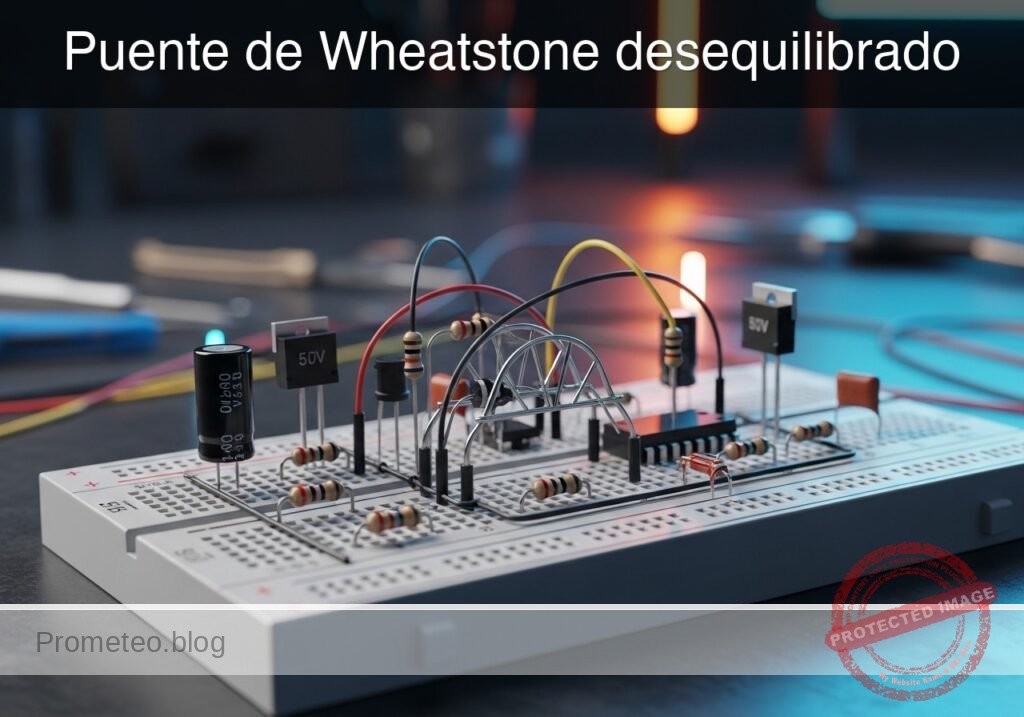
Practical case: Unbalanced Wheatstone Bridge

Unbalanced Wheatstone Bridge prototype (Maker Style)

Level: Medium. Analyze differential voltage variation in a resistive bridge by modifying a sensor.

Objective and use case

You will build a Wheatstone bridge circuit using three fixed resistors and one variable resistor to simulate a resistive sensor. This circuit converts a change in resistance into a measurable differential voltage output.

Why it is useful:
* Precision Sensing: Used in load cells (weighing scales) and strain gauges where resistance changes are minute.
* Temperature Measurement: Fundamental for reading RTDs (Resistance Temperature Detectors) and thermistors.
* Zero Calibration: Allows systems to establish a «null point» (0 V output) to cancel out offset errors before taking measurements.
* Small Signal Detection: Filters out power supply noise common to both legs of the bridge (Common Mode Rejection).

Expected outcome:
* Balanced State: When the variable resistor matches the ratio of the fixed arm, the differential voltage (VAB) reads exactly 0 V.
* Unbalanced State: As the resistance changes, VAB becomes positive or negative depending on the direction of the change.
* Sensitivity: You will observe the non-linear relationship between the resistance change (\Delta R) and the output voltage (VOUT).

Target audience and level: Electronics students and hobbyists familiar with Ohm’s Law (Medium).

Materials

  • V1: 5 V DC voltage source, function: main power supply.
  • R1: 1 kΩ resistor, function: upper reference arm.
  • R2: 1 kΩ resistor, function: lower reference arm.
  • R3: 1 kΩ resistor, function: upper measurement arm.
  • R4: 2 kΩ potentiometer (linear), function: variable resistor (simulating a sensor like a thermistor or strain gauge).

Wiring guide

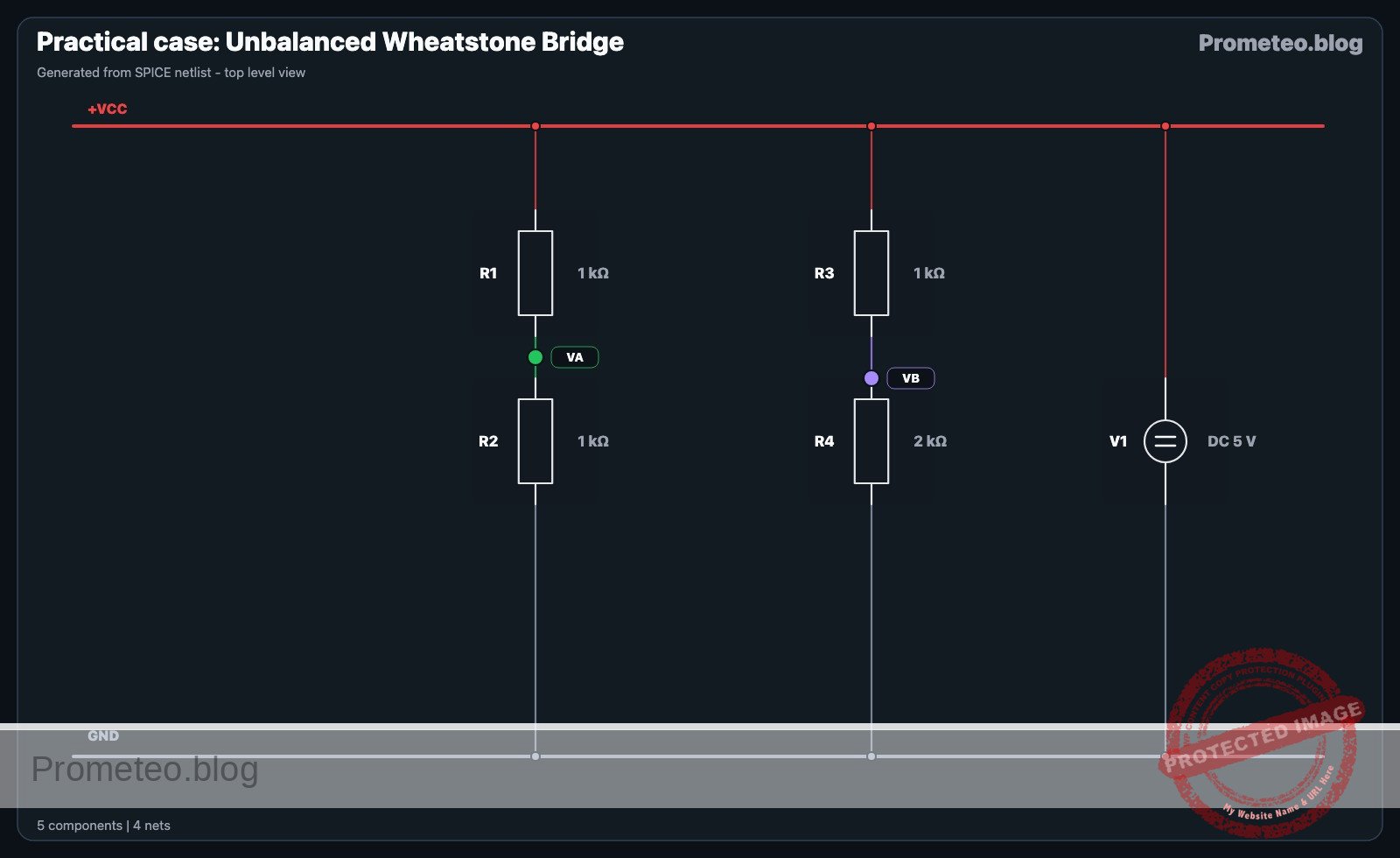
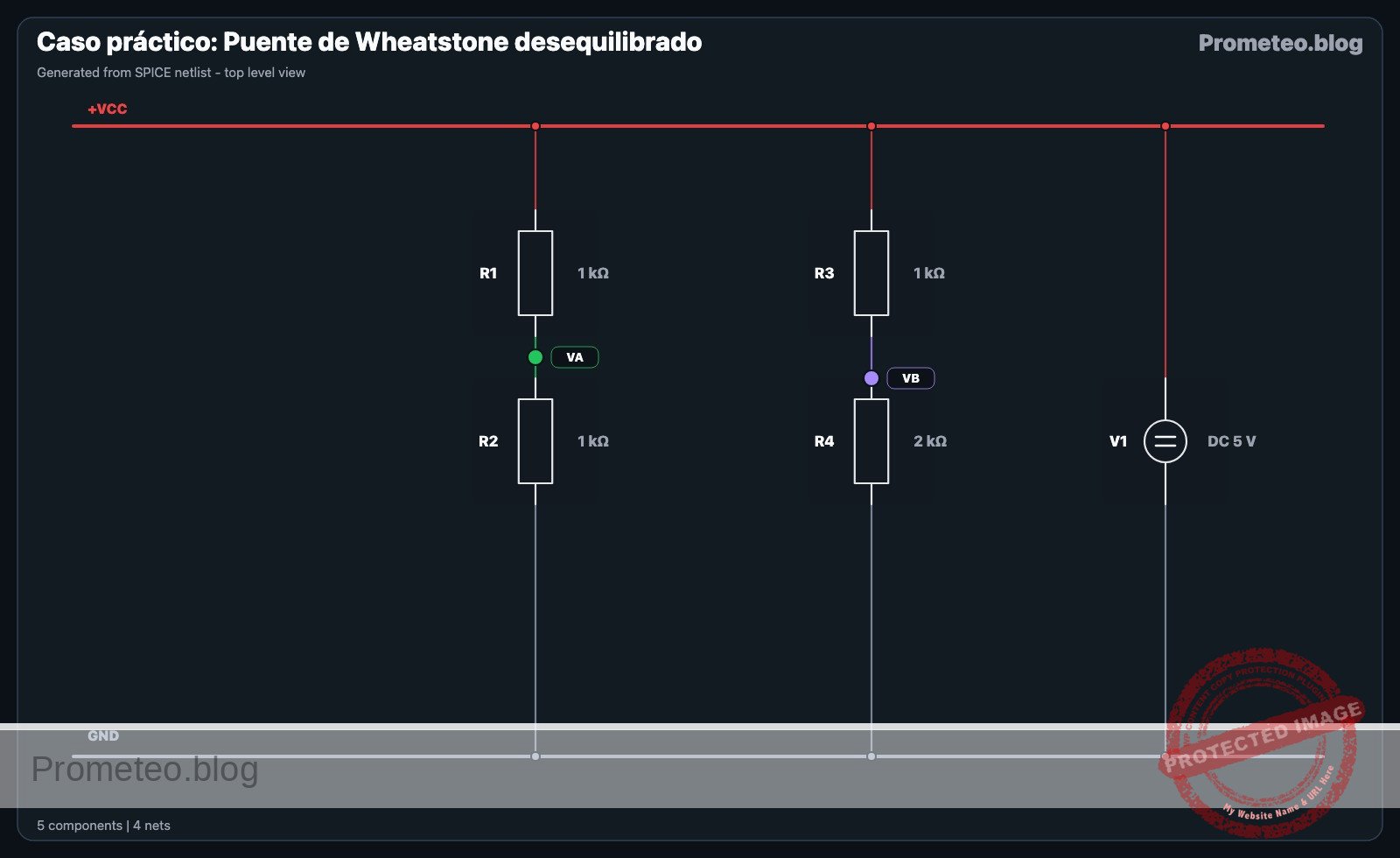
This circuit consists of two parallel voltage dividers connected to a common source. The output is taken differentially between the center points of these dividers.

  • V1 connects between node VCC (positive) and node 0 (GND).
  • R1 connects between node VCC and node VA (Reference Point).
  • R2 connects between node VA and node 0.
  • R3 connects between node VCC and node VB (Measurement Point).
  • R4 connects between node VB and node 0.
  • Measurement: The output VOUT is measured between node VA and node VB.

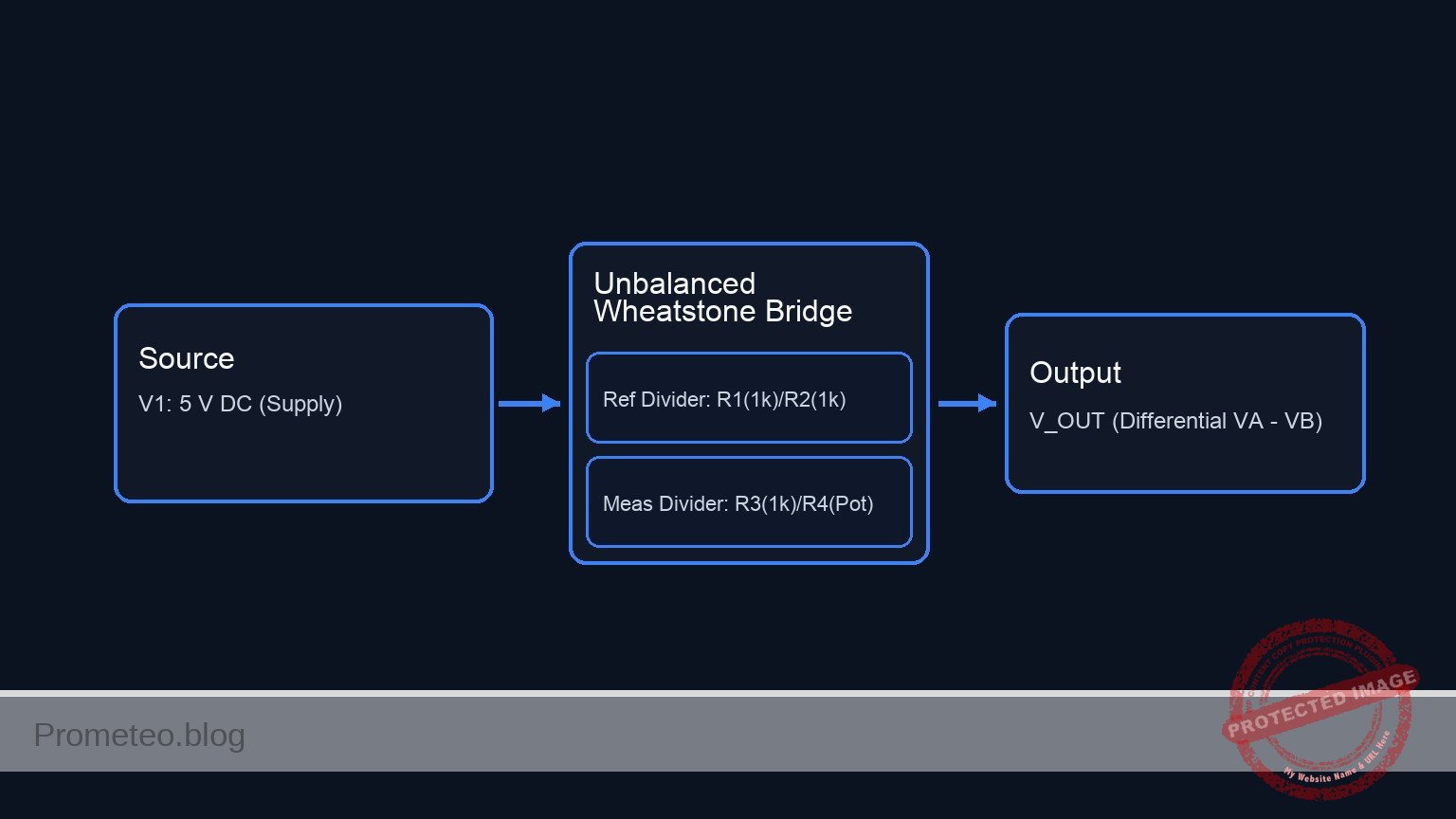
Conceptual block diagram

Conceptual block diagram — Unbalanced Wheatstone Bridge
Quick read: inputs → main block → output (actuator or measurement). This summarizes the ASCII schematic below.

Schematic

[ SOURCE ]                     [ BRIDGE PROCESSING ]                     [ OUTPUT ]

                               +-----------------------------+
                               |   Reference Divider (Left)  |
                            +->|  (Fixed Ratio: R1 / R2)     |--(Node VA)-->+
                            |  |  [ R1: 1 kΩ ] + [ R2: 1 kΩ ]  |              |
                            |  +-----------------------------+              |
                            |                                               v
[ V1: 5 V DC ] --(Supply)--> +                                          [ V_OUT ]
                            |                                          (Differential)
                            |  +-----------------------------+         ( VA - VB )
                            |  |  Measurement Divider (Right)|              ^
                            +->|  (Variable Ratio: R3 / R4)  |--(Node VB)-->+
                               |  [ R3: 1 kΩ ] + [ R4: Pot ]  |
                               +-----------------------------+
Schematic (ASCII)

Electrical diagram

Electrical diagram for case: Unbalanced Wheatstone Bridge
Generated from the validated SPICE netlist for this case.

🔒 This electrical diagram is premium. With the 7-day pass or the monthly membership you can unlock the complete didactic material and the print-ready PDF pack.🔓 See premium access plans

Measurements and tests

Follow these steps to validate the bridge operation using a voltmeter or multimeter.

  1. Setup: Power the circuit with 5 V. Set your multimeter to measure DC Voltage in the 20 V or 2 V range.
  2. Verify Reference: Measure the voltage between VA and 0 (GND). With R1 and R2 being equal (1 kΩ), this should be stable at exactly 2.5 V.
  3. Find the Null Point: Connect the multimeter probes between VA (red probe) and VB (black probe). Adjust potentiometer R4 until the multimeter reads 0.00 V.
    • Observation: At this point, the bridge is balanced (R1 / R2 = R3 / R4). R4 should be approximately 1 kΩ.
  4. Simulate Sensor Increase: Increase the resistance of R4.
    • Observation: The voltage at VB rises. The differential reading (VA – VB) will become negative (assuming Red probe on A, Black on B).
  5. Simulate Sensor Decrease: Decrease the resistance of R4 below 1 kΩ.
    • Observation: The voltage at VB drops. The differential reading will become positive.

SPICE netlist and simulation

Reference SPICE Netlist (ngspice) — excerptFull SPICE netlist (ngspice)

* Practical case: Unbalanced Wheatstone Bridge

* --- Power Supply ---
* V1: 5 V DC voltage source, main power supply
V1 VCC 0 DC 5

* --- Reference Arm (Left) ---
* R1: 1 kΩ, upper reference arm
R1 VCC VA 1k

* R2: 1 kΩ, lower reference arm
R2 VA 0 1k

* --- Measurement Arm (Right) ---
* R3: 1 kΩ, upper measurement arm
R3 VCC VB 1k

* R4: 2 kΩ potentiometer (simulating sensor), lower measurement arm
* Connected between VB and 0. Set to 2k to demonstrate unbalanced state.
R4 VB 0 2k
* ... (truncated in public view) ...

Copy this content into a .cir file and run with ngspice.

🔒 Part of this section is premium. With the 7-day pass or the monthly membership you can access the full content (materials, wiring, detailed build, validation, troubleshooting, variants and checklist) and download the complete print-ready PDF pack.

* Practical case: Unbalanced Wheatstone Bridge

* --- Power Supply ---
* V1: 5 V DC voltage source, main power supply
V1 VCC 0 DC 5

* --- Reference Arm (Left) ---
* R1: 1 kΩ, upper reference arm
R1 VCC VA 1k

* R2: 1 kΩ, lower reference arm
R2 VA 0 1k

* --- Measurement Arm (Right) ---
* R3: 1 kΩ, upper measurement arm
R3 VCC VB 1k

* R4: 2 kΩ potentiometer (simulating sensor), lower measurement arm
* Connected between VB and 0. Set to 2k to demonstrate unbalanced state.
R4 VB 0 2k

* --- Simulation Setup ---
* Calculate DC operating point
.op

* Transient analysis (10ms duration to verify stability)
.tran 100u 10m

* --- Output Directives ---
* Monitor Supply, Reference Voltage (VA), and Sensor Voltage (VB)
* Differential Output VOUT = V(VA) - V(VB)
.print tran V(VCC) V(VA) V(VB)

.end

Simulation Results (Transient Analysis)

Simulation Results (Transient Analysis)
Show raw data table (108 rows)
Index   time            v(vcc)          v(va)           v(vb)
0	0.000000e+00	5.000000e+00	2.500000e+00	3.333333e+00
1	1.000000e-06	5.000000e+00	2.500000e+00	3.333333e+00
2	2.000000e-06	5.000000e+00	2.500000e+00	3.333333e+00
3	4.000000e-06	5.000000e+00	2.500000e+00	3.333333e+00
4	8.000000e-06	5.000000e+00	2.500000e+00	3.333333e+00
5	1.600000e-05	5.000000e+00	2.500000e+00	3.333333e+00
6	3.200000e-05	5.000000e+00	2.500000e+00	3.333333e+00
7	6.400000e-05	5.000000e+00	2.500000e+00	3.333333e+00
8	1.280000e-04	5.000000e+00	2.500000e+00	3.333333e+00
9	2.280000e-04	5.000000e+00	2.500000e+00	3.333333e+00
10	3.280000e-04	5.000000e+00	2.500000e+00	3.333333e+00
11	4.280000e-04	5.000000e+00	2.500000e+00	3.333333e+00
12	5.280000e-04	5.000000e+00	2.500000e+00	3.333333e+00
13	6.280000e-04	5.000000e+00	2.500000e+00	3.333333e+00
14	7.280000e-04	5.000000e+00	2.500000e+00	3.333333e+00
15	8.280000e-04	5.000000e+00	2.500000e+00	3.333333e+00
16	9.280000e-04	5.000000e+00	2.500000e+00	3.333333e+00
17	1.028000e-03	5.000000e+00	2.500000e+00	3.333333e+00
18	1.128000e-03	5.000000e+00	2.500000e+00	3.333333e+00
19	1.228000e-03	5.000000e+00	2.500000e+00	3.333333e+00
20	1.328000e-03	5.000000e+00	2.500000e+00	3.333333e+00
21	1.428000e-03	5.000000e+00	2.500000e+00	3.333333e+00
22	1.528000e-03	5.000000e+00	2.500000e+00	3.333333e+00
23	1.628000e-03	5.000000e+00	2.500000e+00	3.333333e+00
... (84 more rows) ...

Common mistakes and how to avoid them

  1. Measuring relative to Ground: Students often measure VA to GND and VB to GND separately. While valid, the bridge is designed to be measured differentially (VA to VB) directly.
    • Solution: Place the voltmeter probes directly across the bridge midpoints.
  2. Using low-tolerance resistors: If R1 and R2 have high tolerance (e.g., 10%), the reference voltage VA will not be exactly VCC/2, making the null point hard to calculate.
    • Solution: Use 1% metal film resistors for R1, R2, and R3 for precision.
  3. Loading the bridge: Connecting a low-impedance load (like a motor or a low-resistance speaker) directly between VA and VB.
    • Solution: The bridge is for signal measurement, not power. Always connect the output nodes to a high-impedance input, such as an Op-Amp or microcontroller ADC.

Troubleshooting

  • Symptom: Output voltage is always 0 V regardless of potentiometer position.
    • Cause: Power supply is off or there is a short circuit between VA and VB.
    • Fix: Check V1 connections and ensure the two legs of the bridge are not shorted together.
  • Symptom: Cannot reach 0 V (Null point) output.
    • Cause: The fixed resistor R3 is significantly different from the range of potentiometer R4.
    • Fix: Ensure R4’s range includes the value of R3 (e.g., if R3 is 1 kΩ, R4 must be capable of reaching 1 kΩ).
  • Symptom: Readings are unstable or «jittery».
    • Cause: Noisy potentiometer wiper or loose breadboard contacts.
    • Fix: Replace the potentiometer or ensure solid connections on the breadboard.

Possible improvements and extensions

  1. Instrumentation Amplifier: Feed nodes VA and VB into an instrumentation amplifier (like the AD620) to amplify the small differential voltage for a microcontroller to read.
  2. Physical Sensor: Replace R4 with a photoresistor (LDR) or a thermistor (NTC). Observe how light or temperature changes the bridge balance.

More Practical Cases on Prometeo.blog

Find this product and/or books on this topic on Amazon

Go to Amazon

As an Amazon Associate, I earn from qualifying purchases. If you buy through this link, you help keep this project running.

Quick Quiz

Question 1: What is the primary function of the Wheatstone bridge circuit described in the objective?


Question 2: Which component in the circuit is used to simulate a resistive sensor like a thermistor or strain gauge?


Question 3: What is the expected differential voltage (V_AB) when the bridge is in a 'Balanced State'?


Question 4: Why is 'Zero Calibration' mentioned as a useful feature of this circuit?


Question 5: In the context of 'Small Signal Detection', what does the bridge circuit help filter out?


Question 6: What happens to the differential voltage (V_AB) in an 'Unbalanced State'?


Question 7: Which application is explicitly listed as a use case for precision sensing with this circuit?


Question 8: What relationship is generally observed between the resistance change and the output voltage in a Wheatstone bridge?


Question 9: What is the role of the component labeled V1 in the context of this circuit?


Question 10: Which specific type of temperature sensor is mentioned as fundamental for reading with this circuit?


Carlos Núñez Zorrilla
Electronics & Computer Engineer

Telecommunications Electronics Engineer and Computer Engineer (official degrees in Spain).
Follow me:


Caso práctico: Puente de Wheatstone desequilibrado

Prototipo de Puente de Wheatstone desequilibrado (Maker Style)

Nivel: Medio. Analice la variación de voltaje diferencial en un puente resistivo modificando un sensor.

Objetivo y caso de uso

Construirá un circuito de puente de Wheatstone utilizando tres resistencias fijas y una resistencia variable para simular un sensor resistivo. Este circuito convierte un cambio en la resistencia en una salida de voltaje diferencial medible.

Por qué es útil:
* Detección de precisión: Utilizado en celdas de carga (básculas) y galgas extensiométricas donde los cambios de resistencia son minúsculos.
* Medición de temperatura: Fundamental para leer RTD (Detectores de Temperatura de Resistencia) y termistores.
* Calibración a cero: Permite a los sistemas establecer un «punto nulo» (salida de 0 V) para cancelar errores de offset antes de tomar mediciones.
* Detección de señales pequeñas: Filtra el ruido de la fuente de alimentación común a ambas ramas del puente (Rechazo en Modo Común).

Resultado esperado:
* Estado equilibrado: Cuando la resistencia variable coincide con la relación de la rama fija, el voltaje diferencial (VAB) marca exactamente 0 V.
* Estado desequilibrado: A medida que la resistencia cambia, VAB se vuelve positivo o negativo dependiendo de la dirección del cambio.
* Sensibilidad: Observará la relación no lineal entre el cambio de resistencia (\Delta R) y el voltaje de salida (VOUT).

Público objetivo y nivel: Estudiantes de electrónica y aficionados familiarizados con la Ley de Ohm (Medio).

Materiales

  • V1: Fuente de voltaje de 5 V DC, función: alimentación principal.
  • R1: Resistencia de 1 kΩ, función: rama de referencia superior.
  • R2: Resistencia de 1 kΩ, función: rama de referencia inferior.
  • R3: Resistencia de 1 kΩ, función: rama de medición superior.
  • R4: Potenciómetro de 2 kΩ (lineal), función: resistencia variable (simulando un sensor como un termistor o galga extensiométrica).

Guía de conexionado

Este circuito consta de dos divisores de voltaje paralelos conectados a una fuente común. La salida se toma diferencialmente entre los puntos centrales de estos divisores.

  • V1 se conecta entre el nodo VCC (positivo) y el nodo 0 (GND).
  • R1 se conecta entre el nodo VCC y el nodo VA (Punto de Referencia).
  • R2 se conecta entre el nodo VA y el nodo 0.
  • R3 se conecta entre el nodo VCC y el nodo VB (Punto de Medición).
  • R4 se conecta entre el nodo VB y el nodo 0.
  • Medición: La salida VOUT se mide entre el nodo VA y el nodo VB.

Diagrama de bloques conceptual

Conceptual block diagram — Unbalanced Wheatstone Bridge
Lectura rápida: entradas → bloque principal → salida (actuador o medida). Resume el esquemático ASCII de la siguiente sección.

Esquemático

[ SOURCE ]                     [ BRIDGE PROCESSING ]                     [ OUTPUT ]

                               +-----------------------------+
                               |   Reference Divider (Left)  |
                            +->|  (Fixed Ratio: R1 / R2)     |--(Node VA)-->+
                            |  |  [ R1: 1 kΩ ] + [ R2: 1 kΩ ]  |              |
                            |  +-----------------------------+              |
                            |                                               v
[ V1: 5 V DC ] --(Supply)--> +                                          [ V_OUT ]
                            |                                          (Differential)
                            |  +-----------------------------+         ( VA - VB )
                            |  |  Measurement Divider (Right)|              ^
                            +->|  (Variable Ratio: R3 / R4)  |--(Node VB)-->+
                               |  [ R3: 1 kΩ ] + [ R4: Pot ]  |
                               +-----------------------------+
Esquema Eléctrico

Diagrama eléctrico

Diagrama eléctrico del caso: Puente de Wheatstone desequilibrado
Generado desde la netlist SPICE validada del caso.

🔒 Este diagrama eléctrico es premium. Con el pase de 7 días o la suscripción mensual podrás desbloquear el material didáctico completo y el pack PDF listo para imprimir.🔓 Ver planes de acceso premium

Mediciones y pruebas

Siga estos pasos para validar el funcionamiento del puente utilizando un voltímetro o multímetro.

  1. Configuración: Alimente el circuito con 5 V. Configure su multímetro para medir Voltaje DC en el rango de 20 V o 2 V.
  2. Verificar referencia: Mida el voltaje entre VA y 0 (GND). Al ser R1 y R2 iguales (1 kΩ), esto debería ser estable en exactamente 2.5 V.
  3. Encontrar el punto nulo: Conecte las puntas del multímetro entre VA (punta roja) y VB (punta negra). Ajuste el potenciómetro R4 hasta que el multímetro lea 0.00 V.
    • Observación: En este punto, el puente está equilibrado (R1 / R2 = R3 / R4). R4 debería ser aproximadamente 1 kΩ.
  4. Simular aumento del sensor: Aumente la resistencia de R4.
    • Observación: El voltaje en VB aumenta. La lectura diferencial (VA – VB) se volverá negativa (asumiendo punta Roja en A, Negra en B).
  5. Simular disminución del sensor: Disminuya la resistencia de R4 por debajo de 1 kΩ.
    • Observación: El voltaje en VB cae. La lectura diferencial se volverá positiva.

Netlist SPICE y simulación

Netlist SPICE de referencia (ngspice) — extractoNetlist SPICE completo (ngspice)

* Practical case: Unbalanced Wheatstone Bridge

* --- Power Supply ---
* V1: 5 V DC voltage source, main power supply
V1 VCC 0 DC 5

* --- Reference Arm (Left) ---
* R1: 1 kΩ, upper reference arm
R1 VCC VA 1k

* R2: 1 kΩ, lower reference arm
R2 VA 0 1k

* --- Measurement Arm (Right) ---
* R3: 1 kΩ, upper measurement arm
R3 VCC VB 1k

* R4: 2 kΩ potentiometer (simulating sensor), lower measurement arm
* Connected between VB and 0. Set to 2k to demonstrate unbalanced state.
R4 VB 0 2k
* ... (truncated in public view) ...

Copia este contenido en un archivo .cir y ejecútalo con ngspice.

🔒 Parte del contenido de esta sección es premium. Con el pase de 7 días o la suscripción mensual tendrás acceso al contenido completo (materiales, conexionado, compilación detallada, validación paso a paso, troubleshooting, mejoras/variantes y checklist) y podrás descargar el pack PDF listo para imprimir.

* Practical case: Unbalanced Wheatstone Bridge

* --- Power Supply ---
* V1: 5 V DC voltage source, main power supply
V1 VCC 0 DC 5

* --- Reference Arm (Left) ---
* R1: 1 kΩ, upper reference arm
R1 VCC VA 1k

* R2: 1 kΩ, lower reference arm
R2 VA 0 1k

* --- Measurement Arm (Right) ---
* R3: 1 kΩ, upper measurement arm
R3 VCC VB 1k

* R4: 2 kΩ potentiometer (simulating sensor), lower measurement arm
* Connected between VB and 0. Set to 2k to demonstrate unbalanced state.
R4 VB 0 2k

* --- Simulation Setup ---
* Calculate DC operating point
.op

* Transient analysis (10ms duration to verify stability)
.tran 100u 10m

* --- Output Directives ---
* Monitor Supply, Reference Voltage (VA), and Sensor Voltage (VB)
* Differential Output VOUT = V(VA) - V(VB)
.print tran V(VCC) V(VA) V(VB)

.end

Resultados de Simulación (Transitorio)

Resultados de Simulación (Transitorio)
Show raw data table (108 rows)
Index   time            v(vcc)          v(va)           v(vb)
0	0.000000e+00	5.000000e+00	2.500000e+00	3.333333e+00
1	1.000000e-06	5.000000e+00	2.500000e+00	3.333333e+00
2	2.000000e-06	5.000000e+00	2.500000e+00	3.333333e+00
3	4.000000e-06	5.000000e+00	2.500000e+00	3.333333e+00
4	8.000000e-06	5.000000e+00	2.500000e+00	3.333333e+00
5	1.600000e-05	5.000000e+00	2.500000e+00	3.333333e+00
6	3.200000e-05	5.000000e+00	2.500000e+00	3.333333e+00
7	6.400000e-05	5.000000e+00	2.500000e+00	3.333333e+00
8	1.280000e-04	5.000000e+00	2.500000e+00	3.333333e+00
9	2.280000e-04	5.000000e+00	2.500000e+00	3.333333e+00
10	3.280000e-04	5.000000e+00	2.500000e+00	3.333333e+00
11	4.280000e-04	5.000000e+00	2.500000e+00	3.333333e+00
12	5.280000e-04	5.000000e+00	2.500000e+00	3.333333e+00
13	6.280000e-04	5.000000e+00	2.500000e+00	3.333333e+00
14	7.280000e-04	5.000000e+00	2.500000e+00	3.333333e+00
15	8.280000e-04	5.000000e+00	2.500000e+00	3.333333e+00
16	9.280000e-04	5.000000e+00	2.500000e+00	3.333333e+00
17	1.028000e-03	5.000000e+00	2.500000e+00	3.333333e+00
18	1.128000e-03	5.000000e+00	2.500000e+00	3.333333e+00
19	1.228000e-03	5.000000e+00	2.500000e+00	3.333333e+00
20	1.328000e-03	5.000000e+00	2.500000e+00	3.333333e+00
21	1.428000e-03	5.000000e+00	2.500000e+00	3.333333e+00
22	1.528000e-03	5.000000e+00	2.500000e+00	3.333333e+00
23	1.628000e-03	5.000000e+00	2.500000e+00	3.333333e+00
... (84 more rows) ...

Errores comunes y cómo evitarlos

  1. Medir con respecto a Tierra: Los estudiantes a menudo miden VA a GND y VB a GND por separado. Aunque es válido, el puente está diseñado para medirse diferencialmente (VA a VB) directamente.
    • Solución: Coloque las puntas del voltímetro directamente a través de los puntos medios del puente.
  2. Usar resistencias de baja tolerancia: Si R1 y R2 tienen una tolerancia alta (p. ej., 10%), el voltaje de referencia VA no será exactamente VCC/2, dificultando el cálculo del punto nulo.
    • Solución: Utilice resistencias de película metálica del 1% para R1, R2 y R3 para mayor precisión.
  3. Cargar el puente: Conectar una carga de baja impedancia (como un motor o un altavoz de baja resistencia) directamente entre VA y VB.
    • Solución: El puente es para medición de señales, no para potencia. Conecte siempre los nodos de salida a una entrada de alta impedancia, como un amplificador operacional o el ADC de un microcontrolador.

Solución de problemas

  • Síntoma: El voltaje de salida es siempre 0 V independientemente de la posición del potenciómetro.
    • Causa: La fuente de alimentación está apagada o hay un cortocircuito entre VA y VB.
    • Solución: Verifique las conexiones de V1 y asegúrese de que las dos ramas del puente no estén en cortocircuito entre sí.
  • Síntoma: No se puede alcanzar la salida de 0 V (Punto nulo).
    • Causa: La resistencia fija R3 es significativamente diferente del rango del potenciómetro R4.
    • Solución: Asegúrese de que el rango de R4 incluya el valor de R3 (p. ej., si R3 es 1 kΩ, R4 debe ser capaz de alcanzar 1 kΩ).
  • Síntoma: Las lecturas son inestables o «temblorosas».
    • Causa: Cursor del potenciómetro ruidoso o contactos sueltos en la protoboard.
    • Solución: Reemplace el potenciómetro o asegure conexiones sólidas en la protoboard.

Posibles mejoras y extensiones

  1. Amplificador de instrumentación: Alimente los nodos VA y VB en un amplificador de instrumentación (como el AD620) para amplificar el pequeño voltaje diferencial para que lo lea un microcontrolador.
  2. Sensor físico: Reemplace R4 con una fotorresistencia (LDR) o un termistor (NTC). Observe cómo la luz o la temperatura cambian el equilibrio del puente.

Más Casos Prácticos en Prometeo.blog

Encuentra este producto y/o libros sobre este tema en Amazon

Ir a Amazon

Como afiliado de Amazon, gano con las compras que cumplan los requisitos. Si compras a través de este enlace, ayudas a mantener este proyecto.

Quiz rápido

Pregunta 1: ¿Cuál es el objetivo principal del circuito de puente de Wheatstone descrito?


Pregunta 2: ¿Qué sucede en el 'Estado equilibrado' del puente?


Pregunta 3: ¿Qué componente se utiliza para simular un sensor resistivo en este experimento?


Pregunta 4: ¿Cuál es una aplicación práctica mencionada para este tipo de circuito?


Pregunta 5: ¿Qué permite la 'Calibración a cero' en los sistemas de medición?


Pregunta 6: ¿Qué ocurre en el 'Estado desequilibrado' según el contexto?


Pregunta 7: ¿Qué beneficio aporta el circuito respecto al ruido de la fuente de alimentación?


Pregunta 8: ¿Para qué tipo de medición de temperatura es fundamental este circuito?


Pregunta 9: ¿Qué componentes básicos conforman el puente descrito además de la resistencia variable?


Pregunta 10: ¿Por qué es útil este circuito para la detección de señales pequeñas?


Carlos Núñez Zorrilla
Electronics & Computer Engineer

Ingeniero Superior en Electrónica de Telecomunicaciones e Ingeniero en Informática (titulaciones oficiales en España).

Sígueme:


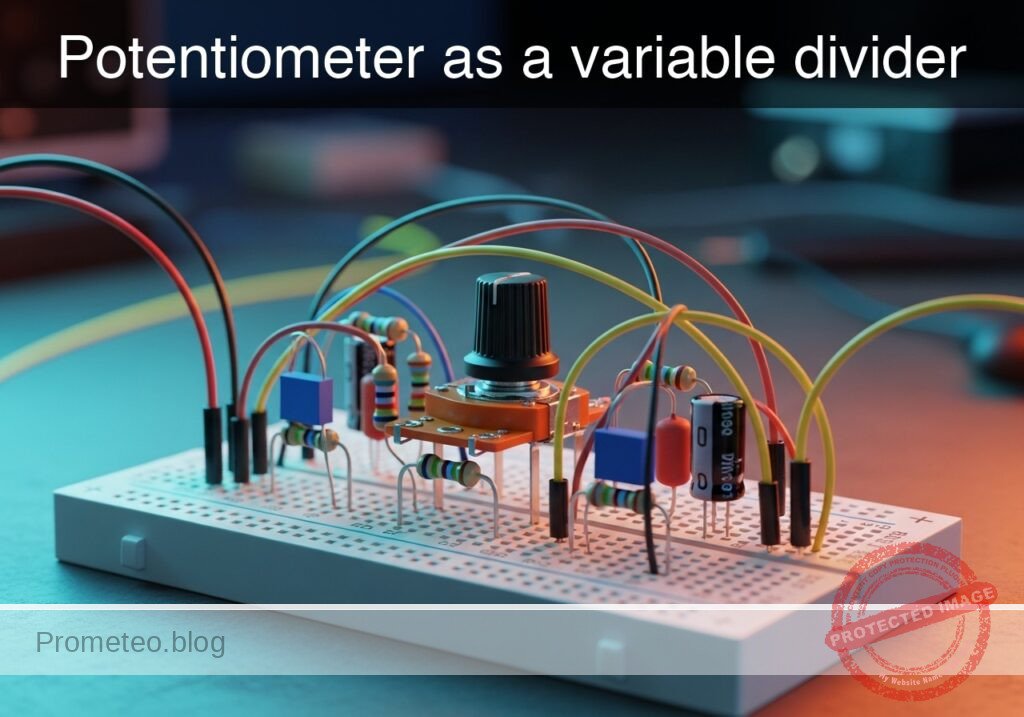
Practical case: Potentiometer as a variable divider

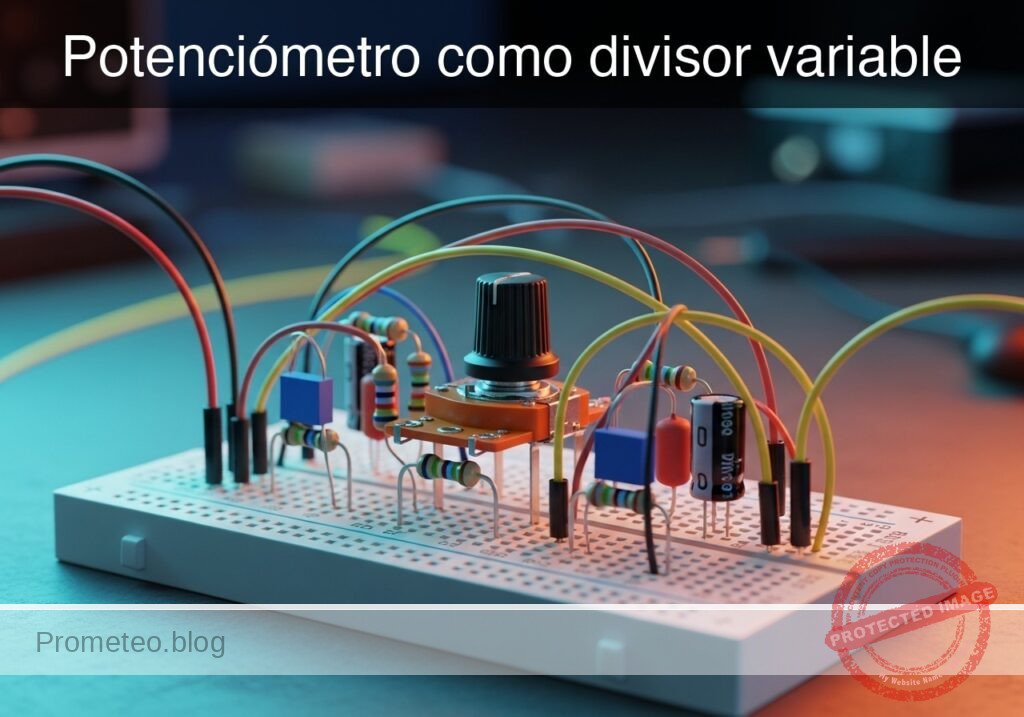
Potentiometer as a variable divider prototype (Maker Style)

Level: Basic. Objective: Understand how output voltage varies when modifying resistance in a potentiometer connected as a voltage divider.

Objective and use case

You will build a variable voltage divider circuit using a linear potentiometer to generate an adjustable analog voltage signal ranging from 0 V to the supply voltage.

  • Why it is useful:

    • Used in volume knobs for audio equipment.
    • Provides reference voltages for comparators and operational amplifiers.
    • Simulates analog sensor data (like temperature or light) during testing.
    • Acts as a control signal for dimmers and motor speed controllers.
    • Essential for calibrating sensitivity in sensor circuits.
  • Expected outcome:

    • The output voltage (VOUT) varies smoothly from 0 V to 5 V.
    • At the mechanical midpoint of a linear potentiometer, VOUT reads approximately 2.5 V.
    • The sum of voltage across the upper section and voltage across the lower section equals the source voltage (VIN).
  • Target audience and level: Students and electronics hobbyists (Level: Basic).

Materials

  • V1: 5 V DC supply, function: main power source.
  • R1: 10 kΩ linear potentiometer, function: variable voltage divider.
  • M1: Digital Multimeter (set to DC Volts), function: measure V_OUT.
  • W1: Jumper wires, function: interconnections.

Wiring guide

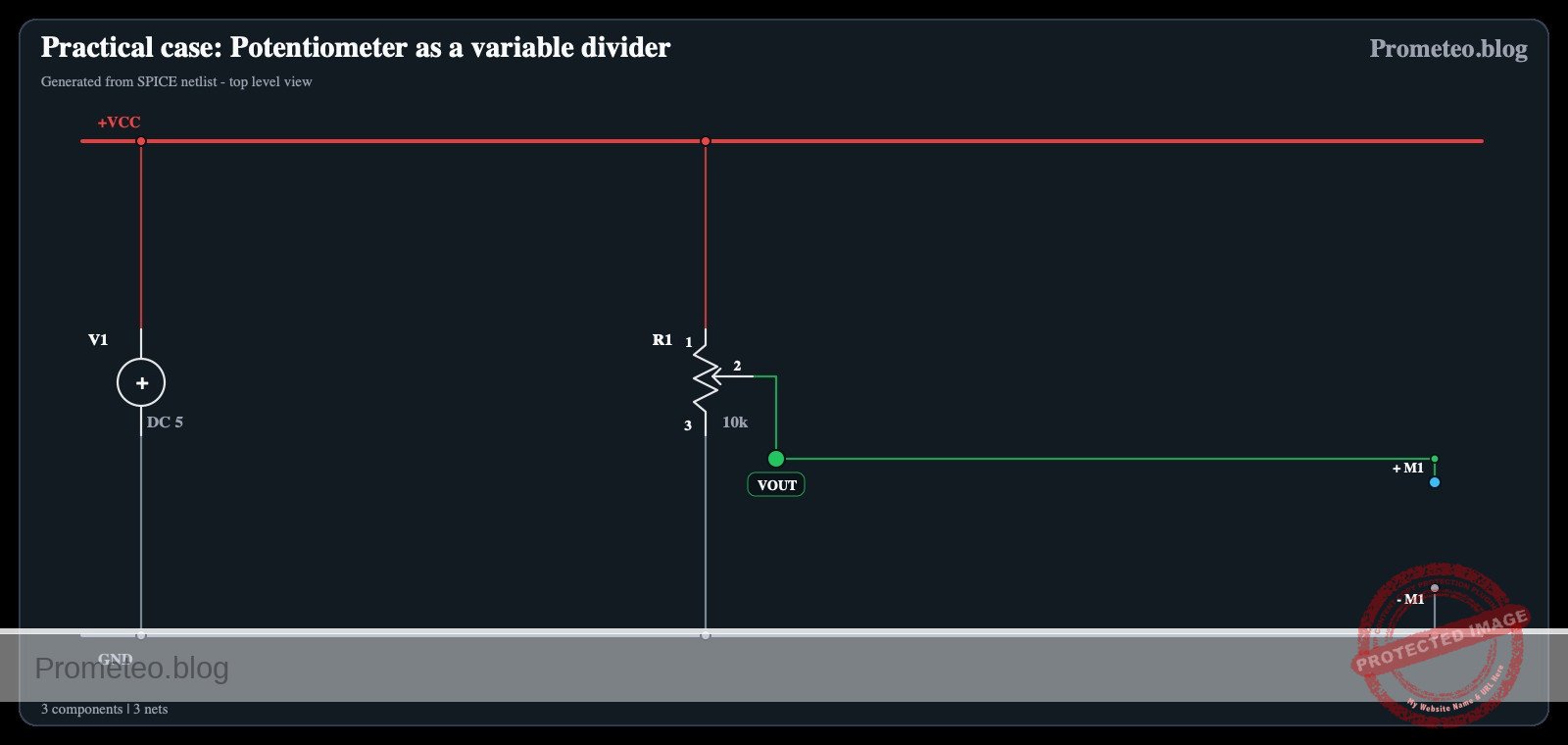
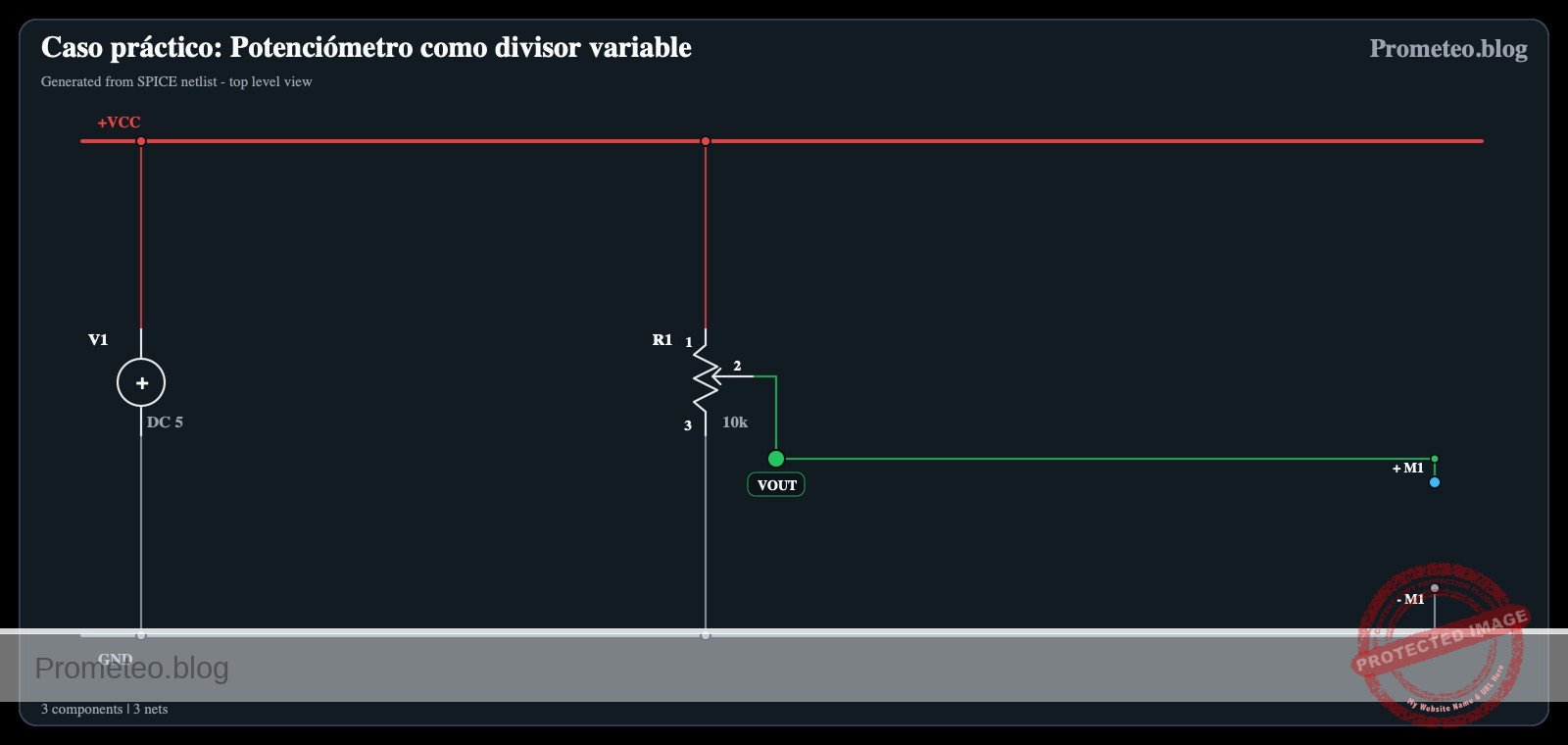
This circuit uses standard SPICE node naming conventions (VCC, 0 for GND, VOUT).

  • V1 (Positive Terminal): Connects to node VCC.
  • V1 (Negative Terminal): Connects to node 0 (GND).
  • R1 (Pin 1 – Top/Fixed): Connects to node VCC.
  • R1 (Pin 3 – Bottom/Fixed): Connects to node 0 (GND).
  • R1 (Pin 2 – Wiper/Variable): Connects to node VOUT.
  • M1 (Positive Probe): Connects to node VOUT.
  • M1 (Negative Probe): Connects to node 0 (GND).

Conceptual block diagram

Conceptual block diagram — Potentiometer
Quick read: inputs → main block → output (actuator or measurement). This summarizes the ASCII schematic below.

Schematic

[ SOURCE ]                       [ COMPONENT ]                     [ MEASUREMENT ]

[ V1: 5 V Supply (+) ] --(Node VCC)--> [ R1: Pin 1 (Top)    ]
                                      |                    |
                                      |  Potentiometer     |
                                      |  (Voltage Divider) |
                                      |                    |
                                      |  R1: Pin 2 (Wiper) ] --(Node VOUT)--> [ M1: Multimeter (+) ]
                                      |                    |
[ V1: 5 V Supply (-) ] --(Node 0)----> [ R1: Pin 3 (Bottom) ] --(Node 0)-----> [ M1: Multimeter (-) ]
Schematic (ASCII)

Electrical diagram

Electrical diagram: Practical case: Potentiometer as a variable divider
Generated from the validated SPICE netlist for this case.

🔒 This electrical diagram is premium. With the 7-day pass or the monthly membership you can unlock the complete didactic material and the print-ready PDF pack.🔓 See premium access plans

Measurements and tests

Follow these steps to validate the voltage divider behavior:

  1. Setup: Configure the multimeter to measure DC Voltage (20 V range). Connect the black probe to Ground (0) and the red probe to the potentiometer wiper (VOUT).
  2. Minimum Check: Rotate the potentiometer knob fully counter-clockwise.
    • Observation: The multimeter should read roughly 0 V.
  3. Maximum Check: Rotate the potentiometer knob fully clockwise.
    • Observation: The multimeter should read roughly 5 V (or equal to your specific V1 voltage).
  4. Midpoint Check: Rotate the knob to the approximate physical center.
    • Observation: The multimeter should read approximately 2.5 V.
  5. Linearity Test: Turn the knob slowly from one end to the other.
    • Observation: The voltage reading should change smoothly without jumps.

SPICE netlist and simulation

Reference SPICE Netlist (ngspice) — excerptFull SPICE netlist (ngspice)

* Practical case: Potentiometer as a variable divider

* --- Power Supply ---
* V1: 5V Main power source
* Connected to VCC (+) and 0 (GND)
V1 VCC 0 DC 5

* --- Simulation Control Source ---
* Vknob simulates the mechanical action of the potentiometer.
* Sweeps from 0 (0%) to 1 (100%) over 500us.
Vknob knob 0 PWL(0 0 500u 1)

* --- R1: 10k Potentiometer ---
* Implemented as two behavioral voltage sources (B-sources) acting as variable resistors.
* This allows the "Variable Divider" behavior to be simulated in Transient analysis.
* Total Resistance ~ 10k.

* R1 Top Part (Pin 1 to Pin 2): Connects VCC to VOUT
* Resistance = 10k * (1 - Knob) + 1 ohm (offset to avoid divide-by-zero/shorts)
B_R1_top VCC VOUT V = I(B_R1_top) * (10000 * (1 - V(knob)) + 1)
* ... (truncated in public view) ...

Copy this content into a .cir file and run with ngspice.

🔒 Part of this section is premium. With the 7-day pass or the monthly membership you can access the full content (materials, wiring, detailed build, validation, troubleshooting, variants and checklist) and download the complete print-ready PDF pack.

* Practical case: Potentiometer as a variable divider

* --- Power Supply ---
* V1: 5V Main power source
* Connected to VCC (+) and 0 (GND)
V1 VCC 0 DC 5

* --- Simulation Control Source ---
* Vknob simulates the mechanical action of the potentiometer.
* Sweeps from 0 (0%) to 1 (100%) over 500us.
Vknob knob 0 PWL(0 0 500u 1)

* --- R1: 10k Potentiometer ---
* Implemented as two behavioral voltage sources (B-sources) acting as variable resistors.
* This allows the "Variable Divider" behavior to be simulated in Transient analysis.
* Total Resistance ~ 10k.

* R1 Top Part (Pin 1 to Pin 2): Connects VCC to VOUT
* Resistance = 10k * (1 - Knob) + 1 ohm (offset to avoid divide-by-zero/shorts)
B_R1_top VCC VOUT V = I(B_R1_top) * (10000 * (1 - V(knob)) + 1)

* R1 Bottom Part (Pin 2 to Pin 3): Connects VOUT to GND
* Resistance = 10k * Knob + 1 ohm
B_R1_bot VOUT 0 V = I(B_R1_bot) * (10000 * V(knob) + 1)

* --- M1: Digital Multimeter ---
* Function: Measure V_OUT.
* Modeled as a high input impedance load (10 Megohm) connected to VOUT and GND.
R_M1 VOUT 0 10Meg

* --- Analysis Commands ---
* Transient analysis to capture the full sweep of the potentiometer (500us)
.tran 1u 500u

* Print the Output Voltage and the Control Signal (Knob position)
.print tran V(VOUT) V(knob)

* Calculate DC operating point
.op

.end

Simulation Results (Transient Analysis)

Simulation Results (Transient Analysis)
Show raw data table (508 rows)
Index   time            v(vout)         v(knob)
0	0.000000e+00	4.999000e-04	0.000000e+00
1	1.000000e-08	5.998800e-04	2.000000e-05
2	2.000000e-08	6.998599e-04	4.000000e-05
3	4.000000e-08	8.998199e-04	8.000000e-05
4	8.000000e-08	1.299740e-03	1.600000e-04
5	1.600000e-07	2.099579e-03	3.200000e-04
6	3.200000e-07	3.699258e-03	6.400000e-04
7	6.400000e-07	6.898613e-03	1.280000e-03
8	1.280000e-06	1.329731e-02	2.560000e-03
9	2.280000e-06	2.329525e-02	4.560000e-03
10	3.280000e-06	3.329314e-02	6.560000e-03
11	4.280000e-06	4.329099e-02	8.560000e-03
12	5.280000e-06	5.328880e-02	1.056000e-02
13	6.280000e-06	6.328657e-02	1.256000e-02
14	7.280000e-06	7.328430e-02	1.456000e-02
15	8.280000e-06	8.328200e-02	1.656000e-02
16	9.280000e-06	9.327965e-02	1.856000e-02
17	1.028000e-05	1.032773e-01	2.056000e-02
18	1.128000e-05	1.132749e-01	2.256000e-02
19	1.228000e-05	1.232724e-01	2.456000e-02
20	1.328000e-05	1.332699e-01	2.656000e-02
21	1.428000e-05	1.432674e-01	2.856000e-02
22	1.528000e-05	1.532648e-01	3.056000e-02
23	1.628000e-05	1.632622e-01	3.256000e-02
... (484 more rows) ...

Common mistakes and how to avoid them

  1. Floating the wiper: Connecting only the two fixed legs of the potentiometer makes it act as a fixed resistor. Always connect the middle pin (wiper) to your output node.
  2. Shorting the supply: Connecting the wiper to VCC and one fixed leg to 0, then turning the knob fully to the grounded side creates a short circuit. Ensure fixed legs go to Power and Ground, and the Wiper is the Output.
  3. Using a Logarithmic Potentiometer: Audio taper (Log) pots change resistance non-linearly. For a predictable voltage divider test, ensure you use a Linear taper (usually marked ‘B’).

Troubleshooting

  • Symptom: Voltage is constant at 2.5 V regardless of knob position.
    • Cause: The wiper is disconnected, or you are measuring across the fixed terminals.
    • Fix: Verify the multimeter probe is connected specifically to the center pin (wiper).
  • Symptom: Smoke or heat coming from the potentiometer.
    • Cause: Short circuit created by wiring the wiper to a rail and turning it to the opposite rail.
    • Fix: Immediately disconnect power. Re-wire so that the fixed outer pins connect to VCC and GND, and the wiper connects only to the high-impedance meter.
  • Symptom: Voltage jumps erratically (e.g., 1 V -> 4 V -> 2 V).
    • Cause: Dirty or defective internal track (wiper losing contact).
    • Fix: Replace the potentiometer or clean it with contact cleaner.

Possible improvements and extensions

  1. Loading Effect: Connect a 1 kΩ fixed resistor between VOUT and 0. Observe how the output voltage drops significantly compared to the unloaded state, demonstrating impedance mismatch.
  2. Safe Limits: Add a 330 Ω fixed resistor in series with the top leg and another with the bottom leg. This restricts the output range (e.g., 0.5 V to 4.5 V) and protects the potentiometer from short circuits if the output is accidentally grounded.

More Practical Cases on Prometeo.blog

Find this product and/or books on this topic on Amazon

Go to Amazon

As an Amazon Associate, I earn from qualifying purchases. If you buy through this link, you help keep this project running.

Quick Quiz

Question 1: What is the primary objective of the circuit described in the text?


Question 2: Which component acts as the variable voltage divider in this circuit?


Question 3: If the supply voltage is 5 V, what is the expected output voltage range?


Question 4: What is a common real-world application for this type of circuit mentioned in the text?


Question 5: Where is the wiper (Pin 2) of the potentiometer typically connected to measure the divided voltage?


Question 6: At the mechanical midpoint of a linear potentiometer with a 5 V supply, what should V_OUT read approximately?


Question 7: Which pin of the potentiometer connects to the Ground (node 0) in a standard voltage divider configuration?


Question 8: What is the function of the Digital Multimeter (M1) in this setup?


Question 9: According to the expected outcome, the sum of the voltage across the upper section and the lower section equals what?


Question 10: What specific type of potentiometer is recommended in the materials list?


Carlos Núñez Zorrilla
Electronics & Computer Engineer

Telecommunications Electronics Engineer and Computer Engineer (official degrees in Spain).
Follow me:


Caso práctico: Potenciómetro como divisor variable

Prototipo de Potenciómetro como divisor variable (Maker Style)

Nivel: Básico. Objetivo: Entender cómo varía el voltaje de salida al modificar la resistencia en un potenciómetro conectado como divisor de voltaje.

Objetivo y caso de uso

Construirás un circuito divisor de voltaje variable utilizando un potenciómetro lineal para generar una señal de voltaje analógica ajustable que oscila entre 0 V y el voltaje de alimentación.

  • Por qué es útil:

    • Se utiliza en perillas de volumen para equipos de audio.
    • Proporciona voltajes de referencia para comparadores y amplificadores operacionales.
    • Simula datos de sensores analógicos (como temperatura o luz) durante las pruebas.
    • Actúa como señal de control para reguladores de intensidad (dimmers) y controladores de velocidad de motores.
    • Esencial para calibrar la sensibilidad en circuitos de sensores.
  • Resultado esperado:

    • El voltaje de salida (VOUT) varía suavemente de 0 V a 5 V.
    • En el punto medio mecánico de un potenciómetro lineal, VOUT marca aproximadamente 2.5 V.
    • La suma del voltaje a través de la sección superior y el voltaje a través de la sección inferior es igual al voltaje de la fuente (VIN).
  • Público objetivo y nivel: Estudiantes y aficionados a la electrónica (Nivel: Básico).

Materiales

  • V1: Fuente de 5 V DC, función: fuente de alimentación principal.
  • R1: Potenciómetro lineal de 10 kΩ, función: divisor de voltaje variable.
  • M1: Multímetro digital (configurado en Voltios DC), función: medir V_OUT.
  • W1: Cables puente (jumpers), función: interconexiones.

Guía de conexionado

Este circuito utiliza las convenciones estándar de nomenclatura de nodos SPICE (VCC, 0 para GND, VOUT).

  • V1 (Terminal Positivo): Se conecta al nodo VCC.
  • V1 (Terminal Negativo): Se conecta al nodo 0 (GND).
  • R1 (Pin 1 – Superior/Fijo): Se conecta al nodo VCC.
  • R1 (Pin 3 – Inferior/Fijo): Se conecta al nodo 0 (GND).
  • R1 (Pin 2 – Cursor/Variable): Se conecta al nodo VOUT.
  • M1 (Sonda Positiva): Se conecta al nodo VOUT.
  • M1 (Sonda Negativa): Se conecta al nodo 0 (GND).

Diagrama de bloques conceptual

Conceptual block diagram — Potentiometer
Lectura rápida: entradas → bloque principal → salida (actuador o medida). Resume el esquemático ASCII de la siguiente sección.

Esquemático

[ SOURCE ]                       [ COMPONENT ]                     [ MEASUREMENT ]

[ V1: 5 V Supply (+) ] --(Node VCC)--> [ R1: Pin 1 (Top)    ]
                                      |                    |
                                      |  Potentiometer     |
                                      |  (Voltage Divider) |
                                      |                    |
                                      |  R1: Pin 2 (Wiper) ] --(Node VOUT)--> [ M1: Multimeter (+) ]
                                      |                    |
[ V1: 5 V Supply (-) ] --(Node 0)----> [ R1: Pin 3 (Bottom) ] --(Node 0)-----> [ M1: Multimeter (-) ]
Esquema Eléctrico

Diagrama eléctrico

Diagrama eléctrico: Caso práctico: Potenciómetro como divisor variable
Generado desde la netlist SPICE validada del caso.

🔒 Este diagrama eléctrico es premium. Con el pase de 7 días o la suscripción mensual podrás desbloquear el material didáctico completo y el pack PDF listo para imprimir.🔓 Ver planes de acceso premium

Mediciones y pruebas

Sigue estos pasos para validar el comportamiento del divisor de voltaje:

  1. Configuración: Configura el multímetro para medir voltaje DC (rango de 20 V). Conecta la sonda negra a Tierra (0) y la sonda roja al cursor (wiper) del potenciómetro (VOUT).
  2. Verificación de Mínimo: Gira la perilla del potenciómetro completamente en sentido antihorario.
    • Observación: El multímetro debería leer aproximadamente 0 V.
  3. Verificación de Máximo: Gira la perilla del potenciómetro completamente en sentido horario.
    • Observación: El multímetro debería leer aproximadamente 5 V (o igual al voltaje específico de tu V1).
  4. Verificación del Punto Medio: Gira la perilla al centro físico aproximado.
    • Observación: El multímetro debería leer aproximadamente 2.5 V.
  5. Prueba de Linealidad: Gira la perilla lentamente de un extremo al otro.
    • Observación: La lectura de voltaje debería cambiar suavemente sin saltos.

Netlist SPICE y simulación

Netlist SPICE de referencia (ngspice) — extractoNetlist SPICE completo (ngspice)

* Practical case: Potentiometer as a variable divider

* --- Power Supply ---
* V1: 5V Main power source
* Connected to VCC (+) and 0 (GND)
V1 VCC 0 DC 5

* --- Simulation Control Source ---
* Vknob simulates the mechanical action of the potentiometer.
* Sweeps from 0 (0%) to 1 (100%) over 500us.
Vknob knob 0 PWL(0 0 500u 1)

* --- R1: 10k Potentiometer ---
* Implemented as two behavioral voltage sources (B-sources) acting as variable resistors.
* This allows the "Variable Divider" behavior to be simulated in Transient analysis.
* Total Resistance ~ 10k.

* R1 Top Part (Pin 1 to Pin 2): Connects VCC to VOUT
* Resistance = 10k * (1 - Knob) + 1 ohm (offset to avoid divide-by-zero/shorts)
B_R1_top VCC VOUT V = I(B_R1_top) * (10000 * (1 - V(knob)) + 1)
* ... (truncated in public view) ...

Copia este contenido en un archivo .cir y ejecútalo con ngspice.

🔒 Parte del contenido de esta sección es premium. Con el pase de 7 días o la suscripción mensual tendrás acceso al contenido completo (materiales, conexionado, compilación detallada, validación paso a paso, troubleshooting, mejoras/variantes y checklist) y podrás descargar el pack PDF listo para imprimir.

* Practical case: Potentiometer as a variable divider

* --- Power Supply ---
* V1: 5V Main power source
* Connected to VCC (+) and 0 (GND)
V1 VCC 0 DC 5

* --- Simulation Control Source ---
* Vknob simulates the mechanical action of the potentiometer.
* Sweeps from 0 (0%) to 1 (100%) over 500us.
Vknob knob 0 PWL(0 0 500u 1)

* --- R1: 10k Potentiometer ---
* Implemented as two behavioral voltage sources (B-sources) acting as variable resistors.
* This allows the "Variable Divider" behavior to be simulated in Transient analysis.
* Total Resistance ~ 10k.

* R1 Top Part (Pin 1 to Pin 2): Connects VCC to VOUT
* Resistance = 10k * (1 - Knob) + 1 ohm (offset to avoid divide-by-zero/shorts)
B_R1_top VCC VOUT V = I(B_R1_top) * (10000 * (1 - V(knob)) + 1)

* R1 Bottom Part (Pin 2 to Pin 3): Connects VOUT to GND
* Resistance = 10k * Knob + 1 ohm
B_R1_bot VOUT 0 V = I(B_R1_bot) * (10000 * V(knob) + 1)

* --- M1: Digital Multimeter ---
* Function: Measure V_OUT.
* Modeled as a high input impedance load (10 Megohm) connected to VOUT and GND.
R_M1 VOUT 0 10Meg

* --- Analysis Commands ---
* Transient analysis to capture the full sweep of the potentiometer (500us)
.tran 1u 500u

* Print the Output Voltage and the Control Signal (Knob position)
.print tran V(VOUT) V(knob)

* Calculate DC operating point
.op

.end

Resultados de Simulación (Transitorio)

Resultados de Simulación (Transitorio)
Show raw data table (508 rows)
Index   time            v(vout)         v(knob)
0	0.000000e+00	4.999000e-04	0.000000e+00
1	1.000000e-08	5.998800e-04	2.000000e-05
2	2.000000e-08	6.998599e-04	4.000000e-05
3	4.000000e-08	8.998199e-04	8.000000e-05
4	8.000000e-08	1.299740e-03	1.600000e-04
5	1.600000e-07	2.099579e-03	3.200000e-04
6	3.200000e-07	3.699258e-03	6.400000e-04
7	6.400000e-07	6.898613e-03	1.280000e-03
8	1.280000e-06	1.329731e-02	2.560000e-03
9	2.280000e-06	2.329525e-02	4.560000e-03
10	3.280000e-06	3.329314e-02	6.560000e-03
11	4.280000e-06	4.329099e-02	8.560000e-03
12	5.280000e-06	5.328880e-02	1.056000e-02
13	6.280000e-06	6.328657e-02	1.256000e-02
14	7.280000e-06	7.328430e-02	1.456000e-02
15	8.280000e-06	8.328200e-02	1.656000e-02
16	9.280000e-06	9.327965e-02	1.856000e-02
17	1.028000e-05	1.032773e-01	2.056000e-02
18	1.128000e-05	1.132749e-01	2.256000e-02
19	1.228000e-05	1.232724e-01	2.456000e-02
20	1.328000e-05	1.332699e-01	2.656000e-02
21	1.428000e-05	1.432674e-01	2.856000e-02
22	1.528000e-05	1.532648e-01	3.056000e-02
23	1.628000e-05	1.632622e-01	3.256000e-02
... (484 more rows) ...

Errores comunes y cómo evitarlos

  1. Dejar el cursor (wiper) flotando: Conectar solo las dos patas fijas del potenciómetro hace que actúe como una resistencia fija. Conecta siempre el pin central (cursor) a tu nodo de salida.
  2. Cortocircuitar la fuente: Conectar el cursor a VCC y una pata fija a 0, y luego girar la perilla completamente hacia el lado conectado a tierra crea un cortocircuito. Asegúrate de que las patas fijas vayan a Alimentación y Tierra, y que el Cursor sea la Salida.
  3. Usar un potenciómetro logarítmico: Los potenciómetros de audio (Log) cambian la resistencia de forma no lineal. Para una prueba de divisor de voltaje predecible, asegúrate de usar uno lineal (generalmente marcado como ‘B’).

Solución de problemas

  • Síntoma: El voltaje es constante en 2.5 V independientemente de la posición de la perilla.
    • Causa: El cursor está desconectado, o estás midiendo a través de los terminales fijos.
    • Solución: Verifica que la sonda del multímetro esté conectada específicamente al pin central (cursor).
  • Síntoma: Humo o calor proveniente del potenciómetro.
    • Causa: Cortocircuito creado al conectar el cursor a un riel y girarlo hacia el riel opuesto.
    • Solución: Desconecta inmediatamente la alimentación. Vuelve a conectar de modo que los pines exteriores fijos se conecten a VCC y GND, y el cursor se conecte solo al medidor de alta impedancia.
  • Síntoma: El voltaje salta erráticamente (por ejemplo, 1 V -> 4 V -> 2 V).
    • Causa: Pista interna sucia o defectuosa (el cursor pierde contacto).
    • Solución: Reemplaza el potenciómetro o límpialo con limpiador de contactos.

Posibles mejoras y extensiones

  1. Efecto de carga: Conecta una resistencia fija de 1 kΩ entre VOUT y 0. Observa cómo el voltaje de salida cae significativamente en comparación con el estado sin carga, demostrando el desajuste de impedancia.
  2. Límites seguros: Agrega una resistencia fija de 330 Ω en serie con la pata superior y otra con la pata inferior. Esto restringe el rango de salida (por ejemplo, 0.5 V a 4.5 V) y protege el potenciómetro de cortocircuitos si la salida se conecta accidentalmente a tierra.

Más Casos Prácticos en Prometeo.blog

Encuentra este producto y/o libros sobre este tema en Amazon

Ir a Amazon

Como afiliado de Amazon, gano con las compras que cumplan los requisitos. Si compras a través de este enlace, ayudas a mantener este proyecto.

Quiz rápido

Pregunta 1: ¿Cuál es el objetivo principal del circuito descrito en el artículo?


Pregunta 2: ¿Qué componente principal se utiliza para crear el divisor de voltaje variable?


Pregunta 3: ¿Cuál es el rango de oscilación del voltaje de salida esperado en este circuito?


Pregunta 4: ¿Qué valor de voltaje se espera medir aproximadamente en el punto medio mecánico de un potenciómetro lineal alimentado con 5 V?


Pregunta 5: ¿Cuál de las siguientes es una aplicación útil mencionada para este circuito?


Pregunta 6: ¿Qué relación existe entre los voltajes de la sección superior e inferior del potenciómetro?


Pregunta 7: ¿Qué tipo de señal de control puede actuar este circuito para dimmers y motores?


Pregunta 8: ¿Cuál es el nivel de dificultad indicado para este artículo?


Pregunta 9: ¿Qué tipo de potenciómetro se especifica para obtener 2.5 V exactamente en el punto medio?


Pregunta 10: ¿Qué función cumple este circuito en equipos de audio según el texto?


Carlos Núñez Zorrilla
Electronics & Computer Engineer

Ingeniero Superior en Electrónica de Telecomunicaciones e Ingeniero en Informática (titulaciones oficiales en España).

Sígueme:


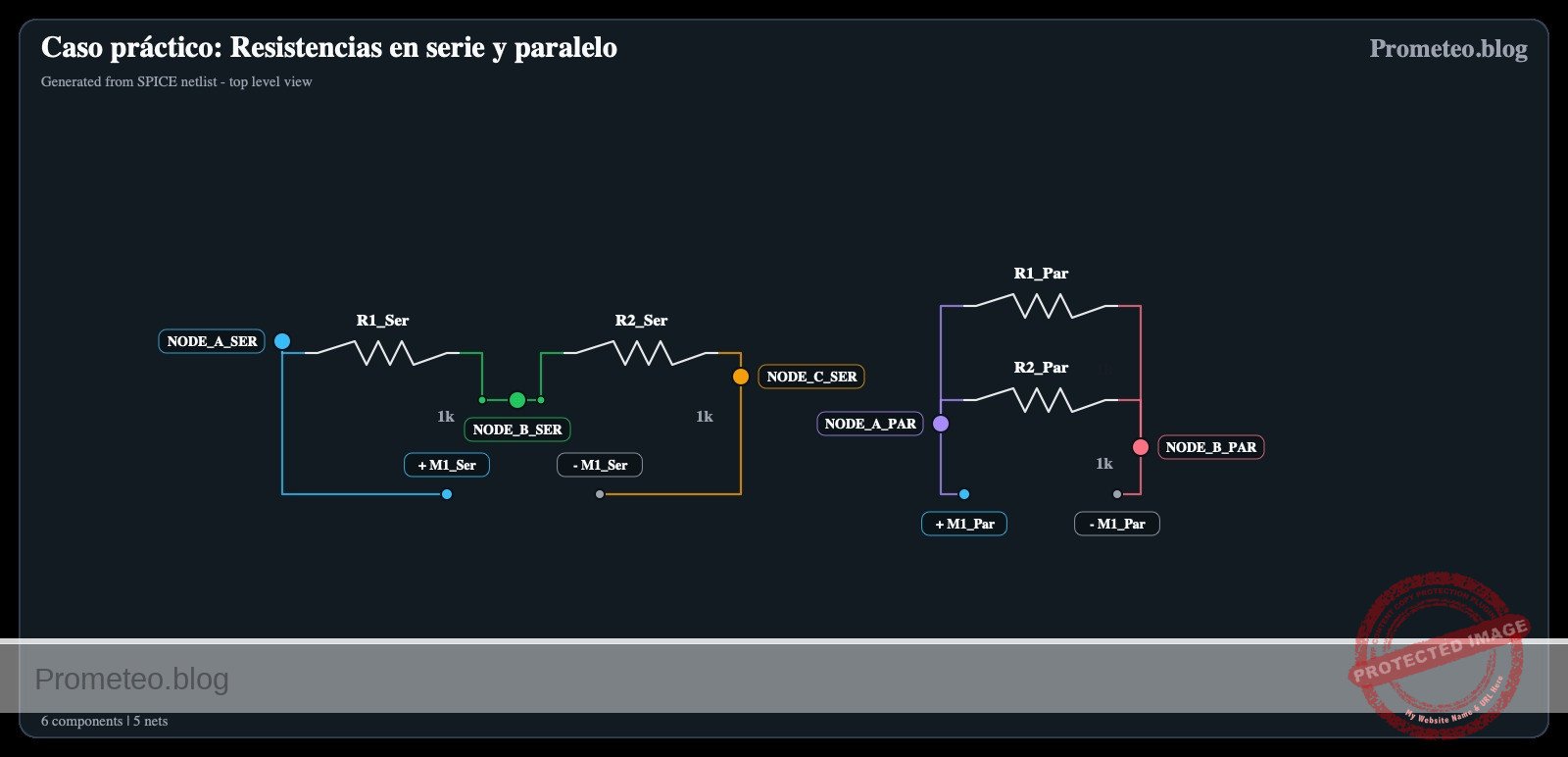
Practical case: Series and parallel resistors

Series and parallel resistors prototype (Maker Style)

Level: Basic – Verify equivalent resistance formulas through measurement.

Objective and use case

In this practical case, you will build a passive circuit using two resistors to analyze how resistance values change when components are connected in series versus parallel. You will measure the total equivalent resistance (Req) using a multimeter in ohmmeter mode.

  • Useful for:
    • Designing voltage dividers for sensors or power supplies.
    • Calculating total load resistance in power distribution networks.
    • Adjusting specific resistance values when standard components are not available.
    • Understanding current limiting paths in LED driver circuits.
  • Expected outcome:
    • Series Mode: The measured value should equal the sum of both resistors (Req ≈ 2 kΩ).
    • Parallel Mode: The measured value should be half of the individual resistance (if R1=R2) or follow the parallel formula (Req ≈ 500 Ω).
    • Verification: Measured values should fall within the tolerance range (e.g., ±5%) of the theoretical calculation.
  • Target audience: Students and hobbyists learning fundamental laws of circuit analysis (Ohm’s Law).

Materials

  • R1: 1 kΩ resistor, function: Test load A
  • R2: 1 kΩ resistor, function: Test load B
  • M1: Digital Multimeter, function: Resistance measurement (Ohmmeter)
  • W1: Jumper wires, function: Circuit interconnection

Wiring guide

This guide uses specific node names. Ensure the circuit is not connected to a voltage source (battery) during resistance measurements.

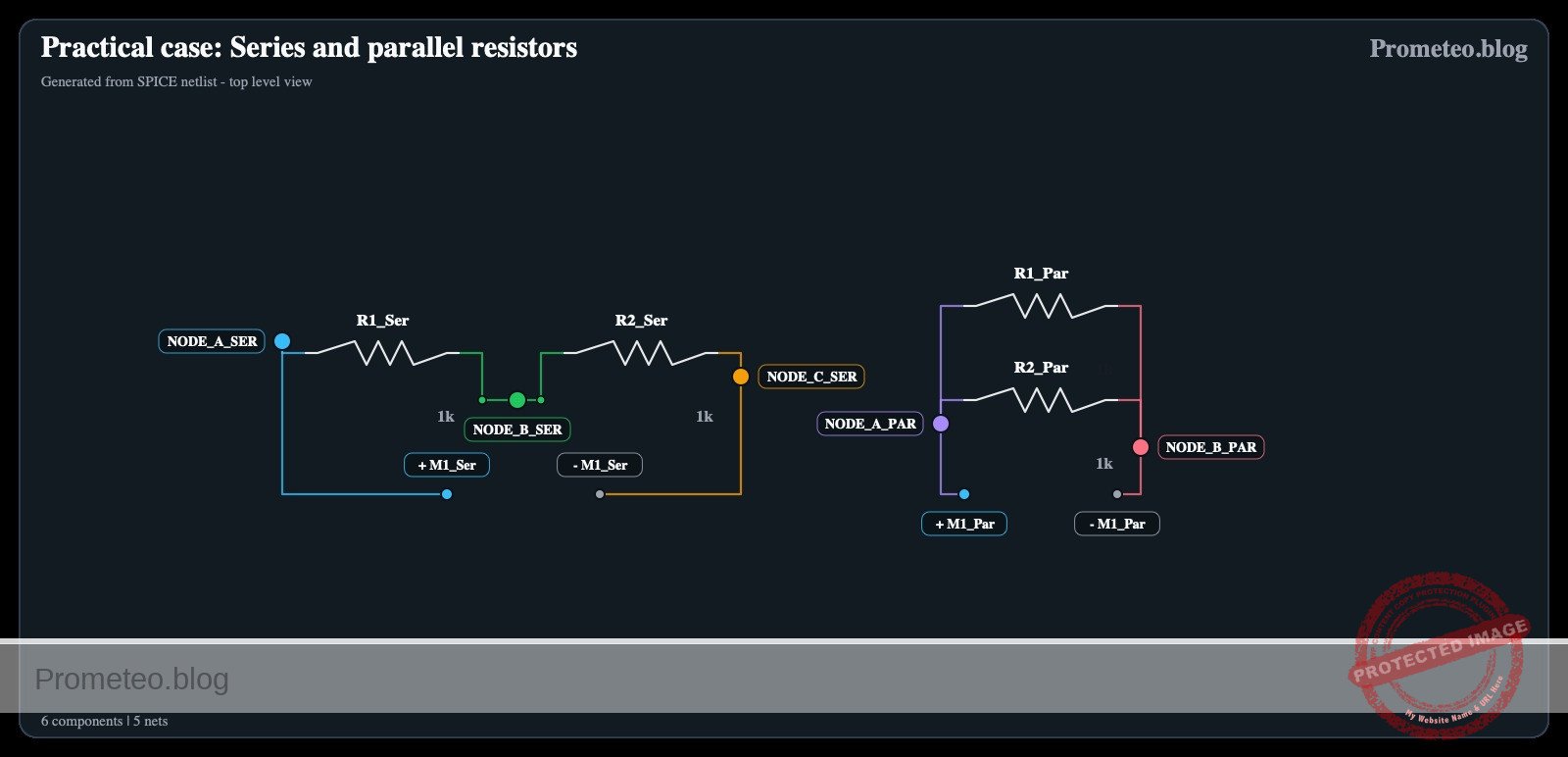
Part A: Series Configuration
* R1: Connects between node Node_A and node Node_B.
* R2: Connects between node Node_B and node Node_C.
* M1 (Positive Probe): Connects to Node_A.
* M1 (Negative Probe): Connects to Node_C.

Part B: Parallel Configuration (Re-wiring required)
* R1: Connects between node Node_A and node Node_B.
* R2: Connects between node Node_A and node Node_B (physically parallel to R1).
* M1 (Positive Probe): Connects to Node_A.
* M1 (Negative Probe): Connects to Node_B.

Conceptual block diagram

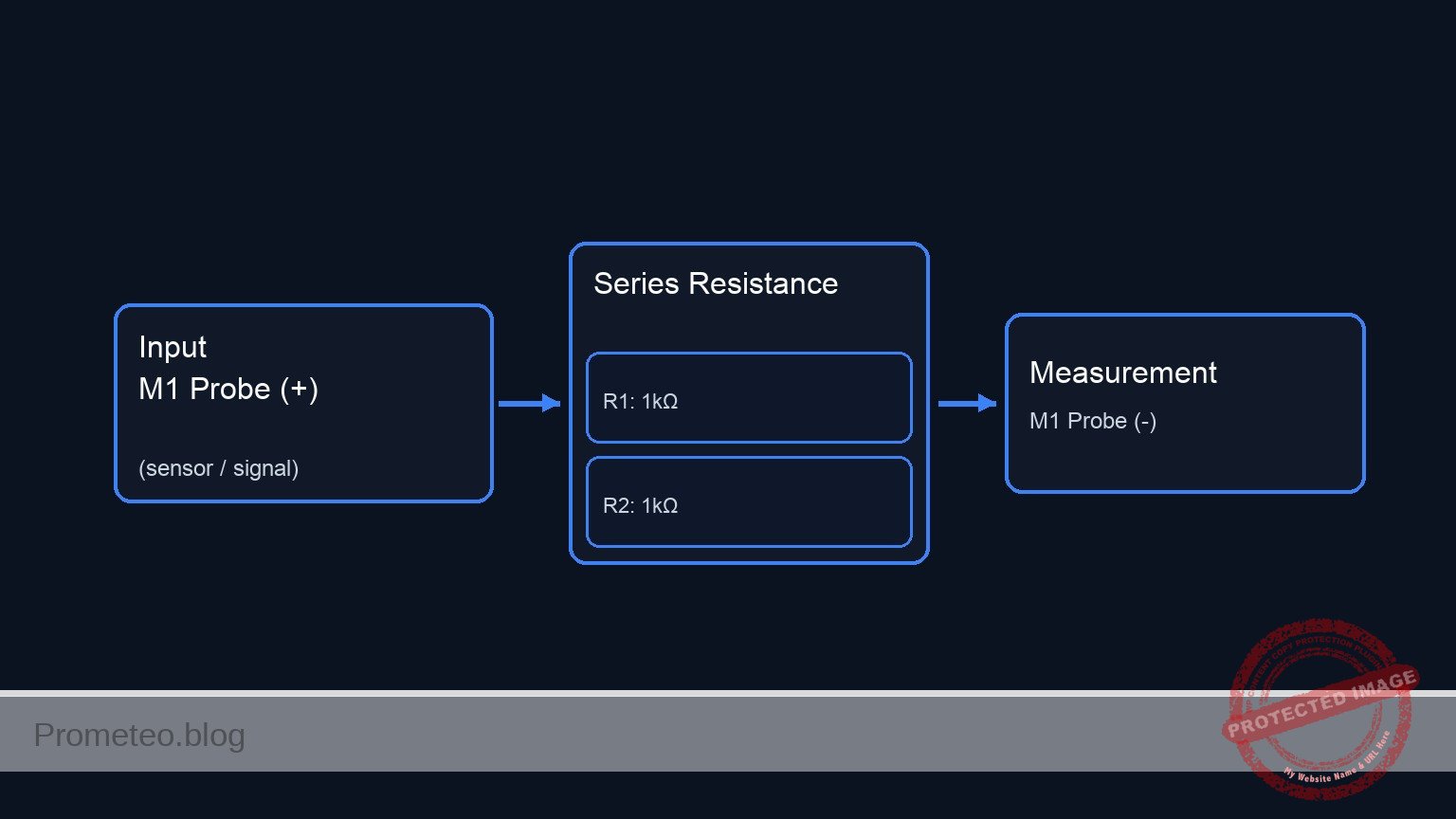
Conceptual block diagram — Series Resistance
Quick read: inputs → main block → output (actuator or measurement). This summarizes the ASCII schematic below.

Schematic

PART A: SERIES CONFIGURATION (Current flows through R1 then R2)

      [ INPUT / SOURCE ]             [ CIRCUIT TOPOLOGY ]             [ RETURN / MEASURE ]

    [ M1 Probe (+) ] --(Node A)--> [ R1: 1kΩ ] --(Node B)--> [ R2: 1kΩ ] --(Node C)--> [ M1 Probe (-) ]


PART B: PARALLEL CONFIGURATION (Current splits between R1 and R2)

      [ INPUT / SOURCE ]             [ CIRCUIT TOPOLOGY ]             [ RETURN / MEASURE ]

                                         +--> [ R1: 1kΩ ] --+
    [ M1 Probe (+) ] --(Node A)--> [ SPLIT ]                [ JOIN ] --(Node B)--> [ M1 Probe (-) ]
                                         +--> [ R2: 1kΩ ] --+
Schematic (ASCII)

Electrical diagram

Electrical diagram: Practical case: Series and parallel resistors
Generated from the validated SPICE netlist for this case.

🔒 This electrical diagram is premium. With the 7-day pass or the monthly membership you can unlock the complete didactic material and the print-ready PDF pack.🔓 See premium access plans

Measurements and tests

Perform these steps with the multimeter set to the Ohms (Ω) setting (start with the 20k range if manual).

  1. Component verification:
    • Measure R1 and R2 individually before connecting them. Confirm they are approximately 1 kΩ each.
  2. Series measurement:
    • Construct the circuit described in Part A of the Wiring Guide.
    • Connect the probes to Node_A and Node_C.
    • Validation: The display should read approximately 2.0 kΩ ($R1 + R2$).
  3. Parallel measurement:
    • Modify the circuit to match Part B of the Wiring Guide (connect both resistor ends to the same pair of rows).
    • Connect the probes across the parallel pair.
    • Validation: The display should read approximately 0.5 kΩ (500 Ω).
  4. Comparison:
    • Observe that the series combination increases total resistance, while the parallel combination decreases total resistance.

SPICE netlist and simulation

Reference SPICE Netlist (ngspice) — excerptFull SPICE netlist (ngspice)

* Practical case: Series and parallel resistors
*
* This netlist implements both Part A (Series) and Part B (Parallel) 
* configurations as separate sub-circuits to allow simultaneous simulation.
*
* BOM:
* R1, R2: 1 kΩ resistors
* M1: Digital Multimeter (Simulated as 1mA Current Source for Resistance Measurement)
* W1: Jumper wires (Implicit in netlist connectivity)

* ==============================================================================
* GLOBAL SETTINGS
* ==============================================================================
* Global Ground is Node 0.
* Unused System Supply (Required by prompt constraints)
VCC_Supply VCC 0 DC 5

* ==============================================================================
* PART A: SERIES CONFIGURATION
* ==============================================================================
* ... (truncated in public view) ...

Copy this content into a .cir file and run with ngspice.

🔒 Part of this section is premium. With the 7-day pass or the monthly membership you can access the full content (materials, wiring, detailed build, validation, troubleshooting, variants and checklist) and download the complete print-ready PDF pack.

* Practical case: Series and parallel resistors
*
* This netlist implements both Part A (Series) and Part B (Parallel) 
* configurations as separate sub-circuits to allow simultaneous simulation.
*
* BOM:
* R1, R2: 1 kΩ resistors
* M1: Digital Multimeter (Simulated as 1mA Current Source for Resistance Measurement)
* W1: Jumper wires (Implicit in netlist connectivity)

* ==============================================================================
* GLOBAL SETTINGS
* ==============================================================================
* Global Ground is Node 0.
* Unused System Supply (Required by prompt constraints)
VCC_Supply VCC 0 DC 5

* ==============================================================================
* PART A: SERIES CONFIGURATION
* ==============================================================================
* Wiring Guide Mapping:
* Node_A -> Node_A_Ser
* Node_B -> Node_B_Ser
* Node_C -> Node_C_Ser
*
* Connections:
* R1 connects between Node_A and Node_B
* R2 connects between Node_B and Node_C
* M1 (Ohmmeter) connects to Node_A (+) and Node_C (-)
*
* Simulation Logic:
* Ohmmeter is modeled as a 1mA Current Source (I_M1_Ser) injecting into the 
* positive probe node, with the negative probe node grounded.
* V(Node_A_Ser) = Resistance * 1mA => 1V = 1kΩ.

I_M1_Ser     0            Node_A_Ser   DC 1m
R1_Ser       Node_A_Ser   Node_B_Ser   1k
R2_Ser       Node_B_Ser   Node_C_Ser   1k
V_M1_Ret_Ser Node_C_Ser   0            DC 0   ; Ground return for M1 (-)

* ==============================================================================
* PART B: PARALLEL CONFIGURATION
* ==============================================================================
* Wiring Guide Mapping:
* Node_A -> Node_A_Par
* Node_B -> Node_B_Par
*
* Connections:
* R1 connects between Node_A and Node_B
* R2 connects between Node_A and Node_B (Physically parallel)
* M1 (Ohmmeter) connects to Node_A (+) and Node_B (-)

I_M1_Par     0            Node_A_Par   DC 1m
R1_Par       Node_A_Par   Node_B_Par   1k
R2_Par       Node_A_Par   Node_B_Par   1k
V_M1_Ret_Par Node_B_Par   0            DC 0   ; Ground return for M1 (-)

* ==============================================================================
* ANALYSIS DIRECTIVES
* ==============================================================================
* Transient analysis to satisfy prompt requirements for logging
.tran 100u 5ms

* Print voltages representing resistance values
* V(Node_A_Ser) should be ~2.0V (2kΩ)
* V(Node_A_Par) should be ~0.5V (500Ω)
.print tran V(Node_A_Ser) V(Node_B_Ser) V(Node_A_Par)

* DC Operating Point for quick verification
.op

.end

Simulation Results (Transient Analysis)

Simulation Results (Transient Analysis)
Show raw data table (59 rows)
Index   time            v(node_a_ser)   v(node_b_ser)   v(node_a_par)
0	0.000000e+00	2.000000e+00	1.000000e+00	5.000000e-01
1	5.000000e-07	2.000000e+00	1.000000e+00	5.000000e-01
2	1.000000e-06	2.000000e+00	1.000000e+00	5.000000e-01
3	2.000000e-06	2.000000e+00	1.000000e+00	5.000000e-01
4	4.000000e-06	2.000000e+00	1.000000e+00	5.000000e-01
5	8.000000e-06	2.000000e+00	1.000000e+00	5.000000e-01
6	1.600000e-05	2.000000e+00	1.000000e+00	5.000000e-01
7	3.200000e-05	2.000000e+00	1.000000e+00	5.000000e-01
8	6.400000e-05	2.000000e+00	1.000000e+00	5.000000e-01
9	1.280000e-04	2.000000e+00	1.000000e+00	5.000000e-01
10	2.280000e-04	2.000000e+00	1.000000e+00	5.000000e-01
11	3.280000e-04	2.000000e+00	1.000000e+00	5.000000e-01
12	4.280000e-04	2.000000e+00	1.000000e+00	5.000000e-01
13	5.280000e-04	2.000000e+00	1.000000e+00	5.000000e-01
14	6.280000e-04	2.000000e+00	1.000000e+00	5.000000e-01
15	7.280000e-04	2.000000e+00	1.000000e+00	5.000000e-01
16	8.280000e-04	2.000000e+00	1.000000e+00	5.000000e-01
17	9.280000e-04	2.000000e+00	1.000000e+00	5.000000e-01
18	1.028000e-03	2.000000e+00	1.000000e+00	5.000000e-01
19	1.128000e-03	2.000000e+00	1.000000e+00	5.000000e-01
20	1.228000e-03	2.000000e+00	1.000000e+00	5.000000e-01
21	1.328000e-03	2.000000e+00	1.000000e+00	5.000000e-01
22	1.428000e-03	2.000000e+00	1.000000e+00	5.000000e-01
23	1.528000e-03	2.000000e+00	1.000000e+00	5.000000e-01
... (35 more rows) ...

Common mistakes and how to avoid them

  1. Measuring resistance with power on: Never measure resistance in a live circuit. This will give false readings and may blow the fuse in your multimeter. Solution: Disconnect all batteries or power supplies before using the ohmmeter.
  2. Touching the metal probes: If you hold the metal tips of the probes with both hands while measuring, your body’s resistance (parallel to the circuit) will affect the reading, especially with high-value resistors. Solution: Use alligator clips or press the probes against the breadboard without touching the metal tips.
  3. Assuming perfect values: A 1 kΩ resistor with 5% tolerance can physically measure between 950 Ω and 1050 Ω. Solution: Always measure the individual components first to know their actual values before calculating the expected total.

Troubleshooting

  • Symptom: Multimeter reads «1» or «OL» (Over Limit).
    • Cause: The resistance is higher than the selected range on the multimeter.
    • Fix: Switch the dial to a higher range (e.g., from 200 Ω to 2 kΩ or 20 kΩ).
  • Symptom: Reading is 0 Ω.
    • Cause: Short circuit; the probes might be touching each other or a wire is bypassing the resistors.
    • Fix: Check the breadboard rows to ensure the resistors are not shorted out by a misplaced jumper.
  • Symptom: Reading fluctuates or is unstable.
    • Cause: Poor contact between the resistor leads and the breadboard clips.
    • Fix: Remove the resistor, straighten the legs, and re-insert it firmly into different holes on the same node.

Possible improvements and extensions

  1. Mixed topology: Add a third resistor (R3 = 1 kΩ) in series with the parallel pair of R1 and R2 to create a Series-Parallel combination. Calculate and verify the new total (1.5 kΩ).
  2. Variable resistance: Replace R2 with a 10 kΩ potentiometer. Measure how the total resistance changes in both series and parallel configurations as you turn the knob.

More Practical Cases on Prometeo.blog

Find this product and/or books on this topic on Amazon

Go to Amazon

As an Amazon Associate, I earn from qualifying purchases. If you buy through this link, you help keep this project running.

Quick Quiz

Question 1: What is the primary objective of this practical case?


Question 2: Which instrument is used to measure the equivalent resistance in this experiment?


Question 3: What is the expected equivalent resistance when two 1 kΩ resistors are connected in series?


Question 4: What is the expected equivalent resistance when two 1 kΩ resistors are connected in parallel?


Question 5: Which of the following is a practical application for understanding equivalent resistance mentioned in the text?


Question 6: According to the text, what is the expected outcome for the measured values compared to theoretical calculations?


Question 7: Who is the primary target audience for this practical case?


Question 8: Why might understanding equivalent resistance be useful for LED circuits?


Question 9: If standard components are not available, how does this knowledge help?


Question 10: In a parallel configuration with two identical resistors, how does the equivalent resistance compare to the individual resistance?


Carlos Núñez Zorrilla
Electronics & Computer Engineer

Telecommunications Electronics Engineer and Computer Engineer (official degrees in Spain).
Follow me:


Caso práctico: Resistencias en serie y paralelo

Prototipo de Resistencias en serie y paralelo (Maker Style)

Nivel: Básico – Verificar fórmulas de resistencia equivalente mediante medición.

Objetivo y caso de uso

En este caso práctico, construirás un circuito pasivo utilizando dos resistencias para analizar cómo cambian los valores de resistencia cuando los componentes se conectan en serie frente a paralelo. Medirás la resistencia equivalente total (Req) usando un multímetro en modo óhmetro.

  • Útil para:
    • Diseñar divisores de voltaje para sensores o fuentes de alimentación.
    • Calcular la resistencia de carga total en redes de distribución de energía.
    • Ajustar valores de resistencia específicos cuando no hay componentes estándar disponibles.
    • Comprender las rutas de limitación de corriente en circuitos controladores de LED.
  • Resultado esperado:
    • Modo serie: El valor medido debe ser igual a la suma de ambas resistencias (Req ≈ 2 kΩ).
    • Modo paralelo: El valor medido debe ser la mitad de la resistencia individual (si R1=R2) o seguir la fórmula de paralelo (Req ≈ 500 Ω).
    • Verificación: Los valores medidos deben caer dentro del rango de tolerancia (p. ej., ±5%) del cálculo teórico.
  • Público objetivo: Estudiantes y aficionados que aprenden las leyes fundamentales del análisis de circuitos (Ley de Ohm).

Materiales

  • R1: Resistencia de 1 kΩ, función: Carga de prueba A
  • R2: Resistencia de 1 kΩ, función: Carga de prueba B
  • M1: Multímetro digital, función: Medición de resistencia (Óhmetro)
  • W1: Cables puente (jumpers), función: Interconexión del circuito

Guía de conexionado

Esta guía utiliza nombres de nodos específicos. Asegúrate de que el circuito no esté conectado a una fuente de voltaje (batería) durante las mediciones de resistencia.

Parte A: Configuración en serie
* R1: Se conecta entre el nodo Node_A y el nodo Node_B.
* R2: Se conecta entre el nodo Node_B y el nodo Node_C.
* M1 (Sonda positiva): Se conecta al Node_A.
* M1 (Sonda negativa): Se conecta al Node_C.

Parte B: Configuración en paralelo (Requiere recableado)
* R1: Se conecta entre el nodo Node_A y el nodo Node_B.
* R2: Se conecta entre el nodo Node_A y el nodo Node_B (físicamente en paralelo a R1).
* M1 (Sonda positiva): Se conecta al Node_A.
* M1 (Sonda negativa): Se conecta al Node_B.

Diagrama de bloques conceptual

Conceptual block diagram — Series Resistance
Lectura rápida: entradas → bloque principal → salida (actuador o medida). Resume el esquemático ASCII de la siguiente sección.

Esquemático

PART A: SERIES CONFIGURATION (Current flows through R1 then R2)

      [ INPUT / SOURCE ]             [ CIRCUIT TOPOLOGY ]             [ RETURN / MEASURE ]

    [ M1 Probe (+) ] --(Node A)--> [ R1: 1kΩ ] --(Node B)--> [ R2: 1kΩ ] --(Node C)--> [ M1 Probe (-) ]


PART B: PARALLEL CONFIGURATION (Current splits between R1 and R2)

      [ INPUT / SOURCE ]             [ CIRCUIT TOPOLOGY ]             [ RETURN / MEASURE ]

                                         +--> [ R1: 1kΩ ] --+
    [ M1 Probe (+) ] --(Node A)--> [ SPLIT ]                [ JOIN ] --(Node B)--> [ M1 Probe (-) ]
                                         +--> [ R2: 1kΩ ] --+
Esquema Eléctrico

Diagrama eléctrico

Diagrama eléctrico: Caso práctico: Resistencias en serie y paralelo
Generado desde la netlist SPICE validada del caso.

🔒 Este diagrama eléctrico es premium. Con el pase de 7 días o la suscripción mensual podrás desbloquear el material didáctico completo y el pack PDF listo para imprimir.🔓 Ver planes de acceso premium

Mediciones y pruebas

Realiza estos pasos con el multímetro configurado en el ajuste de Ohmios (Ω) (comienza con el rango de 20k si es manual).

  1. Verificación de componentes:
    • Mide R1 y R2 individualmente antes de conectarlas. Confirma que sean de aproximadamente 1 kΩ cada una.
  2. Medición en serie:
    • Construye el circuito descrito en la Parte A de la Guía de conexionado.
    • Conecta las sondas al Node_A y Node_C.
    • Validación: La pantalla debe indicar aproximadamente 2.0 kΩ ($R1 + R2$).
  3. Medición en paralelo:
    • Modifica el circuito para que coincida con la Parte B de la Guía de conexionado (conecta ambos extremos de la resistencia al mismo par de filas).
    • Conecta las sondas a través del par paralelo.
    • Validación: La pantalla debe indicar aproximadamente 0.5 kΩ (500 Ω).
  4. Comparación:
    • Observa que la combinación en serie aumenta la resistencia total, mientras que la combinación en paralelo disminuye la resistencia total.

Netlist SPICE y simulación

Netlist SPICE de referencia (ngspice) — extractoNetlist SPICE completo (ngspice)

* Practical case: Series and parallel resistors
*
* This netlist implements both Part A (Series) and Part B (Parallel) 
* configurations as separate sub-circuits to allow simultaneous simulation.
*
* BOM:
* R1, R2: 1 kΩ resistors
* M1: Digital Multimeter (Simulated as 1mA Current Source for Resistance Measurement)
* W1: Jumper wires (Implicit in netlist connectivity)

* ==============================================================================
* GLOBAL SETTINGS
* ==============================================================================
* Global Ground is Node 0.
* Unused System Supply (Required by prompt constraints)
VCC_Supply VCC 0 DC 5

* ==============================================================================
* PART A: SERIES CONFIGURATION
* ==============================================================================
* ... (truncated in public view) ...

Copia este contenido en un archivo .cir y ejecútalo con ngspice.

🔒 Parte del contenido de esta sección es premium. Con el pase de 7 días o la suscripción mensual tendrás acceso al contenido completo (materiales, conexionado, compilación detallada, validación paso a paso, troubleshooting, mejoras/variantes y checklist) y podrás descargar el pack PDF listo para imprimir.

* Practical case: Series and parallel resistors
*
* This netlist implements both Part A (Series) and Part B (Parallel) 
* configurations as separate sub-circuits to allow simultaneous simulation.
*
* BOM:
* R1, R2: 1 kΩ resistors
* M1: Digital Multimeter (Simulated as 1mA Current Source for Resistance Measurement)
* W1: Jumper wires (Implicit in netlist connectivity)

* ==============================================================================
* GLOBAL SETTINGS
* ==============================================================================
* Global Ground is Node 0.
* Unused System Supply (Required by prompt constraints)
VCC_Supply VCC 0 DC 5

* ==============================================================================
* PART A: SERIES CONFIGURATION
* ==============================================================================
* Wiring Guide Mapping:
* Node_A -> Node_A_Ser
* Node_B -> Node_B_Ser
* Node_C -> Node_C_Ser
*
* Connections:
* R1 connects between Node_A and Node_B
* R2 connects between Node_B and Node_C
* M1 (Ohmmeter) connects to Node_A (+) and Node_C (-)
*
* Simulation Logic:
* Ohmmeter is modeled as a 1mA Current Source (I_M1_Ser) injecting into the 
* positive probe node, with the negative probe node grounded.
* V(Node_A_Ser) = Resistance * 1mA => 1V = 1kΩ.

I_M1_Ser     0            Node_A_Ser   DC 1m
R1_Ser       Node_A_Ser   Node_B_Ser   1k
R2_Ser       Node_B_Ser   Node_C_Ser   1k
V_M1_Ret_Ser Node_C_Ser   0            DC 0   ; Ground return for M1 (-)

* ==============================================================================
* PART B: PARALLEL CONFIGURATION
* ==============================================================================
* Wiring Guide Mapping:
* Node_A -> Node_A_Par
* Node_B -> Node_B_Par
*
* Connections:
* R1 connects between Node_A and Node_B
* R2 connects between Node_A and Node_B (Physically parallel)
* M1 (Ohmmeter) connects to Node_A (+) and Node_B (-)

I_M1_Par     0            Node_A_Par   DC 1m
R1_Par       Node_A_Par   Node_B_Par   1k
R2_Par       Node_A_Par   Node_B_Par   1k
V_M1_Ret_Par Node_B_Par   0            DC 0   ; Ground return for M1 (-)

* ==============================================================================
* ANALYSIS DIRECTIVES
* ==============================================================================
* Transient analysis to satisfy prompt requirements for logging
.tran 100u 5ms

* Print voltages representing resistance values
* V(Node_A_Ser) should be ~2.0V (2kΩ)
* V(Node_A_Par) should be ~0.5V (500Ω)
.print tran V(Node_A_Ser) V(Node_B_Ser) V(Node_A_Par)

* DC Operating Point for quick verification
.op

.end

Resultados de Simulación (Transitorio)

Resultados de Simulación (Transitorio)
Show raw data table (59 rows)
Index   time            v(node_a_ser)   v(node_b_ser)   v(node_a_par)
0	0.000000e+00	2.000000e+00	1.000000e+00	5.000000e-01
1	5.000000e-07	2.000000e+00	1.000000e+00	5.000000e-01
2	1.000000e-06	2.000000e+00	1.000000e+00	5.000000e-01
3	2.000000e-06	2.000000e+00	1.000000e+00	5.000000e-01
4	4.000000e-06	2.000000e+00	1.000000e+00	5.000000e-01
5	8.000000e-06	2.000000e+00	1.000000e+00	5.000000e-01
6	1.600000e-05	2.000000e+00	1.000000e+00	5.000000e-01
7	3.200000e-05	2.000000e+00	1.000000e+00	5.000000e-01
8	6.400000e-05	2.000000e+00	1.000000e+00	5.000000e-01
9	1.280000e-04	2.000000e+00	1.000000e+00	5.000000e-01
10	2.280000e-04	2.000000e+00	1.000000e+00	5.000000e-01
11	3.280000e-04	2.000000e+00	1.000000e+00	5.000000e-01
12	4.280000e-04	2.000000e+00	1.000000e+00	5.000000e-01
13	5.280000e-04	2.000000e+00	1.000000e+00	5.000000e-01
14	6.280000e-04	2.000000e+00	1.000000e+00	5.000000e-01
15	7.280000e-04	2.000000e+00	1.000000e+00	5.000000e-01
16	8.280000e-04	2.000000e+00	1.000000e+00	5.000000e-01
17	9.280000e-04	2.000000e+00	1.000000e+00	5.000000e-01
18	1.028000e-03	2.000000e+00	1.000000e+00	5.000000e-01
19	1.128000e-03	2.000000e+00	1.000000e+00	5.000000e-01
20	1.228000e-03	2.000000e+00	1.000000e+00	5.000000e-01
21	1.328000e-03	2.000000e+00	1.000000e+00	5.000000e-01
22	1.428000e-03	2.000000e+00	1.000000e+00	5.000000e-01
23	1.528000e-03	2.000000e+00	1.000000e+00	5.000000e-01
... (35 more rows) ...

Errores comunes y cómo evitarlos

  1. Medir resistencia con la alimentación encendida: Nunca midas resistencia en un circuito vivo. Esto dará lecturas falsas y puede fundir el fusible de tu multímetro. Solución: Desconecta todas las baterías o fuentes de alimentación antes de usar el óhmetro.
  2. Tocar las sondas metálicas: Si sostienes las puntas metálicas de las sondas con ambas manos mientras mides, la resistencia de tu cuerpo (en paralelo al circuito) afectará la lectura, especialmente con resistencias de alto valor. Solución: Usa pinzas de cocodrilo o presiona las sondas contra la protoboard sin tocar las puntas metálicas.
  3. Asumir valores perfectos: Una resistencia de 1 kΩ con 5% de tolerancia puede medir físicamente entre 950 Ω y 1050 Ω. Solución: Siempre mide los componentes individuales primero para conocer sus valores reales antes de calcular el total esperado.

Solución de problemas

  • Síntoma: El multímetro lee «1» u «OL» (Over Limit/Fuera de límite).
    • Causa: La resistencia es mayor que el rango seleccionado en el multímetro.
    • Solución: Cambia el selector a un rango más alto (p. ej., de 200 Ω a 2 kΩ o 20 kΩ).
  • Síntoma: La lectura es 0 Ω.
    • Causa: Cortocircuito; las sondas podrían estar tocándose entre sí o un cable está puenteando las resistencias.
    • Solución: Revisa las filas de la protoboard para asegurarte de que las resistencias no estén en cortocircuito por un cable mal colocado.
  • Síntoma: La lectura fluctúa o es inestable.
    • Causa: Mal contacto entre las patas de la resistencia y los clips de la protoboard.
    • Solución: Retira la resistencia, endereza las patas y vuelve a insertarla firmemente en orificios diferentes del mismo nodo.

Posibles mejoras y extensiones

  1. Topología mixta: Añade una tercera resistencia (R3 = 1 kΩ) en serie con el par paralelo de R1 y R2 para crear una combinación Serie-Paralelo. Calcula y verifica el nuevo total (1.5 kΩ).
  2. Resistencia variable: Reemplaza R2 con un potenciómetro de 10 kΩ. Mide cómo cambia la resistencia total en ambas configuraciones (serie y paralelo) mientras giras la perilla.

Más Casos Prácticos en Prometeo.blog

Encuentra este producto y/o libros sobre este tema en Amazon

Ir a Amazon

Como afiliado de Amazon, gano con las compras que cumplan los requisitos. Si compras a través de este enlace, ayudas a mantener este proyecto.

Quiz rápido

Pregunta 1: ¿Cuál es el objetivo principal de este caso práctico?


Pregunta 2: ¿Qué instrumento se utiliza para medir la resistencia equivalente total (Req)?


Pregunta 3: En el modo serie, ¿cuál es el resultado esperado para la resistencia equivalente?


Pregunta 4: Si se utilizan dos resistencias de 1 kΩ en paralelo, ¿cuál es el valor aproximado esperado?


Pregunta 5: ¿Para qué aplicación es útil entender la resistencia equivalente?


Pregunta 6: Según el contexto, ¿cuál es el valor implícito de las resistencias individuales usadas en el ejemplo?


Pregunta 7: ¿Qué resultado se espera al medir las resistencias en modo paralelo si R1 es igual a R2?


Pregunta 8: En la verificación de resultados, ¿qué condición deben cumplir los valores medidos?


Pregunta 9: ¿Cuál de las siguientes NO se menciona como una utilidad de este caso práctico?


Pregunta 10: Si el resultado esperado en serie es aprox. 2 kΩ, ¿qué sucede con la corriente en comparación con una sola resistencia de 1 kΩ (a mismo voltaje)?


Carlos Núñez Zorrilla
Electronics & Computer Engineer

Ingeniero Superior en Electrónica de Telecomunicaciones e Ingeniero en Informática (titulaciones oficiales en España).

Sígueme: