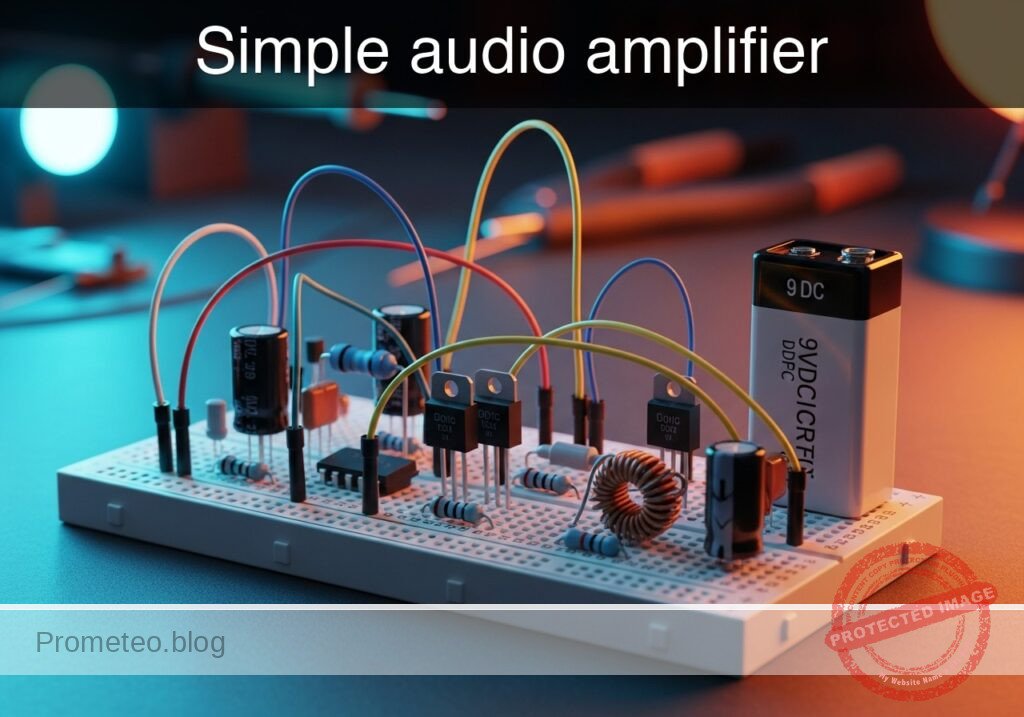
Practical case: Simple audio amplifier

Simple audio amplifier prototype (Maker Style)

Level: Basic. Build a circuit to amplify a weak audio signal using an NPN transistor in common-emitter configuration.

Objective and use case

In this case, you will build a classic single-stage Class A amplifier using an NPN transistor with voltage divider biasing. You will input a small AC signal (representing audio) and observe a larger voltage swing at the output.

  • Why it is useful:

    • Pre-amplification: Boosts weak signals from microphones before they reach a power amplifier.
    • Signal conditioning: Raises sensor output levels to be readable by microcontrollers.
    • Analog processing: Fundamental building block for filters, oscillators, and mixers.
    • Impedance matching: Buffers high-impedance sources to drive lower-impedance loads (depending on specific configuration).
  • Expected outcome:

    • DC Operating Point: VCE stabilizes around half the supply voltage (VCC / 2) for maximum swing.
    • Amplification: The AC output voltage (Vout) is significantly larger than the input (Vin), indicating Voltage Gain (Av > 1).
    • Phase Inversion: The output signal waveform is inverted (180^\circ) relative to the input.
    • Current Flow: IC is controlled by IB according to the transistor’s beta (\beta).
  • Target audience and level: Students with basic knowledge of Ohm’s Law and component identification.

Materials

  • V1: 9 V DC battery or bench supply, function: main circuit power.
  • V2: Signal Generator (Sine wave, 1 kHz, 20 mV peak-to-peak), function: simulates weak audio input.
  • Q1: 2N3904 (or 2N2222) NPN BJT, function: active amplifying element.
  • R1: 22 kΩ resistor, function: upper base bias divider.
  • R2: 6.8 kΩ resistor, function: lower base bias divider.
  • R3: 4.7 kΩ resistor, function: collector load (sets gain and output impedance).
  • R4: 1 kΩ resistor, function: emitter degeneration (sets DC stability).
  • C1: 10 µF electrolytic capacitor, function: input DC blocking.
  • C2: 10 µF electrolytic capacitor, function: output DC blocking.
  • C3: 100 µF electrolytic capacitor, function: emitter bypass (increases AC gain).

Wiring guide

Use the following nodes to wire your circuit: VCC (9 V), 0 (GND), BASE, COLL, EMIT, VIN, VOUT.

  • V1: Positive terminal connects to VCC, Negative terminal connects to 0.
  • V2: Signal output connects to VIN, Ground connects to 0.
  • R1: Connects between VCC and BASE.
  • R2: Connects between BASE and 0.
  • R3: Connects between VCC and COLL.
  • R4: Connects between EMIT and 0.
  • Q1: Collector pin to COLL, Base pin to BASE, Emitter pin to EMIT.
  • C1: Positive leg to BASE, Negative leg to VIN.
  • C2: Positive leg to COLL, Negative leg to VOUT (Load/Scope probe connects here).
  • C3: Positive leg to EMIT, Negative leg to 0 (Place in parallel with R4).

Conceptual block diagram
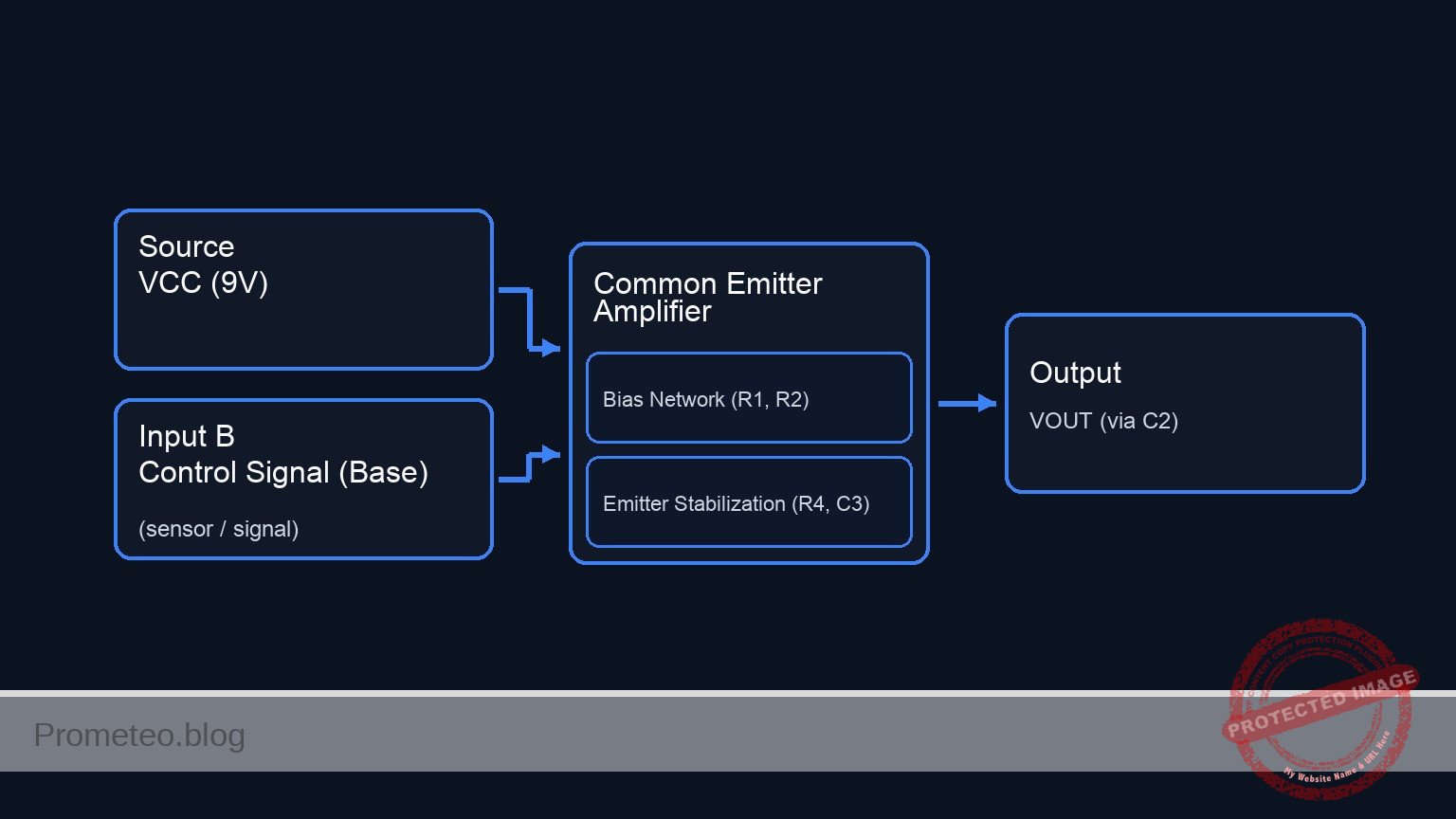
Conceptual block diagram — Common Emitter Amplifier
Quick read: inputs → main block → output (actuator or measurement). This summarizes the ASCII schematic below.

Schematic

Title: Practical case: Simple audio amplifier

      (BIAS & INPUT NETWORK)                               (POWER & OUTPUT NETWORK)
      ======================                               ========================

                                                           VCC (9 V)
      VCC (9 V)                                                |
         |                                                    |
         v                                                    v
    [ R1: 22k ]                                          [ R3: 4.7k ]
         |                                                    |
         v                                                    v
      (BASE) --------(Control Signal)----------------> [ Q1: Collector ] <--(COLL)--+
         ^                                                    |                     |
         |                                                    | (Amplified Current) |
    [ C1: 10uF ] <--(VIN)-- [ V2: Source ]                    v                     |
         |                                             [ Q1: Emitter ]              +--> [ C2: 10uF ] --> VOUT
         v                                                    |
    [ R2: 6.8k ]                                              v
         |                                                  (EMIT)
         v                                                    |
        GND                                       +-----------+-----------+
                                                  |                       |
                                                  v                       v
                                             [ R4: 1k ]             [ C3: 100uF ]
                                                  |                       |
                                                  v                       v
                                                 GND                     GND
Schematic (ASCII)

Measurements and tests

Perform these tests using a Multimeter (DMM) and an Oscilloscope (if available).

  1. DC Bias Check (Quiescent Point):

    • Ensure V2 (AC source) is OFF or disconnected.
    • Measure voltage from COLL to 0. It should be approximately 4 V to 5 V (roughly half of VCC).
    • Measure voltage from EMIT to 0. It should be approximately 1 V (VE).
    • Measure voltage from BASE to EMIT (VBE). It must be ~0.65 V to 0.7 V for the transistor to be active.
  2. Current Calculation:

    • Calculate Collector Current (IC): IC ≈ VEMIT / R4. Expect approx 1 mA.
    • Calculate Base Current (IB): IC / \beta (assuming \beta ≈ 100, IB ≈ 10 µ A).
  3. AC Gain Verification:

    • Connect V2 (VIN) with a 20 mV peak-to-peak sine wave at 1 kHz.
    • Measure the Peak-to-Peak voltage at VOUT.
    • Calculate Voltage Gain (Av): Av = Voutpp / Vinpp.
    • Observation: Without C3, gain is low (≈ R3 / R4). With C3 connected, gain should increase significantly.

SPICE netlist and simulation

Reference SPICE Netlist (ngspice) — excerptFull SPICE netlist (ngspice)

* Practical case: Simple audio amplifier

* --- Power Supply ---
* V1: 9 V DC battery
V1 VCC 0 DC 9

* --- Input Signal ---
* V2: Signal Generator (Sine wave, 1 kHz, 20 mV peak-to-peak -> 10mV Amplitude)
V2 VIN 0 SIN(0 10m 1k)

* --- Components ---
* Q1: 2N3904 NPN BJT
Q1 COLL BASE EMIT 2N3904

* R1: Upper base bias divider
R1 VCC BASE 22k

* R2: Lower base bias divider
R2 BASE 0 6.8k

* ... (truncated in public view) ...

Copy this content into a .cir file and run with ngspice.

🔒 Part of this section is premium. With the 7-day pass or the monthly membership you can access the full content (materials, wiring, detailed build, validation, troubleshooting, variants and checklist) and download the complete print-ready PDF pack.

* Practical case: Simple audio amplifier

* --- Power Supply ---
* V1: 9 V DC battery
V1 VCC 0 DC 9

* --- Input Signal ---
* V2: Signal Generator (Sine wave, 1 kHz, 20 mV peak-to-peak -> 10mV Amplitude)
V2 VIN 0 SIN(0 10m 1k)

* --- Components ---
* Q1: 2N3904 NPN BJT
Q1 COLL BASE EMIT 2N3904

* R1: Upper base bias divider
R1 VCC BASE 22k

* R2: Lower base bias divider
R2 BASE 0 6.8k

* R3: Collector load
R3 VCC COLL 4.7k

* R4: Emitter degeneration
R4 EMIT 0 1k

* C1: Input DC blocking (Positive leg to BASE, Negative leg to VIN)
C1 BASE VIN 10u

* C2: Output DC blocking (Positive leg to COLL, Negative leg to VOUT)
C2 COLL VOUT 10u

* C3: Emitter bypass (Positive leg to EMIT, Negative leg to 0)
C3 EMIT 0 100u

* --- Load Simulation ---
* High impedance load to simulate scope probe and prevent floating node error at VOUT
R_SCOPE VOUT 0 1Meg

* --- Models ---
.model 2N3904 NPN(IS=1E-14 VAF=100 BF=300 IKF=0.4 XTB=1.5 BR=4 CJC=4E-12 CJE=8E-12 RB=20 RC=0.1 RE=0.1 TR=250n TF=350p ITF=1 VTF=2 XTF=3)

* --- Analysis Directives ---
.op
.tran 10u 5ms

* --- Output ---
* Prints Input and Output voltages, plus internal transistor nodes
.print tran V(VIN) V(VOUT) V(BASE) V(COLL) V(EMIT)

.end

Simulation Results (Transient Analysis)

Simulation Results (Transient Analysis)
Show raw data table (511 rows)
Index   time            v(vin)          v(vout)         v(base)         v(coll)         v(emit)
0	0.000000e+00	0.000000e+00	0.000000e+00	2.100182e+00	2.275541e+00	1.435514e+00
1	1.000000e-07	6.283185e-06	-1.11372e-03	2.100188e+00	2.274427e+00	1.435514e+00
2	2.000000e-07	1.256637e-05	-2.51792e-03	2.100195e+00	2.273023e+00	1.435514e+00
3	4.000000e-07	2.513271e-05	-5.47602e-03	2.100207e+00	2.270065e+00	1.435514e+00
4	8.000000e-07	5.026527e-05	-1.15278e-02	2.100232e+00	2.264013e+00	1.435514e+00
5	1.600000e-06	1.005293e-04	-2.35622e-02	2.100283e+00	2.251979e+00	1.435514e+00
6	3.200000e-06	2.010484e-04	-4.77358e-02	2.100383e+00	2.227805e+00	1.435514e+00
7	6.400000e-06	4.020155e-04	-9.61836e-02	2.100584e+00	2.179357e+00	1.435514e+00
8	1.280000e-05	8.033810e-04	-1.93689e-01	2.100985e+00	2.081852e+00	1.435516e+00
9	2.280000e-05	1.427671e-03	-3.47124e-01	2.101609e+00	1.928416e+00	1.435522e+00
10	3.280000e-05	2.046327e-03	-5.01331e-01	2.102227e+00	1.774210e+00	1.435531e+00
11	4.280000e-05	2.656907e-03	-6.48595e-01	2.102836e+00	1.626945e+00	1.435544e+00
12	5.280000e-05	3.257002e-03	-7.15494e-01	2.103433e+00	1.560045e+00	1.435558e+00
13	6.280000e-05	3.844242e-03	-7.38189e-01	2.104013e+00	1.537349e+00	1.435575e+00
14	7.280000e-05	4.416311e-03	-7.50146e-01	2.104572e+00	1.525391e+00	1.435592e+00
15	8.280000e-05	4.970951e-03	-7.58389e-01	2.105109e+00	1.517147e+00	1.435610e+00
16	9.280000e-05	5.505973e-03	-7.63991e-01	2.105621e+00	1.511545e+00	1.435628e+00
17	1.028000e-04	6.019265e-03	-7.68326e-01	2.106106e+00	1.507209e+00	1.435647e+00
18	1.128000e-04	6.508802e-03	-7.71816e-01	2.106563e+00	1.503719e+00	1.435667e+00
19	1.228000e-04	6.972652e-03	-7.74681e-01	2.106990e+00	1.500853e+00	1.435687e+00
20	1.328000e-04	7.408984e-03	-7.77018e-01	2.107384e+00	1.498515e+00	1.435707e+00
21	1.428000e-04	7.816076e-03	-7.78966e-01	2.107746e+00	1.496566e+00	1.435728e+00
22	1.528000e-04	8.192321e-03	-7.80567e-01	2.108073e+00	1.494964e+00	1.435750e+00
23	1.628000e-04	8.536235e-03	-7.81896e-01	2.108365e+00	1.493635e+00	1.435772e+00
... (487 more rows) ...

Common mistakes and how to avoid them

  1. Transistor Pinout Reversal: Swapping the Collector and Emitter prevents amplification and acts like a reverse-biased diode.
    • Solution: Double-check the datasheet for the 2N3904 (E-B-C flat side facing you) before inserting.
  2. Capacitor Polarity: Electrolytic capacitors (C1, C2, C3) explode or fail if biased backwards.
    • Solution: Ensure the positive lead (longer leg) faces the more positive DC potential (towards the transistor base/collector).
  3. Saturation or Cutoff: Using wrong resistor values shifts the Q-point, causing the signal to clip (flatten) immediately.
    • Solution: Verify DC voltages at the Collector before applying an AC signal. If VC is near 9 V or 0 V, check R1 and R2.

Troubleshooting

  • Symptom: No Output Signal.
    • Cause: Loose connection, blown transistor, or V1 is off.
    • Fix: Check continuity on the breadboard rails; verify V1 is 9 V.
  • Symptom: Output is Clipped (Flat tops or bottoms).
    • Cause: The amplifier is driven into saturation (flat bottom) or cutoff (flat top), or input signal is too large.
    • Fix: Reduce input amplitude (V2); check bias resistors (R1, R2) to center the Q-point.
  • Symptom: Low Gain (Output ≈ Input).
    • Cause: Bypass capacitor C3 is missing, loose, or too small.
    • Fix: Ensure C3 is connected solidly in parallel with R4. This shorts the emitter resistor for AC signals, maximizing gain.

Possible improvements and extensions

  1. Volume Control: Replace R2 (or add a pot before C1) with a 10 kΩ potentiometer to attenuate the input signal.
  2. Increased Power: Add a second transistor stage (Emitter Follower / Class B push-pull) after VOUT to drive a small 8 Ω speaker instead of just observing voltage on a scope.

More Practical Cases on Prometeo.blog

Find this product and/or books on this topic on Amazon

Go to Amazon

As an Amazon Associate, I earn from qualifying purchases. If you buy through this link, you help keep this project running.

Quick Quiz

Question 1: What is the primary objective of the circuit described in the text?


Question 2: Which transistor configuration is used in this amplifier circuit?


Question 3: What is the expected phase relationship between the input and output signals in this configuration?


Question 4: Ideally, where should the DC operating point (V_CE) stabilize for maximum voltage swing?


Question 5: Which component serves as the active amplifying element in this circuit?


Question 6: What is the purpose of the signal generator (V2) in this setup?


Question 7: Which of the following is explicitly listed as a use case for this type of amplifier?


Question 8: What does a Voltage Gain (Av > 1) signify in this context?


Question 9: What role does resistor R1 (22 kΩ) typically play in a voltage divider biasing network?


Question 10: According to standard BJT theory implied in the text, the collector current (I_C) is primarily controlled by the base current (I_B) and which parameter?


Carlos Núñez Zorrilla
Electronics & Computer Engineer

Telecommunications Electronics Engineer and Computer Engineer (official degrees in Spain).

Follow me:


Practical case: The transistor as a light switch

The transistor as a light switch prototype (Maker Style)

Level: Basic. Objective: Understand BJT cut-off and saturation to control a load (LED) with a small control signal.

Objective and use case

In this practical case, you will build a circuit using an NPN Bipolar Junction Transistor (BJT) to switch a high-current load (an LED) on and off using a low-current control signal triggered by a push button.

Why it is useful:
* Microcontroller interfacing: Allows low-power pins (like those on an Arduino or ESP32) to drive higher current loads.
* Sensor actuation: Enables weak signals from sensors (like LDRs or thermistors) to activate lights or alarms.
* Component protection: Separates the sensitive control circuit from the power circuit.
* Logic switching: Forms the fundamental building block of digital logic gates.

Expected outcome:
* Idle State (Button Released): The transistor is in Cut-off. IC ≈ 0 mA, LED is OFF, and VCE ≈ Vsupply.
* Active State (Button Pressed): The transistor enters Saturation. LED is ON.
* Saturation Voltage: VCE drops to approximately $0.1$ V to $0.2$ V.
* Base Threshold: VBE stabilizes around $0.7$ V when the transistor is conducting.

Target audience: Basic level electronics students.

Materials

  • V1: 9 V DC battery or power supply, function: Main circuit power.
  • S1: Tactile Push-button (Normally Open), function: User input trigger.
  • R1: 10 kΩ resistor, function: Base current limiting (to ensure saturation without damaging the Base).
  • R2: 100 kΩ resistor, function: Pull-down resistor (keeps Base at 0 V when S1 is open).
  • R3: 330 Ω resistor, function: LED current limiting protection.
  • Q1: 2N2222 (or BC547) NPN Transistor, function: Electronic switch.
  • D1: Red LED, function: Visual load indicator.

Wiring guide

This guide uses specific node names to help you visualize the connections.
* Power Nodes: Connect V1 positive to node VCC and negative to node 0 (GND).
* Input Stage:
* Connect one side of S1 to VCC.
* Connect the other side of S1 to node INPUT_SIG.
* Connect R1 (10 kΩ) between INPUT_SIG and node BASE.
* Connect R2 (100 kΩ) between node BASE and node 0 (GND).
* Transistor Connections:
* Connect the Base of Q1 to node BASE.
* Connect the Emitter of Q1 directly to node 0 (GND).
* Connect the Collector of Q1 to node COLL.
* Output Load:
* Connect R3 (330 Ω) between VCC and node LED_ANODE.
* Connect the Anode (long leg) of D1 to node LED_ANODE.
* Connect the Cathode (short leg, flat side) of D1 to node COLL.

Conceptual block diagram

Conceptual block diagram — Transistor Switch (NPN)
Quick read: inputs → main block → output (actuator or measurement). This summarizes the ASCII schematic below.

Schematic

Title: Practical case: The transistor as a light switch

1. CONTROL PATH (Input Stage)
   Flow: VCC triggers the Base when S1 is pressed. R2 ensures Base is 0 V when S1 is open.

   [ VCC ] --> [ S1: Button ] --(INPUT_SIG)--> [ R1: 10k ] --(BASE)--+--> [ Q1: Base ]
                                                                     |
                                                                     +--> [ R2: 100k ] --> [ GND ]

2. LOAD PATH (Output Stage)
   Flow: Current flows from VCC through the LED into the Transistor Collector.

   [ VCC ] --> [ R3: 330R ] --(LED_ANODE)--> [ D1: Red LED ] --(COLL)--> [ Q1: Collector ]

3. COMMON RETURN (Grounding)
   Flow: The transistor completes the circuit to Ground.

   [ Q1: Emitter ] --> [ GND ]
Schematic (ASCII)

Measurements and tests

Perform these steps with a multimeter to verify the transistor regions of operation.

  1. Test Cut-off Region (Switch Open):

    • Ensure S1 is not pressed.
    • Measure voltage between Base and Emitter (VBE). Result should be 0 V.
    • Measure voltage between Collector and Emitter (VCE). Result should be close to 9 V (Source voltage), indicating the switch is open.
    • Observe D1: It must be OFF.
  2. Test Saturation Region (Switch Closed):

    • Press and hold S1.
    • Measure voltage between Base and Emitter (VBE). Result should be approximately 0.65 V to 0.75 V.
    • Measure voltage between Collector and Emitter (VCE). Result should drop to < 0.2 V. This voltage drop proves the transistor is acting as a closed switch (Saturation).
    • Observe D1: It must turn ON brightly.

SPICE netlist and simulation

Reference SPICE Netlist (ngspice) — excerptFull SPICE netlist (ngspice)

* Practical case: The transistor as a light switch
* Improved Netlist with robust switch modelling

.width out=256

* --- Power Supply ---
* V1: 9 V DC battery (Main circuit power)
V1 VCC 0 DC 9

* --- User Input Trigger (S1) ---
* S1: Tactile Push-button (Normally Open) connecting VCC to INPUT_SIG.
* Modeled using a Voltage-Controlled Switch (S1) driven by a control pulse (V_ACT).
* V_ACT simulates the user pressing the button (Logic 0 -> 1 -> 0).
V_ACT ACTUATE 0 PULSE(0 5 1ms 100u 100u 5ms 20ms)
S1 VCC INPUT_SIG ACTUATE 0 SW_TACTILE

* --- Input Stage ---
* R1: 10 kOhm, Base current limiting
R1 INPUT_SIG BASE 10k

* ... (truncated in public view) ...

Copy this content into a .cir file and run with ngspice.

🔒 Part of this section is premium. With the 7-day pass or the monthly membership you can access the full content (materials, wiring, detailed build, validation, troubleshooting, variants and checklist) and download the complete print-ready PDF pack.

* Practical case: The transistor as a light switch
* Improved Netlist with robust switch modelling

.width out=256

* --- Power Supply ---
* V1: 9 V DC battery (Main circuit power)
V1 VCC 0 DC 9

* --- User Input Trigger (S1) ---
* S1: Tactile Push-button (Normally Open) connecting VCC to INPUT_SIG.
* Modeled using a Voltage-Controlled Switch (S1) driven by a control pulse (V_ACT).
* V_ACT simulates the user pressing the button (Logic 0 -> 1 -> 0).
V_ACT ACTUATE 0 PULSE(0 5 1ms 100u 100u 5ms 20ms)
S1 VCC INPUT_SIG ACTUATE 0 SW_TACTILE

* --- Input Stage ---
* R1: 10 kOhm, Base current limiting
R1 INPUT_SIG BASE 10k

* R2: 100 kOhm, Pull-down resistor (keeps Base low when S1 is open)
R2 BASE 0 100k

* --- Transistor Switch ---
* Q1: 2N2222 NPN Transistor
* Connections: Collector=COLL, Base=BASE, Emitter=0(GND)
Q1 COLL BASE 0 2N2222

* --- Output Load ---
* R3: 330 Ohm, LED current limiting resistor
R3 VCC LED_ANODE 330

* D1: Red LED
* Connections: Anode=LED_ANODE, Cathode=COLL
D1 LED_ANODE COLL RED_LED

* --- Component Models ---
* Switch Model: Added hysteresis (Vh) and relaxed Ron for better convergence
.model SW_TACTILE SW(Vt=2.5 Vh=0.1 Ron=1 Roff=100Meg)

* Transistor Model: Standard 2N2222 parameters
.model 2N2222 NPN(IS=1E-14 VAF=100 BF=200 IKF=0.3 XTB=1.5 BR=3 CJC=8p CJE=25p TR=46.9n TF=411p ITF=0.6 VTF=1.7 XTF=3 RB=10 RC=1 RE=0.1)

* LED Model: Generic Red LED parameters
.model RED_LED D(IS=93.2p RS=42m N=3.73 BV=5 IBV=10u CJO=2.97p VJ=0.75 M=0.33 TT=4.32u)

* --- Analysis Commands ---
.op
* Simulate for 10ms to capture the button press event
.tran 100u 10ms

* --- Output Directives ---
* Printing INPUT (Switch output) and OUTPUT (Collector voltage) first
.print tran V(INPUT_SIG) V(COLL) V(BASE) V(LED_ANODE) V(ACTUATE)

.end

Simulation Results (Transient Analysis)

Simulation Results (Transient Analysis)
Show raw data table (170 rows)
Index   time            v(input_sig)    v(coll)         v(base)         v(led_anode)    v(actuate)
0	0.000000e+00	9.890018e-03	8.982941e+00	8.991007e-03	9.000000e+00	0.000000e+00
1	1.000000e-06	9.890019e-03	8.982941e+00	8.991008e-03	9.000000e+00	0.000000e+00
2	2.000000e-06	9.890019e-03	8.982941e+00	8.991008e-03	9.000000e+00	0.000000e+00
3	4.000000e-06	9.890021e-03	8.982941e+00	8.991010e-03	9.000000e+00	0.000000e+00
4	8.000000e-06	9.890021e-03	8.982941e+00	8.991010e-03	9.000000e+00	0.000000e+00
5	1.600000e-05	9.890021e-03	8.982941e+00	8.991010e-03	9.000000e+00	0.000000e+00
6	3.200000e-05	9.890021e-03	8.982941e+00	8.991010e-03	9.000000e+00	0.000000e+00
7	6.400000e-05	9.890021e-03	8.982942e+00	8.991010e-03	9.000000e+00	0.000000e+00
8	1.280000e-04	9.890021e-03	8.982942e+00	8.991010e-03	9.000000e+00	0.000000e+00
9	2.280000e-04	9.890021e-03	8.982943e+00	8.991010e-03	9.000000e+00	0.000000e+00
10	3.280000e-04	9.890021e-03	8.982944e+00	8.991010e-03	9.000000e+00	0.000000e+00
11	4.280000e-04	9.890021e-03	8.982945e+00	8.991010e-03	9.000000e+00	0.000000e+00
12	5.280000e-04	9.890021e-03	8.982946e+00	8.991010e-03	9.000000e+00	0.000000e+00
13	6.280000e-04	9.890021e-03	8.982947e+00	8.991010e-03	9.000000e+00	0.000000e+00
14	7.280000e-04	9.890021e-03	8.982948e+00	8.991010e-03	9.000000e+00	0.000000e+00
15	8.280000e-04	9.890021e-03	8.982949e+00	8.991010e-03	9.000000e+00	0.000000e+00
16	9.280000e-04	9.890021e-03	8.982950e+00	8.991010e-03	9.000000e+00	0.000000e+00
17	1.000000e-03	9.890021e-03	8.982950e+00	8.991010e-03	9.000000e+00	0.000000e+00
18	1.010000e-03	9.890021e-03	8.982951e+00	8.991010e-03	9.000000e+00	5.000000e-01
19	1.027500e-03	9.890021e-03	8.982951e+00	8.991010e-03	9.000000e+00	1.375000e+00
20	1.032344e-03	9.890021e-03	8.982951e+00	8.991010e-03	9.000000e+00	1.617187e+00
21	1.040820e-03	9.890021e-03	8.982951e+00	8.991010e-03	9.000000e+00	2.041016e+00
22	1.043167e-03	9.890021e-03	8.982951e+00	8.991010e-03	9.000000e+00	2.158325e+00
23	1.047272e-03	9.890021e-03	8.982951e+00	8.991010e-03	9.000000e+00	2.363617e+00
... (146 more rows) ...

Common mistakes and how to avoid them

  1. Swapping Collector and Emitter:
    • Error: The LED turns on but looks dim or fails to switch completely. The transistor may overheat.
    • Solution: Double-check the pinout of the 2N2222 (E-B-C or C-B-E depending on the specific package/datasheet).
  2. Omitting the Base Resistor (R1):
    • Error: Connecting the switch directly to the Base causes a massive current flow from Base to Emitter, destroying the transistor instantly.
    • Solution: Always include a limiting resistor (R1) in series with the Base.
  3. Floating Base (Missing R2):
    • Error: The LED might flicker or glow faintly when the switch is open because the Base picks up electromagnetic noise.
    • Solution: Ensure R2 (Pull-down) is connected to ground to discharge the Base capacitance when the switch is open.

Troubleshooting

  • Symptom: LED is always ON, even when the button is not pressed.
    • Cause: Transistor C-E shorted internally or R2 is missing/disconnected.
    • Fix: Replace Q1 and check R2 connection to Ground.
  • Symptom: LED does not turn ON when button is pressed.
    • Cause: LED connected backwards, R1 value too high (preventing saturation), or R3 too high.
    • Fix: Check LED polarity. Verify R1 is 10 kΩ and R3 is 330 Ω.
  • Symptom: LED is very dim when ON.
    • Cause: Transistor is in the «Active» region, not «Saturation».
    • Fix: Decrease R1 slightly (e.g., to 4.7 kΩ) to increase Base current (IB) and force full saturation.

Possible improvements and extensions

  1. High Power Control: Replace the LED and R3 with a 9 V Relay (remember to add a flyback diode in parallel with the relay coil) to control a household lamp.
  2. Automatic Night Light: Replace the tactile button (S1) with an LDR (Light Dependent Resistor) and adjust the position of resistors to create a sensor that turns on the LED in the dark.

More Practical Cases on Prometeo.blog

Find this product and/or books on this topic on Amazon

Go to Amazon

As an Amazon Associate, I earn from qualifying purchases. If you buy through this link, you help keep this project running.

Quick Quiz

Question 1: What is the primary objective of the circuit described in the text?


Question 2: Which component acts as the electronic switch in the described circuit?


Question 3: What is the state of the transistor when the button is released (Idle State)?


Question 4: In the Cut-off state, what is the approximate value of the collector current (Ic)?


Question 5: What is the status of the LED when the transistor enters the Saturation state?


Question 6: What is the approximate voltage drop across the collector-emitter (Vce) during saturation?


Question 7: What is the primary function of the base resistor (often R1) in a BJT switching circuit?


Question 8: What is the purpose of a pull-down resistor (often R2) connected to the Base?


Question 9: What is the typical Base-Emitter voltage (Vbe) when the transistor is conducting?


Question 10: Which of the following is a practical use case mentioned for this BJT circuit?


Carlos Núñez Zorrilla
Electronics & Computer Engineer

Telecommunications Electronics Engineer and Computer Engineer (official degrees in Spain).
Follow me:


Practical case: Simple Transistor Timer

Simple Transistor Timer prototype (Maker Style)

Level: Basic. Build an off-delay circuit using the slow discharge of a capacitor to control a transistor.

Objective and use case

In this session, you will build an analog timer circuit that keeps an LED illuminated for a specific duration after a push-button is released. This demonstrates how a capacitor stores energy and discharges it over time to control a switching element (the transistor).

Why it is useful:
* Interior car lighting: Lights that fade out slowly after the door is closed.
* Staircase timers: Lighting that remains on long enough for someone to climb the stairs.
* Bathroom fans: Fans that continue running for a few minutes after being switched off to clear humidity.
* Debouncing: Smoothing out short, unwanted signal interruptions.

Expected outcome:
* Button Press: The LED turns ON immediately to full brightness.
* Button Release: The LED remains ON initially.
* Delay Phase: The LED gradually dims and turns OFF after a few seconds as the capacitor voltage drops.
* Target Audience: Students and hobbyists learning about RC time constants and transistor switching.

Materials

  • V1: 9 V DC supply, function: main power source.
  • S1: Push-button (Normally Open), function: charging trigger.
  • C1: 470 µF electrolytic capacitor, function: timing and energy storage.
  • R1: 10 kΩ resistor, function: discharge timing resistor.
  • R2: 470 Ω resistor, function: LED current limiting.
  • Q1: 2N2222 NPN transistor, function: current switch.
  • D1: Red LED, function: visual output indicator.

Wiring guide

Construct the circuit following these connections using the specific node names provided.

  • Power Supply:

    • Connect V1 positive terminal to node VCC.
    • Connect V1 negative terminal to node 0 (GND).
  • Input and Timing Network:

    • Connect S1 between node VCC and node VCAP.
    • Connect C1 positive terminal to node VCAP.
    • Connect C1 negative terminal to node 0.
    • Connect R1 between node VCAP and node BASE.
  • Transistor Switch:

    • Connect Q1 Base to node BASE.
    • Connect Q1 Emitter to node 0.
    • Connect Q1 Collector to node COL.
  • Output Load (LED):

    • Connect R2 between node VCC and node LED_A.
    • Connect D1 Anode to node LED_A.
    • Connect D1 Cathode to node COL.

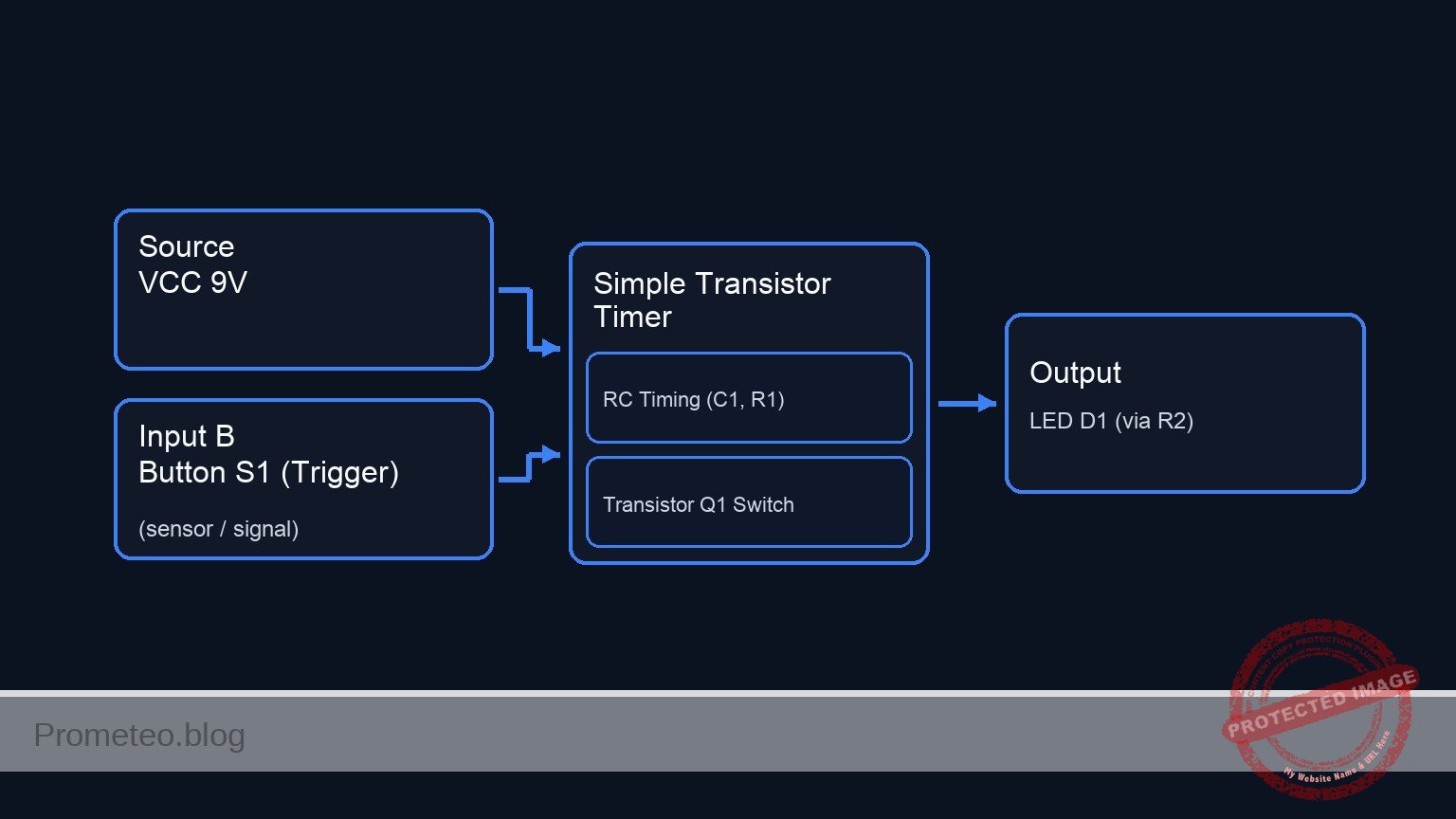
Conceptual block diagram

Conceptual block diagram — Simple Transistor Timer
Quick read: inputs → main block → output (actuator or measurement). This summarizes the ASCII schematic below.

Schematic

[ INPUT & TIMING ]                  [ LOGIC / SWITCH ]                 [ OUTPUT LOAD ]

(VCC 9 V) --+--(Power Path)--------------------------------------------------> [ Resistor R2 ]
           |                                                                        |
           |                                                                        v
     [ Button S1 ]                                                             [ LED D1 ]
           |                                                                        |
           v (Trigger)                                                              |
     [ Node VCAP ] --(Slow Discharge)--> [ Resistor R1 ] --(Base Sig)-->+           |
           |                                                            |           |
           + <--(Stores Charge)-- [ Capacitor C1 ]                      |           |
                                       |                                v           v
                                       v                        +-----------------------+
                                    [ GND ]                     |     TRANSISTOR Q1     |
                                                                | (Base)    (Collector) |
                                                                +-----------------------+
                                                                            |
                                                                            v (Emitter)
                                                                         [ GND ]
Schematic (ASCII)

Measurements and tests

Follow these steps to validate the circuit behavior using a multimeter.

  1. Initial State: Ensure S1 is not pressed. The LED should be OFF.
    • Measure voltage at VCAP. It should be near 0 V.
  2. Charging Phase: Press and hold S1.
    • Check: The LED turns ON immediately.
    • Measurement: The voltage at VCAP should instantly rise to approximately 9 V (VCC).
  3. Discharge Phase: Release S1 and start a stopwatch.
    • Observation: The LED remains lit.
    • Measurement: Monitor the voltage at VCAP. It will slowly decrease.
    • Threshold: When VCAP drops below approximately 1.4 V (V_BE + drop across R1), the LED will dim significantly and turn OFF.
  4. Time Constant: Record the time from release until the LED turns completely off.

SPICE netlist and simulation

Reference SPICE Netlist (ngspice) — excerptFull SPICE netlist (ngspice)

* Practical case: Simple Transistor Timer

* --- Power Supply ---
* V1: 9 V DC supply
V1 VCC 0 DC 9

* --- Input and Timing Network ---
* S1: Push-button (Normally Open)
* Modeled as a Voltage Controlled Switch (S1) driven by a control pulse (V_S1_ACT)
* Connects VCC to VCAP when activated
S1 VCC VCAP CTRL 0 SW_MODEL

* Control signal for the button press simulation
* Press button at T=0.5s, hold for 0.5s, then release to allow discharge
V_S1_ACT CTRL 0 PULSE(0 5 0.5 1m 1m 0.5 20)

* C1: 470 µF electrolytic capacitor
C1 VCAP 0 470u

* R1: 10 kΩ resistor (Discharge path to Base)
* ... (truncated in public view) ...

Copy this content into a .cir file and run with ngspice.

🔒 Part of this section is premium. With the 7-day pass or the monthly membership you can access the full content (materials, wiring, detailed build, validation, troubleshooting, variants and checklist) and download the complete print-ready PDF pack.

* Practical case: Simple Transistor Timer

* --- Power Supply ---
* V1: 9 V DC supply
V1 VCC 0 DC 9

* --- Input and Timing Network ---
* S1: Push-button (Normally Open)
* Modeled as a Voltage Controlled Switch (S1) driven by a control pulse (V_S1_ACT)
* Connects VCC to VCAP when activated
S1 VCC VCAP CTRL 0 SW_MODEL

* Control signal for the button press simulation
* Press button at T=0.5s, hold for 0.5s, then release to allow discharge
V_S1_ACT CTRL 0 PULSE(0 5 0.5 1m 1m 0.5 20)

* C1: 470 µF electrolytic capacitor
C1 VCAP 0 470u

* R1: 10 kΩ resistor (Discharge path to Base)
R1 VCAP BASE 10k

* --- Transistor Switch ---
* Q1: 2N2222 NPN transistor
* Connections: Collector=COL, Base=BASE, Emitter=0(GND)
Q1 COL BASE 0 2N2222MOD

* --- Output Load (LED) ---
* R2: 470 Ω resistor
R2 VCC LED_A 470

* D1: Red LED
* Connections: Anode=LED_A, Cathode=COL
D1 LED_A COL DLED

* --- Models ---
* Switch Model: Threshold 2.5V, Low On-Resistance
.model SW_MODEL SW(Vt=2.5 Ron=0.1 Roff=100Meg)

* NPN Transistor Model (Generic 2N2222)
.model 2N2222MOD NPN(IS=1E-14 VAF=100 BF=200 IKF=0.3 XTB=1.5 BR=3 CJC=8E-12 CJE=25E-12 TR=46.91E-9 TF=411.1E-12 ITF=0.6 VTF=1.7 XTF=3 RB=10 RC=0.3 RE=0.2)

* LED Model (Red LED approx)
.model DLED D(IS=1u N=2 RS=10 BV=5 IBV=10u)

* --- Analysis Commands ---
* Transient analysis for 10 seconds to observe the long RC discharge (Tau ~ 4.7s)
.tran 10m 10s

* Output voltage of Capacitor, Base, Collector, and LED Anode
.print tran V(VCAP) V(BASE) V(COL) V(LED_A)

.op
.end

Simulation Results (Transient Analysis)

Simulation Results (Transient Analysis)
Show raw data table (2110 rows)
Index   time            v(vcap)         v(base)         v(col)
0	0.000000e+00	5.504285e-01	5.495835e-01	8.838023e+00
1	1.000000e-04	5.504285e-01	5.495836e-01	8.838088e+00
2	2.000000e-04	5.504285e-01	5.495835e-01	8.838088e+00
3	4.000000e-04	5.504285e-01	5.495835e-01	8.838088e+00
4	8.000000e-04	5.504285e-01	5.495835e-01	8.838088e+00
5	1.600000e-03	5.504285e-01	5.495835e-01	8.838088e+00
6	3.200000e-03	5.504285e-01	5.495835e-01	8.838088e+00
7	6.400000e-03	5.504285e-01	5.495835e-01	8.838088e+00
8	1.280000e-02	5.504285e-01	5.495835e-01	8.838088e+00
9	2.280000e-02	5.504285e-01	5.495835e-01	8.838088e+00
10	3.280000e-02	5.504285e-01	5.495835e-01	8.838088e+00
11	4.280000e-02	5.504285e-01	5.495835e-01	8.838088e+00
12	5.280000e-02	5.504285e-01	5.495835e-01	8.838088e+00
13	6.280000e-02	5.504285e-01	5.495835e-01	8.838088e+00
14	7.280000e-02	5.504285e-01	5.495835e-01	8.838088e+00
15	8.280000e-02	5.504285e-01	5.495835e-01	8.838088e+00
16	9.280000e-02	5.504285e-01	5.495835e-01	8.838088e+00
17	1.028000e-01	5.504285e-01	5.495835e-01	8.838088e+00
18	1.128000e-01	5.504285e-01	5.495835e-01	8.838088e+00
19	1.228000e-01	5.504285e-01	5.495835e-01	8.838088e+00
20	1.328000e-01	5.504285e-01	5.495835e-01	8.838088e+00
21	1.428000e-01	5.504285e-01	5.495835e-01	8.838088e+00
22	1.528000e-01	5.504285e-01	5.495835e-01	8.838088e+00
23	1.628000e-01	5.504285e-01	5.495835e-01	8.838088e+00
... (2086 more rows) ...

Common mistakes and how to avoid them

  1. Reversed Capacitor Polarity: Electrolytic capacitors can explode or fail if connected backwards. Ensure the negative stripe on C1 connects to 0 (GND).
  2. Incorrect Transistor Pinout: Confusing the Collector and Emitter prevents switching. Verify the 2N2222 datasheet; usually, the tab or flat side indicates the pin orientation.
  3. Capacitor Value Too Small: Using a small capacitor (e.g., 100 nF) results in a delay too short for the human eye to perceive. Use at least 100 µF for visible results.

Troubleshooting

  • Symptom: LED never turns ON.
    • Cause: LED installed backwards or transistor broken.
    • Fix: Check D1 orientation (Anode to resistor, Cathode to Collector) and verify Q1 connections.
  • Symptom: LED turns OFF immediately upon releasing the button.
    • Cause: Capacitor is missing, disconnected, or value is too low.
    • Fix: Ensure C1 is firmly connected between VCAP and 0. Try increasing C1 to 1000 µF.
  • Symptom: Transistor gets very hot.
    • Cause: Missing base resistor or short circuit at the output.
    • Fix: Ensure R1 (10 kΩ) is correctly installed between the capacitor and the base to limit base current.

Possible improvements and extensions

  1. Variable Timer: Replace R1 with a 50 kΩ potentiometer in series with a 1 kΩ resistor to allow the user to adjust the delay duration.
  2. Darlington Pair: Replace Q1 with a Darlington transistor (or two NPNs connected as a Darlington pair) to significantly increase input impedance, allowing for much longer delays with the same capacitor value.

More Practical Cases on Prometeo.blog

Find this product and/or books on this topic on Amazon

Go to Amazon

As an Amazon Associate, I earn from qualifying purchases. If you buy through this link, you help keep this project running.

Quick Quiz

Question 1: What is the primary function of the capacitor (C1) in this circuit?


Question 2: Which component acts as the current switch in this off-delay circuit?


Question 3: What happens to the LED immediately after the push-button is released?


Question 4: Which real-world application is mentioned as a use case for this type of circuit?


Question 5: What is the purpose of the resistor R2 (470 Ω) in a typical LED circuit like this?


Question 6: What is the voltage of the power supply (V1) used in this project?


Question 7: Which component works in conjunction with the capacitor to determine the discharge timing?


Question 8: What type of switch is S1 described as in the expected outcome?


Question 9: During the 'Delay Phase', why does the LED eventually turn off?


Question 10: What is the target audience for this specific project?


Carlos Núñez Zorrilla
Electronics & Computer Engineer

Telecommunications Electronics Engineer and Computer Engineer (official degrees in Spain).

Follow me:


Practical case: DC blocking

DC blocking prototype (Maker Style)

Level: Basic. Verify that a capacitor allows AC signals to pass while blocking DC components.

Objective and use case

You will build a passive circuit connecting a signal source with a DC offset to a load through a series capacitor. The setup demonstrates how the capacitor filters out the direct current (DC) component while allowing the alternating current (AC) signal to reach the load.

Why it is useful:
* Audio Coupling: Essential for connecting amplifier stages where different DC bias voltages exist but the audio signal must pass through unchanged.
* Sensor Conditioning: Removes constant voltage offsets from sensors (like piezoelectric elements) to focus only on dynamic changes.
* Protection: Prevents dangerous DC currents from flowing into sensitive loads like headphones or speakers.

Expected outcome:
* Input Signal: A sine wave oscillating strictly above 0 V (e.g., between +2 V and +4 V).
* Output Signal: The same sine wave centered around 0 V (oscillating between -1 V and +1 V).
* DC Measurement: The input node measures a steady DC voltage (e.g., +3 V), while the output node measures 0 V DC.

Target audience and level:
Students and hobbyists learning about passive filters and AC coupling.

Materials

  • V1: Function Generator, function: provides 1 kHz sine wave (2 Vpp) with +3 V DC offset.
  • C1: 10 µF electrolytic capacitor, function: DC blocking coupling capacitor.
  • R1: 10 kΩ resistor, function: output load to ground.
  • Measurement Tools: Oscilloscope (DC coupling mode) and Multimeter.

Wiring guide

This circuit uses three specific nodes: VIN (source), VOUT (load), and 0 (GND).

  • V1 (Source): Connect the positive terminal to node VIN and the negative/ground terminal to node 0.
  • C1 (Capacitor): Connect the positive terminal (anode) to node VIN and the negative terminal (cathode) to node VOUT.
  • R1 (Resistor): Connect one leg to node VOUT and the other leg to node 0.

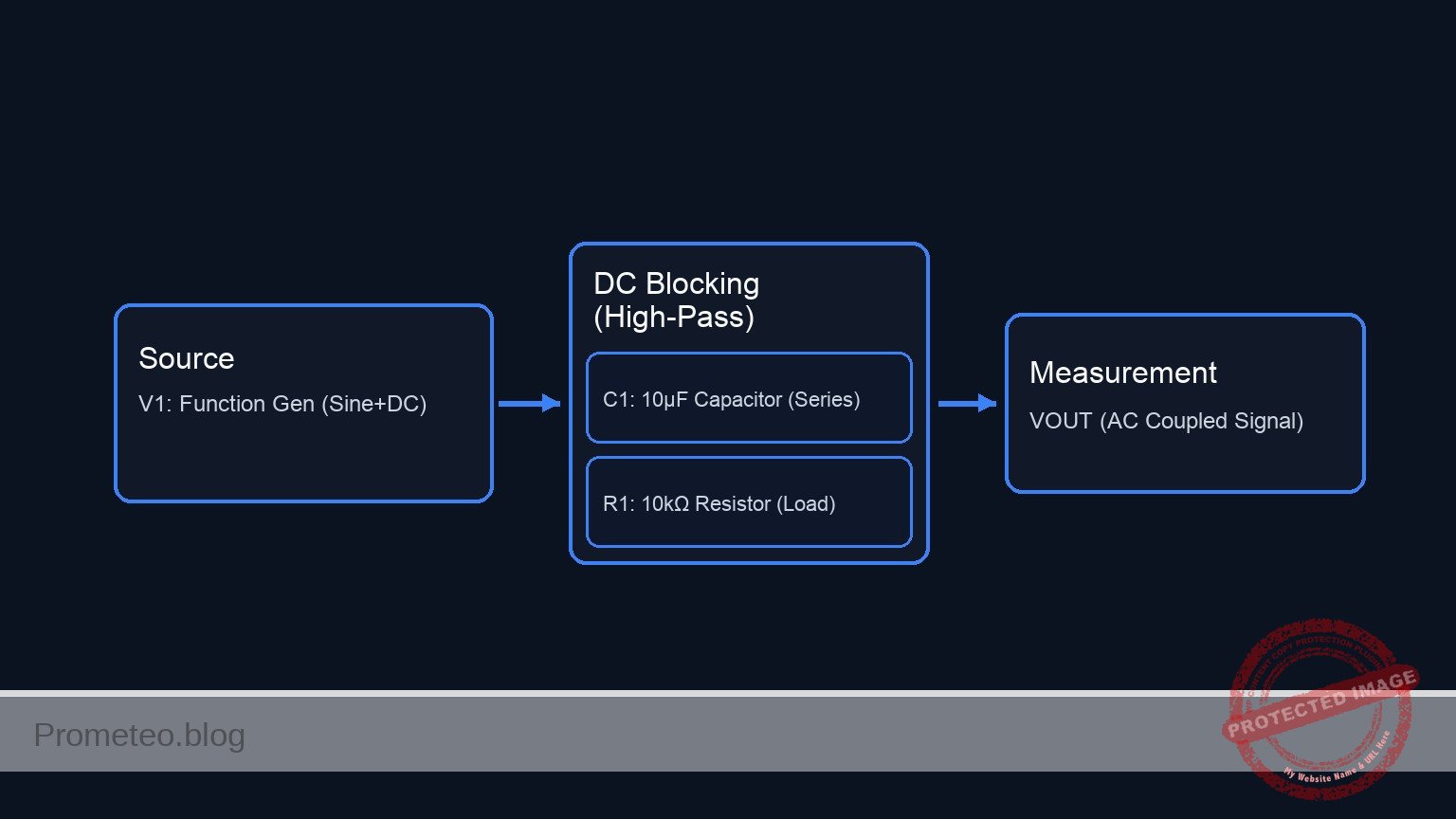
Conceptual block diagram

Conceptual block diagram — DC Blocking (High-Pass)
Quick read: inputs → main block → output (actuator or measurement). This summarizes the ASCII schematic below.

Schematic

[ INPUT SOURCE ]                 [ PROCESSING ]                   [ OUTPUT LOAD ]

    [ V1: Function Gen ]             [ C1: Capacitor ]                 [ R1: Resistor ]
    ( 1kHz Sine, 2Vpp  ) --(VIN)--> +[     10 µF     ]- --(VOUT)--> [     10 kΩ      ] --> GND
    (   +3 V DC Offset  )      |      ( Electrolytic  )       |
                              |                              |
                              v                              v
                       [ Measurement ]                [ Measurement ]
                       (Scope/Multi)                  (Scope/Multi)
Schematic (ASCII)

Measurements and tests

To validate the circuit, ensure your oscilloscope is set to DC Coupling on the input channel. If set to AC Coupling, the scope itself will block the DC, hiding the effect of the external capacitor.

  1. Configure Source (V1): Set the function generator to a Sine wave, Frequency = 1 kHz, Amplitude = 2 V peak-to-peak, Offset = +3 V.
  2. Measure Input (VIN):
    • Connect the scope probe to VIN.
    • Observation: The signal should oscillate between +2 V and +4 V. The center line is at +3 V.
    • DC Meter: Should read approximately +3 V.
  3. Measure Output (VOUT):
    • Connect the scope probe to VOUT.
    • Observation: The signal should oscillate between -1 V and +1 V. The center line is at 0 V.
    • DC Meter: Should read approximately 0 V.
  4. Verification: Confirm that the shape and amplitude (2 Vpp) of the AC wave remain largely unchanged, but the vertical position has shifted down by 3 volts.

SPICE netlist and simulation

Reference SPICE Netlist (ngspice) — excerptFull SPICE netlist (ngspice)

* Practical case: DC blocking

* --- Components ---

* V1: Function Generator
* Specs: 1 kHz sine wave, 2 Vpp (Amplitude = 1V), +3 V DC offset
* Connection: Positive to VIN, Negative to 0 (GND)
V1 VIN 0 SIN(3 1 1k)

* C1: 10 uF electrolytic capacitor
* Function: DC blocking coupling capacitor
* Connection: Positive (VIN) to Negative (VOUT)
C1 VIN VOUT 10u

* R1: 10 kOhm resistor
* Function: Output load to ground
* Connection: VOUT to 0 (GND)
R1 VOUT 0 10k

* --- Simulation Commands ---
* ... (truncated in public view) ...

Copy this content into a .cir file and run with ngspice.

🔒 Part of this section is premium. With the 7-day pass or the monthly membership you can access the full content (materials, wiring, detailed build, validation, troubleshooting, variants and checklist) and download the complete print-ready PDF pack.

* Practical case: DC blocking

* --- Components ---

* V1: Function Generator
* Specs: 1 kHz sine wave, 2 Vpp (Amplitude = 1V), +3 V DC offset
* Connection: Positive to VIN, Negative to 0 (GND)
V1 VIN 0 SIN(3 1 1k)

* C1: 10 uF electrolytic capacitor
* Function: DC blocking coupling capacitor
* Connection: Positive (VIN) to Negative (VOUT)
C1 VIN VOUT 10u

* R1: 10 kOhm resistor
* Function: Output load to ground
* Connection: VOUT to 0 (GND)
R1 VOUT 0 10k

* --- Simulation Commands ---

* Operating point analysis
.op

* Transient analysis
* Frequency is 1kHz (Period = 1ms). Simulate 5ms to see 5 cycles.
.tran 10u 5m

* --- Output Directives ---
* Print input and output voltages for logging
.print tran V(VIN) V(VOUT)

.end

Simulation Results (Transient Analysis)

Simulation Results (Transient Analysis)
Show raw data table (508 rows)
Index   time            v(vin)          v(vout)
0	0.000000e+00	3.000000e+00	0.000000e+00
1	1.000000e-07	3.000628e+00	6.283179e-04
2	2.000000e-07	3.001257e+00	1.256635e-03
3	4.000000e-07	3.002513e+00	2.513266e-03
4	8.000000e-07	3.005027e+00	5.026506e-03
5	1.600000e-06	3.010053e+00	1.005285e-02
6	3.200000e-06	3.020105e+00	2.010452e-02
7	6.400000e-06	3.040202e+00	4.020026e-02
8	1.280000e-05	3.080338e+00	8.033296e-02
9	2.280000e-05	3.142767e+00	1.427508e-01
10	3.280000e-05	3.204633e+00	2.045991e-01
11	4.280000e-05	3.265691e+00	2.656336e-01
12	5.280000e-05	3.325700e+00	3.256134e-01
13	6.280000e-05	3.384424e+00	3.843020e-01
14	7.280000e-05	3.441631e+00	4.414676e-01
15	8.280000e-05	3.497095e+00	4.968847e-01
16	9.280000e-05	3.550597e+00	5.503345e-01
17	1.028000e-04	3.601927e+00	6.016061e-01
18	1.128000e-04	3.650880e+00	6.504972e-01
19	1.228000e-04	3.697265e+00	6.968148e-01
20	1.328000e-04	3.740898e+00	7.403761e-01
21	1.428000e-04	3.781608e+00	7.810093e-01
22	1.528000e-04	3.819232e+00	8.185538e-01
23	1.628000e-04	3.853624e+00	8.528617e-01
... (484 more rows) ...

Common mistakes and how to avoid them

  1. Using AC Coupling on the Oscilloscope: This is the most frequent error. It makes the input look exactly like the output because the scope blocks the DC internally. Solution: Always verify the scope channel is set to «DC Coupling».
  2. Reversing Capacitor Polarity: Using a polarized electrolytic capacitor backwards can cause it to leak current or fail. Solution: Ensure the positive side of C1 faces the higher DC potential (the source VIN in this case).
  3. Load Resistance (R1) too Low: If R1 is very small, it creates a High-Pass filter with a cutoff frequency above 1 kHz, attenuating the AC signal. Solution: Ensure R1 × C1 is large enough so fcutoff = (1 / (2\pi R C)) is well below the signal frequency.

Troubleshooting

  • Symptom: VOUT shows a DC voltage significantly higher than 0 V.
    • Cause: The capacitor C1 is leaky or damaged (acting like a resistor).
    • Fix: Replace C1 with a new capacitor.
  • Symptom: No signal at VOUT (0 V AC and 0 V DC).
    • Cause: Open circuit connection or defective breadboard track.
    • Fix: Check continuity between C1 cathode and R1.
  • Symptom: The AC signal at VOUT is much smaller than at VIN.
    • Cause: The source frequency is too low for the selected C1/R1 combination (High-Pass filtering effect).
    • Fix: Increase the frequency of V1 or increase the value of C1.

Possible improvements and extensions

  1. Frequency Sweep: Lower the frequency of V1 from 1 kHz down to 1 Hz to observe how the capacitor eventually blocks the AC signal as well (High-Pass filter demonstration).
  2. Variable Load: Replace R1 with a potentiometer to see how changing load impedance affects the low-frequency cutoff point.

More Practical Cases on Prometeo.blog

Find this product and/or books on this topic on Amazon

Go to Amazon

As an Amazon Associate, I earn from qualifying purchases. If you buy through this link, you help keep this project running.

Quick Quiz

Question 1: What is the primary function of the capacitor in the described circuit?


Question 2: Which component is typically used as the output load to ground in this type of circuit?


Question 3: Why is this circuit essential for 'Audio Coupling'?


Question 4: If the input signal oscillates between +2 V and +4 V, what is the average DC offset at the input?


Question 5: What is the expected behavior of the output signal compared to the input signal?


Question 6: Based on the context, what type of capacitor is likely used for values like 10 µF?


Question 7: Why is this circuit useful for sensor conditioning?


Question 8: What is the expected DC measurement at the output node after the capacitor?


Question 9: In the described setup, which node connects directly to the signal source?


Question 10: What protection benefit does this circuit offer for sensitive loads like headphones?


Carlos Núñez Zorrilla
Electronics & Computer Engineer

Telecommunications Electronics Engineer and Computer Engineer (official degrees in Spain).
Follow me:


Practical case: Basic rectifier filtering

Basic rectifier filtering prototype (Maker Style)

Level: Basic. Demonstrate how a capacitor smoothes ripple in a half-wave rectified signal.

Objective and use case

In this practical case, you will build a half-wave rectifier circuit and observe the effect of adding a filter capacitor in parallel with the load.
* Why it is useful:
* Essential for converting Alternating Current (AC) from the mains into Direct Current (DC) for powering electronics.
* Used in simple battery chargers.
* Fundamental concept for audio signal demodulation (envelope detectors).
* Demonstrates energy storage properties of capacitors in power supplies.
* Expected outcome:
* Input: A pure AC sine wave (swinging positive and negative).
* Step 1 Output: A pulsing positive-only signal (half-wave rectification).
* Step 2 Output: A steady DC voltage with slight variation (ripple) after connecting the capacitor.
* Target audience and level: Students and hobbyists understanding basic AC/DC conversion.

Materials

  • V1: 10 V (peak), 50 Hz sine wave source, function: AC power input.
  • D1: 1N4007 diode, function: rectifies AC to pulsating DC.
  • R1: 1 kΩ resistor, function: acts as the electrical load.
  • C1: 100 µF electrolytic capacitor, function: filters voltage ripple (stores energy).
  • GND: Ground reference (0 V).

Wiring guide

Construct the circuit following these node connections:

  • V1 (Source): Connect the positive terminal to node VAC and the negative terminal to node 0 (GND).
  • D1 (Rectifier): Connect the Anode to node VAC and the Cathode to node VOUT.
  • R1 (Load): Connect between node VOUT and node 0 (GND).
  • C1 (Filter): Connect the positive terminal to node VOUT and the negative terminal to node 0 (GND). Note: Initially leave C1 disconnected to observe the unfiltered signal, then connect it.

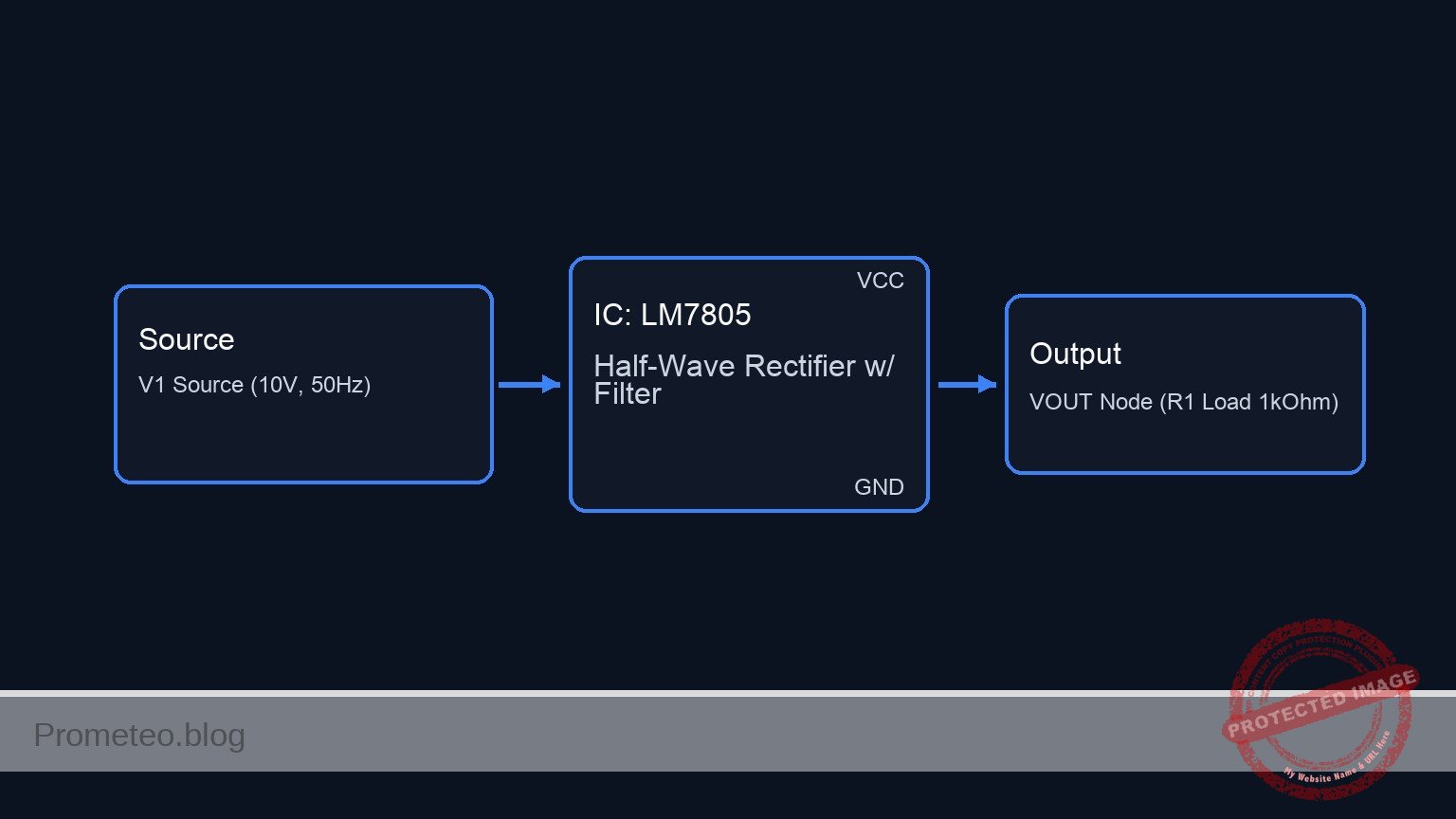
Conceptual block diagram

Conceptual block diagram — LM7805 Half-Wave Rectifier w/ Filter
Quick read: inputs → main block → output (actuator or measurement). This summarizes the ASCII schematic below.

Schematic

[ AC SOURCE ]            [ RECTIFICATION ]             [ OUTPUT STAGE ]

                                                          +--> [ C1 Filter ] --> GND
                                                          |    (100 uF)
    [ V1 Source ] --(VAC)--> [ D1 Diode ] --(VOUT Node)-->+
    (10 V, 50Hz)              (1N4007)                     |
                                                          +--> [ R1 Load ]   --> GND
                                                               (1 kOhm)
Schematic (ASCII)

Measurements and tests

Perform the following steps using an oscilloscope or a multimeter:

  1. Input Verification:
    • Connect the probe to VAC.
    • Verify a sine wave oscillating between +10 V and -10 V.
  2. Unfiltered Rectification (C1 Disconnected):
    • Remove C1 temporarily.
    • Measure VOUT. You should see only the positive half-cycles of the sine wave (approx. 0 V to 9.3 V due to diode drop). The voltage drops to zero between peaks.
  3. Filtered Rectification (C1 Connected):
    • Connect C1 across R1.
    • Measure VOUT. The signal should now be a DC voltage near the peak value (approx. 9 V) that does not drop to zero.
    • Vripple Measurement: Set the oscilloscope to AC coupling to zoom in on the small voltage fluctuation («sawtooth» shape) on top of the DC line.

SPICE netlist and simulation

Reference SPICE Netlist (ngspice) — excerptFull SPICE netlist (ngspice)

* Basic rectifier filtering

* --- Components ---

* V1: 10 V (peak), 50 Hz sine wave source
* Connected: Positive -> VAC, Negative -> 0 (GND)
V1 VAC 0 SIN(0 10 50)

* D1: 1N4007 diode (Rectifier)
* Connected: Anode -> VAC, Cathode -> VOUT
D1 VAC VOUT 1N4007

* R1: 1 kΩ resistor (Load)
* Connected: Between VOUT and 0 (GND)
R1 VOUT 0 1k

* C1: 100 µF electrolytic capacitor (Filter)
* Connected: Positive -> VOUT, Negative -> 0 (GND)
* Note: Included to demonstrate the filtering effect described in the case.
C1 VOUT 0 100u
* ... (truncated in public view) ...

Copy this content into a .cir file and run with ngspice.

🔒 Part of this section is premium. With the 7-day pass or the monthly membership you can access the full content (materials, wiring, detailed build, validation, troubleshooting, variants and checklist) and download the complete print-ready PDF pack.

* Basic rectifier filtering

* --- Components ---

* V1: 10 V (peak), 50 Hz sine wave source
* Connected: Positive -> VAC, Negative -> 0 (GND)
V1 VAC 0 SIN(0 10 50)

* D1: 1N4007 diode (Rectifier)
* Connected: Anode -> VAC, Cathode -> VOUT
D1 VAC VOUT 1N4007

* R1: 1 kΩ resistor (Load)
* Connected: Between VOUT and 0 (GND)
R1 VOUT 0 1k

* C1: 100 µF electrolytic capacitor (Filter)
* Connected: Positive -> VOUT, Negative -> 0 (GND)
* Note: Included to demonstrate the filtering effect described in the case.
C1 VOUT 0 100u

* --- Models ---

* Standard silicon rectifier diode model approximation for 1N4007
.model 1N4007 D(IS=7.03n RS=0.04 N=1.85 CJO=10p VJ=1 M=0.5 BV=1000 IBV=10u TT=5u)

* --- Analysis Directives ---

* Transient analysis: 100ms duration (5 cycles of 50Hz) with 0.1ms step
.tran 0.1ms 100ms

* Operating point analysis
.op

* Print directives for simulation logging
.print tran V(VAC) V(VOUT)

.end

Simulation Results (Transient Analysis)

Simulation Results (Transient Analysis)
Show raw data table (1017 rows)
Index   time            v(vac)          v(vout)
0	0.000000e+00	0.000000e+00	-2.77024e-22
1	1.000000e-06	3.141593e-03	3.430255e-10
2	2.000000e-06	6.283185e-03	6.932562e-10
3	4.000000e-06	1.256637e-02	1.411758e-09
4	8.000000e-06	2.513271e-02	2.956960e-09
5	1.600000e-05	5.026527e-02	6.646271e-09
6	3.200000e-05	1.005293e-01	1.882015e-08
7	5.304087e-05	1.666251e-01	6.310202e-08
8	7.565486e-05	2.376544e-01	2.484107e-07
9	1.009625e-04	3.171298e-01	1.270798e-06
10	1.280850e-04	4.022822e-01	7.576310e-06
11	1.570209e-04	4.930958e-01	5.140208e-05
12	1.876236e-04	5.890955e-01	3.869871e-04
13	2.197798e-04	6.899101e-01	3.065854e-03
14	2.535671e-04	7.957622e-01	2.015809e-02
15	2.900907e-04	9.100857e-01	7.787813e-02
16	3.269176e-04	1.025237e+00	1.740794e-01
17	3.659101e-04	1.147010e+00	2.922342e-01
18	4.156771e-04	1.302180e+00	4.470469e-01
19	4.731074e-04	1.480844e+00	6.257990e-01
20	5.731074e-04	1.790758e+00	9.360689e-01
21	6.731074e-04	2.098905e+00	1.244455e+00
22	7.731074e-04	2.404980e+00	1.550935e+00
23	8.731074e-04	2.708681e+00	1.855020e+00
... (993 more rows) ...

Common mistakes and how to avoid them

  1. Reversing Capacitor Polarity:
    • Error: Connecting the negative leg of an electrolytic capacitor to the positive voltage node.
    • Solution: Always ensure the stripe (negative side) of the capacitor connects to Ground (0). Reverse polarity can cause the capacitor to explode.
  2. Load Resistance Too Low:
    • Error: Using a very small resistor (e.g., 10 Ω) with a small capacitor.
    • Solution: If the load draws too much current, the capacitor discharges too quickly, causing massive ripple. Increase C1 or R1.
  3. Ignoring Diode Voltage Drop:
    • Error: Expecting exactly 10 V DC from a 10 V AC peak source.
    • Solution: Account for the ~0.7 V drop across the silicon diode. Expect around 9.3 V peak.

Troubleshooting

  • Symptom: Output is identical to Input (AC sine wave).
    • Cause: Diode is shorted internally.
    • Fix: Replace D1.
  • Symptom: Output is 0 V.
    • Cause: Diode is open or connected backward (blocking positive cycle).
    • Fix: Check diode orientation (anode to source).
  • Symptom: Ripple is very high (voltage drops deeply between peaks).
    • Cause: Capacitor value is too low for the frequency or load.
    • Fix: Increase C1 to 470 µF or 1000 µF.

Possible improvements and extensions

  1. Full-Wave Rectification: Replace the single diode with a bridge rectifier (4 diodes) to utilize the negative half-cycle, doubling the ripple frequency and improving efficiency.
  2. Voltage Regulator: Add a Zener diode or a linear regulator (like an LM7805) after the capacitor to create a fixed, stable DC output regardless of ripple.

More Practical Cases on Prometeo.blog

Find this product and/or books on this topic on Amazon

Go to Amazon

As an Amazon Associate, I earn from qualifying purchases. If you buy through this link, you help keep this project running.

Quick Quiz

Question 1: What is the primary function of the 1N4007 diode (D1) in this circuit?


Question 2: What is the role of the capacitor C1 in the circuit?


Question 3: Before adding the capacitor, what does the output signal look like after passing through the diode?


Question 4: Which component acts as the electrical load in this specific circuit?


Question 5: What is the expected output after connecting the capacitor to the circuit?


Question 6: To which node should the Anode of the diode D1 be connected in a standard half-wave rectifier configuration?


Question 7: What is the frequency of the AC sine wave source (V1) specified for this experiment?


Question 8: Why is this circuit useful for powering electronics?


Question 9: Where should the negative terminal of the capacitor C1 be connected?


Question 10: Besides power supplies, what is another application mentioned for this fundamental concept?


Carlos Núñez Zorrilla
Electronics & Computer Engineer

Telecommunications Electronics Engineer and Computer Engineer (official degrees in Spain).
Follow me:


Practical case: Visual Charge and Discharge with LED

Visual Charge and Discharge with LED prototype (Maker Style)

Level: Basic – Observe energy storage in an electrolytic capacitor via LED fading.

Objective and use case

You will build a simple circuit where a capacitor acts as a temporary energy reservoir, keeping an LED illuminated briefly after the power source is disconnected.

  • Why it is useful:

    • Demonstrates how capacitors store and release electrical energy.
    • Simulates the «smoothing» effect used in power supply adapters to maintain steady voltage.
    • Visualizes the RC time constant (the relationship between resistance, capacitance, and time).
    • Introduces the concept of «hold-up time» in power failures.
  • Expected outcome:

    • Switch ON: The LED lights up immediately.
    • Switch OFF: The LED does not turn off instantly; instead, it slowly fades out over several seconds.
    • Visual: A smooth transition from bright light to darkness.
    • Audience: Students and hobbyists interested in basic component behavior.

Materials

  • V1: 9 V DC battery or power supply, function: main energy source.
  • S1: SPST toggle switch or push-button, function: controls the connection to the power source.
  • C1: 2200 µF electrolytic capacitor (16 V or higher), function: energy storage reservoir.
  • R1: 470 Ω resistor, function: LED current limiting and discharge timing control.
  • D1: Red LED, function: visual indicator of current flow and stored charge.

Wiring guide

Use the following explicit node connections to build the circuit. The standard ground reference is node 0.

  • Power and Switch:

    • Connect the Positive terminal of V1 to node VCC.
    • Connect the Negative terminal of V1 to node 0 (GND).
    • Connect one side of switch S1 to node VCC.
    • Connect the other side of switch S1 to node V_CAP.
  • Capacitor (The Tank):

    • Connect the Positive (long leg) of C1 to node V_CAP.
    • Connect the Negative (short leg/stripe) of C1 to node 0.
  • LED and Resistor (The Load):

    • Connect resistor R1 between node V_CAP and node V_LED.
    • Connect the Anode (long leg) of D1 to node V_LED.
    • Connect the Cathode (short leg/flat spot) of D1 to node 0.

Conceptual block diagram

Conceptual block diagram — RC Charge/Discharge Circuit
Quick read: inputs → main block → output (actuator or measurement). This summarizes the ASCII schematic below.

Schematic

Title: Practical case: Visual Charge and Discharge with LED

      [ INPUT / CONTROL ]               [ STORAGE / BUFFER ]               [ OUTPUT / LOAD ]

                                            (Node V_CAP)
    [ 9 V Battery ] --(+)--> [ Switch S1 ] -------+-------> [ Resistor R1 ] --> [ LED D1 ] --> GND
                                                 |
                                                 |
                                                 v
                                          [ Capacitor C1 ]
                                          (   2200 uF    )
                                                 |
                                                GND
Schematic (ASCII)

Measurements and tests

  1. Initial State: Ensure S1 is Open (Off). The LED should be dark.
  2. Charge Phase: Close S1. Observe that the LED lights up instantly. The capacitor C1 charges to approximately 9 V almost immediately.
  3. Discharge Phase: Open S1.
    • Observe that the LED remains lit but begins to dim.
    • Use a stopwatch to measure the time from opening the switch until the LED is completely dark.
  4. Repeat: Swap C1 for a smaller value (e.g., 100 µF) and observe how the fade time becomes much shorter (almost instant).

SPICE netlist and simulation

Reference SPICE Netlist (ngspice) — excerptFull SPICE netlist (ngspice)

* Practical case: Visual Charge and Discharge with LED

* --- Power Supply (V1) ---
* 9V DC Battery connected to VCC and GND (0)
V1 VCC 0 DC 9

* --- Switch (S1) ---
* Modeled as a Voltage-Controlled Switch to simulate a physical push-button.
* Connections: VCC to V_CAP
* The switch is controlled by the voltage at node 'CTRL'.
S1 VCC V_CAP CTRL 0 SW_PUSH

* Switch Control Source (Simulates User Interaction)
* Simulates pressing the button at T=0.1s, holding for 1s, then releasing.
* PULSE(V1 V2 TD TR TF PW PER)
V_USER_S1 CTRL 0 PULSE(0 5 0.1 1m 1m 1 5)

* Switch Model Definition
* Ron=1 ohm represents wiring/contact resistance.
.model SW_PUSH SW(Vt=2.5 Ron=1 Roff=100Meg)
* ... (truncated in public view) ...

Copy this content into a .cir file and run with ngspice.

🔒 Part of this section is premium. With the 7-day pass or the monthly membership you can access the full content (materials, wiring, detailed build, validation, troubleshooting, variants and checklist) and download the complete print-ready PDF pack.

* Practical case: Visual Charge and Discharge with LED

* --- Power Supply (V1) ---
* 9V DC Battery connected to VCC and GND (0)
V1 VCC 0 DC 9

* --- Switch (S1) ---
* Modeled as a Voltage-Controlled Switch to simulate a physical push-button.
* Connections: VCC to V_CAP
* The switch is controlled by the voltage at node 'CTRL'.
S1 VCC V_CAP CTRL 0 SW_PUSH

* Switch Control Source (Simulates User Interaction)
* Simulates pressing the button at T=0.1s, holding for 1s, then releasing.
* PULSE(V1 V2 TD TR TF PW PER)
V_USER_S1 CTRL 0 PULSE(0 5 0.1 1m 1m 1 5)

* Switch Model Definition
* Ron=1 ohm represents wiring/contact resistance.
.model SW_PUSH SW(Vt=2.5 Ron=1 Roff=100Meg)

* --- Capacitor (C1) ---
* 2200uF Energy Storage
* Connections: V_CAP to GND (0)
C1 V_CAP 0 2200u

* --- Resistor (R1) ---
* 470 Ohm Current Limiting Resistor
* Connections: V_CAP to V_LED
R1 V_CAP V_LED 470

* --- LED (D1) ---
* Red LED Indicator
* Connections: Anode (V_LED) to Cathode (0)
D1 V_LED 0 D_LED_RED

* LED Model Definition
* Generic Red LED parameters
.model D_LED_RED D(IS=1e-14 N=2 RS=10 BV=5 IBV=10u)

* --- Analysis Commands ---
* The discharge time constant (Tau) = R * C = 470 * 2200e-6 approx 1.03 seconds.
* Simulation runs for 3 seconds to visualize the charge and discharge cycle.
.tran 10m 3s

* --- Output Directives ---
* Prints the capacitor voltage, LED anode voltage, and switch control signal.
.print tran V(V_CAP) V(V_LED) V(CTRL)

.op
.end

Simulation Results (Transient Analysis)

Simulation Results (Transient Analysis)
Show raw data table (352 rows)
Index   time            v(v_cap)        v(v_led)        v(ctrl)
0	0.000000e+00	8.234122e-01	8.233738e-01	0.000000e+00
1	1.000000e-04	8.234122e-01	8.233738e-01	0.000000e+00
2	2.000000e-04	8.234122e-01	8.233738e-01	0.000000e+00
3	4.000000e-04	8.234122e-01	8.233738e-01	0.000000e+00
4	8.000000e-04	8.234122e-01	8.233738e-01	0.000000e+00
5	1.600000e-03	8.234122e-01	8.233738e-01	0.000000e+00
6	3.200000e-03	8.234122e-01	8.233738e-01	0.000000e+00
7	6.400000e-03	8.234122e-01	8.233738e-01	0.000000e+00
8	1.280000e-02	8.234122e-01	8.233738e-01	0.000000e+00
9	2.280000e-02	8.234122e-01	8.233738e-01	0.000000e+00
10	3.280000e-02	8.234122e-01	8.233738e-01	0.000000e+00
11	4.280000e-02	8.234122e-01	8.233738e-01	0.000000e+00
12	5.280000e-02	8.234122e-01	8.233738e-01	0.000000e+00
13	6.280000e-02	8.234122e-01	8.233738e-01	0.000000e+00
14	7.280000e-02	8.234122e-01	8.233738e-01	0.000000e+00
15	8.280000e-02	8.234122e-01	8.233738e-01	0.000000e+00
16	9.280000e-02	8.234122e-01	8.233738e-01	0.000000e+00
17	1.000000e-01	8.234122e-01	8.233738e-01	0.000000e+00
18	1.001000e-01	8.234122e-01	8.233738e-01	5.000000e-01
19	1.002600e-01	8.234122e-01	8.233738e-01	1.300000e+00
20	1.003075e-01	8.234122e-01	8.233738e-01	1.537500e+00
21	1.003906e-01	8.234122e-01	8.233738e-01	1.953125e+00
22	1.004136e-01	8.234122e-01	8.233738e-01	2.068164e+00
23	1.004539e-01	8.234122e-01	8.233738e-01	2.269482e+00
... (328 more rows) ...

Common mistakes and how to avoid them

  1. Reversed Capacitor Polarity: Electrolytic capacitors are polarized. Connecting the negative leg to positive voltage can cause the component to overheat or pop. Solution: Always check the stripe on the side of the capacitor; it marks the negative pin.
  2. Omitting the Resistor: Connecting the LED directly to the 9 V source (or charged capacitor) without R1 will burn out the LED instantly. Solution: Ensure R1 is in series with D1.
  3. Using a very small Capacitor: If C1 is too small (e.g., 100 nF), the discharge will happen so fast the human eye cannot see the fade. Solution: Use values ≥ 1000 µF for visual tests.

Troubleshooting

  • LED never lights up:
    • Check if D1 is inserted backward (Anode/Cathode swapped).
    • Verify S1 is actually closing the circuit.
    • Check battery voltage.
  • LED turns off instantly (no fade):
    • C1 might be disconnected or open-circuit.
    • C1 value is too low.
    • R1 value is too high, making the LED too dim to see the tail end of the fade.
  • Capacitor gets hot:
    • Immediately disconnect power! The polarity of C1 is likely reversed.

Possible improvements and extensions

  1. Variable Timing: Replace R1 with a 1 kΩ potentiometer in series with a 100 Ω fixed resistor. Adjusting the pot will change the discharge time and LED brightness.
  2. Dual Switch Logic: Use a SPDT (Single Pole Double Throw) switch. Connect Node VCC to Position 1, Node 0 to Position 2, and the Common pin to the Capacitor/Resistor network. This allows you to actively «dump» the energy to ground or let it fade naturally.

More Practical Cases on Prometeo.blog

Find this product and/or books on this topic on Amazon

Go to Amazon

As an Amazon Associate, I earn from qualifying purchases. If you buy through this link, you help keep this project running.

Quick Quiz

Question 1: What is the primary function of the capacitor in this circuit?


Question 2: What visual effect is expected when the switch is turned OFF?


Question 3: Which component is responsible for limiting the current to the LED?


Question 4: What is the recommended value for the capacitor C1 in this experiment?


Question 5: Why is this circuit useful for understanding power supplies?


Question 6: What happens to the LED immediately after the switch is turned ON?


Question 7: What concept describes the relationship between resistance, capacitance, and time?


Question 8: What is the function of the component labeled V1?


Question 9: What real-world concept related to power failures does this circuit introduce?


Question 10: Who is the intended audience for this specific circuit experiment?


Carlos Núñez Zorrilla
Electronics & Computer Engineer

Telecommunications Electronics Engineer and Computer Engineer (official degrees in Spain).

Follow me: