Practical case: Potentiometer as a variable divider

Potentiometer as a variable divider prototype (Maker Style)

Level: Basic. Objective: Understand how output voltage varies when modifying resistance in a potentiometer connected as a voltage divider.

Objective and use case

You will build a variable voltage divider circuit using a linear potentiometer to generate an adjustable analog voltage signal ranging from 0 V to the supply voltage.

  • Why it is useful:

    • Used in volume knobs for audio equipment.
    • Provides reference voltages for comparators and operational amplifiers.
    • Simulates analog sensor data (like temperature or light) during testing.
    • Acts as a control signal for dimmers and motor speed controllers.
    • Essential for calibrating sensitivity in sensor circuits.
  • Expected outcome:

    • The output voltage (VOUT) varies smoothly from 0 V to 5 V.
    • At the mechanical midpoint of a linear potentiometer, VOUT reads approximately 2.5 V.
    • The sum of voltage across the upper section and voltage across the lower section equals the source voltage (VIN).
  • Target audience and level: Students and electronics hobbyists (Level: Basic).

Materials

  • V1: 5 V DC supply, function: main power source.
  • R1: 10 kΩ linear potentiometer, function: variable voltage divider.
  • M1: Digital Multimeter (set to DC Volts), function: measure V_OUT.
  • W1: Jumper wires, function: interconnections.

Wiring guide

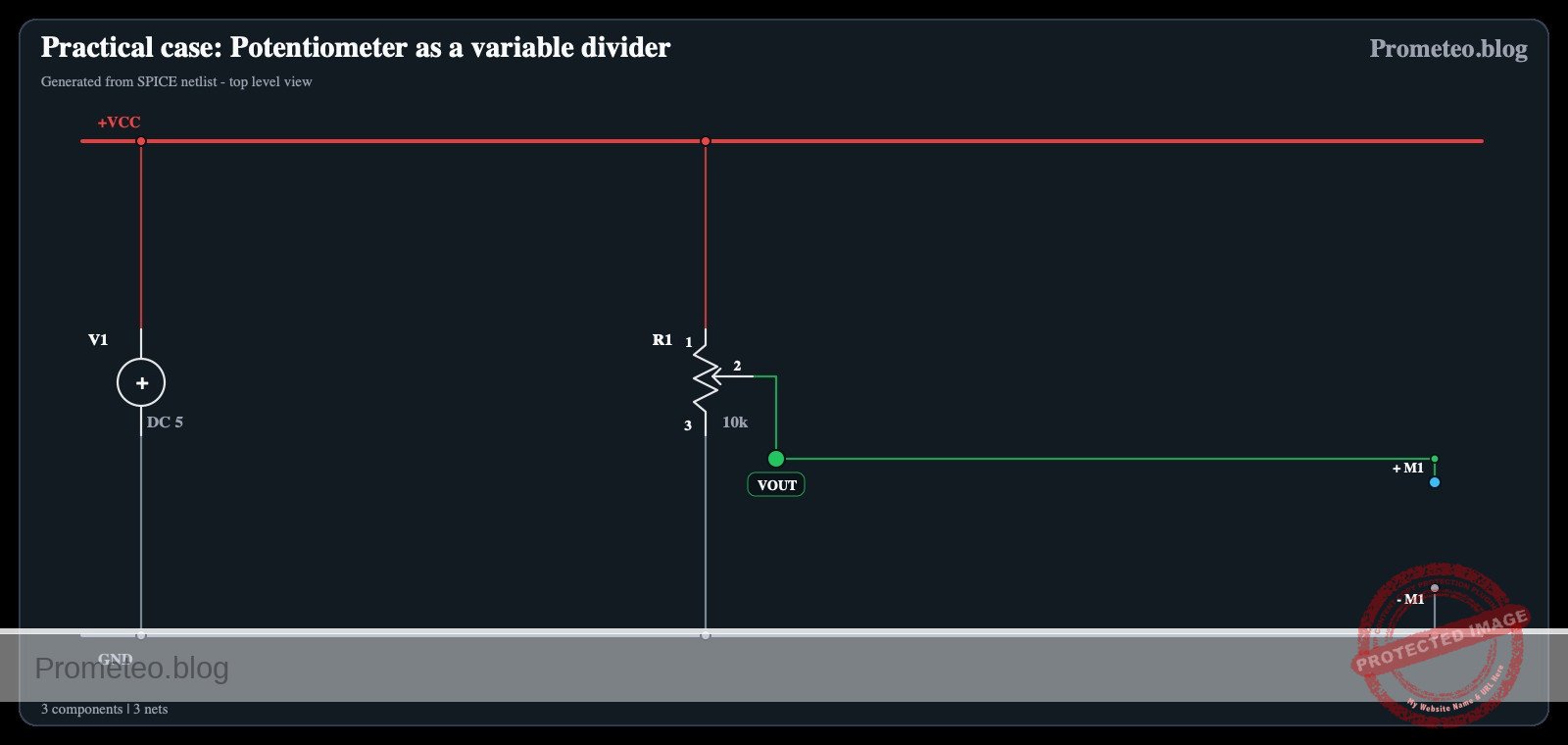
This circuit uses standard SPICE node naming conventions (VCC, 0 for GND, VOUT).

  • V1 (Positive Terminal): Connects to node VCC.
  • V1 (Negative Terminal): Connects to node 0 (GND).
  • R1 (Pin 1 – Top/Fixed): Connects to node VCC.
  • R1 (Pin 3 – Bottom/Fixed): Connects to node 0 (GND).
  • R1 (Pin 2 – Wiper/Variable): Connects to node VOUT.
  • M1 (Positive Probe): Connects to node VOUT.
  • M1 (Negative Probe): Connects to node 0 (GND).

Conceptual block diagram

Conceptual block diagram — Potentiometer
Quick read: inputs → main block → output (actuator or measurement). This summarizes the ASCII schematic below.

Schematic

[ SOURCE ]                       [ COMPONENT ]                     [ MEASUREMENT ]

[ V1: 5 V Supply (+) ] --(Node VCC)--> [ R1: Pin 1 (Top)    ]
                                      |                    |
                                      |  Potentiometer     |
                                      |  (Voltage Divider) |
                                      |                    |
                                      |  R1: Pin 2 (Wiper) ] --(Node VOUT)--> [ M1: Multimeter (+) ]
                                      |                    |
[ V1: 5 V Supply (-) ] --(Node 0)----> [ R1: Pin 3 (Bottom) ] --(Node 0)-----> [ M1: Multimeter (-) ]
Schematic (ASCII)

Electrical diagram

Electrical diagram: Practical case: Potentiometer as a variable divider
Generated from the validated SPICE netlist for this case.

🔒 This electrical diagram is premium. With the 7-day pass or the monthly membership you can unlock the complete didactic material and the print-ready PDF pack.🔓 See premium access plans

Measurements and tests

Follow these steps to validate the voltage divider behavior:

  1. Setup: Configure the multimeter to measure DC Voltage (20 V range). Connect the black probe to Ground (0) and the red probe to the potentiometer wiper (VOUT).
  2. Minimum Check: Rotate the potentiometer knob fully counter-clockwise.
    • Observation: The multimeter should read roughly 0 V.
  3. Maximum Check: Rotate the potentiometer knob fully clockwise.
    • Observation: The multimeter should read roughly 5 V (or equal to your specific V1 voltage).
  4. Midpoint Check: Rotate the knob to the approximate physical center.
    • Observation: The multimeter should read approximately 2.5 V.
  5. Linearity Test: Turn the knob slowly from one end to the other.
    • Observation: The voltage reading should change smoothly without jumps.

SPICE netlist and simulation

Reference SPICE Netlist (ngspice) — excerptFull SPICE netlist (ngspice)

* Practical case: Potentiometer as a variable divider

* --- Power Supply ---
* V1: 5V Main power source
* Connected to VCC (+) and 0 (GND)
V1 VCC 0 DC 5

* --- Simulation Control Source ---
* Vknob simulates the mechanical action of the potentiometer.
* Sweeps from 0 (0%) to 1 (100%) over 500us.
Vknob knob 0 PWL(0 0 500u 1)

* --- R1: 10k Potentiometer ---
* Implemented as two behavioral voltage sources (B-sources) acting as variable resistors.
* This allows the "Variable Divider" behavior to be simulated in Transient analysis.
* Total Resistance ~ 10k.

* R1 Top Part (Pin 1 to Pin 2): Connects VCC to VOUT
* Resistance = 10k * (1 - Knob) + 1 ohm (offset to avoid divide-by-zero/shorts)
B_R1_top VCC VOUT V = I(B_R1_top) * (10000 * (1 - V(knob)) + 1)
* ... (truncated in public view) ...

Copy this content into a .cir file and run with ngspice.

🔒 Part of this section is premium. With the 7-day pass or the monthly membership you can access the full content (materials, wiring, detailed build, validation, troubleshooting, variants and checklist) and download the complete print-ready PDF pack.

* Practical case: Potentiometer as a variable divider

* --- Power Supply ---
* V1: 5V Main power source
* Connected to VCC (+) and 0 (GND)
V1 VCC 0 DC 5

* --- Simulation Control Source ---
* Vknob simulates the mechanical action of the potentiometer.
* Sweeps from 0 (0%) to 1 (100%) over 500us.
Vknob knob 0 PWL(0 0 500u 1)

* --- R1: 10k Potentiometer ---
* Implemented as two behavioral voltage sources (B-sources) acting as variable resistors.
* This allows the "Variable Divider" behavior to be simulated in Transient analysis.
* Total Resistance ~ 10k.

* R1 Top Part (Pin 1 to Pin 2): Connects VCC to VOUT
* Resistance = 10k * (1 - Knob) + 1 ohm (offset to avoid divide-by-zero/shorts)
B_R1_top VCC VOUT V = I(B_R1_top) * (10000 * (1 - V(knob)) + 1)

* R1 Bottom Part (Pin 2 to Pin 3): Connects VOUT to GND
* Resistance = 10k * Knob + 1 ohm
B_R1_bot VOUT 0 V = I(B_R1_bot) * (10000 * V(knob) + 1)

* --- M1: Digital Multimeter ---
* Function: Measure V_OUT.
* Modeled as a high input impedance load (10 Megohm) connected to VOUT and GND.
R_M1 VOUT 0 10Meg

* --- Analysis Commands ---
* Transient analysis to capture the full sweep of the potentiometer (500us)
.tran 1u 500u

* Print the Output Voltage and the Control Signal (Knob position)
.print tran V(VOUT) V(knob)

* Calculate DC operating point
.op

.end

Simulation Results (Transient Analysis)

Simulation Results (Transient Analysis)
Show raw data table (508 rows)
Index   time            v(vout)         v(knob)
0	0.000000e+00	4.999000e-04	0.000000e+00
1	1.000000e-08	5.998800e-04	2.000000e-05
2	2.000000e-08	6.998599e-04	4.000000e-05
3	4.000000e-08	8.998199e-04	8.000000e-05
4	8.000000e-08	1.299740e-03	1.600000e-04
5	1.600000e-07	2.099579e-03	3.200000e-04
6	3.200000e-07	3.699258e-03	6.400000e-04
7	6.400000e-07	6.898613e-03	1.280000e-03
8	1.280000e-06	1.329731e-02	2.560000e-03
9	2.280000e-06	2.329525e-02	4.560000e-03
10	3.280000e-06	3.329314e-02	6.560000e-03
11	4.280000e-06	4.329099e-02	8.560000e-03
12	5.280000e-06	5.328880e-02	1.056000e-02
13	6.280000e-06	6.328657e-02	1.256000e-02
14	7.280000e-06	7.328430e-02	1.456000e-02
15	8.280000e-06	8.328200e-02	1.656000e-02
16	9.280000e-06	9.327965e-02	1.856000e-02
17	1.028000e-05	1.032773e-01	2.056000e-02
18	1.128000e-05	1.132749e-01	2.256000e-02
19	1.228000e-05	1.232724e-01	2.456000e-02
20	1.328000e-05	1.332699e-01	2.656000e-02
21	1.428000e-05	1.432674e-01	2.856000e-02
22	1.528000e-05	1.532648e-01	3.056000e-02
23	1.628000e-05	1.632622e-01	3.256000e-02
... (484 more rows) ...

Common mistakes and how to avoid them

  1. Floating the wiper: Connecting only the two fixed legs of the potentiometer makes it act as a fixed resistor. Always connect the middle pin (wiper) to your output node.
  2. Shorting the supply: Connecting the wiper to VCC and one fixed leg to 0, then turning the knob fully to the grounded side creates a short circuit. Ensure fixed legs go to Power and Ground, and the Wiper is the Output.
  3. Using a Logarithmic Potentiometer: Audio taper (Log) pots change resistance non-linearly. For a predictable voltage divider test, ensure you use a Linear taper (usually marked ‘B’).

Troubleshooting

  • Symptom: Voltage is constant at 2.5 V regardless of knob position.
    • Cause: The wiper is disconnected, or you are measuring across the fixed terminals.
    • Fix: Verify the multimeter probe is connected specifically to the center pin (wiper).
  • Symptom: Smoke or heat coming from the potentiometer.
    • Cause: Short circuit created by wiring the wiper to a rail and turning it to the opposite rail.
    • Fix: Immediately disconnect power. Re-wire so that the fixed outer pins connect to VCC and GND, and the wiper connects only to the high-impedance meter.
  • Symptom: Voltage jumps erratically (e.g., 1 V -> 4 V -> 2 V).
    • Cause: Dirty or defective internal track (wiper losing contact).
    • Fix: Replace the potentiometer or clean it with contact cleaner.

Possible improvements and extensions

  1. Loading Effect: Connect a 1 kΩ fixed resistor between VOUT and 0. Observe how the output voltage drops significantly compared to the unloaded state, demonstrating impedance mismatch.
  2. Safe Limits: Add a 330 Ω fixed resistor in series with the top leg and another with the bottom leg. This restricts the output range (e.g., 0.5 V to 4.5 V) and protects the potentiometer from short circuits if the output is accidentally grounded.

More Practical Cases on Prometeo.blog

Find this product and/or books on this topic on Amazon

Go to Amazon

As an Amazon Associate, I earn from qualifying purchases. If you buy through this link, you help keep this project running.

Quick Quiz

Question 1: What is the primary objective of the circuit described in the text?


Question 2: Which component acts as the variable voltage divider in this circuit?


Question 3: If the supply voltage is 5 V, what is the expected output voltage range?


Question 4: What is a common real-world application for this type of circuit mentioned in the text?


Question 5: Where is the wiper (Pin 2) of the potentiometer typically connected to measure the divided voltage?


Question 6: At the mechanical midpoint of a linear potentiometer with a 5 V supply, what should V_OUT read approximately?


Question 7: Which pin of the potentiometer connects to the Ground (node 0) in a standard voltage divider configuration?


Question 8: What is the function of the Digital Multimeter (M1) in this setup?


Question 9: According to the expected outcome, the sum of the voltage across the upper section and the lower section equals what?


Question 10: What specific type of potentiometer is recommended in the materials list?


Carlos Núñez Zorrilla
Electronics & Computer Engineer

Telecommunications Electronics Engineer and Computer Engineer (official degrees in Spain).
Follow me:


Practical case: Series and parallel resistors

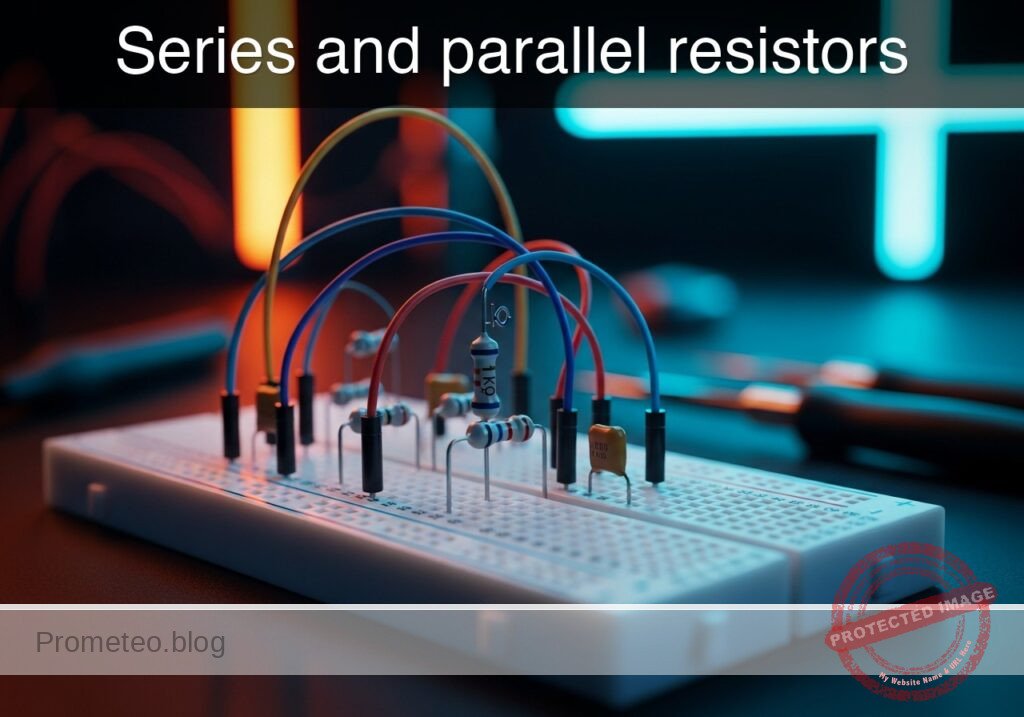
Series and parallel resistors prototype (Maker Style)

Level: Basic – Verify equivalent resistance formulas through measurement.

Objective and use case

In this practical case, you will build a passive circuit using two resistors to analyze how resistance values change when components are connected in series versus parallel. You will measure the total equivalent resistance (Req) using a multimeter in ohmmeter mode.

  • Useful for:
    • Designing voltage dividers for sensors or power supplies.
    • Calculating total load resistance in power distribution networks.
    • Adjusting specific resistance values when standard components are not available.
    • Understanding current limiting paths in LED driver circuits.
  • Expected outcome:
    • Series Mode: The measured value should equal the sum of both resistors (Req ≈ 2 kΩ).
    • Parallel Mode: The measured value should be half of the individual resistance (if R1=R2) or follow the parallel formula (Req ≈ 500 Ω).
    • Verification: Measured values should fall within the tolerance range (e.g., ±5%) of the theoretical calculation.
  • Target audience: Students and hobbyists learning fundamental laws of circuit analysis (Ohm’s Law).

Materials

  • R1: 1 kΩ resistor, function: Test load A
  • R2: 1 kΩ resistor, function: Test load B
  • M1: Digital Multimeter, function: Resistance measurement (Ohmmeter)
  • W1: Jumper wires, function: Circuit interconnection

Wiring guide

This guide uses specific node names. Ensure the circuit is not connected to a voltage source (battery) during resistance measurements.

Part A: Series Configuration
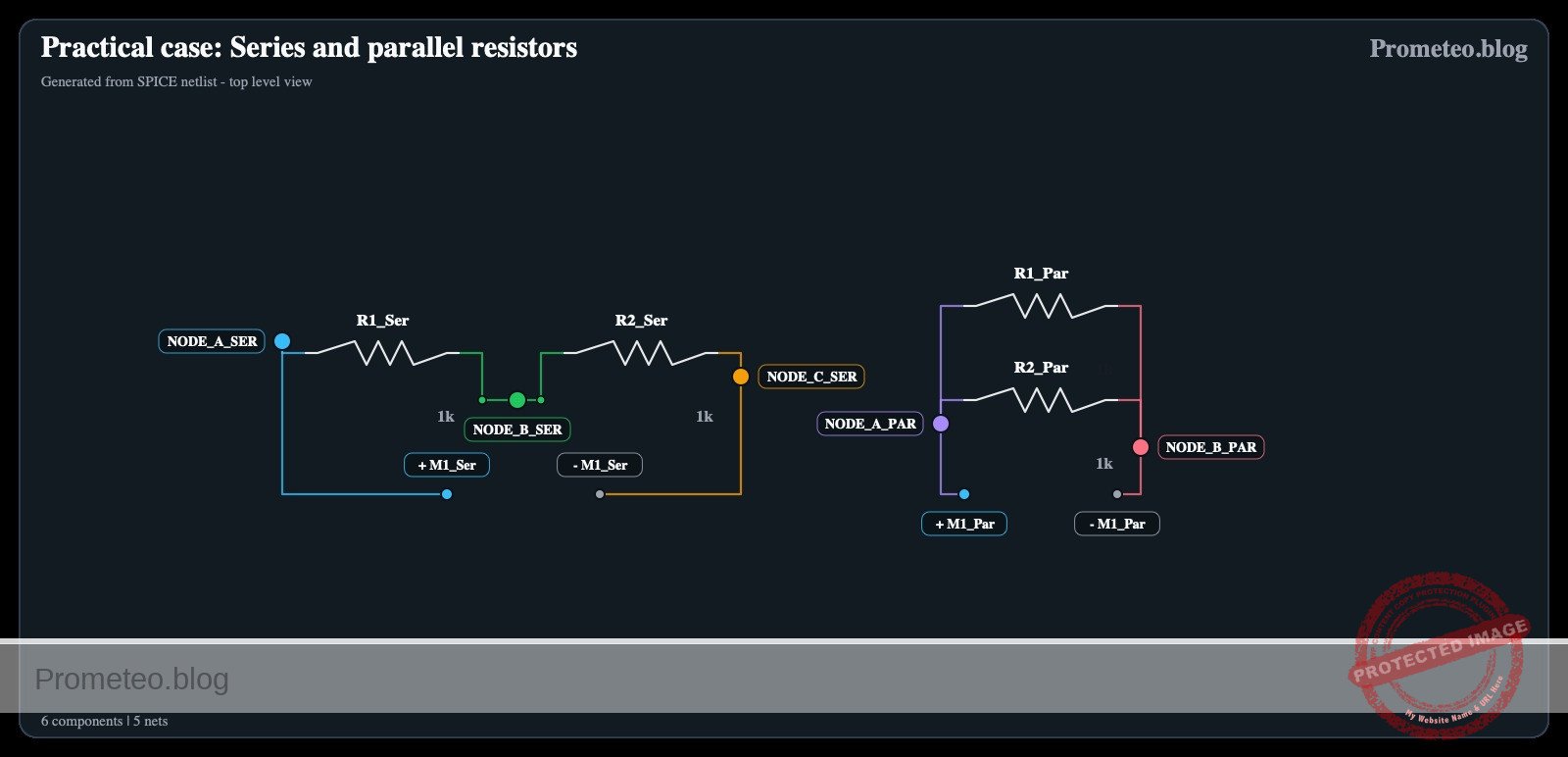
* R1: Connects between node Node_A and node Node_B.
* R2: Connects between node Node_B and node Node_C.
* M1 (Positive Probe): Connects to Node_A.
* M1 (Negative Probe): Connects to Node_C.

Part B: Parallel Configuration (Re-wiring required)
* R1: Connects between node Node_A and node Node_B.
* R2: Connects between node Node_A and node Node_B (physically parallel to R1).
* M1 (Positive Probe): Connects to Node_A.
* M1 (Negative Probe): Connects to Node_B.

Conceptual block diagram

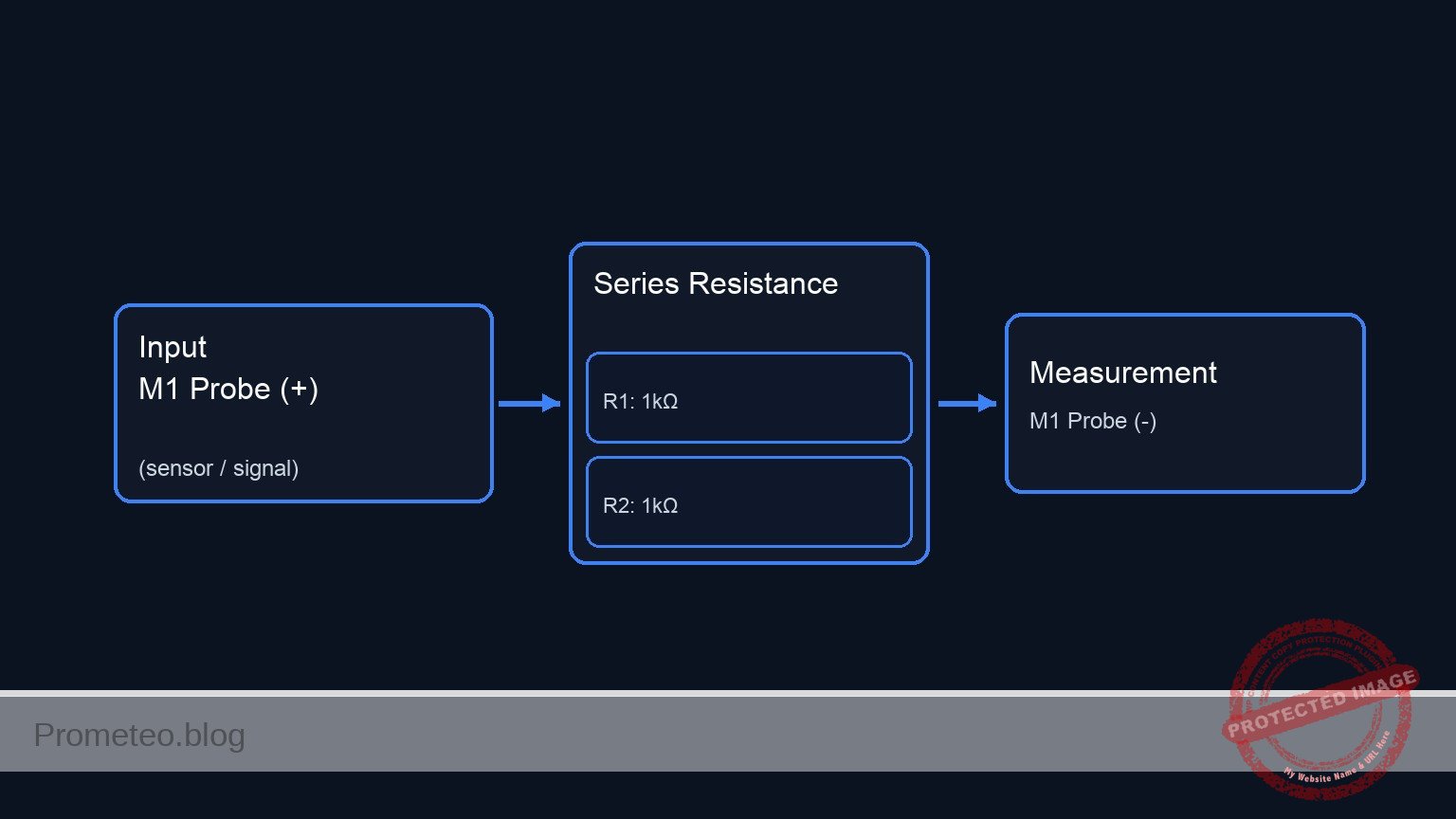
Conceptual block diagram — Series Resistance
Quick read: inputs → main block → output (actuator or measurement). This summarizes the ASCII schematic below.

Schematic

PART A: SERIES CONFIGURATION (Current flows through R1 then R2)

      [ INPUT / SOURCE ]             [ CIRCUIT TOPOLOGY ]             [ RETURN / MEASURE ]

    [ M1 Probe (+) ] --(Node A)--> [ R1: 1kΩ ] --(Node B)--> [ R2: 1kΩ ] --(Node C)--> [ M1 Probe (-) ]


PART B: PARALLEL CONFIGURATION (Current splits between R1 and R2)

      [ INPUT / SOURCE ]             [ CIRCUIT TOPOLOGY ]             [ RETURN / MEASURE ]

                                         +--> [ R1: 1kΩ ] --+
    [ M1 Probe (+) ] --(Node A)--> [ SPLIT ]                [ JOIN ] --(Node B)--> [ M1 Probe (-) ]
                                         +--> [ R2: 1kΩ ] --+
Schematic (ASCII)

Electrical diagram

Electrical diagram: Practical case: Series and parallel resistors
Generated from the validated SPICE netlist for this case.

🔒 This electrical diagram is premium. With the 7-day pass or the monthly membership you can unlock the complete didactic material and the print-ready PDF pack.🔓 See premium access plans

Measurements and tests

Perform these steps with the multimeter set to the Ohms (Ω) setting (start with the 20k range if manual).

  1. Component verification:
    • Measure R1 and R2 individually before connecting them. Confirm they are approximately 1 kΩ each.
  2. Series measurement:
    • Construct the circuit described in Part A of the Wiring Guide.
    • Connect the probes to Node_A and Node_C.
    • Validation: The display should read approximately 2.0 kΩ ($R1 + R2$).
  3. Parallel measurement:
    • Modify the circuit to match Part B of the Wiring Guide (connect both resistor ends to the same pair of rows).
    • Connect the probes across the parallel pair.
    • Validation: The display should read approximately 0.5 kΩ (500 Ω).
  4. Comparison:
    • Observe that the series combination increases total resistance, while the parallel combination decreases total resistance.

SPICE netlist and simulation

Reference SPICE Netlist (ngspice) — excerptFull SPICE netlist (ngspice)

* Practical case: Series and parallel resistors
*
* This netlist implements both Part A (Series) and Part B (Parallel) 
* configurations as separate sub-circuits to allow simultaneous simulation.
*
* BOM:
* R1, R2: 1 kΩ resistors
* M1: Digital Multimeter (Simulated as 1mA Current Source for Resistance Measurement)
* W1: Jumper wires (Implicit in netlist connectivity)

* ==============================================================================
* GLOBAL SETTINGS
* ==============================================================================
* Global Ground is Node 0.
* Unused System Supply (Required by prompt constraints)
VCC_Supply VCC 0 DC 5

* ==============================================================================
* PART A: SERIES CONFIGURATION
* ==============================================================================
* ... (truncated in public view) ...

Copy this content into a .cir file and run with ngspice.

🔒 Part of this section is premium. With the 7-day pass or the monthly membership you can access the full content (materials, wiring, detailed build, validation, troubleshooting, variants and checklist) and download the complete print-ready PDF pack.

* Practical case: Series and parallel resistors
*
* This netlist implements both Part A (Series) and Part B (Parallel) 
* configurations as separate sub-circuits to allow simultaneous simulation.
*
* BOM:
* R1, R2: 1 kΩ resistors
* M1: Digital Multimeter (Simulated as 1mA Current Source for Resistance Measurement)
* W1: Jumper wires (Implicit in netlist connectivity)

* ==============================================================================
* GLOBAL SETTINGS
* ==============================================================================
* Global Ground is Node 0.
* Unused System Supply (Required by prompt constraints)
VCC_Supply VCC 0 DC 5

* ==============================================================================
* PART A: SERIES CONFIGURATION
* ==============================================================================
* Wiring Guide Mapping:
* Node_A -> Node_A_Ser
* Node_B -> Node_B_Ser
* Node_C -> Node_C_Ser
*
* Connections:
* R1 connects between Node_A and Node_B
* R2 connects between Node_B and Node_C
* M1 (Ohmmeter) connects to Node_A (+) and Node_C (-)
*
* Simulation Logic:
* Ohmmeter is modeled as a 1mA Current Source (I_M1_Ser) injecting into the 
* positive probe node, with the negative probe node grounded.
* V(Node_A_Ser) = Resistance * 1mA => 1V = 1kΩ.

I_M1_Ser     0            Node_A_Ser   DC 1m
R1_Ser       Node_A_Ser   Node_B_Ser   1k
R2_Ser       Node_B_Ser   Node_C_Ser   1k
V_M1_Ret_Ser Node_C_Ser   0            DC 0   ; Ground return for M1 (-)

* ==============================================================================
* PART B: PARALLEL CONFIGURATION
* ==============================================================================
* Wiring Guide Mapping:
* Node_A -> Node_A_Par
* Node_B -> Node_B_Par
*
* Connections:
* R1 connects between Node_A and Node_B
* R2 connects between Node_A and Node_B (Physically parallel)
* M1 (Ohmmeter) connects to Node_A (+) and Node_B (-)

I_M1_Par     0            Node_A_Par   DC 1m
R1_Par       Node_A_Par   Node_B_Par   1k
R2_Par       Node_A_Par   Node_B_Par   1k
V_M1_Ret_Par Node_B_Par   0            DC 0   ; Ground return for M1 (-)

* ==============================================================================
* ANALYSIS DIRECTIVES
* ==============================================================================
* Transient analysis to satisfy prompt requirements for logging
.tran 100u 5ms

* Print voltages representing resistance values
* V(Node_A_Ser) should be ~2.0V (2kΩ)
* V(Node_A_Par) should be ~0.5V (500Ω)
.print tran V(Node_A_Ser) V(Node_B_Ser) V(Node_A_Par)

* DC Operating Point for quick verification
.op

.end

Simulation Results (Transient Analysis)

Simulation Results (Transient Analysis)
Show raw data table (59 rows)
Index   time            v(node_a_ser)   v(node_b_ser)   v(node_a_par)
0	0.000000e+00	2.000000e+00	1.000000e+00	5.000000e-01
1	5.000000e-07	2.000000e+00	1.000000e+00	5.000000e-01
2	1.000000e-06	2.000000e+00	1.000000e+00	5.000000e-01
3	2.000000e-06	2.000000e+00	1.000000e+00	5.000000e-01
4	4.000000e-06	2.000000e+00	1.000000e+00	5.000000e-01
5	8.000000e-06	2.000000e+00	1.000000e+00	5.000000e-01
6	1.600000e-05	2.000000e+00	1.000000e+00	5.000000e-01
7	3.200000e-05	2.000000e+00	1.000000e+00	5.000000e-01
8	6.400000e-05	2.000000e+00	1.000000e+00	5.000000e-01
9	1.280000e-04	2.000000e+00	1.000000e+00	5.000000e-01
10	2.280000e-04	2.000000e+00	1.000000e+00	5.000000e-01
11	3.280000e-04	2.000000e+00	1.000000e+00	5.000000e-01
12	4.280000e-04	2.000000e+00	1.000000e+00	5.000000e-01
13	5.280000e-04	2.000000e+00	1.000000e+00	5.000000e-01
14	6.280000e-04	2.000000e+00	1.000000e+00	5.000000e-01
15	7.280000e-04	2.000000e+00	1.000000e+00	5.000000e-01
16	8.280000e-04	2.000000e+00	1.000000e+00	5.000000e-01
17	9.280000e-04	2.000000e+00	1.000000e+00	5.000000e-01
18	1.028000e-03	2.000000e+00	1.000000e+00	5.000000e-01
19	1.128000e-03	2.000000e+00	1.000000e+00	5.000000e-01
20	1.228000e-03	2.000000e+00	1.000000e+00	5.000000e-01
21	1.328000e-03	2.000000e+00	1.000000e+00	5.000000e-01
22	1.428000e-03	2.000000e+00	1.000000e+00	5.000000e-01
23	1.528000e-03	2.000000e+00	1.000000e+00	5.000000e-01
... (35 more rows) ...

Common mistakes and how to avoid them

  1. Measuring resistance with power on: Never measure resistance in a live circuit. This will give false readings and may blow the fuse in your multimeter. Solution: Disconnect all batteries or power supplies before using the ohmmeter.
  2. Touching the metal probes: If you hold the metal tips of the probes with both hands while measuring, your body’s resistance (parallel to the circuit) will affect the reading, especially with high-value resistors. Solution: Use alligator clips or press the probes against the breadboard without touching the metal tips.
  3. Assuming perfect values: A 1 kΩ resistor with 5% tolerance can physically measure between 950 Ω and 1050 Ω. Solution: Always measure the individual components first to know their actual values before calculating the expected total.

Troubleshooting

  • Symptom: Multimeter reads «1» or «OL» (Over Limit).
    • Cause: The resistance is higher than the selected range on the multimeter.
    • Fix: Switch the dial to a higher range (e.g., from 200 Ω to 2 kΩ or 20 kΩ).
  • Symptom: Reading is 0 Ω.
    • Cause: Short circuit; the probes might be touching each other or a wire is bypassing the resistors.
    • Fix: Check the breadboard rows to ensure the resistors are not shorted out by a misplaced jumper.
  • Symptom: Reading fluctuates or is unstable.
    • Cause: Poor contact between the resistor leads and the breadboard clips.
    • Fix: Remove the resistor, straighten the legs, and re-insert it firmly into different holes on the same node.

Possible improvements and extensions

  1. Mixed topology: Add a third resistor (R3 = 1 kΩ) in series with the parallel pair of R1 and R2 to create a Series-Parallel combination. Calculate and verify the new total (1.5 kΩ).
  2. Variable resistance: Replace R2 with a 10 kΩ potentiometer. Measure how the total resistance changes in both series and parallel configurations as you turn the knob.

More Practical Cases on Prometeo.blog

Find this product and/or books on this topic on Amazon

Go to Amazon

As an Amazon Associate, I earn from qualifying purchases. If you buy through this link, you help keep this project running.

Quick Quiz

Question 1: What is the primary objective of this practical case?


Question 2: Which instrument is used to measure the equivalent resistance in this experiment?


Question 3: What is the expected equivalent resistance when two 1 kΩ resistors are connected in series?


Question 4: What is the expected equivalent resistance when two 1 kΩ resistors are connected in parallel?


Question 5: Which of the following is a practical application for understanding equivalent resistance mentioned in the text?


Question 6: According to the text, what is the expected outcome for the measured values compared to theoretical calculations?


Question 7: Who is the primary target audience for this practical case?


Question 8: Why might understanding equivalent resistance be useful for LED circuits?


Question 9: If standard components are not available, how does this knowledge help?


Question 10: In a parallel configuration with two identical resistors, how does the equivalent resistance compare to the individual resistance?


Carlos Núñez Zorrilla
Electronics & Computer Engineer

Telecommunications Electronics Engineer and Computer Engineer (official degrees in Spain).
Follow me:


Practical case: Simple voltage divider

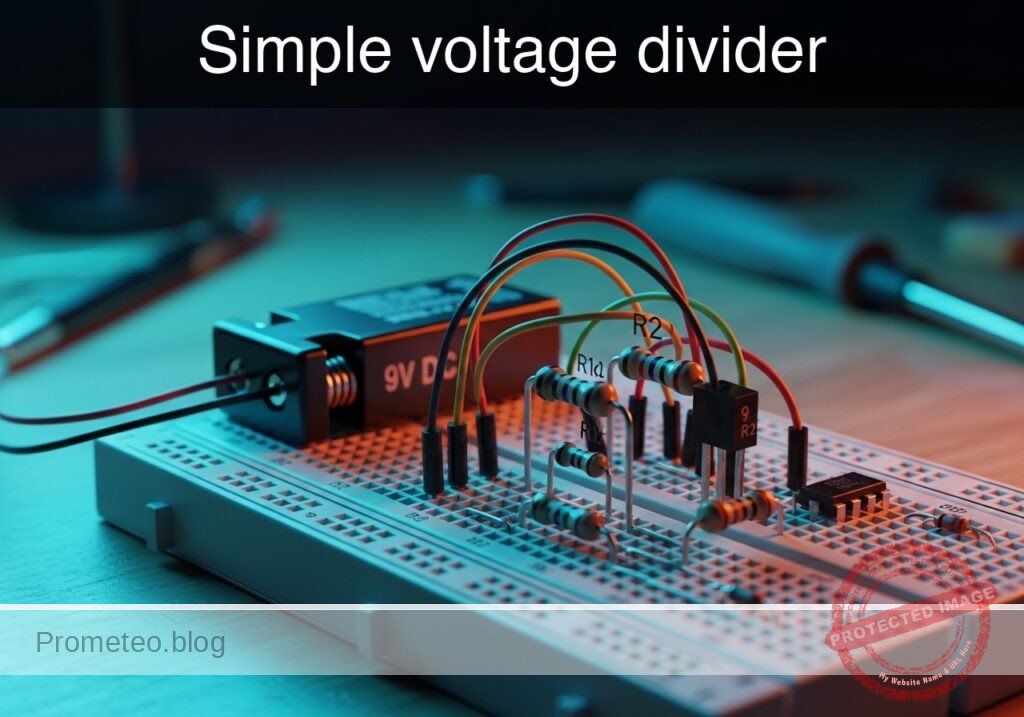
Simple voltage divider prototype (Maker Style)

Level: Basic. Demonstrate how two resistors in series divide the input voltage into predictable proportions.

Objective and use case

In this practical case, you will build a fundamental circuit that uses two resistors in series to reduce a higher DC source voltage to a specific lower voltage level.

  • Why it is useful:

    • Sensor interfacing: Adapts high-voltage sensors (e.g., 12 V automotive sensors) to low-voltage microcontrollers (e.g., 3.3 V or 5 V logic).
    • Biasing: Provides stable reference voltages for transistor bases or operational amplifier inputs.
    • Level shifting: Simple method to step down signal levels between different circuit stages.
  • Expected outcome:

    • Input Voltage (Vin): Measured at the full 9 V supply.
    • Output Voltage (Vout): Measured at the junction between the resistors; expecting exactly 4.5 V (50% of input).
    • Current: A small, safe current flows continuously from the source to ground through the series path.
    • Ratio verification: The output voltage follows the formula Vout = Vin × (R2 / (R1 + R2)).
  • Target audience and level: Students starting with Ohm’s Law and Series Circuits (Level: Basic).

Materials

  • V1: 9 V DC voltage source (battery or power supply).
  • R1: 10 kΩ resistor, function: high-side element (drops half the voltage).
  • R2: 10 kΩ resistor, function: low-side element (measurement resistor).
  • M1: Digital Multimeter (Voltmeter mode), function: measurement tool.

Wiring guide

Construct the circuit using the following node connections. Ensure the power supply is turned off while assembling components.

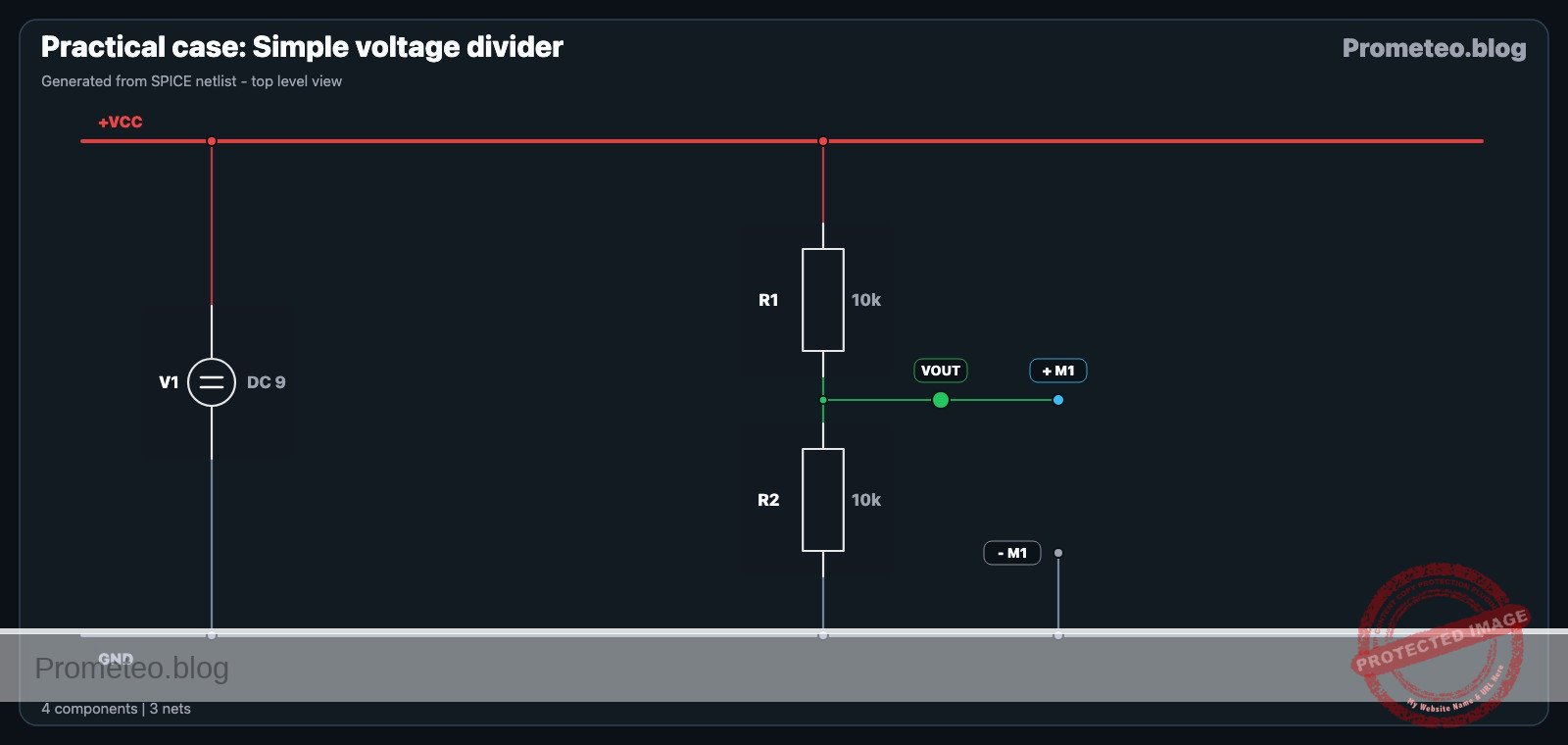
  • V1: Connect the positive terminal to node VCC and the negative terminal to node 0 (GND).
  • R1: Connect between node VCC and node VOUT.
  • R2: Connect between node VOUT and node 0 (GND).

Conceptual block diagram

Conceptual block diagram — Voltage Divider
Quick read: inputs → main block → output (actuator or measurement). This summarizes the ASCII schematic below.

Schematic

[ INPUT ]                    [ PROCESSING ]                    [ OUTPUT ]

 [ 9V Source (V1) ] --(VCC)--> [ R1: High-Side 10k ] --(VOUT)--> [ Multimeter (M1) ]
                                          |
                                          v
                                 [ R2: Low-Side 10k ]
                                          |
                                          v
                                    [ Node 0 (GND) ]
Schematic (ASCII)

Electrical diagram

Electrical diagram for the practical case: Simple voltage divider
Generated from the validated SPICE netlist for this case.

🔒 This electrical diagram is premium. With the 7-day pass or the monthly membership you can unlock the complete didactic material and the print-ready PDF pack.🔓 See premium access plans

Measurements and tests

Perform the following steps to validate the circuit behavior.

  1. Set up the Multimeter: Switch your multimeter to DC Voltage mode (20 V range or auto-range).
  2. Measure Input (Vin): Place the red probe on node VCC and the black probe on node 0. Verify the reading is approximately 9 V.
  3. Measure Output (Vout): Place the red probe on node VOUT (the junction between R1 and R2) and the black probe on node 0.
  4. Validate Result: The reading should be approximately 4.5 V.
    • Calculation: Vout = 9V × (10kΩ / (10kΩ + 10kΩ)) = 9V × 0.5 = 4.5V.

SPICE netlist and simulation

Reference SPICE Netlist (ngspice) — excerptFull SPICE netlist (ngspice)

* Title: Simple voltage divider

* --- Power Supply ---
* V1: 9 V DC voltage source
* Connected positive to VCC, negative to 0 (GND)
V1 VCC 0 DC 9

* --- Components ---
* R1: 10 kOhm resistor (High-side)
* Connected between VCC and VOUT
R1 VCC VOUT 10k

* R2: 10 kOhm resistor (Low-side)
* Connected between VOUT and 0 (GND)
R2 VOUT 0 10k

* M1: Digital Multimeter (Voltmeter mode)
* Function: Measurement tool across R2 (VOUT to GND)
* Modeled as a high-impedance resistor (10 MegOhm) to represent input impedance
R_M1 VOUT 0 10Meg
* ... (truncated in public view) ...

Copy this content into a .cir file and run with ngspice.

🔒 Part of this section is premium. With the 7-day pass or the monthly membership you can access the full content (materials, wiring, detailed build, validation, troubleshooting, variants and checklist) and download the complete print-ready PDF pack.

* Title: Simple voltage divider

* --- Power Supply ---
* V1: 9 V DC voltage source
* Connected positive to VCC, negative to 0 (GND)
V1 VCC 0 DC 9

* --- Components ---
* R1: 10 kOhm resistor (High-side)
* Connected between VCC and VOUT
R1 VCC VOUT 10k

* R2: 10 kOhm resistor (Low-side)
* Connected between VOUT and 0 (GND)
R2 VOUT 0 10k

* M1: Digital Multimeter (Voltmeter mode)
* Function: Measurement tool across R2 (VOUT to GND)
* Modeled as a high-impedance resistor (10 MegOhm) to represent input impedance
R_M1 VOUT 0 10Meg

* --- Simulation and Output ---
* Operating point analysis for DC steady state
.op

* Transient analysis (required for .print tran)
* Simulating for 5ms to show steady DC levels
.tran 100u 5ms

* Print directives
.print tran V(VCC) V(VOUT)

.end

Simulation Results (Transient Analysis)

Simulation Results (Transient Analysis)
Show raw data table (59 rows)
Index   time            v(vcc)          v(vout)
0	0.000000e+00	9.000000e+00	4.497751e+00
1	5.000000e-07	9.000000e+00	4.497751e+00
2	1.000000e-06	9.000000e+00	4.497751e+00
3	2.000000e-06	9.000000e+00	4.497751e+00
4	4.000000e-06	9.000000e+00	4.497751e+00
5	8.000000e-06	9.000000e+00	4.497751e+00
6	1.600000e-05	9.000000e+00	4.497751e+00
7	3.200000e-05	9.000000e+00	4.497751e+00
8	6.400000e-05	9.000000e+00	4.497751e+00
9	1.280000e-04	9.000000e+00	4.497751e+00
10	2.280000e-04	9.000000e+00	4.497751e+00
11	3.280000e-04	9.000000e+00	4.497751e+00
12	4.280000e-04	9.000000e+00	4.497751e+00
13	5.280000e-04	9.000000e+00	4.497751e+00
14	6.280000e-04	9.000000e+00	4.497751e+00
15	7.280000e-04	9.000000e+00	4.497751e+00
16	8.280000e-04	9.000000e+00	4.497751e+00
17	9.280000e-04	9.000000e+00	4.497751e+00
18	1.028000e-03	9.000000e+00	4.497751e+00
19	1.128000e-03	9.000000e+00	4.497751e+00
20	1.228000e-03	9.000000e+00	4.497751e+00
21	1.328000e-03	9.000000e+00	4.497751e+00
22	1.428000e-03	9.000000e+00	4.497751e+00
23	1.528000e-03	9.000000e+00	4.497751e+00
... (35 more rows) ...

Common mistakes and how to avoid them

  1. Connecting a heavy load: Connecting a motor or low-resistance load to VOUT will cause the voltage to drop significantly below 4.5 V (loading effect). Solution: Only connect high-impedance loads (like microcontroller inputs) or use a buffer.
  2. Using incorrect resistor ratios: Using random resistor values will result in a random output voltage. Solution: Always calculate the required ratio using the voltage divider formula before building.
  3. Overheating resistors: Using very low resistance values (e.g., 10 Ω) connects the supply almost directly to ground, causing high current. Solution: Use values in the kΩ range for signal reference voltages to minimize power waste.

Troubleshooting

  • Symptom: VOUT reads 0 V.
    • Cause: R1 is open (broken) or R2 is shorted to ground.
    • Fix: Check continuity of R1 and ensure R2 legs are not touching.
  • Symptom: VOUT equals VCC (9 V).
    • Cause: R2 is open (broken) or R1 is shorted.
    • Fix: Ensure R2 is correctly inserted into the breadboard rails.
  • Symptom: VOUT is slightly off (e.g., 4.6 V instead of 4.5 V).
    • Cause: Resistor tolerance (standard resistors vary by ±5%).
    • Fix: This is normal behavior. Use 1% precision resistors if exact values are critical.

Possible improvements and extensions

  1. Variable Divider: Replace R1 and R2 with a single 10 kΩ potentiometer (wiper to output) to create a variable voltage source from 0 V to 9 V.
  2. Buffered Output: Connect the VOUT node to an Operational Amplifier configured as a voltage follower to drive loads like LEDs without dropping the voltage.

More Practical Cases on Prometeo.blog

Find this product and/or books on this topic on Amazon

Go to Amazon

As an Amazon Associate, I earn from qualifying purchases. If you buy through this link, you help keep this project running.

Quick Quiz

Question 1: What is the primary objective of the circuit described in this practical case?


Question 2: Which formula correctly represents the output voltage (Vout) in a voltage divider circuit?


Question 3: If the input voltage is 9 V and both resistors are equal (e.g., 10 kΩ), what is the expected output voltage?


Question 4: What is a practical use case for this voltage divider circuit mentioned in the text?


Question 5: In the context of the expected outcome, what role does the resistor R1 play?


Question 6: Which component would be used to verify the voltage levels in this experiment?


Question 7: Where is the Output Voltage (Vout) measured in this circuit?


Question 8: What is the target audience level for this practical case?


Question 9: How is the current flow described in this series circuit?


Question 10: Why is this circuit useful for 'Biasing'?


Carlos Núñez Zorrilla
Electronics & Computer Engineer

Telecommunications Electronics Engineer and Computer Engineer (official degrees in Spain).
Follow me:


Practical case: Current limiting in an LED

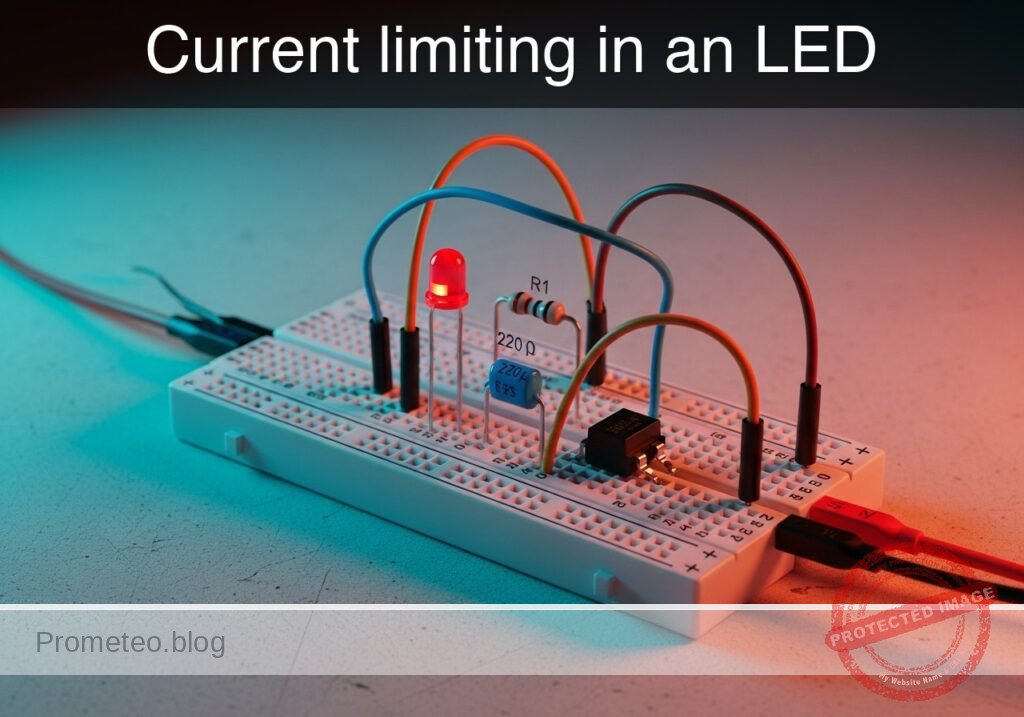
Current limiting in an LED prototype (Maker Style)

Level: Basic. Demonstrate how a resistor protects a sensitive component (LED) by limiting current flow according to Ohm’s Law.

Objective and use case

In this case, you will build a fundamental series circuit connecting a DC voltage source, a current-limiting resistor, and a Light Emitting Diode (LED).

Why it is useful:
* Component Protection: Prevents the LED from drawing excessive current and burning out instantly.
* Ohm’s Law Application: Visually demonstrates the relationship between Voltage, Current, and Resistance ($I = V/R$).
* Status Indication: Forms the basis for power indicators on almost every electronic device.
* Diagnostic Tooling: Simple LED circuits are often used to debug logic levels in complex systems.

Expected outcome:
* The LED lights up steadily without overheating.
* The current flowing through the circuit remains within the safe range (typically 10–20 mA).
* The voltage drop across the resistor corresponds to the supply voltage minus the LED forward voltage.

Target audience and level: Beginners and students starting with basic component analysis.

Materials

  • V1: 5 V DC supply
  • R1: 220 Ω resistor, function: current limiting
  • D1: Red LED, function: light emission
  • M1: Multimeter, function: current measurement (A)
  • M2: Multimeter, function: voltage measurement (V)

Wiring guide

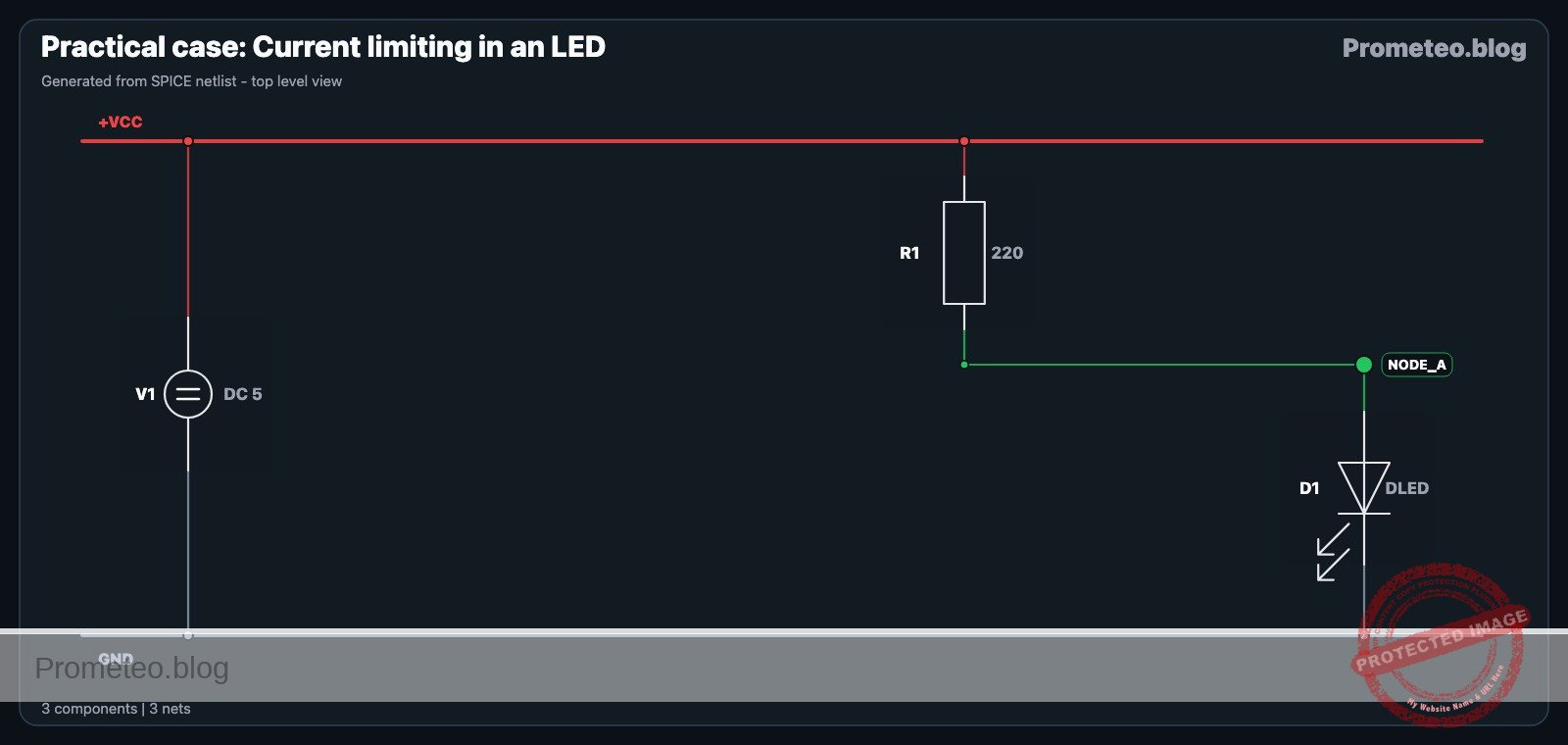
This circuit uses a series topology. We define the nodes as VCC (5V Source), 0 (Ground), and NODE_A (Intermediate connection).

  • V1 (DC Source): Positive terminal connects to node VCC. Negative terminal connects to node 0.
  • R1 (Resistor): Connects between node VCC and node NODE_A.
  • D1 (LED): Anode connects to node NODE_A. Cathode connects to node 0.

Conceptual block diagram

Conceptual block diagram — Current Limiting
Quick read: inputs → main block → output (actuator or measurement). This summarizes the ASCII schematic below.

Schematic

[ SOURCE ]                  [ CURRENT CONTROL ]              [ OUTPUT / LOAD ]

    [ V1: 5V DC ] --(VCC)--> [ R1: 220 Ohm ] --(Node A)--> [ D1: Red LED ] --(0)--> [ GND ]
Schematic (ASCII)

Electrical diagram

Electrical diagram for current limiting in an LED
Generated from the validated SPICE netlist for this case.

🔒 This electrical diagram is premium. With the 7-day pass or the monthly membership you can unlock the complete didactic material and the print-ready PDF pack.🔓 See premium access plans

Measurements and tests

To validate Ohm’s Law and component safety:

  1. Calculate Expected Current:
    • Assume LED Forward Voltage ($V_f$) $\approx$ 2.0 V.
    • Voltage across R1: $V_{R1} = V_{source} – V_f = 5V – 2V = 3V$.
    • Expected Current: $I = V_{R1} / R1 = 3V / 220\Omega \approx 13.6 mA$.
  2. Voltage Measurement: Set multimeter M2 to DC Volts. Measure across R1 (leads on VCC and NODE_A). The reading should be approximately 3 V.
  3. Current Measurement: Break the circuit at node VCC or 0 and insert multimeter M1 in series (Amperemeter mode). The reading should be close to 13–14 mA.
  4. Visual Check: The LED should emit a steady, bright red light.

SPICE netlist and simulation

Reference SPICE Netlist (ngspice) — excerptFull SPICE netlist (ngspice)

* Practical case: Current limiting in an LED

* --- Power Supply ---
* V1: 5V DC Supply connected between VCC and 0 (GND)
V1 VCC 0 DC 5

* --- Components ---
* R1: 220 Ohm Resistor
* Function: Current limiting
* Connected between VCC and NODE_A
R1 VCC NODE_A 220

* D1: Red LED
* Function: Light emission
* Anode connected to NODE_A, Cathode connected to 0 (GND)
D1 NODE_A 0 DLED

* --- Models ---
* Model for D1 (Red LED)
* Parameters: IS (Saturation Current), N (Emission Coefficient), RS (Series Resistance)
* ... (truncated in public view) ...

Copy this content into a .cir file and run with ngspice.

🔒 Part of this section is premium. With the 7-day pass or the monthly membership you can access the full content (materials, wiring, detailed build, validation, troubleshooting, variants and checklist) and download the complete print-ready PDF pack.

* Practical case: Current limiting in an LED

* --- Power Supply ---
* V1: 5V DC Supply connected between VCC and 0 (GND)
V1 VCC 0 DC 5

* --- Components ---
* R1: 220 Ohm Resistor
* Function: Current limiting
* Connected between VCC and NODE_A
R1 VCC NODE_A 220

* D1: Red LED
* Function: Light emission
* Anode connected to NODE_A, Cathode connected to 0 (GND)
D1 NODE_A 0 DLED

* --- Models ---
* Model for D1 (Red LED)
* Parameters: IS (Saturation Current), N (Emission Coefficient), RS (Series Resistance)
* Tuned for approximately 1.8V - 2.0V forward voltage drop
.model DLED D (IS=1e-14 N=2.5 RS=5 BV=5 IBV=10u)

* --- Analysis Directives ---
* Calculate DC operating point
.op

* Transient analysis (Required for .print output generation)
* Step: 100us, Stop: 10ms
.tran 100u 10m

* --- Output / Measurements ---
* Simulating M2 (Multimeter - Voltage): Probing NODE_A (Voltage across LED)
* Simulating M1 (Multimeter - Current): Probing I(V1) (Total circuit current)
* Note: I(V1) will be negative as current flows out of the voltage source.
.print tran V(VCC) V(NODE_A) I(V1)

.end

Simulation Results (Transient Analysis)

Simulation Results (Transient Analysis)
Show raw data table (108 rows)
Index   time            v(vcc)          v(node_a)       v1#branch
0	0.000000e+00	5.000000e+00	1.880179e+00	-1.41810e-02
1	1.000000e-06	5.000000e+00	1.880178e+00	-1.41810e-02
2	2.000000e-06	5.000000e+00	1.880178e+00	-1.41810e-02
3	4.000000e-06	5.000000e+00	1.880178e+00	-1.41810e-02
4	8.000000e-06	5.000000e+00	1.880178e+00	-1.41810e-02
5	1.600000e-05	5.000000e+00	1.880178e+00	-1.41810e-02
6	3.200000e-05	5.000000e+00	1.880178e+00	-1.41810e-02
7	6.400000e-05	5.000000e+00	1.880178e+00	-1.41810e-02
8	1.280000e-04	5.000000e+00	1.880178e+00	-1.41810e-02
9	2.280000e-04	5.000000e+00	1.880178e+00	-1.41810e-02
10	3.280000e-04	5.000000e+00	1.880178e+00	-1.41810e-02
11	4.280000e-04	5.000000e+00	1.880178e+00	-1.41810e-02
12	5.280000e-04	5.000000e+00	1.880178e+00	-1.41810e-02
13	6.280000e-04	5.000000e+00	1.880178e+00	-1.41810e-02
14	7.280000e-04	5.000000e+00	1.880178e+00	-1.41810e-02
15	8.280000e-04	5.000000e+00	1.880178e+00	-1.41810e-02
16	9.280000e-04	5.000000e+00	1.880178e+00	-1.41810e-02
17	1.028000e-03	5.000000e+00	1.880178e+00	-1.41810e-02
18	1.128000e-03	5.000000e+00	1.880178e+00	-1.41810e-02
19	1.228000e-03	5.000000e+00	1.880178e+00	-1.41810e-02
20	1.328000e-03	5.000000e+00	1.880178e+00	-1.41810e-02
21	1.428000e-03	5.000000e+00	1.880178e+00	-1.41810e-02
22	1.528000e-03	5.000000e+00	1.880178e+00	-1.41810e-02
23	1.628000e-03	5.000000e+00	1.880178e+00	-1.41810e-02
... (84 more rows) ...

Common mistakes and how to avoid them

  1. Reversed LED Polarity: Connecting the LED cathode to positive. Solution: Ensure the longer leg (Anode) faces the positive voltage side (towards R1).
  2. Omitting the Resistor: Connecting the LED directly to 5V. Solution: Always verify the resistor is in series before applying power to prevent destroying the LED.
  3. Measuring Current in Parallel: Attempting to measure current by probing across the LED like a voltmeter. Solution: Always break the circuit path and place the meter in series for current measurements.

Troubleshooting

  • Symptom: LED does not light up.
    • Cause: LED connected backwards or broken circuit.
    • Fix: Check orientation (Anode/Cathode) and ensure all breadboard connections are tight.
  • Symptom: LED flashes once and dies.
    • Cause: No current limiting resistor used (LED burned out).
    • Fix: Replace the LED and ensure R1 (220 Ω) is correctly installed.
  • Symptom: LED is very dim.
    • Cause: Resistance value is too high (e.g., using 10 kΩ instead of 220 Ω).
    • Fix: Verify the resistor color bands or measure R1 with a multimeter.
  • Symptom: Multimeter reads 0 A.
    • Cause: Blown fuse in the multimeter or improper mode selection.
    • Fix: Check probe connections (Com/mA) and ensure the meter dial is set to DC Current.

Possible improvements and extensions

  1. Variable Brightness: Replace R1 with a 1 kΩ potentiometer in series with a 100 Ω safety resistor to manually adjust the brightness.
  2. Multiple Colors: Swap the Red LED for Blue or Green and measure the change in current (different colors have different forward voltages, affecting the calculation).

More Practical Cases on Prometeo.blog

Find this product and/or books on this topic on Amazon

Go to Amazon

As an Amazon Associate, I earn from qualifying purchases. If you buy through this link, you help keep this project running.

Quick Quiz

Question 1: What is the primary function of the resistor (R1) in this circuit?


Question 2: Which fundamental law is visually demonstrated by this circuit?


Question 3: What is the expected outcome regarding the LED if the circuit is built correctly?


Question 4: What is the typical safe current range for the LED mentioned in the text?


Question 5: What is the voltage of the DC supply (V1) used in this circuit?


Question 6: Which topology is used to wire this circuit?


Question 7: What determines the voltage drop across the resistor in this circuit?


Question 8: What is a common use case for this type of simple LED circuit mentioned in the text?


Question 9: Why is this circuit useful for component protection?


Question 10: What is the resistance value of R1 specified in the materials list?


Carlos Núñez Zorrilla
Electronics & Computer Engineer

Telecommunications Electronics Engineer and Computer Engineer (official degrees in Spain).

Follow me:


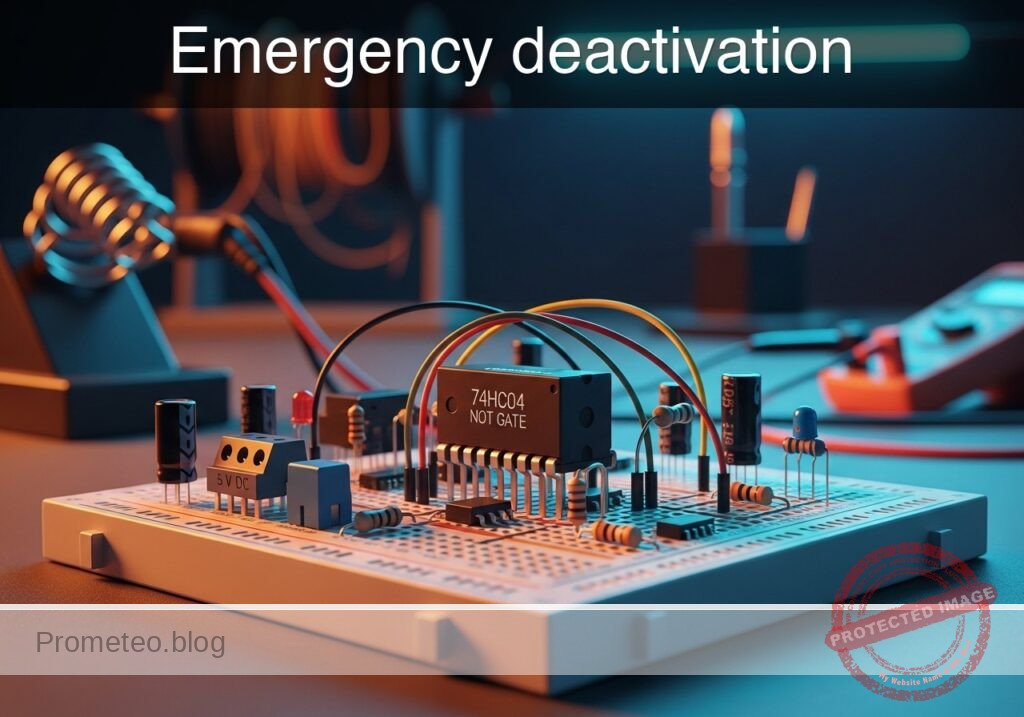
Practical case: Emergency deactivation

Emergency deactivation prototype (Maker Style)

Level: Basic. Build a safety circuit that cuts a ‘Ready’ signal instantly when a stop button is pressed.

Objective and use case

In this tutorial, you will build a digital logic circuit that inverts an input signal. Specifically, a «System Ready» indicator (Green LED) will remain active by default and will immediately turn off when an emergency pushbutton is pressed.

  • Why it is useful:

    • Industrial safety: Simulates an emergency kill switch where the active state shuts down machinery.
    • Security systems: Sensors (like door contacts) often break a circuit to trigger an alarm or change a status.
    • Fail-safe logic: Ensures a system defaults to «safe» (off) when an active intervention occurs.
  • Expected outcome:

    • Idle State: When the button is NOT pressed (Logic 0), the Green LED is ON (Logic 1).
    • Active State: When the button IS pressed (Logic 1), the Green LED turns OFF (Logic 0).
    • Signal Voltage: Input transitions between 0 V and 5 V; Output inverts logically.
  • Target audience and level: Students and hobbyists learning basic digital inversion.

Materials

  • V1: 5 V DC supply, function: main power source.
  • U1: 74HC04 Hex Inverter IC, function: logic inversion (NOT gate).
  • S1: Pushbutton (Normally Open), function: emergency signal trigger.
  • R1: 10 kΩ resistor, function: pull-down resistor for input stability.
  • R2: 330 Ω resistor, function: current limiting for the LED.
  • D1: Green LED, function: ‘System Ready’ indicator.

Pin-out of the IC used

Selected Chip: 74HC04 (Hex Inverter)

Pin Name Logic function Connection in this case
14 VCC Power Supply (+5V) Connect to 5 V rail
7 GND Ground (0V) Connect to 0 V rail
1 1A Input 1 Connect to Pushbutton and Pull-down resistor
2 1Y Output 1 Connect to LED resistor (R2)

Wiring guide

Construct the circuit following these node connections (Nodes: VCC, 0, V_IN, V_OUT):

  • Power Supply:
    • V1 connects between VCC (positive) and 0 (negative/GND).
    • U1 Pin 14 connects to VCC.
    • U1 Pin 7 connects to 0.
  • Input Stage (Button Logic):
    • S1 connects between VCC and V_IN.
    • R1 connects between V_IN and 0 (This pulls the input to 0 V when the button is open).
    • U1 Pin 1 (Input 1A) connects to V_IN.
  • Output Stage (Indicator):
    • U1 Pin 2 (Output 1Y) connects to V_OUT.
    • R2 connects between V_OUT and node LED_ANODE.
    • D1 Anode connects to LED_ANODE.
    • D1 Cathode connects to 0.

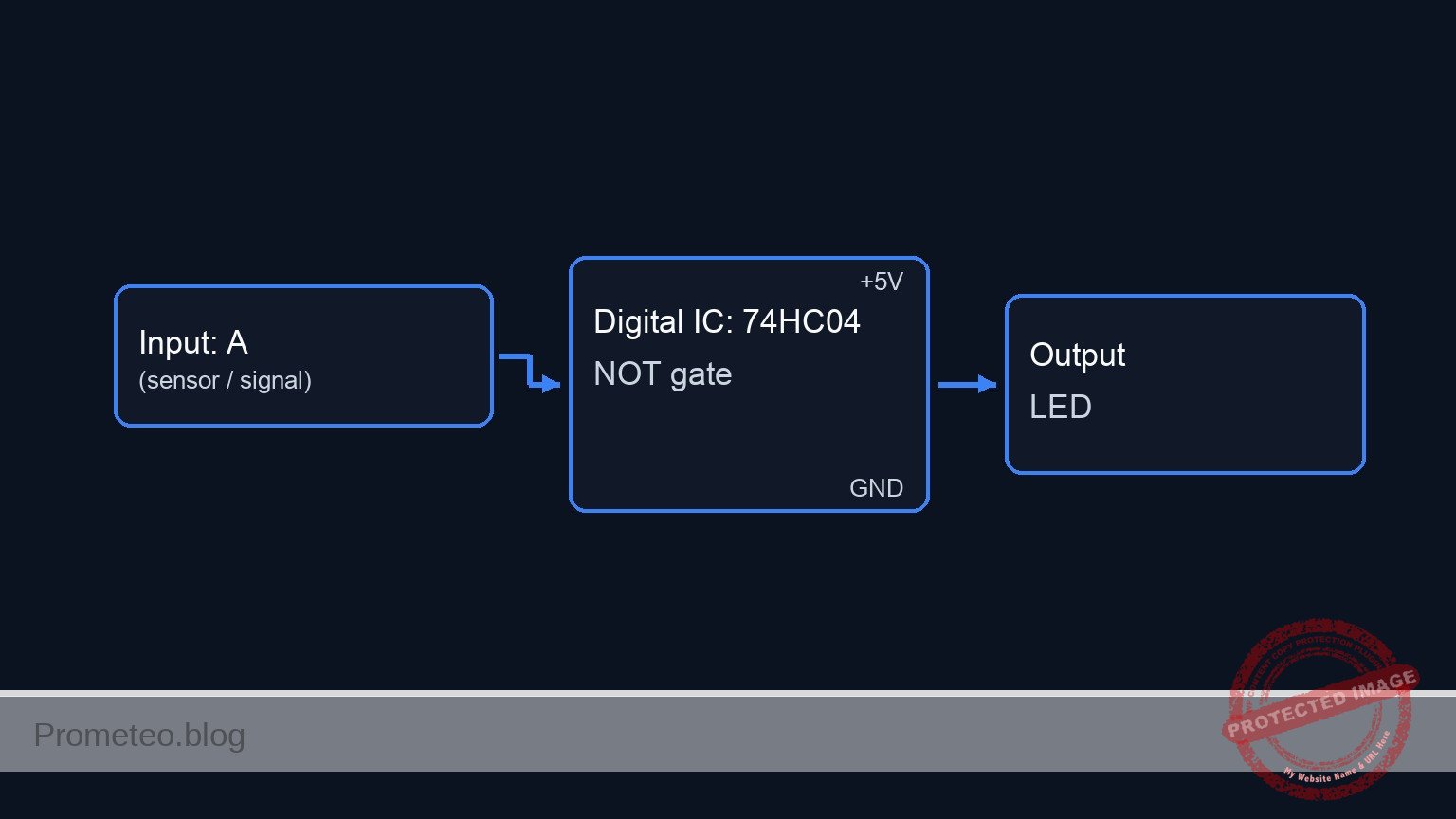
Conceptual block diagram

Conceptual block diagram — 74HC04 NOT gate

Schematic

[ INPUT STAGE ]                          [ LOGIC STAGE ]                       [ OUTPUT STAGE ]

    [ V1: 5V Supply ] --(Power VCC)--------> [ U1 Power: Pin 14 ]

    [ S1: Pushbutton ] --(Press = 5V)--+
    (Emergency Trig)                   |
                                       v
                                  [ Node V_IN ] --(Pin 1)--> [   U1: 74HC04   ] --(Pin 2)--> [ R2: 330 Ohm ] --> [ D1: Green LED ] --> [ GND ]
                                       ^                     [ Hex Inverter IC]              (Current Limit)     (System Ready)
                                       |                     [   (NOT Gate)   ]
    [ R1: 10k Resistor ] --(Open = 0V)-+                     [  GND: Pin 7    ]
    (Pull-down to GND)                                             |
                                                                   v
                                                                [ GND ]
Schematic (ASCII)

Truth table

The 74HC04 implements the Boolean NOT function ($Y = \overline{A}$).

Button State Input Voltage (V_IN) Logic Input (A) Logic Output (Y) LED State
Released 0 V (Pulled down) 0 1 ON
Pressed 5 V (VCC) 1 0 OFF

Measurements and tests

Follow these steps to validate the emergency deactivation logic:

  1. Idle Check:

    • Ensure the power supply is on. Do not touch the button.
    • Visual: The Green LED should be lit.
    • Measurement: Use a multimeter to measure voltage at V_IN (Pin 1). It should be approx 0 V.
    • Measurement: Measure voltage at V_OUT (Pin 2). It should be approx 5 V (Logic High).
  2. Activation Check:

    • Press and hold the pushbutton S1.
    • Visual: The Green LED must turn OFF immediately.
    • Measurement: Voltage at V_IN should rise to 5 V.
    • Measurement: Voltage at V_OUT should drop to approx 0 V (Logic Low).

SPICE netlist and simulation

Reference SPICE Netlist (ngspice) — excerptFull SPICE netlist (ngspice)

* Practical case: Emergency deactivation
* Circuit: Inverter Logic (NOT Gate) with LED Indicator

* --- Power Supply ---
* V1: Main 5V DC supply
V1 VCC 0 DC 5

* --- Input Stage (Button Logic) ---
* Components: S1 (Pushbutton), R1 (Pull-down)
* Connectivity: S1 connects VCC to V_IN. R1 connects V_IN to 0.
* Logic: 
*   - Button Released (Default): S1 Open -> V_IN pulled to 0V by R1.
*   - Button Pressed (Emergency): S1 Closed -> V_IN pulled to 5V (VCC).

* Simulation of S1 (Normally Open Pushbutton):
* Modeled as a Voltage-Controlled Switch (S1) driven by SW_CTRL.
* Vt=2.5V ensures switch closes when control signal is 5V.
S1 VCC V_IN SW_CTRL 0 SW_BTN
.model SW_BTN SW(Vt=2.5 Vh=0.1 Ron=1 Roff=10Meg)

* ... (truncated in public view) ...

Copy this content into a .cir file and run with ngspice.

🔒 Part of this section is premium. With the 7-day pass or the monthly membership you can access the full content (materials, wiring, detailed build, validation, troubleshooting, variants and checklist) and download the complete print-ready PDF pack.

* Practical case: Emergency deactivation
* Circuit: Inverter Logic (NOT Gate) with LED Indicator

* --- Power Supply ---
* V1: Main 5V DC supply
V1 VCC 0 DC 5

* --- Input Stage (Button Logic) ---
* Components: S1 (Pushbutton), R1 (Pull-down)
* Connectivity: S1 connects VCC to V_IN. R1 connects V_IN to 0.
* Logic: 
*   - Button Released (Default): S1 Open -> V_IN pulled to 0V by R1.
*   - Button Pressed (Emergency): S1 Closed -> V_IN pulled to 5V (VCC).

* Simulation of S1 (Normally Open Pushbutton):
* Modeled as a Voltage-Controlled Switch (S1) driven by SW_CTRL.
* Vt=2.5V ensures switch closes when control signal is 5V.
S1 VCC V_IN SW_CTRL 0 SW_BTN
.model SW_BTN SW(Vt=2.5 Vh=0.1 Ron=1 Roff=10Meg)

* Control Signal (User Finger Simulation):
* Generates a pulse: 0V (Released) -> 5V (Pressed) -> 0V (Released).
* Timeline: Idle for 100us, Press for 300us, then Release.
V_BTN_CTRL SW_CTRL 0 PULSE(0 5 100u 1u 1u 300u 1000u)

* R1: 10k Pull-down resistor
R1 V_IN 0 10k

* --- Logic Stage (U1) ---
* Component: 74HC04 Hex Inverter
* Connectivity: Pin 1 (Input) -> V_IN, Pin 2 (Output) -> V_OUT.
* Power: Pin 14 -> VCC, Pin 7 -> 0.
XU1 V_IN V_OUT 0 VCC 74HC04_INV

* Subcircuit for 74HC04 Inverter
* Behavioral model: Output is High when Input is Low.
* Uses a sigmoid function for smooth switching and convergence.
.subckt 74HC04_INV In Out Gnd Vcc
B1 Out Gnd V = V(Vcc,Gnd) / (1 + exp(50 * (V(In,Gnd) - V(Vcc,Gnd)/2)))
.ends

* --- Output Stage (Indicator) ---
* Components: R2 (Resistor), D1 (Green LED)
* Connectivity: V_OUT -> R2 -> LED_ANODE -> D1 -> 0
* Logic: 
*   - V_IN=0 (Ready) -> V_OUT=5 -> LED ON.
*   - V_IN=5 (Emergency) -> V_OUT=0 -> LED OFF.

R2 V_OUT LED_ANODE 330

* D1: Green LED
D1 LED_ANODE 0 LED_GREEN
.model LED_GREEN D(Is=1e-22 Rs=5 N=1.5 Cjo=10p Vj=0.75 M=0.33 BV=5 Ibv=10u)

* --- Simulation Directives ---
* Transient analysis to observe the button press event
.tran 10u 600u

* Output data for analysis
.print tran V(V_IN) V(V_OUT) V(LED_ANODE) V(SW_CTRL)

* Calculate DC operating point
.op

.end

Simulation Results (Transient Analysis)

Simulation Results (Transient Analysis)
Show raw data table (260 rows)
Index   time            v(v_in)         v(v_out)        v(led_anode)
0	0.000000e+00	4.995005e-03	5.000000e+00	1.833072e+00
1	6.000000e-08	4.995005e-03	5.000000e+00	1.833072e+00
2	1.200000e-07	4.995005e-03	5.000000e+00	1.833072e+00
3	2.400000e-07	4.995005e-03	5.000000e+00	1.833072e+00
4	4.800000e-07	4.995005e-03	5.000000e+00	1.833072e+00
5	9.600000e-07	4.995005e-03	5.000000e+00	1.833072e+00
6	1.920000e-06	4.995005e-03	5.000000e+00	1.833072e+00
7	3.840000e-06	4.995005e-03	5.000000e+00	1.833072e+00
8	7.680000e-06	4.995005e-03	5.000000e+00	1.833072e+00
9	1.536000e-05	4.995005e-03	5.000000e+00	1.833072e+00
10	2.536000e-05	4.995005e-03	5.000000e+00	1.833072e+00
11	3.536000e-05	4.995005e-03	5.000000e+00	1.833072e+00
12	4.536000e-05	4.995005e-03	5.000000e+00	1.833072e+00
13	5.536000e-05	4.995005e-03	5.000000e+00	1.833072e+00
14	6.536000e-05	4.995005e-03	5.000000e+00	1.833072e+00
15	7.536000e-05	4.995005e-03	5.000000e+00	1.833072e+00
16	8.536000e-05	4.995005e-03	5.000000e+00	1.833072e+00
17	9.536000e-05	4.995005e-03	5.000000e+00	1.833072e+00
18	1.000000e-04	4.995005e-03	5.000000e+00	1.833072e+00
19	1.001000e-04	4.995005e-03	5.000000e+00	1.833072e+00
20	1.002750e-04	4.995005e-03	5.000000e+00	1.833072e+00
21	1.003234e-04	4.995005e-03	5.000000e+00	1.833072e+00
22	1.004082e-04	4.995005e-03	5.000000e+00	1.833072e+00
23	1.004317e-04	4.995005e-03	5.000000e+00	1.833072e+00
... (236 more rows) ...

Common mistakes and how to avoid them

  1. Floating Input: Omitting R1 (pull-down resistor) causes the input to float when the button is released.
    • Solution: Always ensure the input pin is connected to GND via a resistor (e.g., 10 kΩ) when the switch is open.
  2. LED Reversed: The LED does not light up even when the output is High.
    • Solution: Check D1 polarity. The longer leg (Anode) must face the resistor/IC output; the shorter leg (Cathode) goes to Ground.
  3. Short Circuiting Power: Connecting the button directly between VCC and GND without the gate input in between or wiring the button in parallel with the supply.
    • Solution: Follow the node list carefully. The button connects VCC to the Input Pin, not directly to Ground.

Troubleshooting

  • Symptom: LED is always ON, pressing the button does nothing.
    • Cause: The button is not connected to VCC, or the input pin is permanently grounded.
    • Fix: Check continuity across S1 when pressed. Ensure S1 connects to Pin 1.
  • Symptom: LED is always OFF.
    • Cause: IC not powered, LED reversed, or input permanently connected to VCC.
    • Fix: Measure Pin 14 (VCC) and Pin 7 (GND). Check V_IN voltage; it should be 0 V when the button is released.
  • Symptom: LED flickers when your hand gets close to the wire.
    • Cause: Floating input (Missing R1).
    • Fix: Install the 10 kΩ pull-down resistor securely between Pin 1 and Ground.

Possible improvements and extensions

  1. Add a «Stop» Indicator: Add a second inverter (or use another gate on the same chip) to drive a Red LED that turns ON when the system is stopped (Output High when Input High).
  2. Latching Circuit: Replace the simple NOT gate with a Flip-Flop logic circuit so that once the emergency button is pressed, the system stays off even if the button is released, requiring a separate «Reset» button.

More Practical Cases on Prometeo.blog

Find this product and/or books on this topic on Amazon

Go to Amazon

As an Amazon Associate, I earn from qualifying purchases. If you buy through this link, you help keep this project running.

Quick Quiz

Question 1: What is the primary function of the digital logic circuit described in the tutorial?


Question 2: What is the state of the Green LED when the pushbutton is NOT pressed (Idle State)?


Question 3: What happens to the 'System Ready' indicator when the emergency pushbutton is pressed?


Question 4: Which component is specified as the main power source (V1) for this circuit?


Question 5: In the context of industrial safety, what does this circuit simulate?


Question 6: What is the logic level of the Green LED when the button is pressed (Active State)?


Question 7: What is the voltage range for the input signal transitions described?


Question 8: What concept ensures a system defaults to a 'safe' or off state during an intervention?


Question 9: Who is the target audience for this tutorial?


Question 10: Which type of security system component is mentioned as a similar use case?


Carlos Núñez Zorrilla
Electronics & Computer Engineer

Telecommunications Electronics Engineer and Computer Engineer (official degrees in Spain).
Follow me:


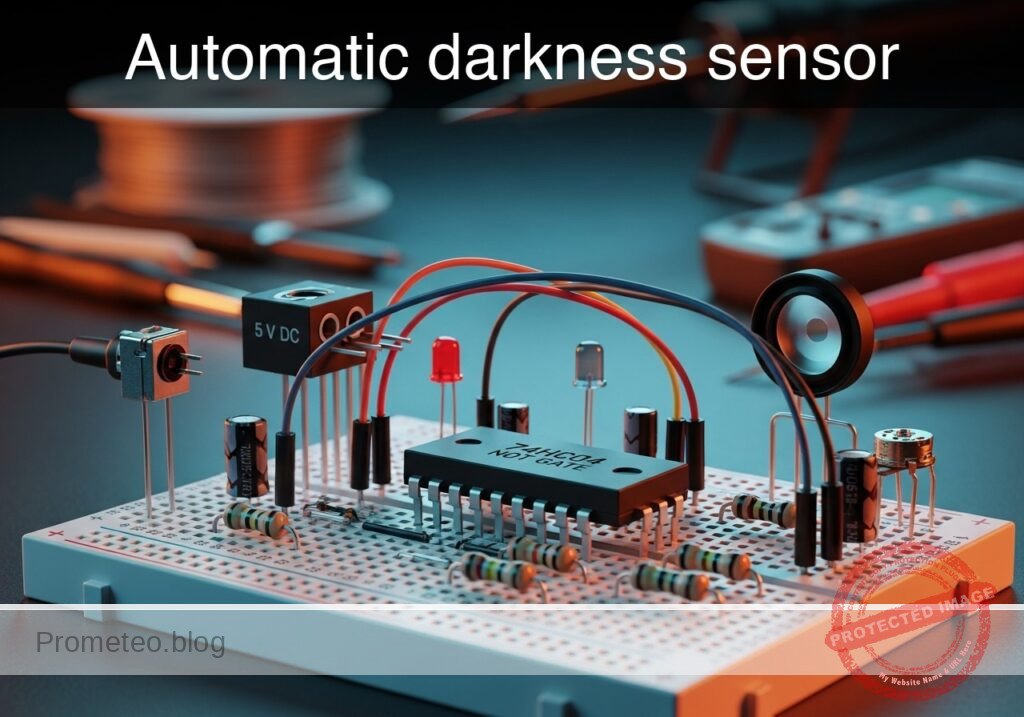
Practical case: Automatic darkness sensor

Automatic darkness sensor prototype (Maker Style)

Level: Basic — Use a 74HC04 inverter and an LDR to automatically switch on an LED when ambient light drops.

Objective and use case

You will build an automatic light control circuit that detects darkness using a Light Dependent Resistor (LDR) and activates an LED using a 74HC04 digital inverter.

  • Why it is useful:
    • Automating streetlights to turn on only at night to save energy.
    • Activating emergency pathway lighting during power failures or darkness.
    • Controlling garden solar lights automatically.
    • Adjusting screen brightness on mobile devices based on ambient light.
  • Expected outcome:
    • When the LDR is exposed to bright light, the LED remains OFF.
    • When the LDR is covered (darkness), the LED turns ON.
    • The voltage at the logic gate input transitions from Logic High (5V) to Logic Low (0V) as it gets darker.
  • Target audience and level: Students and hobbyists familiar with basic breadboarding.

Materials

  • V1: 5 V DC supply, function: Main power source.
  • R1: LDR (GL5528 or similar), function: Light sensor (Variable resistor).
  • R2: 10 kΩ potentiometer, function: Sensitivity calibration (Pull-down).
  • U1: 74HC04, function: Hex Inverter (NOT gate).
  • R3: 330 Ω resistor, function: LED current limiting.
  • D1: Red LED, function: Visual output indicator.

Pin-out of the IC used

Chip: 74HC04 (Hex Inverter)

Pin Name Logic function Connection in this case
14 VCC Power (+) Connect to VCC (5V)
7 GND Ground (-) Connect to 0 (GND)
1 1A Input Connect to sensor node VSENSE
2 1Y Output Connect to LED node VOUT

(Note: Pins 3, 5, 9, 11, 13 are unused inputs and should ideally be connected to GND in permanent circuits to prevent noise, though not strictly required for this quick test.)

Wiring guide

Use the following explicit node connections to build the circuit on your breadboard:

  • Power Supply:
    • V1 positive terminal connects to node VCC.
    • V1 negative terminal connects to node 0 (GND).
  • Sensor Stage (Voltage Divider):
    • R1 (LDR) connects between VCC and node VSENSE.
    • R2 (Potentiometer) connects between node VSENSE and 0 (GND).
    • Note: Adjust R2 so the voltage at VSENSE varies when light changes.
  • Logic Stage (Inverter):
    • U1 Pin 14 connects to VCC.
    • U1 Pin 7 connects to 0.
    • U1 Pin 1 (Input) connects to node VSENSE.
    • U1 Pin 2 (Output) connects to node VOUT.
  • Output Stage:
    • R3 connects between node VOUT and node LED_ANODE.
    • D1 connects between node LED_ANODE (Anode/Long leg) and 0 (Cathode/Short leg).

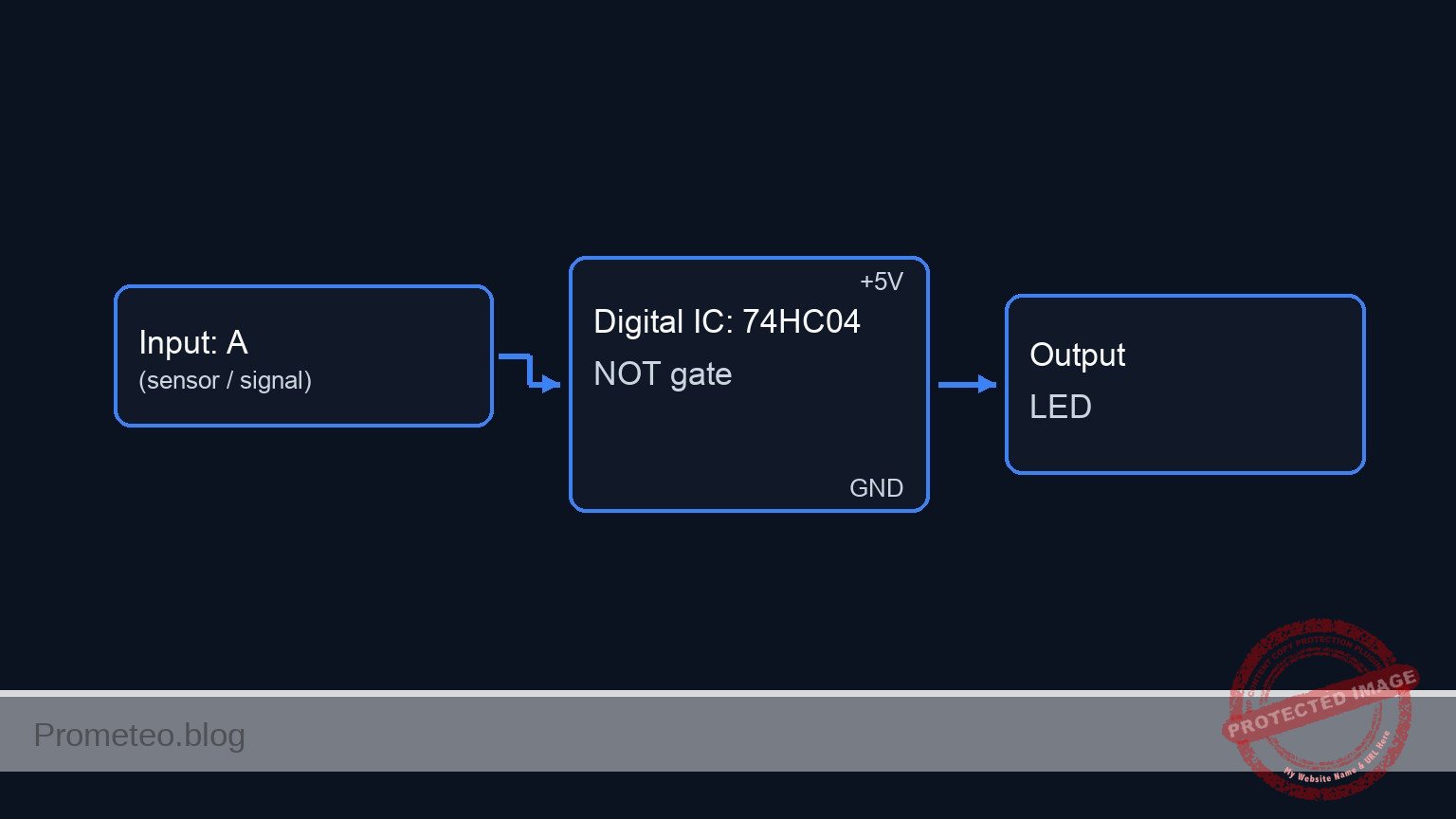
Conceptual block diagram

Conceptual block diagram — 74HC04 NOT gate

Schematic

[ INPUT / SENSOR STAGE ]               [ LOGIC STAGE ]                  [ OUTPUT STAGE ]

 [ VCC ] --> [ R1: LDR (Sensor) ] --+
                                    |
                                    v
                               [ VSENSE ] --(Pin 1)--> [ U1: 74HC04 ] --(Pin 2)--> [ R3: 330 Ohm ] --> [ D1: LED ] --> GND
                                    ^                  [  NOT Gate  ]
                                    |
 [ GND ] --> [ R2: Pot (Calib) ] ---+
Schematic (ASCII)

Truth table

The 74HC04 inverts the input signal. We configure the sensors so that «Bright» creates a HIGH input.

Ambient Condition LDR Resistance Voltage at VSENSE (Input) Logic Input Logic Output (VOUT) LED State
Bright Low High (> 2.5V) 1 0 (GND) OFF
Dark High Low (< 1.5V) 0 1 (5V) ON

Measurements and tests

  1. Calibration: Expose the LDR to normal room light. Adjust potentiometer R2 until the LED turns OFF.
  2. Voltage Check (Bright): Measure voltage between VSENSE and GND. It should be close to 5V (Logic 1). The output at VOUT should be near 0V.
  3. Activation: Cover the LDR with your hand to simulate darkness.
  4. Voltage Check (Dark): Measure VSENSE again. It should drop towards 0V (Logic 0). The output VOUT should jump to approx. 5V, turning the LED ON.

SPICE netlist and simulation

Reference SPICE Netlist (ngspice) — excerptFull SPICE netlist (ngspice)

* Practical case: Automatic darkness sensor

* --- Models ---
* Generic Red LED Model
.model DLED D (IS=1e-22 N=1.5 RS=5 BV=5 IBV=10u CJO=10p)

* --- Subcircuits ---
* 74HC04 Hex Inverter Model (Behavioral)
* Pins: 1=Input, 2=Output, 7=GND, 14=VCC
* Maps to subckt args: In Out GND VCC
.subckt 74HC04 In Out GND VCC
  * Robust Sigmoid Transfer Function for Inverter
  * Threshold is VCC/2. Output swings between GND and VCC.
  * Formula: Vout = VCC * (1 / (1 + exp(50 * (V(In) - V(VCC)/2))))
  B_INV Out GND V = V(VCC) * (1 / (1 + exp(50 * (V(In) - V(VCC)/2))))
.ends

* --- Main Circuit Components ---

* 1. Power Supply
* ... (truncated in public view) ...

Copy this content into a .cir file and run with ngspice.

🔒 Part of this section is premium. With the 7-day pass or the monthly membership you can access the full content (materials, wiring, detailed build, validation, troubleshooting, variants and checklist) and download the complete print-ready PDF pack.

* Practical case: Automatic darkness sensor

* --- Models ---
* Generic Red LED Model
.model DLED D (IS=1e-22 N=1.5 RS=5 BV=5 IBV=10u CJO=10p)

* --- Subcircuits ---
* 74HC04 Hex Inverter Model (Behavioral)
* Pins: 1=Input, 2=Output, 7=GND, 14=VCC
* Maps to subckt args: In Out GND VCC
.subckt 74HC04 In Out GND VCC
  * Robust Sigmoid Transfer Function for Inverter
  * Threshold is VCC/2. Output swings between GND and VCC.
  * Formula: Vout = VCC * (1 / (1 + exp(50 * (V(In) - V(VCC)/2))))
  B_INV Out GND V = V(VCC) * (1 / (1 + exp(50 * (V(In) - V(VCC)/2))))
.ends

* --- Main Circuit Components ---

* 1. Power Supply
* V1: 5V DC supply
V1 VCC 0 DC 5

* 2. Sensor Stage (Voltage Divider)
* R1: LDR (Light Dependent Resistor)
* Implementation: A dummy R1 is placed to satisfy the BOM.
* A parallel behavioral source (B_LDR) implements the dynamic resistance change.
R1 VCC VSENSE 100Meg
B_LDR VCC VSENSE I = V(VCC, VSENSE) / V(RES_CTRL)

* R2: 10k Potentiometer (Sensitivity Calibration)
R2 VSENSE 0 10k

* Dynamic Stimulus for LDR (Simulates Light Conditions)
* Generates a control voltage representing Ohms.
* Pulse sweeps from 1k (Light) to 100k (Dark).
* Logic: Light(1k) -> VSENSE High -> LED OFF. Dark(100k) -> VSENSE Low -> LED ON.
V_LDR_CTRL RES_CTRL 0 PULSE(1k 100k 0 200u 200u 400u 2ms)

* 3. Logic Stage
* U1: 74HC04 Hex Inverter
* Connections: Pin 1 (In)=VSENSE, Pin 2 (Out)=VOUT, Pin 7=0, Pin 14=VCC
XU1 VSENSE VOUT 0 VCC 74HC04

* 4. Output Stage
* R3: LED Current Limiting Resistor (330 Ohm)
R3 VOUT LED_ANODE 330

* D1: Red LED
D1 LED_ANODE 0 DLED

* --- Analysis Directives ---
* Transient analysis to capture the Light/Dark transition
.tran 10u 2ms

* Print specific node voltages for validation
.print tran V(VSENSE) V(VOUT) V(LED_ANODE)

* Compute DC operating point
.op

.end

Simulation Results (Transient Analysis)

Simulation Results (Transient Analysis)
Show raw data table (224 rows)
Index   time            v(vsense)       v(vout)         v(led_anode)
0	0.000000e+00	4.545459e+00	1.916016e-44	6.555013e-37
1	1.000000e-07	4.525005e+00	3.875543e-44	2.124754e-38
2	2.000000e-07	4.504821e+00	1.070470e-43	-1.98700e-38
3	4.000000e-07	4.464726e+00	4.391831e-43	-3.30922e-39
4	8.000000e-07	4.386087e+00	5.351931e-42	4.963938e-40
5	1.600000e-06	4.240174e+00	7.789996e-38	7.726704e-38
6	3.200000e-06	3.973321e+00	1.292803e-32	1.287493e-32
7	6.400000e-06	3.529123e+00	-6.61237e-21	-6.59876e-21
8	1.280000e-05	2.884261e+00	2.263832e-08	2.262430e-08
9	1.905731e-05	2.447108e+00	4.668386e+00	1.823995e+00
10	2.344117e-05	2.212214e+00	4.999997e+00	1.833723e+00
11	2.751655e-05	2.030989e+00	5.000000e+00	1.833029e+00
12	3.266976e-05	1.840361e+00	5.000000e+00	1.833116e+00
13	4.266976e-05	1.556825e+00	5.000000e+00	1.833028e+00
14	5.266976e-05	1.349010e+00	5.000000e+00	1.833116e+00
15	6.266976e-05	1.190157e+00	5.000000e+00	1.833028e+00
16	7.266976e-05	1.064784e+00	5.000000e+00	1.833116e+00
17	8.266976e-05	9.633175e-01	5.000000e+00	1.833028e+00
18	9.266976e-05	8.795141e-01	5.000000e+00	1.833116e+00
19	1.026698e-04	8.091310e-01	5.000000e+00	1.833028e+00
20	1.126698e-04	7.491835e-01	5.000000e+00	1.833116e+00
21	1.226698e-04	6.975110e-01	5.000000e+00	1.833028e+00
22	1.326698e-04	6.525106e-01	5.000000e+00	1.833116e+00
23	1.426698e-04	6.129684e-01	5.000000e+00	1.833028e+00
... (200 more rows) ...

Common mistakes and how to avoid them

  1. Swapping LDR and Potentiometer: If you swap R1 and R2, the logic inverts: the light will turn ON when it is bright and OFF when it is dark. Ensure the LDR is connected to VCC and the Potentiometer to GND.
  2. LED inserted backwards: If D1 does not light up when VOUT is high, check the polarity. The longer leg (anode) must face the resistor R3.
  3. Sensitivity too low: If the LED never turns off, R2 might be set to too high a resistance, keeping voltage at VSENSE always high. Turn the knob to lower the resistance.

Troubleshooting

  • LED is always ON:
    • Cause: Potentiometer resistance is too high or LDR is broken (open circuit).
    • Fix: Decrease R2 value by turning the knob. Check LDR connections.
  • LED is always OFF:
    • Cause: Potentiometer resistance is too low (shorting input to ground) or U1 is not powered.
    • Fix: Verify Pin 14 has 5V. Increase R2 resistance slightly.
  • LED flickers:
    • Cause: The light level is right at the switching threshold of the 74HC04.
    • Fix: Adjust R2 slightly to move away from the threshold or shade the LDR more decisively.

Possible improvements and extensions

  1. Add Hysteresis: Replace the 74HC04 with a 74HC14 (Schmidt Trigger Inverter). This prevents flickering when the light transitions slowly (dusk/dawn).
  2. High Power Load: Connect the output pin to a transistor (like a 2N2222) and a relay module to switch a 110V/220V desk lamp instead of a small LED.

More Practical Cases on Prometeo.blog

Find this product and/or books on this topic on Amazon

Go to Amazon

As an Amazon Associate, I earn from qualifying purchases. If you buy through this link, you help keep this project running.

Quick Quiz

Question 1: What is the primary function of the LDR in this circuit?


Question 2: Which component is used to calibrate the sensitivity of the light detection?


Question 3: What happens to the LED when the LDR is exposed to bright light?


Question 4: Which logic gate is contained within the 74HC04 chip?


Question 5: What is the expected voltage transition at the logic gate input as the environment gets darker?


Question 6: To which pin of the 74HC04 IC should the main power (VCC) be connected?


Question 7: What is the purpose of the 330 Ω resistor (R3) in this circuit?


Question 8: Which pin on the 74HC04 is typically used as the Ground (GND) connection?


Question 9: What is a practical application mentioned for this circuit?


Question 10: In this specific circuit configuration, where is the sensor node `VSENSE` connected on the IC?


Carlos Núñez Zorrilla
Electronics & Computer Engineer

Telecommunications Electronics Engineer and Computer Engineer (official degrees in Spain).

Follow me: