Practical case: Light-controlled oscillator

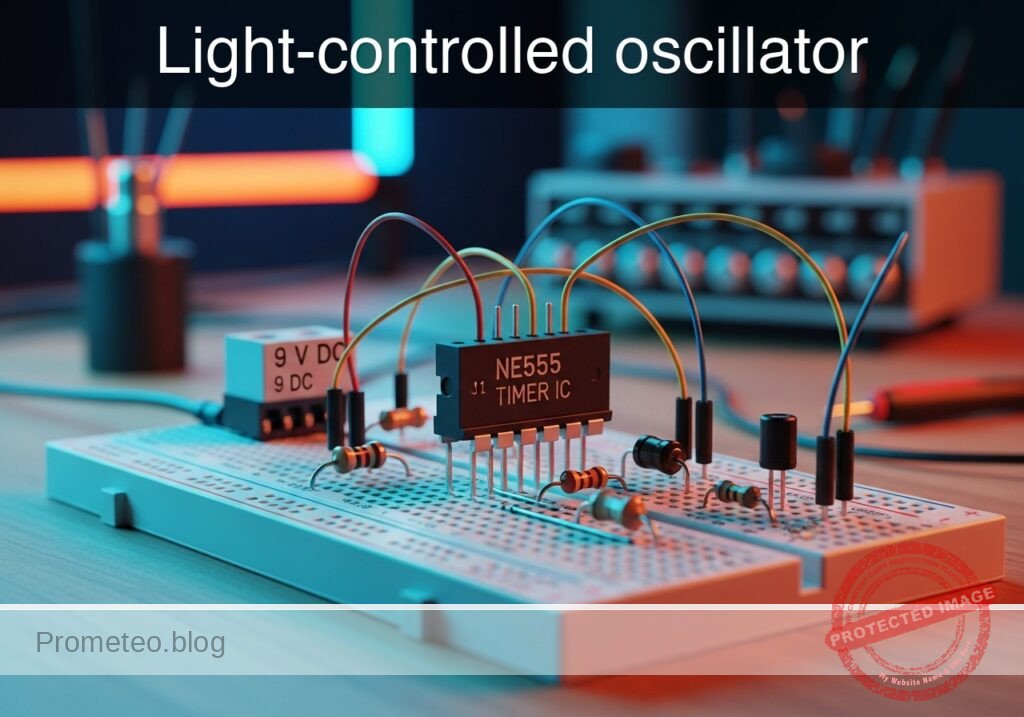
Light-controlled oscillator prototype (Maker Style)

Level: Medium. Design an astable NE555 oscillator where an LDR modulates the output frequency based on ambient light.

Objective and use case

In this project, you will build an astable oscillator using the 555 timer IC, where a Light Dependent Resistor (LDR) replaces one of the standard timing resistors. This substitution dynamically changes the pitch of a piezoelectric speaker depending on the amount of light hitting the sensor.

This circuit is highly useful in the real world:
* It serves as an auditory sensor for light warnings, such as an alarm for a refrigerator door left open.
* It acts as a fundamental building block for simple electronic musical instruments, like a basic optical theremin.
* It provides accessibility indicators, giving distinct audio feedback for visually impaired users to know if lights are turned on or off in a room.
* It demonstrates how to convert a varying analog physical property (luminosity) into a frequency-modulated electrical signal.

Expected outcome:
* The piezoelectric speaker will output a continuous, audible tone.
* The frequency (pitch) of the tone will increase significantly when the LDR is exposed to bright light.
* The frequency of the tone will drop to a lower pitch when the LDR is covered or in a dark environment.
* The primary timing capacitor will continuously charge and discharge between 1/3 and 2/3 of the supply voltage.

Target audience and level: Intermediate electronics students looking to combine analog sensors with standard timing ICs.

Materials

  • V1: 9 V DC supply
  • U1: NE555 timer IC, function: astable oscillator
  • R1: 1 kΩ resistor, function: fixed timing resistor limiting discharge current
  • R2: Photoresistor (LDR), function: variable timing resistor modulated by light
  • C1: 100 nF ceramic capacitor, function: primary timing oscillator capacitor
  • C2: 10 nF ceramic capacitor, function: control voltage stabilization for U1
  • C3: 10 µF electrolytic capacitor, function: AC coupling for the speaker
  • LS1: Piezoelectric speaker, function: audio output

Wiring guide

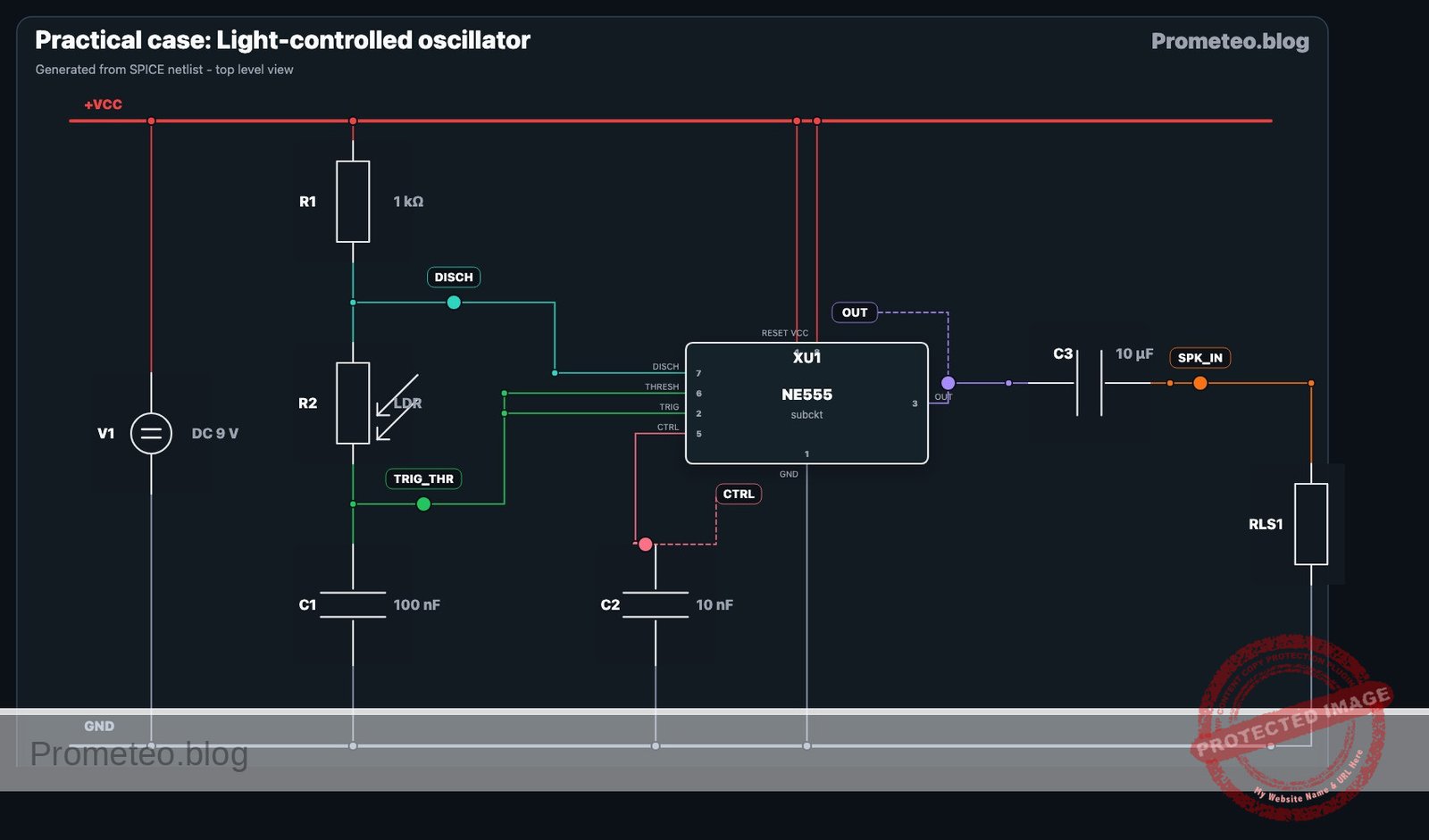
  • V1: connects between node VCC and node 0 (GND).
  • U1 Pin 1 (GND): connects to node 0.
  • U1 Pin 8 (VCC): connects to node VCC.
  • U1 Pin 4 (RESET): connects to node VCC.
  • U1 Pin 7 (DISCHARGE): connects to node DISCH.
  • U1 Pin 2 (TRIGGER): connects to node TRIG_THR.
  • U1 Pin 6 (THRESHOLD): connects to node TRIG_THR.
  • U1 Pin 5 (CONTROL): connects to node CTRL.
  • U1 Pin 3 (OUTPUT): connects to node OUT.
  • R1: connects between node VCC and node DISCH.
  • R2: connects between node DISCH and node TRIG_THR.
  • C1: connects between node TRIG_THR and node 0.
  • C2: connects between node CTRL and node 0.
  • C3: connects between node OUT (positive terminal) and node SPK_IN (negative terminal).
  • LS1: connects between node SPK_IN and node 0.

Conceptual block diagram
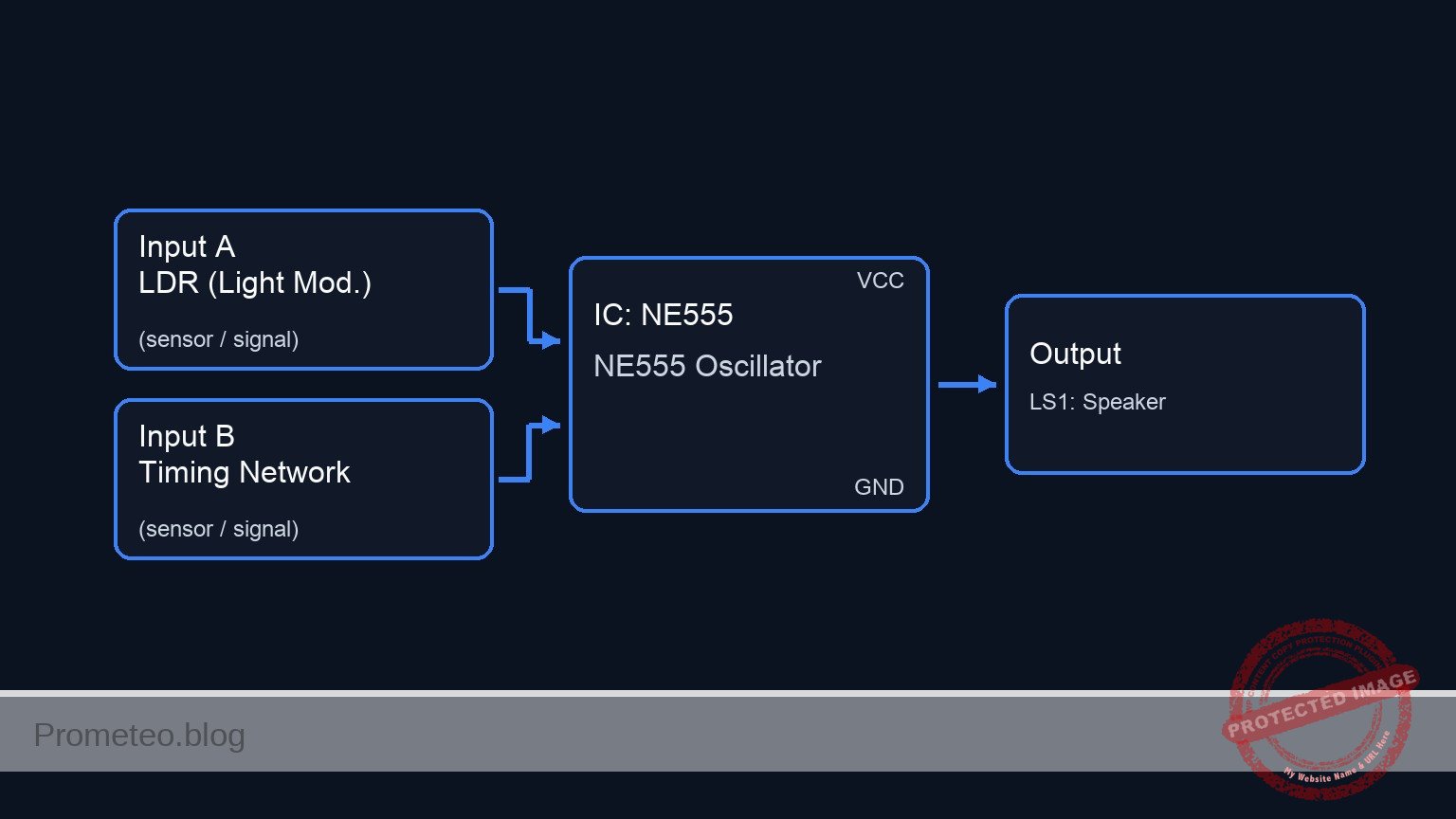
Conceptual block diagram — NE555 NE555 Oscillator
Quick read: inputs → main block → output (actuator or measurement). This summarizes the ASCII schematic below.

Schematic

Inputs / Timing Network                                        Processing                      Output / Load
=======================                                        ==========                      =============

[ VCC --> R1: 1 kΩ ] -----------------------(DISCH: Pin 7)----> [ U1: NE555 Timer ]
                                                               [                 ]
[ Node DISCH --> R2: LDR (Light Mod.) ] ---(TRIG_THR: Pins 2,6)[                 ]
                                                               [  (Oscillator)   ] --(OUT: Pin 3)--> [ C3: 10µF ] --(SPK_IN)--> [ LS1: Speaker ] --> GND
[ Node TRIG_THR --> C1: 100nF --> GND ] ---(Timing Ref)------> [                 ]
                                                               [                 ]
[ Node CTRL --> C2: 10nF --> GND ] --------(CTRL: Pin 5)-----> [                 ]
Electrical Schematic

Electrical diagram

Electrical diagram for case: Light-controlled oscillator
Generated from the validated SPICE netlist for this case.

🔒 This electrical diagram is premium. With the 7-day pass or the monthly membership you can unlock the complete didactic material and the print-ready PDF pack.🔓 See premium access plans

Measurements and tests

  1. LDR resistance: Before inserting the LDR into the circuit, measure its resistance with a digital multimeter. Record the value in absolute darkness (it should be very high, e.g., > 50 kΩ) and under direct flashlight illumination (it should drop significantly, e.g., < 1 kΩ).
  2. Capacitor voltage: Power the assembled circuit. Use an oscilloscope to probe the node TRIG_THR with respect to ground (node 0). You should observe a continuous charge-discharge waveform (resembling a shark fin or triangle) oscillating exactly between 3 V and 6 V (which correspond to 1/3 and 2/3 of the 9 V supply).
  3. Output frequency: Connect an oscilloscope or a frequency counter to node OUT with respect to ground. Shine a flashlight directly onto the LDR and observe the frequency rise rapidly. Cover the sensor with your hand to simulate darkness and watch the frequency fall.

SPICE netlist and simulation

Reference SPICE Netlist (ngspice) — excerptFull SPICE netlist (ngspice)

* Light-controlled oscillator (NE555 astable)
.width out=256

.op
.tran 10u 5m uic
.print tran V(TRIG_THR) V(OUT) V(VCC) V(SPK_IN)

* Power Supply
V1 VCC 0 DC 9

* 555 Timer IC Subcircuit Definition
.subckt NE555 1 2 3 4 5 6 7 8
* Pins: 1:GND 2:TRIG 3:OUT 4:RESET 5:CTRL 6:THR 7:DISCH 8:VCC
* Internal voltage divider
R1 8 5 5k
R2 5 N_TRIG_REF 5k
R3 N_TRIG_REF 1 5k

* Comparators using continuous tanh functions for robust convergence
B_S N_S 1 V=0.5 + 0.5*tanh(100 * (V(N_TRIG_REF) - V(2)))
* ... (truncated in public view) ...

Copy this content into a .cir file and run with ngspice.

🔒 Part of this section is premium. With the 7-day pass or the monthly membership you can access the full content (materials, wiring, detailed build, validation, troubleshooting, variants and checklist) and download the complete print-ready PDF pack.

* Light-controlled oscillator (NE555 astable)
.width out=256

.op
.tran 10u 5m uic
.print tran V(TRIG_THR) V(OUT) V(VCC) V(SPK_IN)

* Power Supply
V1 VCC 0 DC 9

* 555 Timer IC Subcircuit Definition
.subckt NE555 1 2 3 4 5 6 7 8
* Pins: 1:GND 2:TRIG 3:OUT 4:RESET 5:CTRL 6:THR 7:DISCH 8:VCC
* Internal voltage divider
R1 8 5 5k
R2 5 N_TRIG_REF 5k
R3 N_TRIG_REF 1 5k

* Comparators using continuous tanh functions for robust convergence
B_S N_S 1 V=0.5 + 0.5*tanh(100 * (V(N_TRIG_REF) - V(2)))
B_R N_R 1 V=0.5 + 0.5*tanh(100 * (V(6) - V(5)))
B_RESET N_RESET 1 V=0.5 + 0.5*tanh(100 * (0.7 - (V(4) - V(1))))

* SR Latch (Behavioral RC model ensuring smooth transitions)
B_INT N_INT 1 V=(V(N_RESET)<=0.5) * ( (V(N_S)>=0.5) + (V(N_S)<0.5) * (V(N_R)<=0.5) * V(N_INT_CAP) )
R_INT N_INT N_INT_CAP 100
C_INT N_INT_CAP 1 1n

* Output stage (Push-pull behavior)
B_OUT N_OUT 1 V=(V(N_INT_CAP)>0.5) * V(8)
R_OUT N_OUT 3 10

* Discharge stage (Open collector behavior)
B_DISCH 7 1 I=V(7) * ( (V(N_INT_CAP)<0.5)*0.1 + (V(N_INT_CAP)>=0.5)*1e-9 )
.ends

* Main Circuit
XU1 0 TRIG_THR OUT VCC CTRL TRIG_THR DISCH VCC NE555
R1 VCC DISCH 1k
R2 DISCH TRIG_THR 10k
C1 TRIG_THR 0 100n
C2 CTRL 0 10n
C3 OUT SPK_IN 10u
RLS1 SPK_IN 0 1k

.end
* --- GPT review (BOM/Wiring/SPICE) ---
* circuit_ok=true
* simulation_summary: The transient simulation shows the trigger/threshold voltage oscillating between approximately 3V (1/3 VCC) and 6V (2/3 VCC), and the output toggling between near 0V and near 9V. The AC-coupled speaker input (SPK_IN) correctly centers around 0V during operation.
* bom_vs_spice equivalences ignored:
*   - Photoresistor (LDR) R2 modeled as a fixed 10k resistor.
*   - Piezoelectric speaker LS1 modeled as a 1k resistor RLS1.
* overall_comment: The SPICE netlist accurately represents the light-controlled oscillator described in the BOM and wiring guide. The NE555 subcircuit functions correctly as an astable multivibrator, and the simulation results confirm the expected oscillation. The circuit is perfectly suitable as a didactic example.
* --------------------------------------

Simulation Results (Transient Analysis)

Simulation Results (Transient Analysis)

Analysis: The transient simulation shows the trigger/threshold voltage oscillating between approximately 3V (1/3 VCC) and 6V (2/3 VCC), and the output toggling between near 0V and near 9V. The AC-coupled speaker input (SPK_IN) correctly centers around 0V during operation.
Show raw data table (631 rows)
Index   time            v(trig_thr)     v(out)          v(vcc)          v(spk_in)
0	1.000000e-07	8.901188e-06	0.000000e+00	9.000000e+00	0.000000e+00
1	1.014392e-07	2.067642e-05	8.910891e+00	9.000000e+00	8.910890e+00
2	1.043176e-07	4.422687e-05	8.910891e+00	9.000000e+00	8.910887e+00
3	1.100744e-07	9.132756e-05	8.910891e+00	9.000000e+00	8.910882e+00
4	1.215880e-07	1.855282e-04	8.910891e+00	9.000000e+00	8.910872e+00
5	1.446152e-07	3.739266e-04	8.910891e+00	9.000000e+00	8.910852e+00
6	1.906696e-07	7.507115e-04	8.910892e+00	9.000000e+00	8.910811e+00
7	2.827784e-07	1.504234e-03	8.910893e+00	9.000000e+00	8.910730e+00
8	4.361485e-07	2.758782e-03	8.910894e+00	9.000000e+00	8.910595e+00
9	6.136134e-07	4.210203e-03	8.910896e+00	9.000000e+00	8.910438e+00
10	8.824756e-07	6.408686e-03	8.910898e+00	9.000000e+00	8.910201e+00
11	1.315870e-06	9.951414e-03	8.910902e+00	9.000000e+00	8.909818e+00
12	2.182659e-06	1.703268e-02	8.910909e+00	9.000000e+00	8.909054e+00
13	3.916236e-06	3.117850e-02	8.910925e+00	9.000000e+00	8.907525e+00
14	7.383392e-06	5.940335e-02	8.910955e+00	9.000000e+00	8.904468e+00
15	1.000000e-05	8.064538e-02	8.910978e+00	9.000000e+00	8.902161e+00
16	1.069343e-05	8.626452e-02	8.910985e+00	9.000000e+00	8.901550e+00
17	1.208029e-05	9.749572e-02	8.910997e+00	9.000000e+00	8.900328e+00
18	1.485402e-05	1.199157e-01	8.911021e+00	9.000000e+00	8.897884e+00
19	2.040147e-05	1.645865e-01	8.911070e+00	9.000000e+00	8.892998e+00
20	3.040147e-05	2.445449e-01	8.911158e+00	9.000000e+00	8.884197e+00
21	4.040147e-05	3.237797e-01	8.911246e+00	9.000000e+00	8.875405e+00
22	5.040147e-05	4.022975e-01	8.911334e+00	9.000000e+00	8.866622e+00
23	6.040147e-05	4.801047e-01	8.911422e+00	9.000000e+00	8.857848e+00
... (607 more rows) ...

Common mistakes and how to avoid them

  • Swapping the positions of R1 and the LDR: If the LDR is placed between VCC and pin 7 (DISCHARGE), intense light will drop its resistance to almost zero. When the NE555 attempts to discharge the capacitor by grounding pin 7, it will create a near short-circuit from VCC to ground, potentially destroying the IC. Always keep a fixed safety resistor (R1) in the upper position.
  • Choosing the wrong value for C1: If C1 is too large (like a 10 µF electrolytic capacitor), the oscillator will run at a sub-audio frequency, producing a series of clicks rather than a tone. Stick to the 10 nF to 100 nF range for audible results.
  • Omitting the AC coupling capacitor (C3): Connecting the piezo speaker directly from the output pin to ground forces a constant DC offset through the speaker, which draws unnecessary power and can degrade the component over time. Always use an AC coupling capacitor to block the DC component.

Troubleshooting

  • Symptom: The speaker emits a continuous clicking or ticking sound instead of a musical tone.
    • Cause: The oscillation frequency is too low, likely below 20 Hz.
    • Fix: Check the value of C1. Ensure it is a 100 nF ceramic capacitor (often marked 104) and not a much larger electrolytic capacitor. Also, ensure the LDR is not in total darkness.
  • Symptom: No sound is produced, and the NE555 chip feels hot to the touch.
    • Cause: A short circuit during the discharge cycle.
    • Fix: Disconnect power immediately. Verify that R1 is a fixed 1 kΩ resistor and that the LDR is strictly placed between pins 7 and 6, NOT between VCC and pin 7.
  • Symptom: A tone is heard, but the pitch barely changes when waving a hand over the sensor.
    • Cause: The resistance swing of the LDR in current lighting conditions is too small, or ambient room light is too uniform.
    • Fix: Test the circuit by shining a highly focused light source (like a smartphone flashlight) directly onto the LDR, then completely covering it with a dark cup. If the tone still doesn’t change much, verify that R2 is indeed an LDR and not a standard fixed resistor by mistake.

Possible improvements and extensions

  • Manual tuning potentiometer: Add a 10 kΩ potentiometer in series with the LDR. This allows you to manually offset the total resistance, providing a way to tune the «base pitch» of the oscillator for different room lighting conditions.
  • Inverse light response: Modify the configuration so that pitch decreases as light increases. This can be achieved by rewiring the timing section (keeping safety resistors in mind) or by using a secondary transistor to invert the LDR’s behavior over the control voltage (Pin 5) of the NE555 instead of the standard timing network.

More Practical Cases on Prometeo.blog

Find this product and/or books on this topic on Amazon

Go to Amazon

As an Amazon Associate, I earn from qualifying purchases. If you buy through this link, you help keep this project running.

Quick Quiz

Question 1: What is the main function of the NE555 timer IC in this project?


Question 2: How does the Light Dependent Resistor (LDR) affect the circuit's output?


Question 3: What happens to the frequency of the tone when the LDR is exposed to bright light?


Question 4: Which of the following is listed as a real-world use case for this circuit?


Question 5: What type of speaker is used to output the continuous tone in this project?


Question 6: What type of musical instrument is mentioned as a basic building block application for this circuit?


Question 7: What physical property does this circuit convert into a frequency-modulated electrical signal?


Question 8: What component replaces one of the standard timing resistors in this NE555 oscillator design?


Question 9: What is the difficulty level of this project?


Question 10: How does this circuit provide accessibility for visually impaired users?


Carlos Núñez Zorrilla
Electronics & Computer Engineer

Telecommunications Electronics Engineer and Computer Engineer (official degrees in Spain).
Follow me:


Practical case: Shadow detector for visual alert

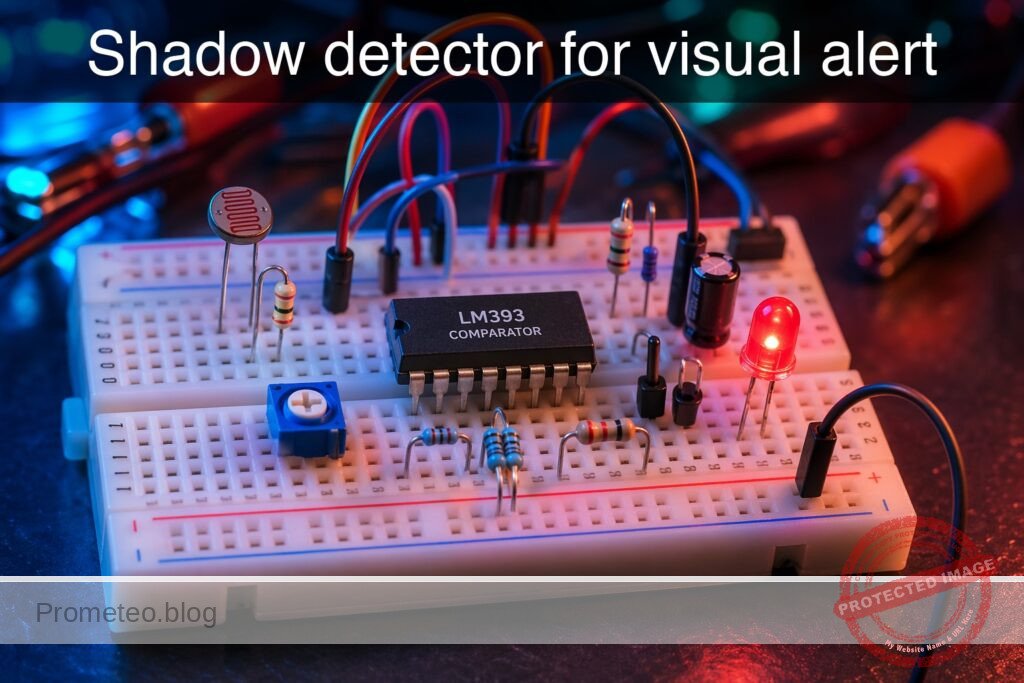
Shadow detector for visual alert prototype (Maker Style)

Level: Medium — Build a stable shadow detector with visual indication and low false triggering.

Objective and use case

You will build a photoresistor-based circuit that detects a sudden drop in light caused by a shadow and turns on an LED in a stable way. The design uses an LDR voltage divider, an RC filter, and a comparator with hysteresis to reduce false activations.

Why it is useful:

  • Detect when a hand or object passes in front of a lighted opening.
  • Create a simple visual warning for access points, boxes, or cabinets.
  • Monitor brief shadow events in classroom experiments on light sensing.
  • Add a reliable light-change trigger to small automation prototypes.

Expected outcome:

  • Sensor voltage at VA changes with light level, typically from about 0.8 V to 4.2 V depending on illumination.
  • Filtered voltage at VB changes more slowly than VA, reducing short spikes and flicker.
  • Comparator output at VOUT switches cleanly between low and high states.
  • LED D1 turns on when light drops below the adjusted threshold and remains stable near the switching point.
  • Hysteresis of about 0.2 V to 0.5 V avoids repeated on/off oscillation.

Target audience and level: Students with basic knowledge of resistors, capacitors, and voltage measurement.

Materials

  • V1: 5 V DC supply
  • R1: LDR photoresistor, function: light-dependent upper arm of sensor divider
  • R2: 10 kΩ potentiometer, function: adjustable lower arm of sensor divider and threshold tuning aid
  • R3: 22 kΩ resistor, function: series resistor from sensor node to RC filter
  • C1: 10 µF capacitor, function: low-pass filter for shadow event stabilization
  • U1: LM393 comparator, function: compare filtered sensor voltage against adjustable reference
  • R4: 10 kΩ potentiometer, function: reference voltage adjustment for comparator
  • R5: 220 kΩ resistor, function: positive feedback to add hysteresis
  • R6: 10 kΩ resistor, function: pull-up for LM393 open-collector output
  • D1: red LED, function: visual alert output
  • R7: 330 Ω resistor, function: LED current limiting

Wiring guide

  • V1 connects between nodes VCC and 0.
  • R1 connects between nodes VCC and VA.
  • R2 connects between nodes VA and 0; use the potentiometer as a variable resistor to adjust the divider sensitivity.
  • R3 connects between nodes VA and VB.
  • C1 connects between nodes VB and 0.
  • R4 connects between nodes VCC and 0; connect the wiper of R4 to node VREF.
  • U1 LM393 power pins connect as follows: supply pin to VCC, ground pin to 0.
  • U1 comparator non-inverting input connects to node VREF.
  • U1 comparator inverting input connects to node VB.
  • R5 connects between nodes VOUT and VREF.
  • R6 connects between nodes VCC and VOUT.
  • R7 connects between nodes VCC and VLED.
  • D1 connects between nodes VLED and VOUT; orient the LED so it turns on when VOUT is pulled low by U1.

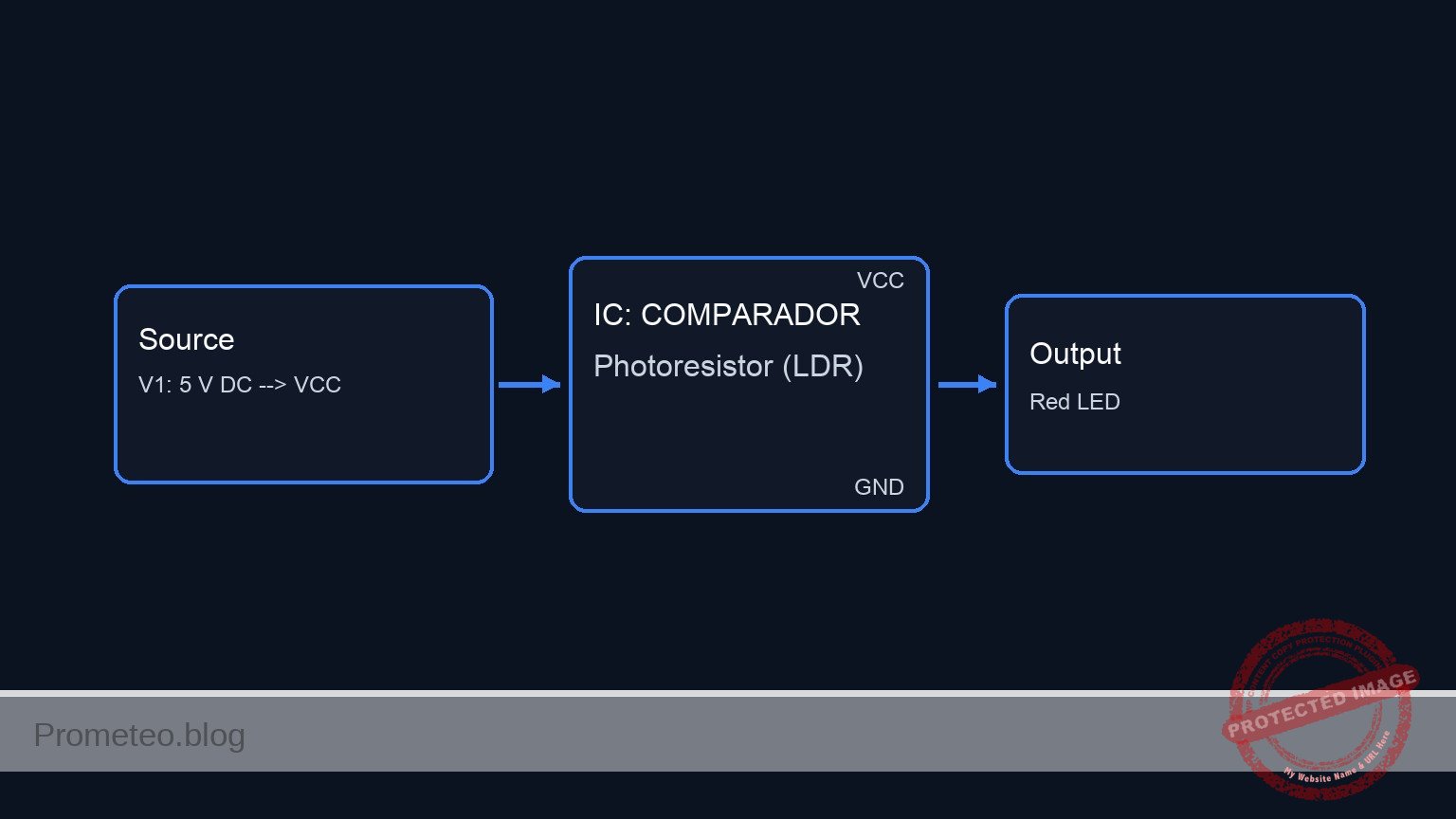
Conceptual block diagram

Conceptual block diagram — COMPARADOR Photoresistor (LDR)
Quick read: inputs → main block → output (actuator or measurement). This summarizes the ASCII schematic below.

Schematic

Practical case: Shadow detector for visual alert

Light / Shadow
      --> [ R1: LDR ]
      --> (VA: sensor divider node)
      --> [ R3: 22 kΩ ]
      --> (VB: filtered sensor signal)
      --> [ U1: LM393 Comparator (-) ]

VCC --> [ R2: 10 kΩ Pot, sensitivity adjust ] --> GND
                  \
                   --> (VA)

VCC --> [ R4: 10 kΩ Pot, reference adjust ] --> GND
                  \
                   --> (VREF)
                   --> [ U1: LM393 Comparator (+) ]

[ U1: LM393 Comparator Output VOUT ]
      --> [ R5: 220 kΩ Positive Feedback ] --> (VREF)
      --> [ D1: Red LED ] --> [ R7: 330 Ω ] --> VCC
      --> [ Alert Output: LED ON when VOUT goes LOW ]

VCC --> [ R6: 10 kΩ Pull-up ] --> (VOUT)

(VB) --> [ C1: 10 µF Low-Pass Filter ] --> GND

V1: 5 V DC --> VCC
V1: 0 V    --> GND
U1 power: VCC, GND
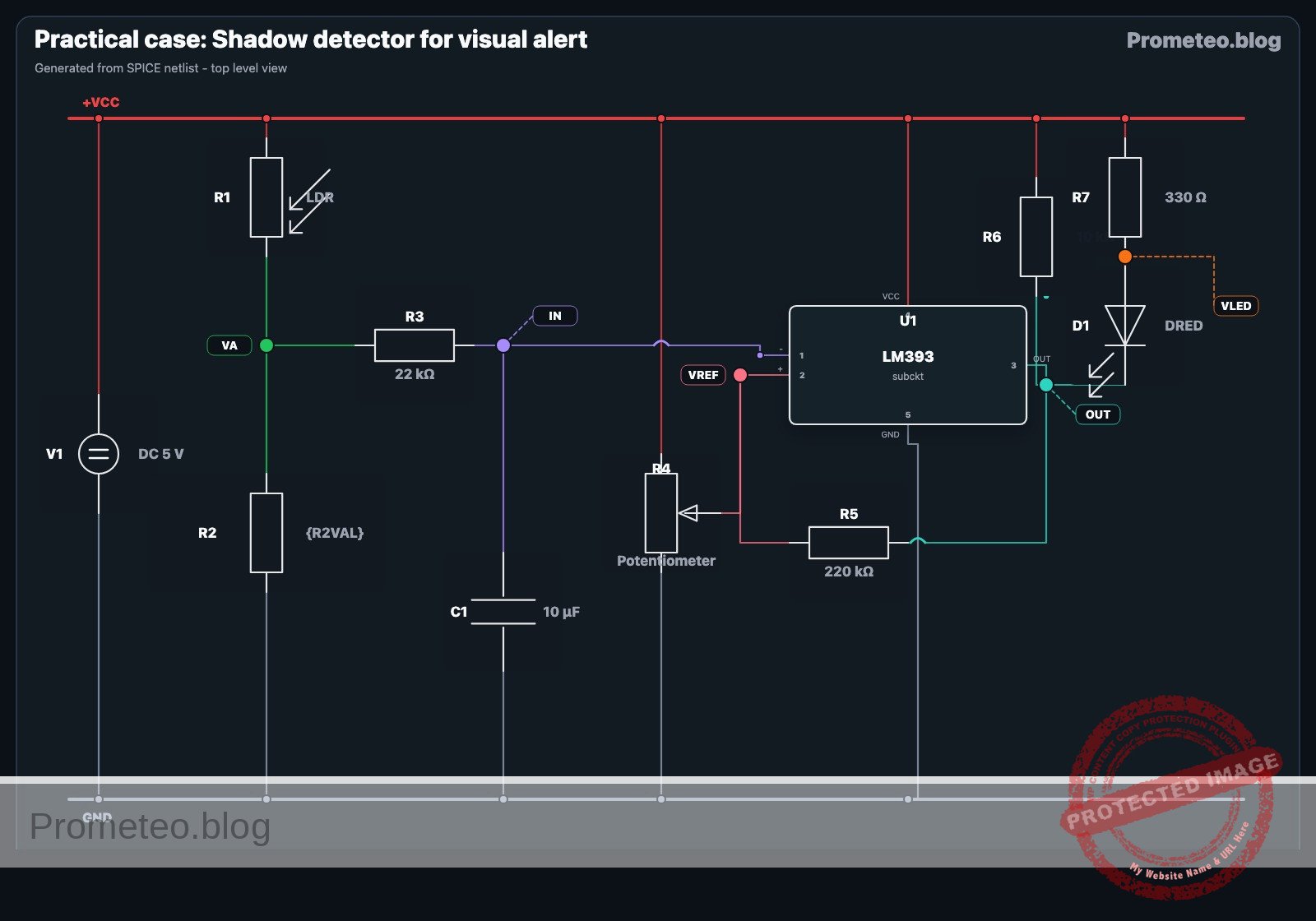
Electrical Schematic

Electrical diagram

Electrical diagram for the shadow detector for visual alert case
Generated from the validated SPICE netlist for this case.

🔒 This electrical diagram is premium. With the 7-day pass or the monthly membership you can unlock the complete didactic material and the print-ready PDF pack.🔓 See premium access plans

Measurements and tests

  1. Power-off inspection
  2. Check that VCC and 0 are not shorted.
  3. Confirm LED polarity.
  4. Verify that the LM393 output has a pull-up resistor R6.

  5. Supply check

  6. Power the circuit with V1 = 5 V.
  7. Measure between VCC and 0; expected value: 4.9 V to 5.1 V.

  8. Sensor voltage measurement

  9. Measure VA in bright light and then under a shadow.
  10. Expected result: VA should change clearly, often by more than 1 V.
  11. If the change is too small, adjust R2 or change the light angle on the LDR.

  12. Filtered response measurement

  13. Measure VB while suddenly covering the LDR.
  14. VB should not jump instantly; it should move with a short delay set by R3 × C1.
  15. With R3 = 22 kΩ and C1 = 10 µF, the time constant is about 0.22 s.

  16. Threshold adjustment

  17. Adjust R4 until D1 is off in normal light and turns on when a clear shadow is applied.
  18. Measure VREF; typical useful range is 1 V to 4 V.

  19. Hysteresis verification

  20. Slowly move a hand to create a partial shadow and then slowly remove it.
  21. Measure the switching voltage at VB when the LED turns on and when it turns off.
  22. The two values should differ slightly because of R5; a difference of 0.2 V to 0.5 V is a good target.

  23. Response time test

  24. Repeatedly create a sudden shadow and observe LED behavior.
  25. The LED should react within a fraction of a second, without flickering from very brief light variations.
  26. If the response is too slow, reduce C1 to 4.7 µF.
  27. If false triggering remains, increase C1 to 22 µF or increase R5 slightly for more hysteresis.

  28. False activation test

  29. Illuminate the LDR with room light and introduce small disturbances such as hand motion nearby but not fully covering it.
  30. The LED should remain stable unless the light drop is large enough to cross the threshold.

SPICE netlist and simulation

Reference SPICE Netlist (ngspice) — excerptFull SPICE netlist (ngspice)

* Practical case: Shadow detector for visual alert
.width out=256

.param R2VAL=5k
.param R4POS=0.5
.param R4TOP={10000*(1-R4POS)+1m}
.param R4BOT={10000*(R4POS)+1m}
.param RLIGHT=2k
.param RDARK=50k

V1 VCC 0 DC 5

* Dynamic light/shadow stimulus: 0 = light, 1 = shadow
VLUX LUX 0 PULSE(0 1 50m 1m 1m 200m 400m)

* R1 LDR photoresistor: upper arm of divider
R1 VCC VA r='{RLIGHT + (RDARK-RLIGHT)*V(LUX)}'

* R2 10k potentiometer used as variable resistor
R2 VA 0 {R2VAL}
* ... (truncated in public view) ...

Copy this content into a .cir file and run with ngspice.

🔒 Part of this section is premium. With the 7-day pass or the monthly membership you can access the full content (materials, wiring, detailed build, validation, troubleshooting, variants and checklist) and download the complete print-ready PDF pack.

* Practical case: Shadow detector for visual alert
.width out=256

.param R2VAL=5k
.param R4POS=0.5
.param R4TOP={10000*(1-R4POS)+1m}
.param R4BOT={10000*(R4POS)+1m}
.param RLIGHT=2k
.param RDARK=50k

V1 VCC 0 DC 5

* Dynamic light/shadow stimulus: 0 = light, 1 = shadow
VLUX LUX 0 PULSE(0 1 50m 1m 1m 200m 400m)

* R1 LDR photoresistor: upper arm of divider
R1 VCC VA r='{RLIGHT + (RDARK-RLIGHT)*V(LUX)}'

* R2 10k potentiometer used as variable resistor
R2 VA 0 {R2VAL}

R3 VA VB 22k
C1 VB 0 10u

* R4 10k potentiometer with wiper at VREF
R4A VCC VREF {R4TOP}
R4B VREF 0 {R4BOT}

* U1 LM393 approximation
* Non-inverting input: VREF
* Inverting input: VB
* Open-collector output: VOUT
B_U1DRV NBASE 0 V='0.95*(1+tanh(80*(V(VREF)-V(VB))))/2'
R_U1B NBASE 0 100k
Q_U1 VOUT NBASE 0 QLM393OC

R5 VOUT VREF 220k
R6 VCC VOUT 10k

R7 VCC VLED 330
D1 VLED VOUT DRED

* Probe aliases so .print can include V(IN) and V(OUT) first
V_INMON IN VB DC 0
V_OUTMON OUT VOUT DC 0

.model QLM393OC NPN(IS=1e-14 BF=100 VAF=100 CJE=5p CJC=3p TF=1n TR=10n)
.model DRED D(IS=1e-18 N=2.0 RS=10 CJO=5p VJ=0.75 M=0.33 TT=50n BV=5 IBV=10u)

.print tran V(IN) V(OUT) V(VB) V(VOUT) V(VREF) V(VA) V(VLED) V(LUX)
.op
.tran 100u 500m
.end
* --- GPT review (BOM/Wiring/SPICE) ---
* circuit_ok=true
* simulation_summary: The simulation is consistent with a shadow detector. In bright condition, VA and VB are high, VB is above VREF, the LM393 output transistor is off, and VOUT stays high at about 4.89 V so the LED is off. After the light-to-shadow transition, VA drops, VB falls slowly because of the R3-C1 filter, and when VB crosses below VREF at about 0.168 s, VOUT is pulled low to about 18 mV and the LED turns on. When light returns, VB rises slowly again, so the alert remains on for a while before resetting, consistent with RC filtering and hysteresis.
* bom/wiring vs SPICE issues (modelo):
*   - The LM393 is not a specific manufacturer macro-model; it is only an approximation of open-collector comparator behavior. This is acceptable for logic/function teaching, but not for accurate device-level output saturation or input common-mode behavior.
* bom_vs_spice equivalences ignored:
*   - R2 is described in the wiring guide as a 10 kΩ potentiometer used as a variable resistor, but the netlist fixes it with .param R2VAL=5k. This is acceptable for one simulation run, but the adjustable setting is not exposed unless the parameter is changed manually.
*   - The 10 kΩ potentiometer R4 is validly modeled as two resistors R4A and R4B with the wiper at node VREF.
*   - The LDR R1 is validly modeled as a resistor whose value changes with a control stimulus (behavioral resistance driven by VLUX).
*   - The LED D1 is validly modeled as a diode, with R7 providing the series current limit.
*   - The LM393 comparator is validly modeled with behavioral circuitry plus an NPN open-collector output stage.
*   - The changing light/shadow condition is validly modeled by the PULSE source VLUX.
* overall_comment: This SPICE netlist is broadly faithful to the BOM and wiring and is usable as a didactic example of a shadow-triggered visual alarm. The divider, RC filter, adjustable reference, hysteresis, open-collector pull-up, and active-low LED wiring all match the intended circuit. The main caveat is pedagogical: the LM393 is only behaviorally approximated, and R2 is represented by a fixed chosen value rather than an interactively adjustable potentiometer position. Before classroom use, I would explain the active-low output, the delayed switching caused by R3-C1, and the role of positive feedback R5 in shifting VREF slightly between output states.
* --------------------------------------

Simulation Results (Transient Analysis)

Simulation Results (Transient Analysis)

Analysis: The simulation is consistent with a shadow detector. In bright condition, VA and VB are high, VB is above VREF, the LM393 output transistor is off, and VOUT stays high at about 4.89 V so the LED is off. After the light-to-shadow transition, VA drops, VB falls slowly because of the R3-C1 filter, and when VB crosses below VREF at about 0.168 s, VOUT is pulled low to about 18 mV and the LED turns on. When light returns, VB rises slowly again, so the alert remains on for a while before resetting, consistent with RC filtering and hysteresis.
Show raw data table (5027 rows)
Index   time            v(in)           v(out)          v(vb)           v(vout)         v(vref)         v(va)           v(vled)         v(lux)
0	0.000000e+00	3.571429e+00	4.892473e+00	3.571429e+00	4.892473e+00	2.526882e+00	3.571429e+00	5.000000e+00	0.000000e+00
1	1.000000e-06	3.571429e+00	4.892473e+00	3.571429e+00	4.892473e+00	2.526882e+00	3.571429e+00	5.000000e+00	0.000000e+00
2	2.000000e-06	3.571429e+00	4.892473e+00	3.571429e+00	4.892473e+00	2.526882e+00	3.571429e+00	5.000000e+00	0.000000e+00
3	4.000000e-06	3.571429e+00	4.892473e+00	3.571429e+00	4.892473e+00	2.526882e+00	3.571429e+00	5.000000e+00	0.000000e+00
4	8.000000e-06	3.571429e+00	4.892473e+00	3.571429e+00	4.892473e+00	2.526882e+00	3.571429e+00	5.000000e+00	0.000000e+00
5	1.600000e-05	3.571429e+00	4.892473e+00	3.571429e+00	4.892473e+00	2.526882e+00	3.571429e+00	5.000000e+00	0.000000e+00
6	3.200000e-05	3.571429e+00	4.892473e+00	3.571429e+00	4.892473e+00	2.526882e+00	3.571429e+00	5.000000e+00	0.000000e+00
7	6.400000e-05	3.571429e+00	4.892473e+00	3.571429e+00	4.892473e+00	2.526882e+00	3.571429e+00	5.000000e+00	0.000000e+00
8	1.280000e-04	3.571429e+00	4.892473e+00	3.571429e+00	4.892473e+00	2.526882e+00	3.571429e+00	5.000000e+00	0.000000e+00
9	2.280000e-04	3.571429e+00	4.892473e+00	3.571429e+00	4.892473e+00	2.526882e+00	3.571429e+00	5.000000e+00	0.000000e+00
10	3.280000e-04	3.571429e+00	4.892473e+00	3.571429e+00	4.892473e+00	2.526882e+00	3.571429e+00	5.000000e+00	0.000000e+00
11	4.280000e-04	3.571429e+00	4.892473e+00	3.571429e+00	4.892473e+00	2.526882e+00	3.571429e+00	5.000000e+00	0.000000e+00
12	5.280000e-04	3.571429e+00	4.892473e+00	3.571429e+00	4.892473e+00	2.526882e+00	3.571429e+00	5.000000e+00	0.000000e+00
13	6.280000e-04	3.571429e+00	4.892473e+00	3.571429e+00	4.892473e+00	2.526882e+00	3.571429e+00	5.000000e+00	0.000000e+00
14	7.280000e-04	3.571429e+00	4.892473e+00	3.571429e+00	4.892473e+00	2.526882e+00	3.571429e+00	5.000000e+00	0.000000e+00
15	8.280000e-04	3.571429e+00	4.892473e+00	3.571429e+00	4.892473e+00	2.526882e+00	3.571429e+00	5.000000e+00	0.000000e+00
16	9.280000e-04	3.571429e+00	4.892473e+00	3.571429e+00	4.892473e+00	2.526882e+00	3.571429e+00	5.000000e+00	0.000000e+00
17	1.028000e-03	3.571429e+00	4.892473e+00	3.571429e+00	4.892473e+00	2.526882e+00	3.571429e+00	5.000000e+00	0.000000e+00
18	1.128000e-03	3.571429e+00	4.892473e+00	3.571429e+00	4.892473e+00	2.526882e+00	3.571429e+00	5.000000e+00	0.000000e+00
19	1.228000e-03	3.571429e+00	4.892473e+00	3.571429e+00	4.892473e+00	2.526882e+00	3.571429e+00	5.000000e+00	0.000000e+00
20	1.328000e-03	3.571429e+00	4.892473e+00	3.571429e+00	4.892473e+00	2.526882e+00	3.571429e+00	5.000000e+00	0.000000e+00
21	1.428000e-03	3.571429e+00	4.892473e+00	3.571429e+00	4.892473e+00	2.526882e+00	3.571429e+00	5.000000e+00	0.000000e+00
22	1.528000e-03	3.571429e+00	4.892473e+00	3.571429e+00	4.892473e+00	2.526882e+00	3.571429e+00	5.000000e+00	0.000000e+00
23	1.628000e-03	3.571429e+00	4.892473e+00	3.571429e+00	4.892473e+00	2.526882e+00	3.571429e+00	5.000000e+00	0.000000e+00
... (5003 more rows) ...

Common mistakes and how to avoid them

  1. Connecting the LED directly to the comparator output without a resistor
  2. Always use R7 in series with D1 to limit current.

  3. Forgetting that the LM393 output is open collector

  4. Add R6 from VCC to VOUT, or the output will not produce a valid high level.

  5. Using no hysteresis near the threshold

  6. Keep R5 installed so the LED does not chatter when the light level is close to the switching point.

Troubleshooting

  • Symptom: LED never turns on
  • Cause: VREF is set too low or the LDR divider range is too small.
  • Fix: Adjust R4, then verify that VA and VB really change under a shadow.

  • Symptom: LED is always on

  • Cause: VREF is too high, or the LDR is wired incorrectly.
  • Fix: Lower VREF with R4 and confirm R1 is between VCC and VA.

  • Symptom: LED flickers near the switching point

  • Cause: insufficient filtering or hysteresis.
  • Fix: Increase C1 or reduce R5 moderately to strengthen hysteresis.

  • Symptom: Output voltage at VOUT never rises

  • Cause: missing or incorrect pull-up resistor R6.
  • Fix: Confirm R6 is connected between VCC and VOUT.

  • Symptom: Response is too slow

  • Cause: RC filter too large.
  • Fix: Reduce C1 or R3 to shorten the response time.

Possible improvements and extensions

  1. Add a buzzer output
  2. Connect a transistor driver to VOUT so the same shadow event activates both an LED and a buzzer for stronger alerting.

  3. Use a dual-threshold window

  4. Add a second comparator to detect both excessive darkness and excessive brightness, useful for light-condition monitoring rather than only shadow detection.

More Practical Cases on Prometeo.blog

Find this product and/or books on this topic on Amazon

Go to Amazon

As an Amazon Associate, I earn from qualifying purchases. If you buy through this link, you help keep this project running.

Quick Quiz

Question 1: What is the main purpose of adding hysteresis to the shadow detector comparator?


Question 2: Which component is the key energy-storage element in the RC low-pass filter that stabilizes brief shadow events?


Question 3: What typically happens to the voltage at VA when the light level changes?


Question 4: Why does the voltage at VB change more slowly than VA?


Question 5: What is the role of U1 in the circuit?


Question 6: When is LED D1 intended to turn on in this design?


Question 7: Which component is paired with the LDR to form the sensor voltage divider?


Question 8: What is a stated useful application of this shadow detector?


Question 9: What hysteresis range is mentioned for avoiding repeated switching?


Question 10: For what audience is this project mainly intended?


Carlos Núñez Zorrilla
Electronics & Computer Engineer

Telecommunications Electronics Engineer and Computer Engineer (official degrees in Spain).
Follow me:


Practical case: Adaptive Screen Brightness Regulator

Adaptive Screen Brightness Regulator prototype (Maker Style)

Level: Medium
Design a circuit that decreases LED backlight intensity as ambient light increases.

Objective and use case

In this practical case, you will build a PWM (Pulse Width Modulation) controller using a 555 timer and a photoresistor (LDR). The circuit will automatically adjust the duty cycle of the output signal based on ambient light levels, driving a power MOSFET to dim an LED strip.

Why it is useful:
* Energy Efficiency: Reduces power consumption in high-brightness environments where backlights might be less visible or needed (depending on display type).
* Automatic Night-Lights: Useful for systems that need to be dim during the day and bright at night (if logic is inverted) or vice-versa.
* Human Vision Comfort: Prevents glare by adjusting light intensity dynamically.
* Instrumentation: Often used in automotive dashboards or control panels.

Expected outcome:
* Signal Generation: A square wave output at pin 3 of the 555 timer.
* Inverse Response: When the LDR is exposed to strong light (Flashlight), the LED brightness decreases.
* Dark Response: When the LDR is covered (Darkness), the LED brightness increases to maximum.
* Target Audience: Intermediate electronics students and hobbyists.

Materials

  • V1: 9 V DC voltage source, function: Main circuit power.
  • R1: Photoresistor (LDR), function: Light sensor (Charge path).
  • R2: 10 kΩ resistor, function: Discharge path timing.
  • R3: 1 kΩ resistor, function: MOSFET Gate protection.
  • R4: 330 Ω resistor, function: LED current limiting.
  • C1: 100 nF capacitor, function: PWM timing capacitor.
  • C2: 10 nF capacitor, function: Control voltage noise filtering.
  • D1: 1N4148 diode, function: Steering diode for Charge path.
  • D2: 1N4148 diode, function: Steering diode for Discharge path.
  • D3: High-brightness White LED, function: Simulated Backlight.
  • Q1: 2N7000 (N-Channel MOSFET), function: LED driver switch.
  • U1: NE555 Precision Timer, function: PWM generator.

Wiring guide

This guide uses specific node names (VCC, 0, V_TRIG, V_GATE, etc.) to help you verify connections.

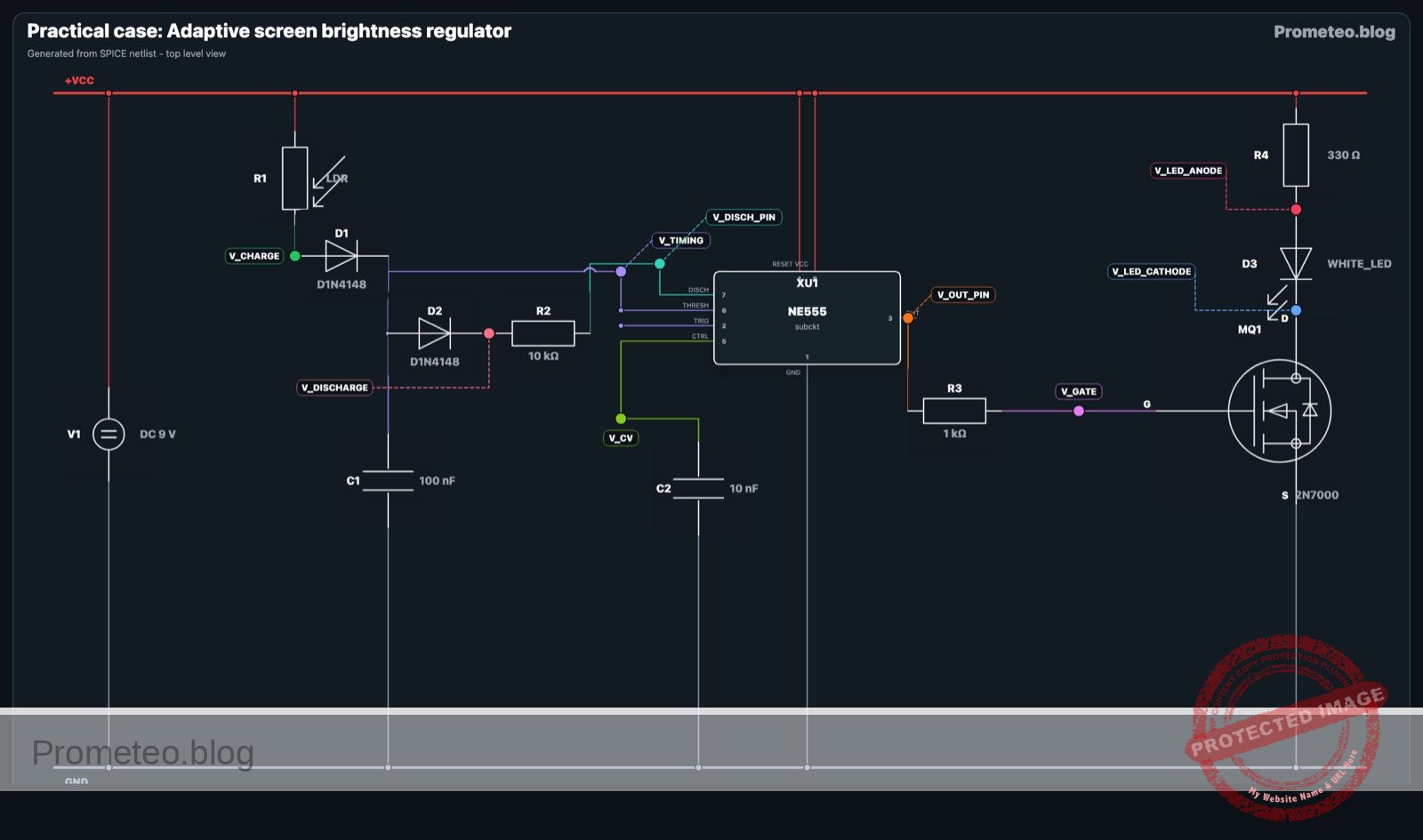
  • Power Supply:
  • Connect V1 positive terminal to node VCC.
  • Connect V1 negative terminal to node 0 (GND).
  • 555 Timer Power & Reset (U1):
  • Connect U1 pin 8 (VCC) to node VCC.
  • Connect U1 pin 1 (GND) to node 0.
  • Connect U1 pin 4 (Reset) to node VCC.
  • Timing Network (The PWM Core):
  • Connect R1 (LDR) between node VCC and node V_CHARGE.
  • Connect D1 (Anode) to V_CHARGE and D1 (Cathode) to node V_TIMING.
  • Connect D2 (Anode) to node V_TIMING and D2 (Cathode) to node V_DISCHARGE.
  • Connect R2 between node V_DISCHARGE and U1 pin 7 (Discharge).
  • Connect C1 between node V_TIMING and node 0.
  • Connect U1 pin 2 (Trigger) to node V_TIMING.
  • Connect U1 pin 6 (Threshold) to node V_TIMING.
  • Control Voltage:
  • Connect C2 between U1 pin 5 (CV) and node 0.
  • Output Stage:
  • Connect R3 between U1 pin 3 (Output) and node V_GATE.
  • Connect Q1 Gate to node V_GATE.
  • Connect Q1 Source to node 0.
  • Connect Q1 Drain to node V_LED_CATHODE.
  • Load (Backlight):
  • Connect R4 between node VCC and node V_LED_ANODE.
  • Connect D3 Anode to node V_LED_ANODE.
  • Connect D3 Cathode to node V_LED_CATHODE.

Conceptual block diagram

Conceptual block diagram — TEMPORIZADOR Adaptive PWM Generator
Quick read: inputs → main block → output (actuator or measurement). This summarizes the ASCII schematic below.

Schematic

Title: Practical case: Adaptive Screen Brightness Regulator

      [ INPUTS / TIMING NETWORK ]              [ LOGIC / CONTROL ]                 [ OUTPUT STAGE ]

[ V1: 9 V Source ] --(Power VCC)--------->+-----------------------+
                                         |                       |
(Light) -> [ R1: LDR ] --(Charge)------->|                       |
                                         |       U1: NE555       |
[ D1, D2, R2 ] --(Steering/Disch)------->|    (PWM Generator)    |--(Pin 3)--> [ R3: 1k ] --> [ Q1: MOSFET ]
                                         |                       |                                  |
[ C1: 100nF ] --(Timing Ramp)----------->|  Pins 2,6 (Trig/Thr)  |                                  |
                                         |  Pin 7 (Discharge)    |                           (Switches GND)
[ C2: 10nF ] --(Filter)----------------->|  Pin 5 (Ctrl Volt)    |                                  |
                                         |                       |                                  v
                                         +-----------------------+                       [ D3: LED + R4: 330R ]
                                                                                              (Backlight)
Schematic (ASCII)

Electrical diagram

Electrical diagram for case: Adaptive screen brightness regulator
Generated from the validated SPICE netlist for this case.

🔒 This electrical diagram is premium. With the 7-day pass or the monthly membership you can unlock the complete didactic material and the print-ready PDF pack.🔓 See premium access plans

Measurements and tests

Perform these steps to validate the «Inverse» behavior (More light = Less Brightness).

  1. Baseline Check (Ambient Light):
    • Power the circuit with 9 V.
    • Observe the LED D3. It should be illuminated at a moderate level.
    • Measure voltage at V_GATE using an oscilloscope. You should see a square wave.
  2. High Light Test:
    • Shine a flashlight directly onto R1 (LDR).
    • Observation: The LED D3 should dim significantly or turn off.
    • Measurement: Check the duty cycle at V_GATE. Since the LDR resistance drops, the capacitor charges very quickly (short Ton) relative to the fixed discharge time (Toff). The Duty Cycle (Ton / Ttotal) decreases.
  3. Low Light Test:
    • Cover R1 (LDR) with your hand or a black cap.
    • Observation: The LED D3 should reach maximum brightness.
    • Measurement: The LDR resistance increases, making the charge time (Ton) much longer. The Duty Cycle increases towards 100%.

SPICE netlist and simulation

Reference SPICE Netlist (ngspice) — excerptFull SPICE netlist (ngspice)

* Practical case: Adaptive Screen Brightness Regulator

* --- Power Supply ---
V1 VCC 0 DC 9

* --- Input Stage (Light Sensor) ---
R1 VCC V_CHARGE 20k

* --- PWM Timing Network ---
D1 V_CHARGE V_TIMING D1N4148
D2 V_TIMING V_DISCHARGE D1N4148
R2 V_DISCHARGE V_DISCH_PIN 10k
C1 V_TIMING 0 100n

* --- Control & Processing ---
* U1: NE555 Precision Timer
XU1 0 V_TIMING V_OUT_PIN VCC V_CV V_TIMING V_DISCH_PIN VCC NE555

* Control Voltage noise filtering
C2 V_CV 0 10n
* ... (truncated in public view) ...

Copy this content into a .cir file and run with ngspice.

🔒 Part of this section is premium. With the 7-day pass or the monthly membership you can access the full content (materials, wiring, detailed build, validation, troubleshooting, variants and checklist) and download the complete print-ready PDF pack.

* Practical case: Adaptive Screen Brightness Regulator

* --- Power Supply ---
V1 VCC 0 DC 9

* --- Input Stage (Light Sensor) ---
R1 VCC V_CHARGE 20k

* --- PWM Timing Network ---
D1 V_CHARGE V_TIMING D1N4148
D2 V_TIMING V_DISCHARGE D1N4148
R2 V_DISCHARGE V_DISCH_PIN 10k
C1 V_TIMING 0 100n

* --- Control & Processing ---
* U1: NE555 Precision Timer
XU1 0 V_TIMING V_OUT_PIN VCC V_CV V_TIMING V_DISCH_PIN VCC NE555

* Control Voltage noise filtering
C2 V_CV 0 10n

* --- Output Driver Stage ---
R3 V_OUT_PIN V_GATE 1k

* Q1: N-Channel MOSFET
MQ1 V_LED_CATHODE V_GATE 0 0 2N7000

* --- Load (Backlight) ---
R4 VCC V_LED_ANODE 330
D3 V_LED_ANODE V_LED_CATHODE WHITE_LED

* --- Component Models ---
.model D1N4148 D (IS=2.682n N=1.836 RS=.5664 BV=100 IBV=100p CJO=4p TT=11.54n)
.model 2N7000 NMOS (Level=1 VTO=2.1 KP=0.5 Lambda=0.002 RD=1.5 RS=1.5 CGSO=10p CGDO=10p CGBO=10p)
.model WHITE_LED D (IS=1p N=5 RS=5 BV=5 IBV=10u CJO=50p)

* --- NE555 Behavioral Subcircuit ---
.subckt NE555 GND TRIG OUT RESET CV THRES DISCH VCC
    * Internal Voltage Divider
    R_div1 VCC CV 5k
    R_div2 CV TR 5k
    R_div3 TR GND 5k

    * Comparators (Sigmoid-based for smooth convergence)
    * Set Signal (Active High) when TRIG < 1/3 VCC (V_TR)
    B_set set_node 0 V = 2.5 + 2.5 * tanh(100 * (V(TR) - V(TRIG)))

    * Reset Signal Logic
    * Condition 1: THRES > CV
    B_c1 c1 0 V = 0.5 * (1 + tanh(100 * (V(THRES) - V(CV))))
    * Condition 2: RESET < 1.0V
    B_c2 c2 0 V = 0.5 * (1 + tanh(100 * (1.0 - V(RESET))))
    * Combine (Probabilistic OR logic): V_rst = c1 + c2 - c1*c2, scaled to 5V
    B_rst rst_node 0 V = 5 * (V(c1) + V(c2) - V(c1)*V(c2))

    * RC Delays to prevent algebraic loops in Flip-Flop
    R_sd set_node set_d 1k
    C_sd set_d 0 1p
    R_rd rst_node rst_d 1k
    C_rd rst_d 0 1p

    * SR Latch (Cross-coupled NOR logic with soft thresholds)
    * Q = ~(R | Qb)
    B_q  q_int  0 V = 5 / (1 + exp( 20 * (V(rst_d) + V(qb_int) - 2.5) ))
    * Qb = ~(S | Q)
    B_qb qb_int 0 V = 5 / (1 + exp( 20 * (V(set_d) + V(q_int) - 2.5) ))

    * Output Buffer
    E_out OUT_int 0 q_int 0 1
    R_out_prot OUT_int OUT 1

    * Discharge Transistor (Switch to GND when Qb is High / Output Low)
    S_disch DISCH 0 qb_int 0 SW_DISCH
    .model SW_DISCH SW(Vt=2.5 Ron=10 Roff=100Meg)
.ends

* --- Simulation Directives ---
.tran 10u 20m
.print tran V(V_TIMING) V(V_GATE) V(V_LED_CATHODE) V(V_LED_ANODE)
.op
.end

Simulation Results (Transient Analysis)

Simulation Results (Transient Analysis)
Show raw data table (4016 rows)
Index   time            v(v_timing)     v(v_gate)       v(v_led_cathode
0	0.000000e+00	3.183820e+00	9.643749e-22	8.709822e+00
1	1.000000e-07	3.183820e+00	9.643749e-22	8.709822e+00
2	2.000000e-07	3.183820e+00	-2.54330e-17	8.709822e+00
3	4.000000e-07	3.183820e+00	4.759196e-18	8.709822e+00
4	8.000000e-07	3.183820e+00	-5.90561e-18	8.709822e+00
5	1.600000e-06	3.183820e+00	1.843922e-17	8.709822e+00
6	3.200000e-06	3.183820e+00	4.911091e-18	8.709822e+00
7	6.400000e-06	3.183819e+00	9.652751e-18	8.709822e+00
8	1.280000e-05	3.183819e+00	-2.42211e-18	8.709822e+00
9	2.280000e-05	3.183818e+00	-2.25892e-17	8.709822e+00
10	3.280000e-05	3.183818e+00	-5.29878e-18	8.709822e+00
11	4.280000e-05	3.183817e+00	-8.38426e-18	8.709822e+00
12	5.280000e-05	3.183816e+00	-5.24090e-18	8.709822e+00
13	6.280000e-05	3.183815e+00	5.344924e-18	8.709822e+00
14	7.280000e-05	3.183815e+00	-6.20163e-18	8.709822e+00
15	8.280000e-05	3.183814e+00	-2.95146e-18	8.709822e+00
16	9.280000e-05	3.183813e+00	-1.95605e-17	8.709822e+00
17	1.028000e-04	3.183813e+00	5.833300e-18	8.709822e+00
18	1.128000e-04	3.183812e+00	-9.79628e-18	8.709822e+00
19	1.228000e-04	3.183812e+00	1.090495e-18	8.709822e+00
20	1.328000e-04	3.183811e+00	-1.79618e-17	8.709822e+00
21	1.428000e-04	3.183810e+00	6.632650e-18	8.709822e+00
22	1.528000e-04	3.183810e+00	-1.47697e-17	8.709822e+00
23	1.628000e-04	3.183809e+00	6.958764e-18	8.709822e+00
... (3992 more rows) ...

Common mistakes and how to avoid them

  1. Reversing Steering Diodes (D1, D2):
    • Error: Placing D1 or D2 backwards prevents the capacitor from charging or discharging properly.
    • Solution: Ensure the black band (cathode) of D1 points towards the capacitor and the black band of D2 points towards Pin 7.
  2. Connecting LDR to Pin 7 directly:
    • Error: Connecting the LDR without the steering diodes creates a standard astable oscillator where frequency changes drastically, but duty cycle control is less distinct.
    • Solution: Use the diode steering topology described to separate the Charge (LDR) and Discharge (R2) paths.
  3. MOSFET Pinout Confusion:
    • Error: Swapping Drain and Source on the 2N7000.
    • Solution: Verify the datasheet. For 2N7000 (TO-92), looking at the flat side, pins are usually Source, Gate, Drain (left to right).

Troubleshooting

  • Symptom: LED is always ON and does not change with light.
    • Cause: MOSFET Gate floating or Pin 3 stuck High.
    • Fix: Check R1 and C1 connections. Ensure Pin 2 and 6 are tied together.
  • Symptom: LED is always OFF.
    • Cause: LDR resistance is too low (short circuit) or LED connected backwards.
    • Fix: Check LED polarity. Measure resistance of LDR in darkness; if it is 0 Ω, it is defective.
  • Symptom: LED flickers visibly.
    • Cause: Frequency is too low.
    • Fix: Reduce the value of C1 (e.g., change from 100 nF to 10 nF) to increase the PWM frequency beyond human persistence of vision (> 100 Hz).

Possible improvements and extensions

  1. Minimum Brightness Clamp: Add a fixed resistor in series with the LDR (R1). This ensures that even in extremely bright light (low LDR resistance), there is still a minimum charge time, preventing the LED from turning off completely.
  2. Smoother Transition: Add a large capacitor across the LDR to filter out rapid changes in light (e.g., shadows from passing objects), creating a «fade» effect rather than an instant jump in brightness.

More Practical Cases on Prometeo.blog

Find this product and/or books on this topic on Amazon

Go to Amazon

As an Amazon Associate, I earn from qualifying purchases. If you buy through this link, you help keep this project running.

Quick Quiz

Question 1: What is the primary function of the circuit described in the text?


Question 2: Which component is responsible for sensing the ambient light levels?


Question 3: What type of signal modulation is used to control the LED brightness?


Question 4: According to the 'Expected outcome', what happens to the LED brightness when the LDR is covered (darkness)?


Question 5: Which component drives the LED strip based on the signal from the 555 timer?


Question 6: Why is this circuit considered useful for energy efficiency?


Question 7: Which pin of the 555 timer outputs the square wave signal?


Question 8: What is the role of the 555 timer in this specific circuit?


Question 9: How does the circuit respond when the LDR is exposed to strong light?


Question 10: Besides energy efficiency, what is another stated benefit of this circuit?


Carlos Núñez Zorrilla
Electronics & Computer Engineer

Telecommunications Electronics Engineer and Computer Engineer (official degrees in Spain).
Follow me:


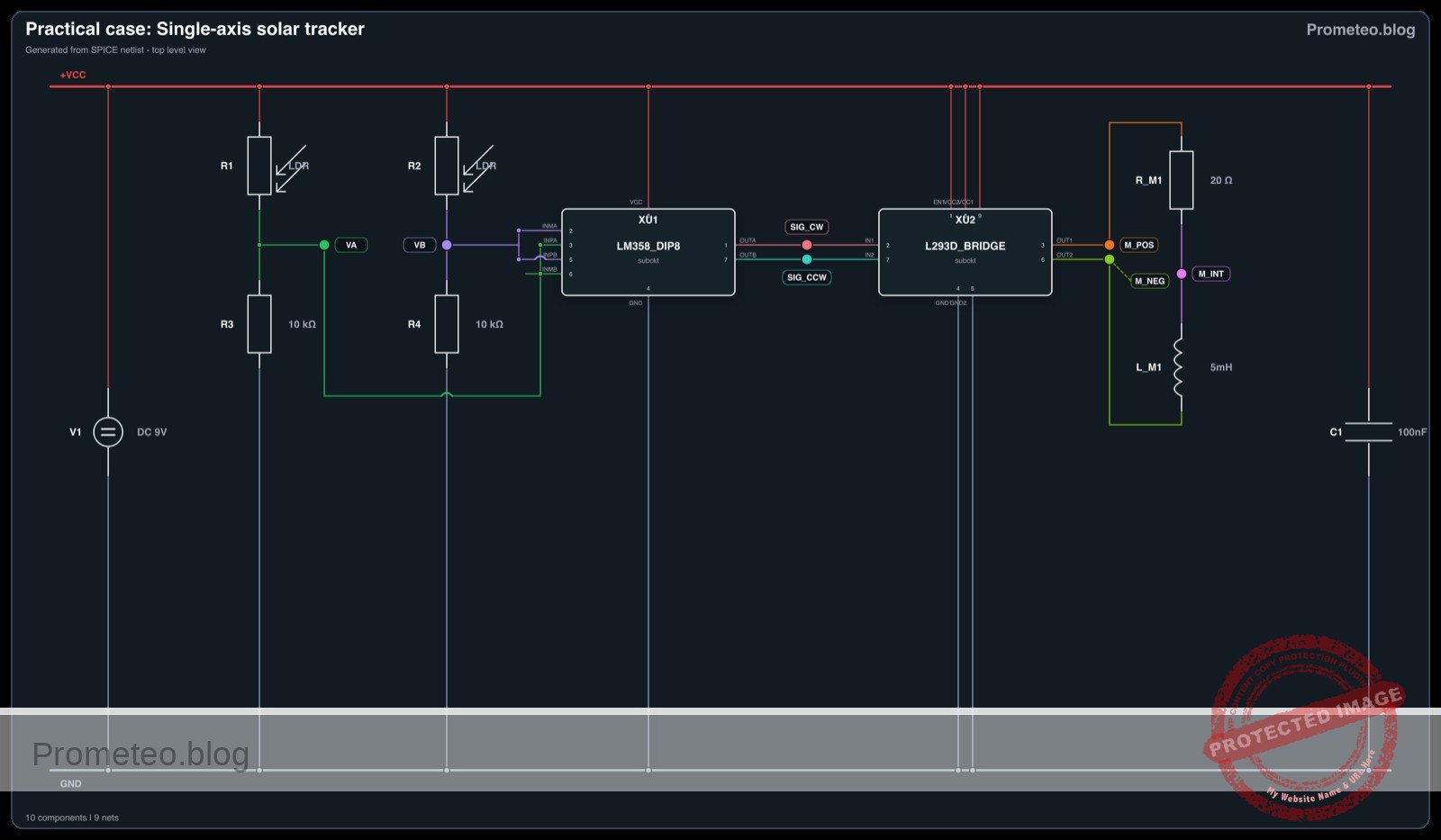
Practical case: Single-axis solar tracker

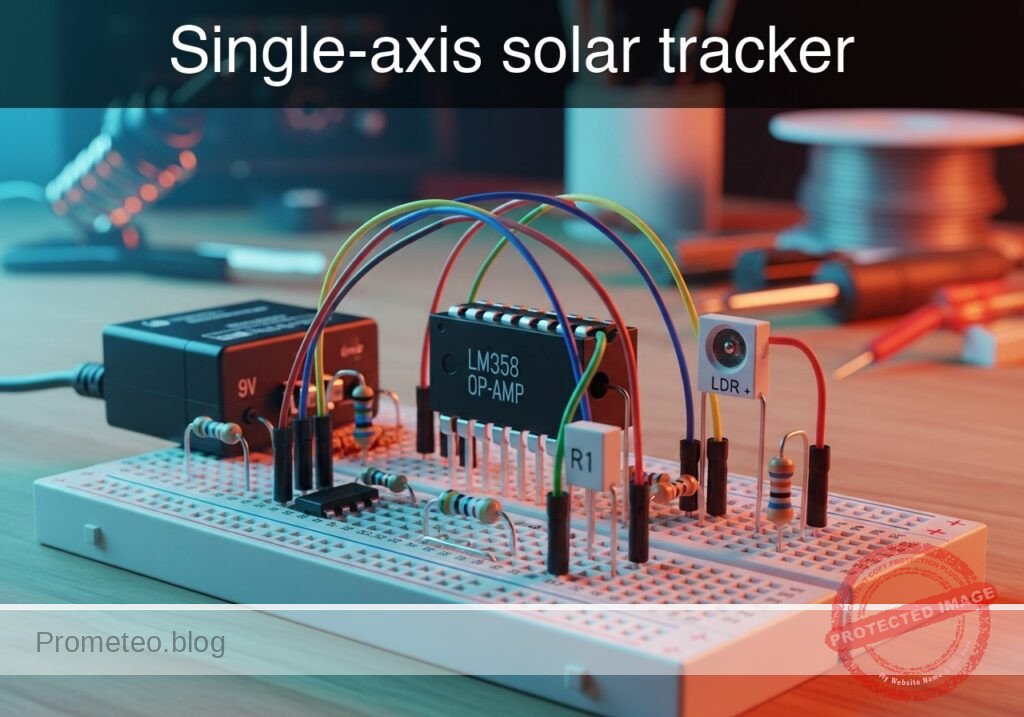
Single-axis solar tracker prototype (Maker Style)

Level: Medium. Design a control circuit that compares light levels from two sensors to orient a motor towards the brightest light source.

Objective and use case

This practical case guides you through building an analog control loop that automatically orients a mechanism towards a light source using photoresistors (LDRs) and operational amplifiers. You will construct a «sun seeker» that actively balances two light inputs to drive a motor in the corresponding direction.

  • Real-world applications:
  • Solar Energy: Increases photovoltaic panel efficiency by keeping panels perpendicular to the sun throughout the day.
  • Robotics: Enables light-seeking behaviors (phototaxis) in autonomous robots.
  • Home Automation: Controls smart blinds to regulate room temperature based on sunlight intensity.
  • Expected outcome:
  • When the light source is balanced, the motor remains stationary.
  • When LDR1 is shaded, the voltage difference triggers the motor to spin Clockwise (CW).
  • When LDR2 is shaded, the motor spins Counter-Clockwise (CCW).
  • Target audience: Electronics students familiar with voltage dividers and OpAmps.

Materials

  • V1: 9 V DC power supply (Power source).
  • R1: Photoresistor (LDR), function: Left light sensor.
  • R2: Photoresistor (LDR), function: Right light sensor.
  • R3: 10 kΩ resistor, function: Voltage divider bottom leg for R1.
  • R4: 10 kΩ resistor, function: Voltage divider bottom leg for R2.
  • U1: LM358, function: Dual Operational Amplifier (Comparators).
  • U2: L293D, function: H-Bridge Motor Driver IC.
  • M1: 9 V DC Gear Motor, function: Tracking actuator.
  • C1: 100 nF capacitor, function: Power supply decoupling.

Wiring guide

This circuit uses two parallel voltage dividers compared by two OpAmps to determine motor direction.

  • Power Supply:
  • Connect V1 positive terminal to node VCC.
  • Connect V1 negative terminal to node GND (0).
  • Connect C1 between VCC and GND.

  • Sensors (Dual Voltage Divider):

  • Connect R1 (LDR Left) between VCC and node VA (Sensor Voltage A).
  • Connect R3 between VA and GND.
  • Connect R2 (LDR Right) between VCC and node VB (Sensor Voltage B).
  • Connect R4 between VB and GND.

  • Comparators (LM358 – U1):

  • Comparator A (Turn Right/CW Logic):
    • Connect U1 Non-inverting input (+) to node VA.
    • Connect U1 Inverting input (-) to node VB.
    • Connect U1 Output A to node SIG_CW.
  • Comparator B (Turn Left/CCW Logic):
    • Connect U1 Non-inverting input (+) to node VB.
    • Connect U1 Inverting input (-) to node VA.
    • Connect U1 Output B to node SIG_CCW.
  • Connect U1 VCC pin to VCC and GND pin to GND.

  • Motor Driver (L293D – U2):

  • Connect U2 Input 1 to node SIG_CW.
  • Connect U2 Input 2 to node SIG_CCW.
  • Connect U2 Enable 1 pin to VCC.
  • Connect U2 Output 1 to node M_POS.
  • Connect U2 Output 2 to node M_NEG.
  • Connect U2 VCC1 (Logic) and VCC2 (Power) to VCC.
  • Connect U2 GND pins to GND.

  • Actuator:

  • Connect M1 (Motor) between nodes M_POS and M_NEG.

Conceptual block diagram

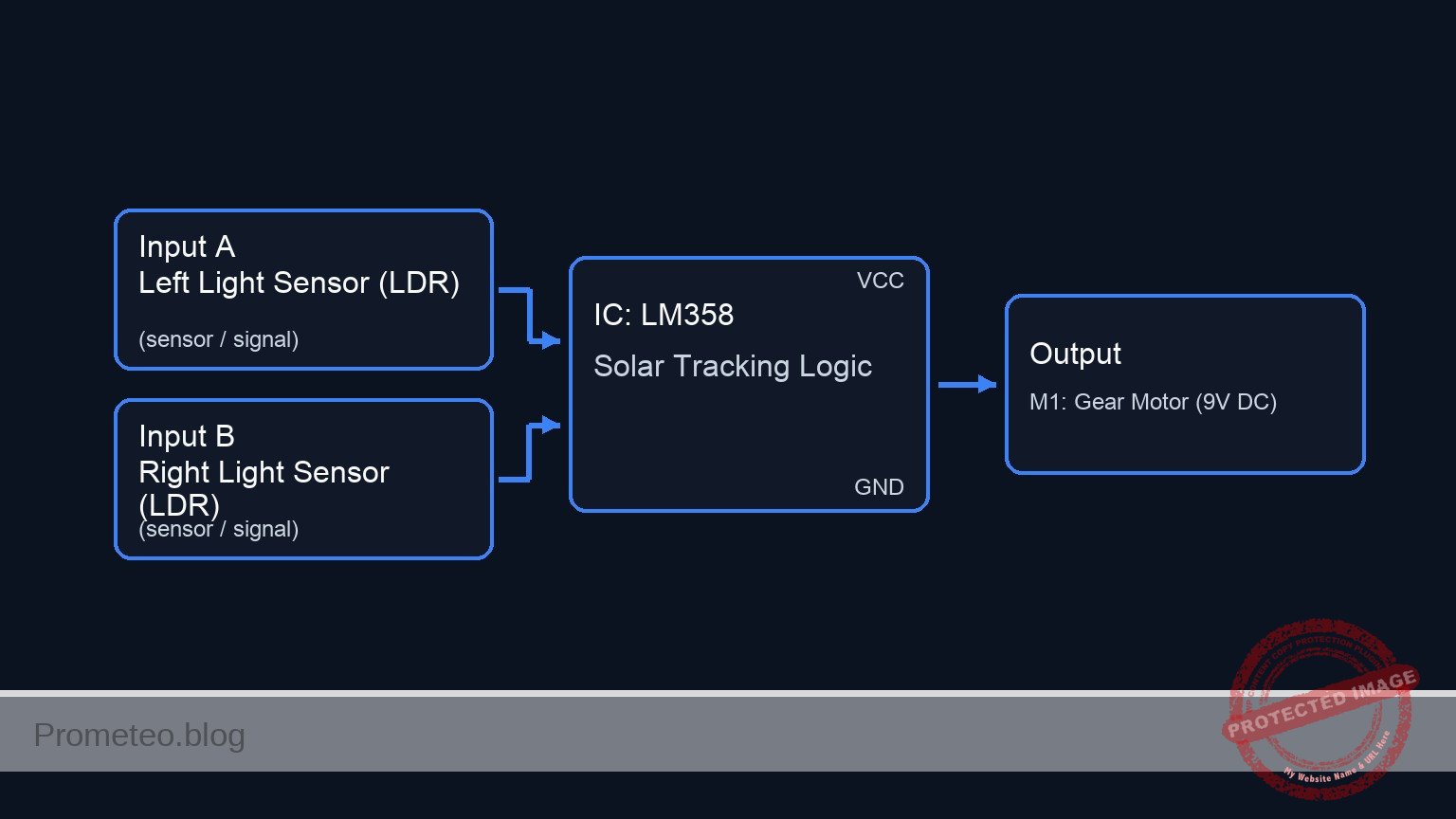
Conceptual block diagram — LM358 Solar Tracking Logic
Quick read: inputs → main block → output (actuator or measurement). This summarizes the ASCII schematic below.

Schematic

[ INPUTS / SENSORS ]               [ LOGIC / PROCESSING ]                  [ ACTUATOR ]

   [ Power Supply Block ]
   [ Source: V1 (9 V)    ] --(VCC/GND Power)--> (Distributes to all ICs and Sensors)
   [ Filter: C1 (100nF) ]

                                         [ U1: LM358 Dual OpAmp ]
                                         |                      |
   [ Left Light Sensor  ]                | Comparator A (Logic) |
   [ Top: R1 (LDR)      ] --(Signal VA)->| Input: VA > VB ?     |--(SIG_CW)--->+
   [ Bot: R3 (10k Ohm)  ]                | Output: Turn CW      |              |
                                         |                      |              |
                                         |                      |              v
                                         | Comparator B (Logic) |      [ U2: L293D H-Bridge ]
   [ Right Light Sensor ]                | Input: VB > VA ?     |      |                    |
   [ Top: R2 (LDR)      ] --(Signal VB)->| Output: Turn CCW     |      | Input 1: CW Sig    |
   [ Bot: R4 (10k Ohm)  ]                |                      |      | Input 2: CCW Sig   |===(High Current)==> [ M1: Gear Motor ]
                                         +----------+-----------+      | Enable: VCC        |      (9 V DC)
                                                    |                  | VCC1/VCC2: 9 V      |
                                                    +--(SIG_CCW)------>| GND: Common        |
                                                                       +--------------------+
Schematic (ASCII)

Electrical diagram

Electrical diagram for practical case: Single-axis solar tracker
Generated from the validated SPICE netlist for this case.

🔒 This electrical diagram is premium. With the 7-day pass or the monthly membership you can unlock the complete didactic material and the print-ready PDF pack.🔓 See premium access plans

Measurements and tests

Follow these steps to validate the tracker logic:

  1. Static Equilibrium Test:

    • Expose both LDRs to ambient light equally.
    • Measure the voltage at node VA and VB. They should be approximately equal.
    • Measure SIG_CW and SIG_CCW. Both should be Low (approx. 0 V) or balanced, keeping the motor stopped.
  2. Left Shade Simulation:

    • Cover R1 (Left LDR) with your hand.
    • Observation: The resistance of R1 increases, causing voltage at VA to drop.
    • Logic Check: Since VB > VA, Comparator B (Non-inverting = VB) should go High (SIG_CCW ≈ VCC).
    • Actuator: The motor should spin Counter-Clockwise.
  3. Right Shade Simulation:

    • Expose R1 to light and cover R2 (Right LDR).
    • Observation: The resistance of R2 increases, causing voltage at VB to drop.
    • Logic Check: Since VA > VB, Comparator A (Non-inverting = VA) should go High (SIG_CW ≈ VCC).
    • Actuator: The motor should spin Clockwise.

SPICE netlist and simulation

Reference SPICE Netlist (ngspice) — excerptFull SPICE netlist (ngspice)

* Single-axis Solar Tracker Simulation
* Based on Practical Electronics Breadboard Case

* --- Power Supply ---
* V1: 9 V DC power supply
V1 VCC 0 DC 9V
* C1: 100 nF capacitor (Decoupling)
C1 VCC 0 100nF

* --- Dynamic Light Stimulus (Virtual Control) ---
* This source simulates the position of the sun moving from Left to Right.
* 0V = Light on Left Sensor, 5V = Light on Right Sensor.
* Sweeps linearly from 0V to 5V over 100ms.
V_LIGHT LIGHT_POS 0 PWL(0 0 100m 5)

* --- Sensors (LDRs) ---
* Modeled as voltage-dependent resistors controlled by LIGHT_POS.
* R1 (Left LDR): Resistance increases as Light moves Right (LIGHT_POS increases).
* Range: 1k (Bright) to 50k (Dark).
R1 VCC VA R = '1k + 49k * (V(LIGHT_POS)/5)'
* ... (truncated in public view) ...

Copy this content into a .cir file and run with ngspice.

🔒 Part of this section is premium. With the 7-day pass or the monthly membership you can access the full content (materials, wiring, detailed build, validation, troubleshooting, variants and checklist) and download the complete print-ready PDF pack.

* Single-axis Solar Tracker Simulation
* Based on Practical Electronics Breadboard Case

* --- Power Supply ---
* V1: 9 V DC power supply
V1 VCC 0 DC 9V
* C1: 100 nF capacitor (Decoupling)
C1 VCC 0 100nF

* --- Dynamic Light Stimulus (Virtual Control) ---
* This source simulates the position of the sun moving from Left to Right.
* 0V = Light on Left Sensor, 5V = Light on Right Sensor.
* Sweeps linearly from 0V to 5V over 100ms.
V_LIGHT LIGHT_POS 0 PWL(0 0 100m 5)

* --- Sensors (LDRs) ---
* Modeled as voltage-dependent resistors controlled by LIGHT_POS.
* R1 (Left LDR): Resistance increases as Light moves Right (LIGHT_POS increases).
* Range: 1k (Bright) to 50k (Dark).
R1 VCC VA R = '1k + 49k * (V(LIGHT_POS)/5)'

* R2 (Right LDR): Resistance decreases as Light moves Right.
* Range: 50k (Dark) to 1k (Bright).
R2 VCC VB R = '1k + 49k * (1 - V(LIGHT_POS)/5)'

* --- Voltage Divider Bottom Legs ---
* R3: 10 kΩ resistor for R1
R3 VA 0 10k
* R4: 10 kΩ resistor for R2
R4 VB 0 10k

* --- Comparators (U1: LM358) ---
* U1 is a Dual OpAmp. We define a subcircuit matching the 8-pin DIP pinout.
* Pinout: 1=OutA, 2=In-A, 3=In+A, 4=GND, 5=In+B, 6=In-B, 7=OutB, 8=VCC
* Wiring Guide:
* Comparator A (CW): (+) VA, (-) VB -> Out SIG_CW
* Comparator B (CCW): (+) VB, (-) VA -> Out SIG_CCW
XU1 SIG_CW VB VA 0 VB VA SIG_CCW VCC LM358_DIP8

* --- Motor Driver (U2: L293D) ---
* U2 is an H-Bridge Driver. We define a subcircuit for the used pins.
* Pinout used: 1=EN1, 2=IN1, 3=OUT1, 4/5=GND, 6=OUT2, 7=IN2, 8=VCC2, 16=VCC1
* Wiring Guide:
* IN1=SIG_CW, IN2=SIG_CCW, OUT1=M_POS, OUT2=M_NEG, EN1=VCC
XU2 VCC SIG_CW M_POS 0 0 M_NEG SIG_CCW VCC VCC L293D_BRIDGE

* --- Actuator (M1: 9V DC Gear Motor) ---
* Modeled as a resistive/inductive load.
R_M1 M_POS M_INT 20
L_M1 M_INT M_NEG 5mH

* --- Subcircuit Definitions ---

.subckt LM358_DIP8 OUTA INMA INPA GND INPB INMB OUTB VCC
* Comparator A Behavior (Sigmoid for convergence)
* Output swings approx 0V to VCC-1.5V
B_OUTA OUTA 0 V = (V(VCC)-1.5) / (1 + exp(-50*(V(INPA)-V(INMA)))) + 0.05
* Comparator B Behavior
B_OUTB OUTB 0 V = (V(VCC)-1.5) / (1 + exp(-50*(V(INPB)-V(INMB)))) + 0.05
.ends

.subckt L293D_BRIDGE EN1 IN1 OUT1 GND1 GND2 OUT2 IN2 VCC2 VCC1
* Logic Threshold approx 2.0V.
* Output Voltage ~ VCC2 - 1.4V drop.
* Enable Logic
B_EN node_en 0 V = 1 / (1 + exp(-50*(V(EN1)-2.0)))
* Output 1 (M_POS)
B_O1 OUT1 0 V = V(node_en) * (1/(1+exp(-50*(V(IN1)-2.0)))) * (V(VCC2)-1.4)
* Output 2 (M_NEG)
B_O2 OUT2 0 V = V(node_en) * (1/(1+exp(-50*(V(IN2)-2.0)))) * (V(VCC2)-1.4)
.ends

* --- Simulation Directives ---
.op
* Transient analysis: 100ms duration to capture the full light sweep
.tran 100u 100m

* Print signals to verify logic:
* VA/VB: Sensor Voltages
* SIG_CW/CCW: Comparator Logic Outputs
* M_POS/M_NEG: Motor Drive Voltages
.print tran V(VA) V(VB) V(SIG_CW) V(SIG_CCW) V(M_POS) V(M_NEG) V(LIGHT_POS)

.end

Simulation Results (Transient Analysis)

Simulation Results (Transient Analysis)
Show raw data table (3024 rows)
Index   time            v(va)           v(vb)           v(sig_cw)
0	0.000000e+00	8.181818e+00	1.500000e+00	7.550000e+00
1	1.000000e-06	8.181454e+00	1.500012e+00	7.550000e+00
2	2.000000e-06	8.181089e+00	1.500025e+00	7.550000e+00
3	4.000000e-06	8.180361e+00	1.500049e+00	7.550000e+00
4	8.000000e-06	8.178903e+00	1.500098e+00	7.550000e+00
5	1.600000e-05	8.175990e+00	1.500196e+00	7.550000e+00
6	3.200000e-05	8.170168e+00	1.500392e+00	7.550000e+00
7	6.400000e-05	8.158542e+00	1.500784e+00	7.550000e+00
8	1.280000e-04	8.135365e+00	1.501569e+00	7.550000e+00
9	2.280000e-04	8.099394e+00	1.502797e+00	7.550000e+00
10	3.280000e-04	8.063833e+00	1.504028e+00	7.550000e+00
11	4.280000e-04	8.028586e+00	1.505260e+00	7.550000e+00
12	5.280000e-04	7.993645e+00	1.506495e+00	7.550000e+00
13	6.280000e-04	7.959008e+00	1.507732e+00	7.550000e+00
14	7.280000e-04	7.924669e+00	1.508970e+00	7.550000e+00
15	8.280000e-04	7.890626e+00	1.510211e+00	7.550000e+00
16	9.280000e-04	7.856873e+00	1.511454e+00	7.550000e+00
17	1.028000e-03	7.823409e+00	1.512699e+00	7.550000e+00
18	1.128000e-03	7.790228e+00	1.513945e+00	7.550000e+00
19	1.228000e-03	7.757327e+00	1.515194e+00	7.550000e+00
20	1.328000e-03	7.724703e+00	1.516445e+00	7.550000e+00
21	1.428000e-03	7.692352e+00	1.517698e+00	7.550000e+00
22	1.528000e-03	7.660271e+00	1.518953e+00	7.550000e+00
23	1.628000e-03	7.628457e+00	1.520211e+00	7.550000e+00
... (3000 more rows) ...

Common mistakes and how to avoid them

  1. LDRs placed too close together:

    • Symptom: The system is insensitive and requires extreme light angles to react.
    • Solution: Mount the LDRs with a physical blinder (a piece of cardboard or plastic) between them so a shadow is cast on one LDR when the light is not perfectly centered.
  2. Driving the motor directly from OpAmps:

    • Symptom: The motor hums but doesn’t turn, or the OpAmp overheats and fails.
    • Solution: Always use a current driver stage like the L293D or a transistor H-Bridge. OpAmps cannot supply the current required by motors (typically >100 mA).
  3. Lack of Deadband (Jittering):

    • Symptom: The motor constantly vibrates back and forth when the light is centered.
    • Solution: This basic topology is a «bang-bang» controller. In advanced designs, add hysteresis resistors to the OpAmps to create a small voltage window where the motor remains off.

Troubleshooting

  • Motor spins in the wrong direction:
    • Cause: The motor polarity is reversed relative to the sensor placement.
    • Fix: Swap the connections of M1 (M_POS and M_NEG) OR physically swap the positions of R1 and R2.
  • Motor runs continuously even in equal light:
    • Cause: Large tolerance difference between the two LDRs or fixed resistors (R3/R4).
    • Fix: Replace one fixed resistor (e.g., R3) with a 10k trim potentiometer to calibrate the bridge balance manually.
  • Nothing happens when light changes:
    • Cause: L293D Enable pin not connected high.
    • Fix: Ensure the Enable pin of the driver is connected to VCC.

Possible improvements and extensions

  1. Sensitivity Control: Replace the fixed resistors R3 and R4 with a single multi-turn potentiometer. Connect the wiper to ground and the ends to the LDRs to allow fine-tuning of the center point.
  2. Solar Power Integration: Replace V1 with a small solar panel and a charging circuit to make the tracker self-sustaining.

More Practical Cases on Prometeo.blog

Find this product and/or books on this topic on Amazon

Go to Amazon

As an Amazon Associate, I earn from qualifying purchases. If you buy through this link, you help keep this project running.

Quick Quiz

Question 1: What is the primary objective of the control circuit described in the text?


Question 2: Which component is used as the light sensor in this circuit?


Question 3: What is a real-world application of this 'sun seeker' circuit mentioned in the text?


Question 4: How does the motor behave when the light source is balanced between the two sensors?


Question 5: What happens to the motor when LDR1 is shaded?


Question 6: What happens to the motor when LDR2 is shaded?


Question 7: Which component is identified as U1 in the context of this circuit?


Question 8: Which component is identified as U2 and is responsible for driving the motor?


Question 9: What is the role of the 10 kΩ resistors (R3 and R4) in the circuit design?


Question 10: Who is the specific target audience for this practical case?


Carlos Núñez Zorrilla
Electronics & Computer Engineer

Telecommunications Electronics Engineer and Computer Engineer (official degrees in Spain).

Follow me:


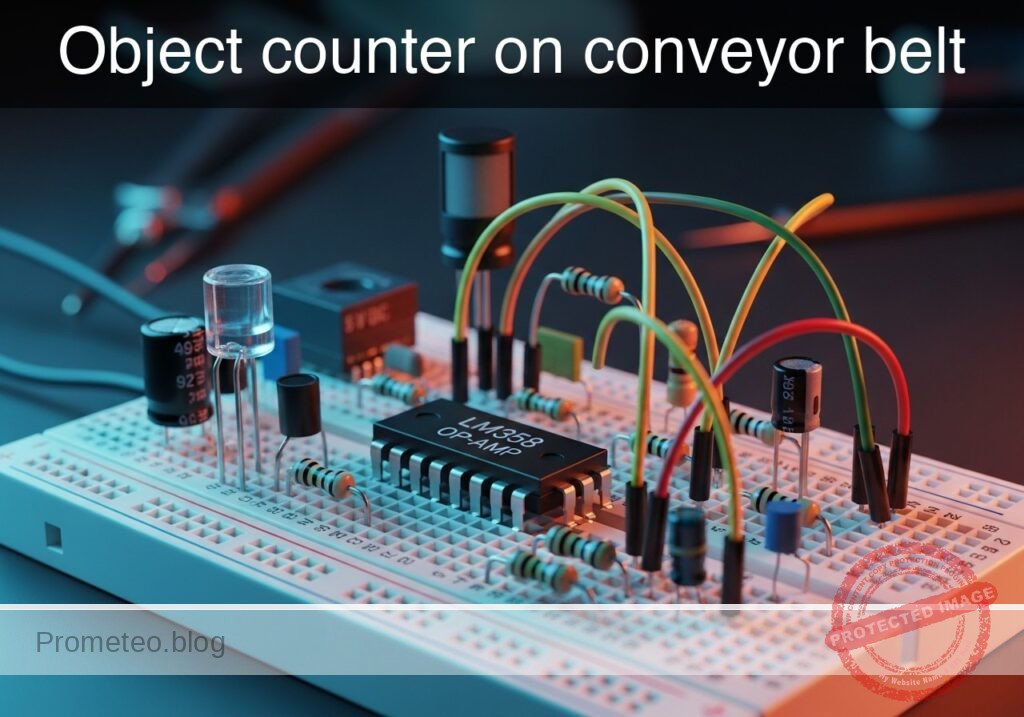
Practical case: Object counter on conveyor belt

Object counter on conveyor belt prototype (Maker Style)

Level: Basic – Build a light interruption sensor system to detect objects moving on a line.

Objective and use case

In this practical case, you will build an optical barrier using a photoresistor (LDR) and an operational amplifier configured as a voltage comparator. The circuit detects when an opaque object interrupts a continuous beam of light, triggering a signal that can be counted or processed.

Why it is useful:
* Industrial automation: Used to count products moving on a conveyor belt.
* Safety barriers: Detects if a person or object crosses a dangerous boundary.
* Intruder alarms: Triggers a warning when a beam of invisible or visible light is broken.
* Parking systems: Detects the presence of a vehicle in a specific spot.

Expected outcome:
* State A (Light path clear): The sensor receives light, and the output indicator (Red LED) remains OFF (Logic Low).
* State B (Object detected): The object blocks the light, increasing LDR resistance. The output indicator turns ON (Logic High).
* Signal Threshold: The comparator switches states when the sensor voltage crosses the adjustable reference voltage (approx. 2.5 V).

Target audience: Level Basic

Materials

  • V1: 5 V DC power supply, function: main circuit power.
  • R1: 10 kΩ resistor, function: voltage divider top for reference.
  • R2: 10 kΩ resistor, function: voltage divider bottom for reference.
  • R3: 10 kΩ resistor, function: pull-up resistor for the sensor node.
  • R4: Photoresistor (LDR), function: light detection sensor.
  • R5: 330 Ω resistor, function: current limiting for output indicator LED.
  • R6: 330 Ω resistor, function: current limiting for emitter LED.
  • D1: White LED, function: light emitter (simulates the beam source).
  • D2: Red LED, function: output indicator (object detected).
  • U1: LM358 or similar OpAmp, function: voltage comparator.

Wiring guide

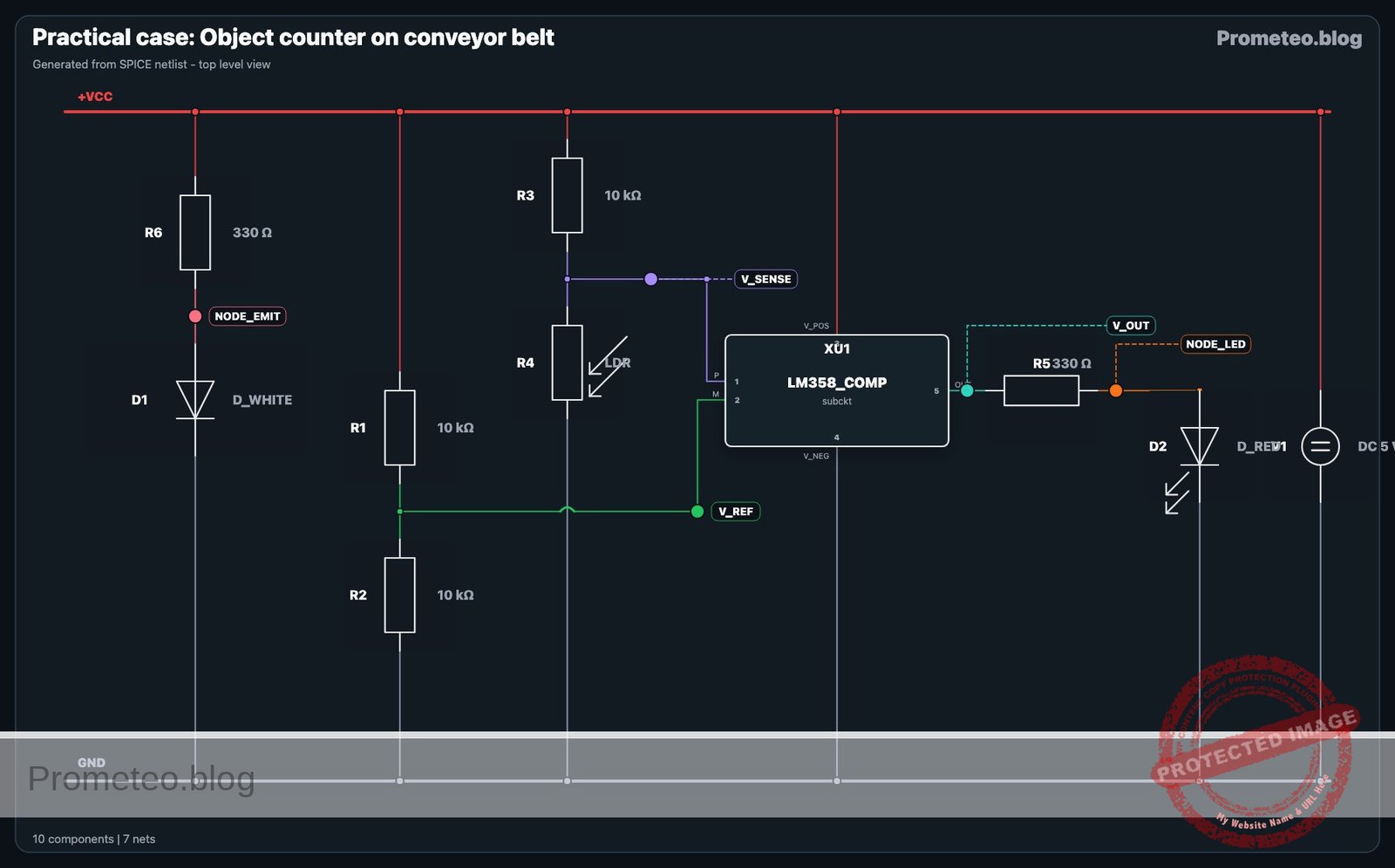
This circuit relies on comparing two voltages: a fixed reference (V_REF) and a variable sensor voltage (V_SENSE).

Power Connections
* V1 (+) connects to node VCC.
* V1 (-) connects to node 0 (GND).
* U1 (Pin 8 / VCC) connects to VCC.
* U1 (Pin 4 / GND) connects to 0.

Reference Voltage (V_REF)
* R1 connects between VCC and V_REF.
* R2 connects between V_REF and 0.
* U1 (Pin 2 / Inverting Input) connects to V_REF.
* Note: This sets a fixed threshold of 2.5 V.

Sensor Voltage (V_SENSE)
* R3 connects between VCC and V_SENSE.
* R4 (LDR) connects between V_SENSE and 0.
* U1 (Pin 3 / Non-Inverting Input) connects to V_SENSE.
* Logic: When light is blocked, R4 resistance increases, V_SENSE rises. If V_SENSE > V_REF, Output goes High.

Light Emitter (Source)
* R6 connects between VCC and NODE_EMIT.
* D1 (Anode) connects to NODE_EMIT.
* D1 (Cathode) connects to 0.
* Place D1 physically facing R4 (LDR).

Output Stage
* U1 (Pin 1 / Output) connects to V_OUT.
* R5 connects between V_OUT and NODE_LED.
* D2 (Anode) connects to NODE_LED.
* D2 (Cathode) connects to 0.

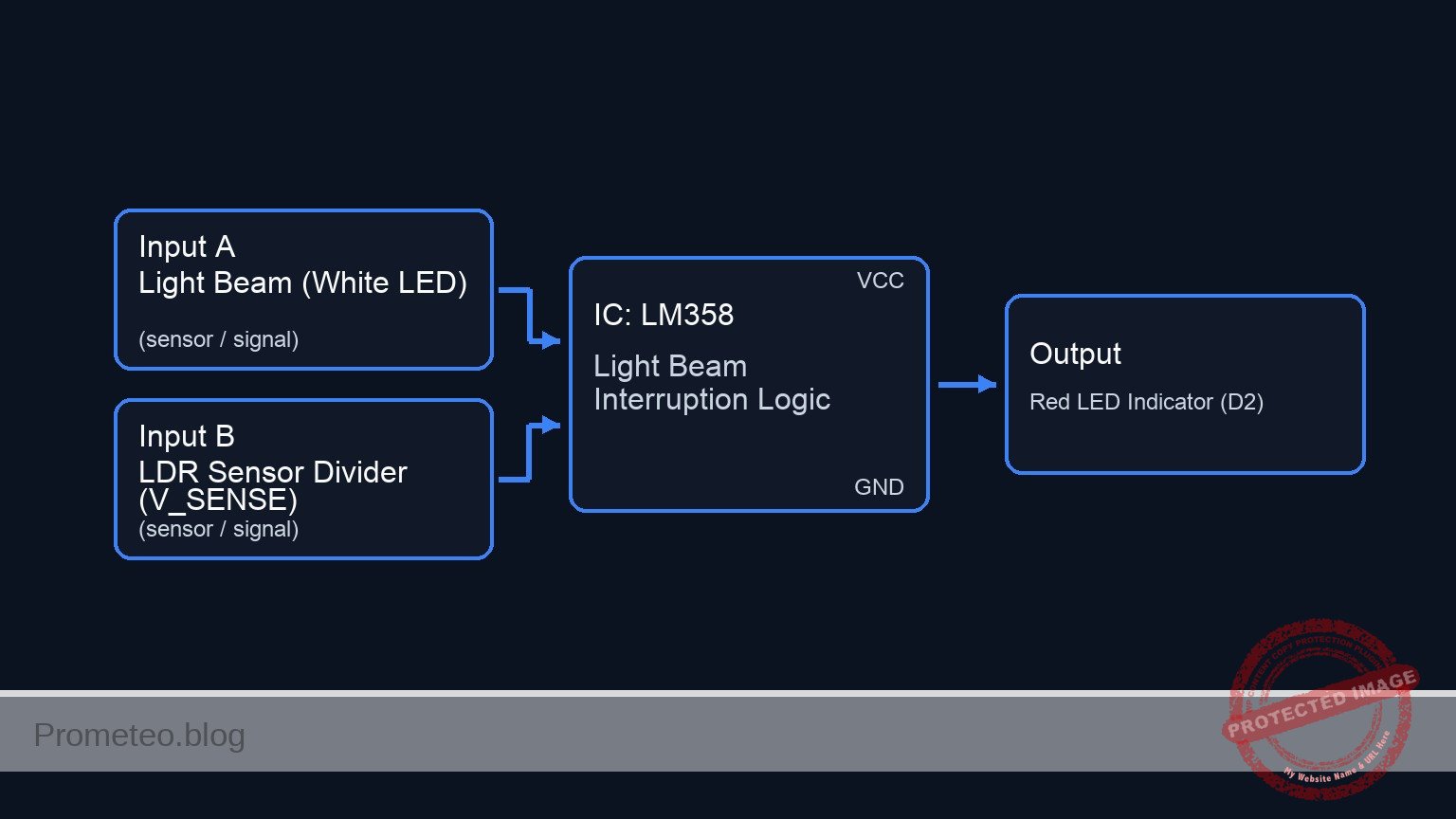
Conceptual block diagram

Conceptual block diagram — LM358 Light Beam Interruption Logic
Quick read: inputs → main block → output (actuator or measurement). This summarizes the ASCII schematic below.

Schematic

[ INPUTS / SENSORS ]                     [ LOGIC / PROCESSING ]             [ OUTPUTS ]

    [ LIGHT SOURCE ]
    [ VCC -> R6 -> D1 (White) ]
             |
      (Light Beam Path)
             |
             V
    [ SENSOR DIVIDER ]
    [ VCC -> R3 -> Node -> R4 ] --(V_SENSE)-->+----------------+
    [ (R4=LDR, varies w/ light)]              |   Pin 3 (+)    |
                                              |                |
                                              |    U1 LM358    |
                                              |   (Comparator) | --(Pin 1)--> [ R5 (330) ] --> [ D2 (Red LED) ] --> GND
                                              |                |
    [ REFERENCE DIVIDER ]                     |                |
    [ VCC -> R1 -> Node -> R2 ] --(V_REF)---->|   Pin 2 (-)    |
    [ (Fixed 2.5 V Threshold)  ]               +----------------+
Schematic (ASCII)

Electrical diagram

Electrical diagram — Object counter on conveyor belt
Generated from the validated SPICE netlist for this case.

🔒 This electrical diagram is premium. With the 7-day pass or the monthly membership you can unlock the complete didactic material and the print-ready PDF pack.🔓 See premium access plans

Measurements and tests

  1. Reference Check: Use a multimeter to measure the voltage between V_REF and 0. It should be approximately 2.5 V (half of VCC).
  2. Light Condition (Clear Path): Ensure the Emitter LED (D1) shines on the LDR (R4). Measure V_SENSE. It should be lower than V_REF (e.g., < 2.0 V). The Output LED (D2) should be OFF.
  3. Dark Condition (Object Detected): Place an object (cardboard or finger) between D1 and R4. Measure V_SENSE. It should rise higher than V_REF (e.g., > 3.0 V). The Output LED (D2) should turn ON.
  4. Comparator Output: Measure V_OUT relative to 0. In the «Dark» state, it should be close to 3.5 V – 4 V (High). In the «Light» state, it should be close to 0 V (Low).

SPICE netlist and simulation

Reference SPICE Netlist (ngspice) — excerptFull SPICE netlist (ngspice)

* Practical case: Object counter on conveyor belt

* -----------------------------------------------------------------------------
* Power Supply
* Wiring: V1 (+) to VCC, V1 (-) to 0 (GND)
* -----------------------------------------------------------------------------
V1 VCC 0 DC 5

* -----------------------------------------------------------------------------
* Reference Voltage Divider
* Wiring: R1 between VCC and V_REF, R2 between V_REF and 0
* Function: Sets threshold voltage (approx 2.5V)
* -----------------------------------------------------------------------------
R1 VCC V_REF 10k
R2 V_REF 0 10k

* -----------------------------------------------------------------------------
* Sensor Network
* Wiring: R3 between VCC and V_SENSE, R4 (LDR) between V_SENSE and 0
* Simulation Note: R4 is modeled as a behavioral resistor to simulate the
* ... (truncated in public view) ...

Copy this content into a .cir file and run with ngspice.

🔒 Part of this section is premium. With the 7-day pass or the monthly membership you can access the full content (materials, wiring, detailed build, validation, troubleshooting, variants and checklist) and download the complete print-ready PDF pack.

* Practical case: Object counter on conveyor belt

* -----------------------------------------------------------------------------
* Power Supply
* Wiring: V1 (+) to VCC, V1 (-) to 0 (GND)
* -----------------------------------------------------------------------------
V1 VCC 0 DC 5

* -----------------------------------------------------------------------------
* Reference Voltage Divider
* Wiring: R1 between VCC and V_REF, R2 between V_REF and 0
* Function: Sets threshold voltage (approx 2.5V)
* -----------------------------------------------------------------------------
R1 VCC V_REF 10k
R2 V_REF 0 10k

* -----------------------------------------------------------------------------
* Sensor Network
* Wiring: R3 between VCC and V_SENSE, R4 (LDR) between V_SENSE and 0
* Simulation Note: R4 is modeled as a behavioral resistor to simulate the
* changing resistance of an LDR when an object blocks the light.
* -----------------------------------------------------------------------------
R3 VCC V_SENSE 10k

* R4 (LDR) Implementation:
* Resistance = 1k (Light/No Object) to 100k (Dark/Object Detected)
* Controlled by dummy voltage source V_OBJ_CTRL
R4 V_SENSE 0 R='1k + 99k / (1 + exp(-50 * (V(V_OBJ_CTRL) - 2.5)))'

* -----------------------------------------------------------------------------
* Light Emitter (Source)
* Wiring: R6 between VCC and NODE_EMIT, D1 Anode to NODE_EMIT, Cathode to 0
* -----------------------------------------------------------------------------
R6 VCC NODE_EMIT 330
D1 NODE_EMIT 0 D_WHITE

* -----------------------------------------------------------------------------
* Comparator (U1: LM358)
* Wiring: Pin 8=VCC, Pin 4=0, Pin 3=V_SENSE (+), Pin 2=V_REF (-), Pin 1=V_OUT
* -----------------------------------------------------------------------------
XU1 V_SENSE V_REF VCC 0 V_OUT LM358_COMP

* -----------------------------------------------------------------------------
* Output Stage
* Wiring: R5 between V_OUT and NODE_LED, D2 Anode to NODE_LED, Cathode to 0
* -----------------------------------------------------------------------------
R5 V_OUT NODE_LED 330
D2 NODE_LED 0 D_RED

* -----------------------------------------------------------------------------
* Dynamic Stimuli (Object Simulation)
* This source drives the behavioral LDR (R4).
* Logic: 0V = Clear (Light), 5V = Object (Dark)
* Timing: Wait 50us, Pulse High for 100us, Repeat every 300us
* -----------------------------------------------------------------------------
V_OBJ V_OBJ_CTRL 0 PULSE(0 5 50u 10u 10u 100u 300u)

* -----------------------------------------------------------------------------
* Models and Subcircuits
* -----------------------------------------------------------------------------
.model D_WHITE D(IS=1e-14 N=4 RS=10) ; High Vf simulation for White LED
.model D_RED D(IS=1e-12 N=2 RS=5)    ; Standard Red LED

* Behavioral OpAmp Subcircuit (Comparator)
* Pinout Order: Non-Inv(+), Inv(-), VCC, GND, Output
.subckt LM358_COMP P M V_POS V_NEG OUT
  * Sigmoid function for robust switching behavior (Rail-to-Rail logic approx)
  * V(OUT) approaches V_POS when P > M, V_NEG when P < M
  B1 OUT 0 V = V(V_POS) * (1 / (1 + exp(-100 * (V(P) - V(M)))))
.ends

* -----------------------------------------------------------------------------
* Analysis Directives
* -----------------------------------------------------------------------------
.op
.tran 1u 500u

* Print required signals for batch processing
.print tran V(V_SENSE) V(V_REF) V(V_OUT) V(V_OBJ_CTRL)

Simulation Results (Transient Analysis)

Simulation Results (Transient Analysis)
Show raw data table (1064 rows)
Index   time            v(v_sense)      v(v_ref)        v(v_out)
0	0.000000e+00	4.545455e-01	2.500000e+00	7.345271e-89
1	1.000000e-08	4.545455e-01	2.500000e+00	7.345271e-89
2	2.000000e-08	4.545455e-01	2.500000e+00	7.345271e-89
3	4.000000e-08	4.545455e-01	2.500000e+00	7.345271e-89
4	8.000000e-08	4.545455e-01	2.500000e+00	7.345271e-89
5	1.600000e-07	4.545455e-01	2.500000e+00	7.345271e-89
6	3.200000e-07	4.545455e-01	2.500000e+00	7.345271e-89
7	6.400000e-07	4.545455e-01	2.500000e+00	7.345271e-89
8	1.280000e-06	4.545455e-01	2.500000e+00	7.345271e-89
9	2.280000e-06	4.545455e-01	2.500000e+00	7.345271e-89
10	3.280000e-06	4.545455e-01	2.500000e+00	7.345271e-89
11	4.280000e-06	4.545455e-01	2.500000e+00	7.345271e-89
12	5.280000e-06	4.545455e-01	2.500000e+00	7.345271e-89
13	6.280000e-06	4.545455e-01	2.500000e+00	7.345271e-89
14	7.280000e-06	4.545455e-01	2.500000e+00	7.345271e-89
15	8.280000e-06	4.545455e-01	2.500000e+00	7.345271e-89
16	9.280000e-06	4.545455e-01	2.500000e+00	7.345271e-89
17	1.028000e-05	4.545455e-01	2.500000e+00	7.345271e-89
18	1.128000e-05	4.545455e-01	2.500000e+00	7.345271e-89
19	1.228000e-05	4.545455e-01	2.500000e+00	7.345271e-89
20	1.328000e-05	4.545455e-01	2.500000e+00	7.345271e-89
21	1.428000e-05	4.545455e-01	2.500000e+00	7.345271e-89
22	1.528000e-05	4.545455e-01	2.500000e+00	7.345271e-89
23	1.628000e-05	4.545455e-01	2.500000e+00	7.345271e-89
... (1040 more rows) ...

Common mistakes and how to avoid them

  • Swapping OpAmp inputs: Connecting the Reference to the Non-Inverting (+) input instead of the Inverting (-) input will reverse the logic (LED turns OFF when object is detected). Ensure V_SENSE goes to the Non-Inverting (+) pin for «Dark Detection».
  • Ambient Light interference: The LDR is very sensitive. If the room is bright, the «Dark» state might not be dark enough to trigger the threshold. Use a small tube or tape to shield the LDR.
  • Incorrect LDR placement: If the LDR (R4) is placed in the top leg of the voltage divider (swapped with R3), the logic is inverted. Ensure R4 connects to Ground (0).

Troubleshooting

  • Output LED never turns ON:
    • Check if the object actually blocks the light completely.
    • Measure V_SENSE. If it never exceeds 2.5 V, increase the value of R3 (e.g., to 22 kΩ) to raise the voltage sensitivity.
  • Output LED never turns OFF:
    • The LDR might be receiving insufficient light from the Emitter.
    • Check alignment of D1 and R4.
    • Measure V_REF. If R1 is disconnected, V_REF might be 0 V, causing the output to stay High.
  • Output flickers:
    • The light source might be unstable, or the voltage is hovering exactly at the threshold. Add a decoupling capacitor (e.g., 100 nF) across the power rails near the OpAmp.

Possible improvements and extensions

  1. Adjustable Sensitivity: Replace R1 or R2 with a 10 kΩ potentiometer. This allows you to fine-tune the V_REF threshold to work in different ambient light conditions.
  2. Hysteresis (Schmidt Trigger): Add a high-value feedback resistor (e.g., 1 MΩ) between the Output (V_OUT) and the Non-Inverting input (V_SENSE). This prevents the LED from flickering if the object moves slowly across the beam.

More Practical Cases on Prometeo.blog

Find this product and/or books on this topic on Amazon

Go to Amazon

As an Amazon Associate, I earn from qualifying purchases. If you buy through this link, you help keep this project running.

Quick Quiz

Question 1: What is the primary component used to detect light intensity in this circuit?


Question 2: What is the specific role of the operational amplifier in this project?


Question 3: According to the expected outcome, what defines 'State B'?


Question 4: What is the status of the Red LED output indicator when an object is detected?


Question 5: What is the approximate reference voltage threshold for the comparator to switch states?


Question 6: How does the LDR's resistance change when an opaque object blocks the light beam?


Question 7: Which of the following is a listed industrial use case for this sensor system?


Question 8: In 'State A' (Light path clear), what is the logic state of the output?


Question 9: What type of safety application is mentioned for this optical barrier?


Question 10: What triggers the intruder alarm function in this system?


Carlos Núñez Zorrilla
Electronics & Computer Engineer

Telecommunications Electronics Engineer and Computer Engineer (official degrees in Spain).
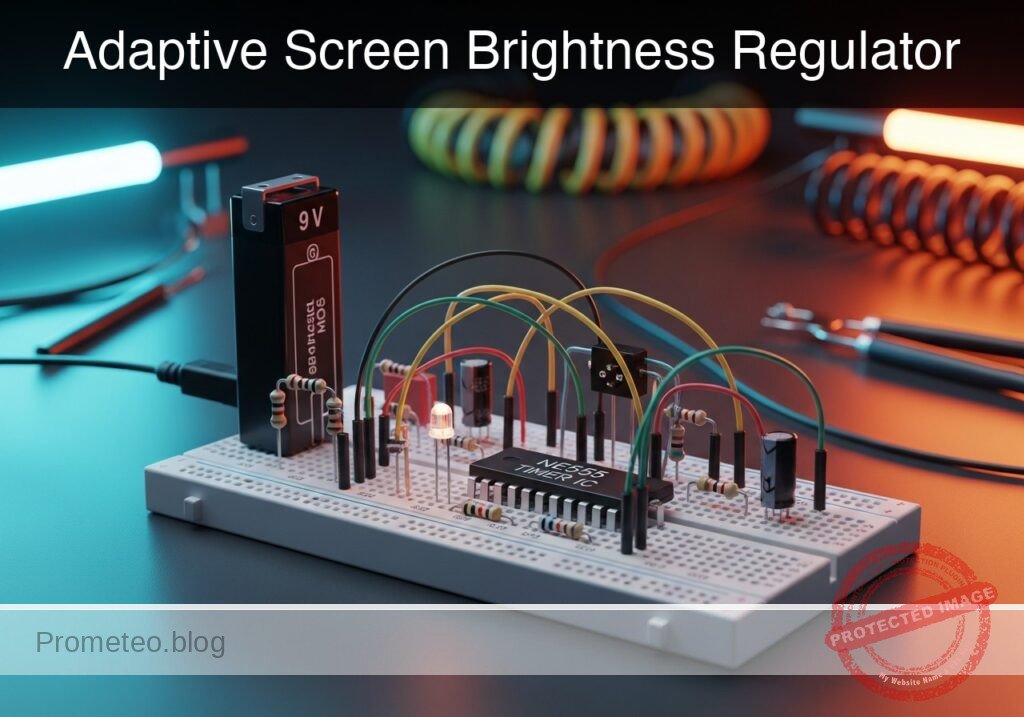
Follow me:


Practical case: Simple light intensity meter

Simple light intensity meter prototype (Maker Style)

Level: Basic – Build a circuit where an LED dims as ambient light increases.

Objective and use case

You will construct a simple analog light sensor circuit using a photoresistor (LDR) in a configuration where the light output is inversely proportional to the ambient light intensity. This creates a «Dark Sensor» effect without using transistors.

Why it is useful:
* Automatic Lighting: Simulates street lamps or night lights that turn on automatically when it gets dark.
* Battery Efficiency: Ensures indicators are only active during low-light conditions when visibility is poor.
* Security Systems: Can detect if a sealed container or dark room has been breached by light.
* Concept Demonstration: Demonstrates current division and non-linear resistance components in parallel circuits.

Expected outcome:
* Dark condition: The LDR resistance is high, forcing current through the LED. The Red LED turns ON.
* Bright condition: The LDR resistance drops significantly, shunting current away from the LED. The Red LED turns OFF or dims significantly.
* Voltage shift: You will measure a voltage drop at the shared node as light increases.
* Target audience: Beginners and students familiar with basic breadboarding.

Materials

  • V1: 5 V DC supply, function: main power source
  • R1: 470 Ω resistor, function: current limiting and voltage divider upper leg
  • R2: LDR (GL5528 or similar), function: ambient light sensor (variable resistor)
  • D1: Red LED, function: low-light indicator

Wiring guide

We will use a «current shunt» topology. The LDR is placed in parallel with the LED.

  • VCC: Connect positive terminal of V1 to one side of R1.
  • VA: Connect the other side of R1 to the Anode (long leg) of D1.
  • VA: Connect one leg of R2 (LDR) to the same node (Anode of D1).
  • 0 (GND): Connect the Cathode (flat side/short leg) of D1 to the negative terminal of V1.
  • 0 (GND): Connect the remaining leg of R2 (LDR) to the negative terminal of V1.

Conceptual block diagram

Conceptual block diagram — Light Intensity Indicator
Quick read: inputs → main block → output (actuator or measurement). This summarizes the ASCII schematic below.

Schematic

[ POWER SOURCE ]              [ CURRENT LIMITER ]               [ SHUNT TOPOLOGY ]

                                                              +--> [ D1: Red LED ] --> GND
                                                              |    (Output Indicator)
    [ V1: 5 V DC ] --(+)--> [ R1: 470 Ω ] --(Node VA)--> [ + ]
                                                              |
                                                              +--> [ R2: LDR ] --> GND
                                                                   (Light Sensor)
Schematic (ASCII)

Electrical diagram

Electrical diagram for case: Simple light intensity meter
Generated from the validated SPICE netlist for this case.

🔒 This electrical diagram is premium. With the 7-day pass or the monthly membership you can unlock the complete didactic material and the print-ready PDF pack.🔓 See premium access plans

Measurements and tests

To validate that the circuit behaves inversely to light intensity:

  1. Set up the multimeter: Select DC Voltage mode (20 V range).
  2. Connect probes: Place the Red probe on node VA (Anode of LED) and Black probe on 0 (GND).
  3. Test 1 (Ambient/Bright Light):
    • Expose the LDR to bright light.
    • Observation: The LED should be DIM or OFF.
    • Measurement: The voltage at VA should drop below the LED forward voltage (likely < 1.5 V). The low resistance of the LDR shunts the current to ground.
  4. Test 2 (Darkness):
    • Cover the LDR completely with your finger or a cap.
    • Observation: The LED should light up BRIGHTLY.
    • Measurement: The voltage at VA should rise to the LED’s forward voltage (approx. 1.8 V to 2.0 V for a red LED). The high resistance of the LDR forces current through the LED.

SPICE netlist and simulation

Reference SPICE Netlist (ngspice) — excerptFull SPICE netlist (ngspice)

* Practical case: Simple light intensity meter

* --- Models ---
* Generic Red LED Model
* Parameters: IS=saturation current, N=emission coefficient, RS=series resistance
* BV=breakdown voltage, IBV=breakdown current, CJO=junction capacitance
.model DLED D(IS=1e-14 N=2 RS=10 BV=5 IBV=10u CJO=20p)

* --- Power Supply ---
* V1: 5V DC supply (Main power source)
* Connected between VCC and GND (0)
V1 VCC 0 DC 5

* --- Circuit Components ---
* R1: 470 Ohm resistor
* Function: Current limiting and voltage divider upper leg
* Wiring: Connects Positive Terminal of V1 (VCC) to Node VA
R1 VCC VA 470

* D1: Red LED
* ... (truncated in public view) ...

Copy this content into a .cir file and run with ngspice.

🔒 Part of this section is premium. With the 7-day pass or the monthly membership you can access the full content (materials, wiring, detailed build, validation, troubleshooting, variants and checklist) and download the complete print-ready PDF pack.

* Practical case: Simple light intensity meter

* --- Models ---
* Generic Red LED Model
* Parameters: IS=saturation current, N=emission coefficient, RS=series resistance
* BV=breakdown voltage, IBV=breakdown current, CJO=junction capacitance
.model DLED D(IS=1e-14 N=2 RS=10 BV=5 IBV=10u CJO=20p)

* --- Power Supply ---
* V1: 5V DC supply (Main power source)
* Connected between VCC and GND (0)
V1 VCC 0 DC 5

* --- Circuit Components ---
* R1: 470 Ohm resistor
* Function: Current limiting and voltage divider upper leg
* Wiring: Connects Positive Terminal of V1 (VCC) to Node VA
R1 VCC VA 470

* D1: Red LED
* Function: Low-light indicator
* Wiring: Anode to Node VA, Cathode to Negative Terminal of V1 (0)
D1 VA 0 DLED

* R2: LDR (GL5528 or similar)
* Function: Ambient light sensor (variable resistor)
* Wiring: Connects Node VA to Negative Terminal of V1 (0)
* Note: Modeled as a behavioral resistor where Resistance = V(V_LDR_CTRL).
* This allows simulating the change from Light (Low R) to Dark (High R).
R2 VA 0 R='V(V_LDR_CTRL)'

* --- Dynamic Stimuli (Simulation Only) ---
* V_LDR_SRC: Generates a voltage signal representing the LDR resistance in Ohms.
* Logic: 
*   - 100V (representing 100 Ohms) = Bright Light -> V(VA) drops -> LED OFF
*   - 10kV (representing 10k Ohms) = Dark -> V(VA) rises -> LED ON
* Timing: Fast pulse to demonstrate switching.
* PULSE(v1 v2 td tr tf pw per)
V_LDR_SRC V_LDR_CTRL 0 PULSE(100 10000 10u 100u 100u 500u 1000u)

* --- Analysis Directives ---
* Transient analysis: 5us step size, 2ms duration
.tran 5u 2ms

* Print specific nodes to verify operation
* V(VA): Voltage at the LED/LDR node (Should swing between ~0.8V and ~1.8V)
* V(V_LDR_CTRL): The resistance value being simulated
.print tran V(VA) V(V_LDR_CTRL)

.op
.end

Simulation Results (Transient Analysis)

Simulation Results (Transient Analysis)
Show raw data table (441 rows)
Index   time            v(va)           v(v_ldr_ctrl)
0	0.000000e+00	8.771739e-01	1.000000e+02
1	5.000000e-08	8.771739e-01	1.000000e+02
2	1.000000e-07	8.771739e-01	1.000000e+02
3	2.000000e-07	8.771739e-01	1.000000e+02
4	4.000000e-07	8.771739e-01	1.000000e+02
5	8.000000e-07	8.771739e-01	1.000000e+02
6	1.600000e-06	8.771739e-01	1.000000e+02
7	3.200000e-06	8.771739e-01	1.000000e+02
8	6.400000e-06	8.771739e-01	1.000000e+02
9	1.000000e-05	8.771739e-01	1.000000e+02
10	1.016024e-05	9.861073e-01	1.158634e+02
11	1.048071e-05	1.182699e+00	1.475902e+02
12	1.112165e-05	1.342799e+00	2.110437e+02
13	1.175485e-05	1.386540e+00	2.737299e+02
14	1.276008e-05	1.418826e+00	3.732481e+02
15	1.399489e-05	1.436968e+00	4.954940e+02
16	1.646450e-05	1.455127e+00	7.399857e+02
17	2.140373e-05	1.468889e+00	1.228969e+03
18	2.640373e-05	1.474732e+00	1.723969e+03
19	3.140373e-05	1.478748e+00	2.218969e+03
20	3.640373e-05	1.480441e+00	2.713969e+03
21	4.140373e-05	1.481529e+00	3.208969e+03
22	4.640373e-05	1.482571e+00	3.703969e+03
23	5.140373e-05	1.483189e+00	4.198969e+03
... (417 more rows) ...

Common mistakes and how to avoid them

  1. Placing components in Series:
    • Mistake: Wiring Source -> Resistor -> LDR -> LED -> Ground.
    • Result: This creates a «Light Sensor» (brighter light = brighter LED), which is the opposite of the objective.
    • Solution: Ensure the LDR is in parallel with the LED (sharing the same start and end nodes).
  2. Using a resistor value that is too high for R1:
    • Mistake: Using a 10 kΩ resistor for R1.
    • Result: The LED never turns on brightly even in total darkness because the current is too restricted.
    • Solution: Use 330 Ω to 470 Ω for a 5 V source to ensure sufficient current for the LED when the LDR is high-resistance.
  3. Expecting a «Hard» On/Off switch:
    • Mistake: Expecting digital-like switching.
    • Result: The LED dims gradually rather than snapping off.
    • Solution: Understand that this is a passive analog circuit. For a hard «snap» action, a transistor or comparator would be required.

Troubleshooting

  • Symptom: LED is always ON, even in bright light.
    • Cause: R1 value is too low, or LDR has very high resistance even in light (or is disconnected).
    • Fix: Check LDR connections. If correct, increase R1 to 1 kΩ to make it easier for the LDR to pull the voltage down.
  • Symptom: LED is always OFF.
    • Cause: LED wired backwards or R1 is too high.
    • Fix: Flip the LED orientation. Ensure R1 is < 1 kΩ.
  • Symptom: Source gets hot.
    • Cause: Short circuit. Likely R1 was bypassed, connecting VCC directly to the LDR or LED.
    • Fix: Ensure R1 is strictly between VCC and the VA node.

Possible improvements and extensions

  1. Sensitivity Adjustment: Replace R1 with a 1 kΩ potentiometer to tune exactly how dark it needs to be before the LED turns on.
  2. Color Mixing: Put a Green LED in series with the LDR (instead of parallel). As light increases, the Green LED gets brighter while the Red LED (parallel) gets dimmer, creating a color-shifting light monitor.

More Practical Cases on Prometeo.blog

Find this product and/or books on this topic on Amazon

Go to Amazon

As an Amazon Associate, I earn from qualifying purchases. If you buy through this link, you help keep this project running.

Quick Quiz

Question 1: What is the primary objective of the circuit described in the text?


Question 2: Which component acts as the ambient light sensor in this circuit?


Question 3: What happens to the Red LED in a 'Dark condition'?


Question 4: Why is this circuit useful for battery efficiency?


Question 5: What electrical concept does this circuit demonstrate?


Question 6: How does the circuit achieve the 'Dark Sensor' effect without transistors?


Question 7: What happens to the LDR resistance in a 'Bright condition'?


Question 8: Which of the following is a listed use case for this circuit?


Question 9: What happens to the voltage at the shared node as light increases?


Question 10: In the 'Dark condition', why does the LED turn on?


Carlos Núñez Zorrilla
Electronics & Computer Engineer

Telecommunications Electronics Engineer and Computer Engineer (official degrees in Spain).
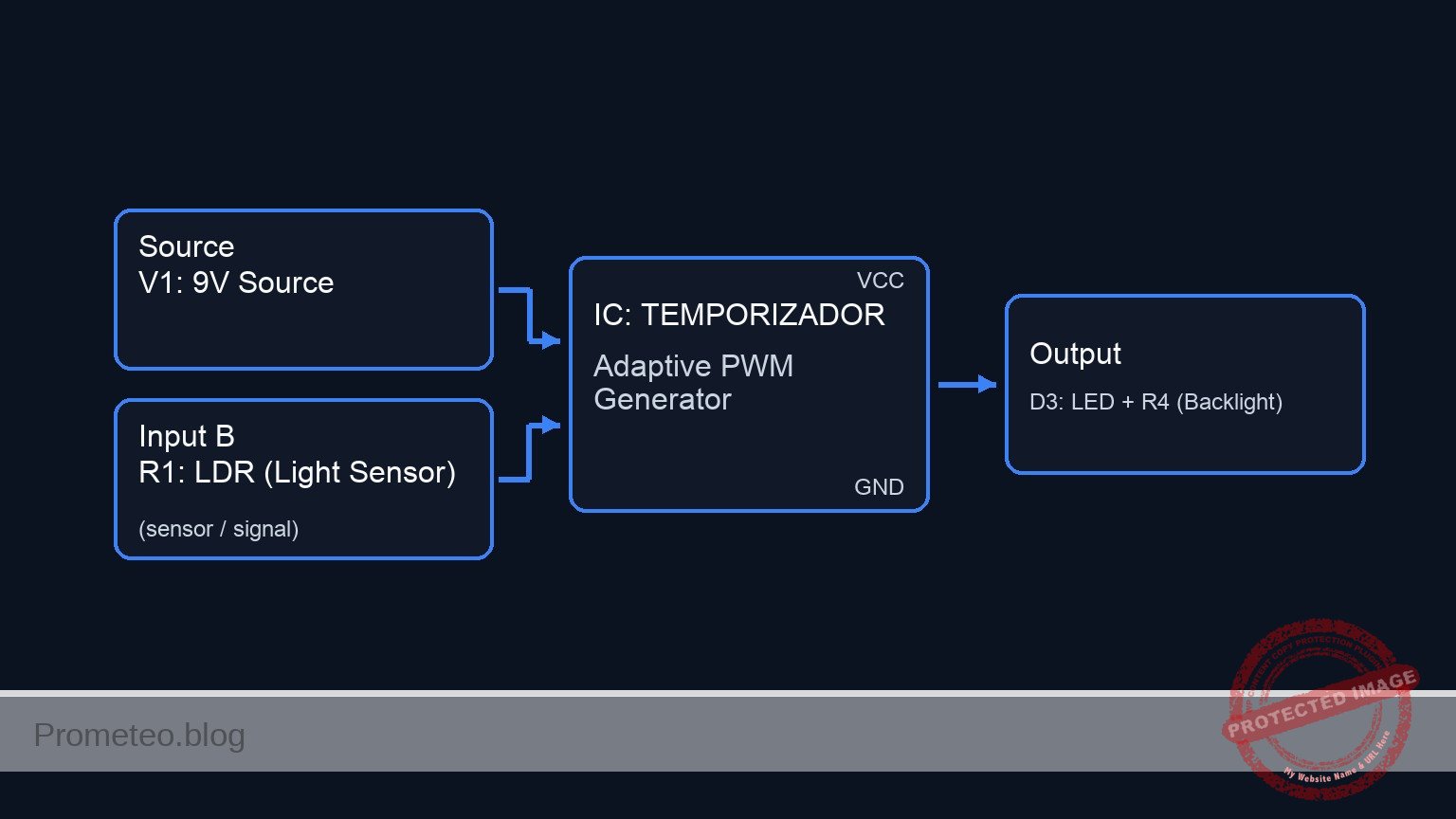
Follow me: