Practical case: High power circuit isolation

High power circuit isolation prototype (Maker Style)

Level: Basic – Control a high-power load using a low-voltage signal via galvanic isolation.

Objective and use case

You will build a driver circuit that uses a small 5 V signal to activate an electromechanical relay, which in turn switches a separate 12 V high-power circuit powering a bulb.

  • Why it is useful:

    • Automotive Systems: Allows a low-current ECU signal to switch high-current headlights.
    • Safety: Keeps high voltage/current (the load side) physically separated from the sensitive control logic (the user side).
    • Interface: Enables microcontrollers (like Arduino/ESP32) to control industrial equipment or AC appliances (simulated here with 12 V).
  • Expected outcome:

    • The 12 V bulb turns ON only when the 5 V control switch is closed.
    • An audible «click» is heard from the relay component when switching states.
    • Measurements: 0 V on the load when the control signal is 0 V; ~12 V on the load when the control signal is 5 V.
  • Target audience: Students dealing with electromechanical interfaces and circuit protection.

Materials

  • V1: 5 V DC voltage source, function: Control Logic Supply
  • V2: 12 V DC voltage source, function: High Power Load Supply
  • S1: SPST Toggle Switch, function: Control trigger
  • R1: 1 kΩ resistor, function: Base current limiter for Q1
  • Q1: 2N2222 NPN BJT Transistor, function: Relay coil driver
  • D1: 1N4007 Diode, function: Flyback protection (snubber)
  • K1: 5 V SPST Relay (coil resistance ~70 Ω), function: Galvanic isolation switch
  • L1: 12 V / 10 W Incandescent Bulb, function: High power load

Wiring guide

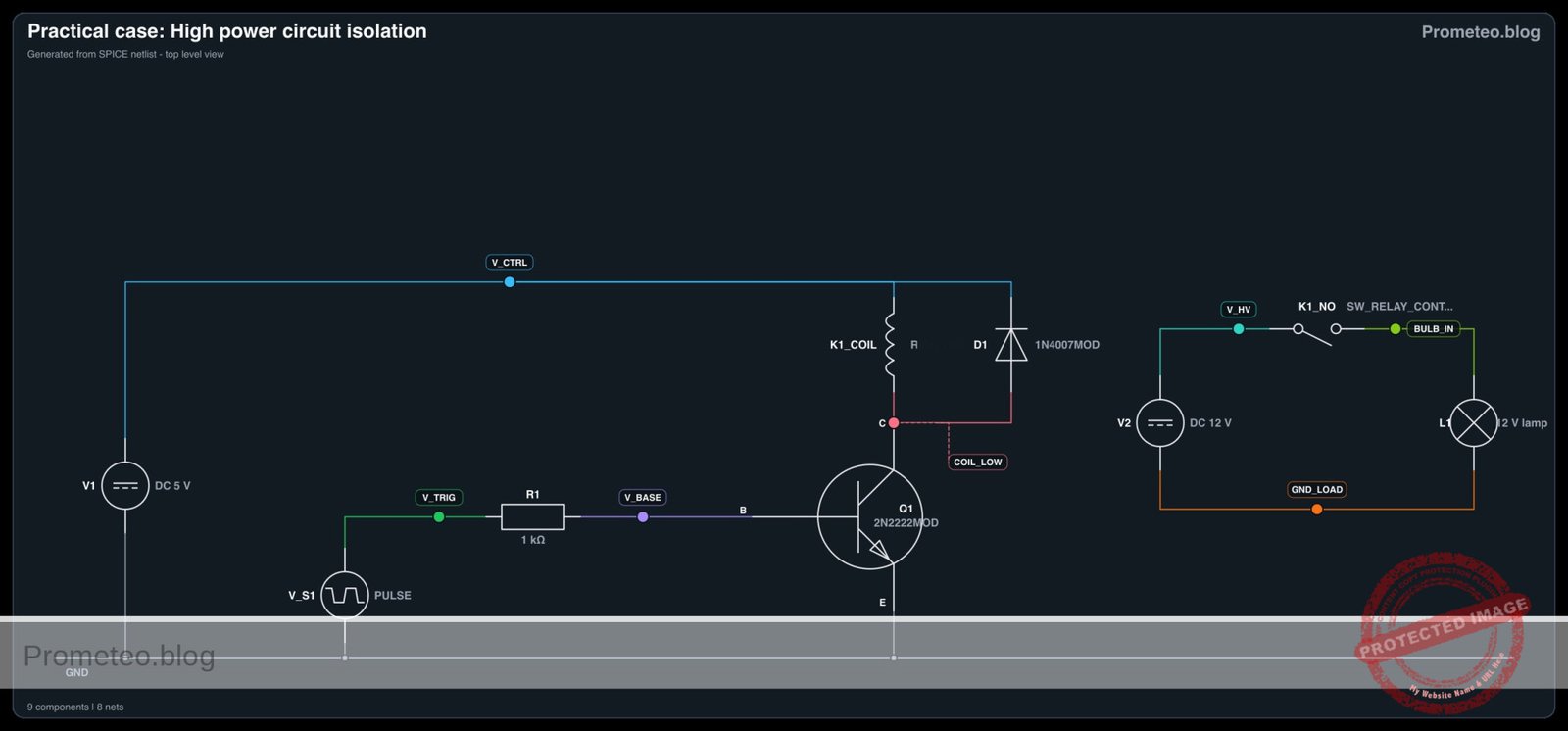
This guide uses specific node names to ensure correct connections in simulation and assembly. The circuit has two isolated sides: the Control Side (Nodes: V_CTRL, 0) and the Load Side (Nodes: V_HV, GND_LOAD).

Control Side (Low Power):
* V1 (+): Connects to Node V_CTRL.
* V1 (-): Connects to Node 0 (Common Ground).
* S1: Connects between V_CTRL and Node V_TRIG.
* R1: Connects between V_TRIG and Node V_BASE.
* Q1 (Base): Connects to Node V_BASE.
* Q1 (Emitter): Connects to Node 0.
* Q1 (Collector): Connects to Node COIL_LOW.
* K1 (Coil pin 1): Connects to Node V_CTRL.
* K1 (Coil pin 2): Connects to Node COIL_LOW.
* D1 (Anode): Connects to Node COIL_LOW.
* D1 (Cathode): Connects to Node V_CTRL (Reverse biased across coil).

Load Side (High Power):
* V2 (+): Connects to Node V_HV.
* V2 (-): Connects to Node GND_LOAD (Isolated from Node 0).
* K1 (Common Contact): Connects to Node V_HV.
* K1 (Normally Open Contact): Connects to Node BULB_IN.
* L1: Connects between Node BULB_IN and Node GND_LOAD.

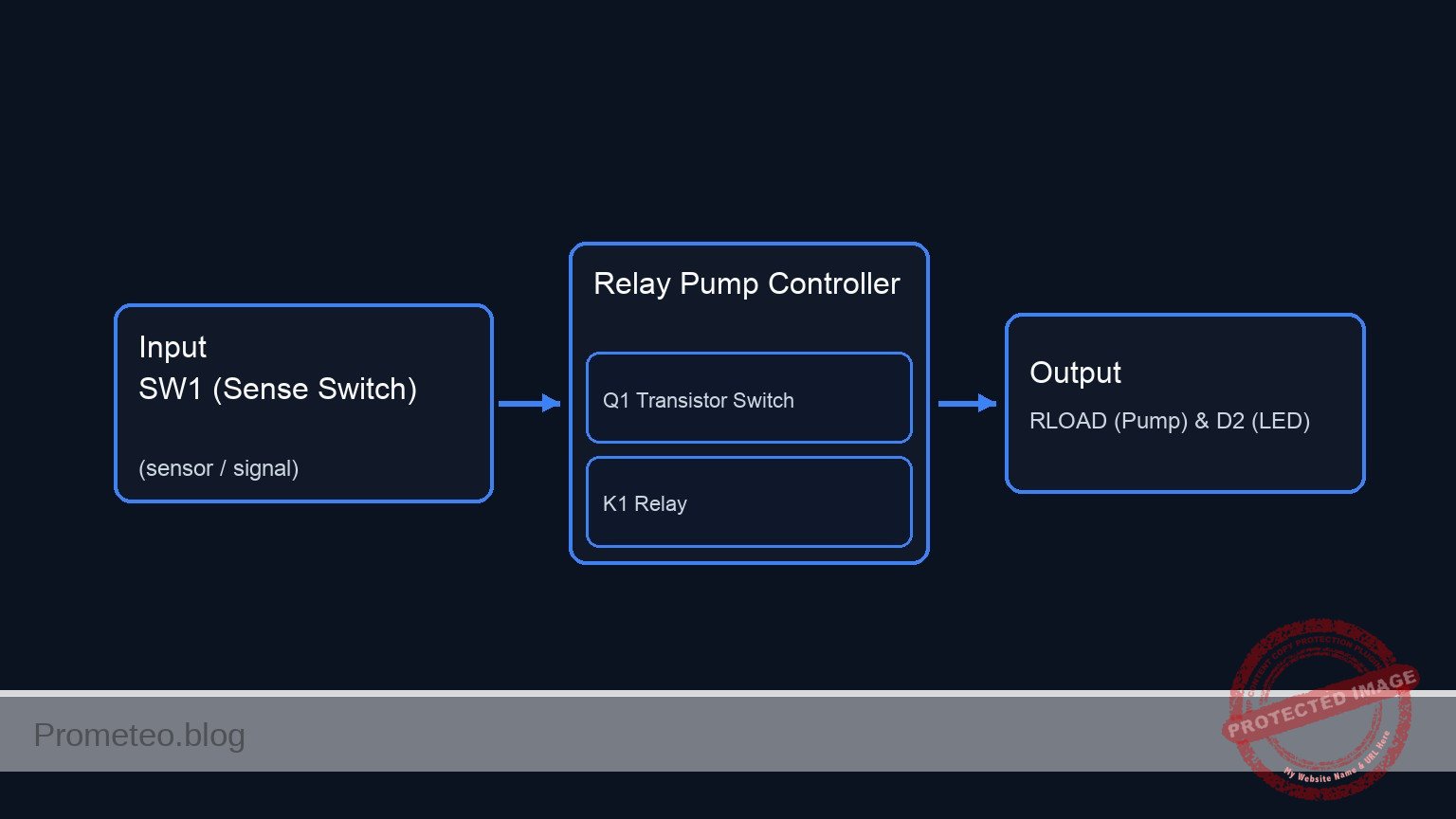
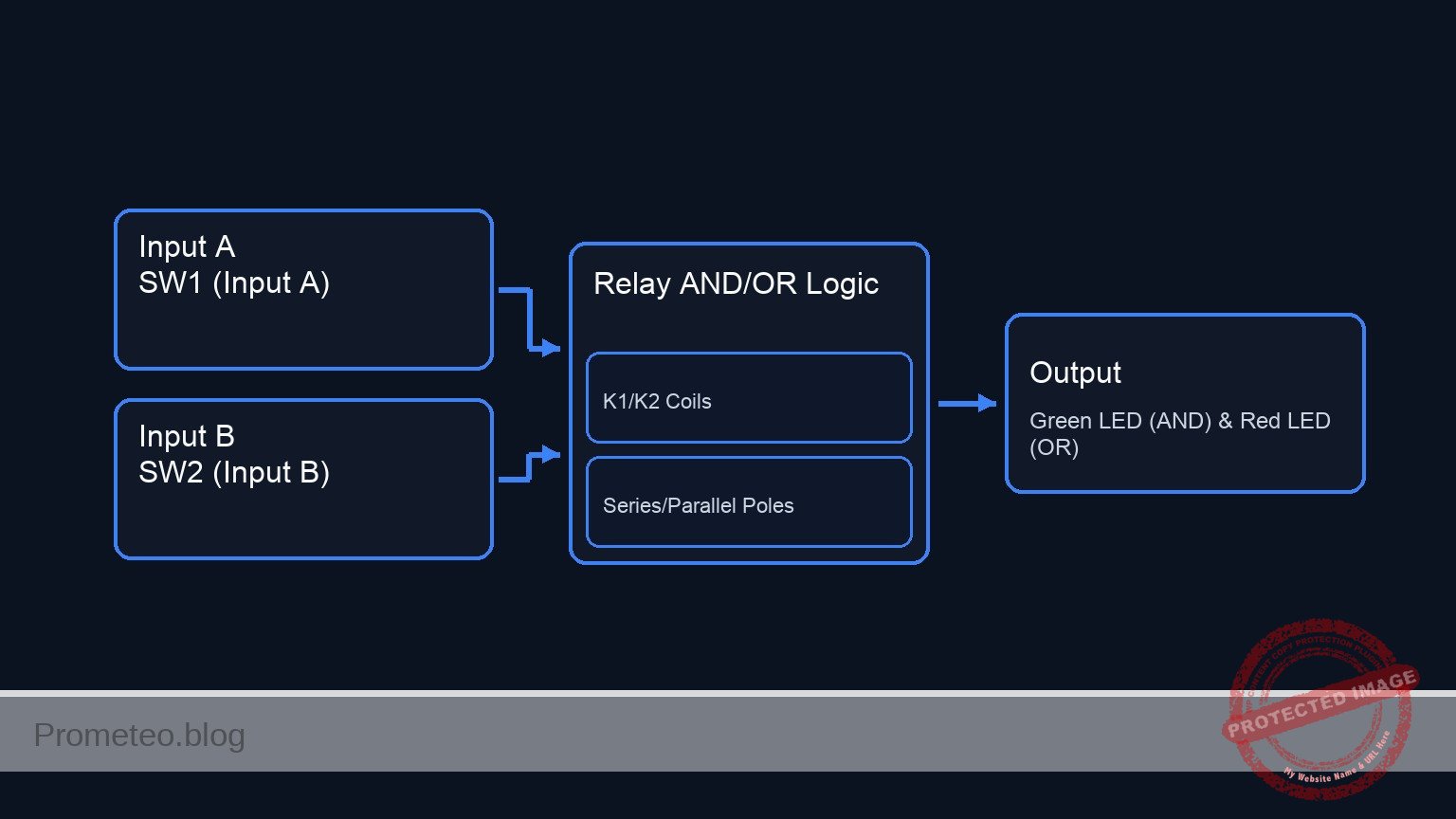
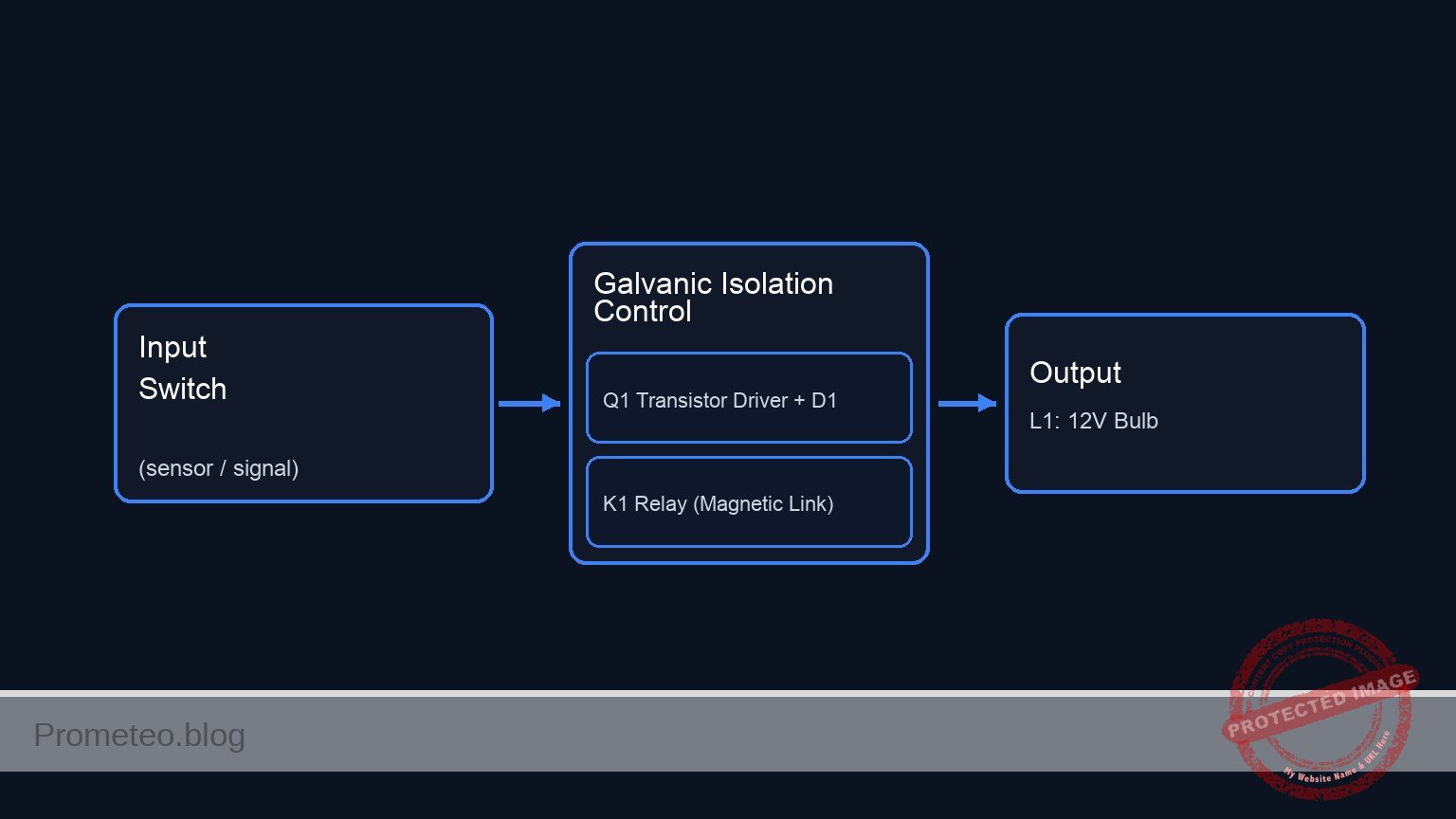
Conceptual block diagram

Conceptual block diagram — Galvanic Isolation Control
Quick read: inputs → main block → output (actuator or measurement). This summarizes the ASCII schematic below.

Schematic

+-------------------------------------------------------------------------+
|               PRACTICAL CASE: HIGH POWER CIRCUIT ISOLATION              |
+-------------------------------------------------------------------------+

===========================================================================
  PART 1: CONTROL SIDE (5 V Logic)
  Nodes: V_CTRL, V_TRIG, V_BASE, COIL_LOW, 0 (GND)
===========================================================================

  (Trigger Signal Path)
  [ V1: 5 V (+) ] --> [ S1: Switch ] --> [ R1: 1k Ohm ] --> [ Q1: Base ]
                                                               |
                                                               | (Controls)
                                                               v
  (Coil Power Path)                                    [ Q1: Collector ]
  [ V1: 5 V (+) ] ---------> [ K1: Relay Coil ] --------------> |
                            [ || D1 Diode    ]                 |
                            [ (Rev Biased)   ]                 | (Conducts to)
                                                               |
                                                               v
                                                       [ Q1: Emitter ]
                                                               |
                                                               v
                                                       [ Node 0 (GND) ]


             ~ ~ ~ ~ ~ ~ ~ ~ ~ ~ ~ ~ ~ ~ ~ ~ ~ ~ ~ ~ ~ ~ ~
             ~      MAGNETIC LINK (GALVANIC ISOLATION)   ~
             ~ ~ ~ ~ ~ ~ ~ ~ ~ ~ ~ ~ ~ ~ ~ ~ ~ ~ ~ ~ ~ ~ ~


===========================================================================
  PART 2: LOAD SIDE (12 V High Power)
  Nodes: V_HV, BULB_IN, GND_LOAD
===========================================================================

  (High Current Path)

  [ V2: 12 V (+) ] --> [ K1: Relay Switch ] --> [ L1: 12 V Bulb ] --> [ GND_LOAD ]
                      [   (COM -> NO)    ]
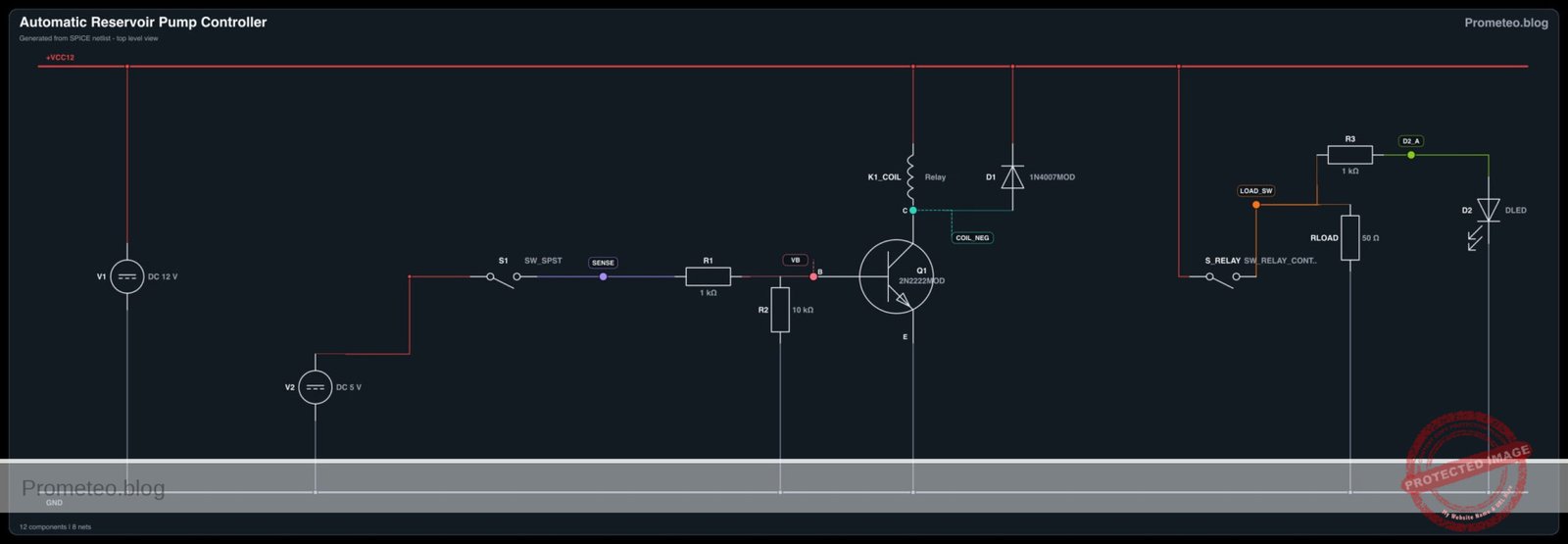
Electrical Schematic

Measurements and tests

Follow these steps to validate the isolation and switching capability:

  1. Coil Voltage Test:

    • Close switch S1.
    • Measure voltage between V_CTRL and COIL_LOW.
    • Result: It should read approximately 5 V (indicating the transistor is sinking current).
  2. Load Activation:

    • Keep S1 closed.
    • Observe L1 (Bulb).
    • Result: The bulb illuminates. Measure voltage across L1; it should be ~12 V.
  3. Switch Latency (Oscilloscope required):

    • Connect Channel 1 to V_TRIG and Channel 2 to BULB_IN.
    • Toggle S1 from OFF to ON.
    • Result: You will observe a delay (typically 5–15 ms) between the signal rising on Ch1 and power appearing on Ch2. This is the mechanical switching time of the relay armature.

SPICE netlist and simulation

Reference SPICE Netlist (ngspice) — excerptFull SPICE netlist (ngspice)

* High power circuit isolation
*
* This netlist simulates a relay driver circuit with a high-power load.
* It includes a low-voltage control side (5V) and an isolated high-voltage load side (12V).
*

* --- Analysis Setup ---
.tran 10u 10m
.print tran V(V_TRIG) V(BULB_IN) V(COIL_LOW) I(L_K1_COIL)

* --- Control Side (Low Power) ---

* Supply V1: 5V DC
V1 V_CTRL 0 DC 5

* Switch S1: Modeled as a Pulse Voltage Source to simulate user actuation
* Connects to V_TRIG to drive the base resistor.
* Timing: Off for 1ms, On for 4ms, then Off.
V_S1 V_TRIG 0 PULSE(0 5 1m 10u 10u 4m 10m)

* ... (truncated in public view) ...

Copy this content into a .cir file and run with ngspice.

🔒 Part of this section is premium. With the 7-day pass or the monthly membership you can access the full content (materials, wiring, detailed build, validation, troubleshooting, variants and checklist) and download the complete print-ready PDF pack.

* High power circuit isolation
*
* This netlist simulates a relay driver circuit with a high-power load.
* It includes a low-voltage control side (5V) and an isolated high-voltage load side (12V).
*

* --- Analysis Setup ---
.tran 10u 10m
.print tran V(V_TRIG) V(BULB_IN) V(COIL_LOW) I(L_K1_COIL)

* --- Control Side (Low Power) ---

* Supply V1: 5V DC
V1 V_CTRL 0 DC 5

* Switch S1: Modeled as a Pulse Voltage Source to simulate user actuation
* Connects to V_TRIG to drive the base resistor.
* Timing: Off for 1ms, On for 4ms, then Off.
V_S1 V_TRIG 0 PULSE(0 5 1m 10u 10u 4m 10m)

* Resistor R1: 1k Base Current Limiter
R1 V_TRIG V_BASE 1k

* Transistor Q1: 2N2222 NPN Relay Driver
* Connections: Collector=COIL_LOW, Base=V_BASE, Emitter=0
Q1 COIL_LOW V_BASE 0 2N2222MOD

* Relay Coil K1 (Coil Side)
* Modeled as Inductance + Resistance in series between V_CTRL and COIL_LOW
R_K1_COIL V_CTRL INT_COIL 70
L_K1_COIL INT_COIL COIL_LOW 50m

* Diode D1: Flyback protection (Snubber)
* Anode=COIL_LOW, Cathode=V_CTRL
D1 COIL_LOW V_CTRL 1N4007MOD

* --- Load Side (High Power) ---

* Ground Isolation: High resistance path to global ground 0 to prevent singular matrix
R_ISO GND_LOAD 0 100Meg

* Supply V2: 12V DC
V2 V_HV GND_LOAD DC 12

* Relay Contact K1 (Switch Side)
* Modeled as a Voltage Controlled Switch
* Controlled by the voltage across the coil: V(V_CTRL) - V(COIL_LOW)
* Connects V_HV to BULB_IN when coil is energized
S_K1 V_HV BULB_IN V_CTRL COIL_LOW RELAY_SW_MOD

* Load L1: 12V / 10W Bulb
* Resistance ~ 14.4 Ohms (R = V^2 / P = 144 / 10)
R_L1 BULB_IN GND_LOAD 14.4

* --- Component Models ---

* NPN Transistor Model
.model 2N2222MOD NPN(IS=1E-14 VAF=100 BF=200 IKF=0.3 XTB=1.5 BR=3 CJC=8E-12 CJE=25E-12 TR=46.91E-9 TF=411.1E-12 ITF=0.6 VTF=1.7 XTF=3 RB=10 RC=0.3 RE=0.2)

* Diode Model
.model 1N4007MOD D(IS=7.02767n RS=0.0341512 N=1.80803 EG=1.11 XTI=3 BV=1000 IBV=5u CJO=10p VJ=0.7 M=0.5 FC=0.5 TT=100n)

* Relay Switch Model
* Threshold Vt=2.5V (Coil is 5V), Hysteresis Vh=0.5V
.model RELAY_SW_MOD SW(Vt=2.5 Vh=0.5 Ron=0.1 Roff=100Meg)

.op
.end

Simulation Results (Transient Analysis)

Simulation Results (Transient Analysis)

Analysis: The simulation shows the trigger signal (V_TRIG) going high (5V) between 1ms and 5ms. During this window, the coil current (I(L_K1_COIL)) rises, causing the relay switch to close and V(BULB_IN) to switch to ~12V. After 5ms, the trigger drops, coil current decays (snubber active), and the load voltage returns to near zero.
Show raw data table (4100 rows)
Index   time            v(v_trig)       v(bulb_in)      v(coil_low)     l_k1_coil#branc
0	0.000000e+00	0.000000e+00	1.722670e-06	5.000000e+00	1.002664e-11
1	1.000000e-07	0.000000e+00	1.722670e-06	5.000000e+00	1.002626e-11
2	2.000000e-07	0.000000e+00	1.722670e-06	5.000000e+00	1.002547e-11
3	4.000000e-07	0.000000e+00	1.722670e-06	5.000000e+00	1.002342e-11
4	8.000000e-07	0.000000e+00	1.722670e-06	5.000000e+00	1.001814e-11
5	1.600000e-06	0.000000e+00	1.722670e-06	5.000000e+00	1.000316e-11
6	3.200000e-06	0.000000e+00	1.722670e-06	5.000000e+00	9.969744e-12
7	6.400000e-06	0.000000e+00	1.722670e-06	5.000000e+00	1.000801e-11
8	1.280000e-05	0.000000e+00	1.722670e-06	5.000000e+00	1.002921e-11
9	2.280000e-05	0.000000e+00	1.722670e-06	5.000000e+00	9.970357e-12
10	3.280000e-05	0.000000e+00	1.722670e-06	5.000000e+00	1.004993e-11
11	4.280000e-05	0.000000e+00	1.722670e-06	5.000000e+00	9.955463e-12
12	5.280000e-05	0.000000e+00	1.722670e-06	5.000000e+00	1.004077e-11
13	6.280000e-05	0.000000e+00	1.722670e-06	5.000000e+00	9.984500e-12
14	7.280000e-05	0.000000e+00	1.722670e-06	5.000000e+00	1.001134e-11
15	8.280000e-05	0.000000e+00	1.722670e-06	5.000000e+00	1.001578e-11
16	9.280000e-05	0.000000e+00	1.722670e-06	5.000000e+00	1.000519e-11
17	1.028000e-04	0.000000e+00	1.722670e-06	5.000000e+00	1.003686e-11
18	1.128000e-04	0.000000e+00	1.722670e-06	5.000000e+00	9.961732e-12
19	1.228000e-04	0.000000e+00	1.722670e-06	5.000000e+00	1.005266e-11
20	1.328000e-04	0.000000e+00	1.722670e-06	5.000000e+00	9.963169e-12
21	1.428000e-04	0.000000e+00	1.722670e-06	5.000000e+00	1.003205e-11
22	1.528000e-04	0.000000e+00	1.722670e-06	5.000000e+00	9.984436e-12
23	1.628000e-04	0.000000e+00	1.722670e-06	5.000000e+00	1.001919e-11
... (4076 more rows) ...

Common mistakes and how to avoid them

  1. Omitting the flyback diode (D1):

    • Error: The transistor Q1 fails permanently after a few switches.
    • Solution: Always place a diode in reverse bias parallel to the relay coil to absorb the high-voltage spike generated when the magnetic field collapses.
  2. Sharing Grounds unintentionally:

    • Error: Connecting GND_LOAD to Node 0 on the breadboard.
    • Solution: While the circuit will work, you lose galvanic isolation. Keep the high-power return path physically separate from the logic ground.
  3. Insufficient Base Current:

    • Error: Using a resistor R1 that is too high (e.g., 100 kΩ). The relay does not click or clicks weakly.
    • Solution: Ensure the transistor is in saturation. For a 2N2222 driving a standard relay, 1 kΩ is usually sufficient.

Troubleshooting

  • Symptom: Relay clicks, but the bulb does not light up.

    • Cause: Issue on the Load Side (Secondary circuit).
    • Fix: Check V2 supply, verify the bulb L1 is not burnt, and ensure connections to the Relay COM/NO pins are tight.
  • Symptom: No sound from relay, Bulb OFF.

    • Cause: The coil is not energizing.
    • Fix: Check voltage at Node V_BASE. If 0 V, check S1. If ~0.7 V, check if Q1 is installed correctly (E-B-C pinout).
  • Symptom: Transistor gets extremely hot.

    • Cause: Coil current is too high for the selected transistor.
    • Fix: Verify the relay coil resistance. If it draws >600 mA, the 2N2222 might be underpowered; use a power transistor (e.g., TIP31) or a MOSFET.

Possible improvements and extensions

  1. Status Indicator: Add a small LED and a 330 Ω resistor in parallel with the Relay Coil to visually indicate when the control signal is active.
  2. Solid State Upgrade: Replace the mechanical relay (K1) and transistor driver with an Optocoupler and a MOSFET (or Triac for AC) to eliminate mechanical wear and reduce switching latency.

More Practical Cases on Prometeo.blog

Find this product and/or books on this topic on Amazon

Go to Amazon

As an Amazon Associate, I earn from qualifying purchases. If you buy through this link, you help keep this project running.

Quick Quiz

Question 1: What is the primary function of the electromechanical relay in this circuit?


Question 2: Which component is typically responsible for driving the relay coil in this type of driver circuit?


Question 3: What is the purpose of the flyback diode (D1) placed across the relay coil?


Question 4: What voltage is specified for the Control Logic Supply (V1)?


Question 5: What physical indication is expected from the relay component when it switches states?


Question 6: Why is this relay circuit useful in automotive systems?


Question 7: What is the function of the base resistor (R1) connected to the transistor?


Question 8: What voltage measurement is expected on the load when the control signal is 0 V?


Question 9: Which component represents the high-power load in this specific circuit?


Question 10: What is the main safety benefit of using a relay for galvanic isolation?


Carlos Núñez Zorrilla
Electronics & Computer Engineer

Telecommunications Electronics Engineer and Computer Engineer (official degrees in Spain).
Follow me:


Practical case: DC Motor Reversing

DC Motor Reversing prototype (Maker Style)

Level: Basic – Understand how to use two SPDT relays to change polarity and direction of a DC motor.

Objective and use case

In this case, you will build a relay-based H-bridge circuit to control a DC motor. By using two Single Pole Double Throw (SPDT) relays, you will be able to drive the motor clockwise, counter-clockwise, or brake it using simple pushbuttons.

  • Real-world scenarios:
  • Automotive Power Windows: Reversing the motor to raise or lower the glass.
  • Robotics: Controlling wheel direction for forward and backward movement.
  • Industrial Conveyors: Changing the direction of a belt to route products.
  • Motorized Curtains: Opening and closing mechanisms.

  • Expected outcome:

  • Idle State: When no buttons are pressed, the motor terminals are grounded (0 V difference), resulting in a dynamic brake (motor stops).
  • Forward State: Pressing Button A applies +5 V to the motor; it spins Clockwise (CW).
  • Reverse State: Pressing Button B applies -5 V (polarity swap) to the motor; it spins Counter-Clockwise (CCW).
  • Braking/Safety: If both buttons are pressed simultaneously, both motor terminals connect to VCC, resulting in 0 V difference and the motor remains stopped.

Target audience: Hobbyists and students getting started with electromechanical control.

Materials

  • V1: 5 V DC Power Supply, function: Main energy source.
  • M1: 5 V DC Motor, function: The actuator to be controlled.
  • K1: 5 V SPDT Relay, function: Controls the «Positive» side of the motor.
  • K2: 5 V SPDT Relay, function: Controls the «Negative» side of the motor.
  • S1: Momentary Pushbutton (NO), function: Activates Relay K1 (Forward).
  • S2: Momentary Pushbutton (NO), function: Activates Relay K2 (Reverse).
  • D1: 1N4007 Diode, function: Flyback protection for K1 coil.
  • D2: 1N4007 Diode, function: Flyback protection for K2 coil.

Wiring guide

This guide uses node names to describe connections.
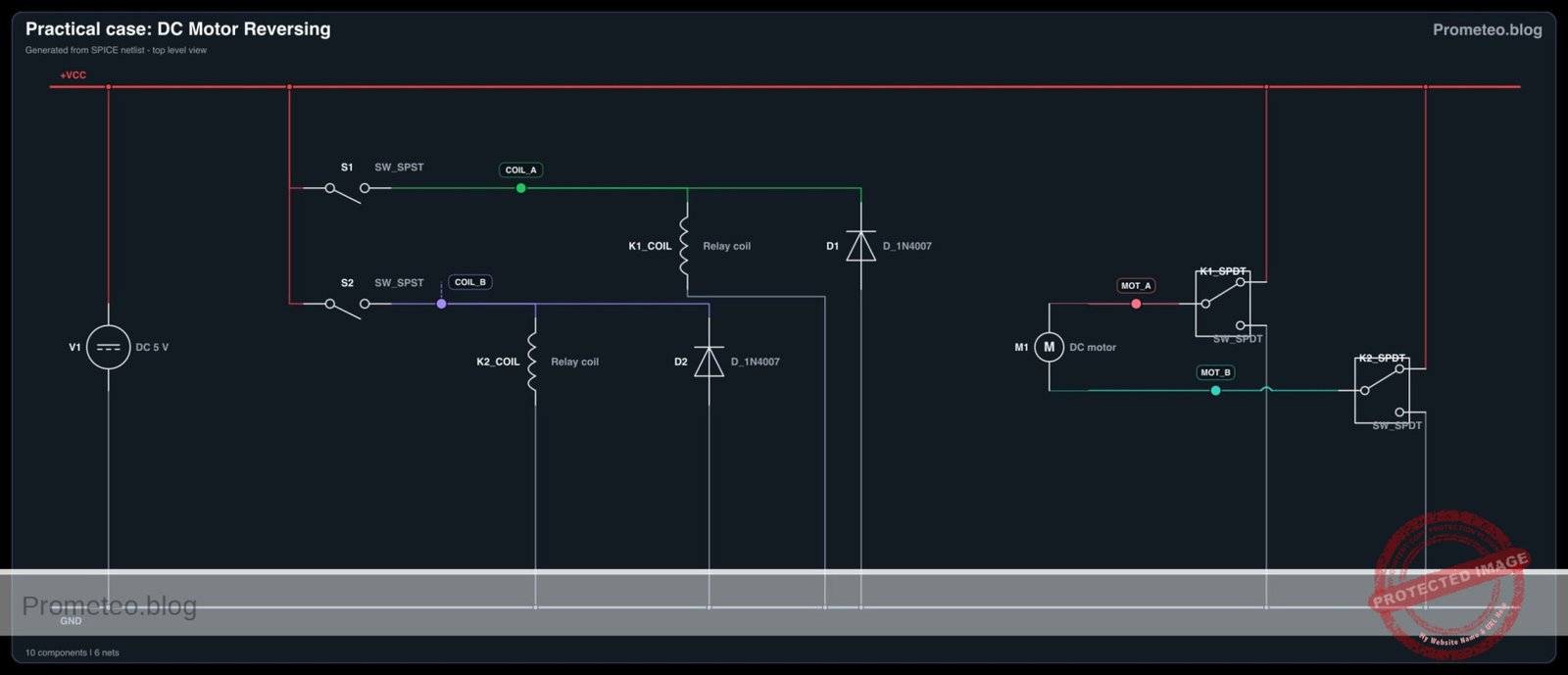
Nodes: VCC (5 V Supply), 0 (Ground), COIL_A, COIL_B, MOT_A, MOT_B.

  • Power Supply:
  • V1 (+): Connects to node VCC.
  • V1 (-): Connects to node 0.

  • Control Circuit (Coils):

  • S1: Connects between VCC and COIL_A.
  • K1 (Coil): Connects between COIL_A and 0.
  • D1: Cathode to COIL_A, Anode to 0 (Protects against inductive spikes).
  • S2: Connects between VCC and COIL_B.
  • K2 (Coil): Connects between COIL_B and 0.
  • D2: Cathode to COIL_B, Anode to 0.

  • Power Circuit (Motor Drive):

  • K1 (Normally Open – NO): Connects to VCC.
  • K1 (Normally Closed – NC): Connects to 0.
  • K1 (Common – COM): Connects to node MOT_A.
  • K2 (Normally Open – NO): Connects to VCC.
  • K2 (Normally Closed – NC): Connects to 0.
  • K2 (Common – COM): Connects to node MOT_B.
  • M1: Connects between MOT_A and MOT_B.

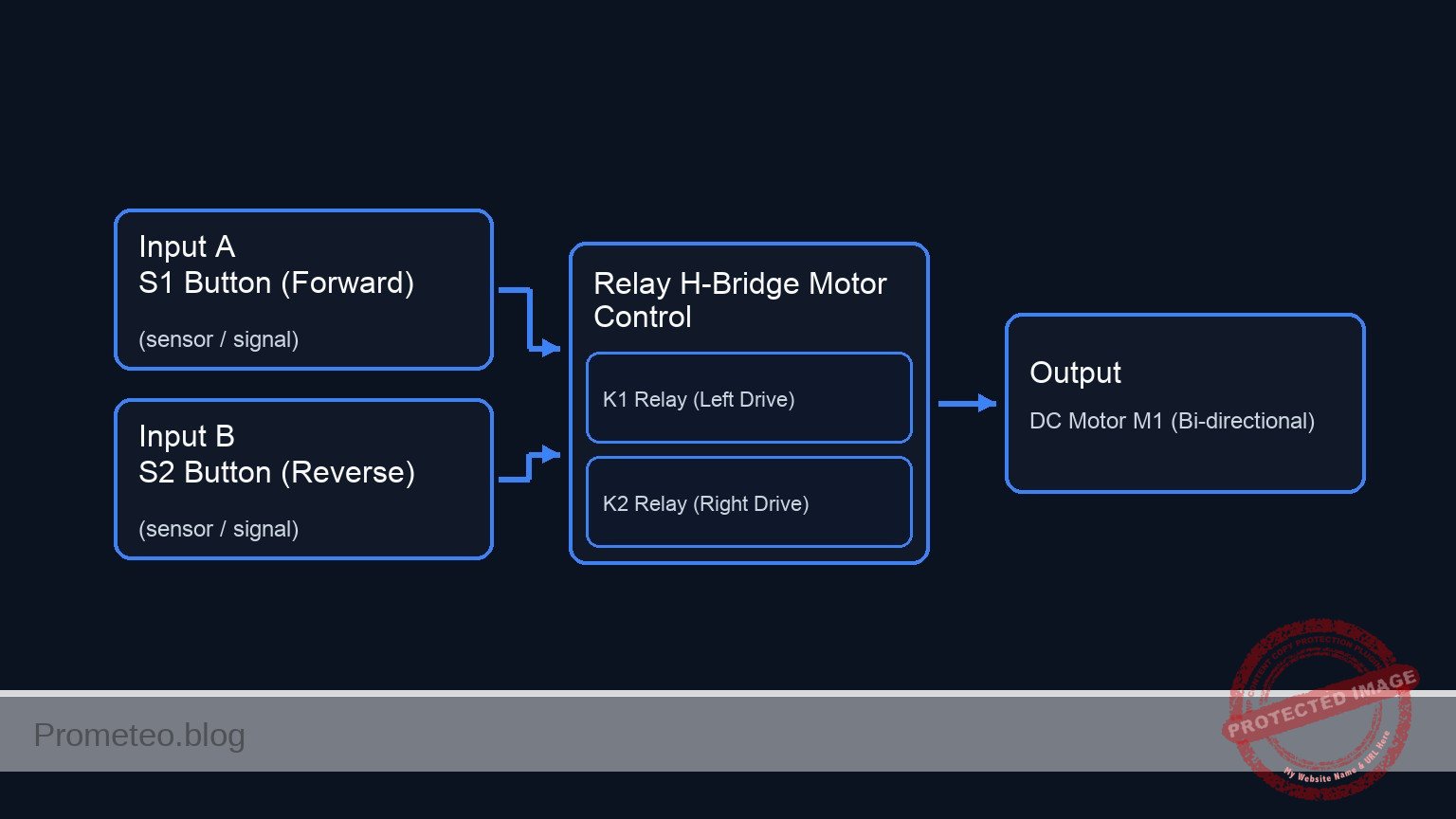
Conceptual block diagram

Conceptual block diagram — Relay H-Bridge Motor Control
Quick read: inputs → main block → output (actuator or measurement). This summarizes the ASCII schematic below.

Schematic

+-------------------------------------------------------------------------+
|                DC MOTOR REVERSING CIRCUIT (H-BRIDGE)                    |
+-------------------------------------------------------------------------+

[ CONTROL SUBSYSTEM ]                                [ POWER SUBSYSTEM ]

      (Forward Input)                                   (Left Side Drive)
VCC --> [ S1 Button ]                                  VCC (NO)
            |                                             |
            v                                             v
    [ Node: COIL_A ]                               [ K1 Switch (COM) ] --(MOT_A)--+
            |                                      [  (Relay 1)      ]            |
            +--> [ K1 Coil || D1 ] --> GND                ^                       |
            |    (D1 is Reverse Biased)                   |                       |
            |                                             |                       |
            +----------(Magnetic Link)--------------------+                       |
                                                          |                       |
                                                  GND (NC) +                      |
                                                                                  v
                                                                           [ DC MOTOR ]
                                                                           [    M1    ]
                                                                                  ^
                                                  GND (NC) +                      |
                                                          |                       |
            +----------(Magnetic Link)--------------------+                       |
            |                                             |                       |
            |    (D2 is Reverse Biased)                   |                       |
            +--> [ K2 Coil || D2 ] --> GND         [ K2 Switch (COM) ] --(MOT_B)--+
            |                                      [  (Relay 2)      ]
    [ Node: COIL_B ]                                      ^
            ^                                             |
            |                                             |
VCC --> [ S2 Button ]                                  VCC (NO)
      (Reverse Input)                                   (Right Side Drive)

+-------------------------------------------------------------------------+
| LOGIC KEY:                                                              |
| 1. Idle: Both Switches connect COM to NC (GND). Motor is braked (0 V).   |
| 2. Press S1: K1 switches to NO (VCC). Current: VCC->MOT_A->MOT_B->GND.  |
| 3. Press S2: K2 switches to NO (VCC). Current: VCC->MOT_B->MOT_A->GND.  |
+-------------------------------------------------------------------------+
Electrical Schematic

Measurements and tests

To validate the circuit, perform the following steps using a multimeter and visual inspection:

  1. Idle Check: Ensure neither S1 nor S2 is pressed. Measure voltage between MOT_A and MOT_B.
    • Result: Should be 0 V. Both terminals are connected to GND via the NC contacts. The motor is locked (hard to turn by hand due to back EMF shorting).
  2. Forward Actuation: Press and hold S1.
    • Result: K1 clicks. Measure voltage from MOT_A (Red probe) to MOT_B (Black probe). Voltage should be approximately +5 V. Motor spins Clockwise.
  3. Reverse Actuation: Release S1, then press and hold S2.
    • Result: K2 clicks. Measure voltage from MOT_A to MOT_B. Voltage should be approximately -5 V. Motor spins Counter-Clockwise.
  4. Double Press (Safety Test): Press both S1 and S2 simultaneously.
    • Result: Both relays click. Voltage between MOT_A and MOT_B is 0 V (Both at 5 V potential). Motor does not move.

SPICE netlist and simulation

Reference SPICE Netlist (ngspice) — excerptFull SPICE netlist (ngspice)

* Practical case: DC Motor Reversing
.width out=256
* Ngspice Netlist
*
* Description: H-Bridge configuration using two SPDT relays to control a DC motor.
* Logic:
* - S1 Pressed -> K1 Active -> MOT_A = 5V, MOT_B = 0V (Forward)
* - S2 Pressed -> K2 Active -> MOT_A = 0V, MOT_B = 5V (Reverse)
* - None Pressed -> MOT_A = 0V, MOT_B = 0V (Stop/Brake)
*
* Simulation Time: 10ms (Captures S1 pulse at 1ms and S2 pulse at 5ms)
.tran 10u 10m

* -----------------------------------------------------------------------------
* Power Supply
* -----------------------------------------------------------------------------
* V1: 5V DC Power Supply, function: Main energy source.
* Connected between VCC (+) and 0 (-).
V1 VCC 0 DC 5

* ... (truncated in public view) ...

Copy this content into a .cir file and run with ngspice.

🔒 Part of this section is premium. With the 7-day pass or the monthly membership you can access the full content (materials, wiring, detailed build, validation, troubleshooting, variants and checklist) and download the complete print-ready PDF pack.

* Practical case: DC Motor Reversing
.width out=256
* Ngspice Netlist
*
* Description: H-Bridge configuration using two SPDT relays to control a DC motor.
* Logic:
* - S1 Pressed -> K1 Active -> MOT_A = 5V, MOT_B = 0V (Forward)
* - S2 Pressed -> K2 Active -> MOT_A = 0V, MOT_B = 5V (Reverse)
* - None Pressed -> MOT_A = 0V, MOT_B = 0V (Stop/Brake)
*
* Simulation Time: 10ms (Captures S1 pulse at 1ms and S2 pulse at 5ms)
.tran 10u 10m

* -----------------------------------------------------------------------------
* Power Supply
* -----------------------------------------------------------------------------
* V1: 5V DC Power Supply, function: Main energy source.
* Connected between VCC (+) and 0 (-).
V1 VCC 0 DC 5

* -----------------------------------------------------------------------------
* User Inputs (Pushbuttons)
* -----------------------------------------------------------------------------
* Modeled as Voltage Controlled Switches (S1, S2) driven by Pulse Sources.
* This strictly simulates the user pressing the button at specific times.

* Stimulus for S1 (Forward Request)
* Pulse: 0V to 5V, starts at 1ms, duration 2ms.
V_USER_S1 CTRL_S1 0 PULSE(0 5 1m 1u 1u 2m 10m)

* Stimulus for S2 (Reverse Request)
* Pulse: 0V to 5V, starts at 5ms, duration 2ms.
V_USER_S2 CTRL_S2 0 PULSE(0 5 5m 1u 1u 2m 10m)

* S1: Momentary Pushbutton (NO)
* Connects VCC to COIL_A when activated by V_USER_S1.
S1 VCC COIL_A CTRL_S1 0 SW_PUSH

* S2: Momentary Pushbutton (NO)
* Connects VCC to COIL_B when activated by V_USER_S2.
S2 VCC COIL_B CTRL_S2 0 SW_PUSH

* -----------------------------------------------------------------------------
* Control Circuit (Relay Coils)
* -----------------------------------------------------------------------------
* Relay K1 Coil Circuit
* K1 Coil: Connects between COIL_A and 0. Modeled as L+R.
L_K1 COIL_A K1_INT 10m
R_K1 K1_INT 0 100
* D1: 1N4007 Diode, function: Flyback protection.
* Cathode to COIL_A, Anode to 0.
D1 0 COIL_A D_1N4007

* Relay K2 Coil Circuit
* K2 Coil: Connects between COIL_B and 0. Modeled as L+R.
L_K2 COIL_B K2_INT 10m
R_K2 K2_INT 0 100
* D2: 1N4007 Diode, function: Flyback protection.
* Cathode to COIL_B, Anode to 0.
D2 0 COIL_B D_1N4007

* -----------------------------------------------------------------------------
* Power Circuit (Motor Drive via Relay Contacts)
* -----------------------------------------------------------------------------
* Relay K1 Contacts (SPDT)
* COM: MOT_A
* NO: VCC (Connected when Coil is Energized/High)
* NC: 0   (Connected when Coil is De-energized/Low)
S_K1_NO VCC MOT_A COIL_A 0 SW_NO_RELAY
S_K1_NC MOT_A 0   COIL_A 0 SW_NC_RELAY

* Relay K2 Contacts (SPDT)
* COM: MOT_B
* NO: VCC (Connected when Coil is Energized/High)
* NC: 0   (Connected when Coil is De-energized/Low)
S_K2_NO VCC MOT_B COIL_B 0 SW_NO_RELAY
S_K2_NC MOT_B 0   COIL_B 0 SW_NC_RELAY

* M1: 5 V DC Motor
* Modeled as a resistive load (50 Ohms) to visualize voltage polarity.
* Connects between MOT_A and MOT_B.
R_M1 MOT_A MOT_B 50

* -----------------------------------------------------------------------------
* Component Models
* -----------------------------------------------------------------------------
* Standard Diode Model
.model D_1N4007 D(IS=1N N=1 RS=0.1 BV=1000 IBV=10u)

* Pushbutton Switch Model (Normally Open)
* Closes (Low R) when Control Voltage > 2.5V
.model SW_PUSH SW(Vt=2.5 Vh=0.1 Ron=0.01 Roff=10Meg)

* Relay Contact Models
* NO (Normally Open): Conducts when Coil > 2.5V
.model SW_NO_RELAY SW(Vt=2.5 Vh=0.1 Ron=0.01 Roff=10Meg)

* NC (Normally Closed): Conducts when Coil < 2.5V
* SPICE SW Logic: If V < Vt, R = Roff. If V > Vt, R = Ron.
* For NC: We want Low R when V < Vt. So Roff=0.01, Ron=10Meg.
.model SW_NC_RELAY SW(Vt=2.5 Vh=0.1 Ron=10Meg Roff=0.01)

* -----------------------------------------------------------------------------
* Output Directives
* -----------------------------------------------------------------------------
* Outputs: Motor Terminals (MOT_A, MOT_B)
* Inputs: Coil Control Voltages (COIL_A, COIL_B)
.print tran V(MOT_A) V(MOT_B) V(COIL_A) V(COIL_B) I(L_K1)

.op
.end

Simulation Results (Transient Analysis)

Simulation Results (Transient Analysis)

Analysis: At 1ms, S1 activates, energizing Coil A (approx 5V). Consequently, MOT_A goes to 5V while MOT_B stays near 0V (Forward). At 3ms, S1 releases and the motor stops. At 5ms, S2 activates, energizing Coil B. MOT_B goes to 5V while MOT_A stays near 0V (Reverse). Inductive kickback is visible on coil nodes when switches open.
Show raw data table (1104 rows)
Index   time            v(mot_a)        v(mot_b)        v(coil_a)       v(coil_b)       l_k1#branch
0	0.000000e+00	5.000000e-09	5.000000e-09	4.999931e-05	4.999931e-05	4.999931e-07
1	1.000000e-07	5.000000e-09	5.000000e-09	4.999931e-05	4.999931e-05	4.999931e-07
2	2.000000e-07	5.000000e-09	5.000000e-09	4.999931e-05	4.999931e-05	4.999931e-07
3	4.000000e-07	5.000000e-09	5.000000e-09	4.999931e-05	4.999931e-05	4.999931e-07
4	8.000000e-07	5.000000e-09	5.000000e-09	4.999931e-05	4.999931e-05	4.999931e-07
5	1.600000e-06	5.000000e-09	5.000000e-09	4.999931e-05	4.999931e-05	4.999931e-07
6	3.200000e-06	5.000000e-09	5.000000e-09	4.999931e-05	4.999931e-05	4.999931e-07
7	6.400000e-06	5.000000e-09	5.000000e-09	4.999931e-05	4.999931e-05	4.999931e-07
8	1.280000e-05	5.000000e-09	5.000000e-09	4.999931e-05	4.999931e-05	4.999931e-07
9	2.280000e-05	5.000000e-09	5.000000e-09	4.999931e-05	4.999931e-05	4.999931e-07
10	3.280000e-05	5.000000e-09	5.000000e-09	4.999931e-05	4.999931e-05	4.999931e-07
11	4.280000e-05	5.000000e-09	5.000000e-09	4.999931e-05	4.999931e-05	4.999931e-07
12	5.280000e-05	5.000000e-09	5.000000e-09	4.999931e-05	4.999931e-05	4.999931e-07
13	6.280000e-05	5.000000e-09	5.000000e-09	4.999931e-05	4.999931e-05	4.999931e-07
14	7.280000e-05	5.000000e-09	5.000000e-09	4.999931e-05	4.999931e-05	4.999931e-07
15	8.280000e-05	5.000000e-09	5.000000e-09	4.999931e-05	4.999931e-05	4.999931e-07
16	9.280000e-05	5.000000e-09	5.000000e-09	4.999931e-05	4.999931e-05	4.999931e-07
17	1.028000e-04	5.000000e-09	5.000000e-09	4.999931e-05	4.999931e-05	4.999931e-07
18	1.128000e-04	5.000000e-09	5.000000e-09	4.999931e-05	4.999931e-05	4.999931e-07
19	1.228000e-04	5.000000e-09	5.000000e-09	4.999931e-05	4.999931e-05	4.999931e-07
20	1.328000e-04	5.000000e-09	5.000000e-09	4.999931e-05	4.999931e-05	4.999931e-07
21	1.428000e-04	5.000000e-09	5.000000e-09	4.999931e-05	4.999931e-05	4.999931e-07
22	1.528000e-04	5.000000e-09	5.000000e-09	4.999931e-05	4.999931e-05	4.999931e-07
23	1.628000e-04	5.000000e-09	5.000000e-09	4.999931e-05	4.999931e-05	4.999931e-07
... (1080 more rows) ...

Common mistakes and how to avoid them

  1. Wiring the Motor to NO/NC instead of COM:
    • Mistake: Connecting the motor to the Normally Open or Closed pins, and power to the Common pin.
    • Solution: Always connect the Load (Motor) to the Common (COM) pin of the SPDT relay for H-bridge configurations. Power and Ground go to NO and NC.
  2. Omitting Flyback Diodes:
    • Mistake: Forgetting D1 and D2 across the relay coils.
    • Solution: Always install diodes in reverse bias across coils to prevent high-voltage spikes from damaging switches or power supplies when the relay turns off.
  3. Using SPST Relays:
    • Mistake: Attempting this topology with 4-pin relays that lack a Normally Closed contact.
    • Solution: Ensure you use 5-pin SPDT relays so the motor can be grounded when the relay is off.

Troubleshooting

  • Motor vibrates but does not spin:
    • Cause: Power supply current is insufficient.
    • Fix: Check the current rating of your power supply; motors draw high current upon startup.
  • Relay clicks but motor does not move:
    • Cause: Burnt internal contacts or loose wiring on the COM/NO/NC terminals.
    • Fix: Verify continuity between COM and NO when the relay is active using a multimeter.
  • Sparks visible inside the relay:
    • Cause: Inductive load kickback from the motor.
    • Fix: While not always fatal, adding a small capacitor (e.g., 100 nF) across the motor terminals can reduce arcing and noise.

Possible improvements and extensions

  1. Limit Switches: Add Normally Closed limit switches in series with the relay coils (COIL_A and COIL_B) to automatically stop the motor when a mechanism reaches its end of travel.
  2. Speed Control: Insert a high-wattage rheostat or a PWM transistor driver in series with the main VCC supply to the relay contacts (not the coils) to vary the motor speed.

More Practical Cases on Prometeo.blog

Find this product and/or books on this topic on Amazon

Go to Amazon

As an Amazon Associate, I earn from qualifying purchases. If you buy through this link, you help keep this project running.

Quick Quiz

Question 1: What is the primary objective of the circuit described in the text?


Question 2: Which type of relay is specifically required for this project?


Question 3: What happens to the motor in the 'Idle State' when no buttons are pressed?


Question 4: Which real-world scenario is NOT mentioned as a use case for this circuit?


Question 5: According to the text, what occurs when Button A is pressed?


Question 6: How is the 'Reverse State' achieved in this circuit?


Question 7: What is the result if both Button A and Button B are pressed simultaneously?


Question 8: In the context of this circuit, what does 'dynamic braking' refer to?


Question 9: What voltage level is applied to the motor to achieve the Forward State in this example?


Question 10: Which of the following is listed as an industrial application for this circuit?


Carlos Núñez Zorrilla
Electronics & Computer Engineer

Telecommunications Electronics Engineer and Computer Engineer (official degrees in Spain).
Follow me:


Practical case: Latching Alarm System

Latching Alarm System prototype (Maker Style)

Level: Basic. Build a self-latching relay circuit to maintain an alarm state after a momentary trigger.

Objective and use case

You will build a basic «memory» circuit using an electromechanical relay, often called a latching or holding circuit. A momentary press of a trigger button will activate an alarm (LED), which will remain active even after the button is released, until a separate reset button is pressed.

  • Security Systems: Used in simple burglar alarms where a tripped sensor keeps the siren on until a user resets it.
  • Industrial Safety: Commonly used in «Start/Stop» motor control stations.
  • Fault Indicators: Captures transient error signals so operators can see a fault occurred even if the condition clears.

Expected outcome:
* Initial state: LED is OFF.
* Action 1: Momentarily press the «Trigger» button → LED turns ON and relay clicks.
* Action 2: Release «Trigger» button → LED remains ON (Latched).
* Action 3: Press «Reset» button → LED turns OFF and relay releases.

Target audience: Beginners familiar with basic circuits and relay operation.

Materials

  • V1: 12 V DC power supply, function: Main power source
  • K1: SPDT Relay (12 V Coil), function: Electromechanical switch and memory element
  • S1: Pushbutton (Normally Open – NO), function: Trigger signal
  • S2: Pushbutton (Normally Closed – NC), function: Reset signal
  • R1: 1 kΩ resistor, function: Current limiting for LED
  • D1: Red LED, function: Visual alarm indicator
  • D2: 1N4007 Diode, function: Flyback protection for the coil

Wiring guide

Connect the components using the following node definitions: VCC (12 V), 0 (Ground), feed_line, latch_node.

  • V1 (DC Source): Connect Positive to VCC and Negative to 0.
  • S2 (Reset Button – NC): Connect between VCC and feed_line.
  • S1 (Trigger Button – NO): Connect between feed_line and latch_node.
  • K1 (Relay Coil): Connect one side to latch_node and the other side to 0.
  • K1 (Relay Common Contact – COM): Connect to feed_line.
  • K1 (Relay Normally Open Contact – NO): Connect to latch_node.
  • D2 (Protection Diode): Connect Cathode (stripe) to latch_node and Anode to 0.
  • R1 (Resistor): Connect between latch_node and node led_anode.
  • D1 (LED): Connect Anode to led_anode and Cathode to 0.

Note: S2 allows current to flow to the circuit. S1 initially energizes the coil. Once K1 energizes, the COM-NO internal connection bypasses S1, keeping the coil powered from the feed_line.

Conceptual block diagram

Conceptual block diagram — Relay Latching Circuit
Quick read: inputs → main block → output (actuator or measurement). This summarizes the ASCII schematic below.

Schematic

Title: Practical case: Latching Alarm System

      (Main Power)
        VCC 12 V
           |
           V
  [ S2: Reset (NC) ]
           |
      (feed_line)
           |
           |    (Path A: Manual Trigger)
           +--> [ S1: Trigger (NO) ] ------------------+
           |                                           |
           |                                           V
           |                                     (latch_node)
           |                                           |
           |    (Path B: Self-Latching)                +----------> [ R1: 1k ] --> [ D1: LED ] --> GND
           +--> [ K1: Contact (NO) ] ------------------+           (Visual Alarm)
                         ^                             |
                         |                             |
                         |                             +----------> [ K1: Coil || D2(Rev) ] --> GND
                         |                                         (Relay Magnet & Protection)
                         |                                                  |
                         +----------------(Magnetic Link)-------------------+
Electrical Schematic

Measurements and tests

Follow these steps to validate the latching behavior:

  1. Coil Continuity Check: Before applying power, use a multimeter in Ohms mode to measure the relay coil pins. You should read a resistance value (typically 100 Ω to 400 Ω depending on the relay).
  2. Standby Check: Power on the circuit. Measure voltage between latch_node and 0. It should be 0 V. The LED should be OFF.
  3. Trigger Test: Press and hold S1. Measure voltage at latch_node. It should rise to approx 12 V. The LED should turn ON.
  4. Latching Test: Release S1. The voltage at latch_node must remain at 12 V, and the LED must stay ON. Listen for the relay; it should not click off.
  5. Reset Test: Press S2 (Reset). The voltage at latch_node should drop to 0 V instantly. The LED turns OFF. Release S2; the LED remains OFF.

SPICE netlist and simulation

Reference SPICE Netlist (ngspice) — excerptFull SPICE netlist (ngspice)

* Latching Alarm System
.width out=256
* Based on Practical Breadboard Case

* ==========================================
* Power Supply
* ==========================================
* V1: 12V Main Supply
V1 VCC 0 DC 12

* ==========================================
* Control Inputs (User Stimuli)
* ==========================================
* S1 (Trigger Button - NO): 
* Simulating a press (Close) at 10ms for 5ms duration.
* Pulse: 0V (Open) -> 5V (Closed) -> 0V (Open)
V_S1_ctrl ctrl_s1 0 PULSE(0 5 10m 100u 100u 5m 100m)

* S2 (Reset Button - NC):
* Simulating a press (Open) at 40ms for 5ms duration.
* ... (truncated in public view) ...

Copy this content into a .cir file and run with ngspice.

🔒 Part of this section is premium. With the 7-day pass or the monthly membership you can access the full content (materials, wiring, detailed build, validation, troubleshooting, variants and checklist) and download the complete print-ready PDF pack.

* Latching Alarm System
.width out=256
* Based on Practical Breadboard Case

* ==========================================
* Power Supply
* ==========================================
* V1: 12V Main Supply
V1 VCC 0 DC 12

* ==========================================
* Control Inputs (User Stimuli)
* ==========================================
* S1 (Trigger Button - NO): 
* Simulating a press (Close) at 10ms for 5ms duration.
* Pulse: 0V (Open) -> 5V (Closed) -> 0V (Open)
V_S1_ctrl ctrl_s1 0 PULSE(0 5 10m 100u 100u 5m 100m)

* S2 (Reset Button - NC):
* Simulating a press (Open) at 40ms for 5ms duration.
* Pulse: 5V (Closed/Idle) -> 0V (Open/Pressed) -> 5V (Closed/Idle)
* Note: This voltage represents the connectivity state (High = Conducting).
V_S2_ctrl ctrl_s2 0 PULSE(5 0 40m 100u 100u 5m 100m)

* ==========================================
* Circuit Components
* ==========================================

* S2: Reset Switch (NC)
* Connects VCC to feed_line.
* Controlled by ctrl_s2 (Active High logic for NC behavior).
S2 VCC feed_line ctrl_s2 0 SW_IDEAL

* S1: Trigger Switch (NO)
* Connects feed_line to latch_node.
* Controlled by ctrl_s1 (Active High logic for NO behavior).
S1 feed_line latch_node ctrl_s1 0 SW_IDEAL

* K1: Relay Implementation
* 1. Coil: Modeled as Inductance + Series Resistance
*    Connects latch_node to Ground (0).
*    100 Ohm resistance is typical for a 12V relay coil.
R_coil latch_node k1_internal 100
L_coil k1_internal 0 10m

* 2. Relay Contact (Switch):
*    Connects feed_line (COM) to latch_node (NO).
*    Controlled by the voltage across the coil (latch_node).
*    Threshold set to 6V (Pull-in) with hysteresis.
S_relay feed_line latch_node latch_node 0 SW_RELAY

* D2: Flyback Protection Diode
* Cathode to latch_node, Anode to 0.
D2 0 latch_node 1N4007

* Alarm Indicator (LED + Resistor)
* R1: Current limiting
R1 latch_node led_anode 1k
* D1: Red LED
D1 led_anode 0 LED_RED

* Floating Node Prevention
* High impedance pull-down for feed_line when S2 opens
R_float feed_line 0 100Meg

* ==========================================
* Models
* ==========================================
* Ideal switch for buttons (Vt=2.5V logic threshold)
.model SW_IDEAL SW(Vt=2.5 Ron=0.01 Roff=100Meg)

* Relay switch model (Picks up at 6V, drops out at 4V)
.model SW_RELAY SW(Vt=6 Vh=2 Ron=0.01 Roff=100Meg)

* 1N4007 Diode Model
.model 1N4007 D(Is=7n Rs=0.04 N=1.5 Cjo=20p BV=1000 IBV=5u)

* Generic Red LED Model
.model LED_RED D(Is=1a N=4 Rs=4)

* ==========================================
* Simulation Directives
* ==========================================
* Transient analysis: 100us step, 60ms total time
* Covers Trigger (10ms) and Reset (40ms) events
.tran 100u 60m

* Output variables
* V(latch_node) is the ALARM STATE (Output)
* V(feed_line) shows power delivery
.print tran V(latch_node) V(feed_line) V(ctrl_s1) V(ctrl_s2) I(L_COIL)

.op
.end

Simulation Results (Transient Analysis)

Simulation Results (Transient Analysis)

Analysis: The simulation accurately demonstrates the latching logic. At 10ms, the trigger pulse (S1) energizes the coil, causing ‘latch_node’ to rise to ~12V. The circuit successfully latches, maintaining 12V output after S1 opens. At 40ms, the reset pulse (S2) cuts power, dropping ‘latch_node’ to ~0V, where it remains even after S2 closes again.
Show raw data table (2796 rows)
Index   time            v(latch_node)   v(feed_line)    v(ctrl_s1)      v(ctrl_s2)      l_coil#branch
0	0.000000e+00	2.399952e-05	1.200000e+01	0.000000e+00	5.000000e+00	2.399952e-07
1	1.000000e-06	2.399953e-05	1.200000e+01	0.000000e+00	5.000000e+00	2.399952e-07
2	2.000000e-06	2.399952e-05	1.200000e+01	0.000000e+00	5.000000e+00	2.399952e-07
3	4.000000e-06	2.399952e-05	1.200000e+01	0.000000e+00	5.000000e+00	2.399952e-07
4	8.000000e-06	2.399952e-05	1.200000e+01	0.000000e+00	5.000000e+00	2.399952e-07
5	1.600000e-05	2.399952e-05	1.200000e+01	0.000000e+00	5.000000e+00	2.399952e-07
6	3.200000e-05	2.399952e-05	1.200000e+01	0.000000e+00	5.000000e+00	2.399952e-07
7	6.400000e-05	2.399952e-05	1.200000e+01	0.000000e+00	5.000000e+00	2.399952e-07
8	1.280000e-04	2.399952e-05	1.200000e+01	0.000000e+00	5.000000e+00	2.399952e-07
9	2.280000e-04	2.399952e-05	1.200000e+01	0.000000e+00	5.000000e+00	2.399952e-07
10	3.280000e-04	2.399952e-05	1.200000e+01	0.000000e+00	5.000000e+00	2.399952e-07
11	4.280000e-04	2.399952e-05	1.200000e+01	0.000000e+00	5.000000e+00	2.399952e-07
12	5.280000e-04	2.399952e-05	1.200000e+01	0.000000e+00	5.000000e+00	2.399952e-07
13	6.280000e-04	2.399952e-05	1.200000e+01	0.000000e+00	5.000000e+00	2.399952e-07
14	7.280000e-04	2.399952e-05	1.200000e+01	0.000000e+00	5.000000e+00	2.399952e-07
15	8.280000e-04	2.399952e-05	1.200000e+01	0.000000e+00	5.000000e+00	2.399952e-07
16	9.280000e-04	2.399952e-05	1.200000e+01	0.000000e+00	5.000000e+00	2.399952e-07
17	1.028000e-03	2.399952e-05	1.200000e+01	0.000000e+00	5.000000e+00	2.399952e-07
18	1.128000e-03	2.399952e-05	1.200000e+01	0.000000e+00	5.000000e+00	2.399952e-07
19	1.228000e-03	2.399952e-05	1.200000e+01	0.000000e+00	5.000000e+00	2.399952e-07
20	1.328000e-03	2.399952e-05	1.200000e+01	0.000000e+00	5.000000e+00	2.399952e-07
21	1.428000e-03	2.399952e-05	1.200000e+01	0.000000e+00	5.000000e+00	2.399952e-07
22	1.528000e-03	2.399952e-05	1.200000e+01	0.000000e+00	5.000000e+00	2.399952e-07
23	1.628000e-03	2.399952e-05	1.200000e+01	0.000000e+00	5.000000e+00	2.399952e-07
... (2772 more rows) ...

Common mistakes and how to avoid them

  1. Using a Normally Open button for Reset: If S2 is NO instead of NC, the circuit will never receive power to start. Ensure S2 conducts current by default.
  2. Connecting the latch to NC contact: If you connect the latch_node to the Relay’s NC pin instead of NO, the relay will turn on immediately upon power-up and oscillate or buzz (buzzer effect). Always use the NO pin for self-latching.
  3. LED burns out immediately: Forgetting R1 allows excessive current through the LED. Always verify the resistor value before powering up.

Troubleshooting

  • Symptom: LED turns on when S1 is pressed but turns off immediately when released.
    • Cause: The latching path is broken.
    • Fix: Check the connection between K1 (COM), K1 (NO), and the latch_node. Ensure the relay contacts are parallel to S1.
  • Symptom: Relay buzzes loudly or chatters.
    • Cause: Power supply voltage is too low or unstable.
    • Fix: Ensure V1 provides stable 12 V and can supply enough current for the coil.
  • Symptom: Circuit cannot be reset.
    • Cause: S2 is bypassed or faulty (shorted).
    • Fix: Check S2 with a multimeter; it must break the connection (Open) when pressed.

Possible improvements and extensions

  1. Audible Alarm: Connect a 12 V active buzzer in parallel with the LED (between latch_node and 0) to add sound to the alarm.
  2. High Power Control: Use a DPDT relay. Use the first set of contacts for the 12 V logic latching (as described above) and the second set of contacts to switch a completely separate high-voltage load, like a 120 V/230 V lamp.

More Practical Cases on Prometeo.blog

Find this product and/or books on this topic on Amazon

Go to Amazon

As an Amazon Associate, I earn from qualifying purchases. If you buy through this link, you help keep this project running.

Quick Quiz

Question 1: What is the primary function of the self-latching relay circuit described?


Question 2: Which component acts as the 'memory element' in this circuit?


Question 3: What happens to the LED when the 'Trigger' button is released?


Question 4: What type of switch is typically used for the 'Reset' button in a standard latching circuit to break the current?


Question 5: What is the specific function of the diode (D2) placed across the relay coil?


Question 6: Which real-world application is mentioned for this type of circuit?


Question 7: What is the voltage of the DC power supply (V1) specified in the materials list?


Question 8: What action is required to turn the LED OFF once it is latched?


Question 9: What is the function of the resistor (R1) connected to the LED?


Question 10: In the expected outcome, what is the initial state of the LED before any buttons are pressed?


Carlos Núñez Zorrilla
Electronics & Computer Engineer

Telecommunications Electronics Engineer and Computer Engineer (official degrees in Spain).
Follow me:


Practical case: DC motor control with relay and pushbutton

DC motor control with relay and pushbutton prototype (Maker Style)

Level: Basic. Learn how to isolate a low-power control signal from a high-power motor circuit using an electromagnetic relay.

Objective and use case

In this practical case, you will build a circuit that utilizes a small pushbutton and a relay to control a high-current DC motor. The relay acts as an electromagnetic switch, allowing the low-power control side to activate the high-power load side without direct electrical connection between the distinct power rails (if separate grounds are used) or simply to handle currents exceeding the switch’s rating.

Why it is useful:
* Automotive systems: Used in starter motors where a small ignition key switch triggers a massive solenoid (relay) to crank the engine.
* Industrial automation: Allows low-voltage PLCs (24 V) to switch high-voltage AC or DC motors (110 V/220 V) safely.
* Safety isolation: Keeps high voltages away from the user interface (buttons and switches).
* Component protection: Prevents burning out delicate switches by offloading the high current switching to the relay contacts.

Expected outcome:
* When the pushbutton is pressed, the relay makes an audible «click.»
* The DC motor starts spinning immediately upon the click.
* Voltage across the relay coil measures 5 V (or rated control voltage).
* The flyback diode protects the switch from high-voltage spikes when the button is released.

Target audience and level: Students and hobbyists understanding basic electromechanical switching (Basic).

Materials

  • V1: 5 V DC voltage source, function: Control circuit power supply.
  • V2: 12 V DC voltage source, function: Motor (Power) circuit supply.
  • S1: Momentary Pushbutton (Normally Open), function: Control switch.
  • K1: SPDT Relay (5 V Coil), function: Electromechanical isolation and switching.
  • D1: 1N4007 Diode, function: Flyback/Freewheeling diode for coil protection.
  • M1: 12 V DC Motor, function: High-power load.

Wiring guide

This guide uses SPICE-friendly node names to define the connections. The nodes are: V_CTRL (5 V), V_PWR (12 V), COIL_IN, MOTOR_IN, and 0 (Ground).

  • V1 (Positive): Connects to node V_CTRL.
  • V1 (Negative): Connects to node 0.
  • V2 (Positive): Connects to node V_PWR.
  • V2 (Negative): Connects to node 0.
  • S1: Connects between node V_CTRL and node COIL_IN.
  • K1 (Coil terminal A): Connects to node COIL_IN.
  • K1 (Coil terminal B): Connects to node 0.
  • D1 (Cathode/Striped side): Connects to node COIL_IN.
  • D1 (Anode): Connects to node 0.
  • K1 (Common/COM Contact): Connects to node V_PWR.
  • K1 (Normally Open/NO Contact): Connects to node MOTOR_IN.
  • M1 (Positive): Connects to node MOTOR_IN.
  • M1 (Negative): Connects to node 0.

Note: In a physical application requiring galvanic isolation, the ground 0 for the control side (V1) and the power side (V2) would be kept separate. For this basic simulation model, they share a common reference.

Conceptual block diagram

Conceptual block diagram — Relay-Based Motor Control
Quick read: inputs → main block → output (actuator or measurement). This summarizes the ASCII schematic below.

Schematic

+---------------------------------------------------------------------------------------------------------+
|                          DC MOTOR CONTROL WITH RELAY (UNIFIED DIAGRAM)                                  |
+---------------------------------------------------------------------------------------------------------+

      (High Power Loop: 12 V)
      [ V2: 12 V Source ] --(Node: V_PWR)--> [ K1: Relay Switch (COM->NO) ] --(Node: MOTOR_IN)--> [ M1: 12 V Motor ] --> [ GND ]
                                                        ^
                                                        |
                                                 (Magnetic Link)
                                                        |
      (Control Loop: 5 V)                                |
      [ V1: 5 V Source ] --(Node: V_CTRL)--> [ S1: Pushbutton ] --(Node: COIL_IN)--> [ Parallel: K1 Coil || D1 (Rev) ] --> [ GND ]

+---------------------------------------------------------------------------------------------------------+
|  LEGEND & NOTES:                                                                                        |
|  -->  : Signal/Power Flow                                                                               |
|  ||   : Components in Parallel (Coil and Diode share Node COIL_IN and GND)                              |
|  Rev  : Diode D1 is Reverse Biased (Cathode to COIL_IN, Anode to GND) to suppress flyback voltage.      |
|  Link : The current in the Control Loop generates the magnetic field to close the Switch in the Power Loop. |
+---------------------------------------------------------------------------------------------------------+
Schematic (ASCII)

Measurements and tests

Follow these steps to validate your circuit assembly:

  1. Coil Voltage Check:

    • Set your multimeter to DC Voltage (20 V range).
    • Connect probes across the relay coil terminals (COIL_IN and 0).
    • Press S1. The reading should jump from 0 V to approx. 5 V.
  2. Audible Confirmation:

    • Press and release S1. Listen for the mechanical «click» of the relay armature moving. If you do not hear it, the coil is not energizing.
  3. Load Voltage Verification:

    • Connect the multimeter across the motor terminals.
    • Press S1. The multimeter should read approx. 12 V (voltage of V2) and the motor should spin.
    • Release S1. The voltage should drop to 0 V and the motor should coast to a stop.
  4. Flyback Diode Test (Advanced):

    • Without D1, monitoring COIL_IN with an oscilloscope would reveal a large negative voltage spike when S1 is released. With D1 installed, this spike is clamped to approx. -0.7 V, protecting S1.

SPICE netlist and simulation

Reference SPICE Netlist (ngspice) — excerptFull SPICE netlist (ngspice)

* Practical case: DC motor control with relay and pushbutton

* --- Models ---
* Generic Pushbutton Switch Model (Voltage Controlled)
.model SW_PB SW(Vt=2.5 Vh=0.1 Ron=0.01 Roff=10Meg)
* Relay Contact Switch Model (Controlled by Coil Voltage)
.model SW_RELAY SW(Vt=3.5 Vh=0.2 Ron=0.05 Roff=10Meg)
* 1N4007 Diode Model
.model D1N4007 D(IS=7.07e-9 RS=0.034 N=1.7 BV=1000 IBV=5e-6 CJO=1e-11 TT=1e-7)

* --- Power Supplies ---
* V1: Control Circuit Power (5V)
V1 V_CTRL 0 DC 5
* V2: Motor Circuit Power (12V)
V2 V_PWR 0 DC 12

* --- Control Circuit (Input) ---
* S1: Pushbutton.
* Modeled as a voltage-controlled switch driven by a PULSE source (V_ACT)
* to simulate the physical act of pressing the button.
* ... (truncated in public view) ...

Copy this content into a .cir file and run with ngspice.

🔒 Part of this section is premium. With the 7-day pass or the monthly membership you can access the full content (materials, wiring, detailed build, validation, troubleshooting, variants and checklist) and download the complete print-ready PDF pack.

* Practical case: DC motor control with relay and pushbutton

* --- Models ---
* Generic Pushbutton Switch Model (Voltage Controlled)
.model SW_PB SW(Vt=2.5 Vh=0.1 Ron=0.01 Roff=10Meg)
* Relay Contact Switch Model (Controlled by Coil Voltage)
.model SW_RELAY SW(Vt=3.5 Vh=0.2 Ron=0.05 Roff=10Meg)
* 1N4007 Diode Model
.model D1N4007 D(IS=7.07e-9 RS=0.034 N=1.7 BV=1000 IBV=5e-6 CJO=1e-11 TT=1e-7)

* --- Power Supplies ---
* V1: Control Circuit Power (5V)
V1 V_CTRL 0 DC 5
* V2: Motor Circuit Power (12V)
V2 V_PWR 0 DC 12

* --- Control Circuit (Input) ---
* S1: Pushbutton.
* Modeled as a voltage-controlled switch driven by a PULSE source (V_ACT)
* to simulate the physical act of pressing the button.
* Wiring: Connects V_CTRL to COIL_IN.
V_ACT ACT_NODE 0 PULSE(0 5 10m 1u 1u 245m 1s)
S1 V_CTRL COIL_IN ACT_NODE 0 SW_PB

* K1: Relay Coil
* Wiring: Coil Terminal A to COIL_IN, Coil Terminal B to 0.
* Modeled as Inductor + Resistor in series.
R_K1_COIL COIL_IN K1_INT 60
L_K1_COIL K1_INT 0 100m

* D1: Flyback Diode
* Wiring: Cathode to COIL_IN, Anode to 0.
* SPICE Syntax: D   
D1 0 COIL_IN D1N4007

* --- Power Circuit (Output) ---
* K1: Relay Contact (Switch)
* Wiring: Common (COM) to V_PWR, Normally Open (NO) to MOTOR_IN.
* Controlled by the voltage at node COIL_IN.
S_K1_SW V_PWR MOTOR_IN COIL_IN 0 SW_RELAY

* M1: DC Motor
* Wiring: Positive to MOTOR_IN, Negative to 0.
* Modeled as an RL load (Resistance + Inductance).
R_M1 MOTOR_IN M1_INT 20
L_M1 M1_INT 0 10m

* --- Analysis Directives ---
.op
.tran 0.1m 250m

* --- Output Printing ---
* Must define INPUT (COIL_IN) and OUTPUT (MOTOR_IN)
.print tran V(COIL_IN) V(MOTOR_IN) V(ACT_NODE) I(L_M1)

.end

Simulation Results (Transient Analysis)

Simulation Results (Transient Analysis)

Analysis: The simulation shows the control signal (V_ACT) going high at 10ms. Consequently, the coil voltage (V(COIL_IN)) rises to ~5V. This triggers the relay switch, causing the motor input voltage (V(MOTOR_IN)) to jump from near 0V to ~12V, and current flows through the motor load.
Show raw data table (2535 rows)
Index   time            v(coil_in)      v(motor_in)     v(act_node)     l_m1#branch
0	0.000000e+00	2.999953e-05	2.399995e-05	0.000000e+00	1.199998e-06
1	1.000000e-06	2.999953e-05	2.399995e-05	0.000000e+00	1.199998e-06
2	2.000000e-06	2.999953e-05	2.399995e-05	0.000000e+00	1.199998e-06
3	4.000000e-06	2.999953e-05	2.399995e-05	0.000000e+00	1.199998e-06
4	8.000000e-06	2.999953e-05	2.399995e-05	0.000000e+00	1.199998e-06
5	1.600000e-05	2.999953e-05	2.399995e-05	0.000000e+00	1.199998e-06
6	3.200000e-05	2.999953e-05	2.399995e-05	0.000000e+00	1.199998e-06
7	6.400000e-05	2.999953e-05	2.399995e-05	0.000000e+00	1.199998e-06
8	1.280000e-04	2.999953e-05	2.399995e-05	0.000000e+00	1.199998e-06
9	2.280000e-04	2.999953e-05	2.399995e-05	0.000000e+00	1.199998e-06
10	3.280000e-04	2.999953e-05	2.399995e-05	0.000000e+00	1.199998e-06
11	4.280000e-04	2.999953e-05	2.399995e-05	0.000000e+00	1.199998e-06
12	5.280000e-04	2.999953e-05	2.399995e-05	0.000000e+00	1.199998e-06
13	6.280000e-04	2.999953e-05	2.399995e-05	0.000000e+00	1.199998e-06
14	7.280000e-04	2.999953e-05	2.399995e-05	0.000000e+00	1.199998e-06
15	8.280000e-04	2.999953e-05	2.399995e-05	0.000000e+00	1.199998e-06
16	9.280000e-04	2.999953e-05	2.399995e-05	0.000000e+00	1.199998e-06
17	1.028000e-03	2.999953e-05	2.399995e-05	0.000000e+00	1.199998e-06
18	1.128000e-03	2.999953e-05	2.399995e-05	0.000000e+00	1.199998e-06
19	1.228000e-03	2.999953e-05	2.399995e-05	0.000000e+00	1.199998e-06
20	1.328000e-03	2.999953e-05	2.399995e-05	0.000000e+00	1.199998e-06
21	1.428000e-03	2.999953e-05	2.399995e-05	0.000000e+00	1.199998e-06
22	1.528000e-03	2.999953e-05	2.399995e-05	0.000000e+00	1.199998e-06
23	1.628000e-03	2.999953e-05	2.399995e-05	0.000000e+00	1.199998e-06
... (2511 more rows) ...

Common mistakes and how to avoid them

  1. Omitting the Flyback Diode (D1):

    • Error: Leaving out the diode across the relay coil.
    • Consequence: The collapsing magnetic field generates a high-voltage spike (back EMF) that can arc across the switch contacts or destroy transistor drivers in future circuits.
    • Solution: Always install a diode in reverse bias (Cathode to positive) across inductive loads.
  2. Using the Wrong Relay Contacts (NC vs NO):

    • Error: Connecting the motor to the Normally Closed (NC) pin instead of Normally Open (NO).
    • Consequence: The motor runs continuously when the button is not pressed and stops when it is pressed.
    • Solution: Identify the NO pin using the datasheet or a continuity test before soldering.
  3. Mixing Power Rails:

    • Error: Connecting the 12 V motor supply directly to the 5 V coil.
    • Consequence: The relay coil will overheat and likely burn out due to over-voltage.
    • Solution: Ensure the coil voltage matches the control supply (V1) and the contact rating matches the motor supply (V2).

Troubleshooting

  • Symptom: Relay clicks, but motor does not run.

    • Cause: Burnt relay contacts or loose wire between COM/NO and the motor.
    • Fix: Check continuity across COM and NO while the relay is held active.
  • Symptom: Relay does not click when S1 is pressed.

    • Cause: Coil wiring error or S1 is faulty.
    • Fix: Measure voltage at the coil terminals while pressing S1. If 0 V, check S1.
  • Symptom: Circuit resets or sparks occur at S1.

    • Cause: Lack of flyback diode causing arcing.
    • Fix: Install D1 immediately across the coil terminals.

Possible improvements and extensions

  1. Transistor Driver: Replace the direct pushbutton connection with an NPN transistor (e.g., 2N2222) to control the relay using a weak signal from an Arduino or microcontroller.
  2. Self-Latching Circuit: Add a second relay contact or wire the relay in a «latching» configuration with a separate «Stop» button (NC), so you don’t have to hold S1 to keep the motor running.

More Practical Cases on Prometeo.blog

Find this product and/or books on this topic on Amazon

Go to Amazon

As an Amazon Associate, I earn from qualifying purchases. If you buy through this link, you help keep this project running.

Quick Quiz

Question 1: What is the primary function of the relay in the described circuit?


Question 2: Why is a relay useful for component protection in this circuit?


Question 3: What happens immediately after the relay makes an audible 'click' in the expected outcome?


Question 4: Why is this circuit configuration commonly used in automotive starter systems?


Question 5: What is the role of the low-power control side in this setup?


Question 6: In industrial automation, what does this relay setup allow low-voltage PLCs to do?


Question 7: How does this relay setup provide safety isolation?


Question 8: What component is used as the user interface to trigger the circuit in this practical case?


Question 9: If separate grounds are used, what is the relationship between the control and load power rails?


Question 10: What physical phenomenon causes the relay to switch contacts?


Carlos Núñez Zorrilla
Electronics & Computer Engineer

Telecommunications Electronics Engineer and Computer Engineer (official degrees in Spain).

Follow me: