
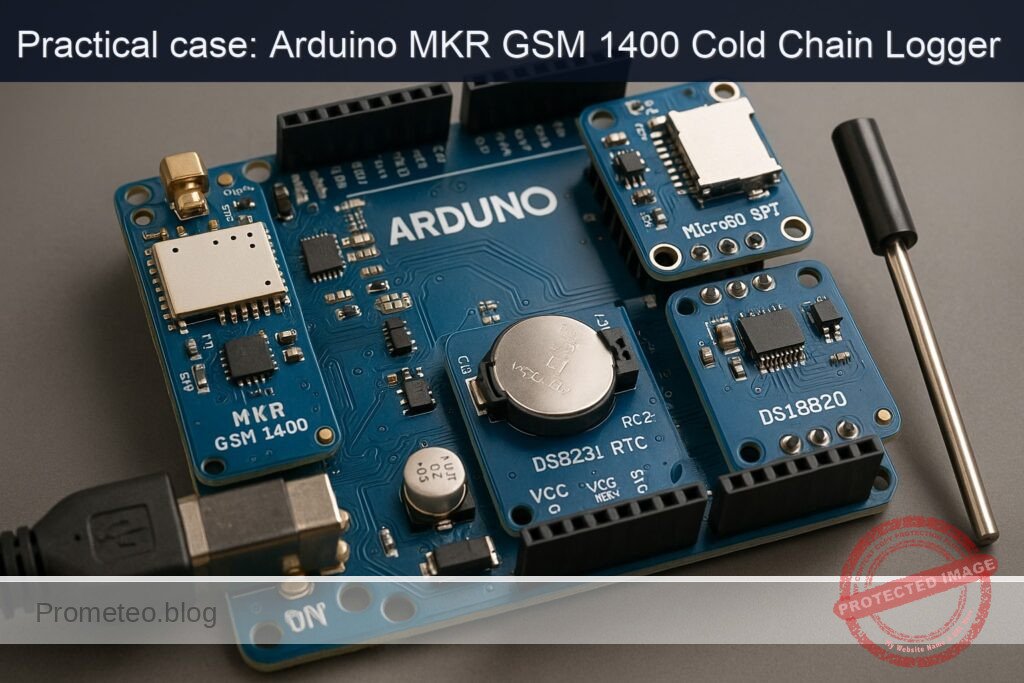
Objective and use case
What you’ll build: A robust cellular cold-chain data logger using the Arduino MKR GSM 1400 that records temperature and timestamps entries, pushing data to the cloud.
Why it matters / Use cases
- Monitor temperature-sensitive pharmaceuticals during transport to ensure compliance with safety regulations.
- Track food products in transit, sending alerts if temperatures exceed safe thresholds.
- Implement IoT solutions for smart agriculture, monitoring conditions for perishable goods.
- Enable real-time data logging for environmental research projects, ensuring accurate data collection.
Expected outcome
- Temperature logging accuracy within ±0.5°C using the DS18B20 sensor.
- Data push frequency of every 10 minutes to the cloud endpoint.
- SMS alerts triggered for temperature excursions above predefined thresholds.
- Timestamp accuracy of ±1 second provided by the DS3231 RTC.
- Data storage capacity of up to 32GB on the MicroSD card for extensive logging.
Audience: Advanced practitioners; Level: Intermediate to advanced.
Architecture/flow: Arduino MKR GSM 1400 communicates with DS3231 for timekeeping, DS18B20 for temperature sensing, and MicroSD for local data storage, with GSM module for cloud connectivity.
Cellular Cold Chain SD Logger (Advanced) with Arduino MKR GSM 1400 + DS3231 + MicroSD SPI (CD74HC4050) + DS18B20
This hands-on case builds a robust cellular cold-chain data logger that records temperature to a MicroSD card, timestamps entries using a DS3231 RTC, and periodically pushes data over GSM to a cloud endpoint. It includes alerting via SMS when temperature excursions are detected. Everything is built around the exact model: Arduino MKR GSM 1400 + DS3231 + MicroSD SPI (CD74HC4050) + DS18B20.
You will compile and flash via Arduino CLI. The guide is written for advanced practitioners and assumes you are comfortable with SPI/I2C buses, cellular APNs, and filesystem logging patterns.
Prerequisites
- Host OS: Linux/macOS/Windows 10+ with USB CDC drivers (MKR boards use native CDC; Windows 10 typically installs automatically).
- Arduino CLI 0.35.x installed and on PATH.
- A working data SIM (nano-SIM) with:
- APN (e.g., internet, m2m.example.com)
- Optional: SIM PIN (can be blank)
- Basic familiarity with:
- 3.3 V logic and level shifting
- OneWire bus (DS18B20)
- I2C devices (DS3231)
- SPI devices and CS line selection
- FAT filesystem on SD
- HTTP and SMS via MKRGSM library
Materials (exact models and parts)
- MCU:
- Arduino MKR GSM 1400 (u-blox SARA modem; 3.3 V logic)
- Real-time clock:
- DS3231 (module with backup CR2032 holder; I2C)
- Temperature sensor:
- DS18B20 (TO-92 or waterproof probe version)
- Storage:
- MicroSD card (FAT32, Class 10 recommended)
- MicroSD SPI breakout (3.3 V compatible)
- Level shifting/buffering:
- CD74HC4050 (hex non-inverting buffer, 3.3 V powered)
- Passives:
- 4.7 kΩ resistor (OneWire pull-up)
- Power:
- LiPo battery 3.7 V (≥ 1200 mAh recommended for field use) connected to MKR JST-PH port
- External GSM antenna (the MKR GSM 1400 requires an antenna)
- Wiring:
- Female-to-female dupont wires, short lengths
- CR2032 cell for RTC backup
- Tools:
- USB cable (Micro USB for MKR)
- Optional: USB power bank or lab PSU
Setup/Connection
The MKR GSM 1400 is a 3.3 V SAMD21 board with native USB. Its SPI/I2C pins are labeled on the headers (MOSI, MISO, SCK, SDA, SCL). The modem draws significant peak current; always use a LiPo or a sturdy 5 V USB source plus LiPo to avoid brownouts during network registration.
Important note on CD74HC4050: This device is a level-down buffer (when VCC=3.3 V). With a 3.3 V MCU and a 3.3 V MicroSD, level shifting is not strictly necessary. We include it to harden SPI edges, provide input protection, and to comply with the specified materials. Do not buffer the MISO line from the card to the MCU.
Pin assignments
- MicroSD SPI (via CD74HC4050 buffering on outputs only):
- SCK: MKR pin SCK -> 4050 input -> 4050 output -> SD SCK
- MOSI: MKR pin MOSI -> 4050 input -> 4050 output -> SD MOSI
- CS: MKR pin D4 -> 4050 input -> 4050 output -> SD CS
- MISO: SD MISO -> MKR pin MISO (direct, not via 4050)
- Power: MKR 3V3 -> SD VCC, MKR GND -> SD GND
- CD74HC4050 VCC=3.3 V, GND common with MKR
- DS3231 RTC (I2C, 3.3 V):
- MKR SDA -> DS3231 SDA
- MKR SCL -> DS3231 SCL
- MKR 3V3 -> DS3231 VCC
- MKR GND -> DS3231 GND
- Insert CR2032 into RTC backup holder
- DS18B20 OneWire:
- Data -> MKR A1 (used as digital I/O)
- 4.7 kΩ pull-up between A1 and 3V3
- GND -> MKR GND, VDD -> MKR 3V3
- GSM:
- Insert nano-SIM
- Connect GSM antenna
- Connect LiPo battery to MKR JST-PH port
CD74HC4050 channel usage (example)
- 1A (input) = SCK from MKR, 1Y (output) -> SD SCK
- 2A (input) = MOSI from MKR, 2Y (output) -> SD MOSI
- 3A (input) = D4 (CS) from MKR, 3Y (output) -> SD CS
Leave MISO direct from SD to MKR.
Connection table
| Function | Module | MKR GSM 1400 pin | Direction (MCU POV) | Notes |
|---|---|---|---|---|
| SD SCK | MicroSD | SCK | Output | Buffer via CD74HC4050 1A->1Y |
| SD MOSI | MicroSD | MOSI | Output | Buffer via CD74HC4050 2A->2Y |
| SD MISO | MicroSD | MISO | Input | Direct (no buffer) |
| SD CS | MicroSD | D4 | Output | Buffer via CD74HC4050 3A->3Y |
| SD VCC | MicroSD | 3V3 | — | 3.3 V only |
| SD GND | MicroSD | GND | — | Common ground |
| RTC SDA | DS3231 | SDA | Bi-directional | I2C pull-ups typically on module |
| RTC SCL | DS3231 | SCL | Output | I2C |
| RTC VCC | DS3231 | 3V3 | — | 3.3 V OK for DS3231 |
| RTC GND | DS3231 | GND | — | — |
| OneWire data | DS18B20 | A1 | Bi-directional | Add 4.7 kΩ pull-up to 3V3 |
| OneWire VDD | DS18B20 | 3V3 | — | — |
| OneWire GND | DS18B20 | GND | — | — |
| GSM antenna | MKR module | Antenna u.FL | — | Must be connected for reliable operation |
| LiPo battery | MKR power | JST-PH | — | Smooths GSM current spikes |
Full Code
Create a folder named coldchain-mkrgsm1400 and put the following sketch as coldchain-mkrgsm1400.ino.
/*
  Cellular Cold Chain SD Logger
  Hardware: Arduino MKR GSM 1400 + DS3231 + MicroSD SPI (CD74HC4050) + DS18B20
  Function: Logs temperature with RTC timestamp to SD, periodically POSTs to HTTP,
            and sends SMS on excursion. Designed for 3.3 V logic, SPI buffered
            with CD74HC4050 on SCK/MOSI/CS; MISO direct.

  Libraries:
    - MKRGSM
    - SPI
    - SD
    - Wire
    - RTClib
    - OneWire
    - DallasTemperature
*/

#include <MKRGSM.h>
#include <SPI.h>
#include <SD.h>
#include <Wire.h>
#include <RTClib.h>
#include <OneWire.h>
#include <DallasTemperature.h>

// =================== Hardware pins ===================
static const int PIN_SD_CS      = 4;      // CS to SD via CD74HC4050
static const int PIN_ONEWIRE    = A1;     // DS18B20 data (with 4.7k pull-up to 3V3)

// =================== GSM credentials ===================
const char PINNUMBER[] = "";              // SIM PIN ("" if not required)
const char APN[]       = "your.apn";      // Replace with your APN
const char LOGIN[]     = "";              // APN username or ""
const char PASSWORD[]  = "";              // APN password or ""

// =================== Cloud endpoint ===================
const char* HTTP_HOST = "webhook.site";   // Use webhook.site for validation
const int   HTTP_PORT = 80;               // 80 (HTTP). For HTTPS use GSMSSLClient, not shown here
// Path example: create a unique token URL on webhook.site and paste the path here
const char* HTTP_PATH = "/your-unique-token-path"; // e.g., "/f7a0b5d1-..." (no trailing slash)

// =================== Logging parameters ===================
static const unsigned SAMPLE_PERIOD_SEC = 60;   // Temperature sample period
static const unsigned POST_PERIOD_SEC   = 300;  // Try to post every 5 minutes
static const float    ALERT_MIN_C       = 2.0;  // Cold chain lower bound
static const float    ALERT_MAX_C       = 8.0;  // Cold chain upper bound
static const uint32_t ALERT_GRACE_SEC   = 120;  // Require sustained excursion for 2 minutes

// =================== Globals ===================
RTC_DS3231 rtc;
OneWire oneWire(PIN_ONEWIRE);
DallasTemperature sensors(&oneWire);
DeviceAddress sensorAddress;

GSM gsmAccess;
GPRS gprs;
GSMClient net;           // For HTTP over TCP
GSM_SMS sms;

File logFile;

uint32_t lastSampleEpoch = 0;
uint32_t lastPostEpoch   = 0;
bool      haveSensor     = false;
bool      sdReady        = false;
bool      gsmReady       = false;
bool      alerted        = false;
uint32_t  excursionStart = 0;

// Utility: format DateTime to ISO8601 "YYYY-MM-DDTHH:MM:SSZ"
String iso8601(const DateTime& dt) {
  char buf[25];
  snprintf(buf, sizeof(buf), "%04d-%02d-%02dT%02d:%02d:%02dZ",
           dt.year(), dt.month(), dt.day(), dt.hour(), dt.minute(), dt.second());
  return String(buf);
}

// Utility: build log file path "/LOGS/YYYY-MM-DD.csv"
String buildDailyPath(const DateTime& dt) {
  char buf[32];
  snprintf(buf, sizeof(buf), "/LOGS/%04d-%02d-%02d.csv", dt.year(), dt.month(), dt.day());
  return String(buf);
}

// Ensure /LOGS exists and the daily file has a header
bool ensureDailyLogFile(const DateTime& now) {
  if (!sdReady) return false;
  if (!SD.exists("/LOGS")) {
    if (!SD.mkdir("/LOGS")) return false;
  }
  String path = buildDailyPath(now);
  if (!SD.exists(path)) {
    File f = SD.open(path, FILE_WRITE);
    if (!f) return false;
    f.println(F("timestamp,temp_c,temp_f,sd_ok,gsm_post_ok,sms_ok,error"));
    f.close();
  }
  return true;
}

bool appendLog(const String& line, const DateTime& now) {
  if (!sdReady) return false;
  String path = buildDailyPath(now);
  File f = SD.open(path, FILE_WRITE);
  if (!f) return false;
  f.println(line);
  f.flush();
  f.close();
  return true;
}

// Find the first DS18B20
bool discoverSensor() {
  byte addr[8];
  oneWire.reset_search();
  if (!oneWire.search(addr)) return false;
  if (DallasTemperature::validAddress(addr) && addr[0] == 0x28) {
    memcpy(sensorAddress, addr, 8);
    sensors.setResolution(sensorAddress, 12);
    return true;
  }
  return false;
}

float readTemperatureC(bool* ok) {
  if (!haveSensor) {
    *ok = false;
    return NAN;
  }
  sensors.requestTemperatures();
  float c = sensors.getTempC(sensorAddress);
  *ok = (c > -127.0 && c < 125.0);
  return c;
}

// Establish GSM and GPRS session
bool ensureGprs() {
  if (gsmReady) return true;
  // Power and attach modem; allow several retries to handle network variability
  for (int attempt = 0; attempt < 3; ++attempt) {
    if (gsmAccess.begin(PINNUMBER) == GSM_READY) {
      if (gprs.attachGPRS(APN, LOGIN, PASSWORD)) {
        gsmReady = true;
        return true;
      }
    }
    delay(5000);
  }
  return false;
}

// Tear down GPRS to save power
void shutdownGprs() {
  if (gsmReady) {
    gprs.detachGPRS();
    // Note: Some modem firmwares support gsmAccess.shutdown() for deeper sleep
    gsmReady = false;
  }
}

// HTTP POST with simple JSON payload; returns true on 200 OK
bool httpPostJson(const String& host, uint16_t port, const String& path, const String& json) {
  if (!ensureGprs()) return false;

  if (!net.connect(host.c_str(), port)) {
    return false;
  }

  // Build HTTP/1.1 request
  String req;
  req.reserve(256 + json.length());
  req += "POST " + path + " HTTP/1.1\r\n";
  req += "Host: " + host + "\r\n";
  req += "User-Agent: MKR-GSM-1400/1.0\r\n";
  req += "Content-Type: application/json\r\n";
  req += "Connection: close\r\n";
  req += "Content-Length: " + String(json.length()) + "\r\n\r\n";
  req += json;

  net.print(req);

  // Read status line (simple parser)
  uint32_t start = millis();
  String statusLine;
  while (millis() - start < 10000) {
    while (net.available()) {
      char c = net.read();
      if (c == '\n') {
        // Got first line (e.g., "HTTP/1.1 200 OK")
        net.stop();
        return statusLine.indexOf(" 200 ") > 0;
      }
      if (c != '\r') statusLine += c;
    }
  }
  net.stop();
  return false;
}

// Send a concise SMS alert
bool sendAlertSMS(const char* phone, const String& msg) {
  if (!ensureGprs()) {
    // SMS can be sent without GPRS; ensure radio is on
    if (gsmAccess.begin(PINNUMBER) != GSM_READY) return false;
  }
  sms.beginSMS(phone);
  sms.print(msg);
  return sms.endSMS() == 1;
}

void setup() {
  Serial.begin(115200);
  while (!Serial && millis() < 5000) { /* wait for USB */ }

  // RTC
  Wire.begin();
  if (!rtc.begin()) {
    Serial.println(F("[RTC] DS3231 not found on I2C"));
  } else {
    if (rtc.lostPower()) {
      // Set from compile time on first boot; replace with host-sync in production
      rtc.adjust(DateTime(F(__DATE__), F(__TIME__)));
      Serial.println(F("[RTC] Lost power; RTC set from compile time."));
    }
  }

  // SD
  if (!SD.begin(PIN_SD_CS)) {
    sdReady = false;
    Serial.println(F("[SD] Initialization failed. Check CS and wiring."));
  } else {
    sdReady = true;
    Serial.println(F("[SD] Ready."));
  }

  // OneWire sensor
  sensors.begin();
  haveSensor = discoverSensor();
  if (!haveSensor) {
    Serial.println(F("[DS18B20] Sensor not found."));
  } else {
    Serial.println(F("[DS18B20] Sensor ready."));
  }

  // Precreate directory and today's file
  DateTime now = rtc.now();
  if (sdReady) {
    if (ensureDailyLogFile(now)) {
      Serial.println(F("[SD] Daily log ready."));
    } else {
      Serial.println(F("[SD] Failed to prepare daily log."));
    }
  }

  lastSampleEpoch = now.unixtime();
  lastPostEpoch   = now.unixtime();
  Serial.println(F("[BOOT] Cold chain logger started."));
}

void loop() {
  DateTime now = rtc.now();
  uint32_t epoch = now.unixtime();

  // Periodic temperature sampling
  if (epoch - lastSampleEpoch >= SAMPLE_PERIOD_SEC) {
    lastSampleEpoch = epoch;

    bool ok = false;
    float tempC = readTemperatureC(&ok);
    float tempF = ok ? tempC * 9.0 / 5.0 + 32.0 : NAN;

    // Excursion tracking
    bool inExcursion = ok && (tempC < ALERT_MIN_C || tempC > ALERT_MAX_C);
    bool smsSent = false;
    String err = ok ? "" : "TEMP_ERR";

    if (inExcursion) {
      if (excursionStart == 0) excursionStart = epoch;
      uint32_t dur = epoch - excursionStart;
      if (!alerted && dur >= ALERT_GRACE_SEC) {
        // Send one SMS alert
        String iso = iso8601(now);
        String msg = "[ColdChain] Excursion " + String(tempC, 2) + "C at " + iso;
        // Replace with your phone number including country code
        smsSent = sendAlertSMS("+1234567890", msg);
        alerted = smsSent; // mark alerted only if SMS succeeded
        if (!smsSent) err = err.length() ? (err + "|SMS_FAIL") : "SMS_FAIL";
      }
    } else {
      excursionStart = 0;
      alerted = false;
    }

    // Log to SD
    bool sd_ok = ensureDailyLogFile(now);
    String line = iso8601(now) + "," +
                  (ok ? String(tempC, 3) : "NaN") + "," +
                  (ok ? String(tempF, 3) : "NaN") + "," +
                  (sd_ok ? "1" : "0") + "," +
                  "0," + (smsSent ? "1" : "0") + "," +
                  (err.length() ? err : "OK");

    bool append_ok = false;
    if (sd_ok) {
      append_ok = appendLog(line, now);
      if (!append_ok) {
        Serial.println(F("[SD] Append failed."));
      }
    }

    // Console
    Serial.print(F("[SAMPLE] "));
    Serial.println(line);
  }

  // Periodic HTTP post batch (simple: post last sample only)
  if (epoch - lastPostEpoch >= POST_PERIOD_SEC) {
    lastPostEpoch = epoch;

    // Sample fresh value to post
    bool ok = false;
    float tempC = readTemperatureC(&ok);
    String iso = iso8601(now);

    // Build JSON payload
    String payload = "{\"device\":\"MKR_GSM_1400\","
                     "\"ts\":\"" + iso + "\","
                     "\"temp_c\":" + (ok ? String(tempC, 3) : "null") + ","
                     "\"alert_min_c\":" + String(ALERT_MIN_C, 2) + ","
                     "\"alert_max_c\":" + String(ALERT_MAX_C, 2) + "}";

    bool post_ok = httpPostJson(String(HTTP_HOST), HTTP_PORT, String(HTTP_PATH), payload);

    // Log a POST outcome entry
    String line = iso + "," +
                  (ok ? String(tempC, 3) : "NaN") + "," +
                  (ok ? String(tempC * 9.0 / 5.0 + 32.0, 3) : "NaN") + "," +
                  (sdReady ? "1" : "0") + "," +
                  (post_ok ? "1" : "0") + ",0," +
                  (post_ok ? "OK" : "POST_FAIL");

    if (sdReady) appendLog(line, now);

    Serial.print(F("[POST] "));
    Serial.println(post_ok ? F("OK") : F("FAIL"));

    // Power savings: disconnect GPRS if not continuously needed
    shutdownGprs();
  }

  // Cooperative delay
  delay(50);
}
Optional: If you need HTTPS/TLS, replace GSMClient with GSMSSLClient and ensure your endpoint’s TLS is compatible with the modem’s cipher suites. TLS is heavier on current consumption and RAM.
Build/Flash/Run commands
All steps use Arduino CLI. Version shown is 0.35.x. Adjust port path as needed.
1) Prepare Arduino CLI and cores
arduino-cli version

# Update index
arduino-cli core update-index

# Install SAMD core for MKR GSM 1400
arduino-cli core install arduino:samd

# Install required libraries (pin exact versions to ensure reproducibility)
arduino-cli lib install "MKRGSM@1.6.0" "SD@1.2.4" "OneWire@2.3.7" "DallasTemperature@3.11.0" "RTClib@2.1.4"
2) Create project structure
mkdir -p ~/projects/coldchain-mkrgsm1400
cd ~/projects/coldchain-mkrgsm1400
# Place the sketch as coldchain-mkrgsm1400.ino in this directory
3) Identify the board and port
arduino-cli board list
# Example output:
# Port         Type              Board Name        FQBN
# /dev/ttyACM0 Serial Port (USB) Arduino MKR GSM 1400 arduino:samd:mkrgsm1400
4) Compile
arduino-cli compile --fqbn arduino:samd:mkrgsm1400 .
5) Upload
# Replace /dev/ttyACM0 with your actual port (COMx on Windows)
arduino-cli upload -p /dev/ttyACM0 --fqbn arduino:samd:mkrgsm1400 .
6) Monitor serial output at 115200 baud
# Stop any program using the port before running this
arduino-cli monitor -p /dev/ttyACM0 --config baudrate=115200
Tip: If the port disappears after a failed upload, double-tap the MKR’s reset button to enter the bootloader (the LED pulses), then retry upload.
Step-by-step Validation
Follow this sequence to validate each subsystem and the integrated cold-chain logger behavior.
1) SD card layer
- With the sketch running, watch serial logs:
- Expect “[SD] Ready.” and “[SD] Daily log ready.”
- Inspect the card contents by removing SD and checking on a PC:
- A directory /LOGS should exist.
- A CSV file named YYYY-MM-DD.csv should be present.
- The first line is the CSV header.
If you prefer on-device check, temporarily add a snippet to list root files via SD.open(«/») and iterate; or use another sketch for directory listing.
2) RTC (DS3231)
- After first boot with a fresh DS3231, the code sets the time from compile time.
- Verify time continuity:
- Power the MKR off (keep CR2032 in RTC).
- Wait a few minutes, power back on.
- Confirm timestamps in new log lines are monotonic and correctly advanced.
- Fine-tuning:
- For higher accuracy, set the RTC once from a known accurate source (host PC NTP-synced) by writing a temporary helper sketch that calls rtc.adjust() with a host-provided ISO timestamp.
3) DS18B20 reading and calibration check
- Watch “[DS18B20] Sensor ready.” on boot.
- Validate with two-point test:
- Immerse the DS18B20 probe in an ice-water slurry (0 °C). Within a minute, the log should approach 0.0 ±0.5 °C.
- Then place it near ambient; it should read roughly 20–25 °C (lab dependent).
- Ensure you installed the 4.7 kΩ pull-up between A1 and 3V3; without it, readings will be -127 °C or NaN.
4) GSM network registration and data posting
- Replace APN/credentials in the sketch with your SIM’s values.
- For the HTTP endpoint, create a unique URL at https://webhook.site and set HTTP_HOST to «webhook.site» and HTTP_PATH to your unique path.
- Observe logs every 5 minutes:
- “[POST] OK” indicates a 200 OK from webhook.site.
- On webhook.site, you will see JSON payloads that include device, ts, temp_c, and thresholds.
- If you see “[POST] FAIL,” check:
- Antenna firmly attached.
- SIM active and has data plan.
- APN correct.
- Adequate power (LiPo connected).
5) SMS alerting under excursion
- Set ALERT_MIN_C and ALERT_MAX_C to your cold-chain range (2–8 °C typical).
- From ambient, briefly warm the sensor above 8 °C (e.g., pinch with fingers) for more than ALERT_GRACE_SEC (default 120 s).
- Confirm you receive an SMS at the configured phone number. The serial log will show SMS success/failure.
- The code avoids spamming by sending one SMS per excursion event until the temperature returns within range.
6) Daily file rotation
- The logger creates a new CSV for each UTC date.
- To test rotation without waiting:
- Temporarily adjust rtc.adjust() to set a time just before midnight UTC, run, then set just after midnight and reboot. Ensure a new YYYY-MM-DD.csv is created with a header.
7) Robustness and power tests
- Unplug USB and run on LiPo only.
- Confirm:
- Sampling continues (SD logs).
- Cellular posting remains stable (depending on RF conditions).
- Induce network loss (remove antenna):
- Observe continued SD logging.
- “[POST] FAIL” during offline intervals is acceptable; data is still retained locally.
Troubleshooting
- SD fails to initialize:
- Confirm SD CS pin matches the sketch (D4) and is buffered through CD74HC4050.
- Ensure MISO is NOT routed through the 4050; it must be direct SD->MKR.
- Confirm MicroSD is 3.3 V tolerant (most are). Use only 3.3 V supply.
-
Try a different MicroSD; format FAT32, 4–32 GB recommended.
-
DS18B20 reads -127, 85, or NaN:
- Add/verify the 4.7 kΩ pull-up on the OneWire data line.
- Check that the sensor’s data line is actually on A1 and not swapped with VDD/GND.
-
Waterproof DS18B20 cables: colors vary by vendor; verify with a meter.
-
RTC time wrong or not persisting:
- Insert a fresh CR2032 into DS3231 holder.
- Ensure SDA/SCL wiring and 3.3 V power are correct.
-
On first boot with lost power, the sketch sets time from compile time; adjust with a dedicated time-set sketch if needed.
-
GSM attach or GPRS failure:
- Make sure the APN (and login/password if required) are correct.
- Verify antenna connection; weak signal areas cause long attach times.
- Ensure LiPo is connected; the modem can draw >1 A peaks.
-
Confirm SIM is active, with data plan and not PIN-locked (or set PINNUMBER).
-
Cannot upload firmware:
- Double-tap the MKR reset to enter bootloader (pulsating LED), then retry upload.
- On Windows, ensure the COM port driver is correct (native CDC).
-
Check the USB cable (try a different, data-capable cable).
-
HTTP endpoint not receiving:
- Verify host and path exactly (copy/paste the webhook.site path).
- Port 80 in the sketch; firewall issues are rare on cellular, but test with another endpoint if needed.
-
For HTTPS, switch to GSMSSLClient and ensure TLS compatibility.
-
Unexpected pin conflicts:
- The sketch selects D4 for SD CS, A1 for OneWire, and dedicated SPI/I2C pins; these avoid known MKR GSM control lines. If you customized pins, verify against the MKR GSM 1400 pinout and MKRGSM library documentation.
Improvements
- HTTPS/TLS:
-
Replace GSMClient with GSMSSLClient and POST to https endpoints. Validate the modem’s TLS cipher suite compatibility and consider memory usage.
-
Batch uploads:
-
Accumulate multiple samples and post as an array to reduce radio on-time and data cost. Confirm server-side logic accepts batches.
-
Retry/backoff strategy:
-
Implement exponential backoff with jitter for GPRS attach and HTTP POST to avoid radio thrash.
-
File integrity:
-
Append CRC32 per line or per block; or use a companion .sha256 file. Consider SDFat with pre-allocation and journaling patterns.
-
Multi-sensor arrays:
-
Support multiple DS18B20 devices on the bus; store addresses, log each as a separate column.
-
Low power:
-
Use RTCZero or ULP techniques to sleep between samples. Power down modem between posts (already partially implemented) and tune duty cycles.
-
Time zone and DST:
-
Keep RTC in UTC (as implemented). Handle time zone conversion server-side to avoid DST complexities.
-
Over-the-air configuration:
-
Pull APN, thresholds, post periods from a server JSON on boot; store in EEPROM/emulated flash.
-
Alert escalation:
- Add repeated SMS or voice call fallback if excursions persist; add email via HTTP webhook.
Final Checklist
- Wiring
- MKR GSM 1400 powered, antenna attached, LiPo connected.
- DS3231 on SDA/SCL with CR2032 installed.
- DS18B20 on A1 with 4.7 kΩ pull-up to 3V3.
- MicroSD on SPI: SCK/MOSI/CS buffered via CD74HC4050, MISO direct.
-
Common ground across all modules.
-
Software
- Arduino CLI installed and updated.
- arduino:samd core installed.
- Libraries installed: MKRGSM, SD, OneWire, DallasTemperature, RTClib.
-
Sketch configured: APN, HTTP_HOST/PATH, phone number for SMS.
-
Build/Flash
- Compiled with FQBN arduino:samd:mkrgsm1400.
-
Uploaded to correct serial port.
-
Validation
- SD init success and /LOGS/DATE.csv created.
- RTC timestamps correct and persistent across power cycles.
- DS18B20 readings reasonable; ice bath near 0 °C.
- HTTP POSTs visible on webhook.site every ~5 minutes.
-
SMS alert received on sustained temperature excursion.
-
Deployment
- Consider weatherproof housing and strain relief for sensor cable.
- Ensure cellular coverage and data plan in deployment area.
- Provide stable power (LiPo sized to duty cycle and expected runtime).
With this build, you have a reliable cellular cold-chain SD logger using the Arduino MKR GSM 1400, DS3231 RTC for accurate timekeeping, buffered SPI MicroSD storage via CD74HC4050, and a DS18B20 sensor. The system logs locally and pushes to the cloud with SMS alerting for regulatory-grade traceability and proactive incident response.
Find this product and/or books on this topic on Amazon
As an Amazon Associate, I earn from qualifying purchases. If you buy through this link, you help keep this project running.
Quick Quiz

Telecommunications Electronics Engineer and Computer Engineer (official degrees in Spain).

