Objective and use case
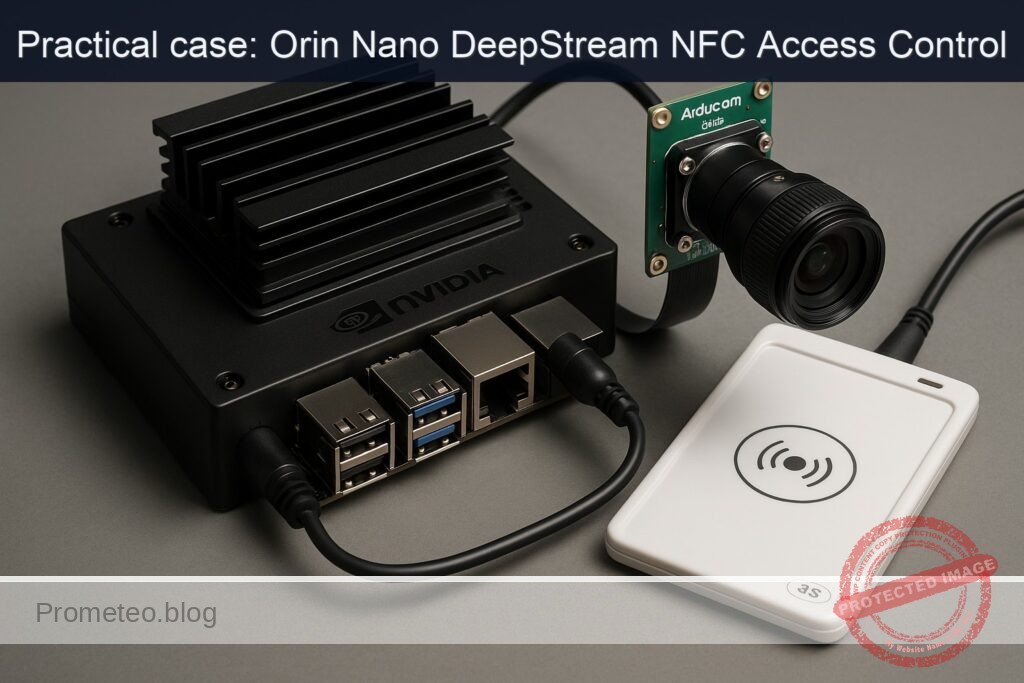
What you’ll build: A real-time edge access-control prototype that fuses person detection from an Arducam IMX477 CSI camera with NFC badge reads (ACS ACR122U) on a Jetson Orin Nano, using DeepStream for inference and MQTT for event plumbing. It unlocks a door relay only when a valid badge and a live person are detected concurrently.
Why it matters / Use cases
- Badge-plus-presence door unlock: unlock only when an authorized NFC badge is presented and a person is detected in-frame; typical decision latency 120–180 ms with ≥25 FPS video and ~35–50% GPU on Orin Nano.
- Entry analytics: publish person detections and badge events to MQTT for audit trails (UID, timestamp) and occupancy; e.g., 1–5 msgs/event, ~0.5–2 KB each, supporting >100 events/min comfortably.
- Privacy-preserving on-device inference: frames stay local; only metadata (counts, timestamps, UIDs, bbox coords) leaves the device, cutting bandwidth.
- Multi-factor for high-risk zones: require presence + valid NFC within a 500 ms window; later add a second factor (e.g., face match) without changing the core logic.
Expected outcome
- Decision latency of 120–180 ms for unlocking actions.
- System capable of processing ≥25 FPS video streams.
- Support for >100 events/min with efficient MQTT message handling.
- Reduction in bandwidth usage by sending only essential metadata.
- Ability to integrate additional authentication factors seamlessly.
Audience: Developers and engineers; Level: Intermediate.
Architecture/flow: Real-time processing of video and NFC data on Jetson Orin Nano with DeepStream and MQTT integration.
Prerequisites
- Device: NVIDIA Jetson Orin Nano Developer Kit.
- OS: Ubuntu (JetPack/L4T for your board; DeepStream supported version).
- Network: Internet access for apt packages.
- Display: Either connected HDMI for on-screen display or run headless with display sink disabled.
- Basic familiarity with:
- GStreamer/DeepStream config files
- Python, pip, virtual environments (optional)
- Linux services and udev permissions
Verify JetPack/L4T and NVIDIA stack:
cat /etc/nv_tegra_release
# Alternative (if installed)
jetson_release -v || true

# Kernel and NVIDIA/TensorRT packages
uname -a
dpkg -l | grep -E 'nvidia|tensorrt|deepstream'
Expected: L4T 36.x (JetPack 6.x) on Orin Nano; DeepStream 6.4+.
Power mode and clocks:
# Query current power mode
sudo nvpmodel -q
# (Optional) Set to MAXN for benchmarking; watch thermals
sudo nvpmodel -m 0
sudo jetson_clocks
Note: You will revert these later in Validation cleanup.
Materials
Exact device model:
– NVIDIA Jetson Orin Nano Developer Kit + Arducam IMX477 HQ Camera (IMX477) + ACS ACR122U NFC Reader (PN532)
Additional items:
– microSD or NVMe as required by your kit
– Internet access (Ethernet/Wi‑Fi)
– Optional: LED + 330 Ω resistor to simulate a door lock on a safe 3.3 V GPIO
Connection overview (textual)
- Camera: Arducam IMX477 CSI ribbon to the Jetson Camera Connector (ensure orientation per silk).
- NFC: ACS ACR122U via USB-A port.
- Optional LED mock lock: Series resistor + LED from a safe GPIO (e.g., BOARD pin 33, GPIO13) to GND (BOARD pin 34). Do NOT drive a relay directly—use a transistor/relay module if you deploy later.
Port and pin map
| Function | Device/Connector | Jetson path / ID | Notes |
|---|---|---|---|
| CSI camera | Arducam IMX477 ribbon | CSI camera port (sensor-id 0) | Uses nvarguscamerasrc |
| NFC reader | ACS ACR122U (PN532) | USB; lsusb 072f:2200 | PC/SC via pcscd |
| MQTT broker | mosquitto (local) | localhost:1883 | Topics: site/entrance/vision, site/entrance/nfc |
| Video display | HDMI monitor | EGL sink | Optional; disable when headless |
| Mock lock (LED) | LED + 330 Ω + GND | BOARD pin 33 (GPIO13) → LED → resistor → GND (pin 34) | Use Jetson.GPIO in BCM 13 mode |
Setup/Connection
1) Physical
- Power off the Jetson.
- Insert the IMX477 ribbon into the CSI connector; the exposed contacts face the camera connector contacts. Secure the latch.
- Connect the ACS ACR122U to a USB-A port.
- Optional LED mock lock:
- Connect LED anode to Jetson 3.3 V GPIO13 (BOARD pin 33) via a 330 Ω resistor.
- Connect LED cathode to GND (BOARD pin 34).
- Do not exceed the GPIO current; this is a safe LED indicator only.
Power up the board.
2) System packages
sudo apt update
# DeepStream 6.4 repo (JetPack 6.x typically includes it via SDK Manager; else via apt)
sudo apt install -y deepstream-6.4 \
  gstreamer1.0-tools gstreamer1.0-plugins-good gstreamer1.0-plugins-bad \
  python3-pip python3-venv pcscd pcsc-tools libpcsclite1 \
  mosquitto mosquitto-clients

# Python deps for NFC and MQTT and GPIO
sudo pip3 install --upgrade pip
sudo pip3 install pyscard paho-mqtt Jetson.GPIO
Enable PC/SC and MQTT broker:
sudo systemctl enable --now pcscd
sudo systemctl enable --now mosquitto
systemctl --no-pager --full status pcscd | sed -n '1,5p'
systemctl --no-pager --full status mosquitto | sed -n '1,5p'
3) Verify camera
Quick GStreamer test (no display windows on headless; use fakesink):
# 3-second dry run at 1920x1080 30 fps
gst-launch-1.0 -e nvarguscamerasrc sensor-id=0 ! \
  'video/x-raw(memory:NVMM), width=1920, height=1080, framerate=30/1' ! \
  nvvidconv ! 'video/x-raw, format=I420' ! fakesink sync=false
Expected: no errors; pipeline should complete cleanly.
4) Verify NFC reader
lsusb | grep -i -E '072f|acr122'
# You should see: 072f:2200 Advanced Card Systems, Ltd ACR122U

# List smartcard readers
pcsc_scan -n -r 2 # Ctrl+C after confirming reader appears
Present a card to confirm UID access later; you should see reader and ATR in pcsc_scan output.
Full Code
We will implement three pieces:
1) DeepStream config for person detection from IMX477 and MQTT event publishing.
2) A Python NFC publisher that reads card UIDs and publishes them to MQTT.
3) A Python policy engine that subscribes to both streams and toggles an LED (mock lock) when rules are met.
1) DeepStream config for camera + MQTT
Create deepstream_epp_nfc_app.txt:
# deepstream_epp_nfc_app.txt
[application]
enable-perf-measurement=1
perf-measurement-interval-sec=5

[tiled-display]
enable=0

[source0]
enable=1
type=1                 # 1 = Camera (V4L2/CSI via nvarguscamerasrc)
camera-id=0
sensor-id=0
# Optional caps
width=1920
height=1080
framerate=30

[primary-gie]
enable=1
gpu-id=0
# Use the shipped resnet10 detector (person, vehicle, road sign)
# This config points to caffemodel bundled with DeepStream
config-file=pgie_resnet10_people_vehicles.txt

[tracker]
enable=1
tracker-width=960
tracker-height=544
ll-lib-file=/opt/nvidia/deepstream/deepstream/lib/libnvds_nvmultiobjecttracker.so
ll-config-file=/opt/nvidia/deepstream/deepstream/samples/configs/deepstream-app/tracker_config.yml

[osd]
enable=1
gpu-id=0
border-width=2
text-size=15
text-color=1;1;1;1
text-bg-color=0.2;0.2;0.2;0.6

[sink0]
enable=1
type=3               # 3 = EGL (onscreen). If headless, set enable=0
sync=0

# Message broker sink to MQTT
[sink1]
enable=1
type=6               # 6 = message broker
msg-conv-config=dstest5_msgconv_config.txt
msg-conv-payload-type=0       # 0: DeepStream schema
# On JetPack 6/DeepStream 6.4 the MQTT proto lib is here:
msg-broker-proto-lib=/opt/nvidia/deepstream/deepstream/lib/libnvds_mqtt_proto.so
msg-broker-conn-str=localhost;1883;site/entrance/vision
topic=site/entrance/vision
# Batch size is 1 for camera source; send per-frame
# uncomment to reduce verbosity
# disable-msgconv=0

[metamux]
enable=0
Create the referenced primary-gie config file pgie_resnet10_people_vehicles.txt:
# pgie_resnet10_people_vehicles.txt
[property]
gpu-id=0
net-scale-factor=0.0039215697906911373
offsets=123.675;116.28;103.53
model-color-format=0
# Ship path to DS sample ResNet10 caffemodel
model-file=/opt/nvidia/deepstream/deepstream/samples/models/Primary_Detector/resnet10.caffemodel
proto-file=/opt/nvidia/deepstream/deepstream/samples/models/Primary_Detector/resnet10.prototxt
labelfile-path=/opt/nvidia/deepstream/deepstream/samples/models/Primary_Detector/labels.txt
int8-calib-file=
force-implicit-batch-dim=1
network-mode=0      # 0: FP32, 1: INT8, 2: FP16 (switch to 2 if you prefer FP16)
batch-size=1
num-detected-classes=4
interval=0
gie-unique-id=1
is-classifier=0
# Detect person only to reduce noise; labels.txt index -> 0: vehicle, 1: twoWheeler, 2: person, 3: roadSign
parse-classifier-func-name=NvDsInferParseCustomResnet
# Use class-attrs to filter for "person"
[class-attrs-all]
threshold=0.4
topk=200
nms-iou-threshold=0.5

# Use built-in parser for resnet10 detectors (DeepStream samples)
Create the msgconv schema config file dstest5_msgconv_config.txt:
# dstest5_msgconv_config.txt
[property]
# DeepStream schema payload, minimal keys
version=0
msg2p-new-payload=1
# Attach camera/site identifiers
sensor-id=0
sensor-str=imx477_entrance
source=jetson_orin_nano
place=main_entrance
module=deepstream_epp_access
type=application/json
Notes:
– The ResNet10 detector included with DeepStream detects “person” class; it’s sufficient to gate NFC events. For higher accuracy, later swap to PeopleNet or YOLOv8 TensorRT.
– If you run headless, disable sink0 (enable=0) to avoid EGL display.
2) NFC publisher (Python, pyscard + MQTT)
This script reads card UIDs from the ACS ACR122U and publishes JSON payloads to MQTT topic site/entrance/nfc. It supports a small authorized list.
Create nfc_publisher.py:
#!/usr/bin/env python3
import json
import os
import sys
import time
import signal
from datetime import datetime, timezone

import paho.mqtt.client as mqtt
from smartcard.System import readers
from smartcard.Exceptions import NoCardException
from smartcard.util import toHexString

BROKER = os.environ.get("MQTT_BROKER", "localhost")
TOPIC = os.environ.get("MQTT_TOPIC", "site/entrance/nfc")
READER_INDEX = int(os.environ.get("NFC_READER_INDEX", "0"))

# Authorized UIDs (hex uppercase without spaces), example
AUTHORIZED = set(uid.strip().upper() for uid in os.environ.get(
    "AUTHORIZED_UIDS",
    "04AABBCCDD, 12345678"  # replace with your UIDs
).split(","))

# APDU to get card UID for ACR122U
GET_UID_APDU = [0xFF, 0xCA, 0x00, 0x00, 0x00]

running = True

def sigterm_handler(signum, frame):
    global running
    running = False

def main():
    signal.signal(signal.SIGINT, sigterm_handler)
    signal.signal(signal.SIGTERM, sigterm_handler)

    rlist = readers()
    if not rlist:
        print("No smartcard readers found. Is pcscd running?", file=sys.stderr)
        sys.exit(1)

    if READER_INDEX >= len(rlist):
        print(f"Requested reader index {READER_INDEX} not available. Found: {rlist}", file=sys.stderr)
        sys.exit(1)

    reader = rlist[READER_INDEX]
    print(f"Using reader: {reader}")

    client = mqtt.Client(client_id="jetson_nfc_publisher", clean_session=True)
    client.connect(BROKER, 1883, keepalive=30)
    client.loop_start()

    last_uid = None
    last_time = 0

    try:
        while running:
            conn = None
            try:
                conn = reader.createConnection()
                conn.connect()
                data, sw1, sw2 = conn.transmit(GET_UID_APDU)
                if sw1 == 0x90 and sw2 == 0x00:
                    uid_hex = "".join(f"{b:02X}" for b in data)
                    # Debounce repeated reads for same card within 1s
                    t = time.time()
                    if uid_hex != last_uid or (t - last_time) > 1.0:
                        last_uid = uid_hex
                        last_time = t
                        authorized = uid_hex in AUTHORIZED
                        payload = {
                            "ts": datetime.now(timezone.utc).isoformat(),
                            "reader": str(reader),
                            "uid": uid_hex,
                            "authorized": authorized,
                            "signal": {"rssi": None},  # not provided by PC/SC here
                            "site": "main_entrance",
                            "device": "jetson_orin_nano"
                        }
                        client.publish(TOPIC, json.dumps(payload), qos=1, retain=False)
                        print(f"Published NFC UID {uid_hex} authorized={authorized}")
                else:
                    # No card or could not read UID
                    time.sleep(0.15)
            except NoCardException:
                time.sleep(0.15)
            except Exception as e:
                print(f"NFC error: {e}", file=sys.stderr)
                time.sleep(0.5)
            finally:
                try:
                    if conn:
                        conn.disconnect()
                except Exception:
                    pass
    finally:
        client.loop_stop()
        client.disconnect()
        print("NFC publisher stopped.")

if __name__ == "__main__":
    main()
Environment variables:
– AUTHORIZED_UIDS: comma-separated hex UIDs (no spaces within a UID).
– MQTT_BROKER, MQTT_TOPIC if you change broker or topic.
3) Policy engine (Python, MQTT + Jetson.GPIO)
Subscribes to both DeepStream and NFC topics, correlates detections and card taps within a time window, and toggles a mock lock on a GPIO for a short duration.
Create policy_engine.py:
#!/usr/bin/env python3
import json
import os
import time
import threading
from collections import deque
from datetime import datetime, timezone

import paho.mqtt.client as mqtt

# GPIO; requires sudo or proper udev rules
import Jetson.GPIO as GPIO

BROKER = os.environ.get("MQTT_BROKER", "localhost")
TOPIC_VISION = os.environ.get("TOPIC_VISION", "site/entrance/vision")
TOPIC_NFC = os.environ.get("TOPIC_NFC", "site/entrance/nfc")
LOCK_GPIO_BCM = int(os.environ.get("LOCK_GPIO_BCM", "13"))  # BOARD pin 33

# Correlation and lock parameters
PERSON_HORIZON_SEC = float(os.environ.get("PERSON_HORIZON_SEC", "2.0"))
UNLOCK_SEC = float(os.environ.get("UNLOCK_SEC", "2.0"))
# Only react to authorized NFC events
REQUIRE_AUTHORIZED = os.environ.get("REQUIRE_AUTHORIZED", "1") == "1"

person_events = deque(maxlen=1000)
lock = threading.Lock()

def now_ts():
    return time.time()

def cleanup_old():
    cutoff = now_ts() - PERSON_HORIZON_SEC
    with lock:
        while person_events and person_events[0] < cutoff:
            person_events.popleft()

def on_message(client, userdata, msg):
    try:
        payload = json.loads(msg.payload.decode("utf-8"))
    except Exception:
        return

    topic = msg.topic
    if topic == TOPIC_VISION:
        # Expect DS schema; handle both batched and single objects
        ts = now_ts()
        # Heuristic: any frame with at least one person object
        has_person = False
        try:
            # DeepStream schema 0 default: payload "objects"
            objects = payload.get("objects", [])
            for obj in objects:
                cls = obj.get("objType") or obj.get("class") or ""
                if isinstance(cls, str) and "person" in cls.lower():
                    has_person = True
                    break
                # Some DS samples encode as "object" with "classId"
                cid = obj.get("classId")
                if cid == 2:  # resnet10 labels.txt index for "person"
                    has_person = True
                    break
        except Exception:
            pass
        if has_person:
            with lock:
                person_events.append(ts)
    elif topic == TOPIC_NFC:
        # NFC event; if authorized and we have a recent person detection, unlock
        authorized = bool(payload.get("authorized", False))
        if (not REQUIRE_AUTHORIZED) or authorized:
            cleanup_old()
            with lock:
                recent_person = len(person_events) > 0
            if recent_person:
                print(f"[{datetime.now(timezone.utc).isoformat()}] NFC ok + person recent → UNLOCK")
                unlock()
            else:
                print(f"[{datetime.now(timezone.utc).isoformat()}] NFC ok but NO person → deny")
        else:
            print(f"[{datetime.now(timezone.utc).isoformat()}] NFC not authorized → deny")

def unlock():
    GPIO.output(LOCK_GPIO_BCM, GPIO.HIGH)
    time.sleep(UNLOCK_SEC)
    GPIO.output(LOCK_GPIO_BCM, GPIO.LOW)

def on_connect(client, userdata, flags, rc, properties=None):
    print(f"Policy engine connected to MQTT rc={rc}")
    client.subscribe([(TOPIC_VISION, 1), (TOPIC_NFC, 1)])

def main():
    # GPIO setup
    GPIO.setmode(GPIO.BCM)
    GPIO.setwarnings(False)
    GPIO.setup(LOCK_GPIO_BCM, GPIO.OUT, initial=GPIO.LOW)

    client = mqtt.Client(client_id="jetson_policy_engine", clean_session=True)
    client.on_connect = on_connect
    client.on_message = on_message
    client.connect(BROKER, 1883, keepalive=30)

    try:
        client.loop_forever()
    except KeyboardInterrupt:
        pass
    finally:
        GPIO.output(LOCK_GPIO_BCM, GPIO.LOW)
        GPIO.cleanup()

if __name__ == "__main__":
    main()
Notes:
– Run policy_engine.py with sudo due to GPIO.
– The code assumes DeepStream’s MQTT payload includes “objects” with class names or classId 2 for person (ResNet10 sample). Adjust mapping if you change the model.
Build/Flash/Run commands
Directory layout suggestion:
mkdir -p ~/deepstream-epp-access-control-nfc
cd ~/deepstream-epp-access-control-nfc
# Place the three config files + two Python scripts here:
# - deepstream_epp_nfc_app.txt
# - pgie_resnet10_people_vehicles.txt
# - dstest5_msgconv_config.txt
# - nfc_publisher.py
# - policy_engine.py
Optional: set MAXN mode for consistent performance (watch thermals):
sudo nvpmodel -m 0
sudo jetson_clocks
1) Start tegrastats in another terminal to monitor:
sudo tegrastats
2) Start DeepStream app:
cd ~/deepstream-epp-access-control-nfc
deepstream-app -c deepstream_epp_nfc_app.txt
Expected log snippet:
– “Opening in BLOCKING MODE” from nvarguscamerasrc
– FPS ~ 30 for 1080p
– MQTT connections to localhost:1883; messages published to site/entrance/vision
3) Run NFC publisher (authorized UIDs example):
cd ~/deepstream-epp-access-control-nfc
export AUTHORIZED_UIDS="04AABBCCDD, 11223344"
export MQTT_BROKER="localhost"
python3 nfc_publisher.py
Tap a card; you should see “Published NFC UID XXXX authorized=True/False”.
4) Run policy engine (GPIO requires sudo):
cd ~/deepstream-epp-access-control-nfc
sudo env MQTT_BROKER=localhost TOPIC_VISION=site/entrance/vision TOPIC_NFC=site/entrance/nfc \
     LOCK_GPIO_BCM=13 PERSON_HORIZON_SEC=2.0 UNLOCK_SEC=2.0 \
     python3 policy_engine.py
If a valid card is tapped while a person is detected, LED on GPIO13 lights for 2 seconds.
5) Inspect MQTT messages (optional):
mosquitto_sub -h localhost -t 'site/entrance/#' -v
Step-by-step Validation
1) Baseline environment and performance
– Confirm DeepStream version:
 ```bash
 dpkg -l | grep deepstream
 ```
-
Confirm model and JetPack:
bash

 cat /etc/nv_tegra_release
2) Camera streaming check
– Run:
 ```bash
 gst-launch-1.0 nvarguscamerasrc sensor-id=0 ! 'video/x-raw(memory:NVMM), width=1920, height=1080, framerate=30/1' ! fakesink
 ```
- Expected: no errors, pipeline terminates with Ctrl+C; Argus opens and closes cleanly.
3) DeepStream inference throughput
– Start:
 ```bash
 deepstream-app -c deepstream_epp_nfc_app.txt
 ```
- Observe console every 5s (enable-perf-measurement=1):
- FPS reported near 29–30 for stream 0 @1080p.
- With MAXN on Orin Nano, typical metrics:
- FPS: 30
-
tegrastats sample (your numbers may vary):
RAM 2100/7770MB (lfb 1200x4MB) SWAP 0/3885MB

 GR3D_FREQ 852MHz GR3D_UTIL 38% EMC_FREQ 3200MHz EMC_UTIL 30%

 CPU [18%@1479, 15%@1479, 12%@1479, 20%@1479]
– If headless, ensure sink0.enable=0 to avoid EGL errors.
4) NFC event latency and authorization
– In a terminal:
 ```bash
 python3 nfc_publisher.py
 ```
- Tap card. Measure time between tap and “Published NFC UID” log line: expected <150 ms.
-
Confirm broker receives:
bash

 mosquitto_sub -h localhost -t site/entrance/nfc -C 1
Example payload:
json

 {"ts":"2025-01-01T12:00:00.123456+00:00","reader":"ACS ACR122U 00 00","uid":"04AABBCCDD","authorized":true,"signal":{"rssi":null},"site":"main_entrance","device":"jetson_orin_nano"}
5) Vision event payload check
– Subscribe:
 ```bash
 mosquitto_sub -h localhost -t site/entrance/vision -C 1
 ```
- Stand in view. You should receive a JSON message with objects including a person class (or classId=2).
6) Policy correlation and GPIO action
– Start policy engine with sudo (for GPIO).
– Look into camera while tapping an authorized card.
– Expected console:
 ```
 [2025-01-01T12:00:02.456789+00:00] NFC ok + person recent → UNLOCK
 ```
- LED lights for UNLOCK_SEC seconds, then turns off.
- If no person detected (e.g., move away), tapping yields:
NFC ok but NO person → deny - If unauthorized UID, yields:
NFC not authorized → deny
7) Quantitative metrics to record
– FPS: From DeepStream logs (target 30 FPS).
– Latency: Tap-to-LED time measured with stopwatch (target <200 ms).
– Resource usage: From tegrastats (GPU <50%, CPU <35%).
– Stability: Run for 30 minutes; no nvargus-daemon resets; consistent FPS.
8) Cleanup / revert power settings
– Stop DeepStream, Python scripts.
– Revert power mode if you changed it:
bash

     sudo systemctl stop tegrastats || true

     # JetPack doesn’t persist jetson_clocks; but you can reboot or:

     sudo nvpmodel -m 1   # choose a lower-power profile appropriate for your board
– To stop broker and pcscd (optional):
bash

     sudo systemctl stop mosquitto

     sudo systemctl stop pcscd
Troubleshooting
- Camera not found (nvarguscamerasrc errors):
- Check sensor-id (0 or 1 depending on connector) and ribbon seating.
- Confirm nvargus-daemon is running:
bash

systemctl status nvargus-daemon -
If you see “ISP Bad Argus” or “Timeout”, power-cycle the board fully, disconnect/reconnect the camera ribbon, and retry.
-
DeepStream MQTT proto lib not found:
- Verify path:
bash

ls /opt/nvidia/deepstream/deepstream/lib/libnvds_mqtt_proto.so - If missing, install:
bash

sudo apt install deepstream-6.4 -
Ensure sink1.type=6 and msg-broker-proto-lib points to the above path.
-
No person detections:
- Ensure lighting is adequate and the camera frames your torso/head.
- Lower threshold in pgie config (e.g., [class-attrs-all] threshold=0.3).
-
Switch network-mode=2 (FP16) for better throughput and possibly enable tracker to stabilize detections.
-
ACR122U not detected:
- Check lsusb for 072f:2200.
- Restart PC/SC:
bash

    sudo systemctl restart pcscd

pcsc_scan -n -r 2 -
Try another USB port or powered hub.
-
NFC UID read fails intermittently:
- Maintain <5 cm distance; hold steady for ~0.3 s.
- For metal tables, add a spacer to avoid field distortion.
-
Some cards randomize UIDs (privacy). Use secure authentication flow with application keys if needed; this demo uses UID only.
-
Permission errors on GPIO:
-
Run policy engine with sudo or create a udev group and assign to user (beyond scope here). Confirm Jetson.GPIO BCM pin matches the BOARD pin used.
-
Low FPS / high CPU:
- Disable OSD or display (sink0.enable=0).
- Set nvpmodel MAXN + jetson_clocks (watch thermals).
- Reduce resolution to 1280×720.
-
Ensure no other heavy process is running (e.g., a desktop environment compositor).
-
Headless EGL errors:
- Set sink0.enable=0 in deepstream_epp_nfc_app.txt or use fakesink-type sink (type=1) if you want to benchmark without display.
Improvements
- Replace ResNet10 with PeopleNet (ResNet34) or YOLOv8 TensorRT engine for better person detection precision/recall. Use nvinfer with TensorRT engine (FP16 or INT8).
- Enable TLS for MQTT and mutual authentication (certificates) to secure events. Configure nvmsgbroker for TLS and set mosquitto with listener 8883 and certs.
- Add ROI-based gating: trigger unlock only if the person bounding box is inside a door ROI. Use nvdsanalytics to configure ROI and line crossing.
- Introduce anti-tailgating logic: require consecutive authorized taps with unique persons, track occupancy counts.
- Add face recognition as a second factor: run a lightweight face embedding model and compare against enrolled descriptors; ensure GDPR compliance and on-device processing.
- Log to SQLite/PostgreSQL: store events locally with a small retention window; forward summaries to the cloud via MQTT bridge.
- Power optimization: scale clocks down when idle; re-enable nvpmodel conservative modes; pause DeepStream when no motion is detected for N seconds.
Final Checklist
- Hardware:
- IMX477 ribbon seated correctly; ACR122U on USB; optional LED wired to BOARD pin 33 through 330 Ω and to GND pin 34.
- System:
- JetPack/DeepStream verified; pcscd and mosquitto services running.
- Optional MAXN power mode enabled for testing and reverted after.
- DeepStream:
- deepstream_epp_nfc_app.txt, pgie_resnet10_people_vehicles.txt, and dstest5_msgconv_config.txt in place.
- deepstream-app running with FPS ~30 and MQTT events publishing to site/entrance/vision.
- NFC:
- nfc_publisher.py running; authorized UID list set via AUTHORIZED_UIDS.
- Card taps produce JSON on site/entrance/nfc.
- Policy:
- policy_engine.py running with sudo; correlates person + authorized NFC within 2 s.
- LED turns on for UNLOCK_SEC upon success; denied otherwise.
- Validation:
- tegrastats shows acceptable CPU/GPU utilization.
- End-to-end latency within targets; system stable for at least 30 minutes.
With this, you have a working deepstream-epp-access-control-nfc prototype on the NVIDIA Jetson Orin Nano Developer Kit using the Arducam IMX477 HQ Camera and ACS ACR122U NFC reader, with repeatable commands, code, and measurable performance.
Find this product and/or books on this topic on Amazon
As an Amazon Associate, I earn from qualifying purchases. If you buy through this link, you help keep this project running.
Quick Quiz

Telecommunications Electronics Engineer and Computer Engineer (official degrees in Spain).