Practical case: Inductive peak protection

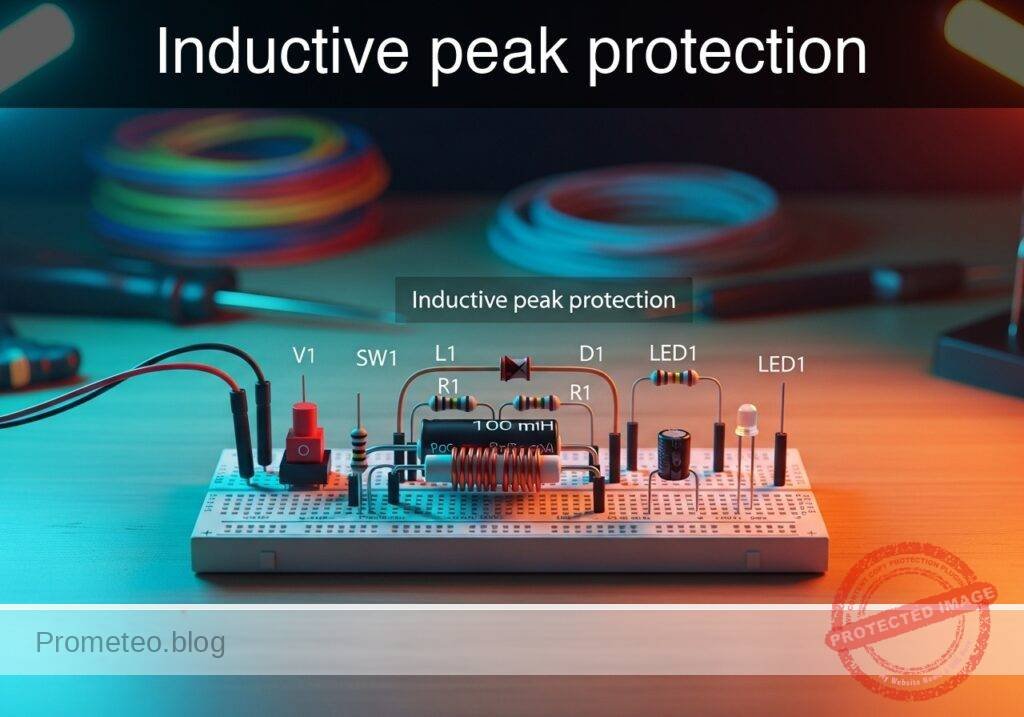
Inductive peak protection prototype (Maker Style)

Level: Medium | Objective: Analyze the transient voltage generated when disconnecting an inductor and mitigate it using a flyback diode.

Objective and use case

In this practical case, you will build a switched inductor circuit monitored by an oscilloscope to observe the destructive voltage spike (inductive kickback) that occurs when current is abruptly interrupted. You will then install a flyback diode in parallel with the inductive load to safely clamp this transient voltage.

Why it is useful:
* Prevents catastrophic overvoltage damage to sensitive switching components such as transistors, MOSFETs, and microcontroller pins.
* Significantly reduces electromagnetic interference (EMI) and radio frequency interference (RFI) caused by high-voltage arcing across mechanical switch contacts.
* Increases the reliability, safety, and lifespan of power supply systems, motor controllers, and relay-driven circuits.

Expected outcome:
* Without the diode, opening the switch will produce a massive negative voltage spike on the oscilloscope, often reaching hundreds of volts.
* With the flyback diode installed, the transient spike will be immediately clamped to a safe level of approximately -0.7 V.
* The stored magnetic energy will safely dissipate as a steadily decaying circulating current through the inductor-resistor-diode loop.

Target audience and level: Intermediate electronics students learning about reactive components, energy storage, and circuit protection techniques.

Materials

  • V1: 12 V DC supply, function: main power source
  • SW1: SPST toggle or push-button switch, function: circuit connection control
  • L1: 100 mH inductor, function: magnetic energy storage
  • R1: 100 Ω resistor, function: limits steady-state current to 120 mA
  • D1: 1N4007 rectifier diode, function: flyback protection

Wiring guide

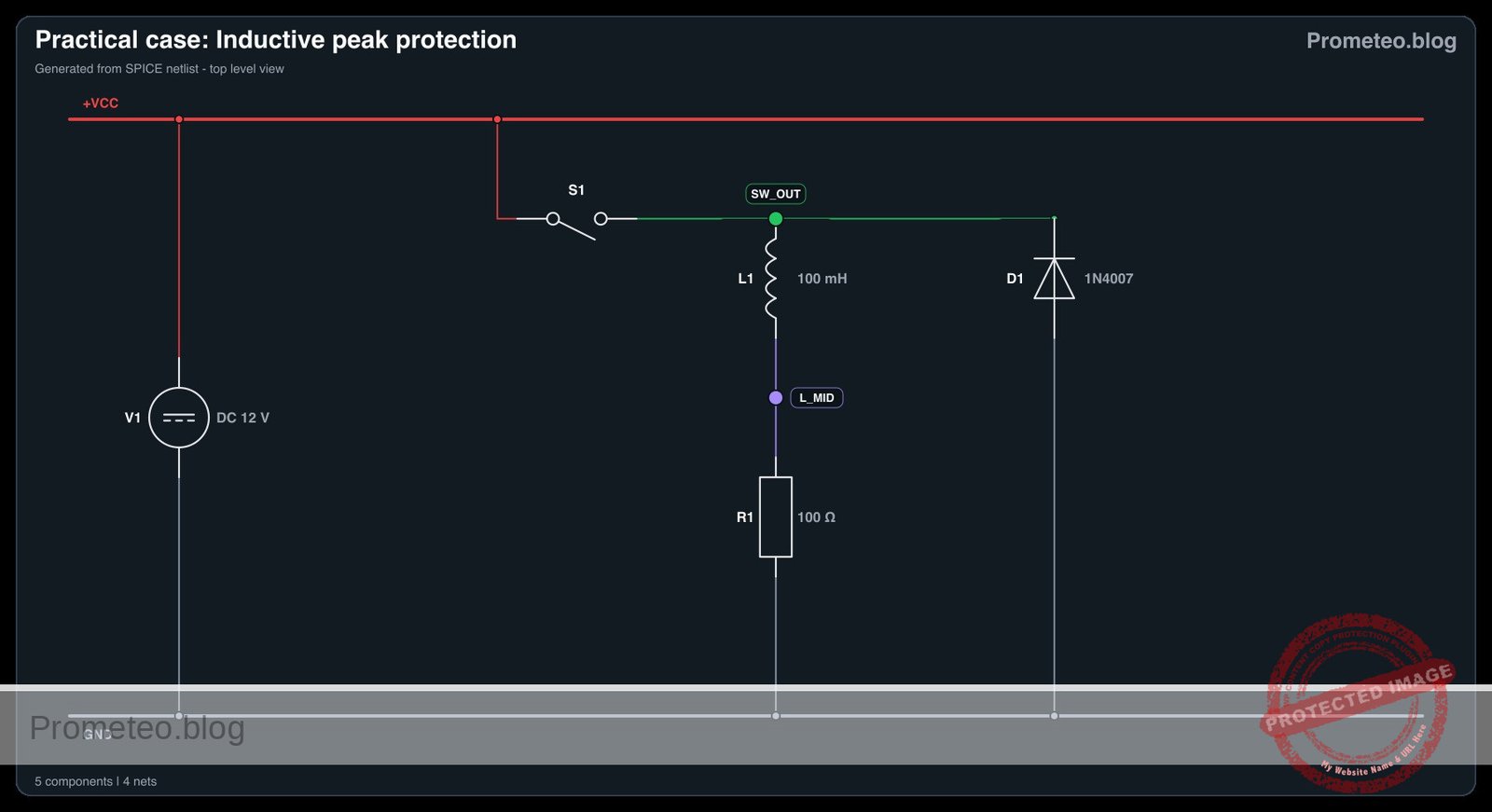
  • V1: connects between node VCC (positive) and node 0 (ground).
  • SW1: connects between node VCC and node SW_OUT.
  • L1: connects between node SW_OUT and node L_MID.
  • R1: connects between node L_MID and node 0.
  • D1: connects between node 0 (Anode) and node SW_OUT (Cathode) for reverse bias during normal closed-switch operation.

Conceptual block diagram

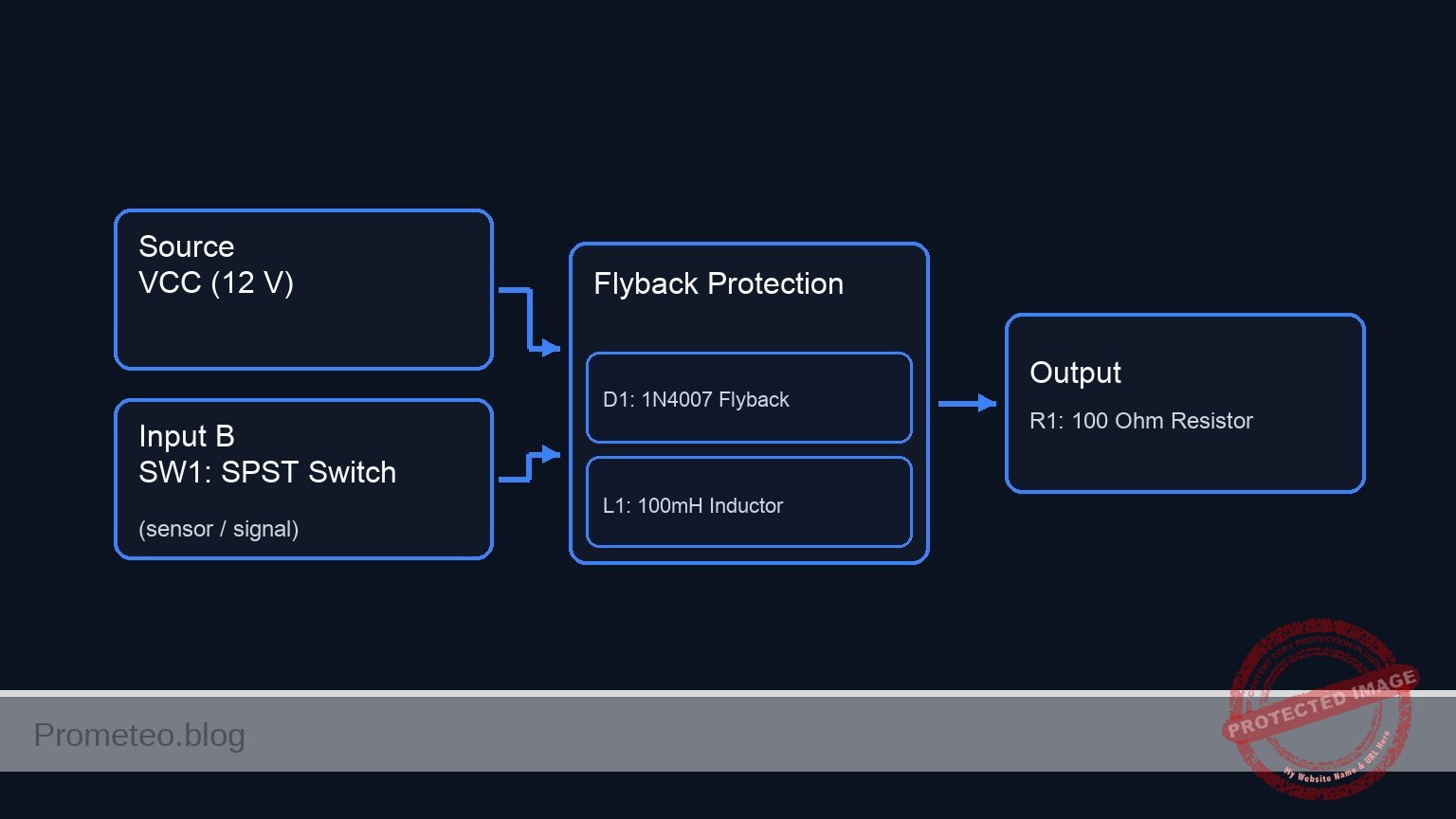
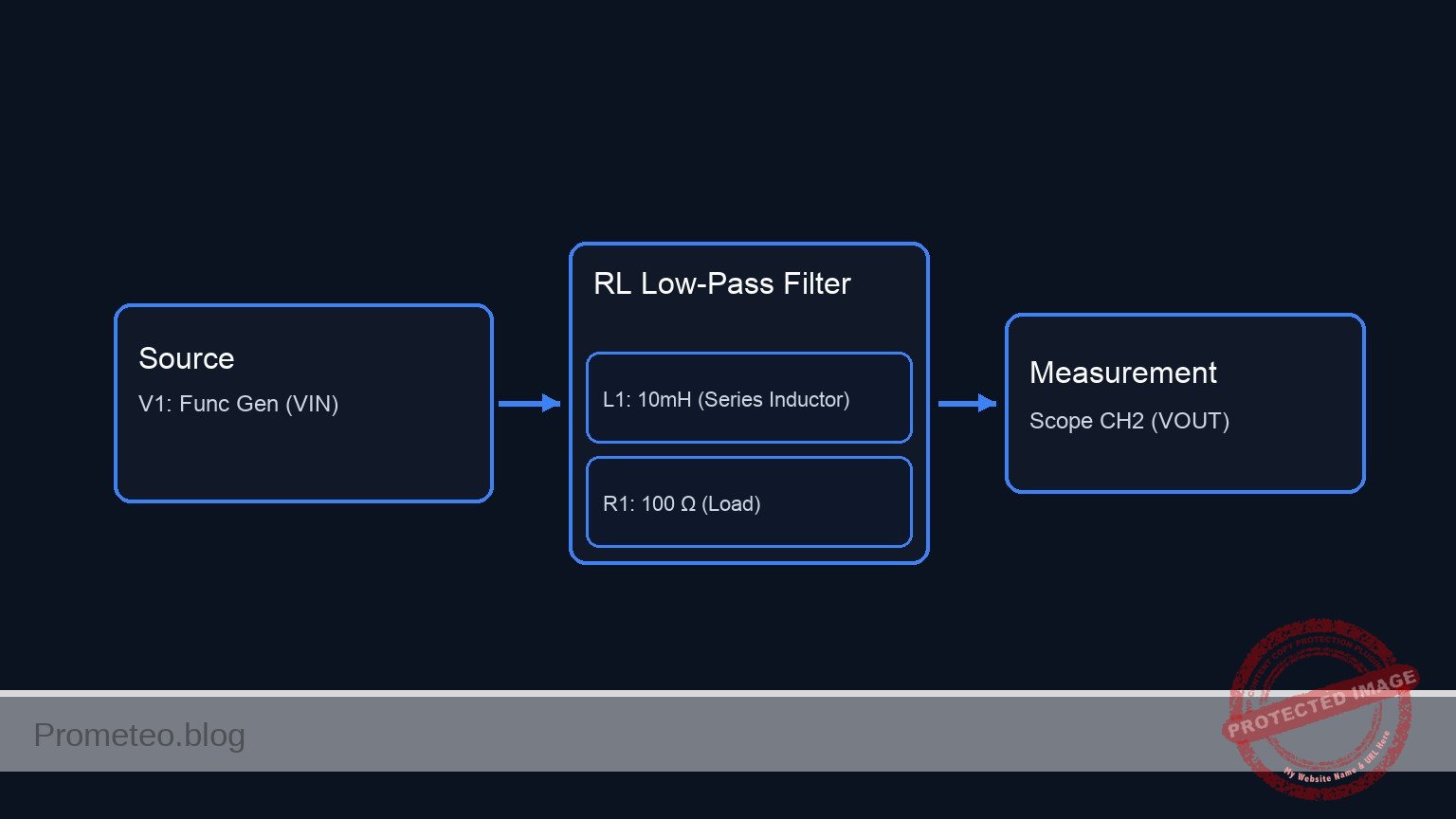
Conceptual block diagram — Flyback Protection
Quick read: inputs → main block → output (actuator or measurement). This summarizes the ASCII schematic below.

Schematic

VCC (12 V) --> [ SW1: SPST Switch ] --(SW_OUT)--> [ L1: 100mH Inductor ] --(L_MID)--> [ R1: 100 Ω Resistor ] --> GND
                                         ^
                                         |
                              (Cathode)  |
                           [ D1: 1N4007 Flyback ]
                              (Anode)    ^
                                         |
                                        GND
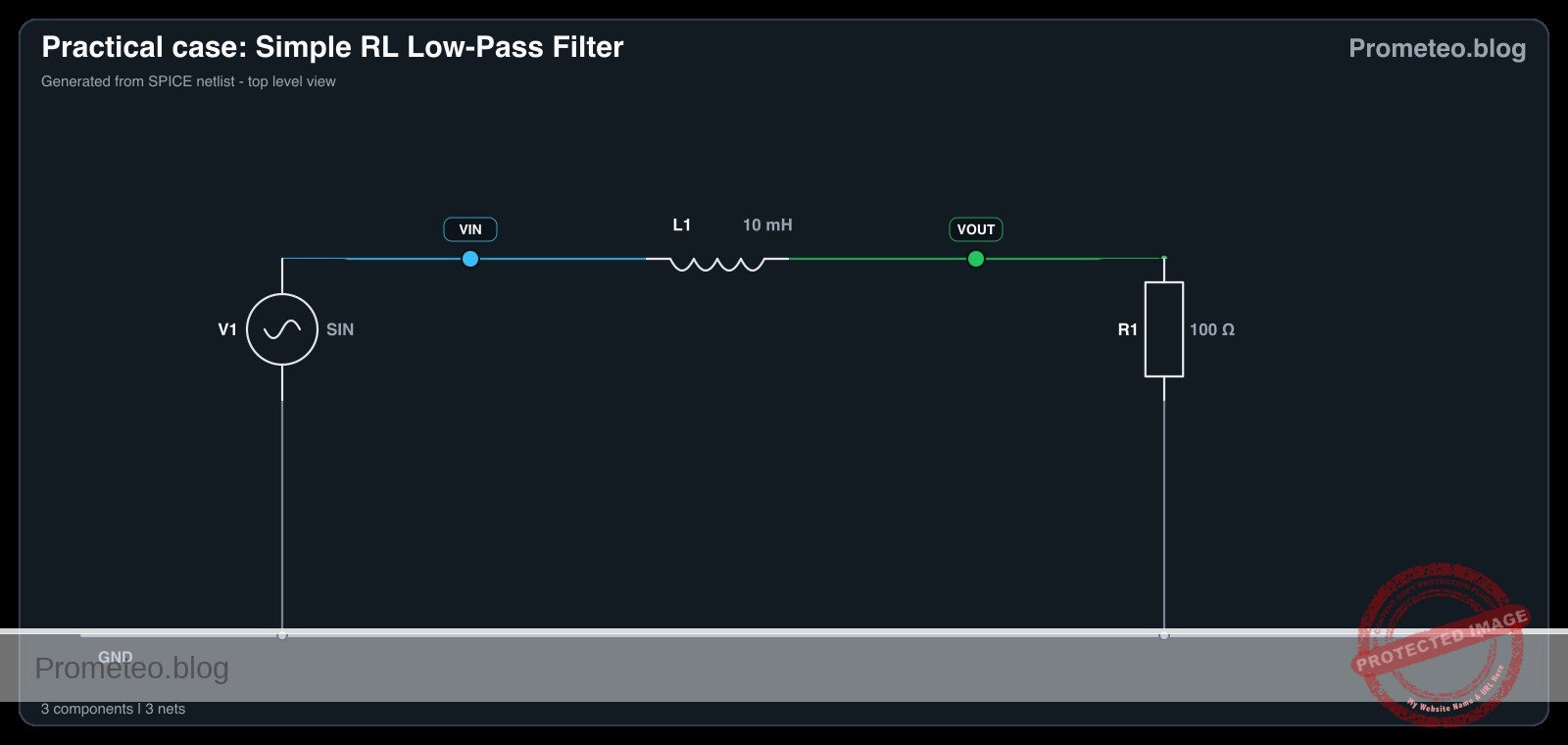
Electrical Schematic

Electrical diagram

Electrical diagram for case: Inductive peak protection
Generated from the validated SPICE netlist for this case.

🔒 This electrical diagram is premium. With the 7-day pass or the monthly membership you can unlock the complete didactic material and the print-ready PDF pack.🔓 See premium access plans

Measurements and tests

  1. Connect the oscilloscope probe to node SW_OUT and attach the ground clip to node 0. Set the oscilloscope trigger to a falling edge, single-shot mode.
  2. Begin with the flyback diode (D1) completely disconnected from the circuit.
  3. Close the switch (SW1) to allow current to flow. Wait a moment for the magnetic field in the inductor to fully build up.
  4. Quickly open the switch (SW1). Observe the oscilloscope capture; you will see a massive negative voltage transient as the inductor acts as a current source, forcing current across the open switch gap.
  5. Connect the flyback diode (D1), verifying that the cathode (striped end) connects to node SW_OUT and the anode connects to node 0.
  6. Repeat the switching process. The oscilloscope trace will now show the negative transient safely clamped at roughly -0.7 V as the diode forward-biases to provide a safe discharge path.

SPICE netlist and simulation

Reference SPICE Netlist (ngspice) — excerptFull SPICE netlist (ngspice)

* Inductive peak protection
.width out=256

V1 VCC 0 DC 12

* SW1 modeled as a voltage-controlled switch connecting VCC to SW_OUT
S1 VCC SW_OUT SW_CTRL 0 SW_MODEL
V_SW_CTRL SW_CTRL 0 PULSE(0 5 100u 1u 1u 500u 1000u)
.model SW_MODEL SW(VT=2.5 VH=0.1 RON=0.01 ROFF=100Meg)

L1 SW_OUT L_MID 100m
R1 L_MID 0 100

* ... (truncated in public view) ...

Copy this content into a .cir file and run with ngspice.

🔒 Part of this section is premium. With the 7-day pass or the monthly membership you can access the full content (materials, wiring, detailed build, validation, troubleshooting, variants and checklist) and download the complete print-ready PDF pack.

* Inductive peak protection
.width out=256

V1 VCC 0 DC 12

* SW1 modeled as a voltage-controlled switch connecting VCC to SW_OUT
S1 VCC SW_OUT SW_CTRL 0 SW_MODEL
V_SW_CTRL SW_CTRL 0 PULSE(0 5 100u 1u 1u 500u 1000u)
.model SW_MODEL SW(VT=2.5 VH=0.1 RON=0.01 ROFF=100Meg)

L1 SW_OUT L_MID 100m
R1 L_MID 0 100

* Flyback protection diode
D1 0 SW_OUT 1N4007
.model 1N4007 D(IS=1e-9 N=1.9 RS=0.03 BV=1000 IBV=5e-08 CJO=10p VJ=0.7 M=0.5 TT=1e-07)

.op
.tran 1u 2000u
.print tran V(SW_CTRL) V(SW_OUT) V(L_MID) V(VCC) I(L1)

.end

Simulation Results (Transient Analysis)

Simulation Results (Transient Analysis)
Analysis: The transient analysis spans 0 s to 2 ms and captures the switching interval. The switching node and inductor current remain bounded, consistent with the flyback path protecting the switch. Main ranges: l1#branch 120 nA -> 62.7 mA; v(sw_out) -884 mV -> 12 V; v(l_mid) 12 uV -> 6.27 V.
Show raw data table (2088 rows)
Index   time            v(sw_ctrl)      v(sw_out)       v(l_mid)        v(vcc)          l1#branch
0	0.000000e+00	0.000000e+00	1.199996e-05	1.199996e-05	1.200000e+01	1.199996e-07
1	1.000000e-08	0.000000e+00	1.199996e-05	1.199996e-05	1.200000e+01	1.199996e-07
2	2.000000e-08	0.000000e+00	1.199996e-05	1.199996e-05	1.200000e+01	1.199996e-07
3	4.000000e-08	0.000000e+00	1.199996e-05	1.199996e-05	1.200000e+01	1.199996e-07
4	8.000000e-08	0.000000e+00	1.199996e-05	1.199996e-05	1.200000e+01	1.199996e-07
5	1.600000e-07	0.000000e+00	1.199996e-05	1.199996e-05	1.200000e+01	1.199996e-07
6	3.200000e-07	0.000000e+00	1.199996e-05	1.199996e-05	1.200000e+01	1.199996e-07
7	6.400000e-07	0.000000e+00	1.199996e-05	1.199996e-05	1.200000e+01	1.199996e-07
8	1.280000e-06	0.000000e+00	1.199996e-05	1.199996e-05	1.200000e+01	1.199996e-07
9	2.280000e-06	0.000000e+00	1.199996e-05	1.199996e-05	1.200000e+01	1.199996e-07
10	3.280000e-06	0.000000e+00	1.199996e-05	1.199996e-05	1.200000e+01	1.199996e-07
11	4.280000e-06	0.000000e+00	1.199996e-05	1.199996e-05	1.200000e+01	1.199996e-07
12	5.280000e-06	0.000000e+00	1.199996e-05	1.199996e-05	1.200000e+01	1.199996e-07
13	6.280000e-06	0.000000e+00	1.199996e-05	1.199996e-05	1.200000e+01	1.199996e-07
14	7.280000e-06	0.000000e+00	1.199996e-05	1.199996e-05	1.200000e+01	1.199996e-07
15	8.280000e-06	0.000000e+00	1.199996e-05	1.199996e-05	1.200000e+01	1.199996e-07
16	9.280000e-06	0.000000e+00	1.199996e-05	1.199996e-05	1.200000e+01	1.199996e-07
17	1.028000e-05	0.000000e+00	1.199996e-05	1.199996e-05	1.200000e+01	1.199996e-07
18	1.128000e-05	0.000000e+00	1.199996e-05	1.199996e-05	1.200000e+01	1.199996e-07
19	1.228000e-05	0.000000e+00	1.199996e-05	1.199996e-05	1.200000e+01	1.199996e-07
20	1.328000e-05	0.000000e+00	1.199996e-05	1.199996e-05	1.200000e+01	1.199996e-07
21	1.428000e-05	0.000000e+00	1.199996e-05	1.199996e-05	1.200000e+01	1.199996e-07
22	1.528000e-05	0.000000e+00	1.199996e-05	1.199996e-05	1.200000e+01	1.199996e-07
23	1.628000e-05	0.000000e+00	1.199996e-05	1.199996e-05	1.200000e+01	1.199996e-07
... (2064 more rows) ...

Common mistakes and how to avoid them

  • Reversing the diode polarity: Placing the diode with the anode pointing to the positive voltage node creates a direct short circuit to ground when the switch is closed. This will destroy the diode or trigger the power supply’s overcurrent protection. Always ensure the cathode faces the higher potential.
  • Using a diode with inadequate current rating: The flyback diode must safely handle a peak forward current equal to the steady-state current of the inductor just before switching. Always use properly rated rectifier, Schottky, or fast-recovery diodes.
  • Omitting the series resistor: Connecting a pure inductor directly across a high-current DC source acts as a near short-circuit once the magnetic field is fully established. Always include a current-limiting series resistor, or ensure the inductor (such as a relay coil) has sufficient internal DC resistance.

Troubleshooting

  • Symptom: The power supply shuts down or its current limit LED turns on immediately upon closing the switch.
    • Cause: The flyback diode is installed backwards, creating a short circuit from the power source to ground.
    • Fix: Disconnect power immediately and flip the diode so its striped end (cathode) faces the switch node.
  • Symptom: A massive voltage spike still appears on the oscilloscope even with the diode supposedly installed.
    • Cause: The diode may have blown open due to a previous overcurrent event, or the breadboard connection is loose.
    • Fix: Verify diode continuity using a multimeter’s diode mode, and check the physical seating of the pins at the switch and ground nodes.
  • Symptom: The oscilloscope trace shows high-frequency ringing instead of a clean clamp.
    • Cause: Parasitic capacitance in the switch, wiring, or oscilloscope probes interacting with the inductor.
    • Fix: Ensure the oscilloscope probe is properly compensated (x10 mode recommended for high voltage spikes) and keep ground leads as short as physically possible.

Possible improvements and extensions

  • Automated switching with a MOSFET: Replace the mechanical switch with an N-channel MOSFET driven by a square wave generator (configured as a low-side switch) to observe repetitive clamping on the oscilloscope in real-time.
  • Fast discharge using a Zener diode: Add an appropriately rated Zener diode in series with the standard flyback diode (anode connected to anode). This allows the inductor to discharge its energy much faster by clamping the voltage at a higher, but strictly controlled, level.

More Practical Cases on Prometeo.blog

Find this product and/or books on this topic on Amazon

Go to Amazon

As an Amazon Associate, I earn from qualifying purchases. If you buy through this link, you help keep this project running.

Quick Quiz

Question 1: What is the main purpose of the flyback diode in this inductive load circuit?


Question 2: Which component stores energy in its magnetic field while current is flowing?


Question 3: What happens to the inductor current immediately after the switch opens?


Question 4: Why can an unprotected inductive load damage a switching device?


Question 5: In the SPICE model, what does the pulsed switch-control source represent?


Question 6: During normal energized operation, what should the flyback diode ideally do?


Question 7: Which measurement is most useful to observe the switching transient in the simulation?


Question 8: What role does R1 play in this practical model?


Question 9: Why is this circuit relevant for relays, solenoids and small motors?


Question 10: What should a correct validation show for this case before publication?


Carlos Núñez Zorrilla
Electronics & Computer Engineer

Telecommunications Electronics Engineer and Computer Engineer (official degrees in Spain).
Follow me:


Practical case: Voltage induction by magnetic movement

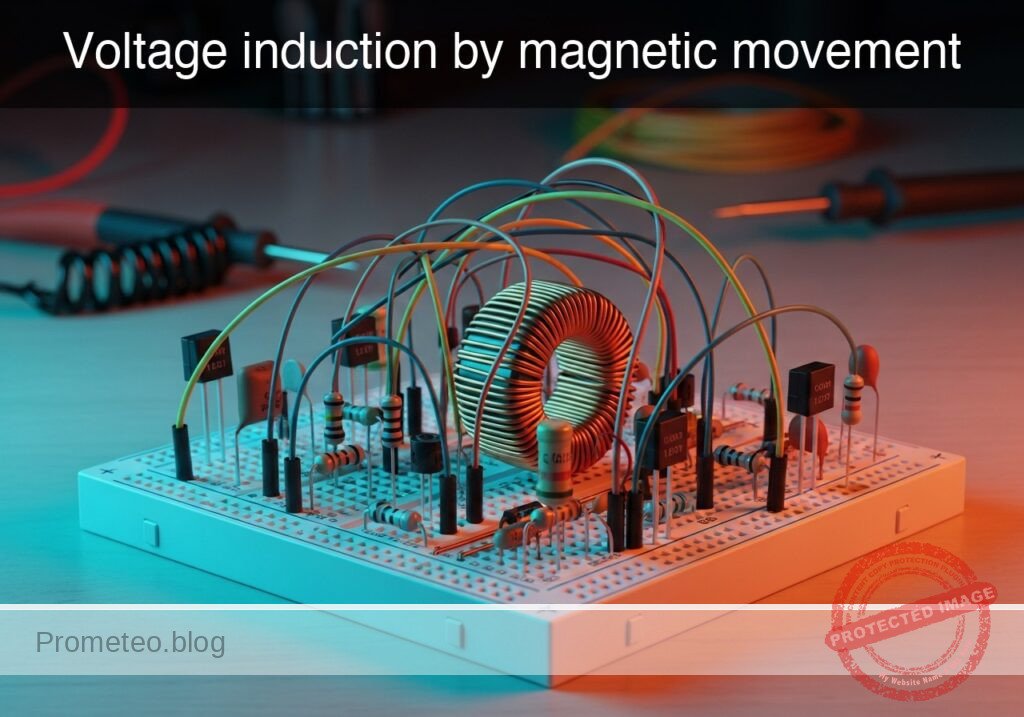
Voltage induction by magnetic movement prototype (Maker Style)

Level: Basic. Demonstrate how moving a magnet through a coil generates an electromotive force (EMF).

Objective and use case

In this practical case, you will construct a fundamental electromagnetic induction demonstrator using a hand-wound copper coil and a high-strength neodymium magnet. You will observe how kinetic energy is converted into electrical energy via Faraday’s Law of Induction.

Why it is useful:
* Power Generation: This mechanism illustrates the core principle behind electric generators, alternators, and wind turbines.
* Audio Technology: This is the operating principle for dynamic microphones and electric guitar pickups (transducers).
* Sensors: Used in automotive ABS speed sensors and industrial position sensors.
* Wireless Charging: Demonstrates the basics of magnetic coupling used in phone chargers.

Expected outcome:
* A measurable voltage spike (positive or negative) on the multimeter when the magnet moves relative to the coil.
* The LED flashes briefly when the magnet is moved rapidly, indicating a voltage peak exceeding the diode’s forward voltage (~1.8 V).
* Reversing the direction of the magnet’s movement reverses the polarity of the induced voltage.

Target audience: Students and hobbyists introducing themselves to Faraday’s Law and passive components.

Materials

  • L1: Air core coil (approx. 500–1000 turns of enameled copper wire), function: induction element.
  • MAG1: Cylindrical Neodymium magnet (fit to pass inside L1), function: source of magnetic flux.
  • D1: Red LED, function: indicator for positive phase induction.
  • D2: Green LED, function: indicator for negative phase induction (connected in anti-parallel).
  • M1: Multimeter (set to 200 mV or 2 V DC range), function: voltage monitor.

Wiring guide

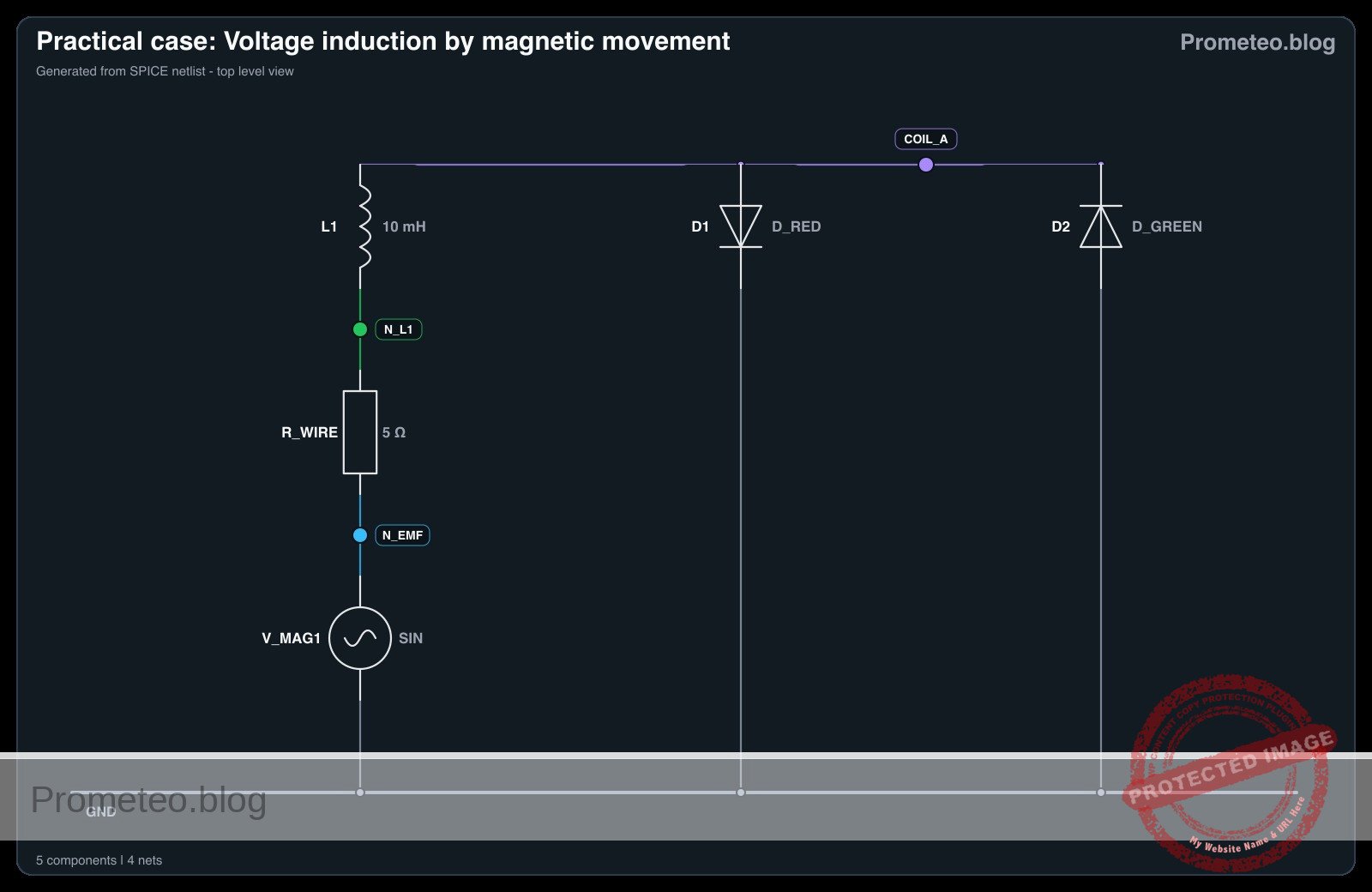
The circuit consists of the coil connected directly to the indicators in parallel. We define the coil terminals as nodes COIL_A and COIL_B.

  • L1: Connects between node COIL_A and node COIL_B.
  • D1: Anode connects to COIL_A; Cathode connects to COIL_B.
  • D2: Anode connects to COIL_B; Cathode connects to COIL_A (anti-parallel to D1).
  • M1: Positive probe connects to COIL_A; Negative probe connects to COIL_B.

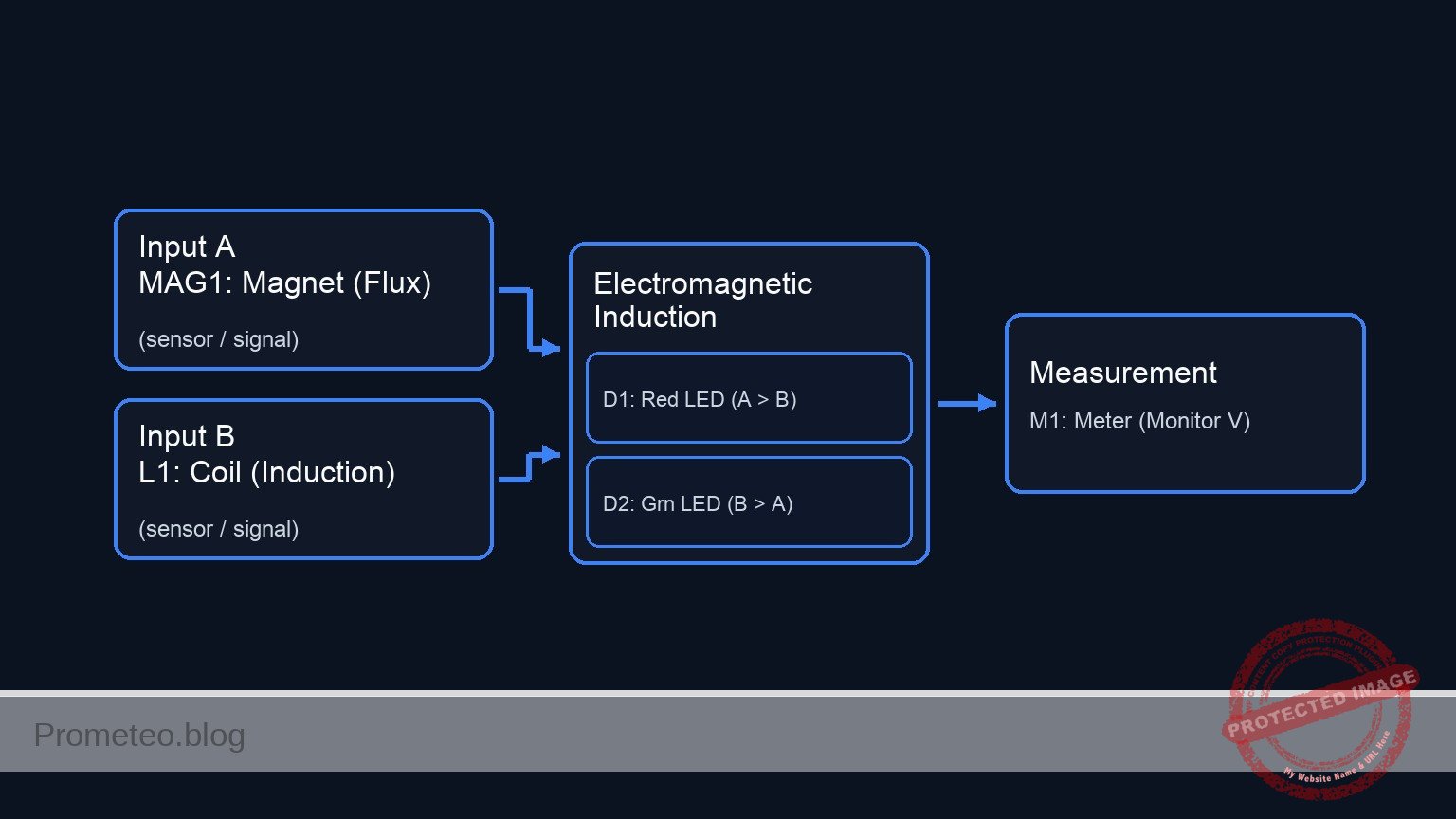
Conceptual block diagram

Conceptual block diagram — Electromagnetic Induction
Quick read: inputs → main block → output (actuator or measurement). This summarizes the ASCII schematic below.

Schematic

markdown
Title: Practical case: Voltage induction by magnetic movement

[ INPUT / SOURCE ]                       [ DISTRIBUTION RAILS ]                    [ OUTPUT / LOADS ]

                                                 (Node A: Top Rail)
                                    /------------------------------------------------------------------>
                                    |                |                    |                    |
[ MAG1: Magnet ] --(Flux)--> [ L1: Coil ]            | (Anode)            | (Cathode)          | (+)
                                    |                v                    v                    v
                                    |        [ D1: Red LED ]      [ D2: Grn LED ]      [ M1: Meter ]
                                    |        (Lights if A > B)    (Lights if B > A)    (Monitor V)
                                    |                |                    |                    |
                                    |                | (Cathode)          | (Anode)            | (-)
                                    \                v                    v                    v
                                    \------------------------------------------------------------------>
                                                 (Node B: Bottom Rail)
Schematic (ASCII)

Electrical diagram

Electrical diagram for case: Voltage induction by magnetic movement
Generated from the validated SPICE netlist for this case.

🔒 This electrical diagram is premium. With the 7-day pass or the monthly membership you can unlock the complete didactic material and the print-ready PDF pack.🔓 See premium access plans

Measurements and tests

  1. Static Test: Place the magnet inside the coil and hold it completely still. The multimeter should read 0 V, and no LEDs should light up. This confirms that a changing magnetic field is required.
  2. Slow Insertion: Set the multimeter to the lowest DC voltage range (e.g., 200 mV). Slowly push the magnet into the coil. Observe a small voltage reading (e.g., +10 to +50 mV).
  3. Fast Action: Quickly thrust the magnet into the coil. You should see a significantly higher voltage spike (potentially > 1 V) and D1 (Red) may flash briefly.
  4. Reverse Motion: Quickly pull the magnet out of the coil. The voltage polarity on the multimeter will flip (negative sign), and D2 (Green) should flash.
  5. Oscillation: Move the magnet back and forth rapidly inside the coil. The LEDs should flicker alternately, demonstrating the generation of Alternating Current (AC).

SPICE netlist and simulation

Reference SPICE Netlist (ngspice) — excerptFull SPICE netlist (ngspice)

* Practical case: Voltage induction by magnetic movement
.width out=256
*
* Description:
* Simulation of a magnet moving through a coil, inducing voltage to drive two antiparallel LEDs.
*
* Nodes:
* COIL_A : Hot terminal of the coil (Multimeter +)
* COIL_B : Reference terminal of the coil (Multimeter -, Grounded)
*
* Note: The physical "Coil" is modeled as a series combination of an EMF Voltage Source (V_MAG1),
* a Resistor (R_WIRE), and the Inductor (L1).

* --- Power / Reference ---
* Grounding COIL_B as per Multimeter negative probe convention
V_REF COIL_B 0 0

* --- Magnetic Induction Source (MAG1) ---
* Simulating the changing magnetic flux from MAG1 as an AC voltage source.
* 3V Peak, 5Hz (Simulates shaking the magnet)
* ... (truncated in public view) ...

Copy this content into a .cir file and run with ngspice.

🔒 Part of this section is premium. With the 7-day pass or the monthly membership you can access the full content (materials, wiring, detailed build, validation, troubleshooting, variants and checklist) and download the complete print-ready PDF pack.

* Practical case: Voltage induction by magnetic movement
.width out=256
*
* Description:
* Simulation of a magnet moving through a coil, inducing voltage to drive two antiparallel LEDs.
*
* Nodes:
* COIL_A : Hot terminal of the coil (Multimeter +)
* COIL_B : Reference terminal of the coil (Multimeter -, Grounded)
*
* Note: The physical "Coil" is modeled as a series combination of an EMF Voltage Source (V_MAG1),
* a Resistor (R_WIRE), and the Inductor (L1).

* --- Power / Reference ---
* Grounding COIL_B as per Multimeter negative probe convention
V_REF COIL_B 0 0

* --- Magnetic Induction Source (MAG1) ---
* Simulating the changing magnetic flux from MAG1 as an AC voltage source.
* 3V Peak, 5Hz (Simulates shaking the magnet)
V_MAG1 N_EMF COIL_B SIN(0 3 5)

* --- Coil Assembly (L1) ---
* Internal wire resistance
R_WIRE N_EMF N_L1 5
* The physical inductance L1
L1 N_L1 COIL_A 10m

* --- Indicators ---
* D1: Red LED (Indicates Positive Phase)
* Anode: COIL_A, Cathode: COIL_B
D1 COIL_A COIL_B D_RED

* D2: Green LED (Indicates Negative Phase)
* Anode: COIL_B, Cathode: COIL_A
D2 COIL_B COIL_A D_GREEN

* --- Multimeter (M1) ---
* Modeled as the voltage difference V(COIL_A) - V(COIL_B)
* (Implicit in the node voltages)

* --- Models ---
* Generic LED Models
.model D_RED D(IS=1e-18 N=2 RS=10 BV=5)
.model D_GREEN D(IS=1e-18 N=2.5 RS=10 BV=5)

* --- Simulation Directives ---
.op
* Transient analysis: 1ms step, 500ms duration (2.5 cycles at 5Hz)
.tran 1m 500m

* --- Output ---
* Monitoring the induced voltage at COIL_A
.print tran V(COIL_A) I(L1)

Simulation Results (Transient Analysis)

Simulation Results (Transient Analysis)

Analysis: The transient analysis shows an AC voltage at COIL_A oscillating between approx +2.6V and -2.8V at 5Hz. Current flows through L1, peaking around 66mA. The voltage levels are sufficient to forward bias the LEDs (D_RED and D_GREEN) alternately, consistent with the intended indication of positive and negative phases.
Show raw data table (522 rows)
Index   time            v(coil_a)       l1#branch
0	0.000000e+00	4.375392e-35	-8.75078e-36
1	1.000000e-05	9.424778e-04	1.884985e-15
2	2.000000e-05	1.884955e-03	3.769970e-15
3	4.000000e-05	3.769910e-03	7.539938e-15
4	8.000000e-05	7.539814e-03	1.507987e-14
5	1.600000e-04	1.507958e-02	3.015936e-14
6	3.200000e-04	3.015878e-02	6.031856e-14
7	6.400000e-04	6.031451e-02	1.206316e-13
8	1.280000e-03	1.206046e-01	2.412214e-13
9	2.280000e-03	2.147012e-01	4.294658e-13
10	3.280000e-03	3.085859e-01	6.175653e-13
11	4.280000e-03	4.021661e-01	8.067202e-13
12	5.280000e-03	4.953494e-01	1.005111e-12
13	6.280000e-03	5.880438e-01	1.262566e-12
14	7.280000e-03	6.801579e-01	1.873422e-12
15	8.280000e-03	7.716008e-01	4.548512e-12
16	9.280000e-03	8.622822e-01	1.907006e-11
17	1.028000e-02	9.521126e-01	1.003825e-10
18	1.128000e-02	1.041003e+00	5.511221e-10
19	1.228000e-02	1.128867e+00	3.003086e-09
20	1.328000e-02	1.215616e+00	1.605415e-08
21	1.428000e-02	1.301164e+00	8.389370e-08
22	1.528000e-02	1.385424e+00	4.276266e-07
23	1.628000e-02	1.468291e+00	2.121308e-06
... (498 more rows) ...

Common mistakes and how to avoid them

  1. Using weak magnets: Standard black ferrite magnets are often too weak to generate visible voltage on an LED. Solution: Use rare-earth Neodymium magnets.
  2. Moving too slowly: Faraday’s Law (V = – N · d\Phi / dt) depends on the rate of change. Solution: Move the magnet as quickly as possible to maximize the voltage spike.
  3. Insulation issues: Enameled wire has a clear coating that blocks electricity. Solution: Ensure the ends of the coil wire are sanded or scraped down to bare copper before connecting to the LEDs or multimeter.

Troubleshooting

  • Symptom: Multimeter shows voltage, but LEDs never light up.
    • Cause: The induced voltage is lower than the LED forward voltage threshold (~1.8 V).
    • Fix: Add more turns to the coil (increase $N$) or move the magnet faster.
  • Symptom: No reading on the multimeter even with fast movement.
    • Cause: Open circuit or poor connection at the coil tips.
    • Fix: Check continuity (resistance mode) across the coil terminals; it should read a few Ohms, not infinite.
  • Symptom: Voltage reading is erratic or hard to see.
    • Cause: Digital multimeters have a slow sample rate.
    • Fix: Use the «Max/Min» hold function if available, or use an analog (needle) multimeter which responds better to transient pulses.

Possible improvements and extensions

  1. Shake Flashlight: Add a bridge rectifier (4 diodes) and a large capacitor (e.g., 1000 µF) to store the energy generated by shaking the magnet, allowing the LED to stay lit for a few seconds after motion stops.
  2. Core Comparison: Insert an iron bolt inside the coil (making it an iron-core inductor) and move a magnet near the head of the bolt to observe how the ferromagnetic core concentrates the magnetic flux and affects induction.

More Practical Cases on Prometeo.blog

Find this product and/or books on this topic on Amazon

Go to Amazon

As an Amazon Associate, I earn from qualifying purchases. If you buy through this link, you help keep this project running.

Quick Quiz

Question 1: What core physical law does this practical case demonstrate?


Question 2: Which type of energy conversion takes place in this experiment?


Question 3: What component serves as the source of magnetic flux in this setup?


Question 4: Which real-world device operates on the same principle demonstrated here?


Question 5: What is the function of the LED in the circuit?


Question 6: What happens to the induced voltage polarity when the direction of the magnet's movement is reversed?


Question 7: To see the LED flash, the induced voltage peak must exceed approximately what value?


Question 8: What is the expected outcome on the multimeter when the magnet moves relative to the coil?


Question 9: Besides power generation, which automotive application uses this sensor technology?


Question 10: Which modern convenience technology is mentioned as using the basics of magnetic coupling?


Carlos Núñez Zorrilla
Electronics & Computer Engineer

Telecommunications Electronics Engineer and Computer Engineer (official degrees in Spain).
Follow me:


Practical case: Simple RL Low-Pass Filter

Simple RL Low-Pass Filter prototype (Maker Style)

Level: Basic – Observe how an inductor filters high frequencies in an RL series circuit.

Objective and use case

In this practical exercise, you will build a passive RL low-pass filter using a series inductor and a shunt resistor. This circuit demonstrates the inductive reactance property, where impedance increases with frequency, effectively blocking high-frequency signals while allowing low-frequency signals to pass through to the output.

Why it is useful:
* Audio Electronics: Used in crossover networks to direct low frequencies (bass) to woofers while blocking treble.
* Power Supplies: Essential for smoothing output currents and reducing ripple in DC/DC converters.
* Noise Suppression: Filters out high-frequency interference (EMI) on signal lines.
* Signal Conditioning: Removes high-frequency noise from sensor data before processing.

Expected outcome:
* Low Frequency Input (< Cutoff): The output amplitude (VOUT) is approximately equal to the input amplitude (VIN).
* Cutoff Frequency (fc): The output amplitude drops to roughly 70.7% of the input amplitude (-3dB point).
* High Frequency Input (> Cutoff): The output amplitude is significantly attenuated (reduced).
* Target audience: Basic electronics students and hobbyists exploring AC circuit theory.

Materials

  • V1: Function Generator (Sine wave source), function: AC signal injection
  • L1: 10 mH inductor, function: series reactive element (impedance increases with frequency)
  • R1: 100 Ω resistor, function: load/shunt resistor (output taken here)
  • Scope: Dual-channel Oscilloscope, function: visual comparison of Input vs. Output

Wiring guide

Construct the circuit using the following node connections. The output voltage is measured across the resistor.

  • V1 (Signal Source): Connects between node VIN (Positive) and node 0 (GND).
  • L1: Connects between node VIN and node VOUT.
  • R1: Connects between node VOUT and node 0 (GND).
  • Oscilloscope Channel 1: Connect probe tip to VIN and ground clip to 0.
  • Oscilloscope Channel 2: Connect probe tip to VOUT and ground clip to 0.

Conceptual block diagram

Conceptual block diagram — RL Low-Pass Filter
Quick read: inputs → main block → output (actuator or measurement). This summarizes the ASCII schematic below.

Schematic

[ V1: Func Gen ] --(Node VIN)--> [ L1: 10mH ] --(Node VOUT)--> [ R1: 100 Ω ] --> GND (0)
       |                        (Series Inductor)      |          (Load)
       |                                               |
       +--------(Probe)-------> [ Scope CH1 ]          +--------(Probe)-------> [ Scope CH2 ]
Schematic (ASCII)

Electrical diagram

Electrical diagram for case: Simple RL low-pass filter
Generated from the validated SPICE netlist for this case.

🔒 This electrical diagram is premium. With the 7-day pass or the monthly membership you can unlock the complete didactic material and the print-ready PDF pack.🔓 See premium access plans

Measurements and tests

Follow these steps to validate the frequency response of the filter.

  1. Setup: Configure the Function Generator (V1) to output a Sine Wave with 5 Vpp amplitude.
  2. Low Frequency Test (Pass Band):
    • Set V1 frequency to 100 Hz.
    • Observe Channel 1 (Input) and Channel 2 (Output) on the oscilloscope.
    • Result: The output wave (VOUT) should be almost identical in amplitude to the input (VIN).
  3. Cutoff Frequency Test (fc):
    • Calculate the theoretical cutoff: fc = (R / (2\pi L)) ≈ (100 / (2\pi × 0.01)) ≈ 1.59 kHz.
    • Set V1 frequency to 1.6 kHz.
    • Result: VOUT should be approximately 3.5 Vpp (roughly 0.707 × 5 Vpp). You will also notice a phase lag of -45°.
  4. High Frequency Test (Stop Band):
    • Set V1 frequency to 50 kHz.
    • Result: The output wave (VOUT) should be very small (highly attenuated) compared to the input.

SPICE netlist and simulation

Reference SPICE Netlist (ngspice) — excerptFull SPICE netlist (ngspice)

* Practical case: Simple RL Low-Pass Filter
.width out=256

* --- Component Definitions ---

* V1: Function Generator (Sine wave source)
* Wiring: Connects between node VIN (Positive) and node 0 (GND)
* Configuration: Sine wave, 0V offset, 5V amplitude, 2kHz frequency
* (Note: Cutoff frequency fc = R/(2*pi*L) approx 1.6kHz. 2kHz chosen to show attenuation)
V1 VIN 0 SIN(0 5 2k)

* L1: 10 mH inductor
* Wiring: Connects between node VIN and node VOUT
L1 VIN VOUT 10m

* R1: 100 Ohm resistor
* Wiring: Connects between node VOUT and node 0 (GND)
R1 VOUT 0 100

* --- Analysis Commands ---
* ... (truncated in public view) ...

Copy this content into a .cir file and run with ngspice.

🔒 Part of this section is premium. With the 7-day pass or the monthly membership you can access the full content (materials, wiring, detailed build, validation, troubleshooting, variants and checklist) and download the complete print-ready PDF pack.

* Practical case: Simple RL Low-Pass Filter
.width out=256

* --- Component Definitions ---

* V1: Function Generator (Sine wave source)
* Wiring: Connects between node VIN (Positive) and node 0 (GND)
* Configuration: Sine wave, 0V offset, 5V amplitude, 2kHz frequency
* (Note: Cutoff frequency fc = R/(2*pi*L) approx 1.6kHz. 2kHz chosen to show attenuation)
V1 VIN 0 SIN(0 5 2k)

* L1: 10 mH inductor
* Wiring: Connects between node VIN and node VOUT
L1 VIN VOUT 10m

* R1: 100 Ohm resistor
* Wiring: Connects between node VOUT and node 0 (GND)
R1 VOUT 0 100

* --- Analysis Commands ---

* Transient Analysis
* Step size: 1us
* Stop time: 2ms (sufficient to capture several cycles at 2kHz)
.tran 1u 2m

* Operating Point Analysis (DC check)
.op

* --- Output Directives ---

* Print Input (VIN) and Output (VOUT) voltages for simulation logging
* Scope Channel 1: VIN
* Scope Channel 2: VOUT
.print tran V(VIN) V(VOUT) I(L1)

.end

Simulation Results (Transient Analysis)

Simulation Results (Transient Analysis)

Analysis: The simulation shows a sinusoidal input (VIN) and a sinusoidal output (VOUT). At 2kHz, the output amplitude (approx 3V peak) is attenuated relative to the input (5V peak) and phase-shifted, consistent with RL low-pass filter behavior near its cutoff frequency.
Show raw data table (2012 rows)
Index   time            v(vin)          v(vout)         l1#branch
0	0.000000e+00	0.000000e+00	0.000000e+00	0.000000e+00
1	1.000000e-08	6.283185e-04	6.282557e-08	6.282557e-10
2	1.084006e-08	6.811008e-04	6.854662e-08	6.854662e-10
3	1.252017e-08	7.866654e-04	8.087543e-08	8.087543e-10
4	1.588039e-08	9.977945e-04	1.108531e-07	1.108531e-09
5	2.260084e-08	1.420053e-03	1.920880e-07	1.920880e-09
6	3.604174e-08	2.264569e-03	4.396687e-07	4.396687e-09
7	6.292353e-08	3.953601e-03	1.275216e-06	1.275216e-08
8	1.166871e-07	7.331665e-03	4.307397e-06	4.307397e-08
9	2.242143e-07	1.408778e-02	1.581244e-05	1.581244e-07
10	4.392686e-07	2.759992e-02	6.055593e-05	6.055593e-07
11	8.693773e-07	5.462350e-02	2.367416e-04	2.367416e-06
12	1.729595e-06	1.086651e-01	9.340244e-04	9.340244e-06
13	2.729595e-06	1.714719e-01	2.318447e-03	2.318447e-05
14	3.729595e-06	2.342516e-01	4.313902e-03	4.313902e-05
15	4.729595e-06	2.969943e-01	6.913992e-03	6.913992e-05
16	5.729595e-06	3.596901e-01	1.011228e-02	1.011228e-04
17	6.729595e-06	4.223291e-01	1.390231e-02	1.390231e-04
18	7.729595e-06	4.849014e-01	1.827756e-02	1.827756e-04
19	8.729595e-06	5.473972e-01	2.323151e-02	2.323151e-04
20	9.729595e-06	6.098065e-01	2.875758e-02	2.875758e-04
21	1.072959e-05	6.721195e-01	3.484918e-02	3.484918e-04
22	1.172959e-05	7.343264e-01	4.149966e-02	4.149966e-04
23	1.272959e-05	7.964173e-01	4.870237e-02	4.870237e-04
... (1988 more rows) ...

Common mistakes and how to avoid them

  1. Measuring across the Inductor: If you measure voltage across L1 instead of R1, you create a High-Pass filter (passing high frequencies). Solution: Ensure the oscilloscope probe monitors the node between L1 and R1 relative to Ground.
  2. Using DC Input: An inductor acts as a short circuit in DC (after the transient). Solution: Ensure the function generator is set to AC (Sine Wave) to observe reactance effects.
  3. Inductor Saturation: Using a very small inductor core with high current can saturate the magnetic field, distorting the waveform. Solution: Use an appropriate inductor or keep signal current within the component’s rating.

Troubleshooting

  • Symptom: VOUT is zero at all frequencies.
    • Cause: Open circuit in the wiring or broken inductor wire.
    • Fix: Check continuity of L1 and connections at VIN and VOUT.
  • Symptom: VOUT equals VIN at all frequencies.
    • Cause: The inductor L1 is shorted or R1 is disconnected (open).
    • Fix: Measure the resistance of L1 (should be non-zero but low) and ensure R1 is properly grounded.
  • Symptom: No attenuation observed at 50 kHz.
    • Cause: Inductor value is too small or Resistor value is too large (cutoff frequency is too high).
    • Fix: Verify component values. Try increasing L1 or decreasing R1 to lower the cutoff frequency.

Possible improvements and extensions

  1. Bode Plotting: Manually record the amplitude of VOUT at 10 different frequencies from 100 Hz to 100 kHz and plot the results on semi-log graph paper to visualize the -20dB/decade roll-off.
  2. Second Order Filter: Add a capacitor in parallel with R1 to create an RLC low-pass filter, creating a steeper roll-off (-40dB/decade) and potentially introducing resonance.

More Practical Cases on Prometeo.blog

Find this product and/or books on this topic on Amazon

Go to Amazon

As an Amazon Associate, I earn from qualifying purchases. If you buy through this link, you help keep this project running.

Quick Quiz

Question 1: What type of filter is described in this practical exercise?


Question 2: Which component acts as the series reactive element in this circuit?


Question 3: How does the impedance of an inductor change with frequency?


Question 4: Where is the output voltage typically measured in a series RL low-pass filter configuration?


Question 5: What happens to the output amplitude when the input frequency is significantly higher than the cutoff frequency?


Question 6: In audio electronics, what is a common use for this type of filter?


Question 7: Why is this circuit useful in power supplies?


Question 8: What is the primary function of the inductor in this circuit regarding signal frequencies?


Question 9: Which application involves removing high-frequency noise from sensor data?


Question 10: What is the expected outcome for a Low Frequency Input (< Cutoff) in this circuit?


Carlos Núñez Zorrilla
Electronics & Computer Engineer

Telecommunications Electronics Engineer and Computer Engineer (official degrees in Spain).

Follow me:


Practical case: Opposition to DC current change

Opposition to DC current change prototype (Maker Style)

Level: Basic. Observe the delay in lamp activation due to self-induction.

Objective and use case

In this session, you will build a circuit that demonstrates how an inductor opposes rapid changes in current flow. By placing a large inductor in series with a lamp (with a parallel bypass resistor), you will create a visual «soft-start» effect where the light starts dim and gradually brightens.

Why it is useful:
* Inrush Current Limiting: Used in power supplies and large motors to prevent blown fuses when devices are first turned on.
* Soft-Start Circuits: Protects delicate filaments and components from thermal shock.
* Filtering: Smoothes out noise and ripples in DC power lines.

Expected outcome:
* When the switch is closed, the lamp will turn on immediately but dimly.
* Over a short period (0.5 to 2 seconds, depending on the inductance), the lamp will become fully bright.
* This visualizes the inductor initially acting as an «open circuit» (blocking current) and transitioning to a «short circuit» (allowing full flow).
* Target audience: Basic electronics students and hobbyists.

Materials

  • V1: 12 V DC power supply or battery.
  • S1: SPST mechanical switch (toggle or push-button).
  • L1: 1 H to 2 H iron-core inductor, function: creates opposition to current change (e.g., a transformer primary winding used as a choke).
  • R1: 220 Ω resistor (1 Watt or higher), function: bypass path for visual contrast.
  • X1: 12 V / 100 mA incandescent lamp (small bulb), function: visual output load.

Wiring guide

Construct the circuit using the following connections. The node names (e.g., VCC, SW_OUT) help identify the electrical points.

  • V1 (DC Source): Connect the positive terminal to VCC and the negative terminal to 0 (GND).
  • S1 (Switch): Connect between VCC and node SW_OUT.
  • L1 (Inductor): Connect between node SW_OUT and node LAMP_IN.
  • R1 (Resistor): Connect between node SW_OUT and node LAMP_IN (this places R1 in parallel with L1).
  • X1 (Lamp): Connect between node LAMP_IN and 0 (GND).

Conceptual block diagram

Conceptual block diagram — RL Parallel Circuit
Quick read: inputs → main block → output (actuator or measurement). This summarizes the ASCII schematic below.

Schematic

(Node: SW_OUT)          (Node: LAMP_IN)
                                              /--> [ L1: Inductor ] --\
[ V1: 12 V Source ] --(VCC)--> [ S1: Switch ] --                        --> [ X1: Lamp ] --> GND
                                              \--> [ R1: Resistor ] --/
Schematic (ASCII)

Electrical diagram

Electrical diagram for the opposition to DC current change case
Generated from the validated SPICE netlist for this case.

🔒 This electrical diagram is premium. With the 7-day pass or the monthly membership you can unlock the complete didactic material and the print-ready PDF pack.🔓 See premium access plans

Measurements and tests

Follow these steps to validate the phenomenon:

  1. Initial State: Ensure the switch S1 is open. The lamp X1 should be off.
  2. Observation: Keep your eyes on the lamp X1.
  3. Action: Close switch S1.
  4. Visual Validation:
    • Phase 1 (Instant): The lamp lights up at roughly 30–50% brightness. (Current is flowing through R1, as L1 opposes the sudden change).
    • Phase 2 (Delay): The lamp brightness ramps up smoothly to 100%. (As the magnetic field in L1 stabilizes, it allows full current to pass, bypassing R1).
  5. Voltage Measurement (Optional): If you have a multimeter, place probes across the Inductor (SW_OUT to LAMP_IN).
    • At the moment of contact, voltage is high (approx 6–8 V).
    • After 1–2 seconds, voltage drops to near 0 V.

SPICE netlist and simulation

Reference SPICE Netlist (ngspice) — excerptFull SPICE netlist (ngspice)

* Title: Practical case: Opposition to DC current change
.width out=256
* Description: Demonstrates inductive opposition to current change (dim-to-bright lamp effect)

* --- Power Supply ---
* 12V DC Supply
V1 VCC 0 DC 12

* --- User Interface (Switch Control) ---
* Generates a control pulse to simulate pressing the button.
* Button Press: Starts at 10ms, Duration 300ms.
V_BTN_CTRL CTRL 0 PULSE(0 5 10m 1u 1u 300m 600m)

* --- Components ---

* S1: SPST Mechanical Switch
* Connected between VCC and SW_OUT.
* Modeled as a voltage-controlled switch driven by the control pulse.
S1 VCC SW_OUT CTRL 0 SW_IDEAL

* ... (truncated in public view) ...

Copy this content into a .cir file and run with ngspice.

🔒 Part of this section is premium. With the 7-day pass or the monthly membership you can access the full content (materials, wiring, detailed build, validation, troubleshooting, variants and checklist) and download the complete print-ready PDF pack.

* Title: Practical case: Opposition to DC current change
.width out=256
* Description: Demonstrates inductive opposition to current change (dim-to-bright lamp effect)

* --- Power Supply ---
* 12V DC Supply
V1 VCC 0 DC 12

* --- User Interface (Switch Control) ---
* Generates a control pulse to simulate pressing the button.
* Button Press: Starts at 10ms, Duration 300ms.
V_BTN_CTRL CTRL 0 PULSE(0 5 10m 1u 1u 300m 600m)

* --- Components ---

* S1: SPST Mechanical Switch
* Connected between VCC and SW_OUT.
* Modeled as a voltage-controlled switch driven by the control pulse.
S1 VCC SW_OUT CTRL 0 SW_IDEAL

* L1: 1.5H Iron-core Inductor
* Creates opposition to current change.
* Connected between SW_OUT and LAMP_IN.
L1 SW_OUT LAMP_IN 1.5

* R1: 220 Ohm Resistor
* Bypass path for visual contrast (parallel to L1).
* Connected between SW_OUT and LAMP_IN.
R1 SW_OUT LAMP_IN 220

* X1: 12V / 100mA Incandescent Lamp
* Modeled as a resistor: R = V / I = 12 / 0.1 = 120 Ohms.
* Connected between LAMP_IN and 0 (GND).
R_X1 LAMP_IN 0 120

* --- Models ---
* Ideal switch model: Low resistance when ON, High when OFF.
.model SW_IDEAL sw(vt=2.5 ron=0.01 roff=100Meg)

* --- Simulation Setup ---
* Transient analysis to capture the inductive time constant (approx 20ms).
* Simulation time: 500ms to allow full settling.
.op
.tran 1m 500m

* --- Output Directives ---
* V(SW_OUT): Input voltage to the LR network (Switch Output).
* V(LAMP_IN): Voltage across the Lamp (Visual Output).
.print tran V(SW_OUT) V(LAMP_IN) I(L1)

.end

Simulation Results (Transient Analysis)

Simulation Results (Transient Analysis)

Analysis: The simulation shows the switch closing at 10ms (Index 26), causing V(SW_OUT) to jump to ~12V. V(LAMP_IN) rises to ~4.2V initially due to the inductive kick/impedance, then settles. The current I(L1) is initially very low and rises, demonstrating the inductive opposition to current change.
Show raw data table (564 rows)
Index   time            v(sw_out)       v(lamp_in)      l1#branch
0	0.000000e+00	1.439998e-05	1.439998e-05	1.199999e-07
1	1.000000e-05	1.439998e-05	1.439998e-05	1.199999e-07
2	2.000000e-05	1.439998e-05	1.439998e-05	1.199999e-07
3	4.000000e-05	1.439998e-05	1.439998e-05	1.199999e-07
4	8.000000e-05	1.439998e-05	1.439998e-05	1.199999e-07
5	1.600000e-04	1.439998e-05	1.439998e-05	1.199999e-07
6	3.200000e-04	1.439998e-05	1.439998e-05	1.199999e-07
7	6.400000e-04	1.439998e-05	1.439998e-05	1.199999e-07
8	1.280000e-03	1.439998e-05	1.439998e-05	1.199999e-07
9	2.280000e-03	1.439998e-05	1.439998e-05	1.199999e-07
10	3.280000e-03	1.439998e-05	1.439998e-05	1.199999e-07
11	4.280000e-03	1.439998e-05	1.439998e-05	1.199999e-07
12	5.280000e-03	1.439998e-05	1.439998e-05	1.199999e-07
13	6.280000e-03	1.439998e-05	1.439998e-05	1.199999e-07
14	7.280000e-03	1.439998e-05	1.439998e-05	1.199999e-07
15	8.280000e-03	1.439998e-05	1.439998e-05	1.199999e-07
16	9.280000e-03	1.439998e-05	1.439998e-05	1.199999e-07
17	1.000000e-02	1.439998e-05	1.439998e-05	1.199999e-07
18	1.000010e-02	1.439998e-05	1.439998e-05	1.199999e-07
19	1.000026e-02	1.439998e-05	1.439998e-05	1.199999e-07
20	1.000031e-02	1.439998e-05	1.439998e-05	1.199999e-07
21	1.000039e-02	1.439998e-05	1.439998e-05	1.199999e-07
22	1.000041e-02	1.439998e-05	1.439998e-05	1.199999e-07
23	1.000045e-02	1.439998e-05	1.439998e-05	1.199999e-07
... (540 more rows) ...

Common mistakes and how to avoid them

  1. Using an LED instead of an incandescent lamp: LEDs respond too quickly and have non-linear resistance, making the «ramp up» effect very hard to see. Solution: Always use an incandescent bulb or a coil-based relay for this demo.
  2. Inductor value too small: If you use a small air-core inductor (e.g., 100 µH), the delay will be microseconds, invisible to the eye. Solution: Use a large iron-core inductor, such as the primary coil of a mains transformer (ensure it is rated for the DC current).
  3. Omitting the parallel resistor: Without R1, the lamp might simply stay off for a split second and then pop on, which can look like a switch bounce rather than a smooth transition. Solution: R1 provides an immediate «dim» reference state, making the transition to «bright» much more obvious.

Troubleshooting

  • Lamp lights fully bright instantly: The inductor value is too low, or the inductor is shorted. Check if you are using an air-core coil; switch to an iron-core one.
  • Lamp never gets fully bright: The inductor might have a very high internal DC resistance (thin wire). Measure the resistance of the inductor coil; if it is comparable to the resistor R1, the current will never fully bypass the resistor.
  • Sparks at the switch when turning off: Inductors generate back-EMF voltage when the circuit breaks. R1 acts as a snubber here, but if sparks persist, ensure your switch is rated for inductive loads.

Possible improvements and extensions

  1. Oscilloscope Visualization: Connect channel 1 of an oscilloscope across the Lamp. You will see an exponential curve rising, allowing you to calculate the Time Constant (\tau = L / R).
  2. Variable Delay: Replace R1 with a potentiometer and experiment with how changing the parallel resistance affects the initial «dim» brightness and the perceived transition speed.

More Practical Cases on Prometeo.blog

Find this product and/or books on this topic on Amazon

Go to Amazon

As an Amazon Associate, I earn from qualifying purchases. If you buy through this link, you help keep this project running.

Quick Quiz

Question 1: What is the primary objective of the circuit described in the text?


Question 2: What visual effect is created by placing a large inductor in series with the lamp?


Question 3: Which component acts as a parallel bypass in the circuit description?


Question 4: Why is inrush current limiting useful according to the text?


Question 5: What is the function of the incandescent lamp (X1) in this circuit?


Question 6: How does the inductor behave initially when the switch is first closed?


Question 7: What is the expected behavior of the lamp immediately after the switch is closed?


Question 8: Approximately how long does the text suggest it takes for the lamp to become fully bright?


Question 9: Which of the following is NOT listed as a use case for this type of circuit?


Question 10: Who is the target audience for this circuit demonstration?


Carlos Núñez Zorrilla
Electronics & Computer Engineer

Telecommunications Electronics Engineer and Computer Engineer (official degrees in Spain).
Follow me:


Practical case: The coil as a simple electromagnet

The coil as a simple electromagnet prototype (Maker Style)

Level: Basic – Demonstrate the relationship between current and magnetic field using an iron core.

Objective and use case

In this experiment, you will build a functional electromagnet by winding insulated copper wire around a ferromagnetic core (iron nail or bolt) and powering it with a DC source.

  • Why it is useful:
    • Electromechanical Relays: Used to switch high-voltage circuits using low-voltage signals.
    • Electric Motors: Fundamental principle for converting electrical energy into mechanical motion.
    • Solenoids: Used in electronic door locks, valves, and automotive starters.
    • Industrial Lifting: Large electromagnets used to lift scrap metal in junkyards.
  • Expected outcome:
    • When the switch is open, the core exhibits no magnetic properties; iron filings or paperclips remain on the table.
    • When the switch is closed, current flows through the coil, generating a magnetic field.
    • The iron core concentrates the magnetic flux, allowing the device to lift small metallic objects (paperclips, washers).
    • Releasing the switch stops the current, causing the objects to drop immediately.
  • Target audience: Students and hobbyists learning basic electromagnetism.

Materials

  • V1: 4.5 V DC Battery pack (3x AA batteries), function: energy source.
  • S1: Momentary Push-button Switch (NO), function: current control.
  • L1: Solenoid Coil (approx. 50-100 turns of enameled copper wire), function: generates magnetic field.
  • CORE: Large Iron Nail or Bolt (Soft Iron), function: magnetic core for L1.
  • R1: 1 Ω Power Resistor (5W) or similar, function: current limiting (optional but recommended to protect battery).
  • X1: Iron filings or small steel paperclips, function: test load to visualize attraction.

Wiring guide

  • V1 (Positive): Connects to node VCC.
  • V1 (Negative): Connects to node 0 (GND).
  • S1: Connects between node VCC and node SW_OUT.
  • R1: Connects between node SW_OUT and node COIL_IN.
  • L1: Connects between node COIL_IN and node 0 (GND).
    • Note: The wire for L1 must be physically wrapped tightly around the CORE.

Conceptual block diagram

Conceptual block diagram — Electromagnet Activation
Quick read: inputs → main block → output (actuator or measurement). This summarizes the ASCII schematic below.

Schematic

[ V1: 4.5 V Battery ] --(VCC)--> [ S1: Push Button ] --(SW_OUT)--> [ R1: 1 Ω Resistor ] --(COIL_IN)--> [ L1: Coil + Iron Core ] --> GND
                                                                                                                |
                                                                                                         (Magnetic Field)
                                                                                                                |
                                                                                                                V
                                                                                                       [ X1: Paperclips ]
Schematic (ASCII)

Electrical diagram

Electrical diagram for the coil as a simple electromagnet case
Generated from the validated SPICE netlist for this case.

🔒 This electrical diagram is premium. With the 7-day pass or the monthly membership you can unlock the complete didactic material and the print-ready PDF pack.🔓 See premium access plans

Measurements and tests

  1. Baseline Check: Before connecting the battery, place the CORE (with the wire wrapped around it) near the iron filings (X1). Confirm there is no attraction.
  2. Activation: Press and hold S1 to close the circuit.
  3. Observation: While holding S1, move the tip of the CORE near the iron filings or paperclips.
  4. Verification: Observe that the metal objects stick to the CORE.
  5. Deactivation: Release S1. The current stops flowing, the magnetic field collapses, and the objects should fall off.
  6. Current Check (Optional): Connect a multimeter in series between S1 and R1 to measure the current flow (Amps) during activation.

SPICE netlist and simulation

Reference SPICE Netlist (ngspice) — excerptFull SPICE netlist (ngspice)

* Practical case: The coil as a simple electromagnet
.width out=256

* --- Power Source ---
* V1: 4.5 V DC Battery pack (3x AA batteries)
V1 VCC 0 DC 4.5

* --- Control Signal for Switch S1 ---
* Simulates the user pressing the button (S1).
* Logic: 0V (Released) -> 5V (Pressed).
* Timing: Press at 1ms, hold for 50ms, release.
V_S1_CTRL S1_GATE 0 PULSE(0 5 1m 1u 1u 50m 100m)

* --- Circuit Components ---

* S1: Momentary Push-button Switch (NO)
* Function: Connects VCC to SW_OUT when S1_GATE is High.
S1 VCC SW_OUT S1_GATE 0 SW_MODEL

* R1: 1 Ohm Power Resistor
* ... (truncated in public view) ...

Copy this content into a .cir file and run with ngspice.

🔒 Part of this section is premium. With the 7-day pass or the monthly membership you can access the full content (materials, wiring, detailed build, validation, troubleshooting, variants and checklist) and download the complete print-ready PDF pack.

* Practical case: The coil as a simple electromagnet
.width out=256

* --- Power Source ---
* V1: 4.5 V DC Battery pack (3x AA batteries)
V1 VCC 0 DC 4.5

* --- Control Signal for Switch S1 ---
* Simulates the user pressing the button (S1).
* Logic: 0V (Released) -> 5V (Pressed).
* Timing: Press at 1ms, hold for 50ms, release.
V_S1_CTRL S1_GATE 0 PULSE(0 5 1m 1u 1u 50m 100m)

* --- Circuit Components ---

* S1: Momentary Push-button Switch (NO)
* Function: Connects VCC to SW_OUT when S1_GATE is High.
S1 VCC SW_OUT S1_GATE 0 SW_MODEL

* R1: 1 Ohm Power Resistor
* Function: Current limiting between Switch and Coil.
R1 SW_OUT COIL_IN 1

* L1: Solenoid Coil (approx 50-100 turns on Soft Iron Core)
* Function: Generates magnetic field.
* Value: 5mH (Estimated for described coil).
L1 COIL_IN 0 5m

* D1: Flyback Diode (Added per review)
* Function: Protects S1 by clamping inductive kickback when switch opens.
* Connection: Anode to GND (0), Cathode to COIL_IN.
D1 0 COIL_IN D_1N4007

* --- Models ---
* Switch Model: Low resistance ON, High resistance OFF.
.model SW_MODEL sw (vt=2.5 vh=0.2 ron=0.05 roff=100Meg)

* Diode Model: Standard Silicon Rectifier (1N4007).
.model D_1N4007 D (IS=2.5n RS=0.04 N=1.7 BV=1000 IBV=5u)

* --- Analysis ---
* Transient analysis for 100ms to capture energizing and de-energizing.
.tran 10u 100m
.op

* --- Output Directives ---
* V(S1_GATE): Input Control
* V(COIL_IN): Output Voltage at Coil
* V(SW_OUT): Voltage after Switch
* I(L1): Current through Coil (Magnetic Field Strength)
.print tran V(S1_GATE) V(COIL_IN) V(SW_OUT) I(L1)

.end

Simulation Results (Transient Analysis)

Simulation Results (Transient Analysis)

Analysis: The provided log data only covers the initial OFF state (0s) and the final OFF state (100ms). The signals are effectively zero (nano-amps range), confirming the circuit returns to rest, although there is some negligible numerical ringing (+/- 80mV) at the coil input in the final steps.
Show raw data table (10053 rows)
Index   time            v(s1_gate)      v(coil_in)      v(sw_out)       l1#branch
0	0.000000e+00	0.000000e+00	0.000000e+00	4.500000e-08	4.500000e-08
1	1.000000e-07	0.000000e+00	-1.58289e-19	4.500000e-08	4.500000e-08
2	2.000000e-07	0.000000e+00	-1.58289e-19	4.500000e-08	4.500000e-08
3	4.000000e-07	0.000000e+00	-1.58289e-19	4.500000e-08	4.500000e-08
4	8.000000e-07	0.000000e+00	-2.44581e-19	4.500000e-08	4.500000e-08
5	1.600000e-06	0.000000e+00	3.684064e-19	4.500000e-08	4.500000e-08
6	3.200000e-06	0.000000e+00	-3.03688e-19	4.500000e-08	4.500000e-08
7	6.400000e-06	0.000000e+00	2.882625e-19	4.500000e-08	4.500000e-08
8	1.280000e-05	0.000000e+00	-3.16655e-19	4.500000e-08	4.500000e-08
9	2.280000e-05	0.000000e+00	2.975540e-19	4.500000e-08	4.500000e-08
10	3.280000e-05	0.000000e+00	-3.05533e-19	4.500000e-08	4.500000e-08
11	4.280000e-05	0.000000e+00	2.975540e-19	4.500000e-08	4.500000e-08
12	5.280000e-05	0.000000e+00	-3.05533e-19	4.500000e-08	4.500000e-08
13	6.280000e-05	0.000000e+00	2.975540e-19	4.500000e-08	4.500000e-08
14	7.280000e-05	0.000000e+00	-3.05533e-19	4.500000e-08	4.500000e-08
15	8.280000e-05	0.000000e+00	2.975540e-19	4.500000e-08	4.500000e-08
16	9.280000e-05	0.000000e+00	-3.05533e-19	4.500000e-08	4.500000e-08
17	1.028000e-04	0.000000e+00	2.975540e-19	4.500000e-08	4.500000e-08
18	1.128000e-04	0.000000e+00	-3.05533e-19	4.500000e-08	4.500000e-08
19	1.228000e-04	0.000000e+00	2.975540e-19	4.500000e-08	4.500000e-08
20	1.328000e-04	0.000000e+00	-3.05533e-19	4.500000e-08	4.500000e-08
21	1.428000e-04	0.000000e+00	2.975540e-19	4.500000e-08	4.500000e-08
22	1.528000e-04	0.000000e+00	-3.05533e-19	4.500000e-08	4.500000e-08
23	1.628000e-04	0.000000e+00	2.975540e-19	4.500000e-08	4.500000e-08
... (10029 more rows) ...

Common mistakes and how to avoid them

  1. Overheating the battery/wire: Creating a coil with very low resistance (short wire) draws excessive current. Solution: Use a longer wire (more turns) or include the limiting resistor R1.
  2. Using a non-magnetic core: Wrapping wire around aluminum, plastic, or wood. Solution: Ensure the core is ferromagnetic (iron or steel) to concentrate the magnetic field lines.
  3. Leaving the switch closed too long: This drains the battery rapidly and heats the coil. Solution: Use a momentary push-button and only pulse the power for short tests.

Troubleshooting

  • Symptom: No magnetic attraction when switch is pressed.
    • Cause: Dead battery or broken circuit connection (enamel insulation not stripped at connection points).
    • Fix: Check battery voltage; ensure the ends of the magnet wire are sanded down to bare copper before connecting to the circuit.
  • Symptom: Very weak magnetic pull.
    • Cause: Too few turns on the coil or low current.
    • Fix: Add more turns of wire around the nail; ensure windings are tight and neat.
  • Symptom: Wire gets extremely hot immediately.
    • Cause: Short circuit condition (resistance too low).
    • Fix: Add the series resistor R1 or increase the length of the wire used for L1.

Possible improvements and extensions

  1. Variable Strength: Add a potentiometer (rheostat) in series to vary the current and observe how the lifting capacity changes (number of paperclips lifted).
  2. Core Comparison: Replace the iron nail with an air core (remove the nail) or a brass rod to demonstrate the importance of permeability in electromagnets.

More Practical Cases on Prometeo.blog

Find this product and/or books on this topic on Amazon

Go to Amazon

As an Amazon Associate, I earn from qualifying purchases. If you buy through this link, you help keep this project running.

Quick Quiz

Question 1: What is the primary objective of the experiment described?


Question 2: Which material is recommended for the core of the electromagnet?


Question 3: What happens when the switch is closed in this circuit?


Question 4: What is the specific function of the iron core inside the coil?


Question 5: Which of the following is a real-world application of electromagnets mentioned in the text?


Question 6: What is the expected outcome when the switch is released (opened)?


Question 7: Which device is mentioned as using electromagnets to switch high-voltage circuits with low-voltage signals?


Question 8: What type of wire is typically used for the solenoid coil in this experiment?


Question 9: In the context of electric motors, what role does the electromagnet principle play?


Question 10: What is the state of the core when the switch is open?


Carlos Núñez Zorrilla
Electronics & Computer Engineer

Telecommunications Electronics Engineer and Computer Engineer (official degrees in Spain).
Follow me:


Micro Tutorial: Inductor

Micro Tutorial: Inductor — imagen destacada

Introduction

Every time I teach about inductors, I recall a student who struggled to grasp their function. One day, while experimenting with a simple circuit, the lightbulb moment happened. It was fascinating to see how a component could store energy in a magnetic field, transforming the way they approached electronics. Inductors are not just passive components; they are vital players in the realm of electrical engineering and circuit design. They can be found in various applications, from power supplies to radio frequency circuits, and understanding their behavior is essential for anyone interested in electronics. In this tutorial, we will delve deeper into the world of inductors, exploring their functions, applications, and how to build a practical project that showcases their utility.

What it’s used for and how it works

Inductors are passive electrical components that store energy in a magnetic field when electrical current passes through them. They are widely used in various applications, including filters, transformers, energy storage devices, and oscillators. Understanding how inductors work is crucial for any electronics enthusiast or engineer.

Basic Principle

The basic principle of an inductor is Faraday’s Law of Electromagnetic Induction, which states that a changing magnetic field within a closed loop induces an electromotive force (EMF) in that loop. When current flows through an inductor, it creates a magnetic field around it. If the current changes, the magnetic field also changes, inducing a voltage that opposes the change in current. This phenomenon is known as self-inductance and is a fundamental concept in electromagnetism.

To illustrate this with an example, consider a simple circuit with a battery and an inductor. When the circuit is first closed, the inductor resists the sudden increase in current due to its magnetic field. This resistance to change results in a gradual increase in current over time, rather than an instantaneous jump. The time it takes for the current to reach its maximum value is determined by the inductance of the inductor and the resistance in the circuit.

Inductance

Inductance is the property of an inductor that quantifies its ability to store energy in the magnetic field. It is measured in henries (H). The inductance value depends on several factors, such as the number of turns in the coil, the core material, and the physical dimensions of the coil. Higher inductance means a greater ability to store energy. For instance, a coil with more turns will have a higher inductance than a coil with fewer turns, all else being equal.

Inductance can also be influenced by the core material used in the inductor. Ferromagnetic materials, such as iron, can significantly increase the inductance compared to air-core inductors. This is due to the higher magnetic permeability of these materials, which enhances the magnetic field created by the current flowing through the coil.

Applications of Inductors

  1. Energy Storage: Inductors are commonly used in power supplies and converters to temporarily store energy and smooth out voltage levels. They help manage fluctuations in current, ensuring stable operation. For example, in a switching power supply, inductors can store energy during the «on» phase and release it during the «off» phase, maintaining a steady output voltage.

  2. Filters: Inductors are employed in LC (inductor-capacitor) filters to allow certain frequencies to pass while blocking others. They are essential in radio frequency (RF) applications, audio systems, and communication devices. For instance, in a low-pass filter, the inductor blocks high-frequency signals while allowing lower frequencies to pass, which is crucial in audio processing to eliminate unwanted noise.

  3. Transformers: In transformers, inductors are used to transfer energy between circuits through electromagnetic induction. They enable voltage transformation, allowing efficient energy distribution. A transformer consists of two inductors (primary and secondary) wound around a common core. When alternating current flows through the primary inductor, it creates a changing magnetic field that induces a voltage in the secondary inductor.

  4. Oscillators: Inductors play a vital role in oscillator circuits by providing the necessary reactance to produce oscillations at specific frequencies. In a tank circuit, which consists of an inductor and a capacitor, the energy oscillates between the magnetic field of the inductor and the electric field of the capacitor, resulting in a sustained oscillation at a resonant frequency.

  5. Chokes: Inductors are used as chokes to limit the amount of AC current flowing in a circuit, filtering out unwanted signals while allowing DC signals to pass. This is particularly useful in power supply circuits, where it is essential to suppress high-frequency noise that can interfere with the operation of sensitive components.

Behavior in Circuits

When an inductor is connected to a DC power supply, it initially resists the change in current, which leads to a gradual increase in current over time. This behavior is characterized by the time constant, which is determined by the inductance and the resistance in the circuit. The time constant (τ) can be calculated using the formula:

τ = L / R

where L is the inductance in henries and R is the resistance in ohms. Eventually, the current stabilizes, and the inductor behaves like a short circuit, allowing the maximum current to flow.

In an AC circuit, the behavior of inductors is different. They introduce reactance, which is frequency-dependent. The inductive reactance ( X(L) ) can be calculated using the formula:

X(L) = 2πfL

where f is the frequency in hertz and L is the inductance in henries. As the frequency of the AC signal increases, the inductive reactance also increases, leading to less current flow. This property is exploited in filter circuits to allow certain frequencies to pass while blocking others.

For example, in a high-pass filter, an inductor is used to block low-frequency signals while allowing high-frequency signals to pass. Conversely, in a low-pass filter, an inductor is used to allow low-frequency signals to pass while blocking high-frequency signals.

Conclusion

In summary, inductors are essential components in the world of electronics. They offer a unique ability to store energy in a magnetic field and are used in various applications, from power supplies to communication systems. Understanding their function and behavior is fundamental for anyone working with electrical circuits. By grasping the principles of inductance and the applications of inductors, you can enhance your skills and knowledge in electronics significantly.

Key parameters

Parameter Typical Range Unit Note
Inductance 10 1 – 10000 H Common in power applications
DC Resistance 0.5 0.01 – 50 Ω Affects efficiency
Saturation Current 1.5 0.1 – 15 A Maximum current before saturation
Quality Factor (Q) 30 5 – 200 Indicates efficiency
Self-Resonant Frequency 100 kHz 1 kHz – 10 MHz Hz Frequency at which it resonates

The table above summarizes the key parameters associated with inductors. Each parameter plays a vital role in determining the performance and suitability of an inductor for a specific application. For instance, the quality factor (Q) indicates how efficiently an inductor can store and release energy, with higher values representing better performance. Understanding these parameters is crucial when selecting inductors for your projects.

Hands-on practical project: Building a Simple LC Filter

Goal: Create a low-pass LC filter to attenuate high frequencies in an audio signal, verifying that the output signal is lower than -3 dB at 1 kHz.

Estimated time: 45 minutes

Materials

  • 1 × Inductor — 10 mH for the filter circuit.
  • 1 × Capacitor — 100 µF for coupling the signals.
  • 1 × Audio source — Any device with an audio output.
  • 1 × Audio amplifier — For output sound amplification.
  • 2 × 3.5 mm audio cables — To connect audio source and amplifier.
  • 1 × Breadboard — For assembling the circuit.
  • 2 × Jumper wires (red and black) — To make connections.
  • 1 × Multimeter — To measure output levels.

Step-by-step build

  1. Set Up the Breadboard: Start by placing the inductor and capacitor on the breadboard. Ensure they are easily accessible for connections. The inductor should be connected in series with the audio source while the capacitor will be connected to ground.
  2. Check: Ensure components are firmly seated on the breadboard. A loose connection can lead to inconsistent performance.

  3. Connect the Inductor: Connect one terminal of the inductor to the audio source’s output. Connect the other terminal of the inductor to one terminal of the capacitor. This configuration allows the inductor to pass low frequencies while blocking higher ones.

  4. Check: Verify that connections are secure, as any loose wires can disrupt the signal flow.

  5. Connect the Capacitor: Connect the second terminal of the capacitor to the ground rail of the breadboard. This completes the LC filter circuit, allowing it to operate effectively.

  6. Check: Ensure the capacitor is oriented correctly; polarity matters unless it’s a non-polarized type. An incorrectly oriented capacitor can fail and potentially damage the circuit.

  7. Connect the Output: Use jumper wires to connect the output of the LC filter to the audio amplifier’s input. This will allow you to hear the filtered audio signal. Make sure to check the right input channel on the amplifier.

  8. Check: Confirm that connections are made to the correct terminals to ensure proper signal routing.

  9. Power Up the Circuit: Once everything is connected, power up the audio source and the amplifier to begin the testing phase. Adjust the volume on the audio source to ensure a clear signal is being sent.

  10. Check: Listen for audio output; there should be no distortion. If distortion occurs, check the connections and component ratings.

  11. Measure Output Levels: Use the multimeter to measure the output voltage of the audio signal at the amplifier. Adjust the frequency of the audio source to verify the -3 dB point at 1 kHz. Note the changes in output signal as the frequency varies.

  12. Check: Make sure the multimeter is set to the correct mode for AC voltage. Accurate measurements are crucial for validating the filter’s performance.

Testing and validation

  1. Frequency Sweep: Connect a function generator to the input of the LC filter and sweep through frequencies from 100 Hz to 10 kHz. Monitor the output level on the multimeter and note when the output drops below -3 dB.
  2. Check: Document the specific frequencies where the output drops significantly, as this will help you understand the filter’s cutoff characteristics.

  3. Listen to the Filtered Audio: Play music through the audio source and listen to the output from the amplifier. The high frequencies should be attenuated, resulting in a more bass-heavy sound.

  4. Check: Verify that the sound quality matches your expectations. If the high frequencies are still present, recheck your connections and component values.

Extend the project

  • Experiment with different inductor and capacitor values to change cutoff frequencies. This will provide insight into how component values affect filter performance.
  • Implement a potentiometer to adjust the resistance and fine-tune the filter. This addition allows for more dynamic control over the cutoff frequency.
  • Add a second filter stage for sharper frequency attenuation. By cascading filters, you can create more complex filtering effects.

Safety

  • Always ensure that the circuit is powered off when making adjustments. This precaution helps prevent accidental shocks or component damage.
  • Avoid touching live wires during operation to prevent shocks. Use insulated tools when necessary.
  • Keep components within their specified ratings to prevent overheating. Exceeding ratings can lead to component failure and potentially dangerous situations.

Common mistakes and how to avoid them

  • Incorrect Polarity: Ensure capacitors are connected with the correct polarity to avoid circuit failure. Always check the markings on the capacitor to identify the positive and negative leads.
  • Loose Connections: Double-check all wire connections to prevent intermittent signals. A loose connection can lead to unpredictable circuit behavior.
  • Overloading Components: Verify that components are rated for the expected voltage and current levels. Using components beyond their ratings can cause overheating and failure.
  • Ignoring Inductor Ratings: Make sure the inductor’s saturation current is not exceeded during operation. Exceeding this limit can lead to a loss of inductance and circuit malfunction.
  • Neglecting Ground Connections: Always provide a proper ground connection to avoid circuit malfunction. A floating ground can cause erratic behavior and signal integrity issues.

Conclusion

Inductors are pivotal in many electronic applications, from filtering signals to energy storage. By understanding how they work and implementing practical projects, you can enhance your knowledge and skills in electronics. I encourage you to explore different configurations and applications. Embrace the learning process and experiment with inductors in your circuits. The journey of discovery in electronics is continuous, and each project brings you closer to mastery. More information at prometeo.blog

Third-party readings

Find this product and/or books on this topic on Amazon

Go to Amazon

As an Amazon Associate, I earn from qualifying purchases. If you buy through this link, you help keep this project running.

Quick Quiz

Question 1: What do inductors primarily store?


Question 2: Which law explains the operation of inductors?


Question 3: What happens to the magnetic field when the current through an inductor changes?


Question 4: In which of the following applications are inductors commonly used?


Question 5: What is the phenomenon called when an inductor induces a voltage that opposes a change in current?


Micro Tutorial: Inductor

Carlos Núñez Zorrilla
Electronics & Computer Engineer

Telecommunications Electronics Engineer and Computer Engineer (official degrees in Spain).

Follow me: