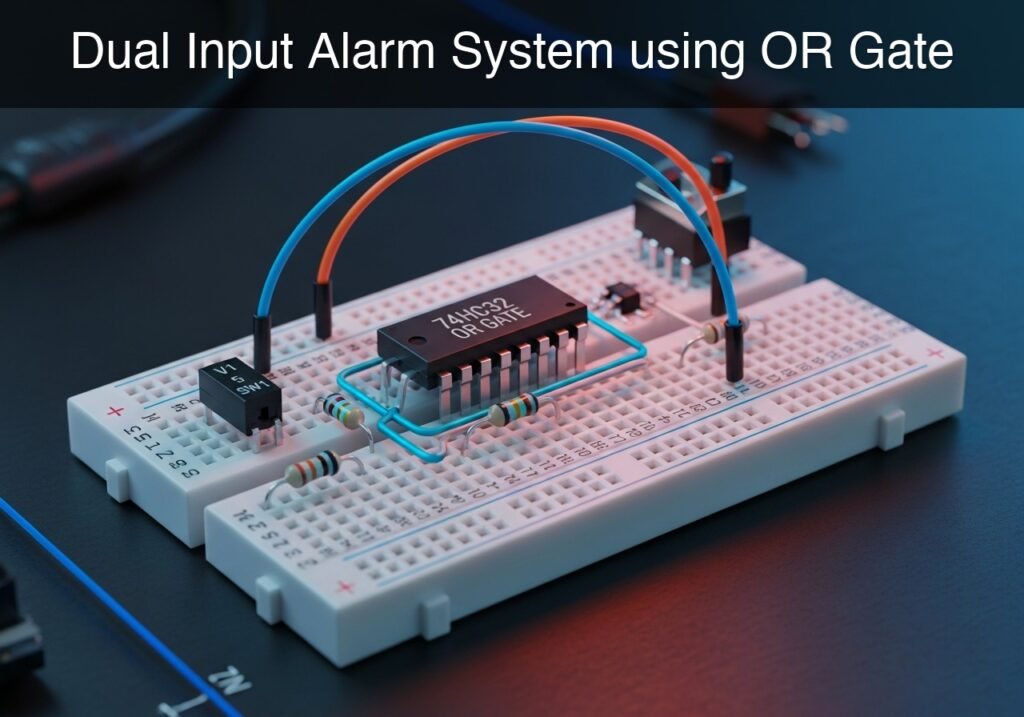
Practical case: Dual Input Alarm System using OR Gate

Dual Input Alarm System using OR Gate prototype (Maker Style)

Level: Basic – Build an alert system that activates a warning LED when either a local or remote signal is triggered.

Objective and use case

In this practical case, you will build a digital alarm indicator utilizing a 74HC32 logic OR gate. The circuit combines two independent input signals (representing a local sensor and a remote sensor) so that if either one or both are activated, the output will drive an alert LED.

Why this circuit is useful:
* Security systems: A single alarm panel can monitor both a front door and a back door.
* Industrial safety: A machine can be halted by either a local emergency stop button or a remote operator console.
* Environmental monitoring: A system can trigger a unified warning if either a smoke detector or a heat sensor detects an anomaly.

Expected outcome:
* With both switches open (0 V at inputs), the output is 0 V and the LED is off.
* Closing the local switch yields 5 V at the first input, forcing the output to 5 V and turning on the LED.
* Closing the remote switch yields 5 V at the second input, forcing the output to 5 V and turning on the LED.
* Closing both switches simultaneously yields 5 V at both inputs, maintaining the 5 V output and keeping the LED illuminated.

Target audience and level: Beginners and hobbyists learning basic digital logic concepts.

Materials

  • U1: 74HC32 quad 2-input OR gate, function: logic control
  • V1: 5 V DC supply, function: power source
  • SW1: SPST switch, function: local alarm trigger
  • SW2: SPST switch, function: remote alarm trigger
  • R1: 10 kΩ resistor, function: pull-down for VA
  • R2: 10 kΩ resistor, function: pull-down for VB
  • R3: 330 Ω resistor, function: LED current limiting
  • D1: red LED, function: alarm indicator

Pin-out of the IC used

74HC32 (Quad 2-input OR gate)

Pin Name Logic function Connection in this case
1 1 A Input 1 for Gate 1 Connects to node VA (from SW1)
2 1B Input 2 for Gate 1 Connects to node VB (from SW2)
3 1Y Output of Gate 1 Connects to node VOUT
7 GND Ground / 0 V reference Connects to node 0
14 VCC Positive supply voltage Connects to node VCC

(Note: Pins 4, 5, 6, 8, 9, 10, 11, 12, and 13 belong to the other three unused OR gates in the package and should ideally have their inputs tied to ground in a permanent design, though they are left out of this primary signal path for simplicity).

Wiring guide

  • V1: Positive terminal connects to node VCC, negative terminal connects to node 0.
  • SW1: Connects between node VCC and node VA.
  • SW2: Connects between node VCC and node VB.
  • R1: Connects between node VA and node 0.
  • R2: Connects between node VB and node 0.
  • U1: Pin 14 connects to node VCC, Pin 7 connects to node 0. Pin 1 connects to node VA, Pin 2 connects to node VB, Pin 3 connects to node VOUT.
  • R3: Connects between node VOUT and node VLED.
  • D1: Anode connects to node VLED, cathode connects to node 0.

Conceptual block diagram
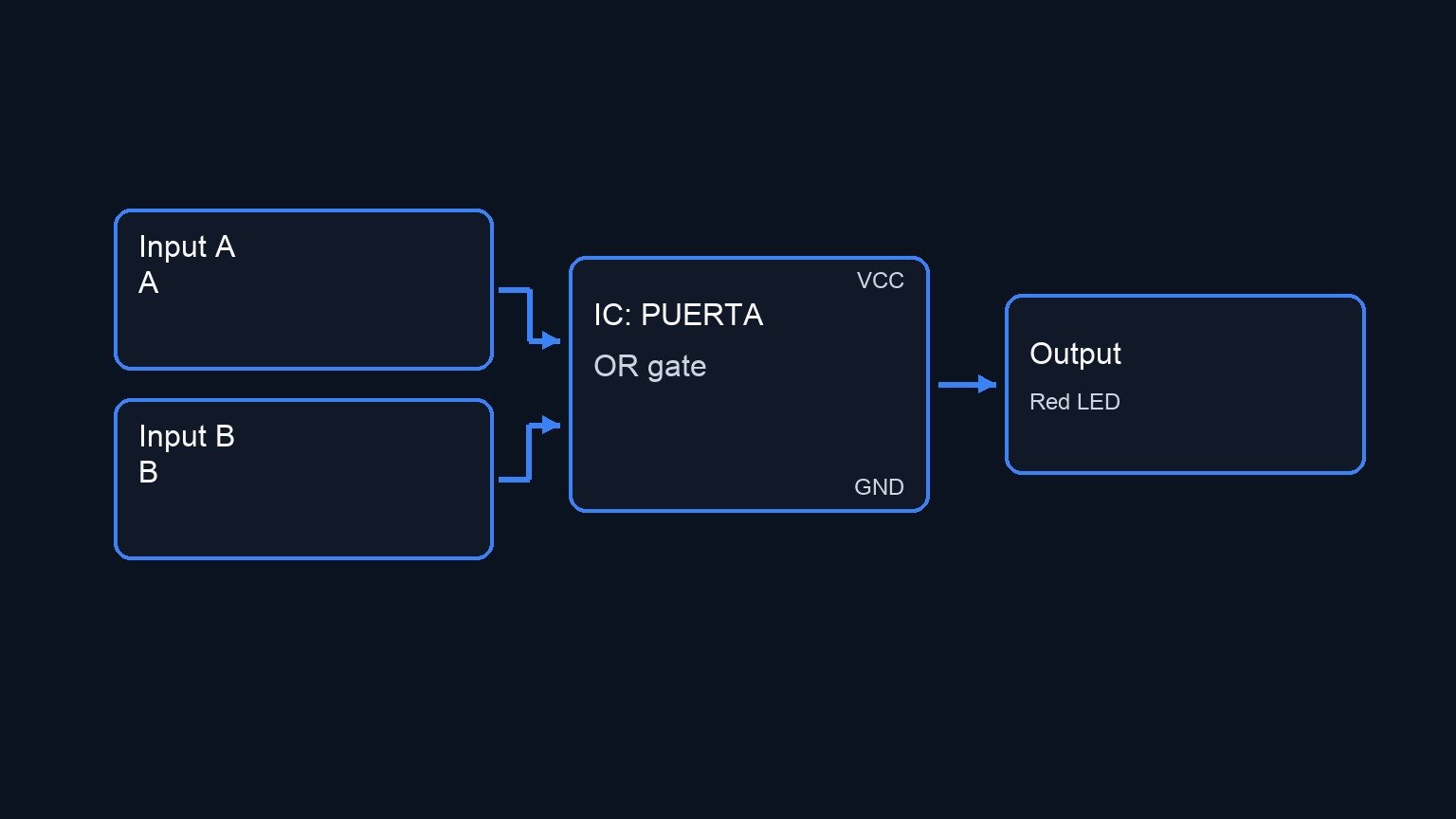
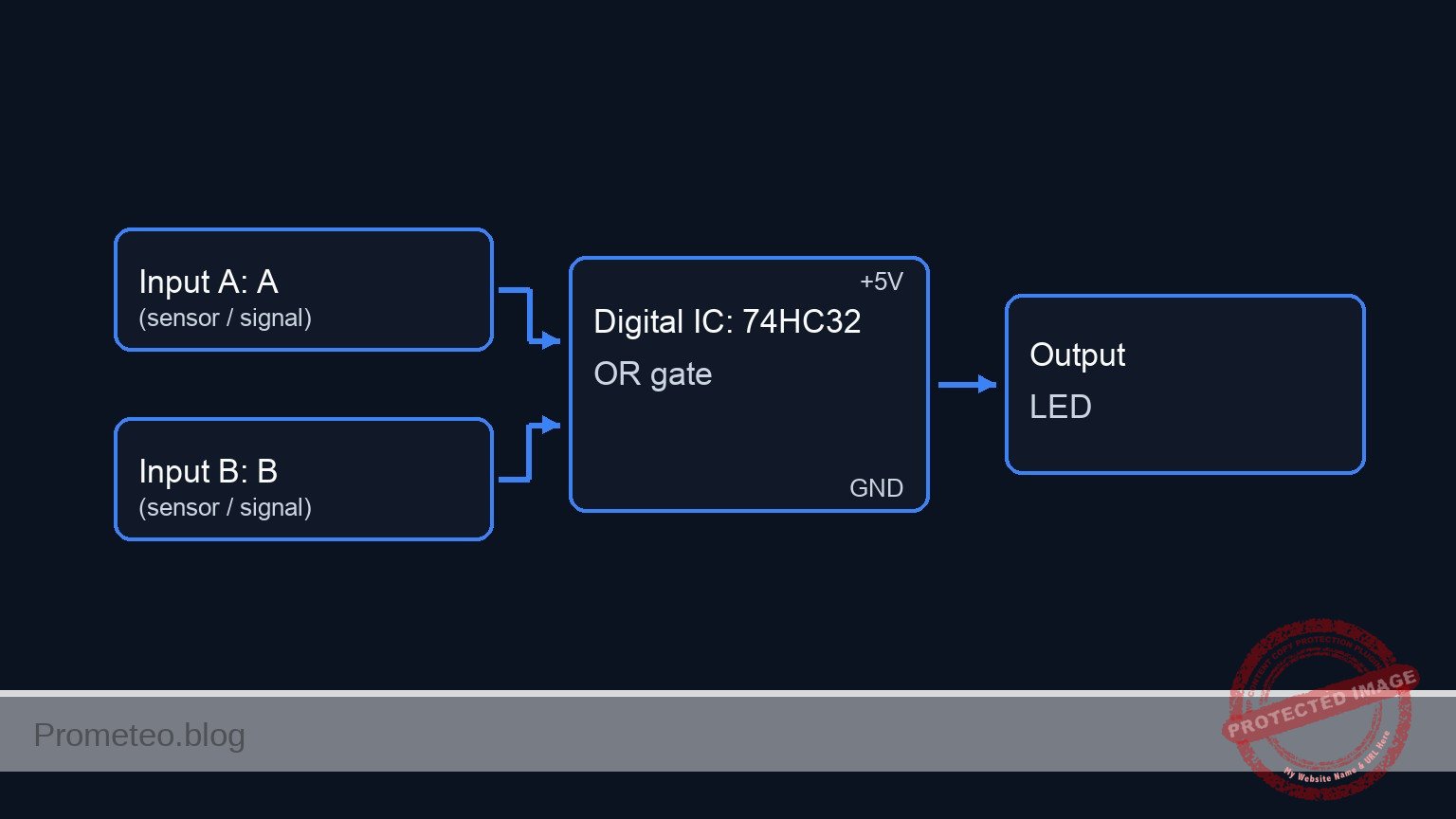
Conceptual block diagram — PUERTA OR gate
Quick read: inputs → main block → output (actuator or measurement). This summarizes the ASCII schematic below.

Schematic

VCC --> [ SW1: Local Alarm ] --(VA)-->+---------------------------------> [           ]
                                      |                                   [ U1: Pin 1 ]
                                      +--> [ R1: 10 kΩ Pull-down ] --> GND [           ]
                                                                          [  74HC32   ] --(VOUT)--> [ R3: 330 Ω ] --(VLED)--> [ D1: Red LED ] --> GND
VCC --> [ SW2: Remote Alarm] --(VB)-->+---------------------------------> [  OR Gate  ]
                                      |                                   [           ]
                                      +--> [ R2: 10 kΩ Pull-down ] --> GND [ U1: Pin 2 ]
                                                                          [           ]
Electrical Schematic

Truth table

Local Signal (VA) Remote Signal (VB) Output (VOUT) Alarm LED (D1)
0 (Low) 0 (Low) 0 (Low) OFF
0 (Low) 1 (High) 1 (High) ON
1 (High) 0 (Low) 1 (High) ON
1 (High) 1 (High) 1 (High) ON

Measurements and tests

  1. Input Verification: Using a digital multimeter (DMM) referenced to node 0, measure the voltage at nodes VA and VB. Verify that they read approximately 0 V when the respective switch is open, and 5 V when closed.
  2. Output Verification: Measure the voltage at node VOUT. Confirm that it reads 0 V only when both VA and VB are at 0 V. If either or both inputs are at 5 V, VOUT must measure close to 5 V.
  3. Visual Confirmation: Toggle SW1 and SW2 through all four possible combinations as listed in the truth table and confirm D1 behaves accordingly.
  4. Current Measurement (Optional): Place your DMM in series with R3 to measure the LED forward current. It should be approximately 8-10 mA depending on the LED’s forward voltage drop.

SPICE netlist and simulation

Reference SPICE Netlist (ngspice) — excerptFull SPICE netlist (ngspice)

* Dual Input Alarm System using OR Gate
.width out=256

* Power Supply
V1 VCC 0 DC 5

* Local Alarm Trigger (SW1)
* Modeled as a voltage-controlled switch driven by a pulse to simulate user interaction
SW1 VCC VA ctrl1 0 mySW
Vctrl1 ctrl1 0 PULSE(0 5 0 1u 1u 50u 100u)

* Remote Alarm Trigger (SW2)
* Modeled as a voltage-controlled switch driven by a pulse to simulate user interaction
SW2 VCC VB ctrl2 0 mySW
Vctrl2 ctrl2 0 PULSE(0 5 0 1u 1u 100u 200u)

* Switch Model
.model mySW SW(Ron=1 Roff=100Meg Vt=2.5)

* Pull-down resistors
* ... (truncated in public view) ...

Copy this content into a .cir file and run with ngspice.

* Dual Input Alarm System using OR Gate
.width out=256

* Power Supply
V1 VCC 0 DC 5

* Local Alarm Trigger (SW1)
* Modeled as a voltage-controlled switch driven by a pulse to simulate user interaction
SW1 VCC VA ctrl1 0 mySW
Vctrl1 ctrl1 0 PULSE(0 5 0 1u 1u 50u 100u)

* Remote Alarm Trigger (SW2)
* Modeled as a voltage-controlled switch driven by a pulse to simulate user interaction
SW2 VCC VB ctrl2 0 mySW
Vctrl2 ctrl2 0 PULSE(0 5 0 1u 1u 100u 200u)

* Switch Model
.model mySW SW(Ron=1 Roff=100Meg Vt=2.5)

* Pull-down resistors
R1 VA 0 10k
R2 VB 0 10k

* 74HC32 Quad 2-input OR gate (using 1 gate)
XU1 VA VB VOUT 0 VCC U_74HC32_OR

* Robust Subcircuit for 74HC32 OR Gate using continuous math functions
.subckt U_74HC32_OR P1 P2 P3 P7 P14
B1 P3 P7 V = V(P14,P7) * (1 - (1 / (1 + exp(50*(V(P1,P7)-V(P14,P7)/2)))) * (1 / (1 + exp(50*(V(P2,P7)-V(P14,P7)/2)))))
.ends

* Output Indicator
R3 VOUT VLED 330
D1 VLED 0 DLED
.model DLED D(IS=1e-15 N=1.8 RS=10)

* Analysis Commands
.tran 1u 300u
.print tran V(VA) V(VB) V(VOUT) V(VLED)
.op

Simulation Results (Transient Analysis)

Simulation Results (Transient Analysis)
Analysis: The transient analysis spans 0 s to 300 us and captures the switching interval. Main ranges: v(vout) 2.77e-62 uV -> 5 V; v(va) 500 uV -> 5 V; v(vb) 500 uV -> 5 V.
Show raw data table (412 rows)
Index   time            v(va)           v(vb)           v(vout)         v(vled)
0	0.000000e+00	4.999500e-04	4.999500e-04	2.767481e-68	5.488664e-30
1	1.000000e-08	4.999500e-04	4.999500e-04	2.767481e-68	4.008316e-41
2	2.000000e-08	4.999500e-04	4.999500e-04	2.767481e-68	-4.00832e-41
3	4.000000e-08	4.999500e-04	4.999500e-04	2.767481e-68	-1.46362e-51
4	8.000000e-08	4.999500e-04	4.999500e-04	2.767481e-68	5.854466e-52
5	1.600000e-07	4.999500e-04	4.999500e-04	2.767481e-68	3.420369e-62
6	3.200000e-07	4.999500e-04	4.999500e-04	2.767481e-68	-8.55089e-63
7	3.562500e-07	4.999500e-04	4.999500e-04	2.767481e-68	2.767467e-68
8	4.196875e-07	4.999500e-04	4.999500e-04	2.767481e-68	2.767492e-68
9	4.372461e-07	4.999500e-04	4.999500e-04	2.767481e-68	2.767481e-68
10	4.679736e-07	4.999500e-04	4.999500e-04	2.767481e-68	2.767481e-68
11	5.019934e-07	4.999500e+00	4.999500e+00	5.000000e+00	1.503225e+00
12	5.700330e-07	4.999500e+00	4.999500e+00	5.000000e+00	1.502641e+00
13	7.061121e-07	4.999500e+00	4.999500e+00	5.000000e+00	1.502321e+00
14	9.782703e-07	4.999500e+00	4.999500e+00	5.000000e+00	1.502318e+00
15	1.000000e-06	4.999500e+00	4.999500e+00	5.000000e+00	1.502314e+00
16	1.043459e-06	4.999500e+00	4.999500e+00	5.000000e+00	1.502314e+00
17	1.130378e-06	4.999500e+00	4.999500e+00	5.000000e+00	1.502314e+00
18	1.304216e-06	4.999500e+00	4.999500e+00	5.000000e+00	1.502314e+00
19	1.651892e-06	4.999500e+00	4.999500e+00	5.000000e+00	1.502314e+00
20	2.347244e-06	4.999500e+00	4.999500e+00	5.000000e+00	1.502314e+00
21	3.347244e-06	4.999500e+00	4.999500e+00	5.000000e+00	1.502314e+00
22	4.347244e-06	4.999500e+00	4.999500e+00	5.000000e+00	1.502314e+00
23	5.347244e-06	4.999500e+00	4.999500e+00	5.000000e+00	1.502314e+00
... (388 more rows) ...


Reference SPICE netlist (ngspice)

* Dual Input Alarm System using OR Gate
.width out=256

* Power Supply
V1 VCC 0 DC 5

* Local Alarm Trigger (SW1)
* Modeled as a voltage-controlled switch driven by a pulse to simulate user interaction
SW1 VCC VA ctrl1 0 mySW
Vctrl1 ctrl1 0 PULSE(0 5 0 1u 1u 50u 100u)

* Remote Alarm Trigger (SW2)
* Modeled as a voltage-controlled switch driven by a pulse to simulate user interaction
SW2 VCC VB ctrl2 0 mySW
Vctrl2 ctrl2 0 PULSE(0 5 0 1u 1u 100u 200u)

* Switch Model
.model mySW SW(Ron=1 Roff=100Meg Vt=2.5)

* Pull-down resistors
R1 VA 0 10k
R2 VB 0 10k

* 74HC32 Quad 2-input OR gate (using 1 gate)
XU1 VA VB VOUT 0 VCC U_74HC32_OR

* Robust Subcircuit for 74HC32 OR Gate using continuous math functions
.subckt U_74HC32_OR P1 P2 P3 P7 P14
B1 P3 P7 V = V(P14,P7) * (1 - (1 / (1 + exp(50*(V(P1,P7)-V(P14,P7)/2)))) * (1 / (1 + exp(50*(V(P2,P7)-V(P14,P7)/2)))))
.ends

* Output Indicator
R3 VOUT VLED 330
D1 VLED 0 DLED
.model DLED D(IS=1e-15 N=1.8 RS=10)

* Analysis Commands
.tran 1u 300u
.print tran V(VA) V(VB) V(VOUT) V(VLED)
.op

Simulation Results (Transient Analysis)

Simulation Results (Transient Analysis)
Analysis: The transient analysis spans 0 s to 300 us and captures the switching interval. Main ranges: v(vout) 2.77e-62 uV -> 5 V; v(va) 500 uV -> 5 V; v(vb) 500 uV -> 5 V.

Common mistakes and how to avoid them

  1. Floating inputs: Forgetting to connect the pull-down resistors (R1 and R2). Without them, when the switches are open, the 74HC32 inputs act like antennas and will cause the output to randomly toggle or oscillate. Always use pull-down resistors.
  2. Missing LED current limiting resistor: Connecting the LED directly from the output pin (node VOUT) to ground. This will draw excessive current, potentially burning out both the LED and the 74HC32 output stage. Always include R3.
  3. Forgetting IC power connections: Wiring the inputs and outputs but forgetting to supply VCC to pin 14 and GND to pin 7. The IC cannot function without its power rails connected.


Troubleshooting

  • Symptom: The LED is always ON, regardless of switch positions.
    • Cause: Inputs are permanently shorted to VCC, or switches are wired as «Normally Closed».
    • Fix: Verify that the switches only bridge VCC to the inputs when actively pressed. Ensure nodes VA and VB measure 0 V when switches are released.
  • Symptom: The LED never turns ON.
    • Cause: LED D1 is inserted backwards (reversed polarity), or the IC is not powered.
    • Fix: Check the orientation of D1 (anode to R3, cathode to ground). Measure pin 14 on U1 to guarantee it receives 5 V.
  • Symptom: The LED flickers when you move your hand near the circuit.
    • Cause: The inputs are floating. CMOS chips have highly sensitive inputs.
    • Fix: Check the connections of R1 and R2. Ensure they securely tie nodes VA and VB to ground when the switches are open.

Possible improvements and extensions

  1. Audible alert integration: Add an active 5 V piezoelectric buzzer in parallel with the LED/resistor combination (connecting the buzzer’s positive lead to VOUT and the negative lead to node 0) to provide both a visual and audible alarm.
  2. Expand to a 3-input alarm: Utilize a second OR gate inside the same 74HC32 chip. Connect VOUT to Pin 4 (2 A), a third switch/pull-down assembly to Pin 5 (2B), and use Pin 6 (2Y) to drive the LED, creating a system that monitors three distinct zones.

More Practical Cases on Prometeo.blog

Find this product and/or books on this topic on Amazon

Go to Amazon

As an Amazon Associate, I earn from qualifying purchases. If you buy through this link, you help keep this project running.

Quick Quiz

Question 1: What is the main logic gate used in this alert system?


Question 2: What condition turns the warning LED off?


Question 3: What voltage represents an open switch at the inputs in this circuit?


Question 4: What happens to the LED if only the local switch is closed?


Question 5: Which of the following is a mentioned use case for this circuit?


Question 6: In the environmental monitoring example, what two sensors are combined?


Question 7: What is the output voltage when both switches are closed simultaneously?


Question 8: How many independent input signals does this specific circuit combine?


Question 9: What does the output of the 74HC32 gate drive in this practical case?


Question 10: In a security system application, what could the two inputs represent?


Carlos Núñez Zorrilla
Electronics & Computer Engineer

Telecommunications Electronics Engineer and Computer Engineer (official degrees in Spain).

Follow me:


Practical case: Nurse call bell

Nurse call bell prototype (Maker Style)

Level: Basic – Implement an OR gate to activate an alert from two independent switches.

Objective and use case

You will build a basic nurse call circuit using a digital OR gate to trigger a visual alert whenever either of two patient bed switches is pressed.

Why it is useful:
* Allows centralized monitoring of multiple independent trigger points.
* Demonstrates how basic digital logic simplifies parallel alarm systems without cross-wiring physical switches.
* Forms the foundation for larger, more complex call bell or security systems.

Expected outcome:
* Pressing switch A drives the output HIGH (near 5 V), lighting the LED.
* Pressing switch B drives the output HIGH (near 5 V), lighting the LED.
* Pressing both switches simultaneously drives the output HIGH, lighting the LED.
* The output remains LOW (0 V) and the LED stays off when no switches are pressed.

Target audience and level: Beginners learning digital logic gates and the importance of pull-down networks.

Materials

  • V1: 5 V DC supply
  • U1: 74HC32 quad 2-input OR gate IC
  • SW1: Push button switch, normally open, function: Bed A trigger
  • SW2: Push button switch, normally open, function: Bed B trigger
  • R1: 10 kΩ resistor, function: pull-down for VA
  • R2: 10 kΩ resistor, function: pull-down for VB
  • R3: 330 Ω resistor, function: LED current limiting
  • D1: Red LED, function: alert indicator

Pin-out of the IC used

74HC32 (Quad 2-Input OR Gate)

Pin Name Logic function Connection in this case
1 1 A Input 1 for Gate 1 Node VA (Switch A)
2 1B Input 2 for Gate 1 Node VB (Switch B)
3 1Y Output of Gate 1 Node VOUT (to LED circuit)
7 GND Ground Node 0
14 VCC Power Supply Node VCC

(Note: Pins 4, 5, 8, 9, 10, 11, 12, 13 are unused inputs and should be tied to Ground in a permanent circuit to prevent CMOS latch-up).

Wiring guide

  • V1: positive terminal connects to VCC; negative terminal connects to 0.
  • SW1: connects between VCC and VA.
  • SW2: connects between VCC and VB.
  • R1: connects between VA and 0.
  • R2: connects between VB and 0.
  • U1 (pin 14): connects to VCC.
  • U1 (pin 7): connects to 0.
  • U1 (pin 1): connects to VA.
  • U1 (pin 2): connects to VB.
  • U1 (pin 3): connects to VOUT.
  • R3: connects between VOUT and the anode of D1.
  • D1: cathode connects to 0.

Conceptual block diagram

Conceptual block diagram — 74HC32 OR gate
Quick read: inputs → main block → output (actuator or measurement). This summarizes the ASCII schematic below.

Schematic

VCC --> [ SW1: Bed A ] --(VA)--> [ R1: 10 kΩ Pull-down ] --> GND
                             \
                              -->(Pin 1) \
                                          [ U1: 74HC32 OR Gate ] --(VOUT, Pin 3)--> [ R3: 330 Ω ] --> [ D1: Red LED ] --> GND
                                          /
                              -->(Pin 2) /
                             /
VCC --> [ SW2: Bed B ] --(VB)--> [ R2: 10 kΩ Pull-down ] --> GND
Electrical Schematic

Truth table

Input A (VA) Input B (VB) Output Y (VOUT) LED State
0 (LOW) 0 (LOW) 0 (LOW) OFF
0 (LOW) 1 (HIGH) 1 (HIGH) ON
1 (HIGH) 0 (LOW) 1 (HIGH) ON
1 (HIGH) 1 (HIGH) 1 (HIGH) ON

Measurements and tests

  1. Power Verification: Measure the voltage between VCC and 0 using a multimeter to ensure it is exactly 5 V.
  2. Idle State Testing: Without pressing any buttons, measure the voltage at nodes VA and VB. Both should read exactly 0 V. The node VOUT should also read 0 V.
  3. Logic HIGH Testing: Press and hold SW1. Measure node VA (should be ~5 V) and measure node VOUT (should be ~5 V). Verify the LED is ON. Repeat this process for SW2 and node VB.
  4. Current Measurement (Optional): Place your multimeter in series with R3 and D1 to measure the forward current of the LED (it should be roughly 8-10 mA depending on the LED’s forward voltage drop).

SPICE netlist and simulation

Reference SPICE Netlist (ngspice) — excerptFull SPICE netlist (ngspice)

* Practical case: Nurse call bell
.width out=256

* Power Supply
V1 VCC 0 DC 5

* Bed A Trigger (SW1)
* Modeled as a voltage-controlled switch activated by a pulse to simulate a user pressing the button
VctrlA ctrlA 0 PULSE(0 5 10u 1u 1u 40u 100u)
S1 VCC VA ctrlA 0 my_switch

* Bed B Trigger (SW2)
* Modeled as a voltage-controlled switch activated by a pulse to simulate a user pressing the button
VctrlB ctrlB 0 PULSE(0 5 10u 1u 1u 90u 200u)
S2 VCC VB ctrlB 0 my_switch

* Pull-down resistors for switch inputs
R1 VA 0 10k
R2 VB 0 10k

* ... (truncated in public view) ...

Copy this content into a .cir file and run with ngspice.

* Practical case: Nurse call bell
.width out=256

* Power Supply
V1 VCC 0 DC 5

* Bed A Trigger (SW1)
* Modeled as a voltage-controlled switch activated by a pulse to simulate a user pressing the button
VctrlA ctrlA 0 PULSE(0 5 10u 1u 1u 40u 100u)
S1 VCC VA ctrlA 0 my_switch

* Bed B Trigger (SW2)
* Modeled as a voltage-controlled switch activated by a pulse to simulate a user pressing the button
VctrlB ctrlB 0 PULSE(0 5 10u 1u 1u 90u 200u)
S2 VCC VB ctrlB 0 my_switch

* Pull-down resistors for switch inputs
R1 VA 0 10k
R2 VB 0 10k

* U1: 74HC32 quad 2-input OR gate IC (using 1 gate)
* Wiring: Pin 1 -> VA, Pin 2 -> VB, Pin 3 -> VOUT, Pin 14 -> VCC, Pin 7 -> 0
XU1 VA VB VOUT VCC 0 74HC32_OR

* Alert Indicator (LED and current limiting resistor)
R3 VOUT D1_A 330
D1 D1_A 0 DLED

* --- Models and Subcircuits ---

* Ideal switch model
.model my_switch SW(vt=2.5 vh=0.5 ron=1 roff=100MEG)

* Generic Red LED model
.model DLED D(IS=1e-20 N=2.2 RS=2)

* Behavioral model for a 74HC32 OR gate (Continuous functions for robust convergence)
.subckt 74HC32_OR A B Y VCC GND
RinA A GND 10MEG
RinB B GND 10MEG
* OR Logic: V_out = VCC * (1 - (1-A)*(1-B)) implemented with sigmoids
B1 Y_int GND V = V(VCC) * (1 - (1 - 1/(1+exp(-50*(V(A)-2.5)))) * (1 - 1/(1+exp(-50*(V(B)-2.5)))))
Rout Y_int Y 10
.ends

* --- Analysis Directives ---

.tran 1u 250u
.print tran V(VA) V(VB) V(VOUT) V(D1_A)
.op
.end

Simulation Results (Transient Analysis)

Simulation Results (Transient Analysis)
Analysis: The transient analysis spans 0 s to 250 us and captures the switching interval. Main ranges: v(vout) -1.01e-29 uV -> 4.92 V; v(va) 499 uV -> 5 V; v(vb) 499 uV -> 5 V.
Show raw data table (354 rows)
Index   time            v(va)           v(vb)           v(vout)         v(d1_a)
0	0.000000e+00	4.994506e-04	4.994506e-04	-1.00582e-35	-3.41977e-34
1	1.000000e-08	4.994506e-04	4.994506e-04	-6.04520e-52	-2.05537e-50
2	2.000000e-08	4.994506e-04	4.994506e-04	6.045198e-52	2.055367e-50
3	4.000000e-08	4.994506e-04	4.994506e-04	1.816637e-67	6.176631e-66
4	8.000000e-08	4.994506e-04	4.994506e-04	-7.26682e-68	-2.47066e-66
5	1.600000e-07	4.994506e-04	4.994506e-04	-1.94609e-72	-1.94609e-72
6	3.200000e-07	4.994506e-04	4.994506e-04	-1.94609e-72	-1.94609e-72
7	6.400000e-07	4.994506e-04	4.994506e-04	-1.94609e-72	-1.94609e-72
8	1.280000e-06	4.994506e-04	4.994506e-04	-1.94609e-72	-1.94609e-72
9	2.280000e-06	4.994506e-04	4.994506e-04	-1.94609e-72	-1.94609e-72
10	3.280000e-06	4.994506e-04	4.994506e-04	-1.94609e-72	-1.94609e-72
11	4.280000e-06	4.994506e-04	4.994506e-04	-1.94609e-72	-1.94609e-72
12	5.280000e-06	4.994506e-04	4.994506e-04	-1.94609e-72	-1.94609e-72
13	6.280000e-06	4.994506e-04	4.994506e-04	-1.94609e-72	-1.94609e-72
14	7.280000e-06	4.994506e-04	4.994506e-04	-1.94609e-72	-1.94609e-72
15	8.280000e-06	4.994506e-04	4.994506e-04	-1.94609e-72	-1.94609e-72
16	9.280000e-06	4.994506e-04	4.994506e-04	-1.94609e-72	-1.94609e-72
17	1.000000e-05	4.994506e-04	4.994506e-04	-1.94609e-72	-1.94609e-72
18	1.010000e-05	4.994506e-04	4.994506e-04	-1.94609e-72	-1.94609e-72
19	1.030000e-05	4.994506e-04	4.994506e-04	-1.94609e-72	-1.94609e-72
20	1.035875e-05	4.994506e-04	4.994506e-04	-1.94609e-72	-1.94609e-72
21	1.046156e-05	4.994506e-04	4.994506e-04	-1.94609e-72	-1.94609e-72
22	1.049002e-05	4.994506e-04	4.994506e-04	-1.94609e-72	-1.94609e-72
23	1.053982e-05	4.994506e-04	4.994506e-04	-1.94609e-72	-1.94609e-72
... (330 more rows) ...


Reference SPICE netlist (ngspice)

* Practical case: Nurse call bell
.width out=256

* Power Supply
V1 VCC 0 DC 5

* Bed A Trigger (SW1)
* Modeled as a voltage-controlled switch activated by a pulse to simulate a user pressing the button
VctrlA ctrlA 0 PULSE(0 5 10u 1u 1u 40u 100u)
S1 VCC VA ctrlA 0 my_switch

* Bed B Trigger (SW2)
* Modeled as a voltage-controlled switch activated by a pulse to simulate a user pressing the button
VctrlB ctrlB 0 PULSE(0 5 10u 1u 1u 90u 200u)
S2 VCC VB ctrlB 0 my_switch

* Pull-down resistors for switch inputs
R1 VA 0 10k
R2 VB 0 10k

* U1: 74HC32 quad 2-input OR gate IC (using 1 gate)
* Wiring: Pin 1 -> VA, Pin 2 -> VB, Pin 3 -> VOUT, Pin 14 -> VCC, Pin 7 -> 0
XU1 VA VB VOUT VCC 0 74HC32_OR

* Alert Indicator (LED and current limiting resistor)
R3 VOUT D1_A 330
D1 D1_A 0 DLED

* --- Models and Subcircuits ---

* Ideal switch model
.model my_switch SW(vt=2.5 vh=0.5 ron=1 roff=100MEG)

* Generic Red LED model
.model DLED D(IS=1e-20 N=2.2 RS=2)

* Behavioral model for a 74HC32 OR gate (Continuous functions for robust convergence)
.subckt 74HC32_OR A B Y VCC GND
RinA A GND 10MEG
RinB B GND 10MEG
* OR Logic: V_out = VCC * (1 - (1-A)*(1-B)) implemented with sigmoids
B1 Y_int GND V = V(VCC) * (1 - (1 - 1/(1+exp(-50*(V(A)-2.5)))) * (1 - 1/(1+exp(-50*(V(B)-2.5)))))
Rout Y_int Y 10
.ends

* --- Analysis Directives ---

.tran 1u 250u
.print tran V(VA) V(VB) V(VOUT) V(D1_A)
.op
.end

Simulation Results (Transient Analysis)

Simulation Results (Transient Analysis)
Analysis: The transient analysis spans 0 s to 250 us and captures the switching interval. Main ranges: v(vout) -1.01e-29 uV -> 4.92 V; v(va) 499 uV -> 5 V; v(vb) 499 uV -> 5 V.

Common mistakes and how to avoid them

  • Floating inputs: Forgetting the pull-down resistors (R1 and R2). Without them, the voltage at the gate inputs will float when the switches are open, causing random, unpredictable triggering of the alarm.
  • Omitting power connections to the IC: Forgetting to connect pins 7 and 14 to Ground and VCC, respectively. The logic gate cannot function without its own power supply.
  • Leaving unused CMOS inputs floating: The 74HC32 is a CMOS device. Any unused input pins (e.g., pins 4, 5, 9, 10, 12, 13) should be tied to Ground (0) to prevent excess power consumption or erratic behavior.


Troubleshooting

  • Symptom: The LED stays ON constantly, even when no buttons are pressed.
  • Cause: One of the pull-down resistors (R1 or R2) is missing or not properly connected to ground.
  • Fix: Verify the connection of the resistors between inputs VA or VB and node 0.
  • Symptom: The LED never turns ON.
  • Cause: LED is installed backward, missing VCC/GND to the IC, or a disconnected R3.
  • Fix: Check LED polarity (flat side / shorter leg goes to node 0). Ensure pins 7 and 14 on U1 have power.
  • Symptom: The LED turns ON randomly when my hand is near the breadboard.
  • Cause: The circuit is experiencing a «floating input» acting as an antenna picking up stray capacitance.
  • Fix: Check your pull-down resistors. Make sure they firmly connect the input pins to ground.
  • Symptom: Output is logic HIGH (measured at pin 3), but LED is extremely dim.
  • Cause: The current limiting resistor R3 is too large (e.g., 10 kΩ instead of 330 Ω).
  • Fix: Replace R3 with the correct 330 Ω value.

Possible improvements and extensions

  • Add an audible alert: Connect an active 5 V buzzer in parallel with the LED/resistor combination so that triggering the switch produces both a light and a sound.
  • Implement a latching circuit: In a real hospital, the light must stay ON until a nurse arrives to reset it. Feed the output of the OR gate into the SET pin of an SR Latch (or use logic gates to build one), and add a third «Reset» button at the nurse station.

More Practical Cases on Prometeo.blog

Find this product and/or books on this topic on Amazon

Go to Amazon

As an Amazon Associate, I earn from qualifying purchases. If you buy through this link, you help keep this project running.

Quick Quiz

Question 1: What is the main objective of the circuit described in the article?


Question 2: Which type of digital logic gate is used to trigger the visual alert in this circuit?


Question 3: What happens to the output when neither switch is pressed?


Question 4: What is the expected outcome if both patient bed switches are pressed simultaneously?


Question 5: Which IC model is used as the quad 2-input OR gate in this project?


Question 6: Which IC model is used as the quad 2-input OR gate in this project?


Question 7: Which IC model is used as the quad 2-input OR gate in this project?


Question 8: Which IC model is used as the quad 2-input OR gate in this project?


Question 9: Which IC model is used as the quad 2-input OR gate in this project?


Question 10: Which IC model is used as the quad 2-input OR gate in this project?


Carlos Núñez Zorrilla
Electronics & Computer Engineer

Telecommunications Electronics Engineer and Computer Engineer (official degrees in Spain).
Follow me:


Practical case: Multi-perimeter intrusion detection

Multi-perimeter intrusion detection prototype (Maker Style)

Level: Advanced — Implement a 4-zone security system using cascaded OR logic to trigger a centralized alarm.

Objective and use case

In this project, you will build a centralized security monitoring system that supervises four distinct access points (windows or doors). The system uses magnetic reed switches and a 74HC32 Quad 2-input OR gate IC to consolidate multiple sensor signals into a single alarm trigger.

Why it is useful:
* Home Security: Monitors multiple entry points (front door, back door, garage, window) simultaneously.
* Server Rooms: Ensures all rack doors are closed; alerts if any single cabinet is breached.
* Industrial Safety: Prevents machine operation if any safety guard perimeter is open.

Expected outcome:
* Secure State: When all doors/windows are closed, the relay remains off (0 V at coil).
* Alarm State: If any single zone (or multiple zones) is breached, the relay activates.
* Voltage Levels: Logic Low (≈ 0 V) represents a secure zone; Logic High (≈ 5 V) represents a breach.
* Indication: A relay clicks and activates a connected load (simulated by a high-power LED or siren).

Target audience: Advanced electronics students and security system prototypers.

Materials

  • V1: 5 V DC voltage source, function: Main power supply
  • U1: 74HC32, function: Quad 2-input OR gate Logic IC
  • S1: SPST Switch (Reed Switch), function: Zone 1 sensor (Normally Open, closed by magnet)
  • S2: SPST Switch (Reed Switch), function: Zone 2 sensor
  • S3: SPST Switch (Reed Switch), function: Zone 3 sensor
  • S4: SPST Switch (Reed Switch), function: Zone 4 sensor
  • R1: 10 kΩ resistor, function: Pull-up for Zone 1
  • R2: 10 kΩ resistor, function: Pull-up for Zone 2
  • R3: 10 kΩ resistor, function: Pull-up for Zone 3
  • R4: 10 kΩ resistor, function: Pull-up for Zone 4
  • R5: 1 kΩ resistor, function: Transistor base current limiting
  • Q1: 2N2222 NPN Transistor, function: Relay driver
  • D1: 1N4007 Diode, function: Flyback protection for relay coil
  • RL1: 5 V Relay (SPDT), function: High-power switching interface
  • C1: 100 nF capacitor, function: Decoupling for U1

Pin-out of the IC used

Chip: 74HC32 (Quad 2-Input OR Gate)

Pin Name Logic Function Connection in this case
1 1A Input OR Gate 1 Connect to Node ZONE1
2 1B Input OR Gate 1 Connect to Node ZONE2
3 1Y Output OR Gate 1 Connect to Node INT_A (Input to Gate 3)
4 2A Input OR Gate 2 Connect to Node ZONE3
5 2B Input OR Gate 2 Connect to Node ZONE4
6 2Y Output OR Gate 2 Connect to Node INT_B (Input to Gate 3)
7 GND Ground Connect to Node 0
9 3A Input OR Gate 3 Connect to Node INT_A
10 3B Input OR Gate 3 Connect to Node INT_B
8 3Y Output OR Gate 3 Connect to Node LOGIC_OUT
14 VCC Power Supply Connect to Node VCC

Note: Pins 11, 12, and 13 (Gate 4) are unused and should be grounded if strictly following best CMOS practices, though often left floating in simple prototypes.

Wiring guide

This circuit uses «Active High» logic for alarms. The sensors are wired as Pull-ups. When a door is closed (magnet present), the switch closes to ground (Logic 0). When a door opens, the resistor pulls the line to VCC (Logic 1).

  • Power Supply
  • V1 positive terminal connects to node VCC.
  • V1 negative terminal connects to node 0 (GND).
  • C1 connects between VCC and 0 (near U1).

  • Zone Sensors (Inputs)

  • R1 connects between VCC and ZONE1.
  • S1 connects between ZONE1 and 0.
  • R2 connects between VCC and ZONE2.
  • S2 connects between ZONE2 and 0.
  • R3 connects between VCC and ZONE3.
  • S3 connects between ZONE3 and 0.
  • R4 connects between VCC and ZONE4.
  • S4 connects between ZONE4 and 0.

  • Logic Processing (Cascading)

  • U1 Pin 1 (1A) connects to ZONE1.
  • U1 Pin 2 (1B) connects to ZONE2.
  • U1 Pin 3 (1Y) connects to INT_A.
  • U1 Pin 4 (2A) connects to ZONE3.
  • U1 Pin 5 (2B) connects to ZONE4.
  • U1 Pin 6 (2Y) connects to INT_B.
  • U1 Pin 9 (3A) connects to INT_A.
  • U1 Pin 10 (3B) connects to INT_B.
  • U1 Pin 8 (3Y) connects to LOGIC_OUT.

  • Output Driver Stage

  • R5 connects between LOGIC_OUT and node BASE.
  • Q1 Base connects to BASE.
  • Q1 Emitter connects to 0.
  • Q1 Collector connects to node RELAY_COIL_NEG.
  • RL1 Coil positive connects to VCC.
  • RL1 Coil negative connects to RELAY_COIL_NEG.
  • D1 Anode connects to RELAY_COIL_NEG.
  • D1 Cathode connects to VCC (Parallel to coil, reverse biased).

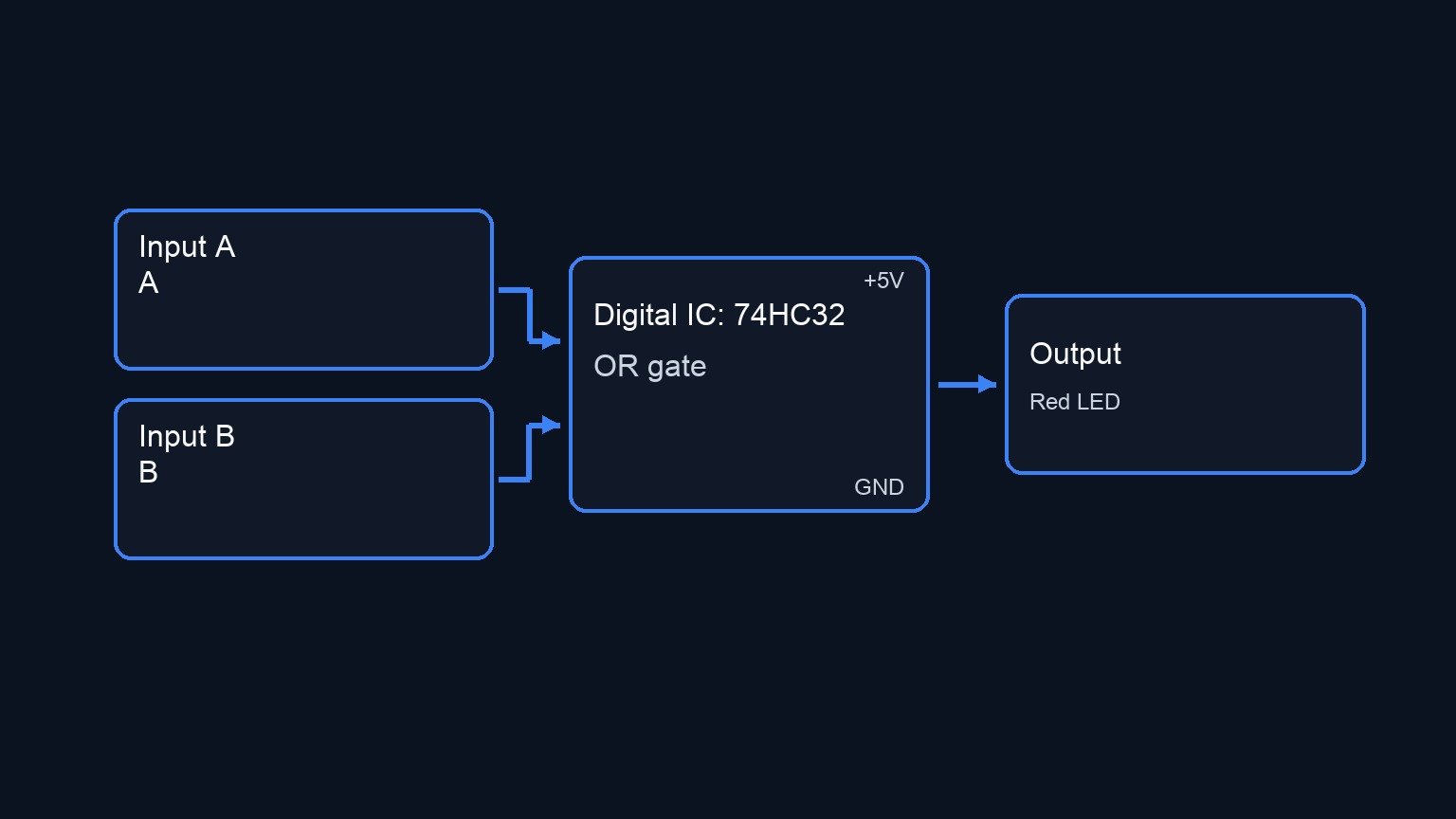
Conceptual block diagram

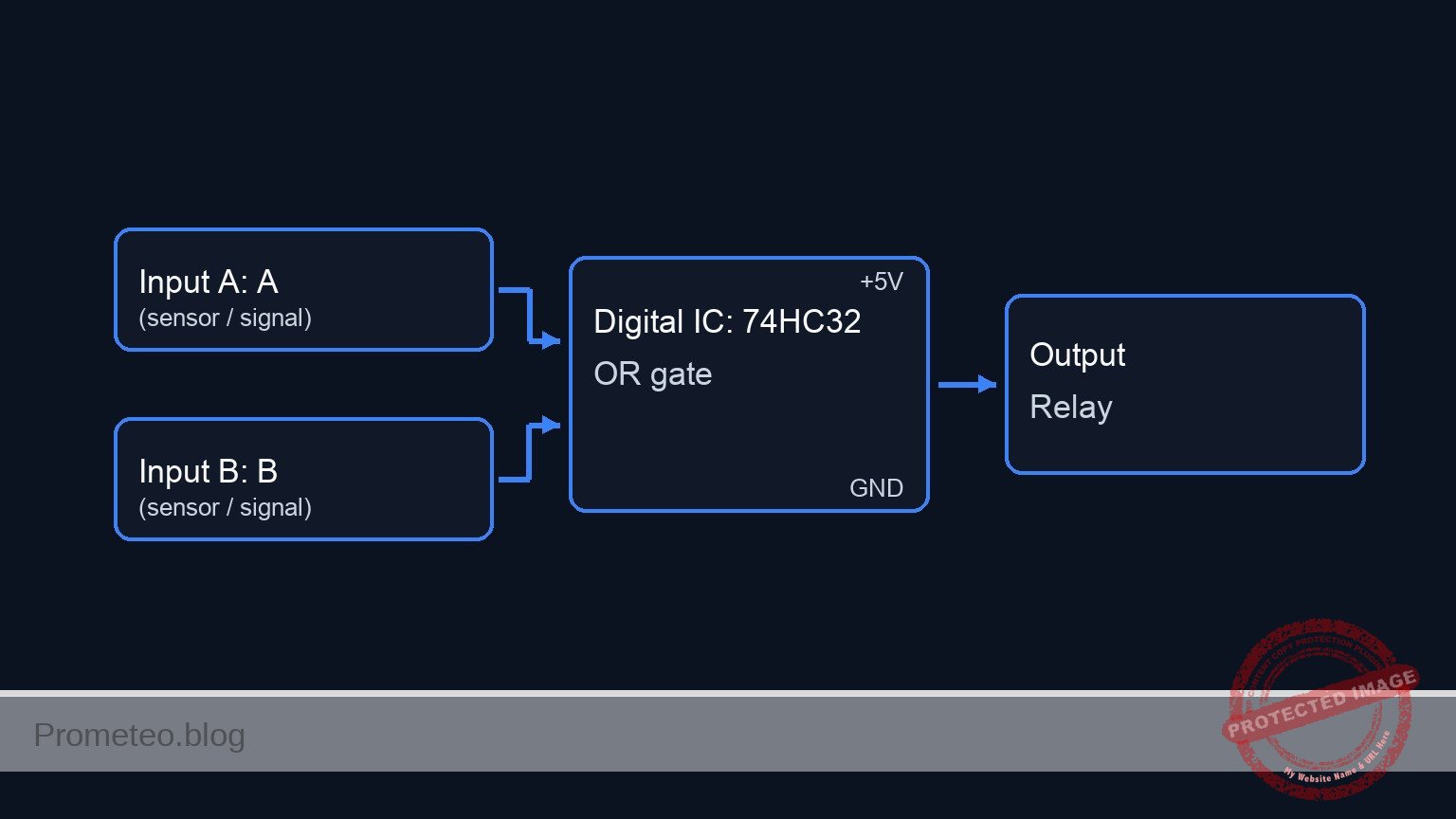
Conceptual block diagram — 74HC32 OR gate

Schematic

Title: Practical case: Multi-perimeter intrusion detection

      [ INPUT STAGE ]                  [ LOGIC STAGE (U1: 74HC32) ]                 [ OUTPUT STAGE ]

   (VCC)                                                                               (VCC)
     |                                                                                   |
   [ R1 ]                                                                            +---+---+
     +----(Zone 1)-------->+-------------+                                           |       |
     |                     |  OR GATE 1  |                                         [D1]    [RL1]
   [ S1 ]                  | (Pins 1,2)  |--(Int A)------>+                        (Diode) (Coil)
     |                     +-------------+                |                          |       |
   (GND)                   ^                              |                          +---+---+
                           |                              |                              |
   (VCC)                   |                              v                              |
     |                     |                       +-------------+                       |
   [ R2 ]                  |                       |  OR GATE 3  |                       |
     +----(Zone 2)---------+                       | (Pins 9,10) |                       |
     |                                             +-------------+                       |
   [ S2 ]                                                 |                              |
     |                                                    +----(Logic Out)--> [ R5 ] --> +
   (GND)                                                  ^                              |
                                                          |                         [ Q1 Base ]
   (VCC)                                                  |                              |
     |                                                    |                        [ Q1 (NPN) ]
   [ R3 ]                                                 |                              |
     +----(Zone 3)-------->+-------------+                |                         (Emitter)
     |                     |  OR GATE 2  |                |                              |
   [ S3 ]                  | (Pins 4,5)  |--(Int B)-------+                            (GND)
     |                     +-------------+
   (GND)                   ^
                           |
   (VCC)                   |
     |                     |
   [ R4 ]                  |
     +----(Zone 4)---------+
     |
   [ S4 ]
     |
   (GND)
Schematic (ASCII)

Electrical diagram

Electrical diagram for case: Practical case: Multi-perimeter intrusion detection
Generated from the validated SPICE netlist for this case.

🔒 This electrical diagram is premium. With the monthly membership (7-day free trial) you can unlock the complete didactic material and the print-ready PDF pack.🔓 See premium access plans

Truth table

The logic is cascaded. Gates 1 and 2 handle the zones; Gate 3 combines their results.
Logic 0 = Secure (Door Closed). Logic 1 = Breach (Door Open).

Zone 1 Zone 2 Zone 3 Zone 4 Int A (Z1+Z2) Int B (Z3+Z4) Final Output System State
0 0 0 0 0 0 0 Secure
1 0 0 0 1 0 1 ALARM
0 1 0 0 1 0 1 ALARM
0 0 1 0 0 1 1 ALARM
0 0 0 1 0 1 1 ALARM
1 1 1 1 1 1 1 ALARM

Note: Any combination containing at least one «1» results in a Final Output of «1».

Measurements and tests

  1. Static Logic Check:
    • Ensure all switches are closed (magnets present). Measure voltage at LOGIC_OUT. It should be < 0.1 V.
    • Open switch S1 only. Measure voltage at ZONE1 (should be ≈ 5 V) and LOGIC_OUT (should be ≈ 5 V).
    • Verify the Relay clicks ON.
  2. Threshold Verification:
    • With S1 open, measure the voltage at node BASE (Q1 Base). It should be approx 0.7 V (Vbe of the transistor).
  3. Cascading Check:
    • Close S1 (Secure). Open S3.
    • Verify INT_A is Low (0 V) and INT_B is High (5 V).
    • Verify LOGIC_OUT remains High.

SPICE netlist and simulation

Reference SPICE Netlist (ngspice) — excerptFull SPICE netlist (ngspice)

* Multi-perimeter intrusion detection
* NGSPICE Netlist
* Created based on Bill of Materials and Wiring Guide

* =============================================================================
* COMPONENT MODELS
* =============================================================================

* NPN Transistor Model (2N2222)
.model 2N2222 NPN(Is=14.34f Xti=3 Eg=1.11 Vaf=74.03 Bf=255.9 Ne=1.307 Ise=14.34f 
+ Ikf=.2847 Xtb=1.5 Br=6.092 Nc=2 Isc=0 Ikr=0 Rc=1 Cjc=7.306p Mjc=.3416 Vjc=.75 
+ Fc=.5 Cje=22.01p Mje=.377 Vje=.75 Tr=46.91n Tf=411.1p Itf=.6 Vtf=1.7 Xtf=3 Rb=10)

* Diode Model (1N4007)
.model 1N4007 D(IS=7.027n RS=0.034 N=1.26 TT=4.32u CJO=4p)

* Voltage Controlled Switch Model (for Reed Switches)
* Vt=2.5V: Control > 2.5V is CLOSED (Low R), Control < 2.5V is OPEN (High R)
.model SW_REED SW(Vt=2.5 Ron=0.1 Roff=10Meg)

* ... (truncated in public view) ...

Copy this content into a .cir file and run with ngspice.

🔒 Part of this section is premium. With the monthly membership (7-day free trial) you can access the full content (materials, wiring, detailed build, validation, troubleshooting, variants and checklist) and download the complete print-ready PDF pack.

* Multi-perimeter intrusion detection
* NGSPICE Netlist
* Created based on Bill of Materials and Wiring Guide

* =============================================================================
* COMPONENT MODELS
* =============================================================================

* NPN Transistor Model (2N2222)
.model 2N2222 NPN(Is=14.34f Xti=3 Eg=1.11 Vaf=74.03 Bf=255.9 Ne=1.307 Ise=14.34f 
+ Ikf=.2847 Xtb=1.5 Br=6.092 Nc=2 Isc=0 Ikr=0 Rc=1 Cjc=7.306p Mjc=.3416 Vjc=.75 
+ Fc=.5 Cje=22.01p Mje=.377 Vje=.75 Tr=46.91n Tf=411.1p Itf=.6 Vtf=1.7 Xtf=3 Rb=10)

* Diode Model (1N4007)
.model 1N4007 D(IS=7.027n RS=0.034 N=1.26 TT=4.32u CJO=4p)

* Voltage Controlled Switch Model (for Reed Switches)
* Vt=2.5V: Control > 2.5V is CLOSED (Low R), Control < 2.5V is OPEN (High R)
.model SW_REED SW(Vt=2.5 Ron=0.1 Roff=10Meg)

* =============================================================================
* POWER SUPPLY
* =============================================================================
V1 VCC 0 DC 5

* =============================================================================
* SENSORS (ZONES 1-4)
* Logic: Door Closed (Magnet Present) -> Switch Closed to GND -> Zone Low (Safe)
*        Door Open (Magnet Removed) -> Switch Open -> Zone Pulled High (Alarm)
* Simulation: Control Voltage 5V = Door Closed. Control Voltage 0V = Door Open.
* =============================================================================

* --- ZONE 1 ---
R1 VCC ZONE1 10k
S1 ZONE1 0 CTRL1 0 SW_REED
* Stimulus: Door 1 opens briefly at 100us
V_S1_CTRL CTRL1 0 PULSE(5 0 100u 1u 1u 50u 10m)

* --- ZONE 2 ---
R2 VCC ZONE2 10k
S2 ZONE2 0 CTRL2 0 SW_REED
* Stimulus: Door 2 opens briefly at 300us
V_S2_CTRL CTRL2 0 PULSE(5 0 300u 1u 1u 50u 10m)

* --- ZONE 3 ---
R3 VCC ZONE3 10k
S3 ZONE3 0 CTRL3 0 SW_REED
* Stimulus: Door 3 opens briefly at 500us
V_S3_CTRL CTRL3 0 PULSE(5 0 500u 1u 1u 50u 10m)

* --- ZONE 4 ---
R4 VCC ZONE4 10k
S4 ZONE4 0 CTRL4 0 SW_REED
* Stimulus: Door 4 opens briefly at 700us
V_S4_CTRL CTRL4 0 PULSE(5 0 700u 1u 1u 50u 10m)

* =============================================================================
* LOGIC PROCESSING (U1: 74HC32 Quad OR Gate)
* =============================================================================

* Subcircuit for 74HC32 using robust behavioral sources (tanh)
* Pinout: 1=1A, 2=1B, 3=1Y, 4=2A, 5=2B, 6=2Y, 7=GND, 8=3Y, 9=3A, 10=3B, 11=4Y, 12=4A, 13=4B, 14=VCC
.subckt 74HC32 1A 1B 1Y 2A 2B 2Y GND 3Y 3A 3B 4Y 4A 4B VCC
    * Gate 1 (1A, 1B -> 1Y)
    B1 1Y GND V = 2.5 * (1 + tanh(10 * (V(1A) + V(1B) - 2.5)))
    * Gate 2 (2A, 2B -> 2Y)
    B2 2Y GND V = 2.5 * (1 + tanh(10 * (V(2A) + V(2B) - 2.5)))
    * Gate 3 (3A, 3B -> 3Y)
    B3 3Y GND V = 2.5 * (1 + tanh(10 * (V(3A) + V(3B) - 2.5)))
    * Gate 4 (4A, 4B -> 4Y) - Unused but modeled
    B4 4Y GND V = 2.5 * (1 + tanh(10 * (V(4A) + V(4B) - 2.5)))
.ends

* Decoupling Capacitor for U1
C1 VCC 0 100n

* Instantiate U1
* Connections based on Wiring Guide:
* 1->ZONE1, 2->ZONE2, 3->INT_A
* 4->ZONE3, 5->ZONE4, 6->INT_B
* 9->INT_A, 10->INT_B, 8->LOGIC_OUT
* 14->VCC, 7->0
* Unused inputs (12, 13) grounded to avoid floating nodes
XU1 ZONE1 ZONE2 INT_A ZONE3 ZONE4 INT_B 0 LOGIC_OUT INT_A INT_B NC_4Y 0 0 VCC 74HC32

* =============================================================================
* OUTPUT DRIVER STAGE
* =============================================================================

* Base Resistor
R5 LOGIC_OUT BASE 1k

* Driver Transistor Q1
Q1 RELAY_COIL_NEG BASE 0 2N2222

* Relay RL1 (Modeled as Coil Inductance + Resistance)
* Coil Positive -> VCC, Negative -> Collector
L_RL1 VCC RELAY_NODE_INT 100m
R_RL1 RELAY_NODE_INT RELAY_COIL_NEG 70

* Flyback Diode D1 (Parallel to coil, Reverse Biased)
* Anode -> Collector (Low side), Cathode -> VCC
D1 RELAY_COIL_NEG VCC 1N4007

* =============================================================================
* SIMULATION COMMANDS
* =============================================================================

.tran 10u 1000u

* Print required signals for validation
.print tran V(ZONE1) V(ZONE2) V(INT_A) V(INT_B) V(LOGIC_OUT) V(RELAY_COIL_NEG)

.op
.end

Simulation Results (Transient Analysis)

Simulation Results (Transient Analysis)
Show raw data table (742 rows)
Index   time            v(zone1)        v(zone2)        v(int_a)
0	0.000000e+00	4.999950e-05	4.999950e-05	0.000000e+00
1	1.000000e-07	4.999950e-05	4.999950e-05	0.000000e+00
2	2.000000e-07	4.999950e-05	4.999950e-05	0.000000e+00
3	4.000000e-07	4.999950e-05	4.999950e-05	0.000000e+00
4	8.000000e-07	4.999950e-05	4.999950e-05	0.000000e+00
5	1.600000e-06	4.999950e-05	4.999950e-05	0.000000e+00
6	3.200000e-06	4.999950e-05	4.999950e-05	0.000000e+00
7	6.400000e-06	4.999950e-05	4.999950e-05	0.000000e+00
8	1.280000e-05	4.999950e-05	4.999950e-05	0.000000e+00
9	2.280000e-05	4.999950e-05	4.999950e-05	0.000000e+00
10	3.280000e-05	4.999950e-05	4.999950e-05	0.000000e+00
11	4.280000e-05	4.999950e-05	4.999950e-05	0.000000e+00
12	5.280000e-05	4.999950e-05	4.999950e-05	0.000000e+00
13	6.280000e-05	4.999950e-05	4.999950e-05	0.000000e+00
14	7.280000e-05	4.999950e-05	4.999950e-05	0.000000e+00
15	8.280000e-05	4.999950e-05	4.999950e-05	0.000000e+00
16	9.280000e-05	4.999950e-05	4.999950e-05	0.000000e+00
17	1.000000e-04	4.999950e-05	4.999950e-05	0.000000e+00
18	1.001000e-04	4.999950e-05	4.999950e-05	0.000000e+00
19	1.002600e-04	4.999950e-05	4.999950e-05	0.000000e+00
20	1.003075e-04	4.999950e-05	4.999950e-05	0.000000e+00
21	1.003906e-04	4.999950e-05	4.999950e-05	0.000000e+00
22	1.004136e-04	4.999950e-05	4.999950e-05	0.000000e+00
23	1.004539e-04	4.999950e-05	4.999950e-05	0.000000e+00
... (718 more rows) ...

Common mistakes and how to avoid them

  1. Directly driving the relay with the IC:
    • Error: Connecting the relay coil directly to the 74HC32 output pin. The chip cannot supply enough current (usually max 25mA, while relays need 70mA+).
    • Solution: Always use a transistor (Q1) as a driver stage.
  2. Omitting the Flyback Diode (D1):
    • Error: Leaving out D1 across the relay coil.
    • Consequence: The high-voltage spike generated when the relay turns off can destroy the transistor Q1.
  3. Floating Inputs:
    • Error: Forgetting the pull-up resistors (R1-R4) or the ground connection on the switches.
    • Consequence: The CMOS inputs will float, causing erratic alarms or random switching due to electromagnetic noise.

Troubleshooting

  • Symptom: Relay chatters (rapid clicking) or activates randomly.
    • Cause: Noisy power supply or floating input pin.
    • Fix: Check C1 is installed. Verify all unused inputs (if any) are tied to GND. Ensure pull-up resistors R1-R4 are securely connected.
  • Symptom: Alarm does not trigger when Door 1 opens.
    • Cause: Switch is stuck «Closed» or wiring error at U1 pin 1/2.
    • Fix: Measure voltage at ZONE1. If it stays 0 V when the door opens, the pull-up R1 is missing or shorted to ground.
  • Symptom: Transistor Q1 gets hot or fails instantly.
    • Cause: Missing base resistor R5.
    • Fix: Ensure R5 (1 kΩ) is in series with the base to limit current.

Possible improvements and extensions

  1. Latching Alarm: Add a flip-flop or feedback loop (SCR logic) so that once the alarm triggers, it stays on even if the intruder closes the door again. A reset button would be required.
  2. Zone Indicators: Add an individual LED buffered from nodes ZONE1 through ZONE4. This allows the user to see exactly which specific window or door caused the alarm.

More Practical Cases on Prometeo.blog

Find this product and/or books on this topic on Amazon

Go to Amazon

As an Amazon Associate, I earn from qualifying purchases. If you buy through this link, you help keep this project running.

Quick Quiz

Question 1: What is the primary objective of the project described in the text?


Question 2: Which specific logic gate IC is used to consolidate the sensor signals?


Question 3: In the 'Secure State', what is the expected status of the relay?


Question 4: What logic voltage level represents a breached zone in this system?


Question 5: Which component functions as the sensor for the zones?


Question 6: What happens if any single zone is breached?


Question 7: What logic level represents a secure zone in this system?


Question 8: Which of the following is NOT listed as a use case for this system?


Question 9: What is the target audience level for this project?


Question 10: How many distinct access points does this system supervise?


Carlos Núñez Zorrilla
Electronics & Computer Engineer

Telecommunications Electronics Engineer and Computer Engineer (official degrees in Spain).

Follow me:


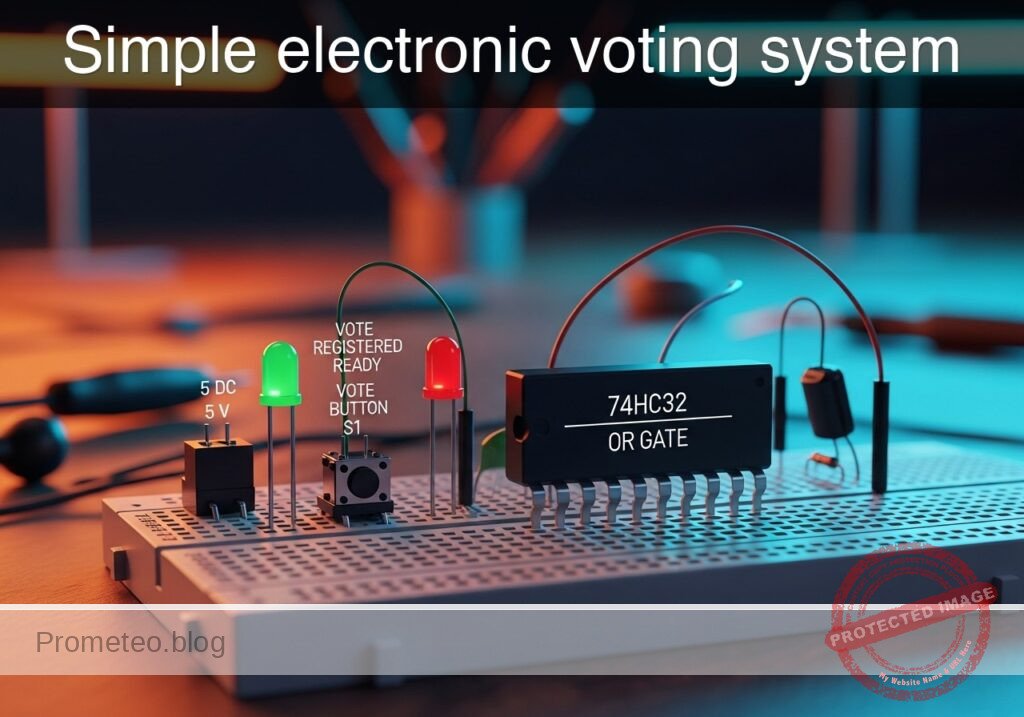
Practical case: Simple electronic voting system

Simple electronic voting system prototype (Maker Style)

Level: Advanced — Design a circuit to approve a motion if at least one of three judges emits a positive vote, integrating combinational logic and signal debouncing.

Objective and use case

You will build a digital logic circuit that processes signals from three independent momentary switches representing judges. The system uses a cascaded OR topology to drive a visual indicator if any single input (or combination of inputs) is active.

Why it is useful:
* Safety Interlocks: Similar logic is used in machine guards where breaking any single beam or opening any door must trigger a stop or alarm.
* Fault Detection: In automotive dashboards, multiple sensors (oil, tire pressure, engine heat) feed into a central warning light (Check Engine) via OR logic.
* Access Control: Systems where multiple different credentials (card, code, or biometric) can grant entry to the same door.
* Interrupt Requests: In microcontrollers, multiple peripherals can trigger a single interrupt line to the CPU using this logic.

Expected outcome:
* The output LED turns ON (Logic High) if Judge A, Judge B, Judge C, or any combination presses their button.
* The output LED remains OFF (Logic Low) only when all buttons are released.
* Input signals are conditioned (debounced) to prevent rapid flickering caused by mechanical switch bounce.
* Verification of signal propagation through cascaded logic gates.

Target audience: Engineering students and advanced electronics enthusiasts.

Materials

  • V1: 5 V DC supply
  • S1: Momentary push-button (Normally Open), function: Judge A Input
  • S2: Momentary push-button (Normally Open), function: Judge B Input
  • S3: Momentary push-button (Normally Open), function: Judge C Input
  • R1: 10 kΩ resistor, function: pull-down for Node A
  • R2: 10 kΩ resistor, function: pull-down for Node B
  • R3: 10 kΩ resistor, function: pull-down for Node C
  • R4: 1 kΩ resistor, function: RC debounce series resistance (Input A)
  • R5: 1 kΩ resistor, function: RC debounce series resistance (Input B)
  • R6: 1 kΩ resistor, function: RC debounce series resistance (Input C)
  • C1: 100 nF capacitor, function: debounce filtering (Input A)
  • C2: 100 nF capacitor, function: debounce filtering (Input B)
  • C3: 100 nF capacitor, function: debounce filtering (Input C)
  • U1: 74HC32 (Quad 2-Input OR Gate IC)
  • R7: 330 Ω resistor, function: LED current limiting
  • D1: Red LED, function: Outcome indicator

Pin-out of the IC used

Chip Selected: 74HC32 (Quad 2-Input OR Gate).
Note: Since we have 3 inputs and the chip contains 2-input gates, we will cascade two gates to create the logic function $Y = (A + B) + C$.

Pin Name Logic function Connection in this case
1 1A Input Connects to Debounced Signal A
2 1B Input Connects to Debounced Signal B
3 1Y Output Connects to Pin 4 (Cascade to next gate)
4 2A Input Connects to Pin 3 (Result of A+B)
5 2B Input Connects to Debounced Signal C
6 2Y Output Connects to Output LED circuit
7 GND Ground Connects to 0 (GND)
14 VCC Power Connects to VCC (+5V)

Wiring guide

This guide uses SPICE-friendly node names.
* Power Supply:
* V1 connects between node VCC and node 0 (GND).
* U1 pin 14 connects to VCC.
* U1 pin 7 connects to 0.

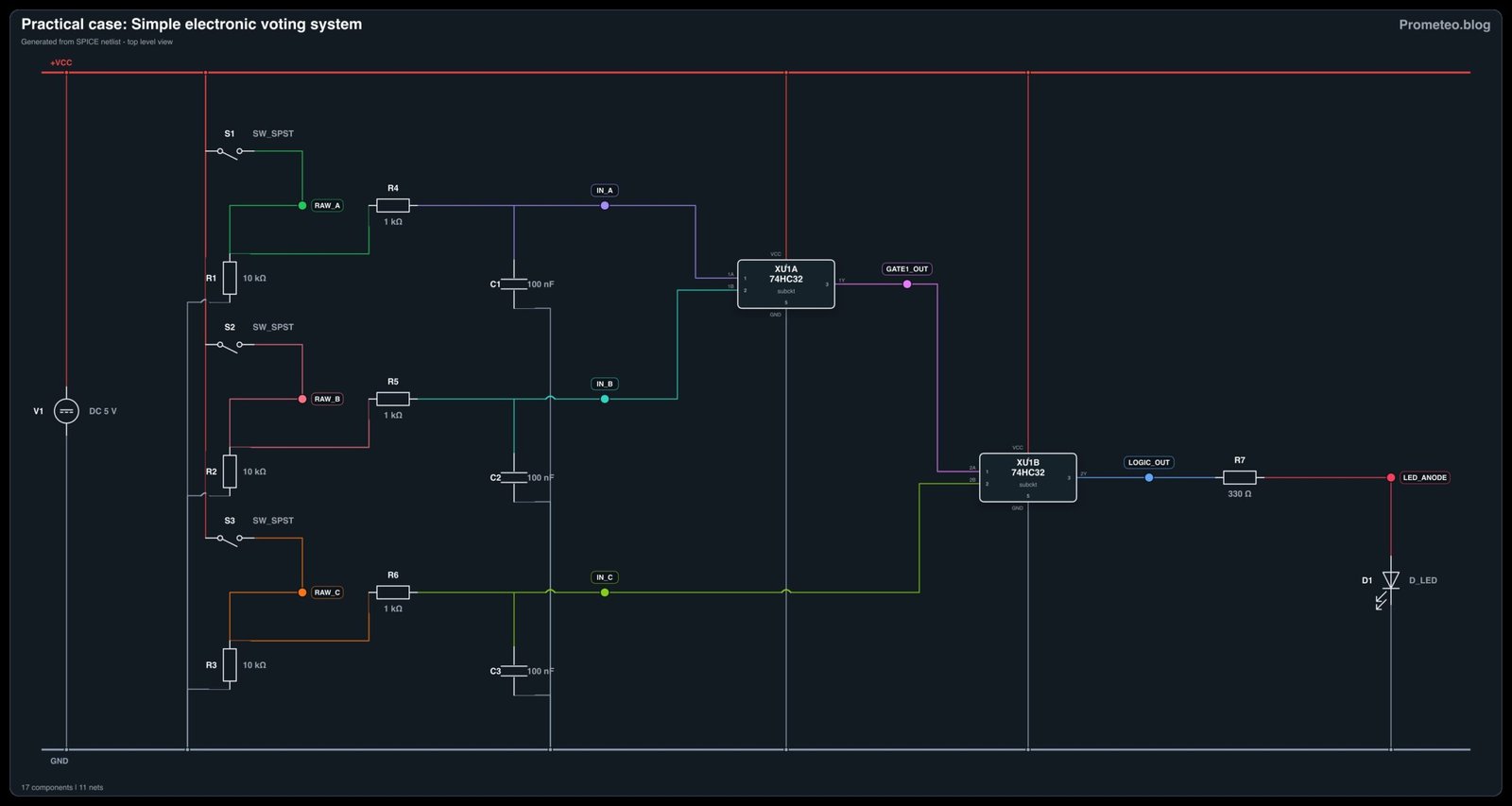
  • Input Stage (Judge A) – Pull-down & Debounce:
  • S1 connects between VCC and node RAW_A.
  • R1 connects between RAW_A and 0.
  • R4 connects between RAW_A and node IN_A.
  • C1 connects between IN_A and 0.

  • Input Stage (Judge B) – Pull-down & Debounce:

  • S2 connects between VCC and node RAW_B.
  • R2 connects between RAW_B and 0.
  • R5 connects between RAW_B and node IN_B.
  • C2 connects between IN_B and 0.

  • Input Stage (Judge C) – Pull-down & Debounce:

  • S3 connects between VCC and node RAW_C.
  • R3 connects between RAW_C and 0.
  • R6 connects between RAW_C and node IN_C.
  • C3 connects between IN_C and 0.

  • Logic Processing (Cascaded OR):

  • U1 pin 1 connects to IN_A.
  • U1 pin 2 connects to IN_B.
  • U1 pin 3 (Gate 1 Output) connects to node GATE1_OUT.
  • U1 pin 4 connects to node GATE1_OUT (Cascading signal).
  • U1 pin 5 connects to IN_C.
  • U1 pin 6 (Final Output) connects to node LOGIC_OUT.

  • Output Stage:

  • R7 connects between LOGIC_OUT and node LED_ANODE.
  • D1 connects between LED_ANODE (Anode) and 0 (Cathode).

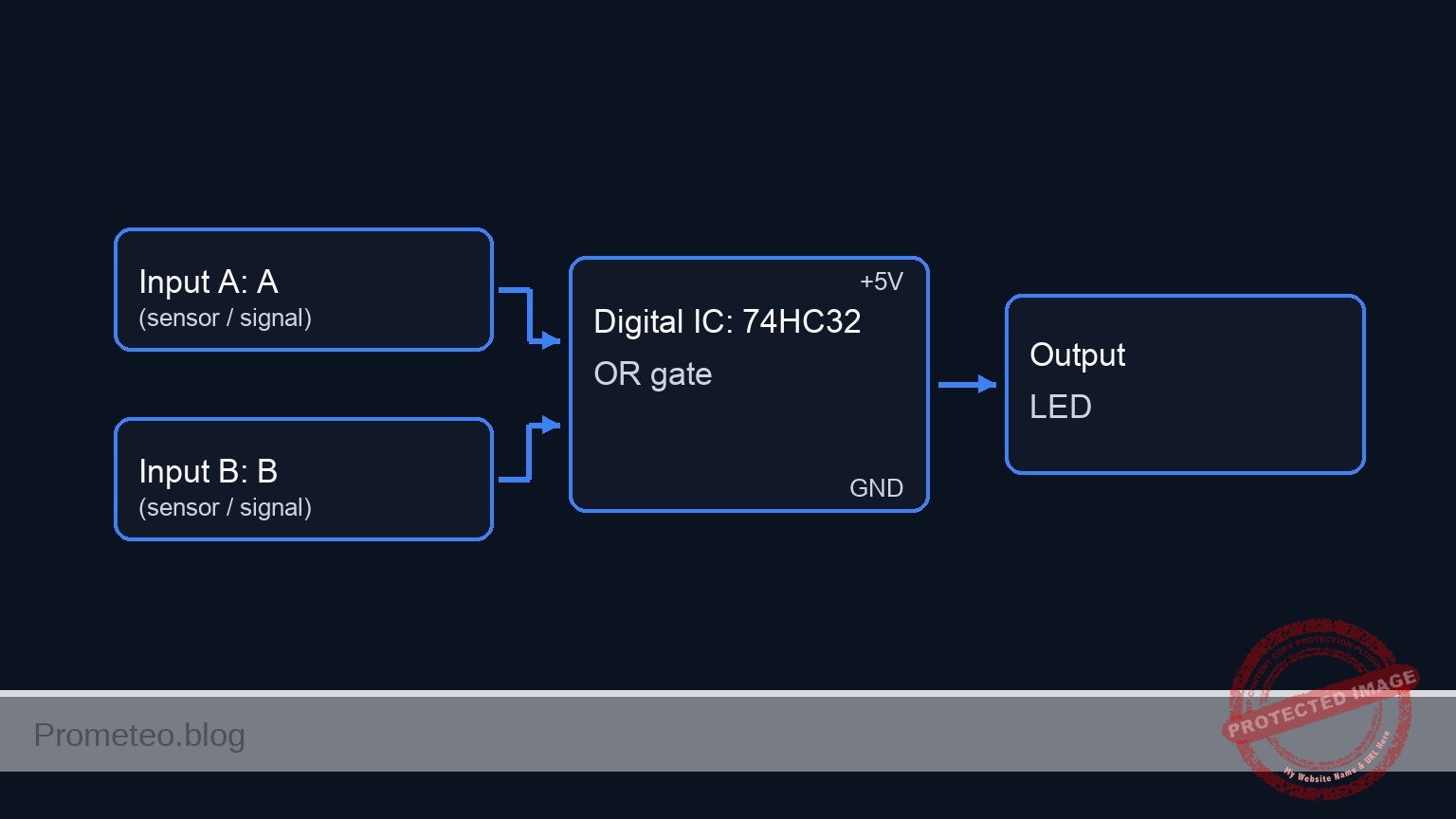
Conceptual block diagram

Conceptual block diagram — 74HC32 OR gate

Schematic

[ INPUT / CONDITIONING ]                  [ LOGIC PROCESSING (74HC32) ]             [ OUTPUT ]

                                                +-------------------------+
    [ S1: Judge A ]                             |        U1: Gate 1       |
    (VCC -> RAW_A) -> [ R1/R4/C1 ] --(Pin 1)--->| Input A                 |
                      (Debounce)                |           OR            |
                                                | Input B       (Output)  |
    [ S2: Judge B ]                    +------->| Pin 2          Pin 3    |--+
    (VCC -> RAW_B) -> [ R2/R5/C2 ] ----+        +-------------------------+  |
                      (Debounce)                                             |
                                                                             |
                                                                             |
                                                +-------------------------+  |
                                                |        U1: Gate 2       |  |
                                                | (Cascade In)   Pin 4    |< +
                                                |           OR            |
    [ S3: Judge C ]                    +------->| Input C        (Output) |
    (VCC -> RAW_C) -> [ R3/R6/C3 ] ----+        | Pin 5          Pin 6    |-----> [ R7: 330 Ohm ]
                      (Debounce)                +-------------------------+           |
                                                                                      v
                                                                                 [ D1: Red LED ]
                                                                                      |
                                                                                      v
                                                                                     GND
Schematic (ASCII)

Electrical diagram

Electrical diagram for case: Practical case: Simple electronic voting system
Generated from the validated SPICE netlist for this case.

🔒 This electrical diagram is premium. With the monthly membership (7-day free trial) you can unlock the complete didactic material and the print-ready PDF pack.🔓 See premium access plans

Truth table

The system creates a 3-Input OR function: $Q = A + B + C$.

Input A Input B Input C Output Q (LED) Note
0 0 0 0 Motion Rejected
0 0 1 1 Motion Approved
0 1 0 1 Motion Approved
0 1 1 1 Motion Approved
1 0 0 1 Motion Approved
1 0 1 1 Motion Approved
1 1 0 1 Motion Approved
1 1 1 1 Motion Approved

Measurements and tests

  1. Static Logic Check: Ensure no buttons are pressed. Measure voltage at U1 Pin 6. It should be close to 0 V. Press S1. The voltage should rise to ~5 V. Repeat for S2 and S3 individually.
  2. Debounce Validation: Connect an oscilloscope to RAW_A and IN_A. Press S1. RAW_A may show sharp voltage spikes/noise on contact. IN_A should show a smooth exponential rise curve, filtering out the noise before it hits the logic gate.
  3. Cascaded Delay: This is an advanced measurement. Measure the propagation delay between IN_A and LOGIC_OUT versus IN_C and LOGIC_OUT. Because IN_A must pass through two gates (Gate 1 then Gate 2), the total propagation delay will be slightly longer than IN_C, which only passes through Gate 2.

SPICE netlist and simulation

Reference SPICE Netlist (ngspice) — excerptFull SPICE netlist (ngspice)

* Simple electronic voting system
* Based on Practical Case BOM and Wiring Guide

* --- Power Supply ---
* V1 connects between node VCC and node 0 (GND).
V1 VCC 0 DC 5

* --- User Input Stimuli (Button Presses) ---
* We simulate the physical push-buttons using Voltage Controlled Switches (S1-S3)
* controlled by independent PULSE sources (V_CTRL_A, etc.) to mimic user behavior.
* The timing is staggered to test inputs A, B, and C sequentially with sufficient 
* time for the RC debounce circuits to charge and discharge.

* Judge A: Press at 1ms, hold for 2ms (releases at 3ms)
V_CTRL_A CTRL_A 0 PULSE(0 5 1m 1u 1u 2m 20m)

* Judge B: Press at 6ms, hold for 2ms (releases at 8ms)
V_CTRL_B CTRL_B 0 PULSE(0 5 6m 1u 1u 2m 20m)

* Judge C: Press at 11ms, hold for 2ms (releases at 13ms)
* ... (truncated in public view) ...

Copy this content into a .cir file and run with ngspice.

🔒 Part of this section is premium. With the monthly membership (7-day free trial) you can access the full content (materials, wiring, detailed build, validation, troubleshooting, variants and checklist) and download the complete print-ready PDF pack.

* Simple electronic voting system
* Based on Practical Case BOM and Wiring Guide

* --- Power Supply ---
* V1 connects between node VCC and node 0 (GND).
V1 VCC 0 DC 5

* --- User Input Stimuli (Button Presses) ---
* We simulate the physical push-buttons using Voltage Controlled Switches (S1-S3)
* controlled by independent PULSE sources (V_CTRL_A, etc.) to mimic user behavior.
* The timing is staggered to test inputs A, B, and C sequentially with sufficient 
* time for the RC debounce circuits to charge and discharge.

* Judge A: Press at 1ms, hold for 2ms (releases at 3ms)
V_CTRL_A CTRL_A 0 PULSE(0 5 1m 1u 1u 2m 20m)

* Judge B: Press at 6ms, hold for 2ms (releases at 8ms)
V_CTRL_B CTRL_B 0 PULSE(0 5 6m 1u 1u 2m 20m)

* Judge C: Press at 11ms, hold for 2ms (releases at 13ms)
V_CTRL_C CTRL_C 0 PULSE(0 5 11m 1u 1u 2m 20m)

* --- Input Stage: Judge A ---
* S1 connects between VCC and node RAW_A
S1 VCC RAW_A CTRL_A 0 SW_PB
* R1 (10k) pull-down for Node A (RAW_A to 0)
R1 RAW_A 0 10k
* R4 (1k) RC debounce series resistance (RAW_A to IN_A)
R4 RAW_A IN_A 1k
* C1 (100nF) debounce filtering (IN_A to 0)
C1 IN_A 0 100n

* --- Input Stage: Judge B ---
* S2 connects between VCC and node RAW_B
S2 VCC RAW_B CTRL_B 0 SW_PB
* R2 (10k) pull-down for Node B (RAW_B to 0)
R2 RAW_B 0 10k
* R5 (1k) RC debounce series resistance (RAW_B to IN_B)
R5 RAW_B IN_B 1k
* C2 (100nF) debounce filtering (IN_B to 0)
C2 IN_B 0 100n

* --- Input Stage: Judge C ---
* S3 connects between VCC and node RAW_C
S3 VCC RAW_C CTRL_C 0 SW_PB
* R3 (10k) pull-down for Node C (RAW_C to 0)
R3 RAW_C 0 10k
* R6 (1k) RC debounce series resistance (RAW_C to IN_C)
R6 RAW_C IN_C 1k
* C3 (100nF) debounce filtering (IN_C to 0)
C3 IN_C 0 100n

* --- Logic Processing: U1 (74HC32 Quad 2-Input OR Gate) ---
* Implemented using Behavioral Voltage Sources (B-sources) for robust simulation.
* Logic Transfer Function: Continuous Sigmoid approximation of OR gate.
* Vout = VCC * Sigmoid( max(Input1, Input2) - Threshold )
* Threshold set to 2.5V (Mid-rail).
* U1 Pin 14 (VCC) and Pin 7 (GND) are functionally represented by the V(VCC) term and node 0 reference.

* Gate 1: Inputs IN_A (Pin 1), IN_B (Pin 2) -> Output GATE1_OUT (Pin 3)
* Corresponds to wiring: U1 pin 1 to IN_A, U1 pin 2 to IN_B, U1 pin 3 to GATE1_OUT
B_U1_G1 GATE1_OUT 0 V = V(VCC) * (1 / (1 + exp(-20 * (max(V(IN_A), V(IN_B)) - 2.5))))

* Cascading Connection:
* Wiring: U1 pin 4 connects to node GATE1_OUT.

* Gate 2: Inputs GATE1_OUT (Pin 4), IN_C (Pin 5) -> Output LOGIC_OUT (Pin 6)
* Corresponds to wiring: U1 pin 4 to GATE1_OUT, U1 pin 5 to IN_C, U1 pin 6 to LOGIC_OUT
B_U1_G2 LOGIC_OUT 0 V = V(VCC) * (1 / (1 + exp(-20 * (max(V(GATE1_OUT), V(IN_C)) - 2.5))))

* --- Output Stage ---
* R7 connects between LOGIC_OUT and node LED_ANODE
R7 LOGIC_OUT LED_ANODE 330
* D1 connects between LED_ANODE (Anode) and 0 (Cathode)
D1 LED_ANODE 0 D_LED

* --- Models ---
* Switch model for push buttons (Active High control)
.model SW_PB SW(Vt=2.5 Ron=0.1 Roff=10Meg)
* Generic LED model (Red)
.model D_LED D(IS=1n N=2 RS=10 BV=5)

* --- Simulation Directives ---
* Transient analysis for 15ms to capture all button presses and RC discharge curves.
* Step size 10us is sufficient for the 100us/1.1ms time constants.
.tran 10u 15m

* Print required nodes for validation
.print tran V(IN_A) V(IN_B) V(IN_C) V(GATE1_OUT) V(LOGIC_OUT) V(LED_ANODE)

.op
.end

Simulation Results (Transient Analysis)

Simulation Results (Transient Analysis)
Show raw data table (3274 rows)
Index   time            v(in_a)         v(in_b)         v(in_c)
0	0.000000e+00	4.995005e-03	4.995005e-03	4.995005e-03
1	1.000000e-07	4.995005e-03	4.995005e-03	4.995005e-03
2	2.000000e-07	4.995005e-03	4.995005e-03	4.995005e-03
3	4.000000e-07	4.995005e-03	4.995005e-03	4.995005e-03
4	8.000000e-07	4.995005e-03	4.995005e-03	4.995005e-03
5	1.600000e-06	4.995005e-03	4.995005e-03	4.995005e-03
6	3.200000e-06	4.995005e-03	4.995005e-03	4.995005e-03
7	6.400000e-06	4.995005e-03	4.995005e-03	4.995005e-03
8	1.280000e-05	4.995005e-03	4.995005e-03	4.995005e-03
9	2.280000e-05	4.995005e-03	4.995005e-03	4.995005e-03
10	3.280000e-05	4.995005e-03	4.995005e-03	4.995005e-03
11	4.280000e-05	4.995005e-03	4.995005e-03	4.995005e-03
12	5.280000e-05	4.995005e-03	4.995005e-03	4.995005e-03
13	6.280000e-05	4.995005e-03	4.995005e-03	4.995005e-03
14	7.280000e-05	4.995005e-03	4.995005e-03	4.995005e-03
15	8.280000e-05	4.995005e-03	4.995005e-03	4.995005e-03
16	9.280000e-05	4.995005e-03	4.995005e-03	4.995005e-03
17	1.028000e-04	4.995005e-03	4.995005e-03	4.995005e-03
18	1.128000e-04	4.995005e-03	4.995005e-03	4.995005e-03
19	1.228000e-04	4.995005e-03	4.995005e-03	4.995005e-03
20	1.328000e-04	4.995005e-03	4.995005e-03	4.995005e-03
21	1.428000e-04	4.995005e-03	4.995005e-03	4.995005e-03
22	1.528000e-04	4.995005e-03	4.995005e-03	4.995005e-03
23	1.628000e-04	4.995005e-03	4.995005e-03	4.995005e-03
... (3250 more rows) ...

Common mistakes and how to avoid them

  1. Floating Inputs: Failing to install the pull-down resistors (R1, R2, R3). Without them, the 74HC32 inputs act as antennas, causing the LED to flicker randomly or stay stuck High. Solution: Always reference inputs to GND when the switch is open.
  2. Ignoring Pinout: Connecting Input C to Pin 3 (which is an output). This creates a short circuit when the gate tries to drive Low while the button drives High. Solution: Double-check the datasheet pin diagram before powering up.
  3. Excessive RC Time Constant: Using a capacitor that is too large (e.g., 100 µF) for the debounce circuit. This creates a very slow voltage rise that causes the digital gate to oscillate linearly during the threshold crossing. Solution: Stick to 100 nF – 1 µF for simple logic inputs.

Troubleshooting

  • LED is always ON: Check pull-down resistors. If measured voltage at pins 1, 2, or 5 is floating (not 0 V), the gate interprets it as Logic High.
  • LED does not light up for Judge A or B: Verify the cascade connection. Pin 3 (Output of first gate) must be physically wired to Pin 4 (Input of second gate).
  • Erratic behavior when touching wires: Indicates missing ground connections on unused inputs (if any) or floating operational inputs. Ensure all grounds share a common point.
  • Gate gets hot: Check for output-to-output short circuits or output-to-VCC shorts. Disconnect power immediately.

Possible improvements and extensions

  1. Majority Vote Extension: Modify the logic to require at least two positive votes to approve the motion (using a combination of AND and OR gates: $AB + BC + AC$).
  2. Latch functionality: Add a D Flip-Flop (e.g., 74HC74) after the output. Once the motion is approved (LED ON), the light stays ON until a dedicated «Reset» button is pressed by a supervisor.

More Practical Cases on Prometeo.blog

        <div class="amazon-affiliate">
          <p><strong>Find this product and/or books on this topic on Amazon</strong></p>
          <p><a class="amazon-affiliate-btn" href="https://amzn.to/4mt8r4C" target="_blank" rel="nofollow sponsored noopener">Go to Amazon</a></p>
          <p class="amazon-affiliate-disclaimer">As an Amazon Associate, I earn from qualifying purchases. If you buy through this link, you help keep this project running.</p>
        </div>

Quick Quiz

Question 1: What is the primary logic topology used in the described circuit to process the judges' votes?


Question 2: Under what condition will the output LED turn ON?


Question 3: Which of the following is NOT listed as a useful application for this type of logic circuit?


Question 4: What specific issue does signal debouncing address in this circuit?


Question 5: What type of switches are specified for the judges' inputs?


Question 6: How is this logic applied in the context of microcontroller interrupt requests?


Question 7: Based on the OR logic described, what is the state of the output LED when all buttons are released?


Question 8: In an automotive dashboard application, how does this logic function?


Question 9: What is the primary purpose of using this logic in safety interlocks?


Question 10: Which access control scenario utilizes the logic described in the text?


Carlos Núñez Zorrilla
Electronics & Computer Engineer

Telecommunications Electronics Engineer and Computer Engineer (official degrees in Spain).

Follow me:


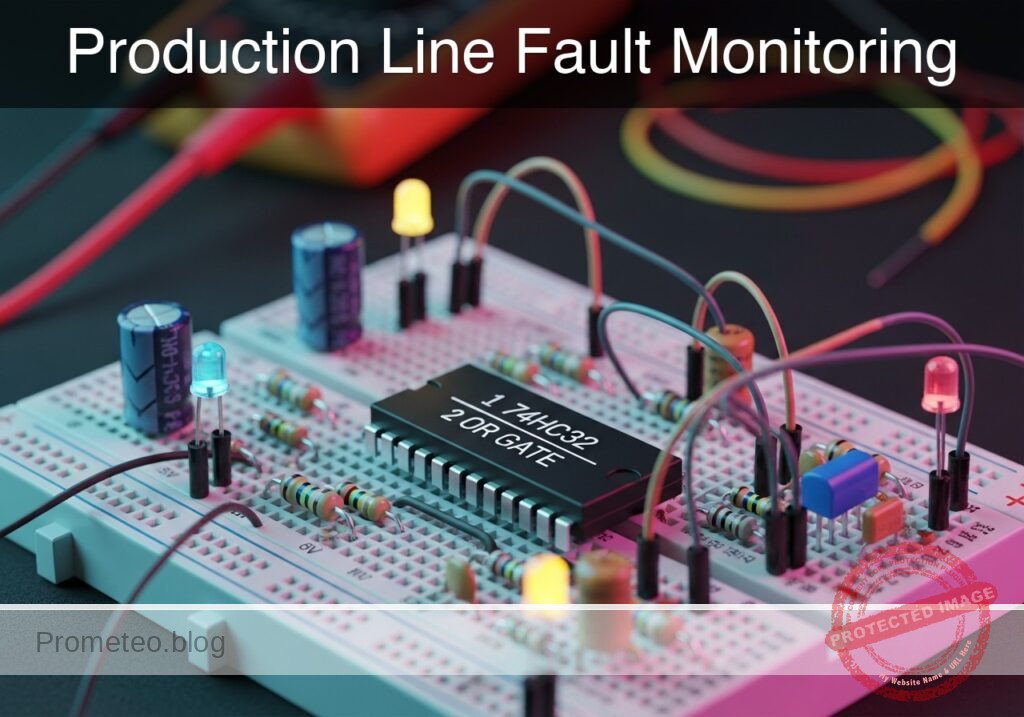
Practical case: Production Line Fault Monitoring

Production Line Fault Monitoring prototype (Maker Style)

Level: Medium. Implement a safety system that stops a conveyor belt if either the temperature sensor OR the jam sensor detects an anomaly.

Objective and use case

You will build a logic control circuit using an OR gate to combine signals from two distinct safety sensors (Temperature and Optical Jam). When either sensor detects a fault (Logic High), the system will output an active signal to trigger an indicator or stop mechanism.

Why it is useful:
* Industrial Safety: Prevents machinery from operating under dangerous conditions.
* Equipment Protection: Stops motors immediately if they overheat to prevent permanent damage.
* Process Efficiency: Detects physical jams on conveyor belts automatically, reducing waste.
* Redundancy: Allows multiple different error types to trigger the same emergency stop routine.

Expected outcome:
* System Standby: When both sensors are Low (0V), the output LED is OFF.
* Temperature Fault: If the temperature sensor triggers (High/5V), the LED turns ON.
* Jam Fault: If the jam sensor triggers (High/5V), the LED turns ON.
* Critical Failure: If both sensors trigger simultaneously, the LED remains ON.

Target audience and level: Electronics students and hobbyists, Level Medium.

Materials

  • V1: 5 V DC power supply, function: Main circuit power.
  • U1: 74HC32, function: Quad 2-input OR gate IC.
  • S1: SPST Toggle Switch, function: Simulates Temperature Sensor (Open=Normal, Closed=Overheat).
  • S2: SPST Toggle Switch, function: Simulates Jam Sensor (Open=Clear, Closed=Jam).
  • R1: 10 kΩ resistor, function: Pull-down for Temperature Input.
  • R2: 10 kΩ resistor, function: Pull-down for Jam Input.
  • R3: 330 Ω resistor, function: Current limiting for indicator LED.
  • D1: Red LED, function: Visual Fault Indicator.

Pin-out of the IC used

Selected Chip: 74HC32 (Quad 2-Input OR Gate)

Pin Name Logic function Connection in this case
1 1A Input A Connected to Temperature Sensor (S1)
2 1B Input B Connected to Jam Sensor (S2)
3 1Y Output Connected to LED driver (R3 + D1)
7 GND Ground Connected to Power Supply Negative (0V)
14 VCC Power (+) Connected to Power Supply Positive (5V)

Wiring guide

  • VCC: Connect V1 positive terminal to U1 pin 14.
  • 0 (GND): Connect V1 negative terminal to U1 pin 7.
  • VA (Temp Signal): Connect S1 terminal 2 to U1 pin 1.
  • VA (Temp Signal): Connect R1 between U1 pin 1 and 0.
  • VCC: Connect S1 terminal 1 to VCC.
  • VB (Jam Signal): Connect S2 terminal 2 to U1 pin 2.
  • VB (Jam Signal): Connect R2 between U1 pin 2 and 0.
  • VCC: Connect S2 terminal 1 to VCC.
  • V_OUT: Connect U1 pin 3 to R3 terminal 1.
  • LED_NODE: Connect R3 terminal 2 to D1 Anode.
  • 0 (GND): Connect D1 Cathode to 0.

Conceptual block diagram

Conceptual block diagram — 74HC32 OR gate

Schematic

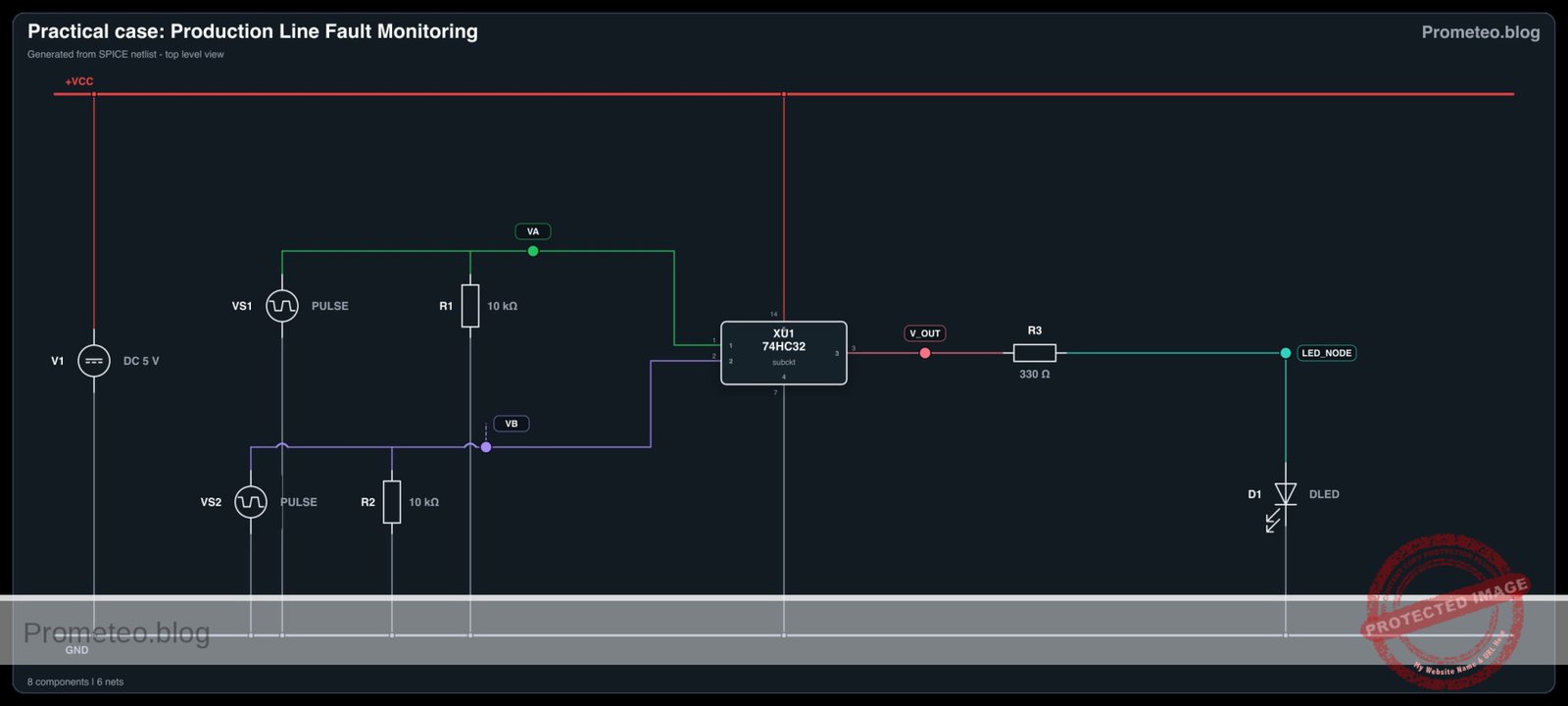
Title: Production Line Fault Monitoring (OR Logic)

      [ INPUT SENSORS ]                       [ LOGIC PROCESSING ]                 [ VISUAL OUTPUT ]

                                                 (Pin 14: VCC)
                                                       |
                                                       v
[ VCC ] --> [ S1: Temp Switch ] --+--(Pin 1)-->+---------------+
                                  |            |               |
                             [ R1: 10k ]       |   U1: 74HC32  |
                                  |            |   (OR Gate)   |--(Pin 3)--> [ R3: 330 ] --> [ D1: LED ] --> [ GND ]
                               [ GND ]         |               |
                                               |               |
[ VCC ] --> [ S2: Jam Switch  ] --+--(Pin 2)-->+---------------+
                                  |                    ^
                             [ R2: 10k ]               |
                                  |               (Pin 7: GND)
                               [ GND ]
Schematic (ASCII)

Electrical diagram

Electrical diagram for case: Practical case: Production Line Fault Monitoring
Generated from the validated SPICE netlist for this case.

🔒 This electrical diagram is premium. With the monthly membership (7-day free trial) you can unlock the complete didactic material and the print-ready PDF pack.🔓 See premium access plans

Truth table

This circuit utilizes positive logic (Active High).

Sensor A (Temp) Sensor B (Jam) Output (Fault Indicator) LED State
Low (0) Low (0) Low (0) OFF
Low (0) High (1) High (1) ON
High (1) Low (0) High (1) ON
High (1) High (1) High (1) ON

Measurements and tests

  1. Standby Check: Ensure both switches S1 and S2 are open. Measure voltage at U1 Pin 3 relative to GND. It should be ~0 V. LED should be OFF.
  2. Temperature Fault Simulation: Close S1 while keeping S2 open. Measure voltage at Pin 1 (Input A). It should be 5 V. The Output Pin 3 should go to High (~5 V) and the LED must light up.
  3. Jam Fault Simulation: Open S1 and close S2. Measure voltage at Pin 2 (Input B). It should be 5 V. The LED must light up.
  4. Simultaneous Fault: Close both S1 and S2. The LED must remain ON.

SPICE netlist and simulation

Reference SPICE Netlist (ngspice) — excerptFull SPICE netlist (ngspice)

* Practical case: Production Line Fault Monitoring

* --- Component Models ---
* Generic Red LED Model
.model DLED D (IS=1e-14 N=2 RS=10 BV=5 IBV=10u CJO=10p)

* --- Subcircuits ---
* 74HC32 Quad 2-input OR Gate
* Pinout: 1=InputA, 2=InputB, 3=Output, 7=GND, 14=VCC
* Implemented using a robust behavioral source with continuous functions
.subckt 74HC32 1 2 3 7 14
* Logic: Output = VCC if (A > 2.5V OR B > 2.5V)
* Using sigmoid function for smooth convergence: S(x) = 1/(1+exp(-k*(x-thresh)))
* max(V(1), V(2)) selects the higher voltage to compare against threshold (2.5V)
B_OR 3 7 V = V(14) * (1 / (1 + exp(-20 * (max(V(1), V(2)) - 2.5))))
.ends

* --- Main Power Supply ---
* V1: 5V DC Supply
* Wiring: Positive -> Node 14 (VCC), Negative -> Node 0 (GND)
V1 14 0 DC 5

* --- Input Sensors (Simulated Switches) ---
* S1: Temperature Sensor Switch
* Wiring: Connects VCC to VA (Pin 1). Modeled as Pulse Source to simulate toggling.
* Logic Sequence: High (Overheat) / Low (Normal)
VS1 VA 0 PULSE(0 5 0 1u 1u 200u 400u)

* S2: Jam Sensor Switch
* Wiring: Connects VCC to VB (Pin 2). Modeled as Pulse Source with faster period.
* ... (truncated in public view) ...

Copy this content into a .cir file and run with ngspice.

🔒 Part of this section is premium. With the monthly membership (7-day free trial) you can access the full content (materials, wiring, detailed build, validation, troubleshooting, variants and checklist) and download the complete print-ready PDF pack.

* Practical case: Production Line Fault Monitoring

* --- Component Models ---
* Generic Red LED Model
.model DLED D (IS=1e-14 N=2 RS=10 BV=5 IBV=10u CJO=10p)

* --- Subcircuits ---
* 74HC32 Quad 2-input OR Gate
* Pinout: 1=InputA, 2=InputB, 3=Output, 7=GND, 14=VCC
* Implemented using a robust behavioral source with continuous functions
.subckt 74HC32 1 2 3 7 14
* Logic: Output = VCC if (A > 2.5V OR B > 2.5V)
* Using sigmoid function for smooth convergence: S(x) = 1/(1+exp(-k*(x-thresh)))
* max(V(1), V(2)) selects the higher voltage to compare against threshold (2.5V)
B_OR 3 7 V = V(14) * (1 / (1 + exp(-20 * (max(V(1), V(2)) - 2.5))))
.ends

* --- Main Power Supply ---
* V1: 5V DC Supply
* Wiring: Positive -> Node 14 (VCC), Negative -> Node 0 (GND)
V1 14 0 DC 5

* --- Input Sensors (Simulated Switches) ---
* S1: Temperature Sensor Switch
* Wiring: Connects VCC to VA (Pin 1). Modeled as Pulse Source to simulate toggling.
* Logic Sequence: High (Overheat) / Low (Normal)
VS1 VA 0 PULSE(0 5 0 1u 1u 200u 400u)

* S2: Jam Sensor Switch
* Wiring: Connects VCC to VB (Pin 2). Modeled as Pulse Source with faster period.
* Logic Sequence: High (Jam) / Low (Clear)
VS2 VB 0 PULSE(0 5 0 1u 1u 100u 200u)

* --- Pull-down Resistors ---
* R1: 10k Pull-down for Temp Input
R1 VA 0 10k
* R2: 10k Pull-down for Jam Input
R2 VB 0 10k

* --- Logic IC U1 ---
* U1: 74HC32 Quad OR Gate
* Connections per wiring guide:
* Pin 1 (A) -> VA
* Pin 2 (B) -> VB
* Pin 3 (Y) -> V_OUT
* Pin 7 (GND) -> 0
* Pin 14 (VCC) -> 14
XU1 VA VB V_OUT 0 14 74HC32

* --- Output Indicator ---
* R3: 330 Ohm Current Limiting Resistor
R3 V_OUT LED_NODE 330

* D1: Red LED Visual Indicator
* Anode -> LED_NODE, Cathode -> GND
D1 LED_NODE 0 DLED

* --- Analysis Directives ---
* Transient analysis to capture truth table states (00, 01, 10, 11)
.tran 1u 400u

* Print required voltages for verification
.print tran V(VA) V(VB) V(V_OUT) V(LED_NODE)

* Calculate DC operating point
.op

.end

Simulation Results (Transient Analysis)

Simulation Results (Transient Analysis)
Show raw data table (906 rows)
Index   time            v(va)           v(vb)           v(v_out)
0	0.000000e+00	0.000000e+00	0.000000e+00	9.643749e-22
1	1.000000e-08	5.000000e-02	5.000000e-02	1.928750e-21
2	2.000000e-08	1.000000e-01	1.000000e-01	5.242886e-21
3	4.000000e-08	2.000000e-01	2.000000e-01	2.137746e-20
4	8.000000e-08	4.000000e-01	4.000000e-01	2.632654e-19
5	1.600000e-07	8.000000e-01	8.000000e-01	2.587285e-17
6	3.200000e-07	1.600000e+00	1.600000e+00	7.614990e-08
7	4.700575e-07	2.350288e+00	2.350288e+00	2.384318e-01
8	6.126008e-07	3.063004e+00	3.063004e+00	4.999936e+00
9	7.041960e-07	3.520980e+00	3.520980e+00	5.000000e+00
10	7.932149e-07	3.966074e+00	3.966074e+00	5.000000e+00
11	9.007723e-07	4.503862e+00	4.503862e+00	5.000000e+00
12	1.000000e-06	5.000000e+00	5.000000e+00	5.000000e+00
13	1.021511e-06	5.000000e+00	5.000000e+00	5.000000e+00
14	1.064534e-06	5.000000e+00	5.000000e+00	5.000000e+00
15	1.150580e-06	5.000000e+00	5.000000e+00	5.000000e+00
16	1.322672e-06	5.000000e+00	5.000000e+00	5.000000e+00
17	1.666856e-06	5.000000e+00	5.000000e+00	5.000000e+00
18	2.355224e-06	5.000000e+00	5.000000e+00	5.000000e+00
19	3.355224e-06	5.000000e+00	5.000000e+00	5.000000e+00
20	4.355224e-06	5.000000e+00	5.000000e+00	5.000000e+00
21	5.355224e-06	5.000000e+00	5.000000e+00	5.000000e+00
22	6.355224e-06	5.000000e+00	5.000000e+00	5.000000e+00
23	7.355224e-06	5.000000e+00	5.000000e+00	5.000000e+00
... (882 more rows) ...

Common mistakes and how to avoid them

  1. Leaving Inputs Floating: Failing to install pull-down resistors (R1, R2) causes the inputs to «float» and pick up noise, causing the LED to flicker or stay ON randomly. Solution: Always use 10kΩ pull-down resistors on CMOS inputs connected to switches.
  2. Missing Current Limiting Resistor: Connecting the LED directly to the 74HC32 output pin without R3. Solution: Ensure R3 (330Ω) is in series with the LED to prevent burning out the IC or the LED.
  3. Confusing Pinout: Treating the 74HC32 like a different logic chip (e.g., 74HC02 NOR) due to similar package shape. Solution: Always verify the datasheet pin diagram; Pin 3 is output for the first gate on the 74HC32.

Troubleshooting

  • LED is always ON: Check if pull-down resistors R1 and R2 are connected to Ground. If inputs are disconnected, they float High.
  • LED is very dim: The resistor R3 might be too high (e.g., 10kΩ instead of 330Ω) or the power supply voltage is below 3V.
  • Nothing happens when switches close: Verify that U1 Pin 14 is connected to 5V and Pin 7 is connected to GND. Check switch continuity.
  • Logic is inverted (LED OFF when fault occurs): You may have accidentally used a NOR gate or wired the LED active-low (Anode to VCC, Cathode to Output).

Possible improvements and extensions

  1. Latching Alarm: Add an SR Flip-Flop or a feedback loop so that once a fault is detected, the alarm stays ON until a manual «Reset» button is pressed, even if the sensor returns to normal.
  2. Audible Alert: Connect a transistor driver and a 5V active buzzer in parallel with the LED to provide an audio warning for noisy factory environments.

More Practical Cases on Prometeo.blog

Find this product and/or books on this topic on Amazon

Go to Amazon

As an Amazon Associate, I earn from qualifying purchases. If you buy through this link, you help keep this project running.

Quick Quiz

Question 1: What is the primary logic gate used in this safety system circuit?


Question 2: What happens to the output LED when both the temperature sensor and the jam sensor are Low (0V)?


Question 3: Which component is typically used to simulate the Temperature Sensor in a basic prototype of this project?


Question 4: What is the specific function of the 74HC32 IC in this circuit?


Question 5: Why are pull-down resistors typically used on the input switches in this logic circuit?


Question 6: If only the Jam Sensor triggers (High/5V), what is the expected state of the LED?


Question 7: What is the primary purpose of a resistor placed in series with the output LED?


Question 8: Which of the following is listed as a benefit of this system for 'Equipment Protection'?


Question 9: What is the standard logic voltage level (High) used for the sensors in this description?


Question 10: How does the system behave during a 'Critical Failure' where both sensors trigger simultaneously?


Carlos Núñez Zorrilla
Electronics & Computer Engineer

Telecommunications Electronics Engineer and Computer Engineer (official degrees in Spain).

Follow me:


Practical case: Redundant motor starter system

Redundant motor starter system prototype (Maker Style)

Level: Medium. Design a control circuit to start industrial machinery from a main panel or a remote safety remote.

Objective and use case

In this practical case, you will build a digital control circuit using an OR logic gate to operate a heavy-duty DC motor via a relay. The system allows the motor to be started from two distinct physical locations: the main control panel or a remote safety station.

  • Operational Redundancy: Ensures machinery can be activated from a secondary location if the primary panel is inaccessible.
  • Convenience: Allows operators to start a conveyor belt or fan from either end of a production line.
  • Signal Isolation: Uses low-voltage logic (5V) to safely switch a high-power inductive load (motor) via a relay driver.

Expected outcome:
* Pressing Button A (Main) starts the motor immediately.
* Pressing Button B (Remote) starts the motor immediately.
* Logic Output High ($V_{OH}$) measures approximately 5V when either button is pressed.
* The relay produces an audible «click» and the DC motor spins when the logic condition is met.

Target audience: Electronics students and hobbyists familiar with basic logic gates and relay driving.

Materials

  • V1: 5 V DC power supply, function: Main logic and relay power
  • U1: 74HC32, function: Quad 2-input OR gate
  • S1: Pushbutton (normally open), function: Main Start Panel
  • S2: Pushbutton (normally open), function: Remote Start Command
  • R1: 10 kΩ resistor, function: Pull-down for Input A
  • R2: 10 kΩ resistor, function: Pull-down for Input B
  • R3: 1 kΩ resistor, function: Transistor base current limiting
  • Q1: 2N2222 NPN Transistor, function: Relay driver switch
  • D1: 1N4007 Diode, function: Flyback protection for relay coil
  • K1: 5 V Relay (SPDT), function: High-current switching
  • M1: 5 V DC Motor, function: Industrial load simulation

Pin-out of the IC used

Chip: 74HC32 (Quad 2-Input OR Gate)

Pin Name Logic function Connection in this case
1 1A Input A Connected to Node START_MAIN
2 1B Input B Connected to Node START_REMOTE
3 1Y Output Connected to Node LOGIC_OUT
7 GND Ground Connected to Node 0
14 VCC Power Supply Connected to Node VCC

Wiring guide

  • V1 connects between node VCC and node 0 (GND).
  • S1 connects between node VCC and node START_MAIN.
  • R1 connects between node START_MAIN and node 0.
  • S2 connects between node VCC and node START_REMOTE.
  • R2 connects between node START_REMOTE and node 0.
  • U1 Pin 1 (1A) connects to node START_MAIN.
  • U1 Pin 2 (1B) connects to node START_REMOTE.
  • U1 Pin 3 (1Y) connects to node LOGIC_OUT.
  • U1 Pin 14 (VCC) connects to node VCC.
  • U1 Pin 7 (GND) connects to node 0.
  • R3 connects between node LOGIC_OUT and node BASE_DRIVE.
  • Q1 Base connects to node BASE_DRIVE.
  • Q1 Emitter connects to node 0.
  • Q1 Collector connects to node RELAY_COIL_LO.
  • K1 Coil Positive connects between node VCC and node RELAY_COIL_LO (Note: Coil connects VCC to Collector).
  • D1 connects between node RELAY_COIL_LO (Anode) and node VCC (Cathode) (Reverse biased).
  • K1 Common contact connects to node VCC.
  • K1 Normally Open (NO) contact connects to node MOTOR_PWR.
  • M1 connects between node MOTOR_PWR and node 0.

Conceptual block diagram

Conceptual block diagram — 74HC32 OR gate

Schematic

Practical case: Redundant motor starter system

      [ INPUTS ]                     [ LOGIC ]                     [ DRIVER ]                   [ OUTPUT / LOAD ]

 [ S1: Main Start ] --+
                      |
 [ R1: Pull-down  ] --+--(Pin 1)-->+------------+
                                   |            |
                                   | U1: 74HC32 |             (Base Sig)
                                   | (OR Gate)  |--(Pin 3)--> [ R3: 1k ] --> [ Q1: NPN ] --(Sink)--> [ K1: Relay Coil ]
                                   |            |                               |                    (w/ D1 Diode)
 [ S2: Remote Cmd ] --+--(Pin 2)-->+------------+                            [ GND ]                       |
                      |                                                                                (Magnetic)
 [ R2: Pull-down  ] --+                                                                                    |
                                                                                                           v
                                                                                                   [ K1: NO Contact ]
                                                                                                           |
                                                                                                     (Switched 5V)
                                                                                                           |
                                                                                                           v
                                                                                                    [ M1: DC Motor ]
                                                                                                           |
                                                                                                        [ GND ]
Schematic (ASCII)

Electrical diagram

Electrical diagram for case: Practical case: Redundant motor starter system
Generated from the validated SPICE netlist for this case.

🔒 This electrical diagram is premium. With the monthly membership (7-day free trial) you can unlock the complete didactic material and the print-ready PDF pack.🔓 See premium access plans

Truth table

This system uses positive logic (active HIGH).

Input A (Main) Input B (Remote) Output Y (Logic) Relay State Motor State
0 (Open) 0 (Open) 0 (Low) OFF Stopped
0 (Open) 1 (Pressed) 1 (High) ON Running
1 (Pressed) 0 (Open) 1 (High) ON Running
1 (Pressed) 1 (Pressed) 1 (High) ON Running

Measurements and tests

  1. Input Validation ($V_{in_high}$): With neither button pressed, measure the voltage at START_MAIN and START_REMOTE. It should be 0V. Press S1 and verify the voltage rises to approx 5V.
  2. Logic Output Verification ($V_{out_logic}$): Place a multimeter probe on Pin 3 of U1. Press S1 OR S2. The voltage should jump from near 0V to $\approx$ 5V.
  3. Actuator Test (Motor RPM): Observe the motor. It should spin when the logic output is High. If using a tachometer, verify the Motor_RPM is consistent regardless of which button (S1 or S2) triggered the start.

SPICE netlist and simulation

Reference SPICE Netlist (ngspice) — excerptFull SPICE netlist (ngspice)

* Redundant motor starter system
* Created based on BOM and Wiring Guide

* --- Power Supply ---
* V1: 5 V DC power supply
V1 VCC 0 DC 5

* --- Input Section ---
* S1: Pushbutton (Main Start)
* Wiring: Connects VCC to START_MAIN.
* Implementation: Voltage Controlled Switch driven by a Stimulus Pulse (V_ACT1)
* Timing: Period 200us, covers logic states 00, 10, 11, 01 combined with S2
V_ACT1 ACT1 0 PULSE(0 5 10u 1u 1u 100u 200u)
S1 VCC START_MAIN ACT1 0 SW_PUSH

* R1: 10 kΩ resistor (Pull-down for Input A)
R1 START_MAIN 0 10k

* S2: Pushbutton (Remote Start)
* Wiring: Connects VCC to START_REMOTE.
* Implementation: Voltage Controlled Switch driven by a Stimulus Pulse (V_ACT2)
V_ACT2 ACT2 0 PULSE(0 5 10u 1u 1u 200u 400u)
S2 VCC START_REMOTE ACT2 0 SW_PUSH

* R2: 10 kΩ resistor (Pull-down for Input B)
R2 START_REMOTE 0 10k

* Model for Pushbuttons
.model SW_PUSH SW(Vt=2.5 Ron=0.1 Roff=10Meg)

* ... (truncated in public view) ...

Copy this content into a .cir file and run with ngspice.

🔒 Part of this section is premium. With the monthly membership (7-day free trial) you can access the full content (materials, wiring, detailed build, validation, troubleshooting, variants and checklist) and download the complete print-ready PDF pack.

* Redundant motor starter system
* Created based on BOM and Wiring Guide

* --- Power Supply ---
* V1: 5 V DC power supply
V1 VCC 0 DC 5

* --- Input Section ---
* S1: Pushbutton (Main Start)
* Wiring: Connects VCC to START_MAIN.
* Implementation: Voltage Controlled Switch driven by a Stimulus Pulse (V_ACT1)
* Timing: Period 200us, covers logic states 00, 10, 11, 01 combined with S2
V_ACT1 ACT1 0 PULSE(0 5 10u 1u 1u 100u 200u)
S1 VCC START_MAIN ACT1 0 SW_PUSH

* R1: 10 kΩ resistor (Pull-down for Input A)
R1 START_MAIN 0 10k

* S2: Pushbutton (Remote Start)
* Wiring: Connects VCC to START_REMOTE.
* Implementation: Voltage Controlled Switch driven by a Stimulus Pulse (V_ACT2)
V_ACT2 ACT2 0 PULSE(0 5 10u 1u 1u 200u 400u)
S2 VCC START_REMOTE ACT2 0 SW_PUSH

* R2: 10 kΩ resistor (Pull-down for Input B)
R2 START_REMOTE 0 10k

* Model for Pushbuttons
.model SW_PUSH SW(Vt=2.5 Ron=0.1 Roff=10Meg)

* --- Logic Section ---
* U1: 74HC32 Quad 2-input OR gate
* Pins: 1(A), 2(B), 3(Y), 7(GND), 14(VCC)
* Implemented as a subcircuit to expose all pins
XU1 START_MAIN START_REMOTE LOGIC_OUT VCC 0 74HC32_OR

.subckt 74HC32_OR A B Y VCC GND
* Behavioral OR logic using continuous tanh function for convergence
* Logic: If (A + B) > Threshold(2.5V), Output High
* Function scales 0-1 range to 0-5V
B1 Y GND V = 5 * (tanh(10 * (V(A) + V(B) - 2.5)) + 1) / 2
.ends

* --- Driver Section ---
* R3: 1 kΩ resistor (Base current limiting)
R3 LOGIC_OUT BASE_DRIVE 1k

* Q1: 2N2222 NPN Transistor (Relay driver)
* Connections: Base=BASE_DRIVE, Collector=RELAY_COIL_LO, Emitter=0
Q1 RELAY_COIL_LO BASE_DRIVE 0 2N2222
.model 2N2222 NPN(IS=1E-14 VAF=100 BF=200 IKF=0.3 XTB=1.5 BR=3 CJC=8p CJE=25p TR=46n TF=411p ITF=0.6 VTF=1.7 XTF=3 RB=10 RC=0.3 RE=0.2)

* --- Relay Section ---
* K1: 5 V Relay (SPDT)
* Coil Connection: VCC to RELAY_COIL_LO
* Modeled as Inductor + Series Resistance
L_K1 VCC K1_INT 10m
R_K1_COIL K1_INT RELAY_COIL_LO 100

* D1: 1N4007 Diode (Flyback protection)
* Connections: Anode=RELAY_COIL_LO, Cathode=VCC
D1 RELAY_COIL_LO VCC 1N4007
.model 1N4007 D(IS=7n RS=0.034 N=1.26 BV=1000 IBV=5u CJO=10p)

* Relay Contact Switch
* Wiring: Common(VCC) to NO(MOTOR_PWR)
* Controlled by voltage across the coil (VCC - RELAY_COIL_LO)
* Threshold set to 3V (Energized state)
S_K1 VCC MOTOR_PWR VCC RELAY_COIL_LO SW_RELAY
.model SW_RELAY SW(Vt=3.0 Ron=0.05 Roff=100Meg)

* --- Motor Load ---
* M1: 5 V DC Motor
* Wiring: MOTOR_PWR to 0
* Modeled as resistive load with slight inductance
R_M1 MOTOR_PWR M1_INT 20
L_M1 M1_INT 0 1m

* --- Simulation Directives ---
.op
.tran 1u 500u

* Print directive for transient analysis
.print tran V(START_MAIN) V(START_REMOTE) V(LOGIC_OUT) V(BASE_DRIVE) V(RELAY_COIL_LO) V(MOTOR_PWR)

.end

Simulation Results (Transient Analysis)

Simulation Results (Transient Analysis)
Show raw data table (1304 rows)
Index   time            v(start_main)   v(start_remote) v(logic_out)
0	0.000000e+00	4.995005e-03	4.995005e-03	0.000000e+00
1	1.000000e-08	4.995005e-03	4.995005e-03	0.000000e+00
2	2.000000e-08	4.995005e-03	4.995005e-03	0.000000e+00
3	4.000000e-08	4.995005e-03	4.995005e-03	0.000000e+00
4	8.000000e-08	4.995005e-03	4.995005e-03	0.000000e+00
5	1.600000e-07	4.995005e-03	4.995005e-03	0.000000e+00
6	3.200000e-07	4.995005e-03	4.995005e-03	0.000000e+00
7	6.400000e-07	4.995005e-03	4.995005e-03	0.000000e+00
8	1.280000e-06	4.995005e-03	4.995005e-03	0.000000e+00
9	2.280000e-06	4.995005e-03	4.995005e-03	0.000000e+00
10	3.280000e-06	4.995005e-03	4.995005e-03	0.000000e+00
11	4.280000e-06	4.995005e-03	4.995005e-03	0.000000e+00
12	5.280000e-06	4.995005e-03	4.995005e-03	0.000000e+00
13	6.280000e-06	4.995005e-03	4.995005e-03	0.000000e+00
14	7.280000e-06	4.995005e-03	4.995005e-03	0.000000e+00
15	8.280000e-06	4.995005e-03	4.995005e-03	0.000000e+00
16	9.280000e-06	4.995005e-03	4.995005e-03	0.000000e+00
17	1.000000e-05	4.995005e-03	4.995005e-03	0.000000e+00
18	1.010000e-05	4.995005e-03	4.995005e-03	0.000000e+00
19	1.026000e-05	4.995005e-03	4.995005e-03	0.000000e+00
20	1.030750e-05	4.995005e-03	4.995005e-03	0.000000e+00
21	1.039062e-05	4.995005e-03	4.995005e-03	0.000000e+00
22	1.041363e-05	4.995005e-03	4.995005e-03	0.000000e+00
23	1.045390e-05	4.995005e-03	4.995005e-03	0.000000e+00
... (1280 more rows) ...

Common mistakes and how to avoid them

  1. Floating Inputs: Forgetting R1 or R2 allows the input pins to «float,» causing the motor to switch on randomly due to electrostatic noise. Always use pull-down resistors with the 74HC series.
  2. Missing Flyback Diode: Omitting D1 allows high-voltage spikes from the relay coil to destroy Q1 or reset U1 when the motor turns off. Always install the diode in reverse parallel to the coil.
  3. Driving Relay Directly: Trying to power the relay coil directly from U1 Pin 3 will damage the IC, as logic gates cannot supply enough current. Always use a transistor (Q1) as a driver.

Troubleshooting

  • Symptom: The motor runs continuously and never stops.
    • Cause: One input is floating or shorted to VCC.
    • Fix: Check R1/R2 connections and ensure buttons are not «Normally Closed» type.
  • Symptom: Logic Output goes High, but Relay does not click.
    • Cause: Transistor Q1 is not conducting or R3 is too high.
    • Fix: Check Q1 pinout (C-B-E) and ensure the emitter goes to Ground.
  • Symptom: The system resets or glitches when the relay turns off.
    • Cause: Inductive kickback noise.
    • Fix: Verify D1 is installed correctly (Cathode to VCC) and add a 100nF decoupling capacitor near U1 VCC.

Possible improvements and extensions

  1. Latch Circuit: Add a feedback loop so the motor stays on after the button is released (Start/Stop station).
  2. Safety Interlock: Add a 74HC08 (AND gate) in series with a «Safety Switch» so the motor only runs if the safety guard is closed AND a button is pressed.

More Practical Cases on Prometeo.blog

Find this product and/or books on this topic on Amazon

Go to Amazon

As an Amazon Associate, I earn from qualifying purchases. If you buy through this link, you help keep this project running.

Quick Quiz

Question 1: What is the primary logic gate used in this control circuit?


Question 2: What is the main purpose of the OR logic gate in this specific application?


Question 3: Which component is used to safely switch the high-power motor using the low-voltage logic signal?


Question 4: What is the function of the diode D1 (1N4007) typically found in relay driver circuits like this?


Question 5: What is the role of resistors R1 and R2 in this logic circuit context?


Question 6: Which transistor is commonly used as a general-purpose NPN switch for driving small relays?


Question 7: What is the expected Logic Output High (V_OH) voltage when a button is pressed?


Question 8: Why is this circuit considered to have 'Operational Redundancy'?


Question 9: What is the function of the base resistor (often 1 kΩ) connected to the transistor?


Question 10: What physical indication confirms the relay has activated?


Carlos Núñez Zorrilla
Electronics & Computer Engineer

Telecommunications Electronics Engineer and Computer Engineer (official degrees in Spain).
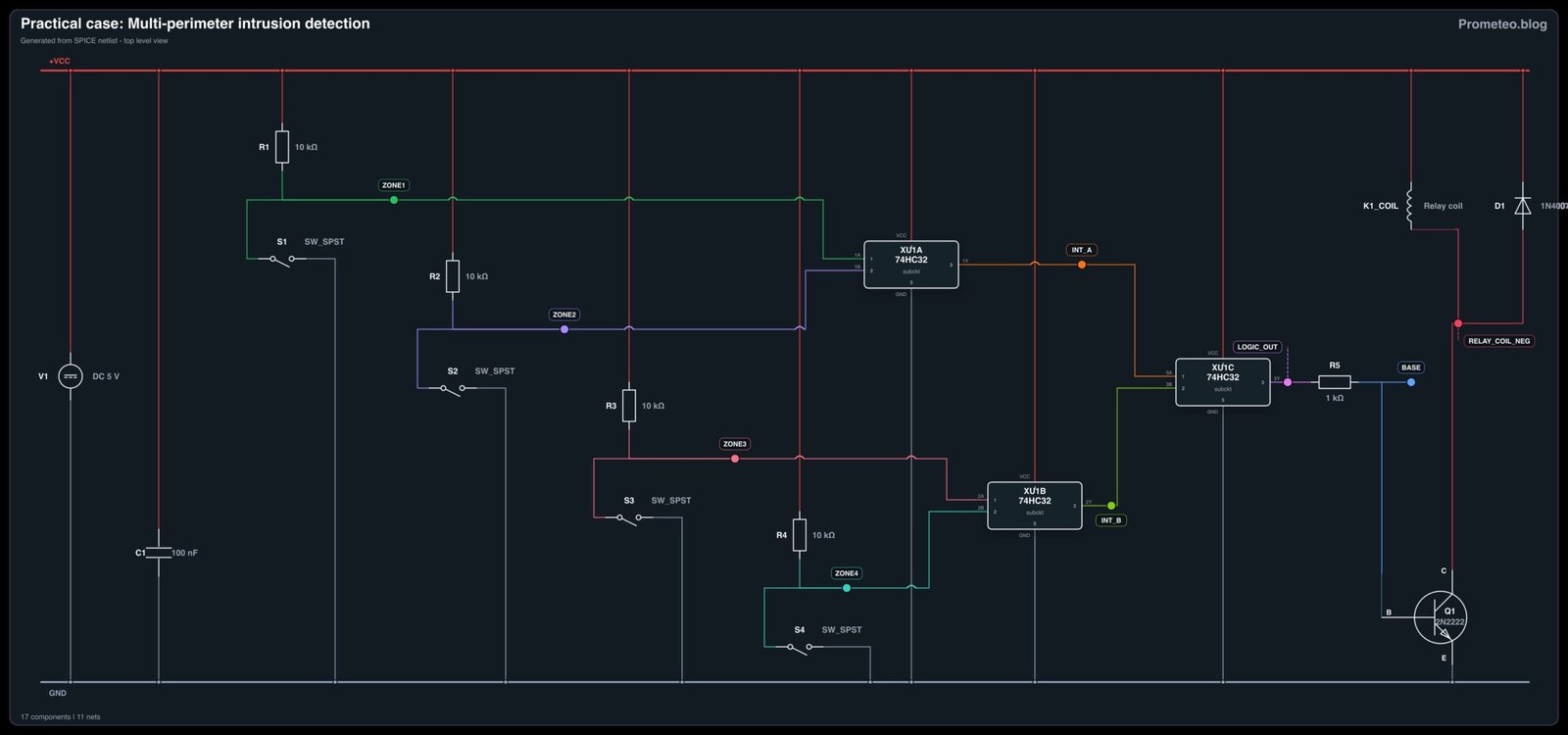
Follow me: