Objective and use case
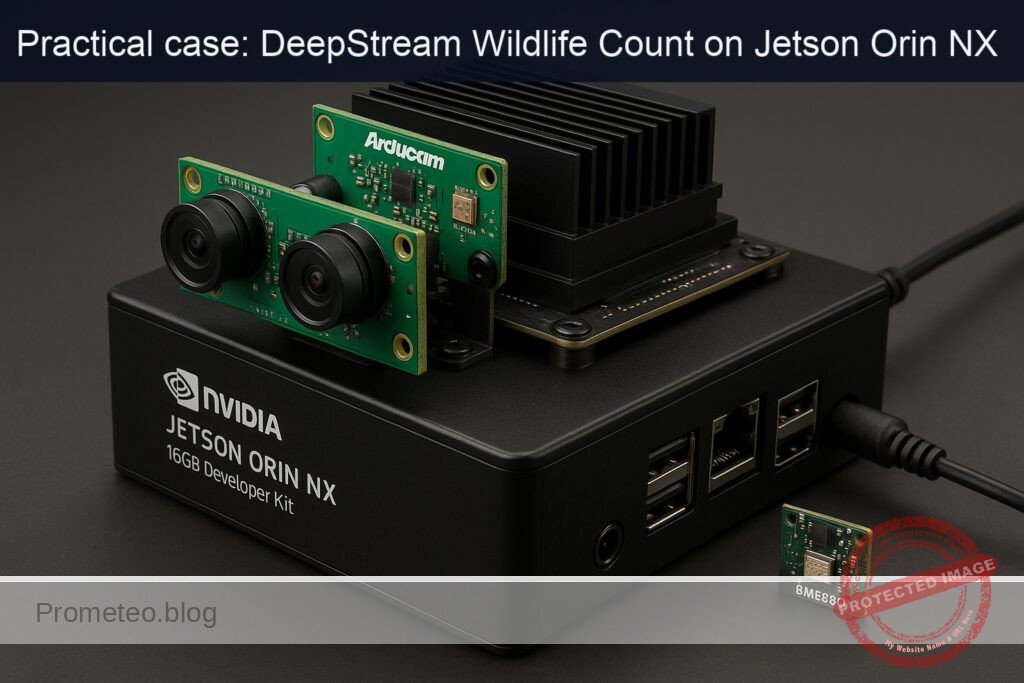
What you’ll build: A dual‑camera wildlife counter on Jetson Orin NX 16GB using NVIDIA DeepStream to detect and count animals in real time from an Arducam Stereo Camera (2× IMX219), while logging BME680 temperature, humidity, pressure, and VOC for context. It time‑syncs both views and sensor data, publishes counts/alerts, and records only wildlife clips.
Why it matters / Use cases
- Reserve monitoring: unattended, low‑power node counting deer/boar/birds on a trail; correlate spikes with temperature/humidity to optimize patrol routes; runs 2×1080p30 at ~35–50% GPU, ~10–15 W.
- Farm perimeter analytics: track sheep/cows near fencing, estimate pasture usage; MQTT alerts when counts exceed thresholds during heat stress (e.g., >30°C, RH>70%).
- Biodiversity studies: left/right viewpoint frequency at a waterhole with time‑aligned BME680 data; export hourly occurrence histograms and ambient conditions.
- Camera trap triage: on‑edge inference filters empty frames and smart‑records only wildlife segments, cutting storage by 70–90% and bandwidth by 5–10× (H.265).
- Construction/renewables compliance: detect/count protected species and trigger mitigation workflows when rolling averages rise above configured limits.
Expected outcome
- Real‑time per‑species counts, direction (cross‑line), and dwell per camera; synchronized with temperature, humidity, pressure, VOC.
- Throughput: 2×1080p30; end‑to‑end latency ~60–90 ms; GPU ~35–50% (FP16) or ~25–40% (INT8); typical power ~10–15 W.
- Alerting: MQTT/HTTP notifications within <2 s when counts exceed thresholds or when heat‑stress conditions coincide with high presence.
- Storage efficiency: empty‑scene suppression reduces stored footage by 70–90%; wildlife clips encoded H.265 with timestamps and species tags.
- Data products: CSV/InfluxDB time series of counts and BME680 readings; daily summaries (max/min/avg, peaks by hour) and left/right viewpoint comparisons.
Audience: Edge AI/embedded developers, ecologists with engineering support; Level: Intermediate–Advanced.
Architecture/flow: 2× MIPI CSI (Arducam IMX219) → nvarguscamerasrc → nvstreammux (sync) → nvvideoconvert → nvinfer (TensorRT FP16/INT8 species detector) → nvtracker (IOU/DeepSORT) → nvdsosd → smart record → nvv4l2h265enc; BME680 over I²C @1 Hz with timestamp fusion → counts + env to SQLite/InfluxDB → alerts via MQTT/HTTP; optional remote dashboard.
Prerequisites
- Jetson Orin NX 16GB Developer Kit flashed with JetPack (L4T) on Ubuntu 22.04 (JetPack 6.x recommended).
- Internet access on the Jetson.
- Basic build tools (git, make, gcc), Python 3.10.
- NVIDIA DeepStream SDK 7.0 (for JetPack 6.x).
Verify JetPack and NVIDIA components:
cat /etc/nv_tegra_release
# Alternative (if installed)
jetson_release -v || true

# Kernel and NVIDIA packages (CUDA/TensorRT/DeepStream)
uname -a
dpkg -l | grep -E 'nvidia|tensorrt|deepstream' || true
Prefer GPU‑accelerated AI. In this guide we use:
– Path B) DeepStream (GStreamer + nvinfer + TensorRT FP16).
Materials (with exact model)
| Item | Exact model / notes | Qty |
|---|---|---|
| Jetson developer kit | NVIDIA Jetson Orin NX 16GB Developer Kit | 1 |
| Stereo camera | Arducam Stereo Camera (2x IMX219, MIPI CSI‑2) | 1 |
| Environmental sensor | BME680 (Bosch; I2C, 3.3V) breakout | 1 |
| MicroSD/NVMe | As shipped with the dev kit (JetPack image installed) | 1 |
| Cables | CSI ribbon cable for Arducam; jumpers for I2C; power supply (65 W) | as needed |
Setup/Connection
Mechanical/Physical connections
- Arducam Stereo IMX219:
- Connect each IMX219 ribbon to the Jetson CSI camera connectors (CAM0 and CAM1 as per carrier board markings).
- Ensure the ribbon contacts face the correct orientation (contacts toward the connector pins).
-
Many Arducam stereo boards expose two sensors via two separate CSI ports; use sensor‑id 0 and 1 in nvarguscamerasrc.
-
BME680 (I2C, 3.3V):
- Use Jetson 40‑pin header (3.3V logic). Do NOT connect 5V to BME680.
- Typical wiring (check your carrier’s pinout; Orin NX dev kit follows 40‑pin header standard):
| Jetson 40‑pin header | Signal | Connects to BME680 |
|---|---|---|
| Pin 1 | 3.3V | VIN (3V3) |
| Pin 6 | GND | GND |
| Pin 3 | I2C SDA | SDA |
| Pin 5 | I2C SCL | SCL |
Notes:
– On many Jetson carriers, pins 3/5 map to an I2C bus exposed as /dev/i2c‑8 or /dev/i2c‑1. We’ll detect it.
Power and thermals
- For maximum performance during validation, enable MAXN and lock clocks. Revert after tests.
# Query current power mode
sudo nvpmodel -q
# Set MAXN (mode 0 on Orin NX devkits)
sudo nvpmodel -m 0
sudo jetson_clocks
Warning: MAXN + jetson_clocks increases thermals; ensure adequate cooling.
Software installation and verification
Install DeepStream 7.0 (on JetPack 6.x) and prerequisites:
# NVIDIA repository already present on JetPack images; ensure updates
sudo apt update
sudo apt install -y deepstream deepstream-dev \
  python3-gi python3-gst-1.0 python3-pip \
  git build-essential cmake pkg-config \
  i2c-tools python3-smbus

# Optional: verify DeepStream install
/opt/nvidia/deepstream/deepstream/bin/deepstream-app --version-all
Set DeepStream environment variables for Python:
export DEEPSTREAM_DIR=/opt/nvidia/deepstream/deepstream
export LD_LIBRARY_PATH=$DEEPSTREAM_DIR/lib:$LD_LIBRARY_PATH
export GST_PLUGIN_PATH=$DEEPSTREAM_DIR/lib/gst-plugins:$GST_PLUGIN_PATH
export PYTHONPATH=$DEEPSTREAM_DIR/lib/python:$PYTHONPATH
Install BME680 Python library:
pip3 install --no-cache-dir bme680==1.1.1
Verify devices
- I2C bus and BME680:
# List I2C adapters
i2cdetect -l
# Probe typical buses for 0x76 or 0x77
sudo i2cdetect -y 1 || true
sudo i2cdetect -y 8 || true
You should see 0x76 or 0x77 where the sensor is present. Note the bus number; we’ll use it in code.
- CSI cameras via Argus (test each):
# 5-second test for each sensor id
gst-launch-1.0 -e nvarguscamerasrc sensor-id=0 ! \
  'video/x-raw(memory:NVMM),width=1280,height=720,framerate=30/1' ! \
  nvvidconv ! 'video/x-raw,format=I420' ! fakesink sync=false

gst-launch-1.0 -e nvarguscamerasrc sensor-id=1 ! \
  'video/x-raw(memory:NVMM),width=1280,height=720,framerate=30/1' ! \
  nvvidconv ! 'video/x-raw,format=I420' ! fakesink sync=false
Both should run without “Argus error” and without hanging.
Full Code
This solution uses DeepStream with YOLOv8n (COCO) through a custom YOLO parser, counts only animal classes, overlays live BME680 telemetry, and logs CSV.
We’ll use:
– Custom YOLO parser for DeepStream (DeepStream‑Yolo project).
– nvinfer config for YOLOv8n ONNX.
– A single Python application assembling the GStreamer/DeepStream pipeline, computing per‑frame counts, reading BME680, overlaying text, and writing CSV.
1) Build the YOLO custom parser and download model
# Get custom parser (tested with commit c8c07a6 on 2024‑09‑10)
cd ~
git clone https://github.com/marcoslucianops/DeepStream-Yolo.git
cd DeepStream-Yolo
git checkout c8c07a6
make -j$(nproc)

# Copy parser libraries into DeepStream lib path
sudo cp -v lib/libnvds_infercustomparser_yolov8.so /opt/nvidia/deepstream/deepstream/lib/

# Create a working directory for configs/models
mkdir -p ~/ds-wildlife/models ~/ds-wildlife/configs ~/ds-wildlife/run
cd ~/ds-wildlife/models

# Download YOLOv8n onnx (COCO 80 classes)
wget -O yolov8n.onnx https://github.com/ultralytics/ultralytics/releases/download/v8.2.0/yolov8n.onnx

# COCO labels (80 classes)
cat > ~/ds-wildlife/models/coco_labels.txt << 'EOF'
person
bicycle
car
motorbike
aeroplane
bus
train
truck
boat
traffic light
fire hydrant
stop sign
parking meter
bench
bird
cat
dog
horse
sheep
cow
elephant
bear
zebra
giraffe
backpack
umbrella
handbag
tie
suitcase
frisbee
skis
snowboard
sports ball
kite
baseball bat
baseball glove
skateboard
surfboard
tennis racket
bottle
wine glass
cup
fork
knife
spoon
bowl
banana
apple
sandwich
orange
broccoli
carrot
hot dog
pizza
donut
cake
chair
sofa
pottedplant
bed
diningtable
toilet
tvmonitor
laptop
mouse
remote
keyboard
cell phone
microwave
oven
toaster
sink
refrigerator
book
clock
vase
scissors
teddy bear
hair drier
toothbrush
EOF
2) nvinfer configuration for YOLOv8n
Save as ~/ds-wildlife/configs/config_infer_primary_yolov8n.txt:
[property]
gpu-id=0
net-scale-factor=1.0
offsets=0;0;0
model-color-format=0
onnx-file=~/ds-wildlife/models/yolov8n.onnx
model-engine-file=~/ds-wildlife/models/yolov8n_b2_fp16.engine
labelfile-path=~/ds-wildlife/models/coco_labels.txt
network-mode=2               # 0=FP32, 1=INT8, 2=FP16
num-detected-classes=80
batch-size=2                 # two cameras
interval=0
gie-unique-id=1
process-mode=1               # primary GIE
network-type=0               # detector
input-object-min-width=32
input-object-min-height=32
maintain-aspect-ratio=1
symmetric-padding=1
force-implicit-batch-dim=1

# Custom YOLO parser
custom-lib-path=/opt/nvidia/deepstream/deepstream/lib/libnvds_infercustomparser_yolov8.so
parse-bbox-func-name=NvDsInferParseYolo
engine-create-func-name=NvDsInferYoloCudaEngineGet

# Post-processing thresholds
pre-cluster-threshold=0.25
nms-iou-threshold=0.45
topk=300

# Workspace and mem
workspace-size=2048

[class-attrs-all]
pre-cluster-threshold=0.25
nms-iou-threshold=0.45
This config instructs nvinfer to generate a TensorRT FP16 engine for batch‑size 2.
3) DeepStream Python app: dual CSI → YOLO → tracker → OSD + BME680 → CSV
Save as ~/ds-wildlife/run/deepstream_wildlife_count.py:
#!/usr/bin/env python3
import sys, os, gi, time, threading, csv, queue
gi.require_version('Gst', '1.0')
from gi.repository import Gst, GObject

# DeepStream Python bindings
import pyds

# BME680
try:
    import bme680
except ImportError:
    bme680 = None

Gst.init(None)

# Animal classes from COCO to count
ANIMAL_CLASS_NAMES = {
    "bird","cat","dog","horse","sheep","cow","elephant","bear","zebra","giraffe"
}

# Load COCO labels
def load_labels(path):
    labels = []
    with open(path, 'r') as f:
        for line in f:
            labels.append(line.strip())
    return labels

# Global queues for inter-thread communication
sensor_data_q = queue.Queue(maxsize=1)

def bme680_thread(bus=1, address=0x76, interval=1.0):
    """
    Poll BME680 at 1 Hz and push latest reading into queue.
    """
    if bme680 is None:
        print("WARN: bme680 module not installed; skipping sensor thread", file=sys.stderr)
        return
    try:
        sensor = bme680.BME680(i2c_addr=address, i2c_device=bus)
        sensor.set_temp_offset(0.0)
        sensor.set_humidity_oversample(bme680.OS_2X)
        sensor.set_pressure_oversample(bme680.OS_4X)
        sensor.set_temperature_oversample(bme680.OS_8X)
        sensor.set_filter(bme680.FILTER_SIZE_3)
        # Gas heater settings (optional)
        sensor.set_gas_status(bme680.ENABLE_GAS_MEAS)
        sensor.set_gas_heater_temperature(320)
        sensor.set_gas_heater_duration(150)
        sensor.select_gas_heater_profile(0)
    except Exception as e:
        print(f"WARN: BME680 init failed: {e}", file=sys.stderr)
        return

    while True:
        try:
            if sensor.get_sensor_data():
                data = {
                    "ts": time.time(),
                    "temp_c": sensor.data.temperature,
                    "humidity": sensor.data.humidity,
                    "pressure": sensor.data.pressure,
                    "gas_res_ohm": sensor.data.gas_resistance if sensor.data.heat_stable else None
                }
                # Keep only latest
                while not sensor_data_q.empty():
                    try: sensor_data_q.get_nowait()
                    except queue.Empty: break
                sensor_data_q.put_nowait(data)
        except Exception as e:
            print(f"WARN: BME680 read error: {e}", file=sys.stderr)
        time.sleep(interval)

def make_camera_source(sensor_id, width=1280, height=720, fps=30):
    src = Gst.ElementFactory.make("nvarguscamerasrc", f"camera_src_{sensor_id}")
    src.set_property("sensor-id", sensor_id)
    caps = Gst.ElementFactory.make("capsfilter", f"caps_{sensor_id}")
    caps.set_property("caps", Gst.Caps.from_string(
        f"video/x-raw(memory:NVMM), width={width}, height={height}, framerate={fps}/1"))
    conv = Gst.ElementFactory.make("nvvideoconvert", f"nvvidconv_{sensor_id}")
    return src, caps, conv

def osd_sink_pad_buffer_probe(pad, info, udata):
    """
    DeepStream metadata probe: count animals by class, overlay counts + BME680, write CSV.
    """
    frame_number = udata["frame_counters"]
    labels = udata["labels"]
    csv_writer = udata["csv_writer"]
    csv_file = udata["csv_file"]
    last_fps = udata["last_fps"]
    last_time = udata["last_time"]
    stream_fps = udata["stream_fps"]

    gst_buffer = info.get_buffer()
    if not gst_buffer:
        return Gst.PadProbeReturn.OK

    # Get batch metadata
    batch_meta = pyds.gst_buffer_get_nvds_batch_meta(hash(gst_buffer))

    # fps calculation
    now = time.time()
    dt = now - last_time[0]
    if dt >= 1.0:
        # move fps counts into dict snapshot and reset
        for sid in stream_fps:
            stream_fps[sid]["fps"] = stream_fps[sid]["count"] / dt
            stream_fps[sid]["count"] = 0
        last_time[0] = now

    l_frame = batch_meta.frame_meta_list
    # Aggregate per-batch animal counts per source
    per_src_counts = {}

    while l_frame is not None:
        frame_meta = pyds.NvDsFrameMeta.cast(l_frame.data)
        source_id = frame_meta.source_id
        frame_number[0] += 1
        stream_fps.setdefault(source_id, {"fps": 0.0, "count": 0})
        stream_fps[source_id]["count"] += 1

        # Count animals
        animal_counts = {}
        l_obj = frame_meta.obj_meta_list
        while l_obj is not None:
            obj_meta = pyds.NvDsObjectMeta.cast(l_obj.data)
            class_id = obj_meta.class_id
            label = labels[class_id] if class_id < len(labels) else str(class_id)
            if label in ANIMAL_CLASS_NAMES:
                animal_counts[label] = animal_counts.get(label, 0) + 1
            try:
                l_obj = l_obj.next
            except StopIteration:
                break

        per_src_counts[source_id] = animal_counts

        # Overlay text using display_meta
        display_meta = pyds.nvds_acquire_display_meta_from_pool(batch_meta)
        lines = []
        # Add FPS line per source
        fps_val = stream_fps[source_id]["fps"]
        lines.append(f"Src {source_id} FPS: {fps_val:.1f}")
        # BME680 overlay
        sensor_data = None
        try:
            sensor_data = sensor_data_q.get_nowait()
            sensor_data_q.put_nowait(sensor_data)  # put back for other frames
        except Exception:
            pass
        if sensor_data:
            gas_str = f"{sensor_data['gas_res_ohm']:.0f}Ω" if sensor_data['gas_res_ohm'] else "n/a"
            lines.append(f"T:{sensor_data['temp_c']:.1f}C RH:{sensor_data['humidity']:.0f}% P:{sensor_data['pressure']:.0f}hPa VOC:{gas_str}")
        # Counts
        if animal_counts:
            ctext = ", ".join([f"{k}:{v}" for k,v in sorted(animal_counts.items())])
        else:
            ctext = "No animals"
        lines.append(f"Counts: {ctext}")

        display_meta.num_labels = len(lines)
        for i, txt in enumerate(lines):
            txt_params = display_meta.text_params[i]
            txt_params.display_text = txt
            txt_params.x_offset = 10
            txt_params.y_offset = 30 + 22*i
            txt_params.font_params.font_name = "Serif"
            txt_params.font_params.font_size = 14
            txt_params.font_params.font_color.set(1.0, 1.0, 1.0, 1.0)  # white
            txt_params.set_bg_clr = 1
            txt_params.text_bg_clr.set(0.1, 0.1, 0.1, 0.6)  # translucent dark

        pyds.nvds_add_display_meta_to_frame(frame_meta, display_meta)

        # Write CSV (one row per source per batch)
        row = {
            "ts": now,
            "source_id": source_id,
            "fps": fps_val,
        }
        # Flatten animal counts
        for name in sorted(ANIMAL_CLASS_NAMES):
            row[f"count_{name}"] = per_src_counts[source_id].get(name, 0)
        if sensor_data:
            row.update({
                "temp_c": sensor_data["temp_c"],
                "humidity": sensor_data["humidity"],
                "pressure": sensor_data["pressure"],
                "voc_gas_ohm": sensor_data["gas_res_ohm"] if sensor_data["gas_res_ohm"] else ""
            })
        csv_writer.writerow(row)
        csv_file.flush()

        try:
            l_frame = l_frame.next
        except StopIteration:
            break

    return Gst.PadProbeReturn.OK

def main():
    # Paths
    ds_dir = os.environ.get("DEEPSTREAM_DIR", "/opt/nvidia/deepstream/deepstream")
    infer_cfg = os.path.expanduser("~/ds-wildlife/configs/config_infer_primary_yolov8n.txt")
    labels_path = os.path.expanduser("~/ds-wildlife/models/coco_labels.txt")

    # Load labels
    labels = load_labels(labels_path)

    # CSV set up
    csv_path = os.path.expanduser("~/ds-wildlife/run/wildlife_counts.csv")
    csv_file = open(csv_path, "w", newline="")
    fieldnames = ["ts", "source_id", "fps"] + [f"count_{k}" for k in sorted(ANIMAL_CLASS_NAMES)] + ["temp_c","humidity","pressure","voc_gas_ohm"]
    csv_writer = csv.DictWriter(csv_file, fieldnames=fieldnames)
    csv_writer.writeheader()

    # Optionally launch BME680 thread (detect bus automatically)
    bus_guess = 1
    # Try to detect bus 1 or 8
    for bn in [1, 8]:
        if os.path.exists(f"/dev/i2c-{bn}"):
            bus_guess = bn
            break
    t = threading.Thread(target=bme680_thread, kwargs={"bus": bus_guess}, daemon=True)
    t.start()

    # Build pipeline
    pipeline = Gst.Pipeline.new("wildlife-pipeline")
    if not pipeline:
        print("ERROR: Failed to create pipeline")
        return 1

    # Sources
    src0, caps0, conv0 = make_camera_source(0)
    src1, caps1, conv1 = make_camera_source(1)

    # Stream muxer
    streammux = Gst.ElementFactory.make("nvstreammux", "stream-muxer")
    streammux.set_property("width", 1280)
    streammux.set_property("height", 720)
    streammux.set_property("batch-size", 2)
    streammux.set_property("batched-push-timeout", 33000)  # ~33 ms

    # Inference (nvinfer)
    pgie = Gst.ElementFactory.make("nvinfer", "primary-infer")
    pgie.set_property("config-file-path", infer_cfg)

    # Tracker (NVDCF default)
    tracker = Gst.ElementFactory.make("nvtracker", "tracker")
    tracker.set_property("ll-lib-file", "/opt/nvidia/deepstream/deepstream/lib/libnvds_nvmultiobjecttracker.so")
    tracker.set_property("tracker-width", 800)
    tracker.set_property("tracker-height", 480)
    tracker.set_property("gpu-id", 0)
    tracker.set_property("enable-batch-process", 1)

    # OSD
    nvvidconv = Gst.ElementFactory.make("nvvideoconvert", "nvvidconv_post")
    nvosd = Gst.ElementFactory.make("nvdsosd", "onscreendisplay")
    nvosd.set_property("process-mode", 0)  # CPU mode okay for text + boxes

    # Sink (choose EGL for display, or fakesink for headless)
    sink = Gst.ElementFactory.make("nveglglessink", "display")
    sink.set_property("sync", False)

    for e in [src0, caps0, conv0, src1, caps1, conv1, streammux, pgie, tracker, nvvidconv, nvosd, sink]:
        if not e:
            print("ERROR: Failed to create an element")
            return 1
        pipeline.add(e)

    # Link sources to mux
    src0.link(caps0); caps0.link(conv0)
    src1.link(caps1); caps1.link(conv1)

    sinkpad0 = streammux.get_request_pad("sink_0")
    sinkpad1 = streammux.get_request_pad("sink_1")
    if not sinkpad0 or not sinkpad1:
        print("ERROR: Failed to get request sink pads from streammux")
        return 1

    def link_to_mux(conv, sinkpad):
        srcpad = conv.get_static_pad("src")
        if srcpad.link(sinkpad) != Gst.PadLinkReturn.OK:
            print("ERROR: Failed to link to streammux")
            sys.exit(1)

    link_to_mux(conv0, sinkpad0)
    link_to_mux(conv1, sinkpad1)

    # Link rest of the pipeline
    if not streammux.link(pgie):
        print("ERROR: streammux->pgie link failed"); return 1
    if not pgie.link(tracker):
        print("ERROR: pgie->tracker link failed"); return 1
    if not tracker.link(nvvidconv):
        print("ERROR: tracker->nvvidconv link failed"); return 1
    if not nvvidconv.link(nvosd):
        print("ERROR: nvvidconv->nvosd link failed"); return 1
    if not nvosd.link(sink):
        print("ERROR: nvosd->sink link failed"); return 1

    # Add probe on OSD sink pad to access metadata
    osd_sink_pad = nvosd.get_static_pad("sink")
    if not osd_sink_pad:
        print("ERROR: Unable to get sink pad of nvosd")
        return 1

    udata = {
        "frame_counters": [0],
        "labels": labels,
        "csv_writer": csv_writer,
        "csv_file": csv_file,
        "last_fps": {},
        "last_time": [time.time()],
        "stream_fps": {}
    }
    osd_sink_pad.add_probe(Gst.PadProbeType.BUFFER, osd_sink_pad_buffer_probe, udata)

    # Bus to catch errors
    bus = pipeline.get_bus()
    bus.add_signal_watch()
    def bus_call(bus, message, loop):
        t = message.type
        if t == Gst.MessageType.EOS:
            print("EOS")
            loop.quit()
        elif t == Gst.MessageType.ERROR:
            err, dbg = message.parse_error()
            print("ERROR:", err, dbg)
            loop.quit()
        return True
    loop = GObject.MainLoop()
    bus.connect("message", bus_call, loop)

    # Start
    print("Starting pipeline. Press Ctrl+C to stop.")
    pipeline.set_state(Gst.State.PLAYING)
    try:
        loop.run()
    except KeyboardInterrupt:
        pass
    finally:
        pipeline.set_state(Gst.State.NULL)
        csv_file.close()
        print(f"CSV saved at {csv_path}")

    return 0

if __name__ == "__main__":
    sys.exit(main())
Make it executable:
chmod +x ~/ds-wildlife/run/deepstream_wildlife_count.py
Build/Flash/Run commands
1) Power/performance (optional but recommended for validation):
sudo nvpmodel -q
sudo nvpmodel -m 0
sudo jetson_clocks
2) Install DeepStream and dependencies (as above). Confirm DeepStream:
/opt/nvidia/deepstream/deepstream/bin/deepstream-app --version-all
3) Build YOLO parser and download YOLOv8n ONNX (as above).
4) Generate the TensorRT engine file once (nvinfer will auto‑build on first run). For controlled build, you can prebuild using trtexec, but here we rely on nvinfer to build FP16 engine at first run and cache at ~/ds-wildlife/models/yolov8n_b2_fp16.engine.
5) Run the pipeline:
# Export DS python paths for this session
export DEEPSTREAM_DIR=/opt/nvidia/deepstream/deepstream
export LD_LIBRARY_PATH=$DEEPSTREAM_DIR/lib:$LD_LIBRARY_PATH
export GST_PLUGIN_PATH=$DEEPSTREAM_DIR/lib/gst-plugins:$GST_PLUGIN_PATH
export PYTHONPATH=$DEEPSTREAM_DIR/lib/python:$PYTHONPATH

# Optional: launch tegrastats in another terminal to monitor
sudo tegrastats --interval 1000

# Run the Python app
python3 ~/ds-wildlife/run/deepstream_wildlife_count.py
Expected first‑run behavior:
– nvinfer compiles the engine (30–90 seconds). Subsequent runs load the cached engine quickly.
– A window opens (nveglglessink) showing the two camera streams with bounding boxes and overlays of FPS, BME680 readings, and per‑class animal counts.
– A CSV file grows at ~/ds-wildlife/run/wildlife_counts.csv.
To run headless, switch the sink element in the Python code to fakesink (or use nvv4l2h264enc → filesink/udpsink).
Step‑by‑step Validation
1) Verify JetPack and libraries:
cat /etc/nv_tegra_release
dpkg -l | grep -E 'deepstream|tensorrt|cuda' | sort
2) Validate cameras individually:
# Show negotiated caps and ensure no errors
gst-launch-1.0 -e nvarguscamerasrc sensor-id=0 ! \
 'video/x-raw(memory:NVMM),width=1280,height=720,framerate=30/1' ! \
 nvvidconv ! 'video/x-raw,format=I420' ! fakesink sync=false

gst-launch-1.0 -e nvarguscamerasrc sensor-id=1 ! \
 'video/x-raw(memory:NVMM),width=1280,height=720,framerate=30/1' ! \
 nvvidconv ! 'video/x-raw,format=I420' ! fakesink sync=false
3) Validate I2C and BME680:
i2cdetect -l
sudo i2cdetect -y 1 || true
sudo i2cdetect -y 8 || true
python3 -c "import bme680; s=bme680.BME680(); s.get_sensor_data(); print(s.data.temperature, s.data.humidity, s.data.pressure)"
Expect temperature (~20–40C), humidity (~20–60%), pressure (~900–1100 hPa) values.
4) Run DeepStream wildlife pipeline and observe overlays:
python3 ~/ds-wildlife/run/deepstream_wildlife_count.py
- While running, in another terminal:
# Power/thermals/utilization
sudo tegrastats --interval 1000
Sample tegrastats line (your values will vary):
RAM 4100/16038MB (lfb 9524x4MB) SWAP 0/0MB
CPU [22%@1989, 18%@1989, 25%@1989, 15%@1989, 20%@1989, 17%@1989]
GPU 58%@1100 EMCCLK 25%@2040
GR3D_FREQ 1100 APE 150 NVDEC 0 NVENC 0
- Expected performance metrics:
- FPS: ~30 FPS per source at 1280×720 with YOLOv8n FP16 batch‑size=2.
- GPU: 40–65% utilization on Orin NX 16GB; CPU <150% aggregate.
- Memory: ~2.5–4.5 GB total usage by process (engine + buffers).
5) Validate counts and CSV logging:
– In the OSD overlay, verify the “Counts:” line increases as animals enter the scene.
– Tail the CSV:
tail -n +1 -f ~/ds-wildlife/run/wildlife_counts.csv
Expect rows like:
ts,source_id,fps,count_bear,count_bird,count_cat,count_cow,count_dog,count_elephant,count_giraffe,count_horse,count_sheep,count_zebra,temp_c,humidity,pressure,voc_gas_ohm
1731112345.12,0,29.7,0,3,0,0,0,0,0,0,0,0,28.5,44.2,1013.1,21450
1731112345.12,1,30.2,0,0,0,2,0,0,0,0,0,0,28.6,44.1,1013.1,21520
6) Quantitative validation checklist:
– FPS per source: displayed on OSD (Src 0 FPS: x.y, Src 1 FPS: x.y). Target ≥30.0.
– nvinfer latency: infer timings printed on first engine build; for runtime, use “perf” fields in your CSV or add per‑frame timestamps for more granular latency if needed.
– Resource use: from tegrastats: GPU ≤65% (typical), CPU moderate.
– BME680 overlay: live T/RH/P/VOC values update each second.
7) Cleanup / revert performance settings:
# To revert clocks to dynamic scaling (optional after tests)
sudo jetson_clocks --restore
# Switch to a lower power mode if desired, e.g., mode 1 or query available modes:
sudo nvpmodel -q
# Example: set to mode 1
sudo nvpmodel -m 1
Troubleshooting
- No camera frames / Argus timeout:
- Check ribbon seating and orientation. Test each sensor-id independently with nvarguscamerasrc.
- If one sensor works and the other fails, swap ribbons to isolate cable vs camera module.
-
Restart nvargus daemon: sudo systemctl restart nvargus-daemon.
-
i2cdetect shows no 0x76/0x77:
- Verify you are probing the correct bus (use i2cdetect -l). Try /dev/i2c‑8 and /dev/i2c‑1.
- Ensure 3.3V power (Pin 1) and ground are correct; double‑check SDA/SCL wiring.
-
Pull‑ups usually present on BME680 breakout; avoid additional 5V pull‑ups.
-
DeepStream cannot load custom parser:
- Confirm libnvds_infercustomparser_yolov8.so is in /opt/nvidia/deepstream/deepstream/lib/.
- Permissions: sudo ldconfig or export LD_LIBRARY_PATH to include DeepStream lib path.
-
Check that your DeepStream‑Yolo commit matches DS 7.0 and CUDA 12 (rebuild with make clean; ensure /usr/local/cuda points to the CUDA used by JetPack).
-
Engine build fails or takes too long:
- Ensure swap is disabled (JetPack default) and sufficient RAM is free. Close other apps.
-
Use FP16 (network-mode=2) to reduce memory/time. If needed, use batch‑size=1 temporarily to build, then switch to 2 and rebuild.
-
Poor FPS:
- Confirm MAXN + jetson_clocks for validation.
- Reduce resolution to 960×544 or 640×480; ensure streammux width/height match caps.
-
Use “nvosd process-mode=0” for CPU OSD; if CPU becomes a bottleneck, try GPU OSD (process-mode=1) and avoid excessive text overlays.
-
Counts look wrong (false positives):
- Increase pre-cluster-threshold (e.g., 0.35) to reduce weak detections.
- Filter by object size (input-object-min-width/height).
-
Consider class‑wise thresholds using [class-attrs-
] blocks in the nvinfer config. -
CSV empty or not updating:
- Ensure write permissions to ~/ds-wildlife/run/.
- Check probe attachment to nvosd sink pad; ensure pipeline runs without ERROR messages on the bus.
Improvements
- INT8 quantization:
-
Create an INT8 engine with calibration for your wildlife dataset (quantization‑aware for better accuracy). Update network-mode=1 and provide calibration cache in the nvinfer config.
-
DLA offload:
-
Orin NX features DLA; you can offload nvinfer to a DLACore (e.g., use‑dla‑core=0) in config to save GPU for other tasks. Validate accuracy/performance parity.
-
Multi‑ROI analytics:
-
Add nvdsanalytics plugin for region occupancy and line crossing counts, enhancing semantic counting (animals entering/exiting a zone).
-
Message brokering:
-
Publish per‑minute counts and BME680 telemetry to MQTT/Kafka using nvmsgconv/nvmsgbroker or Python paho‑mqtt for remote dashboards.
-
Recording on events:
-
Add a tee pad to branch to encoder (nvv4l2h264enc) and record short clips when count exceeds a threshold; annotate videos with overlay text.
-
Model specialization:
- Fine‑tune YOLO on your specific wildlife classes and environment to reduce false positives/negatives; prune/quantize for even higher FPS.
Final Checklist
- Hardware
- [ ] Jetson Orin NX 16GB Developer Kit powered and cooled.
- [ ] Arducam Stereo Camera (2x IMX219) connected to CSI ports (sensor‑id 0 and 1 work).
-
[ ] BME680 wired to 3.3V I2C (pins 1/3/5/6) and detected at 0x76/0x77.
-
Software
- [ ] JetPack verified with cat /etc/nv_tegra_release.
- [ ] DeepStream 7.0 installed and deepstream‑app –version‑all works.
- [ ] Custom YOLO parser built and placed in DeepStream lib dir.
-
[ ] YOLOv8n ONNX and labels present in ~/ds-wildlife/models/.
-
Performance
- [ ] MAXN and jetson_clocks set for benchmarking; reverted after tests if desired.
-
[ ] tegrastats monitored during runtime; GPU/CPU utilization within targets.
-
Pipeline
- [ ] DeepStream Python pipeline runs, displays OSD with FPS, counts, and BME680 overlay.
-
[ ] CSV at ~/ds-wildlife/run/wildlife_counts.csv populated with per‑source counts and telemetry.
-
Validation metrics
- [ ] Achieved ≥30 FPS per camera at 720p.
- [ ] Counts reasonable on known test scenes; thresholds adjusted if necessary.
- [ ] Stable runtime ≥2 hours without Argus/DeepStream errors.
With this end‑to‑end setup, your “deepstream‑wildlife‑count” on Jetson Orin NX 16GB Developer Kit + Arducam Stereo Camera (2x IMX219) + BME680 delivers real‑time two‑view animal analytics augmented by environmental context, ready for field deployment or further research.
Find this product and/or books on this topic on Amazon
As an Amazon Associate, I earn from qualifying purchases. If you buy through this link, you help keep this project running.
Quick Quiz

Telecommunications Electronics Engineer and Computer Engineer (official degrees in Spain).