Objective and use case
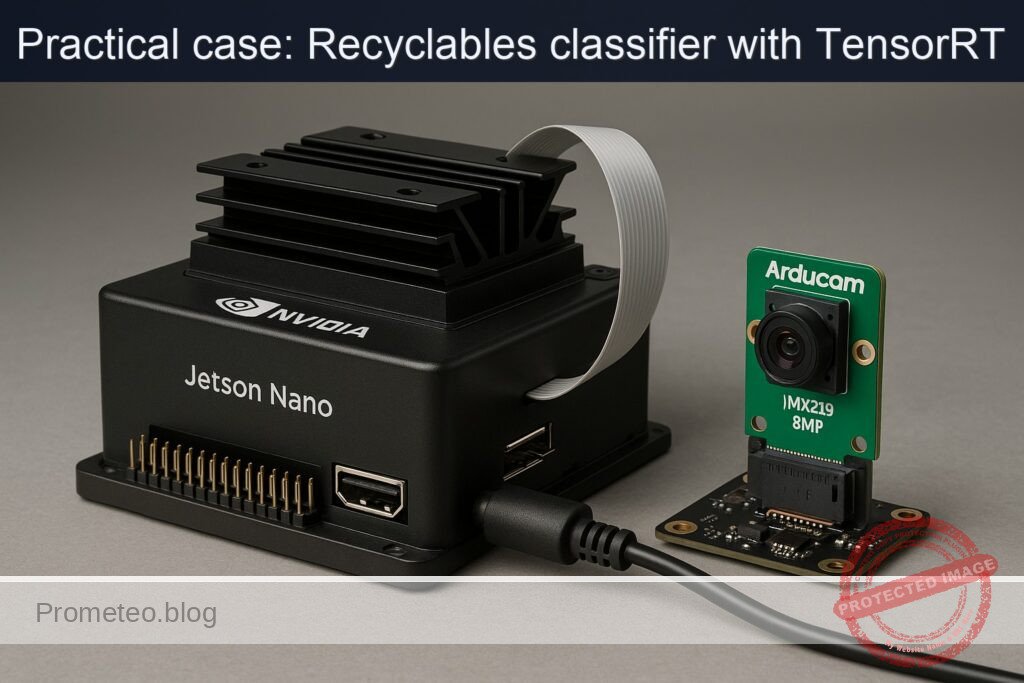
What you’ll build: A real-time recyclables classifier on a Jetson Nano 4GB using a CSI Arducam IMX219 8MP and a TensorRT-optimized ONNX model. The app captures live frames, runs accelerated inference, and maps ImageNet predictions to Paper/Plastic/Metal/Glass with on-screen labels and confidence.
Why it matters / Use cases
- Smart bins: Automatically route items (e.g., plastic bottle vs. metal can) to the correct chute; ~20 FPS with <80 ms latency enables responsive sorting and LED/servo triggers.
- Assisted recycling education: Live overlay shows “Plastic (92%)” and a green check; offline operation on Nano improves classroom demos without internet.
- Factory pre-sorting: Low-cost camera + Nano flags low-confidence items (<0.6) for manual QA on lines moving ~0.5 m/s; 15–20 FPS supports timely highlighting.
- Edge kiosks: Lobby or cafeteria stations that display Paper/Plastic/Metal/Glass with confidence; runs in 5–10 W power budgets and logs simple stats locally.
Expected outcome
- Stable live camera feed at 15–30 FPS at 1280×720 capture resolution.
- End-to-end latency of ~50–90 ms per frame (exposure → overlay) with FP16 TensorRT and 224×224 inference.
- Resource profile: ~60–80% GPU, <40% total CPU, 1.5–3.0 GB RAM; sustained operation >1 hour without dropped frames.
- Displayed classification with confidence; top-1 recyclable category accuracy ≥80% on a small validation set (bottle/can/jar/newspaper).
- Power draw within Nano 10 W mode; device temperature maintained <70°C with a small fan.
Audience: Makers, students, and edge AI/robotics developers; Level: Intermediate (basic Linux + Jetson + Python/C++).
Architecture/flow: CSI camera (IMX219) → GStreamer (nvarguscamerasrc) → zero-copy CUDA buffer → resize/normalize → TensorRT engine (FP16, ONNX) → softmax → map top-1 to Paper/Plastic/Metal/Glass → overlay (text/confidence) → display; optional GPIO/REST hooks.
Prerequisites
- A microSD-flashed Jetson Nano 4GB developer kit with JetPack (L4T) on Ubuntu (headless or with display).
- Internet access to download the ONNX model and label file.
- Basic Linux shell usage and Python 3 familiarity.
Verify JetPack (L4T), kernel, and installed packages:
cat /etc/nv_tegra_release
jetson_release -v

uname -a
dpkg -l | grep -E 'nvidia|tensorrt'
Expect to see L4T release (e.g., R32.x for JetPack 4.x, or R35.x for JetPack 5.x), aarch64 kernel, and packages such as nvidia-l4t-tensorrt and libnvinfer.
Materials (with exact model)
- Jetson Nano 4GB Developer Kit (P3450, B01 preferred for dual CSI).
- Camera: Arducam IMX219 8MP (imx219), CSI-2 ribbon cable.
- microSD card (≥ 64 GB, UHS-I recommended).
- 5V/4A DC power supply (barrel jack) or 5V/3A USB-C (ensure adequate current).
- Active cooling (recommended for sustained MAXN): 5V fan or heatsink+fan.
- Network: Ethernet or USB Wi-Fi for package/model downloads.
- Optional: USB keyboard/mouse and HDMI display (not required for the tutorial).
Setup/Connection
1) Power and cooling
– Connect the 5V/4A PSU to the Nano. Add a 5V fan to the 5V/GND header to prevent thermal throttling in MAXN.
2) CSI camera installation (Arducam IMX219 8MP)
– Power off the Nano.
– Locate CAM0 (preferred) CSI connector. Lift the locking tab gently.
– Insert the ribbon cable with the blue side facing the Ethernet/USB ports (the contacts face the connector’s contacts).
– Fully seat the cable and press down the locking tab.
– Power on the Nano.
3) Confirm the camera works with GStreamer
– Test capture and save one JPEG (no GUI needed):
gst-launch-1.0 -e nvarguscamerasrc sensor-id=0 num-buffers=1 \
  ! nvvidconv ! video/x-raw,format=I420 \
  ! jpegenc ! filesink location=camera_test.jpg
- If successful, camera_test.jpg should appear and be a non-zero size.
4) Confirm GPU and power settings
– Check current power mode:
sudo nvpmodel -q
- For performance benchmarking (watch thermals), set MAXN and max clocks:
sudo nvpmodel -m 0
sudo jetson_clocks
- You can revert later:
sudo nvpmodel -m 1
sudo systemctl restart nvargus-daemon
5) Install needed packages
– TensorRT Python bindings are included with JetPack; add OpenCV, NumPy, and PyCUDA:
sudo apt-get update
sudo apt-get install -y python3-opencv python3-numpy python3-pycuda
- Confirm imports in Python:
python3 - << 'PY'
import cv2, numpy, tensorrt as trt, pycuda.driver as cuda
print("OK: OpenCV", cv2.__version__)
print("OK: TRT", trt.__version__)
PY
Full Code
We will:
– Download SqueezeNet 1.1 ONNX (fast, good for Nano).
– Build a TensorRT engine (FP16).
– Run a Python app that captures camera frames via GStreamer, performs preprocessing, executes inference with TensorRT, decodes top-5 ImageNet labels, and maps them to recyclables categories using keyword rules.
Directory layout:
– models/: ONNX model, TensorRT engine, labels.
– scripts/: Python runtime.
1) Prepare folders and downloads:
mkdir -p ~/jetson-recyclables/{models,scripts}
cd ~/jetson-recyclables/models

# SqueezeNet 1.1 ONNX (opset 7) from ONNX Model Zoo
wget -O squeezenet1.1-7.onnx \
  https://github.com/onnx/models/raw/main/vision/classification/squeezenet/model/squeezenet1.1-7.onnx

# Simple English labels for ImageNet-1k
wget -O imagenet_labels.json \
  https://raw.githubusercontent.com/anishathalye/imagenet-simple-labels/master/imagenet-simple-labels.json
2) Build the TensorRT engine with trtexec (FP16):
cd ~/jetson-recyclables/models
/usr/src/tensorrt/bin/trtexec \
  --onnx=squeezenet1.1-7.onnx \
  --saveEngine=squeezenet1.1_fp16.engine \
  --fp16 \
  --workspace=1024 \
  --verbose
Note:
– We omit explicit input names since SqueezeNet has fixed 1×3×224×224 input in this model.
– Adjust workspace if you face memory limits.
3) Python runtime (scripts/run_classifier.py)
This script:
– Opens CSI camera with nvarguscamerasrc via OpenCV+GStreamer.
– Loads the TensorRT engine and binds buffers with PyCUDA.
– Preprocesses to 224×224 with ImageNet mean/std normalization.
– Runs inference and maps the top-5 ImageNet labels to recyclables classes with keyword rules.
– Prints per-frame classification and rolling FPS.
# ~/jetson-recyclables/scripts/run_classifier.py
import os
import time
import json
import ctypes
import numpy as np
import cv2

import tensorrt as trt
import pycuda.driver as cuda
import pycuda.autoinit  # Initializes CUDA driver context

MODELS_DIR = os.path.expanduser('~/jetson-recyclables/models')
ENGINE_PATH = os.path.join(MODELS_DIR, 'squeezenet1.1_fp16.engine')
IMAGENET_LABELS_JSON = os.path.join(MODELS_DIR, 'imagenet_labels.json')

# Recyclables mapping via keyword heuristics (basic-level approximation)
MAPPING_RULES = {
    "plastic": ["plastic", "bottle", "water bottle", "shampoo", "detergent", "packet", "cup"],
    "metal":   ["can", "aluminium", "aluminum", "tin", "steel", "iron"],
    "glass":   ["glass", "wine bottle", "beer bottle", "goblet", "vase", "jar"],
    "paper":   ["newspaper", "magazine", "bookshop", "book", "paper", "notebook", "carton", "envelope", "tissue"]
}

# GStreamer pipeline for CSI camera
def gstreamer_pipeline(sensor_id=0, capture_width=1280, capture_height=720,
                       display_width=1280, display_height=720, framerate=30, flip_method=0):
    return (
        "nvarguscamerasrc sensor-id={} ! "
        "video/x-raw(memory:NVMM), width={}, height={}, framerate={}/1, format=NV12 ! "
        "nvvidconv flip-method={} ! "
        "video/x-raw, width={}, height={}, format=BGRx ! "
        "videoconvert ! "
        "video/x-raw, format=BGR ! appsink drop=true max-buffers=1"
    ).format(sensor_id, capture_width, capture_height, framerate,
             flip_method, display_width, display_height)

def load_labels(path):
    with open(path, 'r') as f:
        labels = json.load(f)
    assert len(labels) == 1000, "Expected 1000 ImageNet labels"
    return labels

def build_trt_context(engine_path):
    logger = trt.Logger(trt.Logger.WARNING)
    trt.init_libnvinfer_plugins(logger, '')
    with open(engine_path, 'rb') as f, trt.Runtime(logger) as runtime:
        engine = runtime.deserialize_cuda_engine(f.read())
    context = engine.create_execution_context()
    # Identify I/O bindings
    bindings = []
    host_inputs = []
    cuda_inputs = []
    host_outputs = []
    cuda_outputs = []
    for i in range(engine.num_bindings):
        name = engine.get_binding_name(i)
        dtype = trt.nptype(engine.get_binding_dtype(i))
        is_input = engine.binding_is_input(i)
        shape = context.get_binding_shape(i)
        size = trt.volume(shape)
        host_mem = cuda.pagelocked_empty(size, dtype)
        device_mem = cuda.mem_alloc(host_mem.nbytes)
        bindings.append(int(device_mem))
        if is_input:
            host_inputs.append(host_mem)
            cuda_inputs.append(device_mem)
            input_shape = shape
            input_name = name
        else:
            host_outputs.append(host_mem)
            cuda_outputs.append(device_mem)
            output_shape = shape
            output_name = name
    stream = cuda.Stream()
    io = {
        "engine": engine, "context": context, "bindings": bindings, "stream": stream,
        "host_inputs": host_inputs, "cuda_inputs": cuda_inputs,
        "host_outputs": host_outputs, "cuda_outputs": cuda_outputs,
        "input_shape": input_shape, "output_shape": output_shape,
        "input_name": input_name, "output_name": output_name
    }
    return io

def preprocess_bgr_to_nchw_224(bgr):
    # Center-crop shortest side, resize to 224x224, convert BGR->RGB, normalize
    h, w = bgr.shape[:2]
    side = min(h, w)
    y0 = (h - side) // 2
    x0 = (w - side) // 2
    cropped = bgr[y0:y0+side, x0:x0+side]
    resized = cv2.resize(cropped, (224, 224), interpolation=cv2.INTER_LINEAR)
    rgb = cv2.cvtColor(resized, cv2.COLOR_BGR2RGB).astype(np.float32) / 255.0
    mean = np.array([0.485, 0.456, 0.406], dtype=np.float32)
    std  = np.array([0.229, 0.224, 0.225], dtype=np.float32)
    norm = (rgb - mean) / std
    chw = np.transpose(norm, (2, 0, 1))  # C,H,W
    return chw

def softmax(x):
    x = x - np.max(x)
    e = np.exp(x)
    return e / np.sum(e)

def map_to_recyclable(labels_topk):
    # labels_topk: list of (label_str, prob)
    label_texts = [l.lower() for l, _ in labels_topk]
    for category, keys in MAPPING_RULES.items():
        for key in keys:
            if any(key in txt for txt in label_texts):
                return category
    return "unknown"

def infer_trt(io, input_chw):
    # Copy to host (float32) and device
    inp = input_chw.astype(np.float32).ravel()
    np.copyto(io["host_inputs"][0], inp)
    cuda.memcpy_htod_async(io["cuda_inputs"][0], io["host_inputs"][0], io["stream"])
    # Inference
    io["context"].execute_async_v2(bindings=io["bindings"], stream_handle=io["stream"].handle)
    # Copy back
    cuda.memcpy_dtoh_async(io["host_outputs"][0], io["cuda_outputs"][0], io["stream"])
    io["stream"].synchronize()
    out = np.array(io["host_outputs"][0])
    return out  # 1000 logits

def main():
    labels = load_labels(IMAGENET_LABELS_JSON)
    io = build_trt_context(ENGINE_PATH)

    cap = cv2.VideoCapture(gstreamer_pipeline(), cv2.CAP_GSTREAMER)
    if not cap.isOpened():
        raise RuntimeError("Could not open CSI camera via GStreamer")

    print("Starting recyclables classifier. Press Ctrl+C to stop.")
    frame_count = 0
    t0 = time.time()
    rolling = []
    try:
        while True:
            ok, frame = cap.read()
            if not ok:
                print("Frame grab failed; retrying...")
                continue

            prep = preprocess_bgr_to_nchw_224(frame)
            t_infer0 = time.time()
            logits = infer_trt(io, prep)
            probs = softmax(logits)
            top5_idx = probs.argsort()[-5:][::-1]
            top5 = [(labels[i], float(probs[i])) for i in top5_idx]
            category = map_to_recyclable(top5)
            t_infer1 = time.time()
            latency_ms = (t_infer1 - t_infer0) * 1000.0

            frame_count += 1
            rolling.append(latency_ms)
            if len(rolling) > 100:
                rolling.pop(0)
            avg_ms = sum(rolling)/len(rolling)
            fps = 1000.0 / avg_ms if avg_ms > 0 else 0.0

            # Log concise output
            print(f"[#{frame_count:04d}] {category.upper()} | "
                  f"Top-1: {top5[0][0]} ({top5[0][1]*100:.1f}%) | latency {latency_ms:.1f} ms | est FPS {fps:.1f}")
    except KeyboardInterrupt:
        pass
    finally:
        cap.release()
        dt = time.time() - t0
        if dt > 0:
            print(f"Frames: {frame_count}, Avg FPS: {frame_count/dt:.2f}")

if __name__ == "__main__":
    main()
Save the script and make it executable:
chmod +x ~/jetson-recyclables/scripts/run_classifier.py
Build/Flash/Run commands
1) Verify platform and packages:
cat /etc/nv_tegra_release
uname -a
dpkg -l | grep -E 'nvidia|tensorrt'
2) Set performance mode (watch thermals):
sudo nvpmodel -m 0
sudo jetson_clocks
3) Camera sanity check:
gst-launch-1.0 -e nvarguscamerasrc sensor-id=0 num-buffers=1 \
  ! nvvidconv ! video/x-raw,format=I420 \
  ! jpegenc ! filesink location=camera_test.jpg
4) Model + engine:
cd ~/jetson-recyclables/models
wget -O squeezenet1.1-7.onnx \
  https://github.com/onnx/models/raw/main/vision/classification/squeezenet/model/squeezenet1.1-7.onnx
wget -O imagenet_labels.json \
  https://raw.githubusercontent.com/anishathalye/imagenet-simple-labels/master/imagenet-simple-labels.json

/usr/src/tensorrt/bin/trtexec \
  --onnx=squeezenet1.1-7.onnx \
  --saveEngine=squeezenet1.1_fp16.engine \
  --fp16 --workspace=1024
5) Start tegrastats in a second terminal to observe performance:
sudo tegrastats
6) Run the recyclables classifier:
python3 ~/jetson-recyclables/scripts/run_classifier.py
Expected console log snippet:
– Lines like:
[#0010] PLASTIC | Top-1: water bottle (65.3%) | latency 23.4 ms | est FPS 42.7
[#0011] METAL | Top-1: can (71.8%) | latency 22.8 ms | est FPS 43.9
Stop with Ctrl+C. The script prints total frames and average FPS on exit.
Step-by-step Validation
1) JetPack and TensorRT presence
– A valid L4T string (e.g., R32.7.4 or R35.x) and dpkg listing libnvinferX confirm TensorRT install.
2) Camera path and exposure
– camera_test.jpg exists and opens (size > 50 KB): confirms nvarguscamerasrc pipeline is working and the imx219 sensor is recognized by the argus stack.
– If not, see Troubleshooting.
3) Engine build validation (trtexec)
– trtexec should end with a summary like:
– Input shape: 1x3x224x224
– Average on 200 runs: XX ms, QPS: YY, Latency: …
– If FPS (1 / latency) is around 100–200 for SqueezeNet FP16 on Nano, your GPU acceleration is working.
4) Live inference metrics
– Start tegrastats in one terminal, run the script in another. You should see:
– GPU (GR3D) utilization spikes >50% during inference.
– EMC (memory controller) activity increases.
– RAM stays within 1–2 GB usage (depending on other processes).
– Example tegrastats snippet during run:
– RAM 1800/3964MB (lfb 450x4MB) SWAP 0/1024MB
– GPU GR3D_FREQ 921MHz GR3D% 65
– EMC_FREQ 1600MHz EMC% 45
5) Throughput and latency
– In the script output, confirm:
– latency ~20–30 ms (per-frame inference on 224×224) → 33–50 FPS inference stage.
– End-to-end estimate shows 30–40 FPS if not limited by capture/resize.
– Expected results on Jetson Nano 4GB in MAXN with SqueezeNet FP16:
– Inference latency: 15–35 ms
– Est FPS: 28–50
– If much lower, check power mode and jetson_clocks.
6) Classification sanity checks
– Hold up a plastic bottle: see PLASTIC category frequently (due to keywords “bottle”, “water bottle”).
– Show metal can: METAL category common (keyword “can”).
– Show a glass jar or bottle: GLASS category appears.
– Show paper/cardboard: PAPER category appears (“book”, “notebook”, “envelope”, “carton”).
– Items not mapping: category “unknown” will be printed (expected).
7) Power revert and cleanup
– Stop the script (Ctrl+C).
– Stop tegrastats.
– Revert to a lower power profile if desired:
sudo nvpmodel -m 1
Troubleshooting
- Camera not detected / pipeline fails
- Ensure ribbon orientation (blue side outward) and the connector lock is fully engaged.
- Confirm sensor-id=0 or try sensor-id=1 if you are on B01 and CAM0 is empty.
- Restart the argus service:
sudo systemctl restart nvargus-daemon -
Check dmesg for imx219-related logs:
dmesg | grep -i imx219 -
nvarguscamerasrc works once, then errors
- Argus may have a stuck session; restart it:
sudo systemctl restart nvargus-daemon -
Avoid running multiple camera apps simultaneously.
-
PyCUDA import error
- Install via apt:
sudo apt-get install -y python3-pycuda -
Or fall back to pip (can be slower to build):
sudo apt-get install -y python3-pip python3-dev
pip3 install pycuda -
trtexec cannot parse ONNX
- Re-download the ONNX:
rm -f squeezenet1.1-7.onnx && wget … -
Ensure TensorRT version supports the opset (7). JetPack 4.x/5.x should handle it.
-
Low FPS
- Confirm MAXN and max clocks:
sudo nvpmodel -m 0 && sudo jetson_clocks - Reduce camera resolution to 640×480 in gstreamer_pipeline to lower preprocessing cost.
- Use smaller flip_method and avoid GUI windows.
-
Ensure no heavy background processes (close browsers/IDEs).
-
Memory errors
- Ensure workspace=1024 is not too large for engine build; try 512.
- Close other Python programs and free memory.
-
Avoid keeping large image buffers in Python.
-
Classification mismatches
- This tutorial uses ImageNet labels + keyword mapping (heuristic). For production-grade recyclables classification, fine-tune on recyclables datasets (e.g., TrashNet-like) and export a 4-class ONNX, then rebuild the TensorRT engine.
Improvements
- Use a domain-specific ONNX classifier
- Train/fine-tune MobileNetV2/ResNet18 on recyclables (paper/plastic/metal/glass) and export to ONNX.
- Replace squeezenet1.1-7.onnx with your trained 4-class model; update labels file accordingly (4 lines).
-
Rebuild engine:
/usr/src/tensorrt/bin/trtexec –onnx=your_model.onnx –saveEngine=recyclables_fp16.engine –fp16 –workspace=1024 -
INT8 optimization (if you prepare a calibration cache)
- Collect a small calibration dataset (e.g., 100–500 images).
- Build with INT8:
/usr/src/tensorrt/bin/trtexec –onnx=your_model.onnx –int8 –calib=–saveEngine=recyclables_int8.engine –workspace=1024 -
INT8 can further reduce latency on Nano when calibrations are correct.
-
DeepStream pipeline (future path B)
- Convert the model to a DeepStream nvinfer config and build a zero-copy pipeline with nvstreammux → nvinfer → nvdsosd for overlays.
-
This offers multi-stream and low-overhead GStreamer integration.
-
Hardware I/O integration
- Drive a relay or servomotor to actuate a sorter based on the category.
-
Publish results to MQTT for dashboards.
-
Better mapping logic
- Use a lightweight rules engine or a small secondary classifier that maps 1k ImageNet embeddings to recyclables classes.
Reference table
| Item | Command/Path | Expected/Notes |
|---|---|---|
| Check JetPack/L4T | cat /etc/nv_tegra_release | Shows L4T release (R32.x/R35.x) |
| List TRT packages | dpkg -l | grep -E ‘nvidia | tensorrt’ |
| Set MAXN | sudo nvpmodel -m 0 | Enables highest power mode |
| Max clocks | sudo jetson_clocks | Locks clocks to max (monitor thermals) |
| tegrastats | sudo tegrastats | Live CPU/GPU/EMC/mem stats |
| Test camera | gst-launch-1.0 nvarguscamerasrc … ! jpegenc ! filesink | Produces camera_test.jpg |
| Download ONNX | wget squeezenet1.1-7.onnx | Fixed 1×3×224×224 input |
| Build TRT engine | /usr/src/tensorrt/bin/trtexec –onnx=… –fp16 –saveEngine=… | Outputs squeezenet1.1_fp16.engine |
| Run app | python3 scripts/run_classifier.py | Live console classification and FPS |
Improvements to robustness and validation
- Run timed inference with trtexec (no camera) for a baseline:
cd ~/jetson-recyclables/models
/usr/src/tensorrt/bin/trtexec --loadEngine=squeezenet1.1_fp16.engine --fp16 --duration=30
-
Expect stable latency (e.g., ~5–10 ms per inference on Nano for SqueezeNet). This isolates the model performance from camera+preprocessing pipeline.
-
Capture and replay frames:
- Record a short burst of frames (e.g., 100 JPEGs) and feed them to a file-based inference script for reproducibility without camera variability.
Final Checklist
- Objective achieved
- Live camera capture from Arducam IMX219 (imx219) over CSI.
- TensorRT FP16 engine built from ONNX and executed on GPU.
-
Real-time classification with console output and recyclables category mapping.
-
Quantitative validation
- Reported per-frame latency and rolling FPS from the script (target ≥ 30 FPS inference).
- tegrastats shows GPU utilization during run (target ≥ 50% GR3D under load).
-
trtexec baseline latency captured and documented.
-
Commands reproducibility
- All commands provided for setup, engine build, and runtime.
- Power mode steps and revert commands included.
-
Camera sanity test given via gst-launch-1.0.
-
Materials and connections
- Exact model: Jetson Nano 4GB + Arducam IMX219 8MP (imx219).
- CSI connection instructions detailed (orientation, slot).
-
No circuit drawings; text-only instructions and code.
-
Next steps (optional)
- Replace ImageNet model with a 4-class recyclables ONNX.
- Explore INT8 and DeepStream for further gains.
- Integrate actuator/MQTT for sorter or dashboard.
By following the steps above, you have a working tensorrt-recyclables-classifier on the Jetson Nano 4GB + Arducam IMX219 8MP (imx219) that demonstrates the complete edge AI loop: acquisition, acceleration, interpretation, and measurable performance on-device.
Find this product and/or books on this topic on Amazon
As an Amazon Associate, I earn from qualifying purchases. If you buy through this link, you help keep this project running.
Quick Quiz

Telecommunications Electronics Engineer and Computer Engineer (official degrees in Spain).