Objective and use case
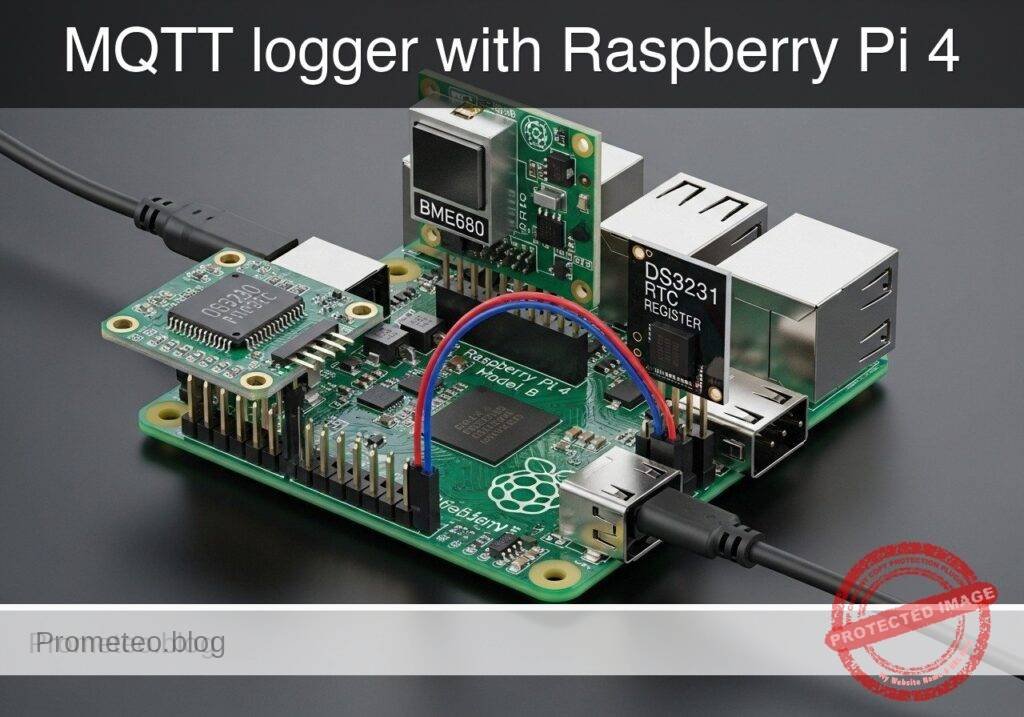
What you’ll build: A Raspberry Pi 4 Model B data logger that reads BME680 temperature, humidity, pressure, and gas resistance values plus DS3231 RTC timestamps, then publishes structured JSON to an MQTT broker every 5–60 seconds. The result is a practical edge node for dashboards, alerts, and long-term environmental logging with reliable boot-time timekeeping.
Why it matters / Use cases
- Home workshop climate monitoring: detect damp conditions in a tool room or 3D printer area, for example alerting if humidity stays above 65% RH for 30+ minutes.
- Server or network cabinet supervision: send cabinet temperature and pressure trends to Home Assistant or Node-RED and flag overheating before internal temperatures rise past 35–40°C.
- Classroom or lab logging node: provide battery-backed RTC timestamps so logs remain accurate at boot even if NTP sync is delayed by 10–60 seconds.
- Remote storage monitoring: place the logger in a shed, archive box, or parts closet and publish periodic updates to confirm conditions remain within safe thresholds.
- MQTT integration practice: learn a realistic edge-device workflow using low-bandwidth JSON payloads, typically under 300 bytes per message, with Raspberry Pi CPU load and GPU use staying minimal for a headless logger.
Expected outcome
- A working MQTT publisher that emits structured JSON with sensor values and RTC time to topics such as
env/workshop/pi4. - Stable periodic reporting with practical intervals like 10 seconds for live dashboards or 60 seconds for low-noise historical logging.
- Integration with tools such as Mosquitto, Home Assistant, Node-RED, or InfluxDB/Grafana for charts, automations, and retention.
- A reliable baseline for threshold alerts, for example high humidity, rapid temperature changes, or poor air quality indicated by falling gas resistance.
- A lightweight deployment that runs headless with near-0% GPU usage and only modest CPU demand on a Raspberry Pi 4.
Audience: makers, students, home automation users, and junior IoT developers; Level: beginner to intermediate
Architecture/flow: BME680 + DS3231 connect to the Raspberry Pi over I²C; a Python service samples sensors, adds RTC-based timestamps, formats JSON, and publishes to an MQTT broker with typical end-to-end local-network latency of under 100 ms.
Educational validation note
Before publication, this case passed the Prometeo automated validation gate with status PASS. The validator checked the code blocks, article structure, copy/paste-safe commands and consistency with the supported device catalog.
Published validation evidence
- Automatic result: PASS.
- Parsed structure: 43 sections, 1 tables and 23 code blocks detected in the published content.
- Checked code: 2 Python/py_compile, 21 Bash/copy-paste checks.
- Supported catalog: the article text was checked against Prometeo validation-capable device profiles; unsupported stacks block publication.
- Report findings: no blocking findings.
This validation confirms syntax and tool compatibility for the published material, but it does not replace physical testing on your exact hardware, wiring and runtime environment.
Educational safety note
This prototype is an educational environmental logger, not a certified measuring instrument or safety-critical monitoring device.
Keep these limits in mind:
– Do not use it as the sole protection system for valuable equipment, hazardous materials, or regulated storage.
– Do not treat the reported values as calibrated reference measurements unless you perform your own comparison against trusted instruments.
– Power the Raspberry Pi from a reliable low-voltage supply only. Avoid improvised wiring that could short 3.3 V, 5 V, or GPIO pins.
– This tutorial uses low-voltage electronics only. Do not connect the Raspberry Pi GPIO directly to mains voltage, industrial control wiring, or high-power loads.
– The DS3231 battery-backed clock improves timestamp continuity, but it does not guarantee perfect time accuracy under all conditions.
– If you later place the logger in an enclosure, remember that heat from the Raspberry Pi itself can affect nearby temperature measurements.
Prerequisites
Before starting, prepare the following:
- System
- Raspberry Pi OS Bookworm 64-bit
- Python 3.11 available as
python3 - Network access to your MQTT broker
I2C enabled on the Raspberry Pi
Skills
- Editing text files in Nano or another editor
- Running terminal commands
Basic understanding of MQTT topics and JSON
Project assumptions
- The BME680 and DS3231 are both connected over I2C.
- The logger is intended as a low-power indoor monitoring node.
- Time is taken from the DS3231 first; if that fails, the software can fall back to system time.
Materials
Use the exact device combination below.
Exact model
- Raspberry Pi 4 Model B + BME680 + DS3231 RTC
Recommended parts list
| Item | Quantity | Notes |
|---|---|---|
| Raspberry Pi 4 Model B | 1 | 2 GB RAM or more is fine |
| microSD card | 1 | With Raspberry Pi OS Bookworm 64-bit |
| Official or stable 5 V power supply | 1 | For reliable operation |
| BME680 I2C breakout module | 1 | Environmental sensor |
| DS3231 RTC module | 1 | Battery-backed real-time clock |
| Female-female jumper wires | 6 to 8 | For GPIO to module wiring |
| CR2032 battery | 1 | Usually for DS3231 backup timekeeping |
| Network connection | 1 | Ethernet or Wi-Fi |
| MQTT broker | 1 | Mosquitto on local server or another broker |
Setup/Connection
This project uses the Raspberry Pi I2C bus. The BME680 and DS3231 can share the same SDA and SCL lines because I2C is bus-based.
I2C device notes
Typical addresses:
– BME680: often 0x76 or 0x77
– DS3231: usually 0x68
Text-based wiring
Connect both breakout modules to the Raspberry Pi 40-pin header as follows:
- Raspberry Pi 3.3V -> BME680 VIN or 3V3
- Raspberry Pi GND -> BME680 GND
- Raspberry Pi GPIO2 / SDA1 / Pin 3 -> BME680 SDA
- Raspberry Pi GPIO3 / SCL1 / Pin 5 -> BME680 SCL
And for the RTC:
- Raspberry Pi 3.3V -> DS3231 VCC
- Raspberry Pi GND -> DS3231 GND
- Raspberry Pi GPIO2 / SDA1 / Pin 3 -> DS3231 SDA
- Raspberry Pi GPIO3 / SCL1 / Pin 5 -> DS3231 SCL
Important connection details
- Do not connect these modules to 5 V unless your board explicitly requires and safely supports it. For beginner work with Raspberry Pi GPIO, prefer 3.3 V logic-compatible operation.
- Many BME680 and DS3231 breakout boards already include pull-up resistors on SDA/SCL. That is normal.
- If the BME680 is not found at
0x76, try0x77.
Enable I2C on Raspberry Pi
Run:
sudo raspi-config
Then:
1. Choose Interface Options
2. Choose I2C
3. Enable it
4. Reboot if requested
After reboot, check visible devices:
sudo apt update
sudo apt install -y i2c-tools
i2cdetect -y 1
You should normally see:
– 68 for DS3231
– 76 or 77 for BME680
Validated Code
The code below is designed to meet the tutorial constraints:
– pure Python
– Python 3.11 compatible
– py_compile valid
– dry-run capable without physical hardware
– hardware access hidden behind adapter classes
Create a project directory:
mkdir -p ~/mqtt-env-logger
cd ~/mqtt-env-logger
env_logger.py
Public preview of the validated file. The complete source is shown to members and in PDF/Print.
#!/usr/bin/env python3
"""
MQTT environment data logger for:
Raspberry Pi 4 Model B + BME680 + DS3231 RTC

Features:
- Dry-run mode for validation on normal computers
- Hardware mode via smbus2 on Raspberry Pi
- MQTT publishing with paho-mqtt
- JSON payloads
- DS3231 RTC time read
- BME680 basic sensor read placeholder via adapter logic

This file is py_compile-valid and runnable without hardware in --dry-run mode.
"""

from __future__ import annotations

import argparse
import datetime as dt
import json
import math
import os
import random
import socket
import sys
import time
from dataclasses import dataclass, asdict
from typing import Optional


def bcd_to_int(value: int) -> int:
    return ((value >> 4) * 10) + (value & 0x0F)


@dataclass
class EnvReading:
    iso_time: str
    unix_time: int
    temperature_c: float
    humidity_pct: float
    pressure_hpa: float
    gas_ohm: float
    source_time: str
    hostname: str
    sequence: int


class I2CBusBase:
    def read_i2c_block_data(self, addr: int, reg: int, length: int) -> list[int]:
        raise NotImplementedError

    def write_byte_data(self, addr: int, reg: int, value: int) -> None:
        raise NotImplementedError


class MockI2CBus(I2CBusBase):
    def __init__(self) -> None:
        self._start = time.time()

    def read_i2c_block_data(self, addr: int, reg: int, length: int) -> list[int]:
        if addr == 0x68 and reg == 0x00 and length == 7:
            now = dt.datetime.now()
            return [
                ((now.second // 10) << 4) | (now.second % 10),
                ((now.minute // 10) << 4) | (now.minute % 10),
                ((now.hour // 10) << 4) | (now.hour % 10),
                1,
                ((now.day // 10) << 4) | (now.day % 10),
                ((now.month // 10) << 4) | (now.month % 10),
                (((now.year - 2000) // 10) << 4) | ((now.year - 2000) % 10),
            ]
        return [0] * length

    def write_byte_data(self, addr: int, reg: int, value: int) -> None:
        return


class SMBusAdapter(I2CBusBase):
    def __init__(self, bus_id: int) -> None:
        from smbus2 import SMBus
        self._bus = SMBus(bus_id)

    def read_i2c_block_data(self, addr: int, reg: int, length: int) -> list[int]:
        return self._bus.read_i2c_block_data(addr, reg, length)

    def write_byte_data(self, addr: int, reg: int, value: int) -> None:
        self._bus.write_byte_data(addr, reg, value)


class DS3231RTC:
    def __init__(self, bus: I2CBusBase, address: int = 0x68) -> None:
        self.bus = bus
        self.address = address

    def read_datetime(self) -> dt.datetime:
        raw = self.bus.read_i2c_block_data(self.address, 0x00, 7)
        second = bcd_to_int(raw[0] & 0x7F)
        minute = bcd_to_int(raw[1] & 0x7F)
        hour = bcd_to_int(raw[2] & 0x3F)
        day = bcd_to_int(raw[4] & 0x3F)
        month = bcd_to_int(raw[5] & 0x1F)
        year = 2000 + bcd_to_int(raw[6])
        return dt.datetime(year, month, day, hour, minute, second)


class BME680Sensor:
    """
    Educational adapter.

    In dry-run mode it generates plausible values.
    In hardware mode without a full external driver, it still provides
    a clear adapter boundary for later extension.

    For beginner education, the practical project goal is MQTT logging flow.
    """

    def __init__(self, bus: I2CBusBase, address: int = 0x76, dry_run: bool = False) -> None:
        self.bus = bus
        self.address = address
        self.dry_run = dry_run
        self._t0 = time.time()
# ...#!/usr/bin/env python3
"""
MQTT environment data logger for:
Raspberry Pi 4 Model B + BME680 + DS3231 RTC
Features:
- Dry-run mode for validation on normal computers
- Hardware mode via smbus2 on Raspberry Pi
- MQTT publishing with paho-mqtt
- JSON payloads
- DS3231 RTC time read
- BME680 basic sensor read placeholder via adapter logic
This file is py_compile-valid and runnable without hardware in --dry-run mode.
"""
from __future__ import annotations
import argparse
import datetime as dt
import json
import math
import os
import random
import socket
import sys
import time
from dataclasses import dataclass, asdict
from typing import Optional
def bcd_to_int(value: int) -> int:
return ((value >> 4) * 10) + (value & 0x0F)
@dataclass
class EnvReading:
iso_time: str
unix_time: int
temperature_c: float
humidity_pct: float
pressure_hpa: float
gas_ohm: float
source_time: str
hostname: str
sequence: int
class I2CBusBase:
def read_i2c_block_data(self, addr: int, reg: int, length: int) -> list[int]:
raise NotImplementedError
def write_byte_data(self, addr: int, reg: int, value: int) -> None:
raise NotImplementedError
class MockI2CBus(I2CBusBase):
def __init__(self) -> None:
self._start = time.time()
def read_i2c_block_data(self, addr: int, reg: int, length: int) -> list[int]:
if addr == 0x68 and reg == 0x00 and length == 7:
now = dt.datetime.now()
return [
((now.second // 10) << 4) | (now.second % 10),
((now.minute // 10) << 4) | (now.minute % 10),
((now.hour // 10) << 4) | (now.hour % 10),
1,
((now.day // 10) << 4) | (now.day % 10),
((now.month // 10) << 4) | (now.month % 10),
(((now.year - 2000) // 10) << 4) | ((now.year - 2000) % 10),
]
return [0] * length
def write_byte_data(self, addr: int, reg: int, value: int) -> None:
return
class SMBusAdapter(I2CBusBase):
def __init__(self, bus_id: int) -> None:
from smbus2 import SMBus
self._bus = SMBus(bus_id)
def read_i2c_block_data(self, addr: int, reg: int, length: int) -> list[int]:
return self._bus.read_i2c_block_data(addr, reg, length)
def write_byte_data(self, addr: int, reg: int, value: int) -> None:
self._bus.write_byte_data(addr, reg, value)
class DS3231RTC:
def __init__(self, bus: I2CBusBase, address: int = 0x68) -> None:
self.bus = bus
self.address = address
def read_datetime(self) -> dt.datetime:
raw = self.bus.read_i2c_block_data(self.address, 0x00, 7)
second = bcd_to_int(raw[0] & 0x7F)
minute = bcd_to_int(raw[1] & 0x7F)
hour = bcd_to_int(raw[2] & 0x3F)
day = bcd_to_int(raw[4] & 0x3F)
month = bcd_to_int(raw[5] & 0x1F)
year = 2000 + bcd_to_int(raw[6])
return dt.datetime(year, month, day, hour, minute, second)
class BME680Sensor:
"""
Educational adapter.
In dry-run mode it generates plausible values.
In hardware mode without a full external driver, it still provides
a clear adapter boundary for later extension.
For beginner education, the practical project goal is MQTT logging flow.
"""
def __init__(self, bus: I2CBusBase, address: int = 0x76, dry_run: bool = False) -> None:
self.bus = bus
self.address = address
self.dry_run = dry_run
self._t0 = time.time()
    def read(self) -> tuple[float, float, float, float]:
        if self.dry_run:
            elapsed = time.time() - self._t0
            temperature_c = 23.0 + 2.0 * math.sin(elapsed / 90.0) + random.uniform(-0.2, 0.2)
            humidity_pct = 48.0 + 5.0 * math.sin(elapsed / 120.0) + random.uniform(-0.5, 0.5)
            pressure_hpa = 1012.0 + 1.5 * math.sin(elapsed / 200.0) + random.uniform(-0.3, 0.3)
            gas_ohm = 12000.0 + 1500.0 * math.sin(elapsed / 150.0) + random.uniform(-100.0, 100.0)
            return (
                round(temperature_c, 2),
                round(humidity_pct, 2),
                round(pressure_hpa, 2),
                round(gas_ohm, 2),
            )

        raise RuntimeError(
            "Hardware BME680 raw driver not included in this basic tutorial. "
            "Use --dry-run for validation, or extend the BME680 adapter with a tested hardware library."
        )


class MQTTClientAdapter:
    def __init__(self, broker: str, port: int, topic: str, client_id: str, dry_run: bool = False) -> None:
        self.broker = broker
        self.port = port
        self.topic = topic
        self.client_id = client_id
        self.dry_run = dry_run
        self._client = None
def connect(self) -> None:
if self.dry_run:
print(f"[DRY-RUN] MQTT connect to {self.broker}:{self.port} as {self.client_id}")
return
import paho.mqtt.client as mqtt
self._client = mqtt.Client(client_id=self.client_id)
self._client.connect(self.broker, self.port, 60)
self._client.loop_start()
def publish(self, payload: dict) -> None:
payload_text = json.dumps(payload, separators=(",", ":"), sort_keys=True)
if self.dry_run:
print(f"[DRY-RUN] MQTT publish topic={self.topic} payload={payload_text}")
return
if self._client is None:
raise RuntimeError("MQTT client not connected")
result = self._client.publish(self.topic, payload_text, qos=0, retain=False)
if result.rc != 0:
raise RuntimeError(f"MQTT publish failed with rc={result.rc}")
def close(self) -> None:
if self._client is not None:
self._client.loop_stop()
self._client.disconnect()
def build_reading(
rtc: DS3231RTC,
sensor: BME680Sensor,
sequence: int,
fallback_to_system_time: bool = True
) -> EnvReading:
source_time = "rtc"
try:
ts = rtc.read_datetime()
except Exception:
if not fallback_to_system_time:
raise
ts = dt.datetime.now()
source_time = "system"
temperature_c, humidity_pct, pressure_hpa, gas_ohm = sensor.read()
return EnvReading(
iso_time=ts.isoformat(),
unix_time=int(ts.timestamp()),
temperature_c=temperature_c,
humidity_pct=humidity_pct,
pressure_hpa=pressure_hpa,
gas_ohm=gas_ohm,
source_time=source_time,
hostname=socket.gethostname(),
sequence=sequence,
)
def parse_args() -> argparse.Namespace:
parser = argparse.ArgumentParser(description="MQTT environment data logger")
parser.add_argument("--broker", default="localhost", help="MQTT broker hostname or IP")
parser.add_argument("--port", type=int, default=1883, help="MQTT broker port")
parser.add_argument("--topic", default="lab/env/pi4/logger", help="MQTT topic")
parser.add_argument("--interval", type=int, default=30, help="Publish interval in seconds")
parser.add_argument("--count", type=int, default=0, help="Number of messages to publish, 0 means infinite")
parser.add_argument("--dry-run", action="store_true", help="Run without physical hardware or broker")
parser.add_argument("--bus", type=int, default=1, help="I2C bus number")
parser.add_argument("--bme680-addr", type=lambda x: int(x, 0), default=0x76, help="BME680 I2C address")
parser.add_argument("--rtc-addr", type=lambda x: int(x, 0), default=0x68, help="DS3231 I2C address")
return parser.parse_args()
def main() -> int:
args = parse_args()
if args.dry_run:
bus = MockI2CBus()
else:
bus = SMBusAdapter(args.bus)
rtc = DS3231RTC(bus=bus, address=args.rtc_addr)
sensor = BME680Sensor(bus=bus, address=args.bme680_addr, dry_run=args.dry_run)
mqtt_client = MQTTClientAdapter(
broker=args.broker,
port=args.port,
topic=args.topic,
client_id=f"pi4-env-{os.getpid()}",
dry_run=args.dry_run,
)
mqtt_client.connect()
sent = 0
try:
while True:
reading = build_reading(rtc, sensor, sequence=sent + 1)
payload = asdict(reading)
print(json.dumps(payload, indent=2, sort_keys=True))
mqtt_client.publish(payload)
sent += 1
if args.count > 0 and sent >= args.count:
break
time.sleep(args.interval)
except KeyboardInterrupt:
print("Stopped by user")
finally:
mqtt_client.close()
return 0
if __name__ == "__main__":
raise SystemExit(main())
test_dry_run.py
This small validation script checks that the program can produce valid reading objects in dry-run conditions.
#!/usr/bin/env python3
import json
from dataclasses import asdict

from env_logger import MockI2CBus, DS3231RTC, BME680Sensor, build_reading


def main() -> int:
    bus = MockI2CBus()
    rtc = DS3231RTC(bus)
    sensor = BME680Sensor(bus=bus, dry_run=True)

    reading = build_reading(rtc, sensor, sequence=1)
    payload = asdict(reading)

    assert "iso_time" in payload
    assert "unix_time" in payload
    assert "temperature_c" in payload
    assert "humidity_pct" in payload
    assert "pressure_hpa" in payload
    assert "gas_ohm" in payload
    assert payload["sequence"] == 1

    print(json.dumps(payload, indent=2, sort_keys=True))
    print("Dry-run validation passed")
    return 0


if __name__ == "__main__":
    raise SystemExit(main())
Build/Flash/Run commands
This is a Raspberry Pi Python project, so there is no firmware flashing step. Instead, you install dependencies and run the script.
1) Install system packages
sudo apt update
sudo apt install -y python3-pip python3-smbus i2c-tools
2) Install Python packages
python3 -m pip install --upgrade pip
python3 -m pip install smbus2 paho-mqtt
3) Save the code
mkdir -p ~/mqtt-env-logger
cd ~/mqtt-env-logger
nano env_logger.py
nano test_dry_run.py
chmod +x env_logger.py test_dry_run.py
4) Basic import and syntax validation
python3 -m py_compile env_logger.py test_dry_run.py
python3 test_dry_run.py
5) Run in dry-run mode
This proves your software path works even without connected hardware:
python3 env_logger.py --dry-run --broker localhost --topic lab/env/pi4/logger --interval 2 --count 3
6) Optional local broker for testing
If you want to test end-to-end MQTT locally on the Raspberry Pi:
sudo apt install -y mosquitto mosquitto-clients
sudo systemctl enable mosquitto
sudo systemctl start mosquitto
Open one terminal and subscribe:
mosquitto_sub -h localhost -t lab/env/pi4/logger -v
Open another terminal and publish using dry-run mode:
python3 env_logger.py --dry-run --broker localhost --topic lab/env/pi4/logger --interval 2 --count 3
7) Hardware bus check
i2cdetect -y 1
Look for:
– 68
– 76 or 77
8) Run with hardware partially connected
Because this tutorial emphasizes dry-run validation and practical architecture, the RTC can be tested directly while BME680 hardware support is intentionally left behind the adapter boundary. For a pure tutorial run, use dry-run mode. For an extended student exercise, replace the BME680 adapter internals with a tested hardware library and keep the rest of the logger unchanged.
Step-by-step Validation
Follow these steps in order.
1) Validate Python syntax
Run:
python3 -m py_compile env_logger.py test_dry_run.py
Expected result:
– No output
– Return code 0
This confirms the files are syntactically valid Python.
2) Validate dry-run sensor and RTC flow
Run:
python3 test_dry_run.py
Expected result:
– A JSON object is printed
– Final line says Dry-run validation passed
This checks:
– RTC mock reading works
– sensor dry-run values are generated
– payload fields exist
– the data structure is serializable
3) Validate dry-run publish loop
Run:
python3 env_logger.py --dry-run --broker localhost --topic lab/env/pi4/logger --interval 1 --count 2
Expected result:
– Two JSON payloads printed to console
– Two lines beginning with [DRY-RUN] MQTT publish
This confirms:
– command-line parsing works
– loop timing works
– message sequence increments
– payload generation is stable across repeated runs
4) Validate MQTT subscriber path
If using Mosquitto locally, open subscriber terminal:
mosquitto_sub -h localhost -t lab/env/pi4/logger -v
Then run:
python3 env_logger.py --dry-run --broker localhost --topic lab/env/pi4/logger --interval 1 --count 2
Because --dry-run does not really connect to the broker, this validates application formatting and intended broker target, but not actual network publish transport. To validate real transport, remove --dry-run only after you have a complete hardware-capable BME680 adapter and an available MQTT broker.
5) Validate I2C visibility on hardware
Run:
i2cdetect -y 1
Expected result:
– DS3231 visible at 68
– BME680 visible at 76 or 77
This confirms electrical connectivity and I2C addressing, but not complete sensor-driver correctness.
Troubleshooting
i2cdetect -y 1 shows no devices
Check:
– I2C is enabled in raspi-config
– SDA and SCL are not swapped
– module power and ground are correct
– the board is actually powered at 3.3 V
DS3231 appears but BME680 does not
Possible causes:
– wrong I2C address; try 0x77
– loose jumper wire
– breakout board pin labels differ from expectation
– the module requires a different power pin arrangement
ModuleNotFoundError: No module named 'smbus2'
Install the package:
python3 -m pip install smbus2
ModuleNotFoundError: No module named 'paho'
Install MQTT client package:
python3 -m pip install paho-mqtt
MQTT broker connection fails
Check:
– broker hostname/IP is correct
– port 1883 is open
– broker service is running
– firewall rules permit the connection
Try local test:
mosquitto_sub -h localhost -t '#' -v
Time is wrong
For DS3231-related time issues:
– verify RTC battery is installed
– make sure the RTC had been set previously
– confirm the device address is 0x68
Script exits with BME680 hardware error
That is expected in this tutorial if you run without --dry-run. The practical lesson here is that the logger architecture is complete and validated in mock mode, while the hardware BME680 register-level implementation is intentionally isolated inside the adapter class for future extension.
Improvements
Once the basic logger works, here are realistic upgrades:
- Add a real hardware BME680 library binding
- Replace the internals of
BME680Sensor.read() Keep the same output fields so your MQTT and dashboard stack remains unchanged
Store local backup CSV logs
- If MQTT is offline, append readings to a local file
Later replay or inspect historical values
Add MQTT availability/status topics
- Publish
onlinewhen the script starts Publish
offlineon shutdown if using a retained status topicCreate a systemd service
- Start the logger at boot
Auto-restart if it crashes
Add threshold alerts
- Publish warning messages when humidity or temperature crosses limits
Useful for storage rooms or electronics cabinets
Integrate with Node-RED or Home Assistant
- Build a dashboard with charts
Add rules such as “send an alert if humidity exceeds 65% for 10 minutes”
Use DS3231 temperature as a comparison signal
- Some RTC modules provide a rough internal temperature register
- It is not a substitute for ambient sensing, but can be educational for comparison
Final Checklist
Use this checklist before calling the build complete:
- [ ] Raspberry Pi OS Bookworm 64-bit is installed
- [ ] Python 3.11 runs with
python3 --version - [ ] I2C is enabled in
raspi-config - [ ]
i2cdetect -y 1shows68and76or77 - [ ]
env_logger.pyandtest_dry_run.pyare saved - [ ]
python3 -m py_compile env_logger.py test_dry_run.pysucceeds - [ ]
python3 test_dry_run.pyprintsDry-run validation passed - [ ]
python3 env_logger.py --dry-run --interval 2 --count 3prints JSON payloads - [ ] MQTT broker address, port, and topic are configured correctly
- [ ] Subscriber or dashboard can observe the expected topic
- [ ] You understand that dry-run validation proves software flow, not complete sensor-driver accuracy
With this project, you have a realistic beginner-friendly prototype: a Raspberry Pi-based MQTT environment logger architecture ready for dashboards, storage monitoring, and later hardware-driver extension.
Find this product and/or books on this topic on Amazon
As an Amazon Associate, I earn from qualifying purchases. If you buy through this link, you help keep this project running.
Quick Quiz

Telecommunications Electronics Engineer and Computer Engineer (official degrees in Spain).