Educational Safety Note: This project is designed for educational purposes to demonstrate I2S audio processing and PWM control. It provides supplemental visual feedback but must not replace certified industrial safety equipment, OSHA-compliant noise monitoring, or mandatory hearing protection protocols in hazardous environments.
Objective and use case
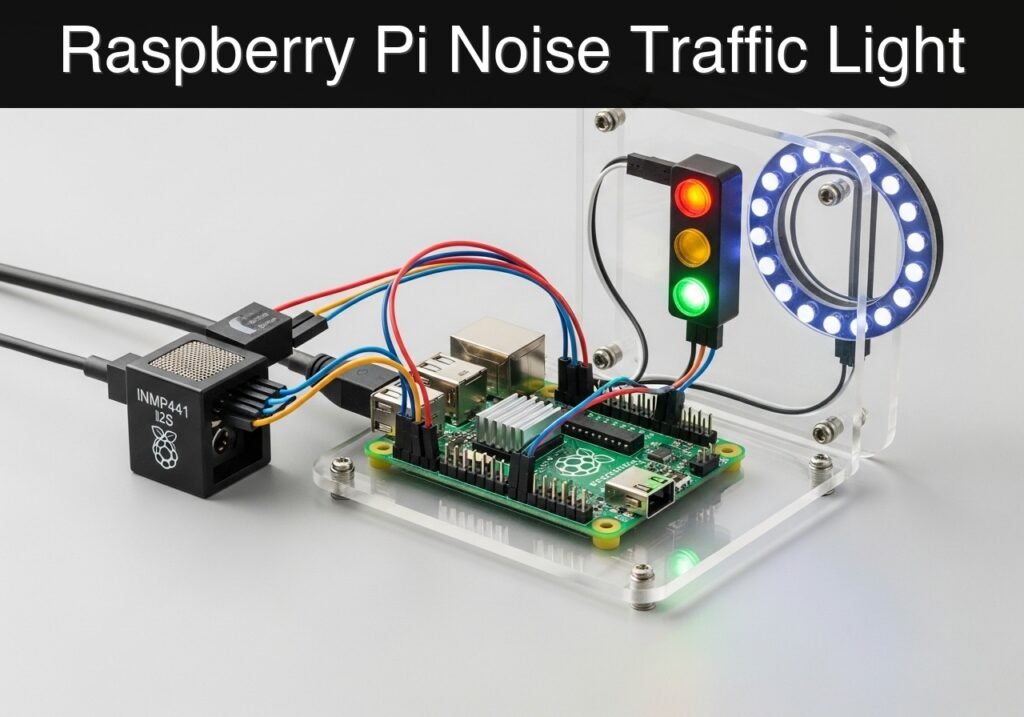
- What you’ll build: You will build a real-time, automated workshop noise traffic light using a digital I2S microphone and a programmable RGB LED ring.
- Why it matters / Use cases:
- Shared Makerspaces: Visually reminds users to wear hearing protection when heavy machinery (like CNC routers or table saws) is operating.
- Classroom Management: Provides non-verbal, objective feedback to students when group work volume exceeds acceptable levels.
- Factory Floors: Acts as a localized, low-cost ambient noise monitor to log environmental conditions and trigger localized visual warnings.
- Library/Study Zones: Can be tuned to highly sensitive thresholds to maintain strict quiet zones without human intervention.
- Expected outcome:
- A Python-based service that continuously captures pulse-code modulation (PCM) audio data via the I2S interface.
- Real-time mathematical conversion of raw audio chunks into Root Mean Square (RMS) and Decibels Relative to Full Scale (dBFS).
- Immediate visual state changes on the NeoPixel ring: Green (quiet), Yellow (warning/moderate), and Red (loud).
- Console logging of numerical dBFS values for calibration and environmental tracking.
- Audience and level: Basic electronics and computer engineering students.
- Architecture/flow:
INMP441 (I2S Audio) -> Raspberry Pi 4B (Python/RMS Math) -> WS2812B NeoPixel Ring (PWM).
Educational validation note
Before publication, this case passed the Prometeo automated validation gate with status PASS. The validator checked the code blocks, article structure, copy/paste-safe commands and consistency with the supported device catalog.
Published validation evidence
- Automatic result: PASS.
- Parsed structure: 12 sections, 1 tables and 2 code blocks detected before publication.
- Checked code: 1 Python/py_compile, 1 Bash/copy-paste checks.
- Supported catalog: the article text was checked against Prometeo’s validation-capable device profiles, and unsupported stacks block publication.
- Report findings: no blocking findings.
This validation confirms syntax and tool compatibility for the published material, but it does not replace physical testing on your exact hardware, wiring and runtime environment.
Educational safety note
This project is a low-voltage educational prototype, not a certified product. Before powering the setup, verify the pinout of your exact Raspberry Pi, never connect 5 V to 3.3 V GPIO pins, disconnect power before changing wiring, and use suitable interfaces or external supplies for sensors, relays, motors or loads.
Conceptual block diagram
High-level view: what enters the system, what each block processes, and what comes out.
Functional architecture
Conceptual signal and responsibility flow between device blocks.

Prerequisites
- Hardware: Raspberry Pi 4 Model B (or Raspberry Pi 5).
- Operating System: Raspberry Pi OS Bookworm 64-bit.
- Software: Python 3.11.
- System Packages:
python3-pip,python3-venv,portaudio19-dev, andgit. - Privileges: The user must be a member of the
audio,gpio, andvideogroups to access the I2S hardware and PWM peripherals without root privileges.
Materials
- Compute: Raspberry Pi 4 Model B (4GB or 8GB RAM recommended).
- Microphone: INMP441 Omnidirectional I2S Digital Microphone Module.
- Visual Indicator: WS2812B NeoPixel Status Ring (12 or 16 LED variant).
- Power: Official 15W (5V/3A) USB-C Power Supply for Raspberry Pi.
- Wiring: Female-to-female jumper wires (at least 9 wires).
Setup/Connection
Connecting an I2S microphone and a NeoPixel ring simultaneously requires careful pin selection. The I2S protocol uses specific hardware pins for its Serial Clock (BCLK), Word Select (LRCLK), and Serial Data (DIN). On the Raspberry Pi 4 Model B, the default I2S clock pin is GPIO 18.
Because WS2812B NeoPixels require strict timing typically generated by the Pi’s hardware PWM, and because PWM0 is also mapped to GPIO 18 by default, we have a hardware conflict. To resolve this, we route the NeoPixel data line to GPIO 12, which provides access to PWM0 without interfering with the I2S clock on GPIO 18.
Pin Mapping Table
| Component | Component Pin | Raspberry Pi 4B Pin | Physical Pin # | Note |
|---|---|---|---|---|
| INMP441 | VDD | 3.3V Power | Pin 1 | Do not use 5V for the INMP441. |
| INMP441 | GND | Ground | Pin 9 | Common ground. |
| INMP441 | L/R | Ground | Pin 14 | Ties mic to the Left I2S channel. |
| INMP441 | WS | GPIO 19 (PCM_FS) | Pin 35 | Word Select / Left-Right Clock. |
| INMP441 | SCK | GPIO 18 (PCM_CLK) | Pin 12 | Serial Clock / Bit Clock. |
| INMP441 | SD | GPIO 20 (PCM_DIN) | Pin 38 | Serial Data Input to Pi. |
| NeoPixel | VCC | 5V Power | Pin 2 | NeoPixels require 5V logic/power. |
| NeoPixel | GND | Ground | Pin 6 | Common ground. |
| NeoPixel | DIN | GPIO 12 (PWM0) | Pin 32 | Avoids conflict with I2S on GPIO 18. |
Enabling I2S in the Operating System
By default, the I2S interface is disabled on Raspberry Pi OS. You must enable it by editing the boot configuration file.
Open /boot/firmware/config.txt (or /boot/config.txt on older versions) and add the following line at the bottom:
dtparam=i2s=on
Additionally, to load the generic I2S audio driver, ensure this line is present:
dtoverlay=googlevoicehat-soundcard
After modifying this file, the Raspberry Pi must be rebooted.
Validation Method
To validate the mathematical accuracy of the dBFS calculation and the hardware responsiveness, place a calibrated commercial SPL (Sound Pressure Level) meter adjacent to the INMP441 microphone. Play a constant 1 kHz test tone from a speaker at a fixed volume.
Expected Evidence: The console logging should output a stable dBFS value within +/- 1.0 dBFS of variance. Adjust the --threshold-red and --threshold-yellow arguments to match your environmental baseline requirements.
Implementation Code
The following section contains two scripts. The first is a Bash script to automate the installation of dependencies and system configuration. The second is the main Python application. The Python application includes mock adapter classes, allowing the code to be validated on a standard PC (dry-run mode) without physical GPIO or I2S hardware attached.
1. Environment Setup Script (setup_env.sh)
#!/bin/bash

echo "Updating package lists..."
sudo apt-get update

echo "Installing system dependencies..."
sudo apt-get install -y portaudio19-dev python3-pyaudio python3-pip python3-venv

echo "Creating Python virtual environment..."
python3 -m venv workshop_env
source workshop_env/bin/activate

echo "Installing Python libraries..."
pip install pyaudio rpi_ws281x adafruit-circuitpython-neopixel

echo "Adding user to required hardware groups..."
sudo usermod -a -G audio,gpio,video $USER

echo "Setup complete. Please reboot your Raspberry Pi to apply group changes."
echo "After reboot, activate the environment using: source workshop_env/bin/activate"
2. Main Application (noise_traffic_light.py)
Public preview of the validated file. The complete source is shown to members and in PDF/Print.
#!/usr/bin/env python3
"""
noise_traffic_light.py
Monitors ambient noise via an I2S microphone and controls a NeoPixel ring.
Includes a dry-run mode for educational validation on standard PCs.
"""

import sys
import math
import struct
import time
import argparse
import logging

# Configure logging
logging.basicConfig(level=logging.INFO, format='%(asctime)s - %(levelname)s - %(message)s')

# Hardware libraries (wrapped in try-except for dry-run compatibility)
try:
    import pyaudio
    HAS_PYAUDIO = True
except ImportError:
    HAS_PYAUDIO = False

try:
    import board
    import neopixel
    HAS_NEOPIXEL = True
except ImportError:
    HAS_NEOPIXEL = False


class MockAudioStream:
    """Generates synthetic PCM audio data to simulate a fluctuating noise environment."""
    def __init__(self, chunk_size, rate):
        self.chunk_size = chunk_size
        self.rate = rate
        self.start_time = time.time()

    def read(self, num_frames, exception_on_overflow=False):
        # Simulate elapsed time
        time.sleep(num_frames / self.rate)
        t = time.time() - self.start_time

        # Create a pulsing envelope: goes from 10% to 100% of max amplitude over 10 seconds
        envelope = 0.1 + 0.9 * ((math.sin(t * 2 * math.pi / 10) + 1) / 2)
        max_amp = 32767 * envelope

        data = bytearray()
        for i in range(num_frames):
            # Generate a 440Hz sine wave sample
            sample = int(max_amp * math.sin(2 * math.pi * 440 * (i / self.rate)))
            # Pack as 16-bit signed integer (little-endian)
            data.extend(struct.pack('<h', sample))
        return bytes(data)

    def close(self):
        pass


class MockStatusRing:
    """Simulates a NeoPixel ring by printing colors to the console."""
    def __init__(self, num_pixels):
        self.num_pixels = num_pixels
        self.current_color = None

    def fill(self, color):
        if color != self.current_color:
            self.current_color = color
            logging.info(f"[MOCK LED] Ring color changed to RGB: {color}")


class RealAudioStream:
    """Wrapper for the PyAudio I2S stream."""
    def __init__(self, chunk_size, rate):
        self.pa = pyaudio.PyAudio()
        self.stream = self.pa.open(
            format=pyaudio.paInt16,
            channels=1,
            rate=rate,
            input=True,
            frames_per_buffer=chunk_size
        )

    def read(self, num_frames, exception_on_overflow=False):
        return self.stream.read(num_frames, exception_on_overflow=exception_on_overflow)

    def close(self):
        self.stream.stop_stream()
        self.stream.close()
        self.pa.terminate()
# ...#!/usr/bin/env python3
"""
noise_traffic_light.py
Monitors ambient noise via an I2S microphone and controls a NeoPixel ring.
Includes a dry-run mode for educational validation on standard PCs.
"""
import sys
import math
import struct
import time
import argparse
import logging
# Configure logging
logging.basicConfig(level=logging.INFO, format='%(asctime)s - %(levelname)s - %(message)s')
# Hardware libraries (wrapped in try-except for dry-run compatibility)
try:
import pyaudio
HAS_PYAUDIO = True
except ImportError:
HAS_PYAUDIO = False
try:
import board
import neopixel
HAS_NEOPIXEL = True
except ImportError:
HAS_NEOPIXEL = False
class MockAudioStream:
"""Generates synthetic PCM audio data to simulate a fluctuating noise environment."""
def __init__(self, chunk_size, rate):
self.chunk_size = chunk_size
self.rate = rate
self.start_time = time.time()
def read(self, num_frames, exception_on_overflow=False):
# Simulate elapsed time
time.sleep(num_frames / self.rate)
t = time.time() - self.start_time
# Create a pulsing envelope: goes from 10% to 100% of max amplitude over 10 seconds
envelope = 0.1 + 0.9 * ((math.sin(t * 2 * math.pi / 10) + 1) / 2)
max_amp = 32767 * envelope
data = bytearray()
for i in range(num_frames):
# Generate a 440Hz sine wave sample
sample = int(max_amp * math.sin(2 * math.pi * 440 * (i / self.rate)))
# Pack as 16-bit signed integer (little-endian)
data.extend(struct.pack('<h', sample))
return bytes(data)
def close(self):
pass
class MockStatusRing:
"""Simulates a NeoPixel ring by printing colors to the console."""
def __init__(self, num_pixels):
self.num_pixels = num_pixels
self.current_color = None
def fill(self, color):
if color != self.current_color:
self.current_color = color
logging.info(f"[MOCK LED] Ring color changed to RGB: {color}")
class RealAudioStream:
"""Wrapper for the PyAudio I2S stream."""
def __init__(self, chunk_size, rate):
self.pa = pyaudio.PyAudio()
self.stream = self.pa.open(
format=pyaudio.paInt16,
channels=1,
rate=rate,
input=True,
frames_per_buffer=chunk_size
)
def read(self, num_frames, exception_on_overflow=False):
return self.stream.read(num_frames, exception_on_overflow=exception_on_overflow)
def close(self):
self.stream.stop_stream()
self.stream.close()
self.pa.terminate()
class RealStatusRing:
    """Wrapper for the hardware NeoPixel ring."""
    def __init__(self, pin, num_pixels):
        # board.D12 corresponds to GPIO 12
        self.pixels = neopixel.NeoPixel(pin, num_pixels, brightness=0.5, auto_write=True)

    def fill(self, color):
        self.pixels.fill(color)


def calculate_dbfs(pcm_data):
    """
    Calculates the Decibels Relative to Full Scale (dBFS) of a PCM audio chunk.
    0 dBFS is the maximum possible digital value. Normal audio is negative.
    """
    # 16-bit audio = 2 bytes per frame
    count = len(pcm_data) // 2
    if count == 0:
        return -96.0

    # Unpack raw bytes into signed 16-bit integers
    shorts = struct.unpack(f'<{count}h', pcm_data)

    # Calculate Root Mean Square (RMS)
    sum_squares = sum(s * s for s in shorts)
    rms = math.sqrt(sum_squares / count)

    if rms == 0:
return -96.0
# Calculate dBFS (Max RMS for 16-bit signed is approx 32768)
dbfs = 20 * math.log10(rms / 32768.0)
return dbfs
def main():
parser = argparse.ArgumentParser(description="Workshop Noise Traffic Light")
parser.add_argument("--dry-run", action="store_true", help="Run with mock hardware interfaces")
parser.add_argument("--threshold-yellow", type=float, default=-25.0, help="dBFS threshold for Yellow")
parser.add_argument("--threshold-red", type=float, default=-15.0, help="dBFS threshold for Red")
args = parser.parse_args()
# Configuration constants
CHUNK = 4096
RATE = 44100
NUM_PIXELS = 12
# Initialize Hardware / Mocks
if args.dry_run:
logging.info("Starting in DRY-RUN mode. Using mock hardware.")
audio = MockAudioStream(CHUNK, RATE)
ring = MockStatusRing(NUM_PIXELS)
else:
if not HAS_PYAUDIO or not HAS_NEOPIXEL:
logging.error("Hardware libraries missing. Run environment setup or use --dry-run.")
sys.exit(1)
logging.info("Starting in HARDWARE mode.")
audio = RealAudioStream(CHUNK, RATE)
ring = RealStatusRing(board.D12, NUM_PIXELS)
# Traffic Light Colors (R, G, B)
COLOR_GREEN = (0, 255, 0)
COLOR_YELLOW = (255, 255, 0)
COLOR_RED = (255, 0, 0)
logging.info("Listening for ambient noise... Press Ctrl+C to stop.")
try:
while True:
# 1. Capture audio chunk
pcm_data = audio.read(CHUNK, exception_on_overflow=False)
# 2. Process audio to dBFS
dbfs = calculate_dbfs(pcm_data)
# 3. Determine state and set visual indicator
if dbfs >= args.threshold_red:
state = "LOUD"
ring.fill(COLOR_RED)
elif dbfs >= args.threshold_yellow:
state = "WARNING"
ring.fill(COLOR_YELLOW)
else:
state = "QUIET"
ring.fill(COLOR_GREEN)
logging.info(f"Level: {dbfs:.2f} dBFS | State: {state}")
except KeyboardInterrupt:
logging.info("Stopping...")
finally:
audio.close()
if __name__ == "__main__":
main()
Find this product and/or books on this topic on Amazon
As an Amazon Associate, I earn from qualifying purchases. If you buy through this link, you help keep this project running.
Quick Quiz
Telecommunications Electronics Engineer and Computer Engineer (official degrees in Spain).