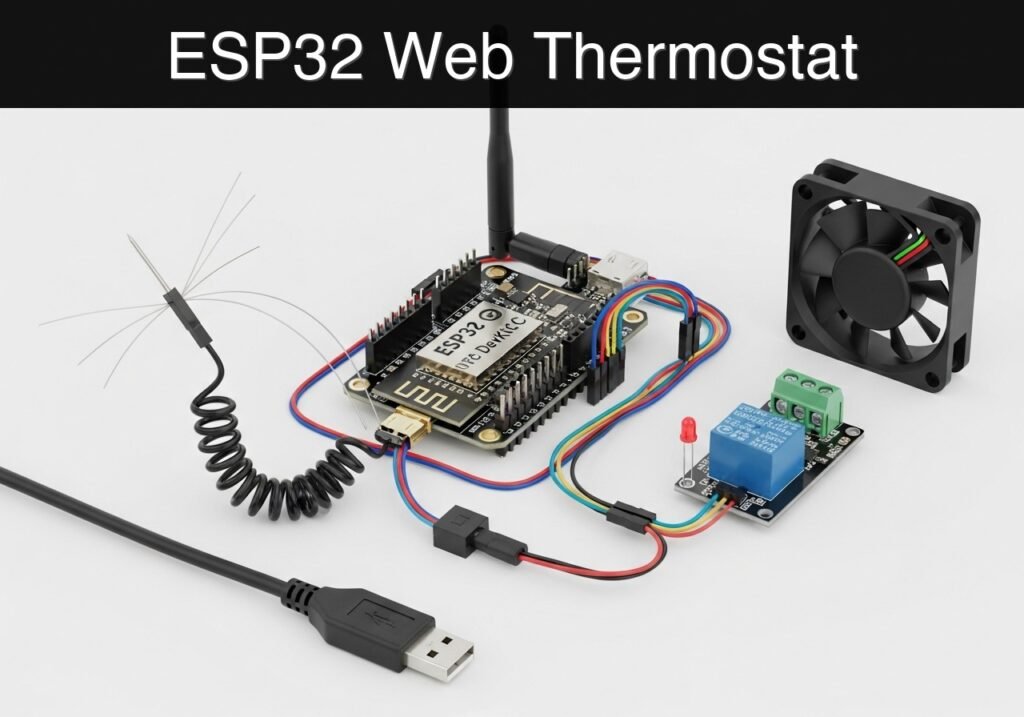
case-device-block-diagram, What you’ll build: A standalone, web-accessible thermostat prototype using an ESP32 that monitors ambient temperature and dynamically scales a cooling fan’s speed via Pulse Width Modulation (PWM). Audience: IoT Developers, Hardware Enthusiasts, Home Automation Makers; Level: Intermediate Architecture/flow: Analog Temperature Sensor (ADC) → ESP32 Processing → PWM Output to Fan Controller ↔ ESP32 Wi-Fi AP & Asynchronous Web Server UI High-level view: what enters the system, what each block processes, and what comes out. Conceptual flow: moisture detection, local decision and user alert. Conceptual summary of the tools used to check the published ESP32 project. Before publication, this case passed the Prometeo automated validation gate with status PASS. For this ESP32 DevKitC profile, the project was checked as a PlatformIO project: the validator extracted This validation confirms syntax and tool compatibility for the published code, but it does not replace physical testing on your exact ESP32 DevKitC board, wiring, power supply and local WiFi environment. This web thermostat is a low-voltage educational prototype, not a certified HVAC controller or thermal safety system. Do not switch heaters, compressors, or mains loads directly from the ESP32; use only low-voltage fans or isolated interface modules, with a suitable external supply and common GND only when the schematic requires it. Do not leave it controlling critical equipment unattended. To build this prototype, you need exactly the following components: The hardware setup is divided into three functional blocks: the temperature sensor, the fan driver, and the status indicator. Important grounding note: The ESP32’s GND must be connected to the 12V power supply’s GND to establish a common reference voltage for the MOSFET gate. Note on the Voltage Divider: The 10k resistor and the NTC thermistor form a voltage divider. Because the NTC is connected to GND and the fixed resistor to 3.3V, the voltage at GPIO34 will decrease as the temperature increases (since NTC resistance drops as it gets hotter). The software accounts for this specific topology. The project requires two files in your PlatformIO workspace. The Create or overwrite the Place the following code into Public preview of the validated file. The complete source is shown to members and in PDF/Print. Use the Find this product and/or books on this topic on Amazon As an Amazon Associate, I earn from qualifying purchases. If you buy through this link, you help keep this project running.
.prometeo-educational-note,
.prometeo-device-postcode-section,
.prometeo-device-section-card {
margin: 2.4rem 0;
padding: 1.45rem 1.55rem;
border: 1px solid rgba(148, 163, 184, 0.30);
border-radius: 14px;
background:
linear-gradient(135deg, rgba(30, 41, 59, 0.50), rgba(15, 23, 42, 0.18)),
rgba(17, 24, 39, 0.48);
box-shadow: 0 18px 48px rgba(0, 0, 0, 0.20);
}
.case-objective > h2:first-of-type,
.case-device-block-diagram > h2:first-of-type,
.prometeo-device-postcode-section > h2:first-of-type,
.prometeo-device-section-card > h2:first-of-type {
margin-top: 0;
}
.prometeo-device-section-card > :last-child,
.case-objective > :last-child,
.case-device-block-diagram > :last-child,
.prometeo-device-postcode-section > :last-child {
margin-bottom: 0;
}
.prometeo-device-section-card.prometeo-device-section-card-code {
border-left: 4px solid rgba(56, 189, 248, 0.86);
background:
linear-gradient(135deg, rgba(8, 47, 73, 0.42), rgba(15, 23, 42, 0.18)),
rgba(15, 23, 42, 0.58);
}
.prometeo-device-section-card.prometeo-device-section-card-compact {
padding: 1.2rem 1.35rem;
}
.prometeo-device-section-card pre,
.case-objective pre,
.case-device-block-diagram pre,
.prometeo-device-postcode-section pre {
max-width: 100%;
}
.prometeo-device-postcode-section .prometeo-device-flow-item {
background:
linear-gradient(135deg, rgba(15, 23, 42, 0.50), rgba(30, 41, 59, 0.28)),
rgba(15, 23, 42, 0.28);
}
@media print {
.case-objective,
.case-device-block-diagram,
.prometeo-educational-note,
.prometeo-device-postcode-section,
.prometeo-device-section-card {
background: #fff;
color: #111827;
box-shadow: none;
break-inside: avoid;
page-break-inside: avoid;
}
}
Objective and use case
Why it matters / Use cases
Expected outcome
Conceptual block diagram
Functional architecture
Validation path
Educational validation note
platformio.ini and src/main.cpp, created a temporary project and ran pio run against platform = espressif32, board = esp32dev and framework = arduino. It also checked article structure, copy/paste-safe ASCII command options, and unsupported stacks such as direct ESP-IDF or non-scoped ESP32 boards.Published validation evidence
Educational safety note
Prerequisites
Materials
* ESP32 DevKitC (Standard 38-pin or 30-pin version)
* 10 kOhm NTC thermistor (Standard B-value of 3950 is assumed)
* 10 kOhm precision resistor (1% tolerance preferred, for the voltage divider)
* Logic-level MOSFET fan driver (e.g., an IRLZ44N module or a custom circuit with an N-channel logic-level MOSFET, a 10k pull-down resistor on the gate, and a flyback diode across the fan terminals)
* Status LED (Any color, standard 5mm)
* 220 Ohm resistor (For the status LED)
* 12V DC PC Fan (Standard 2-wire or 3-wire, driven via low-side switching)
* 12V DC Power Supply (Appropriately rated for the fan’s current draw)
* Breadboard and jumper wiresSetup/Connection
Component ESP32 Pin / Connection Destination / Description NTC Thermistor GNDOne leg of the NTC thermistor. NTC Thermistor GPIO34 (ADC1_CH6)The other leg of the NTC. Also connect the 10k fixed resistor here. 10k Fixed Resistor 3V3Connect the other end of the 10k fixed resistor to the ESP32 3.3V pin. MOSFET Gate (Driver) GPIO18Controls the PWM switching. (Ensure driver has a pull-down resistor). MOSFET Source GNDConnect to common ground (ESP32 GND and 12V GND). MOSFET Drain Fan Negative (-) Pulls the fan to ground when the MOSFET is active. Fan Positive (+) 12V Power SupplyConnect directly to the 12V positive terminal. Status LED Anode GPIO21Connect via the 220 Ohm current-limiting resistor. Status LED Cathode GNDConnect to common ground. Validated Code
platformio.ini file configures the build environment, and src/main.cpp contains the application logic.platformio.ini
platformio.ini file in your project root with the following configuration. This ensures the correct framework and serial baud rate are used.[env:esp32dev]
platform = espressif32
board = esp32dev
framework = arduino
monitor_speed = 115200
src/main.cpp
src/main.cpp. This code handles the Wi-Fi Access Point, the asynchronous-style web server (using the built-in WebServer library), the Steinhart-Hart thermistor calculations, and the proportional PWM logic.#include <Arduino.h>
#include <WiFi.h>
#include <WebServer.h>
// --- Pin Definitions ---
const int NTC_PIN = 34; // ADC pin for thermistor voltage divider
const int FAN_PWM_PIN = 18; // PWM output to MOSFET gate
const int LED_PIN = 21; // Status LED
// --- PWM Configuration ---
const int PWM_FREQ = 5000; // 5 kHz frequency for standard PC fans
const int PWM_CHANNEL = 0; // LEDC channel 0
const int PWM_RES = 8; // 8-bit resolution (0-255)
// --- Thermistor Constants (Steinhart-Hart) ---
const float SERIES_RESISTOR = 10000.0; // 10k fixed resistor
const float NOMINAL_RESISTOR = 10000.0; // 10k NTC at 25 degrees C
const float NOMINAL_TEMP = 25.0; // 25 degrees C
const float B_COEFFICIENT = 3950.0; // Beta value of the thermistor
// --- Global Variables ---
float currentTempC = 0.0;
float targetTempC = 25.0; // Default threshold
int currentFanSpeed = 0; // 0 to 255
// --- Web Server on port 80 ---
WebServer server(80);
// --- HTML Dashboard (Stored in Flash) ---
const char index_html[] PROGMEM = R"rawliteral(
<!DOCTYPE HTML><html>
<head>
<meta name="viewport" content="width=device-width, initial-scale=1">
<title>ESP32 Thermostat</title>
<style>
body { font-family: Arial, sans-serif; text-align: center; margin: 0; padding: 20px; background-color: #f4f4f9; }
h1 { color: #333; }
.card { background: white; padding: 20px; border-radius: 10px; box-shadow: 0 4px 8px rgba(0,0,0,0.1); max-width: 400px; margin: auto; }
.metric { font-size: 2rem; font-weight: bold; color: #007BFF; margin: 10px 0; }
.slider-container { margin-top: 20px; }
input[type=range] { width: 100%; }
</style>
</head>
<body>
<div class="card">
<h1>Fan Thermostat</h1>
<p>Current Temperature:</p>
<div class="metric"><span id="tempValue">--</span> °C</div>
<p>Fan Speed (PWM):</p>
<div class="metric"><span id="fanValue">--</span> / 255</div>
<div class="slider-container">
<p>Target Threshold: <span id="targetValue">25</span> °C</p>
<input type="range" min="15" max="40" value="25" id="targetSlider" onchange="updateTarget(this.value)">
</div>
</div>
<script>
// Fetch data every 2 seconds
setInterval(function() {
fetch('/data')
.then(response => response.json())
.then(data => {
document.getElementById('tempValue').innerText = data.temperature.toFixed(1);
document.getElementById('fanValue').innerText = data.fan_speed;
document.getElementById('targetValue').innerText = data.target;
document.getElementById('targetSlider').value = data.target;
});
}, 2000);
// Send new threshold to ESP32
function updateTarget(val) {
document.getElementById('targetValue').innerText = val;
fetch('/set?threshold=' + val);
}
</script>
</body>
</html>
)rawliteral";
// --- Function to Calculate Temperature ---
float readTemperature() {
int adcValue = analogRead(NTC_PIN);
// Avoid division by zero if ADC is maxed out or grounded
if (adcValue == 0 || adcValue == 4095) return currentTempC;
// Convert ADC value to voltage (ESP32 ADC is 12-bit: 0-4095)
float voltage = adcValue * (3.3 / 4095.0);
// Calculate NTC resistance (Divider: 3.3V -> 10k -> ADC -> NTC -> GND)
float ntcResistance = SERIES_RESISTOR * voltage / (3.3 - voltage);
// Steinhart-Hart Equation
float steinhart;
steinhart = ntcResistance / NOMINAL_RESISTOR; // (R/Ro)
steinhart = log(steinhart); // ln(R/Ro)
steinhart /= B_COEFFICIENT; // 1/B * ln(R/Ro)
steinhart += 1.0 / (NOMINAL_TEMP + 273.15); // + (1/To)
steinhart = 1.0 / steinhart; // Invert
steinhart -= 273.15; // Convert to Celsius
return steinhart;
}
// ...#include <Arduino.h>
#include <WiFi.h>
#include <WebServer.h>
// --- Pin Definitions ---
const int NTC_PIN = 34; // ADC pin for thermistor voltage divider
const int FAN_PWM_PIN = 18; // PWM output to MOSFET gate
const int LED_PIN = 21; // Status LED
// --- PWM Configuration ---
const int PWM_FREQ = 5000; // 5 kHz frequency for standard PC fans
const int PWM_CHANNEL = 0; // LEDC channel 0
const int PWM_RES = 8; // 8-bit resolution (0-255)
// --- Thermistor Constants (Steinhart-Hart) ---
const float SERIES_RESISTOR = 10000.0; // 10k fixed resistor
const float NOMINAL_RESISTOR = 10000.0; // 10k NTC at 25 degrees C
const float NOMINAL_TEMP = 25.0; // 25 degrees C
const float B_COEFFICIENT = 3950.0; // Beta value of the thermistor
// --- Global Variables ---
float currentTempC = 0.0;
float targetTempC = 25.0; // Default threshold
int currentFanSpeed = 0; // 0 to 255
// --- Web Server on port 80 ---
WebServer server(80);
// --- HTML Dashboard (Stored in Flash) ---
const char index_html[] PROGMEM = R"rawliteral(
<!DOCTYPE HTML><html>
<head>
<meta name="viewport" content="width=device-width, initial-scale=1">
<title>ESP32 Thermostat</title>
<style>
body { font-family: Arial, sans-serif; text-align: center; margin: 0; padding: 20px; background-color: #f4f4f9; }
h1 { color: #333; }
.card { background: white; padding: 20px; border-radius: 10px; box-shadow: 0 4px 8px rgba(0,0,0,0.1); max-width: 400px; margin: auto; }
.metric { font-size: 2rem; font-weight: bold; color: #007BFF; margin: 10px 0; }
.slider-container { margin-top: 20px; }
input[type=range] { width: 100%; }
</style>
</head>
<body>
<div class="card">
<h1>Fan Thermostat</h1>
<p>Current Temperature:</p>
<div class="metric"><span id="tempValue">--</span> °C</div>
<p>Fan Speed (PWM):</p>
<div class="metric"><span id="fanValue">--</span> / 255</div>
<div class="slider-container">
<p>Target Threshold: <span id="targetValue">25</span> °C</p>
<input type="range" min="15" max="40" value="25" id="targetSlider" onchange="updateTarget(this.value)">
</div>
</div>
<script>
// Fetch data every 2 seconds
setInterval(function() {
fetch('/data')
.then(response => response.json())
.then(data => {
document.getElementById('tempValue').innerText = data.temperature.toFixed(1);
document.getElementById('fanValue').innerText = data.fan_speed;
document.getElementById('targetValue').innerText = data.target;
document.getElementById('targetSlider').value = data.target;
});
}, 2000);
// Send new threshold to ESP32
function updateTarget(val) {
document.getElementById('targetValue').innerText = val;
fetch('/set?threshold=' + val);
}
</script>
</body>
</html>
)rawliteral";
// --- Function to Calculate Temperature ---
float readTemperature() {
int adcValue = analogRead(NTC_PIN);
// Avoid division by zero if ADC is maxed out or grounded
if (adcValue == 0 || adcValue == 4095) return currentTempC;
// Convert ADC value to voltage (ESP32 ADC is 12-bit: 0-4095)
float voltage = adcValue * (3.3 / 4095.0);
// Calculate NTC resistance (Divider: 3.3V -> 10k -> ADC -> NTC -> GND)
float ntcResistance = SERIES_RESISTOR * voltage / (3.3 - voltage);
// Steinhart-Hart Equation
float steinhart;
steinhart = ntcResistance / NOMINAL_RESISTOR; // (R/Ro)
steinhart = log(steinhart); // ln(R/Ro)
steinhart /= B_COEFFICIENT; // 1/B * ln(R/Ro)
steinhart += 1.0 / (NOMINAL_TEMP + 273.15); // + (1/To)
steinhart = 1.0 / steinhart; // Invert
steinhart -= 273.15; // Convert to Celsius
return steinhart;
}
// --- Web Server Route Handlers ---
void handleRoot() {
  server.send(200, "text/html", index_html);
}

void handleData() {
  String json = "{";
  json += "\"temperature\":" + String(currentTempC) + ",";
  json += "\"fan_speed\":" + String(currentFanSpeed) + ",";
  json += "\"target\":" + String(targetTempC);
  json += "}";
  server.send(200, "application/json", json);
}

void handleSet() {
  if (server.hasArg("threshold")) {
    targetTempC = server.arg("threshold").toFloat();
    Serial.print("New target threshold set to: ");
    Serial.println(targetTempC);
  }
  server.send(200, "text/plain", "OK");
}

void setup() {
  Serial.begin(115200);
  Serial.println("\nInitializing ESP32 Thermostat...");
// Setup Pins
pinMode(LED_PIN, OUTPUT);
digitalWrite(LED_PIN, LOW);
// Setup PWM for Fan (Using ESP32 LEDC API)
ledcSetup(PWM_CHANNEL, PWM_FREQ, PWM_RES);
ledcAttachPin(FAN_PWM_PIN, PWM_CHANNEL);
ledcWrite(PWM_CHANNEL, 0);
// Setup Wi-Fi Access Point
WiFi.softAP("ESP32-Thermostat", "admin1234");
IPAddress IP = WiFi.softAPIP();
Serial.print("AP IP address: ");
Serial.println(IP);
// Setup Web Server Routes
server.on("/", handleRoot);
server.on("/data", handleData);
server.on("/set", handleSet);
server.begin();
Serial.println("HTTP server started.");
}
void loop() {
server.handleClient();
// Read temperature periodically
static unsigned long lastUpdate = 0;
if (millis() - lastUpdate > 1000) {
lastUpdate = millis();
currentTempC = readTemperature();
// Proportional Fan Control Logic
// If temp is below threshold, fan is off (0).
// If temp is at threshold, fan starts at minimum effective PWM (e.g., 100).
// If temp is 5 degrees above threshold, fan runs at max (255).
if (currentTempC < targetTempC) {
currentFanSpeed = 0;
} else {
// Map temperature range [target, target+5] to PWM range [100, 255]
currentFanSpeed = map(currentTempC * 10, targetTempC * 10, (targetTempC + 5) * 10, 100, 255);
// Constrain to ensure we don't exceed 8-bit limits
currentFanSpeed = constrain(currentFanSpeed, 100, 255);
}
// Apply PWM to fan
ledcWrite(PWM_CHANNEL, currentFanSpeed);
// Update Status LED
if (currentFanSpeed > 0) {
digitalWrite(LED_PIN, HIGH);
} else {
digitalWrite(LED_PIN, LOW);
}
// Log to Serial Monitor
Serial.printf("Temp: %.1f C | Target: %.1f C | Fan PWM: %d\n", currentTempC, targetTempC, currentFanSpeed);
}
}
Build/Flash/Run commands


Quick Quiz

Telecommunications Electronics Engineer and Computer Engineer (official degrees in Spain).